By Jason Vaught
Manufacturer: Shenzhen Sake Trading Co. LTD (RANTOPAD)
Product Name: MT Aegis Gaming Mechanical Keyboard
Model Number: RT01-000200-C1
UPC: 6958264911249
Price As Tested: $89.95 (Amazon)
Full Disclosure: The product sample used in this article has been provided by RANTOPAD.
Ever heard of RANTOPAD? I hadn’t until this review, but according to their website, they’ve been distribution partners for several major companies including: HP, Lenovo, Razer, and Dell. From what I’m able to gather from their website, Sake Trading Co. (RANTOPAD) was established around 2004 and is largely in the business of product distribution in China. The RANTOPAD MT Aegis Keyboard is the only keyboard option to be offered for sale directly under the RANTOPAD name.
What is the main reason to spend money on a “gaming” keyboard vs a regular keyboard? With membrane based gaming keyboards, your purchase depends mainly on features that you can only utilize during gameplay. But with a gaming mechanical keyboard, your priorities in performance to value are more broad. You’re looking for a long life keyswitch that offers tactile feel and a comfortable typing experience as well. This is what we should all look for in a gaming mechanical keyboard, does the RANTOPAD MT Aegis live up to their own expectations? Let’s find out.

The best and, in my opinion, only way to test a keyboard is to simply use it! I’ve been utilizing this peripheral for over 30 hours now. I’m currently using it to type this review, as well as for all my gaming (including Diablo III: Reaper of Souls, Battlefield 4, Battlefield 3, and World of Tanks to name a few).
- 60,000,000 cycle key switch life
- Replaceable crystal texture panel
- Full 104-key keyboard
- 30 key simultaneous key press
- Gold plated, sleeved USB cable
The RANTOPAD MT Aegis Gaming Mechanical Keyboard is marketed as a very customizable (cosmetically) peripheral. By utilizing different panels, and the inherent nature of Cherry style switches, the end user can make the keyboard look and feel unique to match one’s own personality.

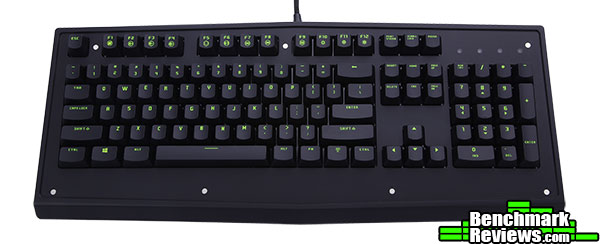
The standard configuration of the RANTOPAD MT Aegis Gaming Mechanical Keyboard is a green panel with black buttons that feature green writing. This configuration is changeable as we’ll discuss later in this review.
The green panel that comes pre-installed on the keyboard pulls off easily and is held into place by 6 magnets. The tolerances in manufacturing the panels and the base itself, make the panels appear seamless. I found the easiest way to get the panel off, without jamming a pry tool underneath the edge, is to remove one key near the edge and just grab the panel with one finger.

Included in the box is a cleaning cloth, orange keycap puller, a mini product catalog, a user manual, and a “VIP” card. All of which, are written in Chinese. Unfortunately I don’t read Chinese and cannot comment on their contents.

The underside of the RANTOPAD MT Aegis Mechanical Keyboard looks like every other keyboard. Two foldout feet and a serial number. Oddly though, this keyboard is listed on both Amazon and RANTOPAD as “MT Aegis Gaming Mechanical Keyboard”, except the word Aegis appears nowhere on the product or it’s packaging.

As you can see above, the RANTOPAD MT Aegis Mechanical Keyboard has a slightly over sized base with a medium sized palm rest. The keys have a standard keyboard curvature to them to promote easier, anti-fatigue typing. The base of keyboard is on the heavy side, a desired feature that keeps your keyboard stable during typing or gameplay.

Although these are listed as “Green AXIS” switches, they look exactly like Cherry MX Blue switches, with the exception that the cover states “RANTOPAD” instead of “CHERRY”. Each key is individually back-lit with a single white LED. While some manufacturers are starting to utilize RGB LEDs, RANTOPAD offers their keycaps with different colored semi-transparent keycaps. The writing on the keycaps, along with the inherent qualities of reflective surfaces, actually make the LEDs appear as different colors depending on which keycap/panel combo you utilize.

The RANTOPAD MT Aegis Gaming Mechanical Keyboard features multimedia keys, volume keys, a gaming key and lighting control keys. The lighting control keys change the lighting effect (2 different breathing modes, on/off) and the brightness setting.
The RANTOPAD MT Aegis Mechanical Gaming Keyboard comes standard with black keys and a green crystal panel. It’s a very unique and slightly loud looking layout, but it has some benefits. The MT does feature 4 different lighting effects for it’s LEDs, including two breathing effects, full on and full off, giving the end user multiple configuration abilities. RANTOPAD also sent 2 additional keycap sets and panels, to show some of it’s available customization, let’s have a look.
Being that the keyboard has white LED backlighting, the keyboard can take on different personalities depending on what keys/panels you equip it with. The default configuration you see above looks very plain during the day. Each keycap has a textured surface, resulting in an optimum typing and gaming experience.

But as you can see here, the darkness is where this keyboard really shines. The white LEDs reflect off the keycaps and the crystal panel give this keyboard a very nice green and white glow, resulting in a very bright and interesting effect. The green crystal panel is the only one of the 3 RANTOPAD sent that seems to light up around the edges.

As you can see above, one of the key sets RANTOPAD sent is GOLD! That’s right, gold keycaps and a black panel. I have to say I thought this was a pretty cool looking setup from a novelty perspective. What better way to say you owned someone in game than on a gold keyboard! Sadly, the golden keycaps are just that, a novelty. They have a very plastic and slick feel to them, resulting in easy fingerprinting and an unpleasant typing experience.

Because of the change in the color of the keycaps’ translucent letter, this gives the MT a very white, edgelit effect. The lighting with these keys is the most important part, as the keys’ glossy gold color make it hard to see the letters with the backlighting off. Because of the slick nature of the keys, knowing where your fingers are on the keyboard based on touch is difficult.

RANTOPAD also send a blue keycap/panel combo. The keycaps in this combo feel and look like metal. The keycaps are indeed plastic, but they feel much better than the gold caps. Resulting in a much better typing experience, with the only drawback of having a slightly slick feel on sweaty fingers.

As you can see above, the blue keycap/panel combo changes the nature of the LED lighting and makes it appear that they are blue, when they are still white of course. RANTOPAD shows many configuration opportunities for the MT on their website, but there isn’t any clear information as to where or how to purchase additional keycap/panel combos.
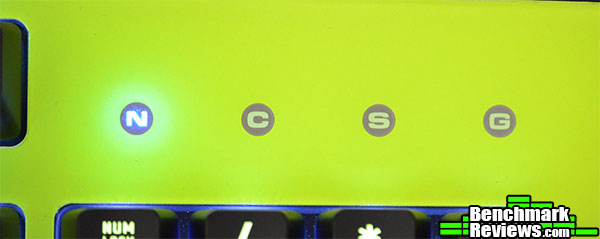
As with many, if not all keyboards, there are status lights for num lock, caps lock, scroll lock, and game lock. Game lock on this keyboard simply means it disables the windows and menu key. This is accomplished by hitting the FN + F9 keys.
Product Name: RANTOPAD H1X XL Star Silky Cloth Gaming Mouse & Keyboard Pad
Model Number: H1X XL
UPC: 6958264901653
Price As Tested: $27.99 (Amazon)

RANTOPAD also decided to include the H1X XL Star Silky Cloth Gaming Mouse & Keyboard Pad. This is a large keyboard/mouse pad that will encompass your keyboard and mouse giving that you have the available desktop space. The pad measures 35.5x13x0.15 inches and features a planetary/star print. The pad has a nice heavy feel and is stitched in such a way as to make sure it remains flat.
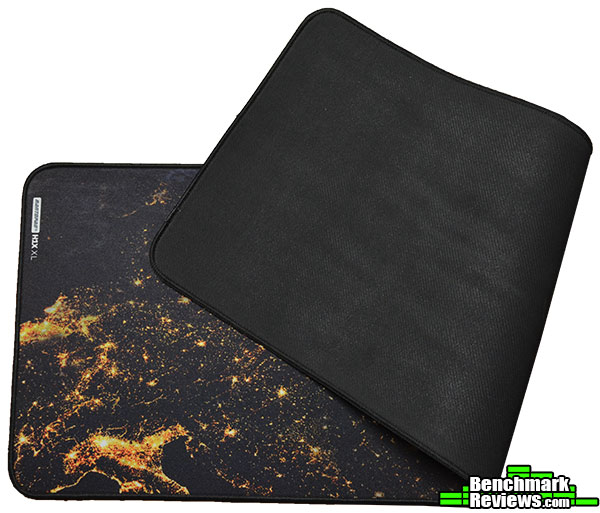
The H1X XL features a grippy rubber backing that will help it stay in place during your gaming sessions.

As you can see above, there is more than enough room for both your keyboard and mouse, as well as a game pad if you have one. This pad is very nice and one of many in RANTOPAD’s arsenal. While their keyboard department is still under development and maturation, their mouse pads are definitely worth looking at if you’re in the market.
The best way to test any keyboard is to simply use it. With the RANTOPAD MT Aegis Gaming Mechanical Keyboard being equipped with Blue (green) switches, I also tested it for typing comfort. The RANTOPAD MT Mechanical Keyboard was tested for an overall period of 30 hours. The programs and games that were used during testing, regular Windows and browser use aside, include: Adobe Photoshop CS6, World of Tanks, Battlefield 4, and Diablo III: Reaper of Souls. Since RANTOPAD sent two additional keycap sets and panels, I also tested each set for roughly 11 hours each with a mix of gameplay and typing.
-
Motherboard: MSI X99A SLI PLUS LGA 2011-v3
-
System Memory: HyperX Savage 32GB (4 x 8GB) 288-Pin DDR4
-
Processor: Intel Core i7-5930K Haswell-E 6-Core 3.5 GHz LGA 2011-v3
-
Audio: On-board
-
Video: Crossfired 2 x XFX Double Dissipation R9-290X (4GB)
-
PSU: Corsair HX Series 1000HX
-
Monitor: Dell UltraSharp U2412M IPS 24? x 3 @ 5760×1200
-
Operating System: Windows 10 Pro (64-bit)
Let me start by saying that the MT Aegis Keyboard, although advertised as a gaming keyboard, actually has zero gaming specific features aside from being able to quickly disable the windows and menu keys on the board. But experienced gamers don’t hit these keys during gameplay anyways, so we won’t be “testing” that one gaming function. So for the purpose of these results I’ll focus on typing comfort between the different keysets.
Default Black/Green Configuration: This configuration is the default configuration for this keyboard and not surprisingly the most comfortable giving that it is the only set of the 3 that feature textured keycaps. The texture on the keys give you a nice, grippy feel and make it easy to navigate they keyboard by touch. Long sessions of gameplay proved no problem for this configuration and they keys kept their grip even when my hands would be a little sweaty.
Blue Configuration: These keycaps are the most attractive in terms of cosmetics. They look of metal and have a similar feel, while being made of plastic. They type very comfortably and are easy to keep track of by touch. Longer gaming sessions where one would develop condensation on their fingertips did result in some slippage, but it was manageable. Typing comfort matched that of the default black/green configuration.
Gold/Black Configuration: This configuration, in my mind, was the most interesting. There is just something about typing and gaming on a gold keyboard! Unfortunately, even with it’s good looks, this was the least desirable experience for both typing and gameplay, as it resulted in the most slippage and was the hardest to navigate by touch.
Overall, the RANTOPAD MT Aegis Mechanical Keyboard is a nice unit. Featuring a plethora of configurations and adjustable backlighting. It lacks on board memory, macro functionality, usb ports, and extra keys commonly found on a gaming mechanical keyboard. Still, in terms of a mechanical keyboard, it functions well.

During my time with the RANTOPAD MT Aegis Gaming Mechanical Keyboard, I came to loath the gold/black configuration. While it looked really nice and was a spiffy configuration, it proved to be the most awkward to type and game on. With the black and green default configuration, every activity was a pleasant experience. I know everyone wants to make and/or have a “gaming” mechanical keyboard. In the case of the MT Aegis, it is just simply a keyboard that has one gaming specific function of disabling the windows and menu keys. It lacks USB ports, extra keys, and macro ability often found in gaming mechanical keyboards. If you plan to purchase just a keyboard, then this is a decent contender.
In terms of performance, the MT Aegis keyboard performed as expected as a keyboard only, but it didn’t add any benefit to gaming. The default configuration proved the most effective for gameplay and typing, while the gold configuration proved the most ineffective and uncomfortable.
Appearance is where this keyboard excels, with the plethora of available keycap/panel options available, the user can really make the keyboard unique to their personality. Unfortunately, at the time of this review, there are no options to buy any additional keyboard layouts in the US. I would assume this is something they are currently working on with their distributors and did not let this affect the final score.
The RANTOPAD MT Aegis Gaming Mechanical Keyboard is constructed nicely and has a slight heft to it. The heft is ideal for gaming and typing as it prevents your keyboard from running around your desk. The weight also gives it a nice, solid foundation when banging away at the keys while typing.
Functionality is where the MT Aegis Keyboard falls short. Being that it’s marketed as a “Gaming” Mechanical Keyboard, I would expect it to have gaming specific features. It has one gaming feature that disables two keys, the windows key and the menu key. Experienced gamers don’t hit these keys anyways, so I can’t say that it adds to the gaming experience. In terms of being just a keyboard, it functions well. In terms of gaming, it doesn’t move the needle.
As for the value with this keyboard, for $89.95 (Amazon) it’s a steal to get a backlit mechanical for under $100. If you’re in the market for a mechanical keyboard with backlighting and you want it under a $100, then this is the keyboard for you. At this price point, you really can’t go wrong so long as you keep in mind you’re getting what you’re paying for, a good mechanical keyboard that features backlighting.
I wholeheartedly recommend this keyboard to anyone wanting to try a mechanical keyboard or pick up a backup mechanical keyboard. If you’re wanting it for gaming, there are better options out there, albeit for more money.
+ Mechanical Blue Switches (Listed as “Green Switches”)
+ Backlighting with multiple “breathing” modes
+ Media Controls
+ Multiple keycap/panel configurations available
+ Braided USB cable
– “Gaming Mode” only turns off the windows key and the menu key
– Limited English support, manual that shipped with product only written in Chinese
– No clear indication of where to buy additional keycap/panel sets in the US
– Gold keycap set has a very plastic/slick feel
– No additional/built in USB ports
– Only one color option for backlighting
– Non-detachable cord
– Confusing switch classifications: Green (Blue) and Orange (Similar to Reds)
-
Performance: 8.50
-
Appearance: 9.00
-
Construction: 8.50
-
Functionality: 8.50
-
Value: 8.00


