By Tom Jaskulka
Manufacturer: SilverStone Technology Co., LTD.
Product Name: Milo ML05
Model Number: SST-ML05B
UPC: 844761010539
Price As Tested: $39.99 (Newegg / Amazon)
Full Disclosure: The product sample used in this article has been provided by SilverStone.
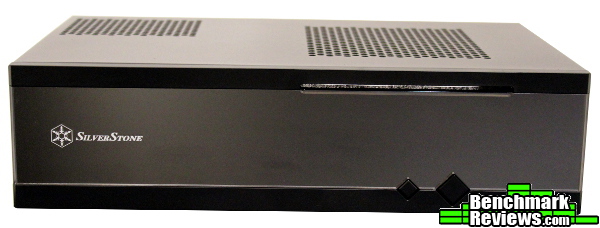
The deceptively small ML05 HTPC case from SilverStone sits in a class of its own. Part of the Milo series of entry-level HTPC cases (designed to incorporate features from the Grandia series in a slim form factor), the ML05 is one of the most inexpensive home theater enclosures on the market. Essentially half the size of the previously reviewed micro-ATX ML04, the smaller Milo ML05 still checks a lot of the home-theater specific boxes: short depth, available optical drive, room for additional storage, and enough airflow to keep things quiet. Benchmark Reviews has a chance to evaluate the SilverStone ML05 Mini-ITX HTPC case (model SST-ML05B) to see what building a different kind of computer in a different kind of case is like.
One thing I want to reiterate from the ML04 review is the reason I don’t do objective sound testing for cases. There’s far too many variables to make it relevant, and while you certainly don’t want an obnoxiously loud computer case (especially in a home theater scenario) every user will have their own particular set up and their own tolerance levels for noise determined by the size of the room and the other noise sources in it. I’ll comment subjectively if anything is noticeable, but take any noise observations with a grain of salt. HTPC cases already have an advantage in that they’re usually located across the room from the user (instead of sitting on or near a desk directly in front of them), but their smaller size makes your component choice the main factor in the production of noise, not so much the case itself.
|
Model No.
|
SST-ML05B (black) | |
|
Material
|
Acrylic and plastic front panel, 0.8mm steel body | |
|
Motherboard
|
Mini-ITX | |
|
Drive Bay
|
External | 9.5mm/12.7mm slim slot-loading optical drive x 1 (replaceable with 3.5” HDD x 1 or 2.5” HDD x 2 or 120mm fan x 1) |
| None | ||
| Internal | 2.5” x 4 | |
|
Cooling System
|
||
| Side | Right: 2 x 80mm fan slot | |
| Top | 120mm fan slot / oversized PSU vents | |
|
Expansion Slot
|
1 | |
|
Front I/O Port
|
USB 3.0 x 2 audio x 1 MIC x 1 |
|
|
Power Supply
|
1 x Optional standard SFX | |
|
Expansion Card
|
1x low profile, width restriction-2.95″ | |
|
Limitation of CPU cooler
|
37~70mm | |
|
Limitation of PSU
|
140mm | |
|
Net Weight
|
2.1kg | |
|
Dimension
|
350mm (W) x 99 mm (H) x 204 mm (D), 7 liters | |
The 7-liter mini-ITX ML05 is a new addition to the Milo series. Designed as entry-level home theater PC cases that are a step down from the Grandia series, the ML05 is a forward-thinking enclosure that takes advantage of the industry’s trend of shrinking form factors.

SilverStone’s HTPC cases have traditionally sported a brushed aluminum front fascia. With the ML05, SilverStone tried a different direction and went with a mirrored acrylic face – and when I say mirrored, I mean mirrored. I’ve got to be honest, I would have greatly preferred to see them stick with brushed aluminum (interestingly enough, after receiving the ML05 for review an ML06 was announced that returns aluminum to the front panel). It isn’t ugly, but it’s just not my first choice in materials as acrylic tends to scratch easily and highlight every single fingerprint. For someone that prefers matte finishes like myself, mirror is about the furthest I can get from my preferences. Of course, that’s just me – although I can’t help but think such a rapid development of a new front fascia means there’s quite a few out there that agree with me… For such an interesting choice of materials, the ML05 still manages to look pretty stylish. At least it’ll blend in nicely with its surroundings – or should I say, reflect them?

The top cover hooks into the front face plate and is secured by three screws in back. I’m not sure why SilverStone doesn’t just include thumbscrews for this, but to be fair it is an HTPC case – constant tinkering isn’t in the mission statement for such cases. It’s a little tough to gauge how small the ML05 really is in photos – the mesh square on the right side fits a 120mm fan, if that helps. Width and height (depth, when in a normal orientation) in the photo above measure 350mm by 204mm. The other mesh vent on top is the intake for an SFX power supply.

The bottom of the ML05 is very plain, only depicting small rings in the corners where the included rubber feet are installed (the two in the center are raised for the power supply mount inside, and also contain rubber domes).

The right side contains a standard USB 3.0 and headphone/microphone jack arrangement and space for two optional 80mm fans. I discovered an exhaust fan installed here does a great job of assisting with cooling the CPU, but as always in such small enclosures the main factor will be the components you choose to install in the first place. The open mesh does an acceptable job of exhausting heat without fans, but the option for more airflow is always appreciated.

There isn’t any wasted space on the back panel either, with room for a single half-height expansion card. An additional “utility” slot is available above the motherboard, but it is oriented the wrong way if you planned on using any PCI-E risers or ribbon connectors – it’s designed for fan controllers and switches that occupy a PCI slot. A knock-out can accept a VGA connector (commonly added as an expansion on some half-height graphics cards), allowing you to keep the half-height compatibility and still add the VGA port. A Kensington lock slot above the SFX PSU completes the tour, so let’s take off that panel and look inside.

Although the perspective makes it a little difficult, hopefully the above image helps depict the small size of the ML05. That’s a 120mm SilverStone fan leaning against the case – the ML05 only stands 99mm tall. You could almost squeeze three 120mm fans across the front, but it would still overhang 10mm past the ML05’s 350mm width.

Removing the top cover reveals just enough room for a mini-ITX motherboard, a drive cage for four 2.5″ drives and enough room for a SFX PSU. There’s a small cross-brace that helps keep the sides from flexing (the normal brackets that would occupy the corners to perform this task take up too much room in such a small enclosure), and the 4-in-1 multi-purpose bracket on the right helps stiffen the structure as well.

They may be a little hard to see, but the front panel has a few tie-down points for cables to assist with some cable management. That’s about as much as you can expect for such a small case – even many micro-ATX cases have cabling challenges, so there’s not much you can do when you have only 7 liters to work with. It’s not like you’re going to block a lot of airflow though (unless you bundle all of the cables next to the 80mm fan mounts…) so you should be able to use these tie-down points adequately.

The modular 4-in-1 bracket allows for – well, four different configurations. I suppose you didn’t really need me to clear that up, but let’s take a look at what those configuration are. Obviously, you could just leave it open and improve airflow to the CPU that’ll be positioned right underneath (but that doesn’t count as one of the four). Or, you could add two 2.5″ drives to this bracket. Although it is possible, I’d say there isn’t much point to placing 2.5″ drives here (unless you’ve already used up the four locations in the drive cage). At least you’ll still get some airflow to the CPU cooler with this configuration as it doesn’t completely block the vent.

Again, although possible I’m not sure if I’d recommend using a 3.5″ drive here. A “thick” hard drive wouldn’t even fit on top of the stock AMD CPU cooler for the A10-5800K, and using a very slim 3.5″ solid state drive ended up blocking a lot of airflow to the CPU causing the fan to spin up much more often (increasing noise substantially over leaving this vent open). It’s nice that the option is there, but you should really be looking at 2.5″ drives or SSDs for a case this small anyway. Still, with a low TDP processor and a low profile cooler, it’s a very valid option and impressive for such a small case.

For a “Steam machine” or other light gaming build, a 120mm fan might make the most amount of sense for the modular bracket. Mounted as an intake directly over the CPU and complemented by 80mm exhausting fans, this would undoubtedly assist immensely with cooling. The A10-5800K stock cooler I used was too tall to allow this though, so I’d have to stick with just the vented opening. That’s too bad, but to be expected when you only have 37-70mm of clearance for the CPU cooler itself (the clearance is a range depending on what you place on this modular bracket). For specific distances, be sure to check the chart on page 13 in the included manual.
That’s only three! What about the four in “4-in-1”? The final configuration would be a slim slot-loading optical drive. In a case this small, an optical drive of any kind is impressive. I don’t have any on hand, but the only ones I’ve seen available cost almost twice as much as the ML05 itself. Personally, I have a hard time spending that much for the convenience of having a drive inside the enclosure – I’d rather just use an external drive for movies or rip them on another machine and stream them, but at least the option is there for the people that want it. I’ve heard certain drives can have problems “grabbing” an optical disc since it is set back a little into the chassis (while others don’t have an issue), but I don’t have the equipment to prove or disprove that particular statement.
SilverStone was kind enough to send along one of their SFX power supplies, the 300W model SST-ST30SF (Newegg / Amazon). With its intelligent fan operation that only turns on when the internal temp reaches 55C, this PSU is a really good choice for this enclosure and a good choice overall for an HTPC (it didn’t need the fan for cooling the entire time I tested it – I’m not sure you could even fit 300W of components in the ML05). It even comes with a full size ATX bracket for use with larger cases if you desire. You’ll probably need to pick up an SFX power supply if you decide to get into mini-ITX builds, and right now SilverStone is one of the main players in this market.
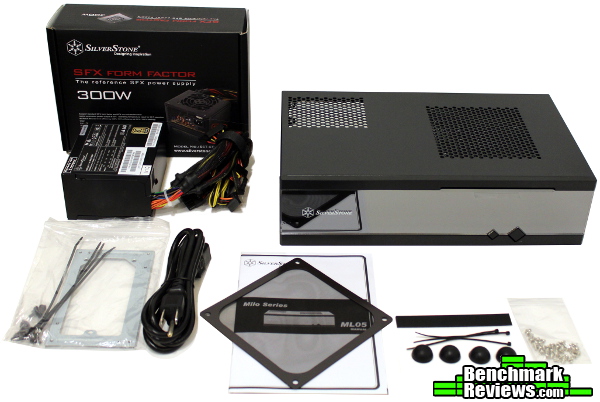
While the PSU includes the accessories on the left side in the photo above, the ML05 only comes with a few additional items. The rubber feet will need to be installed, and some cable ties and rubber “stickers” (rubber spacers for reducing vibration if you opt to install a 120mm fan on the multi-purpose bracket) accompany the bag o’ screws, magnetic dust filter and manual.

Drives can be installed at any time since the drive cage is removable (after the removal of three screws). Otherwise, if you only want to attach them on one side make sure to slide them in before installing the motherboard! As always, I find myself daydreaming of the 2.5″ tool-less stackable drive cage of Corsair’s Carbide Air 540, and would love to see a tool-less implementation in more cases – although, the removable cage in the ML05 does make it pretty simple to add drives even after a motherboard is installed.

The PSU itself installs easily, and you can see I was able to tuck the cables into the drive cage to keep them out of the way. There happens to be just enough space for those cables in between the power supply and drive cage, and that’s where most of them ended up – making cable management a surprisingly easy task for such a miniature case. Silverstone does make a modular SFX power supply, but I wouldn’t recommend it for this case (you just don’t have the clearance for modular connectors). The SST-ST30SF was more than sufficient for the ML05, and the extra cables tucked neatly into this crevice.

I made a mental note to go back and sleeve those power/reset switch and LED cables for the front panel, as bundling them together would clean up the appearance of the interior greatly. They’re long enough to reach most motherboards and do some clean cable routing, but mini-ITX boards are notorious for not following much of a standard layout – check your specific board and think about the wiring layout to plan ahead.
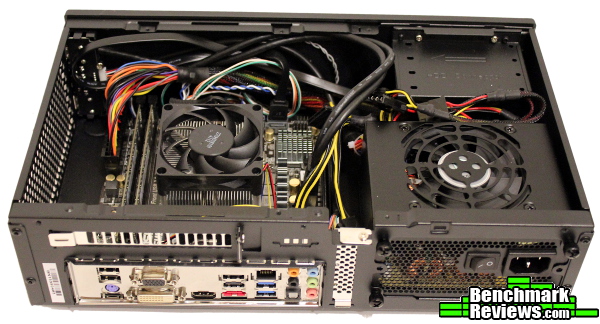
I simply grabbed most of the cables and pulled them against the front panel – for a more permanent installation those cable ties would come in handy, and the front tie-down points are well placed.

While it isn’t in this photo, I was curious what installing a 3.5″ drive on that multi-purpose bracket would do to the cabling. Surprisingly, it was pretty easy to mount to the bracket and install it into the chassis with the data/power cables connected (it was a slim 3.5″ SSD, a regular HDD would not clear the A10-5800K’s stock cooler). The drive was mounted the wrong way for most 90-degree SATA cables, but there was enough room for a regular connector (to make life a little easier, there are slim connectors on the market but they aren’t necessary). Of course, an optical drive in the same location would put the cables at the back of the chassis, so that could get a little more interesting – especially with a half-height expansion card installed. Still, for such a small enclosure it was actually really simple to get everything wired up and with a little more work you could get things looking pretty tidy. The stiff USB 3.0 cable was annoying as always, but that’s pretty typical of most cases.

The blue power LED is indirectly lit, making it visible but very subtle and not blinding whatsoever. That’s important when a case like this will probably end up close to eye-level when sitting on a couch. The overall appearance is pretty attractive, but some more aluminum on that front panel would do wonders… *ahem* ML06 *cough*….
I had finished building an APU-based system in the ML05 right when Valve Software’s SteamOS was made available for download. AMD’s APU processors are a great foundation for a game-oriented PC without discrete graphics, and even though it wasn’t ready for an APU platform (EDIT: this has changed as of 1/8/14, if you’re running SteamOS you should now have AMD graphics support!) I couldn’t resist attempting my own “Steam Machine” build in the ML05. Standing upright next to an Xbox 360 Slim, it wasn’t hard to imagine the ML05 serving the role of living room/gaming PC. The install of SteamOS is definitely an alpha process (I wouldn’t recommend it quite yet with an APU…) but it was an experience that was made all the greater because of the ML05’s form factor. I can’t wait for cases to arrive in a similar form factor to the ML05 that allow for full-size graphics cards. The ML05 is a great step in that direction – and it isn’t even a gaming-oriented case!

How do you rate a case like this for performance? I can’t imagine most users will bother with a discrete GPU, and it isn’t a gaming case (although it does a pretty good job of it when set up right). The open mesh side allows for sufficient airflow, and you can add some fans if you want even more performance. You’ll still need an aftermarket low-profile CPU cooler to get the best temperatures, but overall the ML05’s ability to stay cool with such a low internal volume is pretty remarkable. I was limited by AMD’s stock cooler so gaming with the APU quickly caused the fan to spin up to full speed, but with the right configuration the ML05 can handle a 100W APU in a very quiet manner.
The ML05’s main attraction comes from its petite size. The overall look is fairly attractive, but the mirrored acrylic front panel doesn’t do it any favors (although it looks like that was rapidly adjusted in an updated version). I’m not a fan of the different direction the ML05 takes, although perhaps others might like it – and there’s nothing wrong with having options. At least it probably keeps the cost down… I admire SilverStone’s willingness to try new things, but it’s hard to go wrong with brushed aluminum.
At least the ML05 doesn’t use acrylic for the rest of its construction. Instead, it sticks to typical SilverStone quality and fit/finish. There isn’t a lot of material here, but even the interior is painted black and everything fits together solidly and neatly. The structural cross-braces do their jobs well which is a good thing in a case that has the potential to be moved around a lot due to its size.
You can’t really rate the functionality of such a purpose-built case on the same criteria as every other PC case. It’s limited to SFX power supplies and half-height expansion cards, but that’s hardly a surprise given the miniature size. Accommodating an optical drive or 3.5″ drive (or 120mm + 2x80mm fans) along with four more 2.5″ drives (or six total using the multipurpose bracket) is pretty surprising, and impressive for such a small case. The ML05 resides in somewhat of a niche market, so it is hard to compare it to anything else – but I’d say the ML05 has above-average functionality for a case its size.
In January of 2014 when this article was written, the ML05 was available online for $39.99 (Newegg / Amazon). While there are HTPC cases that are available close to that price, most of them are substantially larger. You’ll probably need to add the cost of an SFX PSU to that, but for a total price of less than $100 you can have a tiny HTPC with some pretty incredible capabilities.
As always you’ll have tradeoffs with a case this small. Requiring an SFX power supply is a given, and thankfully SilverStone offers some great options to pair with the ML05. Overall, there just isn’t anything else available if you’re looking for this small of an HTPC – the ML05 is essentially one-of-a-kind. It’s great that SilverStone has addressed a market that no one else has really cared to. I get the feeling it’ll help them get a head start on some of these rumored “Steam Machines…” Time will ultimately tell of course, but we could see an entire new segment of cases pop up within a few weeks – cases like the ML05 may be a bigger market than anyone has yet realized. Even if that market never fully materializes, the ML05 will still fulfill a niche that few cases can. Although it stands alone in a relatively new and unique corner of the market, it’s a solid option.
+ Only 7 liters
+ Surprising amount of flexibility and performance (with the right components)
+ One of a kind – well, two of a kind now…
+ Subdued design blends in well
+ Amazing price for a unique, well made case
– Mirror, mirror…
– Installing larger components on the multi-purpose bracket impacts airflow substantially
– IR support missing – possibly easily hidden behind that mirror…
-
Performance: 7.50
-
Appearance: 6.00
-
Construction: 8.25
-
Functionality: 8.25
-
Value: 9.25


