By Jeremy Miller
Manufacturer: Shogun Bros. Co. Ltd.
Product Name: Ballista MK-1
Model Number: PM-1002-BL-IUS
EAN: 4897035690070
Price As Tested: $52.45 (Amazon)
Full Disclosure: The product sample used in this article has been provided by Shogun Bros.
A brand that needs more recognition in the PC gaming peripheral market is Shogun Bros. They make high quality products worthy of the highest praise, and the Ballista MK-1 Gaming Mouse is proof of that. The market in the ~$50 price bracket is very high, so it is hard to wade through all the different brands and mice. In this article Benchmark Reviews hopes to shed some light on why the Shogun Bros. Ballista MK-1 is quite possibly the best-in-class must have gaming mouse.
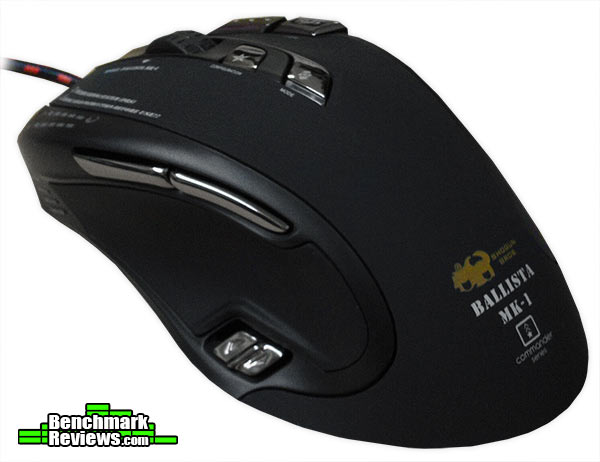
The thing that really stands out about the Shogun Bros. Ballista MK-1 Gaming Mouse is the very strange ergonomic design. The model reviewed is all black with multicolored LED’s lighting up many areas of the surface. The addition of the very large and pronounced two buttons on the top right side of the mouse adds to the unusual visual characteristics. The highly responsive 8,200 dpi sensor is very good, and never seems to skip or stutter in the slightest bit.
In this article we will take a closer look at the mouse by testing its functionality in both gaming applications as well as everyday tasks such as internet browsing and office program use. The offset high dpi laser will be tested for its functionality as well as responsiveness. We will really dig into the specs and go through them, giving in depth answers to some burning questions. Let’s get the review underway!
。 Pro Gaming Grade HD Laser Sensor and Image Processor
。 Extreme 8200 DPI / Extreme 1000HZ Polling Rate / 12000 Frame Per Second
。 5 Preset Gaming Mode for FPS, MMO, RPG Type of gaming
。 Total 50 customized button for Gamer in 5 Mode
。 “Gamer Name Their Own Mode” – Mode name show up when gamer change the mode
。 Backlit Color to On Each Mode and Change in Lightning Speed
。 Left Thumb Rest with Thick “Rubber Sofa”
。 Military Grip Surface on Right Fingers Rest for “Best Control”
。 Total Finger Rest Design
。 Rubberized Coating on Main Body for “Best Grip and Comfort”
。 Golden Plated USB
。 Anti-interference – Best stable and fast Signal (USB Magnet)
。 Tough – Military Fabric Cable
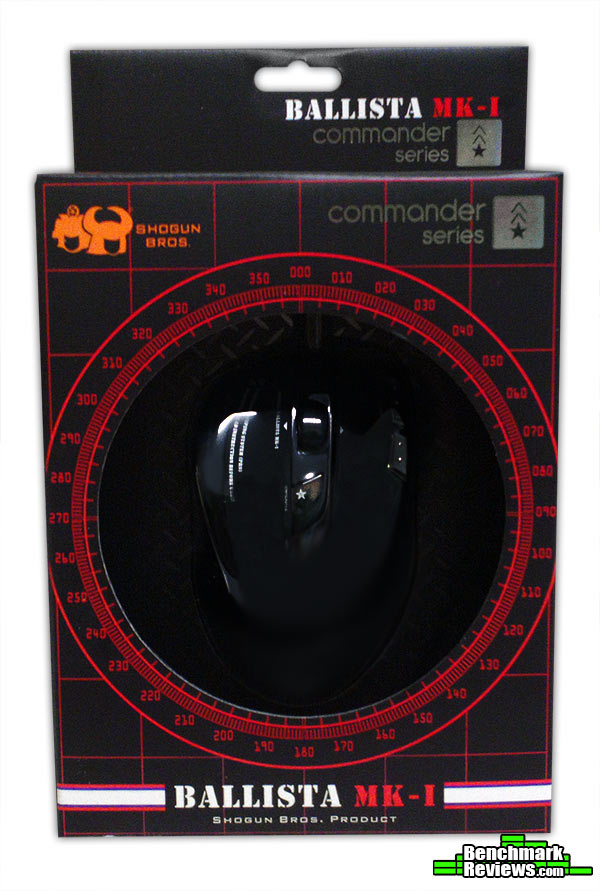
The packaging for the Shogun Bros. Ballista MK-1 Gaming Mouse is very sturdy, and comes with a nice outer plastic shell protecting the inner cardboard box. It is of the highest quality, with colors that pop and really beautiful branding. It really seems they have spared no expense on the box or packaging in general.
The top of the mouse is coated with a nice rubberized paint. This gives it a very nice soft touch feel and keeps your hand from sweating excessively. Other features of the top of the mouse are two buttons, “Mode” and “Configuration.” These allow you to change your profiles and fine tune your setup on the fly. They are very responsive buttons and work well. Also on top of the mouse is the scroll wheel which is lighted in different colors depending on the profile you have selected. The wheel also has three buttons associated with it: click, tilt left, and tilt right.

The thumb rest on the left of the mouse is a very tacky rubber, which allows great grip for controlling the mouse. There are two very well placed thumb buttons just above the rubber pad. They are very responsive and easily reached in normal use or in the middle of battle. One of the great things about this mouse to me is the placement of the DPI toggle. It is located on the back of the mouse under the thumb area. This tucks it out of the way and decrease accidental button mashing, yet leaves it close enough you can toggle your DPI settings on the fly with no problems. On the front of the mouse is the DPI LED indicator lights, letting you know the current setting you are using. This is a great location, moving away from the top middle of the mouse where most are located. It makes it much more visible without taking away from the usability.

The right side of the mouse is covered in a hard plastic with a semi-rough texture. The most notable addition is the inclusion of two buttons on the top right of the mouse where the right-click button meets the right side. This is a wonderful addition and they are placed as well as they can be for ease of use.

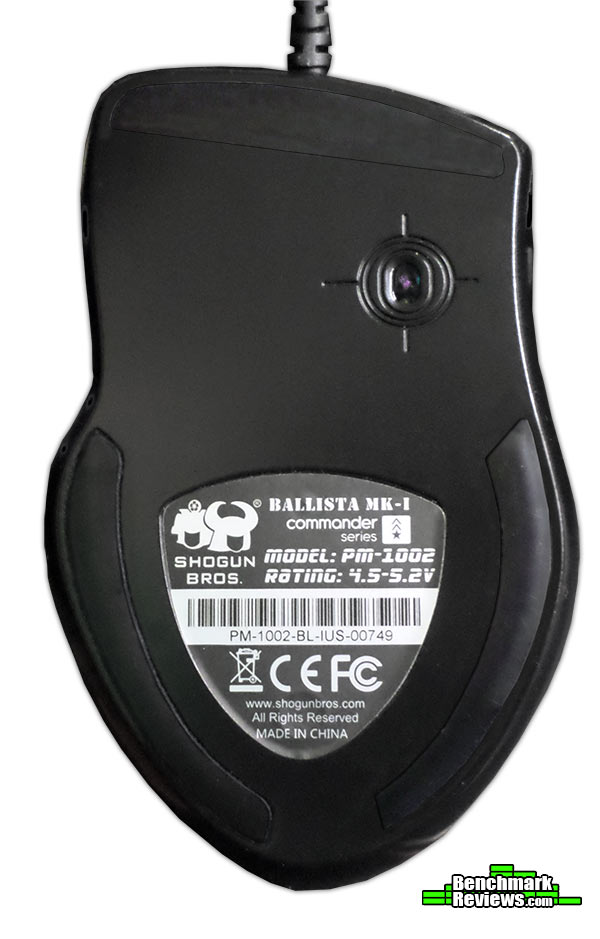
The bottom of the mouse is very plain. The most notable thing is the placement of the laser, which instead of being centered is actually offset. The location of the laser is actually directly under the left click button (pointer finger), which allows very precise control as this tends to be the pivot point when using a mouse. The only complaint that I truly have with the mouse is the lack of a weight system for that extra bit of gaming customization. However, the mouse is extremely well balanced and has a great feel, so this softens the blow a bit.
The software for the Shogun Bros. Ballista MK-1 is very easily navigated, and easy to understand. On the left side of the window you see three large navigation buttons. The first of which is “Button function.” In this screen you can set the actions for each of the 11 programmable buttons. This comes in handy in many applications, specifically setting up buttons for games on your mouse hand for ease of access. Having a handy reload and melee button can be the difference between life and death on the virtual battleground. This is not just for gaming use however, as you can create other profiles (the selectable mode tabs at the top of the screen) for things like copy/paste, forward/back, and many other daily use activities. There are a plethora of different possibilities.

The second button in the navigation menu is “Macros” This is where you will set macros for use in different applications. Have a long list of key presses that you would like to be automated? Want your awesome spells cast in a certain order via a single button press? This is where you will assign these commands. It works very well, and is easy to understand and execute.

The third button in the navigation menu is “DPI & tool.” This section allows you to adjust the 4 DPI levels of the mouse as well as refresh rate and scroll acceleration. On of the many great features of the mouse and software combination is the ability to adjust the DPI on the X and Y axis independently. Want a faster movement side to side, but to limit your up and down look? You can adjust these settings to make it perfect for the way you game. It is a superb addition to an overall impressive software package.

I tested the report rate when set to 1000Hz, and the result is below. I did the test multiple times, and it was between 990 and 1,000 every single time. That is quite a feat, with most mice falling anywhere from 890-1,000 in the test. This was by far the most consistent in this particular test phase that I have ever seen.

The Shogun Bros. Ballista MK-1 Gaming Mouse was tested in a variety of both real world and production settings as well as extensively in many different gaming applications. The mouse has the look of a gaming mouse so I tested it extensively in both the FPS genre as well as RPG/MOBA games.
-
Motherboard: Gigabyte H67MA-USB3-B3
-
System Memory: 12 Gb KingstonDDR3 1333 Mhz
-
Processor: Intel i7 3770k
-
Audio: Realtek High Definition
-
Optical Drive: Lite-On IHAS124-04 Internal DVD Writer
-
Enclosure: Thermaltake V3 Black Edition
-
PSU: Apevia ATX-AS680W-BL 680W
-
Monitor: Sony 98078 24″ 3D LED monitor
-
Operating System: Windows 7 Home Premium 64-bit

Gaming: The Shogun Bros. Ballista MK-1 was used extensively in my ~50 hours of gameplay on the FPS survival game Nether. With my normal gameplay the multiple DPI settings came in handy, and the ease in which they are switched made it a real breeze. Sniping in the game requires a steady hand, so I saw a great opportunity to test the precision of the lower DPI settings the mouse could employ. Not only did it meet my expectations, it far exceeded them! With the laser offset and positioned under my pointer finger, I found that my precision shots were landing with a much higher accuracy than previously. I have no other explanation for my sudden increase in deadly sniping accuracy than this amazing mouse.
I also used the mouse in Smite, a 3rd person perspective MOBA. I tested it as many different classes, and noticed my accuracy was superb no matter what character I selected. From cupid’s deadly arrows to Ymir’s huge ice hammer, no matter ranged or melee, I was a force to be reckoned with. The mouse performed extremely admirably in the MOBA setting.
Another MOBA it was employed in was the newest kid on the block Infinite Crisis. The game is a League of Legends style game, with click movement instead of WASD. The mouse did wonderfully in this game as well, with zero accidental clicks and precision accuracy that I felt gave me a real advantage. I walked away from every game ever more impressed.
Desktop Applications: I tested the mouse for almost an entire month putting it through the ringer in every respect. One way was as my daily use mouse for browsing the web and doing graphic design/word processing. The mouse was a breeze to use in web browsing, with the easy to reach thumb buttons used as the forward/back buttons and the smooth scroll wheel performing exceptionally. In Photoshop the mouse once again shined with the low DPI settings allowing precision lines and edge creation a snap. My production got a small bump from the ease of use of the Ballista MK-1.
Comfort: The mouse is EXTREMELY comfortable in every single scenario in which it was tested. The soft coating on the top prevented excessive palm sweat, and the grip on the thumb side made slippage a nonfactor. The two finger slots on the right in which the ring and pinky finger sit made the mouse feel so natural I thought of it as nothing more than an extension of my hand. The level of comfort the Ballista MK-1 provided was second to none.
The overall look and feel of the Shogun Bros. Ballista MK-1 is that of true quality. The numerous programmable buttons (all nicely chrome finished), the high quality braided cable, and the superb ergonomics make for one amazing gaming peripheral. While the mouse is really close to being perfect, it does have one small fault and that is the lack of a weight system to customize the mouse for your specific feel. This is as close to a con as you can get, and it isn’t that bad considering the extremely fine tuned balance of the mouse and its neutral weight.
Performance: The Ballista MK-1 Gaming Mouse performed to the highest of my expectations in test after test. The high sensitivity laser was very precise in movements, and the offset location made it seem to be even better. My accuracy in games increased, and overall my home workflow saw a bump in productivity as well.
Appearance: The Ballista MK-1 has a very militaristic look to it. The colors, the font type, and the metallic buttons make the mouse look like it belongs in a military base instead of on your computer desk. This is a wonderful look for those that mainly play FPS games, and is a great piece to brag about to your friends. They will surely be looking on in awe.
Construction: The mouse feels as if it is built very well. After around a month of heavy use it looks as good as it did the day it was removed from the packaging. Even the glide pads on the bottom show very little wear, even though I use a high friction mouse pad. The rubber coating on top keeps it from attracting fingerprints, and the coating on the buttons makes them feel metal. The scroll wheel is very responsive and has yet to feel loose or wobbly.
Functionality: The amazing ergonomics of the Ballista MK-1 make it extremely comfortable even after hours of use. You could use this mouse as your peripheral of choice even in an office environment where it will be in use for eight straight hours or more. It is that great of a feel in the hand.
Value: The Shogun Bros Ballista MK-1 is quite possibly the greatest ~$50 mouse on the market today. As of January 2014 the PM-1002-BL model was found online for $52.45 (Amazon). It packs a ton of features into this very modest price point. The only thing it lacks is a weight system, which most of its competitors include.
Final Word: The Shogun Bros. Ballista MK-1 Gaming Mouse gets nothing but the highest praise from me. With the exception of the weight system, you absolutely will not find a better gaming mouse for your money. If you are in the market for a mouse with unbelievable precision, a high DPI laser, and fantastic ergonomics, do not let the Shogun Bros. Ballista MK-1 pass you by!
+ Extremely precise laser
+ Amazing ergonomic design
+ Easy to use software
+ Awesome bang-for-buck performance
– Lacks custom weight system
-
Performance: 9.75
-
Appearance: 9.50
-
Construction: 9.50
-
Functionality: 9.75
-
Value: 9.00
Excellence Achievement: Benchmark Reviews Golden Tachometer Award.
COMMENT QUESTION: How important is a weight system to you in a gaming mouse?


