By Olin Coles
Manufacturer: NVIDIA Corporation
Product Name: GeForce GTX 750 Ti Graphics Card
Price: Starting at $149.99 (Amazon | Newegg)
Full Disclosure: The product sample used in this article has been provided by NVIDIA.
The NVIDIA GeForce GTX 750 Ti graphics card is designed for mainstream 1080p gaming with moderate settings. GeForce GTX 750 Ti utilizes first-generation NVIDIA Maxwell GM107 GPU architecture with 640 CUDA Cores. The memory subsystem of GeForce GTX 750 Ti consists of two 64-bit memory controllers (128-bit total bandwidth) and 2GB of 5.4Gbps GDDR5 memory. GeForce GTX 750 Ti’s base clock speed is 1020MHz, and features a typical Boost Clock speed reaching 1085MHz. In this article, Benchmark Reviews tests the GeForce GTX 750 Ti graphics card using several highly-demanding DX11 video games, such as Metro: Last Light, Batman: Arkham City, and Battlefield 3.

NVIDIA GPU Boost technology automatically increases the GPU’s clock frequency in order to improve performance. GPU Boost works in the background, dynamically adjusting the GPU’s graphics clock speed based on GPU operating conditions.
Originally GPU Boost was designed to reach the highest possible clock speed while remaining within a predefined power target. However, after careful evaluation NVIDIA engineers determined that GPU temperature is often a bigger inhibitor of performance than GPU power. Therefore for Boost 2.0, we’ve switched from boosting clock speeds based on a GPU power target, to a GPU temperature target. This new temperature target is 80 degrees Celsius.
As a result of this change, the GPU will automatically boost to the highest clock frequency it can achieve as long as the GPU temperature remains at 80C. Boost 2.0 constantly monitors GPU temperature, adjusting the GPU’s clock and its voltage on-the-fly to maintain this temperature.
In addition to switching from a power-based boost target to a temperature-based target, with GPU Boost 2.0 we’re also providing end users with more advanced controls for tweaking GPU Boost behavior. Using software tools provided by NVIDIA add-in card partners, end users can adjust the GPU temperature target precisely to their liking. If a user wants his GeForce GTX 760 board to boost to higher clocks for example, he can simply adjust the temperature target higher (for example from 80C, to 85C). The GPU will then boost to higher clock speeds until it reaches the new temperature target.
Besides adjusting the temperature target, Boost 2.0 also provides users with more powerful fan control. The GPU’s fan curve is completely adjustable, so you can adjust the GPU’s fan to operate at different speeds based on your own preferences.
Adaptive Temperature Controller
With GPU Boost 2.0, the GPU will boost to the highest clock speed it can achieve while operating at 80C. Boost 2.0 will dynamically adjust the GPU fan speed up or down as needed to attempt to maintain this temperature. While we’ve attempted to minimize fan speed variation as much as possible in prior GPUs, fan speeds did occasionally fluctuate.
For GeForce GTX 760, we’ve developed an all-new fan controller that uses an adaptive temperature filter with an RPM and temperature targeted control algorithm to eliminate the unnecessary fan fluctuations that contribute to fan noise, providing a smoother acoustic experience.
GeForce Experience is a new application from NVIDIA that optimizes your PC in two key ways. First, it maximizes your game performance and game compatibility by automatically downloading the latest GeForce Game Ready drivers. Second, GeForce Experience intelligently optimizes graphics settings for all your favorite games based on your hardware configuration.
Shadow Play
Utilizing the H.264 video encoder built-in to every Kepler GPU, ShadowPlay works in the background, seamlessly recording your last 20 minutes of gameplay footage, or if you’d like to record your latest StarCraft match, ShadowPlay can record that too.
Compared to software-based video encoders like FRAPS, ShadowPlay takes less of a performance hit, so you can enjoy your games while you’re recording.
Download NVIDIA GeForce Experience here: geforce.com/drivers/geforce-experience/download
In the next section, we detail our test methodology and give specifications for all of the benchmarks and equipment used in our testing process…
The Microsoft DirectX-11 graphics API is native to the Microsoft Windows 7 Operating System, and will be the primary O/S for our test platform. DX11 is also available as a Microsoft Update for the Windows Vista O/S, so our test results apply to both versions of the Operating System.
In each benchmark test there is one ‘cache run’ that is conducted, followed by five recorded test runs. Results are collected at each setting with the highest and lowest results discarded. The remaining three results are averaged, and displayed in the performance charts on the following pages.
A combination of synthetic and video game benchmark tests have been used in this article to illustrate relative performance among graphics solutions. Our benchmark frame rate results are not intended to represent real-world graphics performance, as this experience would change based on supporting hardware and the perception of individuals playing the video game.
- Motherboard: ASUS P9X79 Deluxe Motherboard (Intel X79 Express)
- Processor: Intel Core i7-3960X Extreme Edition (six cores/3300 MHz)
- System Memory: G.SKILL Ripjaws-Z 32GB DDR3-1600
- Power Supply Unit: OCZ Z-Series Gold 850W OCZZ850
- Monitor: ASUS VG278H 27″ Widescreen Monitor
- 3DMark11 Professional Edition by Futuremark
- Settings: Performance Level Preset, 1280×720, 1x AA, Trilinear Filtering, Tessellation level 5)
- Aliens vs Predator Benchmark 1.0
- Settings: Very High Quality, 4x AA, 16x AF, SSAO, Tessellation, Advanced Shadows
- Batman: Arkham City
- Settings: 8x AA, 16x AF, MVSS+HBAO, High Tessellation, Extreme Detail, PhysX Disabled
- BattleField 3
- Settings: Ultra Graphics Quality, FOV 90, 180-second Fraps Scene
- Lost Planet 2 Benchmark 1.0
- Settings: Benchmark B, 4x AA, Blur Off, High Shadow Detail, High Texture, High Render, High DirectX 11 Features
- Metro 2033 Benchmark
- Settings: Very-High Quality, 4x AA, 16x AF, Tessellation, PhysX Disabled
- Unigine Heaven Benchmark 3.0
- Settings: DirectX 11, High Quality, Extreme Tessellation, 16x AF, 4x AA
| Graphics Processing Clusters | 1 |
| Streaming Multiprocessors | 5 |
| CUDA Cores | 640 |
| Texture Units | 40 |
| ROP Units | 16 |
| Base Clock | 1020 MHz |
| Boost Clock | 1085 MHz |
| Memory Clock (Data rate) | 5400 MHz |
| L2 Cache Size | 2048KB |
| Total Video Memory | 2048MB GDDR5 |
| Memory Interface | 128-bit |
| Total Memory Bandwidth | 86.4 GB/s |
| Texture Filtering Rate (Bilinear) | 40.8 GigaTexels/sec |
| Fabrication Process | 28 nm |
| Transistor Count | 1.87 Billion |
| Connectors | 2 x Dual-Link DVI1 x HDMI 1 x DisplayPort |
| Form Factor | Dual Slot |
| Power Connectors | Two 6-pin |
| Recommended Power Supply | 500 Watts |
| Thermal Design Power (TDP)3 | 170 Watts |
| Thermal Threshold4 | 95° C |
| Graphics Card | GeForce GTX650Ti | GeForce GTX750Ti | Radeon HD6970 | GeForce GTX580 | GeForce GTX660Ti | Radeon HD7950 | GeForce GTX760 | GeForce GTX670 |
| GPU Cores | 768 | 640 | 1536 | 512 | 1344 | 1792 | 1152 | 1344 |
| Core Clock (MHz) | 925 | 1020 | 880 | 772 | 915 | 850 | 980 | 915 |
| Shader Clock (MHz) | N/A | 1085 Boost | N/A | 1544 | 980 Boost | N/A | 1033 Boost | 980 Boost |
| Memory Clock (MHz) | 1350 | 1350 | 1375 | 1002 | 1502 | 1250 | 1502 | 1502 |
| Memory Amount | 1024MB GDDR5 | 2048MB GDDR5 | 2048MB GDDR5 | 1536MB GDDR5 | 2048MB GDDR5 | 3072MB GDDR5 | 2048MB GDDR5 | 2048MB GDDR5 |
| Memory Interface | 128-bit | 128-bit | 256-bit | 384-bit | 192-bit | 384-bit | 256-bit | 256-bit |
- NVIDIA GeForce GTX 650Ti (925 MHz GPU/1350 MHz vRAM – Forceware 331.70)
- NVIDIA GeForce GTX 750Ti (925 MHz GPU/1350 MHz vRAM – Forceware 334.69)
- AMD Radeon HD 6970 (880 MHz GPU/1375 MHz vRAM – AMD Catalyst 13.12)
- NVIDIA GeForce GTX 580 (772 MHz GPU/1544 MHz Shader/1002 MHz vRAM – Forceware 331.70)
- ASUS GeForce GTX 660Ti DirectCU-II TOP (1059 MHz GPU/1137 MHz Boost/1502 MHz vRAM – Forceware 331.70)
- AMD Radeon HD 7950 (850 MHz GPU/1250 MHz vRAM – AMD Catalyst 13.12)
- NVIDIA GeForce GTX 760 (980 MHz GPU/1033 MHz Boost/1502 MHz vRAM – Forceware 331.70)
- NVIDIA GeForce GTX 670 (915 MHz GPU/980 MHz Boost/1502 MHz vRAM – Forceware 331.70)
FutureMark 3DMark11 is the latest addition the 3DMark benchmark series built by FutureMark corporation. 3DMark11 is a PC benchmark suite designed to test the DirectX-11 graphics card performance without vendor preference. Although 3DMark11 includes the unbiased Bullet Open Source Physics Library instead of NVIDIA PhysX for the CPU/Physics tests, Benchmark Reviews concentrates on the four graphics-only tests in 3DMark11 and uses them with medium-level ‘Performance’ presets.
The ‘Performance’ level setting applies 1x multi-sample anti-aliasing and trilinear texture filtering to a 1280x720p resolution. The tessellation detail, when called upon by a test, is preset to level 5, with a maximum tessellation factor of 10. The shadow map size is limited to 5 and the shadow cascade count is set to 4, while the surface shadow sample count is at the maximum value of 16. Ambient occlusion is enabled, and preset to a quality level of 5.

- Futuremark 3DMark11 Professional Edition
- Settings: Performance Level Preset, 1280×720, 1x AA, Trilinear Filtering, Tessellation level 5)
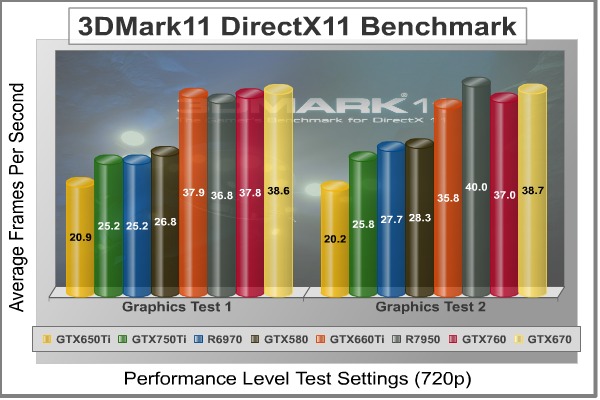
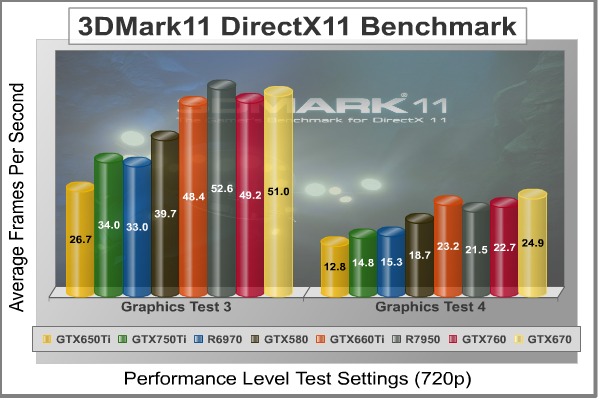
3DMark11 Benchmark Test Results
| Graphics Card | GeForce GTX650Ti | GeForce GTX750Ti | Radeon HD6970 | GeForce GTX580 | GeForce GTX660Ti | Radeon HD7950 | GeForce GTX760 | GeForce GTX670 |
| GPU Cores | 768 | 640 | 1536 | 512 | 1344 | 1792 | 1152 | 1344 |
| Core Clock (MHz) | 925 | 1020 | 880 | 772 | 915 | 850 | 980 | 915 |
| Shader Clock (MHz) | N/A | 1085 Boost | N/A | 1544 | 980 Boost | N/A | 1033 Boost | 980 Boost |
| Memory Clock (MHz) | 1350 | 1350 | 1375 | 1002 | 1502 | 1250 | 1502 | 1502 |
| Memory Amount | 1024MB GDDR5 | 2048MB GDDR5 | 2048MB GDDR5 | 1536MB GDDR5 | 2048MB GDDR5 | 3072MB GDDR5 | 2048MB GDDR5 | 2048MB GDDR5 |
| Memory Interface | 128-bit | 128-bit | 256-bit | 384-bit | 192-bit | 384-bit | 256-bit | 256-bit |
Aliens vs. Predator is a science fiction first-person shooter video game, developed by Rebellion, and published by Sega for Microsoft Windows, Sony PlayStation 3, and Microsoft Xbox 360. Aliens vs. Predator utilizes Rebellion’s proprietary Asura game engine, which had previously found its way into Call of Duty: World at War and Rogue Warrior. The self-contained benchmark tool is used for our DirectX-11 tests, which push the Asura game engine to its limit.
In our benchmark tests, Aliens vs. Predator was configured to use the highest quality settings with 4x AA and 16x AF. DirectX-11 features such as Screen Space Ambient Occlusion (SSAO) and tessellation have also been included, along with advanced shadows.
- Aliens vs Predator
- Settings: Very High Quality, 4x AA, 16x AF, SSAO, Tessellation, Advanced Shadows
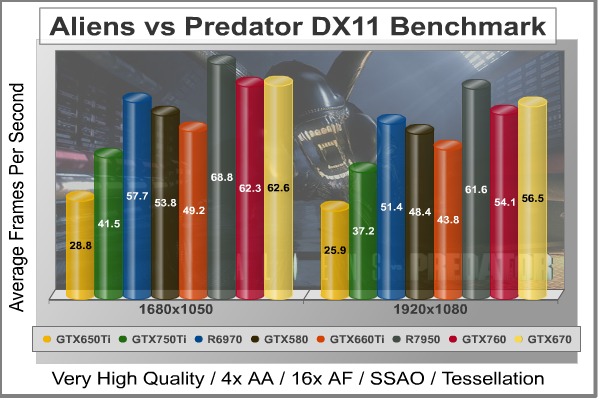
Aliens vs Predator Benchmark Test Results
| Graphics Card | GeForce GTX650Ti | GeForce GTX750Ti | Radeon HD6970 | GeForce GTX580 | GeForce GTX660Ti | Radeon HD7950 | GeForce GTX760 | GeForce GTX670 |
| GPU Cores | 768 | 640 | 1536 | 512 | 1344 | 1792 | 1152 | 1344 |
| Core Clock (MHz) | 925 | 1020 | 880 | 772 | 915 | 850 | 980 | 915 |
| Shader Clock (MHz) | N/A | 1085 Boost | N/A | 1544 | 980 Boost | N/A | 1033 Boost | 980 Boost |
| Memory Clock (MHz) | 1350 | 1350 | 1375 | 1002 | 1502 | 1250 | 1502 | 1502 |
| Memory Amount | 1024MB GDDR5 | 2048MB GDDR5 | 2048MB GDDR5 | 1536MB GDDR5 | 2048MB GDDR5 | 3072MB GDDR5 | 2048MB GDDR5 | 2048MB GDDR5 |
| Memory Interface | 128-bit | 128-bit | 256-bit | 384-bit | 192-bit | 384-bit | 256-bit | 256-bit |
Batman: Arkham City is a 3d-person action game that adheres to story line previously set forth in Batman: Arkham Asylum, which launched for game consoles and PC back in 2009. Based on an updated Unreal Engine 3 game engine, Batman: Arkham City enjoys DirectX 11 graphics which uses multi-threaded rendering to produce life-like tessellation effects. While gaming console versions of Batman: Arkham City deliver high-definition graphics at either 720p or 1080i, you’ll only get the high-quality graphics and special effects on PC.
In an age when developers give game consoles priority over PC, it’s becoming difficult to find games that show off the stunning visual effects and lifelike quality possible from modern graphics cards. Fortunately Batman: Arkham City is a game that does amazingly well on both platforms, while at the same time making it possible to cripple the most advanced graphics card on the planet by offering extremely demanding NVIDIA 32x CSAA and full PhysX capability. Also available to PC users (with NVIDIA graphics) is FXAA, a shader based image filter that achieves similar results to MSAA yet requires less memory and processing power.
Batman: Arkham City offers varying levels of PhysX effects, each with its own set of hardware requirements. You can turn PhysX off, or enable ‘Normal levels which introduce GPU-accelerated PhysX elements such as Debris Particles, Volumetric Smoke, and Destructible Environments into the game, while the ‘High’ setting adds real-time cloth and paper simulation. Particles exist everywhere in real life, and this PhysX effect is seen in many aspects of game to add back that same sense of realism. For PC gamers who are enthusiastic about graphics quality, don’t skimp on PhysX. DirectX 11 makes it possible to enjoy many of these effects, and PhysX helps bring them to life in the game.
- Batman: Arkham City
- Settings: 8x AA, 16x AF, MVSS+HBAO, High Tessellation, Extreme Detail, PhysX Disabled

Batman: Arkham City Benchmark Test Results
| Graphics Card | GeForce GTX650Ti | GeForce GTX750Ti | Radeon HD6970 | GeForce GTX580 | GeForce GTX660Ti | Radeon HD7950 | GeForce GTX760 | GeForce GTX670 |
| GPU Cores | 768 | 640 | 1536 | 512 | 1344 | 1792 | 1152 | 1344 |
| Core Clock (MHz) | 925 | 1020 | 880 | 772 | 915 | 850 | 980 | 915 |
| Shader Clock (MHz) | N/A | 1085 Boost | N/A | 1544 | 980 Boost | N/A | 1033 Boost | 980 Boost |
| Memory Clock (MHz) | 1350 | 1350 | 1375 | 1002 | 1502 | 1250 | 1502 | 1502 |
| Memory Amount | 1024MB GDDR5 | 2048MB GDDR5 | 2048MB GDDR5 | 1536MB GDDR5 | 2048MB GDDR5 | 3072MB GDDR5 | 2048MB GDDR5 | 2048MB GDDR5 |
| Memory Interface | 128-bit | 128-bit | 256-bit | 384-bit | 192-bit | 384-bit | 256-bit | 256-bit |
In Battlefield 3, players step into the role of the Elite U.S. Marines. As the first boots on the ground, players will experience heart-pounding missions across diverse locations including Paris, Tehran and New York. As a U.S. Marine in the field, periods of tension and anticipation are punctuated by moments of complete chaos. As bullets whiz by, walls crumble, and explosions force players to the grounds, the battlefield feels more alive and interactive than ever before.
The graphics engine behind Battlefield 3 is called Frostbite 2, which delivers realistic global illumination lighting along with dynamic destructible environments. The game uses a hardware terrain tessellation method that allows a high number of detailed triangles to be rendered entirely on the GPU when near the terrain. This allows for a very low memory footprint and relies on the GPU alone to expand the low res data to highly realistic detail.
Using Fraps to record frame rates, our Battlefield 3 benchmark test uses a three-minute capture on the ‘Secure Parking Lot’ stage of Operation Swordbreaker. Relative to the online multiplayer action, these frame rate results are nearly identical to daytime maps with the same video settings.
- BattleField 3
- Settings: Ultra Graphics Quality, FOV 90, 180-second Fraps Scene
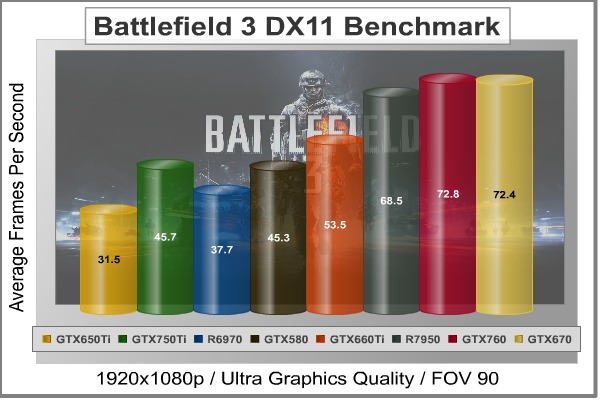
Battlefield 3 Benchmark Test Results
| Graphics Card | GeForce GTX650Ti | GeForce GTX750Ti | Radeon HD6970 | GeForce GTX580 | GeForce GTX660Ti | Radeon HD7950 | GeForce GTX760 | GeForce GTX670 |
| GPU Cores | 768 | 640 | 1536 | 512 | 1344 | 1792 | 1152 | 1344 |
| Core Clock (MHz) | 925 | 1020 | 880 | 772 | 915 | 850 | 980 | 915 |
| Shader Clock (MHz) | N/A | 1085 Boost | N/A | 1544 | 980 Boost | N/A | 1033 Boost | 980 Boost |
| Memory Clock (MHz) | 1350 | 1350 | 1375 | 1002 | 1502 | 1250 | 1502 | 1502 |
| Memory Amount | 1024MB GDDR5 | 2048MB GDDR5 | 2048MB GDDR5 | 1536MB GDDR5 | 2048MB GDDR5 | 3072MB GDDR5 | 2048MB GDDR5 | 2048MB GDDR5 |
| Memory Interface | 128-bit | 128-bit | 256-bit | 384-bit | 192-bit | 384-bit | 256-bit | 256-bit |
Metro 2033 is an action-oriented video game with a combination of survival horror, and first-person shooter elements. The game is based on the novel Metro 2033 by Russian author Dmitry Glukhovsky. It was developed by 4A Games in Ukraine and released in March 2010 for Microsoft Windows. Metro 2033 uses the 4A game engine, developed by 4A Games. The 4A Engine supports DirectX-9, 10, and 11, along with NVIDIA PhysX and GeForce 3D Vision.
The 4A engine is multi-threaded in such that only PhysX had a dedicated thread, and uses a task-model without any pre-conditioning or pre/post-synchronizing, allowing tasks to be done in parallel. The 4A game engine can utilize a deferred shading pipeline, and uses tessellation for greater performance, and also has HDR (complete with blue shift), real-time reflections, color correction, film grain and noise, and the engine also supports multi-core rendering.
Metro 2033 featured superior volumetric fog, double PhysX precision, object blur, sub-surface scattering for skin shaders, parallax mapping on all surfaces and greater geometric detail with a less aggressive LODs. Using PhysX, the engine uses many features such as destructible environments, and cloth and water simulations, and particles that can be fully affected by environmental factors.
NVIDIA has been diligently working to promote Metro 2033, and for good reason: it’s one of the most demanding PC video games we’ve ever tested. When their flagship GeForce GTX 480 struggles to produce 27 FPS with DirectX-11 anti-aliasing turned two to its lowest setting, you know that only the strongest graphics processors will generate playable frame rates. All of our tests enable Advanced Depth of Field and Tessellation effects, but disable advanced PhysX options.
- Metro 2033 Benchmark
- Settings: Very-High Quality, 4x AA, 16x AF, Tessellation, PhysX Disabled

Metro 2033 Benchmark Test Results
| Graphics Card | GeForce GTX650Ti | GeForce GTX750Ti | Radeon HD6970 | GeForce GTX580 | GeForce GTX660Ti | Radeon HD7950 | GeForce GTX760 | GeForce GTX670 |
| GPU Cores | 768 | 640 | 1536 | 512 | 1344 | 1792 | 1152 | 1344 |
| Core Clock (MHz) | 925 | 1020 | 880 | 772 | 915 | 850 | 980 | 915 |
| Shader Clock (MHz) | N/A | 1085 Boost | N/A | 1544 | 980 Boost | N/A | 1033 Boost | 980 Boost |
| Memory Clock (MHz) | 1350 | 1350 | 1375 | 1002 | 1502 | 1250 | 1502 | 1502 |
| Memory Amount | 1024MB GDDR5 | 2048MB GDDR5 | 2048MB GDDR5 | 1536MB GDDR5 | 2048MB GDDR5 | 3072MB GDDR5 | 2048MB GDDR5 | 2048MB GDDR5 |
| Memory Interface | 128-bit | 128-bit | 256-bit | 384-bit | 192-bit | 384-bit | 256-bit | 256-bit |
The Unigine Heaven benchmark is a free publicly available tool that grants the power to unleash the graphics capabilities in DirectX-11 for Windows 7 or updated Vista Operating Systems. It reveals the enchanting magic of floating islands with a tiny village hidden in the cloudy skies. With the interactive mode, emerging experience of exploring the intricate world is within reach. Through its advanced renderer, Unigine is one of the first to set precedence in showcasing the art assets with tessellation, bringing compelling visual finesse, utilizing the technology to the full extend and exhibiting the possibilities of enriching 3D gaming.
The distinguishing feature in the Unigine Heaven benchmark is a hardware tessellation that is a scalable technology aimed for automatic subdivision of polygons into smaller and finer pieces, so that developers can gain a more detailed look of their games almost free of charge in terms of performance. Thanks to this procedure, the elaboration of the rendered image finally approaches the boundary of veridical visual perception: the virtual reality transcends conjured by your hand.
Since only DX11-compliant video cards will properly test on the Heaven benchmark, only those products that meet the requirements have been included.
- Unigine Heaven Benchmark 3.0
- Settings: DirectX 11, High Quality, Extreme Tessellation, 16x AF, 4x AA

Heaven Benchmark Test Results
| Graphics Card | GeForce GTX650Ti | GeForce GTX750Ti | Radeon HD6970 | GeForce GTX580 | GeForce GTX660Ti | Radeon HD7950 | GeForce GTX760 | GeForce GTX670 |
| GPU Cores | 768 | 640 | 1536 | 512 | 1344 | 1792 | 1152 | 1344 |
| Core Clock (MHz) | 925 | 1020 | 880 | 772 | 915 | 850 | 980 | 915 |
| Shader Clock (MHz) | N/A | 1085 Boost | N/A | 1544 | 980 Boost | N/A | 1033 Boost | 980 Boost |
| Memory Clock (MHz) | 1350 | 1350 | 1375 | 1002 | 1502 | 1250 | 1502 | 1502 |
| Memory Amount | 1024MB GDDR5 | 2048MB GDDR5 | 2048MB GDDR5 | 1536MB GDDR5 | 2048MB GDDR5 | 3072MB GDDR5 | 2048MB GDDR5 | 2048MB GDDR5 |
| Memory Interface | 128-bit | 128-bit | 256-bit | 384-bit | 192-bit | 384-bit | 256-bit | 256-bit |


