By Tom Jaskulka
Manufacturer: Thermaltake Co., LTD.
Product Name: Core V71
Model Number: CA-1B6-00F1WN-00
UPC: 841163054567
Price As Tested: $149.99 (Newegg / Amazon)
Full Disclosure: The product sample used in this article has been provided by Thermaltake.
Thermaltake is no stranger to the computer chassis market. With Reddot design awards for their Chaser A71 and Level 10 enclosures, they aren’t afraid to try different approaches to chassis design. With their new Core V71 Full Tower chassis, Thermaltake is offering an E-ATX capable enclosure that is both versatile and adaptable. Focusing on performance with either air or liquid cooling, the Core V71 offers an unprecedented level of flexibility and customization.
Loaded with a 140mm and three 200mm fans in stock configuration while featuring the modular drive trays of the Thermaltake Urban T81, the Core V71 allows the end user to customize this full tower to adapt to their specific purposes. Does it sacrifice anything in the process? Can you really have a case that offers superior performance in both air and liquid configurations? Benchmark Reviews was given an opportunity to see what the Thermaltake Core V71 offers, so let’s get started!

If you’re familiar with some of my other reviews, you know that I try to build a system in each enclosure that matches (or exceeds, if only just for fun!) the type of system one would expect for each chassis and make some observations along the way. When I saw that the Core V71 ships with three 200mm fans in its stock configuration, I simply had to see how an overclocked Crossfire Radeon configuration would perform along with an overclocked FX-8320 CPU. While the ambient temps in the upper Midwest USA are still a little low (preventing some truly objective comparisons), I’m still looking forward to see how well those 200mm fans can cool some toasty components.
| Model | Core V71 |
| P/N | CA-1B6-00F1WN-00 |
| Case Type | Full Tower |
| Dimension (H x W x D) | 583 x 230 x 560 mm (23 x 9.1 x 22 inch) |
| Net Weight | 13.2 kg |
| Side Panel | Transparent Window |
| Color | Exterior & Interior : Black |
| Material | SPCC |
| Cooling System | Front (intake) : 200 x 200 x 30 mm Blue LED fan (600~800rpm, 13~15dBA) x 2 Rear (exhaust) : 140 x 140 x 25 mm Turbo fan (1000rpm, 16dBA) Top (exhaust) : 200 x 200 x 30 mm Blue LED fan (600~800rpm, 13~15dBA) |
| Drive Bays | -Accessible : 2 x 5.25’’ -Hidden : 8 x 3.5’’ or 8 x 2.5’’ |
| Expansion Slots | 8 |
| Motherboards | 9.6” x 9.6” (Micro ATX), 12” x 9.6” (ATX), 12” x 13” (Extend ATX) |
| I/O Ports | USB 3.0 x 2,USB 2.0 x 2, HD Audio x 1 |
| PSU | Standard PS2 PSU (optional) |
| LCS Upgradable | Supports 1/2”、3/8”、1/4” water tube |
| Fan Support | Front: 1 x 120mm or 2 x 120mm or 3 x 120mm 1 x 140mm or 2 x 140mm 1 x 200mm or 2 x 200mm Top: 1 x 120mm or 2 x 120mm or 3 x 120mm 1 x 140mm or 2 x 140mm 1 x 200mm or 2 x 200mm Rear: 1 x 120mm or 1 x 140mm Bottom: 1 x 120mm or 2 x 120mm |
| Radiator Support | Front: 1 x 120mm or 1 x 240mm or 1 x 360mm 1 x 140mm or 1 x 280mm or 1 x 420mm Top: 1 x 120mm or 1 x 240mm or 1 x 360mm 1 x 140mm or 1 x 280mm or 1 x 420mm Rear: 1 x 120mm Bottom: 1 x 120mm or 1 x 240mm |
| Other | CPU cooler height limitation: 185mm VGA length limitation: 310mm(with HDD rack) 400mm(without HDD rack) |
With no time to waste, let’s take a look around the outside of the Core V71.

The front and rear of the Thermaltake Core V71 chassis (left and right above, respectively) showcase a fresh approach to design as yet unseen among the Thermaltake lineup. While the rear reveals a fairly typical full-tower ATX design (with eight PCI expansion slots), the front can be summed up in one word: mesh. It’s a very sturdy round-hole mesh too, it doesn’t give the impression that it’ll dent or deform easily. It’s really quite striking, and evokes faint memories of the CM 690 (I/II/III) and Rosewill Blackhawk Ultra cases while adding a flavor all its own. There are two external 5.25″ bays available, but they are separated by the internal chassis frame – if you have a bay device that fills more than one 5.25″ bay, you won’t be able to use it with the Core V71. Still, that seems a relatively small price to pay, as all that space means two 200mm fans are hiding just behind that mesh panel (along with a removable dust filter); you’ll have to take notes as to the various other fan configurations (and radiators) that can share that space as well. If you don’t want to skip back to the spec table, the front panel can accommodate up to 3x120mm fans (or 120/240/360/480 radiator), 2x140mm fans (or similar radiator), or the 2x200mm fans that come stock.

That mesh continues unbroken along the top of the Core V71, with only a narrow seam separating the two panels along with a symmetric design for the I/O panel and fan controls up top. A single 200mm exhaust fan fills the space below the top mesh (with room for another 200mm), but there are no shortage of fan/radiator combinations that can fit up here as well. The top panel is actually pretty “deep” – it can house a normal radiator and fan combination above the chassis frame! You’ll need to remove the sliding dust filter to do it, but this chassis will definitely allow for some thick radiators and push/pull fan configurations if desired. The fan mounting points up top are essentially duplicated from the front panel, only offset a bit for motherboard clearance.

The Core V71 is raised a substantial amount off of whatever surface it is placed on by four large feet. The pads on the bottom are more of a foam than a non-skid rubber, but a chassis this large probably won’t be moving around on its own anyway. There should be more than enough room to provide fresh air to any optional intake fans you’d consider placing here (two 120mm fans/240mm radiators are officially supported). Removable dust filters cover both the PSU intake and the optional fan slots up front. The front dust filter will require removal of the front panel though – good thing it snaps on and off with little effort.
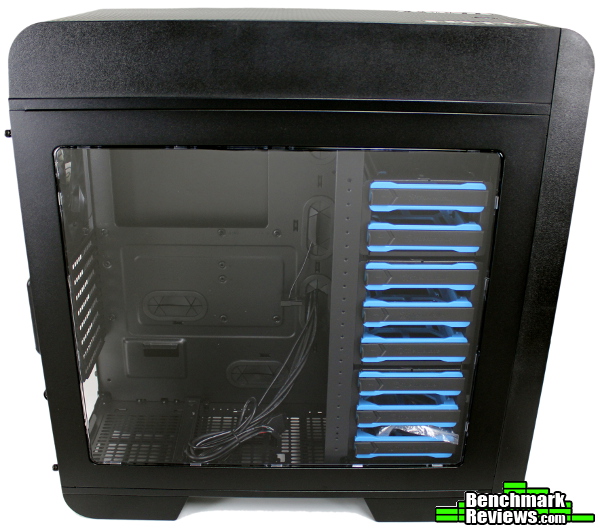
The large side panel window provides a great view of your components. Both side panels are hinged, and attach with captive thumbscrews. That’s a nice touch, as the thumbscrews stay with the panel – no need to set them aside or keep track of them when swapping out drives or devices. Both side panels seem a bit on the thin side, but at least that helps keep the weight down. They’re sturdy enough, so at least you don’t have to battle the chassis to get the thumbscrews to line up when replacing the panel.

Finally, the left (back of motherboard) side is featureless except for an extrusion (about 5 mm) allowing a bit more room for cables.
Now that we’ve seen the outside, let’s look at some of the more detailed features of the Core V71.

Removing the side panel reveals the modular bracket for the 3/3/2 3.5″ tool-less drive sleds. Each of these modular units can be removed and reconfigured based on your needs – in fact, the entire assembly can be removed if necessary. In its stock configuration, there’s still enough room for another set of fans inside the chassis frame (or a slim radiator), but the bracket can be moved rearward to free up even more room. You can even place a single drive cage suspended somewhere in the middle, if you’d like. To me, this ability (along with the 200mm fans) is one of the most distinguishing features of the Core V71. Very rarely do I personally fill a tower with drives, but what an option! That’s what the PC ecosystem is the best at (options), in my opinion, and it’s nice to see a chassis that can accommodate a wide variety of builds/purposes.
While we’re here, take a look at that top panel – see how tall it is? There’s quite a bit of room under there, and by removing the dust filter there’s just under 7cm of vertical room for fans or radiators.

That space is even more apparent when the top mesh panel is removed (like the front, the force required to remove the panel is practically perfect – enough to prevent any movement when attached, but not so much that it feels like you’re going to break something when removing it – well done on the tolerances here Thermaltake!). The I/O cluster sticks up in the front, but that just shows how much space is located above the frame.
All fan cables are very nicely wrapped and routed, and the stock cables are mostly tucked away already for you. I would have preferred a much larger grommeted opening at the bottom for the cables from the PSU, but the rest of the cables should route nicely with very little effort.

Removing and rearranging the drive cages is just a matter of removing some thumbscrews. The lower 5.25″ bay is removable as well, you’ll just need to remove the front panel to get access to the screws.

The drive sleds themselves are a distinct bright blue, and feature a tool-less mounting method that makes it very easy to add and swap hard drives (remove drive sled, pop out the side “pins”, insert drive, replace side pins, insert drive sled and latch). The latching mechanism works well, and the overall operation of these drive sleds is very confidence-inspiring. 2.5″ drives will still need to use screws – it’s too bad at least one bracket/sled wasn’t re-purposed to give a tool-less option for mounting SSDs. Even dedicating one of the drive cages to 2.5″ drives would have been a nice touch. A minor issue to be sure, but most enthusiast builds that end up in cases like this could be assumed to have at least one SSD.

With the drive cages removed, there’s a lot of space to work in. Virtually the entire top, front, and bottom of the Core V71 is available for fans or radiators.

The floor strangely doesn’t include any specific mounting points for fans, but using the included screws they can still be secured through the metal mesh. The series of holes that you can see in the middle are for the PSU support bracket; this bracket should accommodate any power supply on the market.

The above photo is looking down on the Core V71 from the top, where the extra 200mm fan mounting location and offset 120/140mm fan/rad mounting points are obvious. While it may ruin the symmetry (you don’t see it anyway), offset radiator and fan mounting points are essential for clearing motherboard components.

All of the panels can be removed with a very fine-tuned application of force. The “snap-in” of these panels is very crisp and pleasant, and they don’t require an “I’m going to break something” amount of force to remove. Both feature removable dust filters, although the front panel needs to be removed entirely to gain access to its filter. This angle also gives a great view of the two 5.25″ bays (one in the chassis, one “on top”).

Thermaltake did an excellent job with the switches used on the I/O panel. The power button is very crisp and tactile, and the others follow suit without any binding or mushiness. A small detail, but surprisingly pleasant. Two USB 2.0 and two USB 3.0 ports complete the I/O assembly, along with the 3.5mm headphone and microphone jacks.
With a review of the main features complete, let’s take a look at building a system in the Core V71.
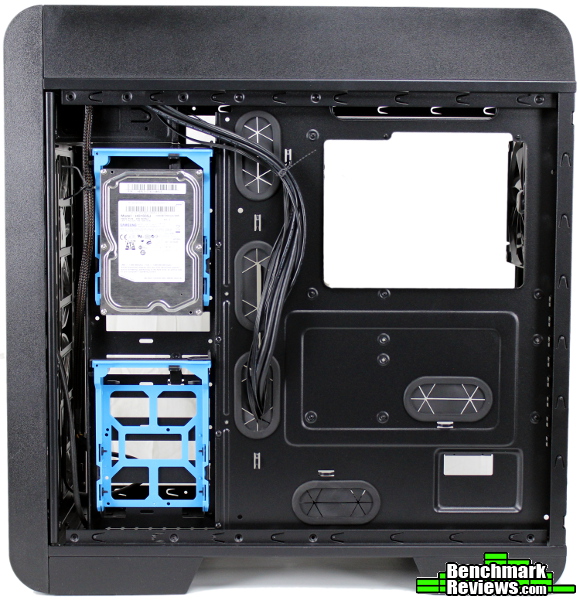
Although, there’s one feature we haven’t looked at yet. Not only are the drive cages modular, but there are two additional drive mounting points on the back of the case. Simply take two of the drive sleds out of their cages and hang/snap them on the included supports. I’m not sure if I’ve seen quite this approach before, but I like it. Especially for my builds, which are usually gaming oriented and rarely use more than two drives (SSD+HDD).

Drives pivot and snap in solidly, and seem quite stable when attached. I didn’t get the feeling they’d fall out whatsoever. Maybe with some severe jostling…but I’m guessing you’d crash some drive heads before getting these trays to fall off.

The PSU installs very easily as well, although you’ll have to shift the support bar that sits on the bottom to fit your specific power supply. A few thumbscrews later, and you shouldn’t have any problems with fitting any power supply on the market.

Adding the motherboard and CPU is easy, just like any other full-tower ATX case – made a little easier just because of the extra room above and in front of the motherboard. You won’t be suffering from cramped quarters in the Core V71. I especially appreciated the very wide opening up top for the 8-pin CPU connector – this cable is probably the most troublesome for any ATX full tower, and the extra space will come in handy for routing fan cables for radiators too.
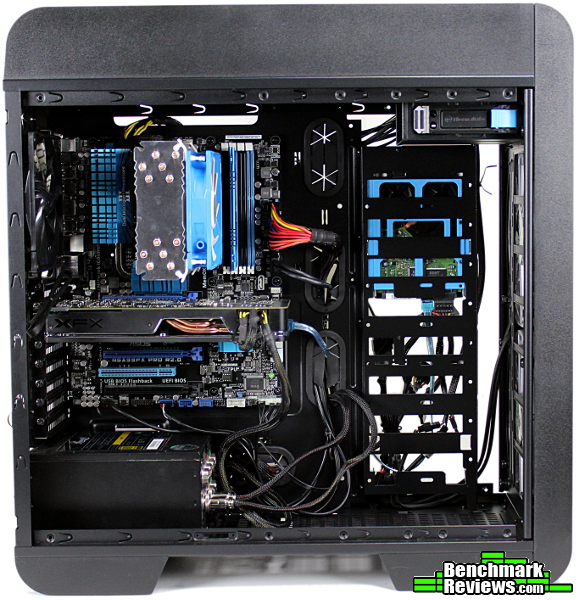
Adding a graphics card is effortless as well – with the drive cages removed, I don’t think you’ll need to worry about clearance for longer GPUs. The specifications state a limit of 310mm with the HDD rack in place (400mm without)…

…which leaves more than enough room for the XFX Radeon R9 270X pictured here. Something like a R9 290 or GTX 780 (generally around 260-300mm) would also fit fine even with the modular drive cages in place.

Cable management is made pretty easy, although there is only one drive for this build. Still, everything neatly lines up for the most part, and Thermaltake includes some reusable tie-downs to make tidying up even easier. The expanded side panel ensures even the thick 24-pin ATX cable will have room without any bowing side panels. There’s about 2.5 cm of space for cables without the side extrusion, 3 cm total. That’s more than an inch for cables, which is generous and appreciated – you shouldn’t have any difficulty replacing the side panel on this case.
With a full tower case that comes stock with three 200mm fans, I just had to see how the Core V71 would deal with a Crossfire configuration. Obviously, your experience will vary greatly depending on the hardware you choose – most Crossfire configurations run pretty warm, and blower-style GPU fans (that exhaust heated air out the back of the chassis) generally perform better when stacked together.
This time I decided to use two midrange Radeon R9 270X’s. Each of these is currently running at a slight overclock of 1050 MHz (core clock). With a full GPU compute load and the chassis fans on high, the top card hit a peak of 85C (while the bottom stayed at 61C). The ambient temperature at the time was about 14.3C, and the internal case temperature (using the temp sensor on the Samsung HDD, so the temp at the upper right corner in the picture above) was about 22C during the test. The internal case temperatures ranged from 18C to 25C measured at the hard drive sensor during the various tests.
Of course, a 100% load isn’t a very realistic benchmark for gaming configurations, so a few runs of 3DMark benchmarks showed a more manageable temperature; 37.3 C CPU, and 61C/49C (top/bottom) for the GPUs.
While playing a few rounds of Battlefield 4, the temperatures I observed were 61C/48C/44C (top/bottom/CPU) – there was still a pretty sizeable gap, but that’s usually what happens when using open-air cooled graphics cards.
There was enough airflow overall to keep the Silverstone Argon AR03 CPU cooler fed with fresh air, so watercooling wasn’t absolutely necessary to keep CPU temps down. Since the Core V71 offers so much space for liquid cooling systems, I had to try at least one – there was a Cooler Master Nepton 280L sitting close by, so why not?
As I found out, even though the Core V71 is one of the most compatible watercooling cases I’ve worked in so far, there are still a few “gotchas.” The Nepton 280L pictured above doesn’t quite fit in the orientation pictured. While there is room on top of the chassis frame, the rail that holds the dust filter on in the top panel wouldn’t quite clear the side of the 280mm radiator. When I attempted to fit a Swiftech H220 in its place, I found that I couldn’t quite fit the large CPU cooling block through the space provided – the attached hoses and barbs wouldn’t fit through the rectangular spaces up top (although most every other AIO cooling block probably would).
I wanted to show that a radiator and fans DO fit in this space up top though – you’ll just have to stick with 120mm wide radiators and fans if you want to completely fill this space. Otherwise, to avoid compatibility issues whatsoever, just mount them in the space under the chassis frame and above the motherboard (like most cases). Variations on this would allow the Nepton 280L to fit as well (such as mounting just the fans above the chassis frame and the radiator itself below). To be clear, the Nepton 280L would fit just fine in the normal mounting location below the top frame; you’d even have room to add an extra set of fans on top.
Most AIO liquid cooling kits won’t have any problems being installed in the Core V71, and there’s still quite a bit of space in the front of the chassis for custom cooling loop components (reservoirs, dual pumps, etc.). Overall, I’d say the Core V71 would turn out to be a very solid watercooling case based on its ability to accommodate a large amount of cooling hardware.

Finally, I had to include a picture of the illumination from the 200mm fans. The lights can easily be switched off with a button on the top panel, but for those that like LEDs the Core V71 does not disappoint. The color is the typical LED blue, not a bright/light blue as depicted in some of the promotional material (LEDs are pretty hard to photograph, at least for me – for a better representation of the color, look on the backdrop of the photo behind the case). I have to admit, I found myself hoping that Thermaltake discovered some baby blue LEDs to match the drive cages…and while it’s okay that they ended up being the typical blue (better color matching with existing components) it would have been neat to see a new color in a chassis other than the red/green/blue LEDs that are common. Obviously, that’s a purely cosmetic observation and doesn’t impact the performance of the Core V71, I just often wonder if small touches like that would be worth the price to be unique – what do you think?
Overall, I’m impressed with the Core V71, but there were a few areas that could use a further refinement.
The side panels feel a little thin, but the Core V71 feels very sturdy everywhere you touch (the mesh front and top, swtiches). Overall, I don’t feel like this is a mark against the Core V71 as the lighter weight is easier to work with. This doesn’t bother me that much, but remember: my last experience with a similar case was a NZXT H630, with soundproofed heavy steel panels. Any side panels would probably feel a little thin after that!
The temperatures in Crossfire were a little higher than I expected. I’d take my results with a grain of salt for now though, this is the first time I’ve tested this particular configuration. I may have to update this article after testing some other enclosures, just to see if one of the GPUs might be the culprit.
The last case I tested with this many 200mm fans was the NZXT H630 (while that chassis comes with only one 200mm stock, I had added a few more out of curiosity). The H630 surprised me with its ability to cool Crossfired 7970s once the 200mm fans slots were maxed out, and I expected similar performance for the Core V71. Perhaps adding another 200mm would have done the trick, although I suspect the intake fans were just too far away from the GPUs to provide any direct cooling benefits. The volume of air moving through the Core V71 was sufficient for normal purposes, but maybe the velocity wasn’t enough to “strip” the hot air from between the two cards? From what little I know about the physics behind cooling, it’s the difference between the cool and hot air that actually cools the components (making the temperature of the air that goes in one of the biggest factors in overall cooling), but it makes me wonder what would happen to that temperature difference between the top and bottom graphics cards if those front cooling fans were positioned closer to the GPUs – or were of the “Air Penetrator” type found in SilverStone’s Raven series of cases.

I think the Core V71 performed very well for its class. While there are more efficient designs and chassis that tame hot Crossfire configurations a little better (usually with the addition of a side intake fan), very few of those allow for the flexibility of air OR liquid cooling. The number of fan and radiator combinations one could use inside the Core V71 is impressive, but the stock configuration is impressive in its own right. You’ll trade a bit of noise for the performance (although the giant fans are pretty inaudible on low, and not distracting on high), but those users concerned about noise would probably take the liquid cooling approach anyway.
I also like the way the Core V71 looks. I think the appearance is among the best of Thermaltake’s offerings – while the sleek, conservative lines of the Urban series are also eye-catching, the Core V71 stands alone with with its rounded corners, blue accents and expanses of round-hole mesh. The large, clear window shows off the bright-blue drive trays and your components. If you like blue, especially, you can build some very attractive systems in the Core V71 – I do wonder if they’ll ever release any other colors…
Overall, I think the construction of the Core V71 is appropriate for its class as well. I mentioned before, some areas feel a bit thin (especially the side panels), but it doesn’t seem to compromise the stability of the chassis at all. If anything, it just helps keep the weight down. I personally would have preferred a matte/smooth touch finish for the plastic sides of the top and front panels though – the texture used on those surfaces didn’t quite seem as “premium” as the rest of the enclosure. I can’t complain too much though – ultimately, I’d rather they spend the manufacturing budget on the included fans than a minor texture, and it saves them the trouble of having to “paint match” the different surfaces (which I’m sure creates an entirely new set of problems). The mesh used seems to be a very good quality, and feels like it will be resistant to dents and dings.
The Core V71 has a lot of functionality. The modular hard drive trays (with dual mounting locations on the back), various fan and radiator configurations and strong airflow in stock trim result in a pretty versatile chassis. This case would allow for almost any conceivable build, and should work for most users that need a full tower. I do wish they had made some 2.5″ tool-less modular drive bays though – even an aftermarket set of drive cages with this functionality would be useful.
The Thermaltake Core V71 is now available online for $149.99 (Newegg / Amazon). It’s most “natural” competition then, are cases like SilverStone’s RV04, NZXT’s H630/Phantom 630, and the Cooler Master Cosmos S/Stacker/Trooper/HAF X (along with many others). The Core V71 may not have the most efficient cooling setup, or the most extravagent looks (not always a bad thing), or the most luxury features…but the modular drive system and overall compatibility with a wide range of builds make this a very compelling option. It just so happens to come with a pretty powerful stock cooling setup too, along with a fresh new look that helps set it apart. I would say the Core V71 is a very fair value for the asking price.
I think Thermaltake picked the perfect name for the Core V71 – I feel they succeeded in offering an enclosure that can form the “core” of your build, whatever you intend your build to be. I hope to see the Core line expanded (especially into other form factors) – there’s some great decisions made with the Core V71, and I’d like to see what else Thermaltake could do with those ideas.
+ Fresh, attractive design from Thermaltake
+ Lots of airflow in stock trim
+ Easy to use and effective modular drive system
+ Truly a versatile and adaptable chassis
+ Performs well in liquid or air cooling configurations
+ Looks great in blue, though LEDs can be switched off if desired
– Doesn’t make much of an effort to block noise (which should be obvious)
– No tool-less provisions for 2.5″ drives
– Only offered in blue
-
Performance: 8.00
-
Appearance: 9.00
-
Construction: 8.00
-
Functionality: 9.50
-
Value: 8.00


5 thoughts on “Thermaltake Core V71 Full-Tower Case Review”
A pretty and nice case. Except for the niggling little problems always inherent with Thermaltake products.
That’s always been the trouble with Thermaltake.
Almost, but not quite, perfect.
It would take just a little bit more effort for them to make excellent products.
But, they’d rather save a dime than make a fortune.
Flimsy side panels and noise just don’t cut it these days.
It seems you might be on to something – the Core V71 has been on sale at Newegg for $139 for the last few days, along with a $10 MIR (and a promo code too, it seems). I still think a chassis that comes stock with three 200mm fans and those modular drive trays is a decent value at $159, but there are a LOT of good choices in that price range…
Very nice case, but I would prefer a couple of SSD’s inside, so the usual hard drive cages are useless to me.
Also would like to see dust covers for the top outputs, even in an airconditioned room the top of my computer seems to attract dust.
I don’t think that dust covers over the top fans (which exhausts air) would prevent dust from settling on top of your computer.
I agree it’s a bit strange that these $100+ cases don’t make some sort of specific provision for 2.5″ drives/SSDs (other than some holes in a drive tray). I would assume those users spending that type of money on a case would also set aside at least that amount for an SSD, given the difference it makes for the system as a whole. Maybe I’m just getting lazy, but it’s a little frustrating to have decent tool-less drive bays for HDDs that still need screws if you want SSDs.
As far as the dust covers, the top panel does include a removable filter – although if by “outputs” you were talking about the USB/audio ports, you could always add something like these.
Comments are closed.