By Julian Duque
Manufacturer: Lian Li Industrial Co., Ltd. Product Name: PC-Q07B Model Number: C48.Q0700.30 UPC: 840353005877
Price As Tested: $59.99 (Newegg | Amazon)
Full Disclosure: The product sample used in this article has been self-supplied.
Lian-Li’s historical reputation is filled with some of the most innovative designs and ideas such as their “reverse-ATX” models. To add to their history, their products are undeniably well built and host one of the highest levels of quality that is available today in the market, which we have really come to enjoy here at Benchmark Reviews. Even in their budget oriented cases, Lian-Li has managed to impress us in the past with their choice of designs and user friendly layouts. The Lian Li PC-Q07B ITX case is no exception, featuring a very appealing and extremely small minimalistic cube design, we found that this case is perfect for the current trend of mini-ITX systems that keeps growing due to the improved integration of motherboard chipsets.
Anyone familiar with Lian-Li’s products is aware of their straightforward approach which sets itself aside from the modern trends of other case companies. Along with the exceptionally simple layout and the extremely small enclosure which is about half the size of other mini-ITX enclosures such as the BitFenix Prodigy and the Corsair 250D, while still being able to house an ordinary ATX power supply, Lian Li does a very good job at keeping us excited to work with their cases.

One thing to note is that when we received this case we didn’t expect to build the most powerful system, nor did we expect to fill it up with bright LEDs and a water cooling system, but rather we decided to build a small everyday computer that is capable of web-browsing, and multi-tasking while still maintaining a very professional look which would be ideal for an office environment. However, you might also find this case perfect for an HTPC or even a small APU gaming system.
| Dimensions | 193mm x 290mm x 208mm |
| Front bezel Material | Aluminum |
| Colors | Black or Silver |
| Side Panel | Aluminum |
| Body Material | Aluminum |
| Net Weight | 1.1 KG |
| 5.25″ drive bay (External) | 1 |
| CPU cooler height | 70 mm |
| HDD bay | 3.5″ HDD x1 or 2.5″ HDD x1 |
| Expansion Slot | 1 |
| Motherboard Support | Mini-ITX |
| I/O Ports | USB3.0 x 2 |
| Maximum Compatibility | VGA Card length: 180mm (only singe slot cards)PSU length: 140mm |
The newest model of the Lian Li PC-Q07B case comes in either black or silver. We decided to go with the black version, which is highly accentuated by the brushed aluminum finish that along with the all-around smooth curved corners are signature features from Lian Li.
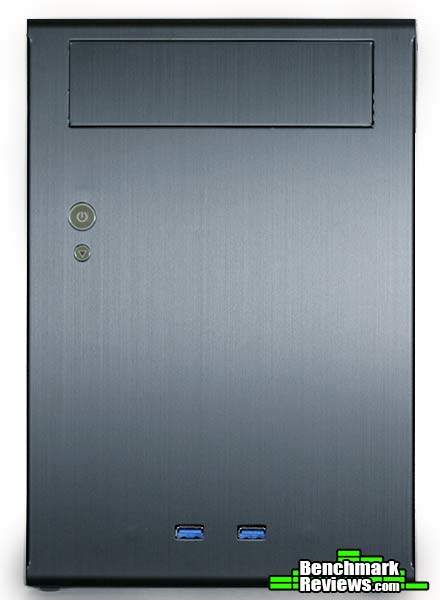
When we first got our hands on this case the first thing we noticed is just how clean the exterior of the case is. At the front we find a simple layout consisting of a 5.25″ drive opening, two USB 3.0 ports centered at the bottom, a power switch with an integrated blue LED that serves as the power indicator light, and a reset switch with an integrated red LED that serves as the HDD indicator light. We did find surprising the lack of 3.5mm jacks which would improve accessibility without affecting aesthetics.
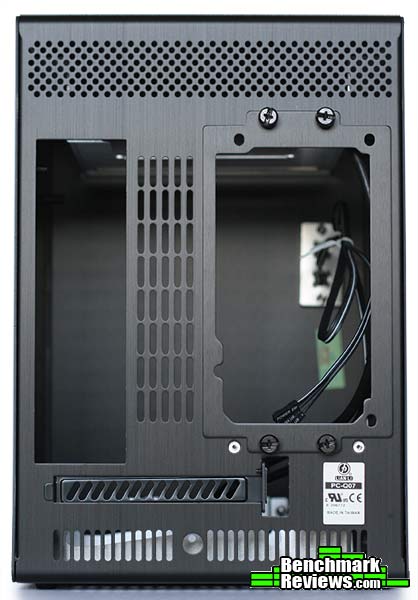
On the back we still find that pleasant aluminum brushed finish even on the power supply mounting bracket. We are also given the first clues of what the Lian Li PC-Q07B hides inside. The I/O shield mount and the bracket that holds in place a standard ATX power supply are only separated by a set of ventilation holes, meaning that there is a 70 mm height limit for a CPU cooler. Sadly this case only features one expansion slot, limiting compatibility with most modern graphic cards,

Along the bottom we see the 4 screws that hold in place the 3.5″ HDD mount found inside the Lian Li PC-Q07B. We also find 4 screw holes to mount a 2.5″ storage device. The four rubber legs prevent the case from sliding if you decide to leave the case on an uneven surface. 
On the right side panel we see more of that simple and clean theme found everywhere in the exterior of the case. We also noticed that both side panels are held in place by 6 small screws that could be easily lost. It would have been more convenient if Lian Li implemented some of their tool-less mechanisms to open the side panels of the Lian Li PC-Q07B.

On the other side we find a very similar side panel except this one features a semi-open portion which provides the power supply with enough air. We also find more of those sneaky screws that make removing and installing the side panels a tedious task.
Looking at the exterior of the case we found many clues to what Lian Li hid inside the PC- Q07B. Over this section we are going to cover in detail the interior features of the Lian Li PC-Q07B Mini ITX enclosure.

First off we are going to take a look at the included accessories. Inside we find a multi-language instruction manual, thumb screws and noise isolation rubber washers to mount a 3.5″ HDD, a cable management tie down point, one zip tie, a USB 2.0 to 3.0 adapter, a Lian Li case badge, and enough screws to completely fill the Lian Li PC-Q07B with hardware.

A first look inside reveals what seemed to us like a layout that along with the standard four ITX motherboard standoffs, a 5.25″ inch drive bay, and a 3.5″ HDD are just a continuation of the simple design we found on the exterior of the case.

Along the top we find the 5.25″ drive bay which although it visually resembles the sharp steel found in other cases, we found quite sturdy and thick enough to prevent any accidental finger cuts. Unfortunately the bay is held in place by rivets which prevents it from being taken off.

At the bottom we find a 3.5″ HDD mounting mechanism made from the same material as the drive bay but to our surprise the HDD mount can be removed by simply taking off the four screws located at the bottom of the case. We also find the 4 holes used to mount a 2.5″ storage device inside the Lian Li PC-Q07B case.
The interior really shows how limited the case really is with no place for fans and only one SSD/HDD mount. However, it provides more than enough features to build an HTPC which is what Lian Li advertises this case for.
Building a system on such a small enclosure can sometimes prove to be a tough challenge, however Lian Li is renowned for their user friendly layouts. This proved true in our experience building within the Lian Li PC-Q07B.
We first started by intalling the power supply and the hard drive, which are relatively easy tasks if you follow the instruction manual. The power supply can be mounted two ways as shown in the picture. Since the case had plenty of ventilation holes we decided to mount the power supply so that it would intake air from outside the case.
We then mounted the motherboard into the side panel, which we used as our static free work station for mounting our processor and memory.

We decided to connect all the cables to the motherboard prior to installing the side panel. We found really strange that the reset and HDD LED cables were about half the length of the other front I/O cables, we ended up connecting them while installing the side panel.

A final look reveals a mess of cables that we were unable to use and therefore had to route underneath the power supply. We highly suggest to use a modular power supply as you won’t be using many of the cables. A short cable kit will also do great as the Lian Li PC-Q07B lacks cable management options, however Lian Li does include some cable management accessories with the case.
Another approach is to install the motherboard prior to the power supply, however both methods will bring very similar results.
My overall experience with this case ends in a positive note. It looks great, it is easy to build in, and it holds up to the Lian Li standard. However Lian Li sacrificed many important features that we find important such as front audio jacks, and fan mounts. The case is also very limited to the amount of stuff you can put in it, such as a single slot expansion card and only one storage device. Inside there seems to be plenty of unused space that could be used for better cable management or even to make a DIY mod to mount more storage devices. Aside from that, the case has some pretty strong points such as being relatively small and still being able to hold an ATX power supply which was the main reason for which we chose this case. On our test set-up we didn’t find our i5 4670 getting past 65 degrees Celsius under load with the stock cooler, which is a pretty standard result for most cases. At this price point, the Lian Li PC-Q07B is a great choice for an office environment or an HTPC enclosure.

Unfortunately the Lian Li PC-Q07B leaves a whole lot to wish as it lacks any form of cooling. The only way air moves into this case is through the ventilation holes found around the case, so don’t expect to load this case with the ultimate gaming hardware, but rather with what is really intended for.
Aesthetically the minimalistic cube design is one of the strongest points of the Lian Li PC-Q07B. It is small enough to fit inside a cabinet, and stylish enough to show it off in your living room.
Another reason to choose the Lian Li PC-Q07B is the amazing build quality. Made from anodized aluminum, the case feels really robust and is extremely light weight. We didn’t find any sharp edges inside which means that you won’t have any accidental finger cuts while building inside this case.
One thing we disliked about the Lian Li PC-Q07B is that unlike some cases like the Corsair 250D, it doesn’t use space really well. If we could remove the 5.25″ drive, we could easily mount more storage devices, apart from the one that it already allows. Another thing we wondered is why Lian Li didn’t allow for a second expansion slot. As seen in the picture above there is plenty of space for a second expansion slot.
As of May 2014 the Lian Li PC-Q07B is the least-expensive case from Lian Li and is available online for $59.99 (Newegg | Amazon). Even at a relative low price it still holds up to it’s name with Lian Li’s great build quality and brushed aluminum look. However, we would only recommend this case if you are willing to accept the limited storage and expansion.
+ Very stylish!
+ Easy to build in.
+ Extremely small!
+ Exceptional build quality.
+ Lightweight.
+ Takes ATX power supplies of up to 140 mm of length.
– Side panels are held by 6 easily to lose screws.
– Only one storage device mount.
– Only one expansion slot.
– No cooling capabilities.
– No front 3.5 mm jacks.
-
Performance: 5.75
-
Appearance: 9.50
-
Construction: 9.25
-
Functionality: 6.75
-
Value: 7.5


