By David Ramsey
Manufacturer: BitFenix Co. Ltd.
Product Name: Shadow
Model Number: BFC-SDO-150-KKXBR-RP
UPC: 886027003251 EAN: 4716779444742
Price As Tested: $79.99 (Amazon | Newegg)
Full Disclosure: BitFenix provided the product sample used in this article.
BitFenix made their reputation in 2010 with their first product, the massive Colossus full tower case. The BitFenix Shadow brings some of the Colossus features, like the signature soft-touch coating and external LED lighting, to a lower price point in a mid-tower ATX case. Sporting room for three 5.25″ devices and seven hard drives, the Shadow tries to balance price with features to distinguish it from its competition. Join us as Benchmark Reviews checks out the BitFenix Shadow BFC-SDO-150-KKXBR-RP mid-tower computer case to see if it’s a worthy contender for your next build.

| Materials | Steel, plastic |
| Dimensions (W,H,D) | 190 x 440 x 506mm |
| Motherboard Sizes | ATX, micro-ATX, mini-ITX |
| 5.25″ bays | x3 |
| 3.5″ bays | x7 |
| 2.5″ bays | x1 |
| Cooling Front | 120mm x 2 (included) |
| Cooling Bottom | 120mm x 1 (optional) |
| Cooling Rear | 120mm x 1 (included) |
| PCI Slots | 7 |
| I/O | USB 3.0 x 2, USB 2.0 x 2, HD audio |
| Power Supply | PS/2 ATX |
| Extras | SofTouch™ Surface Treatment, selectable red/blue LEDs, removable dust filters, tool-free drive locking mechanisms |
Let’s unbox this case and take a look at the exterior in the next section.
The BitFenix Shadow is a rather plain case: basic black, rectangular, with only the BitFenix logo on the front panel to break up the monotony.

Both sides of the case are unadorned black steel panels, with no windows or vents. Event the top of the case is a plain unvented panel.
The bottom of the case sports two filtered air intakes (the filters are on the inside of the case; more on that later). At the front of the case (the right of this image) you can see the four mounting points for a 2.5″ device.

At the rear of the case we see the 120mm exhaust fan (with mounting points for both 80 and 92mm fans should you wish). Two knock-out panels for water cooling hoses and 7 ventilated card slot covers sit between the cutouts for the I/O panel and the bottom-mounted power supply.

The accessory package is meager: some screws, a very skimpy manual, and an odd little angle piece which you can use to brace the front of the power supply.

Let’s take a more detailed look at this case in the next section.
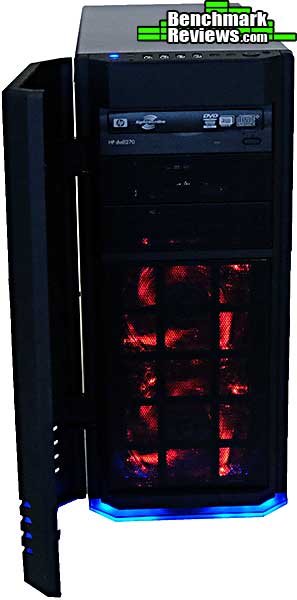
The magnetically-latched swing-open front panel is coated with BitFenix SofTouch™ Surface Treatment, which feels cool and resists fingerprints. It does look visually different from the black-painted steel of the case body, and this difference is evident from across the room. Opening the panel reveals three 5.25″ bays.

Below the 5.25″ bays is a removable dust filter; pressing both top corners releases it. There are mounting spaces for two 120mm intake fans; one is included with the case.

BitFenix sent along some LED-lit Spectre Pro fans for this review. These fans are rated at 56.22 cubic feet per minute of air flow at 18.9dB. With some BitFenix cases, you can control the lighting on these fans directly; but the Shadow doesn’t offer this feature, so I left the jumpers on the fans to keep the LEDs on all the time. You will need to remove the front panel to install or replace the front fans…
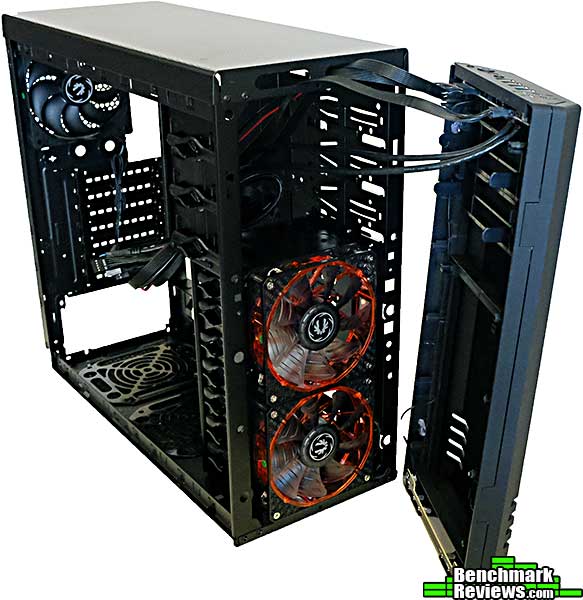
…and that involves removing four of these rather fiddly screws, two on each side. It’s not clear why BitFenix used that odd “metal claw” retainer rather than a simple washer, or for that matter why the front panel doesn’t simply snap off.

At the top front of the case are the power and drive activity LEDs, headphone and microphone ports, two USB 3.0 ports and two USB 2.0 ports, and the power and reset buttons. It’s good to see a reset button, which many cases are excluding these days. Between the USB 2.0 ports and the power button are two additional buttons used to control the case lighting.

The Shadow comes with built-in, subtle, external case lighting, a rarity at this price point, although a common feature in BitFenix cases. A light-pipe strip at the bottom front of the case glows red or blue, and you can change the color, or turn the lighting off completely, using the switches at the top of the case.

Let’s take a look at the interior of the case in the next section.
The Shadow uses a standard layout we’ve seen in many other ATX cases: power supply at the bottom, 5.25″ devices at the top, and 3.5″ devices below them. You can fit up to three 5.25″ devices and seven 3.5″ devices.

There’s also a mounting point for a single 2.5″ device at the very bottom of the case. Mounting a device here will, however, preclude the use of the bottom 3.5″ bay.

At the bottom of the case are two more removable filter elements: one at the rear of the case for the power supply intake, and one in front of it for an optional 120mm intake fan (if you’re keeping count, the case supports a total of four fans). It’s nice to have intake filters, but this design means that the clean them you move remove the power supply and/or the extra intake fan. I don’t think many people would bother to do this.

Rather than using conventional standoffs, the Shadow has a central “locating peg” and 8 punched-up areas your motherboard rests on. Mounting screws secure the board to these punched-up areas. It’s a clever way to keep costs down by not having to include brass standoffs.

These plastic peg-clamps secure both 5.25″ and 3.5″ devices: rotate the locking handle vertically and remove the clamp; insert the device, then replace the clamp and rotate the locking handle so that it’s horizontal. Easy!

There is virtually no room– perhaps 1/4″ of clearance– for cables behind the motherboard tray. Normally this would be a real problem.

However, since there are no cable routing holes or even tie-down points on the motherboard tray, we’re not going to run any cables behind it, so the limited clearance won’t be a problem.

Let’s build a system in this case and see how well it works.
I have always been a proponent of the view that you can’t really evaluate a case without building a system in it. For this build I’m using a rather old X58 motherboard, but hey, ATX is ATX, so let’s get started.

Things look pretty good with just the motherboard installed. The central locating peg positions the motherboard perfectly, and although I was initially a little skeptical of the “punched-up screw mounts” this case uses in lieu of brass standoffs, everything when in smoothly.

But one problem showed up immediately: with no cutouts at the top of the case, there’s no way to run the EPS-12V power cable behind the motherboard to its 8-pin plug. This means that the cable will have to run across the motherboard, which I hate.

Well, it could be worse, I suppose: I ran the cable at the front of the motherboard, then made a sudden turn to loop under the CPU cooler and back to the connector.

Speaking of the CPU cooler, the large cutout makes mounting the cooler backplate easy. In this image you’ll see a “notch” at the upper right which kinda looks like it was intended for the aforementioned EPS-12V cable, but it’s occluded by the motherboard, so its real purpose is a mystery.

BitFenix claims the Shadow will support graphics cards up to 320mm long. This is technically true but should be amended to note “as long as there aren’t any 3.5″ drives in front of the card.” This GTX280 is only 267mm long and there’s no room for a drive in front of it.

The rear card slots use a separate retainer piece; a design that helps reduce the front-to-back measurement of the case by 1/2″ or so.

Since there’s no room for cables behind the motherboard, they have to go in front of the motherboard. This works out better than I’d have thought it would, actually. Although there are no dedicated tie-down points in the case, I was able to use a couple of random holes as anchor points to host a few zip ties to keep things tidy.

A reasonably easy build, overall. With two hard drives and a single optical drive, there’s plenty of room in the case for tucking away extra cables, and since there’s no side window we’re only concerned about serviceability and air flow, not aesthetics as such.
So, what do I think of this case overall?
The BitFenix Shadow is definitely a budget case, and if you’re used to working with cases in the $100-and-up range, you’ll see little cost-cutting measures everywhere you look: only the front door is SofTouch; standoff-less motherboard mounting, internal rather than external dust filters, and a very plain external appearance (except for the front). A lack of cable routing options and tie-down points drives the point home. If you’re building a high performance system, note that the case cooling options are limited with only four fan mounting positions and no top ventilation options.
For my test build, though, most of this made little difference. You can’t route cables behind the motherboard tray, but aside from the EPS-12V cable, this wasn’t an issue, since the design of the case makes it easy to route cables in front of the tray. Using the plastic tool-less drive mounting mechanisms was easy and drives seemed very secure once they were latched in. Overall, this was a pretty easy case to build in.
Yes, a couple of things were annoying: the design of the internal filters at the bottom of the case is silly: does BitFenix honestly expect people to remove their power supply to clean its filter? And the odd mounting of the front panel makes removal unnecessarily difficult (yes, I installed the Spectre Pro LED fans. You can only see them when the front cover is open, but they look cool!), but once you have your fans set up, you probably will never need to remove the front panel again.
So it comes down to a matter of value and expectations. Don’t expect the amenities of an expensive case, and you’ll probably appreciate the bang for the buck you’ll get with the BitFenix Shadow.
With 26 different case offerings at last count, BitFenix seems intent on covering every possible niche in the market. While some of their cases push the boundaries of design, the Shadow offers a standard ATX mid-tower design spiced up with enough extras to help distinguish it from its competition. It’s an easy case to build in, although having to route the EPS-12V cable over the motherboard seems so last-decade.
Don’t expect Colossus-like levels of visual appeal, as this case is subtle to the point of invisibility: it’s a plain black rectangle relieved only by the BitFenix logo on the front panel and the LED lighting strip at the bottom (if it’s turned on). The quality of construction is good, though, with all panels and parts fitting well.
Functionally, the case has limited cooling options and the single 2.5″ mount is surprising these days. Helping offset this are the two front mounts for 120mm fans with the easily-removable front dust filter, when means you can set up cooling adequate for an NVIDIA SLI or AMD CrossFireX system.
For $79.99 (Amazon | Newegg), the case offers good value for the money. Based on all these ratings, I recommend the BitFenix Shadow for future builds.
+ Dust filters
+ Room for plenty of 5.25″ and 3.5″ devices
+ Subtle external case lighting
+ Easy to build in
+ Room for large graphics cards and CPU coolers
+ Front fan mounts for keeping graphics cards cool
– 2.5″ device mounting seems an afterthought
– Internal dust filters inconvenient to clean
– EPS-12V cable must be routed over motherboard
– Limited cooling ability; no place for 240mm radiator and no top ventilation
-
Performance: 8.50
-
Appearance: 7.75
-
Construction: 9.00
-
Functionality: 8.75
-
Value: 9.50


