By Olin Coles and David Ramsey
Manufacturer: PINE Technology Holdings Limited, dba XFX
Product Name: BLACK DD RADEON 7950 900M 3GB D5 2XmDP HDMI 2XDVI
Model Number: FX-795A-TDFC
UPC: 778656058194
Price: Starting at $314.99 (Amazon | Newegg)
Full Disclosure: The product sample used in this article has been provided by XFX.
Who makes a better graphics card for PC video games: AMD Radeon or NVIDIA GeForce? This question has divided PC hardware enthusiasts for many years, and often creates some of the most heated arguments between technical types. Fortunately the desktop computer platform is no longer a place where people merely playing video games, because now GPU-enhanced compute tasks are earning a larger role for themselves and expanding the possibilities. Additionally, each of these brands has employed cutting-edge technologies to improve picture quality and level of entertainment. Nevertheless, the question still remains unanswered.
AMD have been working to extend their graphics reach into emerging markets, primarily through the use of integrated GPUs. This hasn’t slowed their pursuit in the discrete graphics market, where the AMD Radeon series continues to battle for supremacy in some of the most demanding DirectX 11 video games available on PC. The AMD Radeon HD 7950 is an example of this effort, employing 28 Compute Units (1792 Stream Processors) with 3GB GDDR5 memory. In this article Benchmark Reviews tests the custom-designed XFX Radeon HD 7950 Double-Dissipation Black Edition video card, model FX-795A-TDFC, using several highly-demanding DX11 video games such as Metro: Last Light, Batman: Arkham City, and Battlefield 3.
The AMD Radeon HD 7950 is designed with a 850MHz GPU engine clock speed, which XFX extends to 900MHz with a factory overclocked speed that remains stable under demand. The reference AMD Radeon HD 7950 also comes equipped with 3GB of GDDR5 video memory clocked to 1250MHz (5000MHz data rate), which XFX cranks up to 1375MHz (5500MHz data rate). Add to this the custom ‘Double-D’ thermal management system to keep this Black Edition video card cool, and you’ve got an ideal formula for top-end graphics performance.

AMD might have trouble keeping up with the competition in the CPU arena, but their acquisition of ATI allowed them to become a major player in the graphics world. AMD and NVIDIA regularly trade places in the “fastest video card” rankings, and while NVIDIA’s been good holding down the title with its current high-end, the Fermi-based GTX 580, AMD’s new “Tahiti” GPU decisively stole the performance crown in its 7970 form.
Like its big brother, this card comes with a factory overclock and an elaborate dual-fan cooling system. I’ll compare its performance against NVIDIA and AMD’s current top-end cards, as well as the R7970 we tested recently, to see how well it performs.
The XFX Radeon HD 7950 Black Edition Double-D (dissipation) graphics card, model FX-795A-TDFC, sells online for $314.99 (Amazon | Newegg). The kit comes with an accessory package identical to its big brother R7970. Along with the various bits of documentation is a driver CD, a CrossFireX cable, and a passive HDMI to DVI cable. There’s also a cool metal and plastic stick-on “XFX Black Edition” badge you can put somewhere on your case to show off.
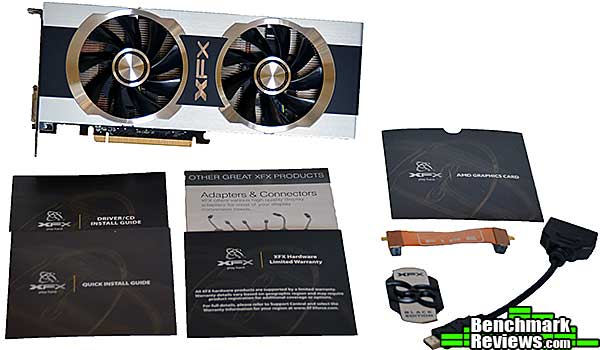
If you’ve owned or read other reviews on previous AMD video cards before, you’re familiar with the “black slab with red accents” styling that AMD reference cards have used for the past few years. Indeed, even the new Tahiti-based cards use this styling, and most of the cards you’ll see will consist of the reference design with a vendor-specific sticker applied. XFX, however, has decided that their new high-end cards deserve better:

The first thing you’ll notice is the dual-fan cooler. The cooler is quite elaborate: XFX replaces the stock AMD vapor chamber cooler with a “HydroCell” vapor chamber of their own design. They then apply two Duratec IP-5X dust-free fans whose design prevents dust from ever reaching the fan bearings, and surrounds the whole assembly with an aluminum “Ghost Thermal Technology” shroud whose design is said to improve cooling by directing air out the top and bottom of the card.

That said, there doesn’t actually appear to be a lot of space for air to exit from the top of the card. A red trim panel and the cooler base above it block most of the airflow from the top of the card, although there is some space below the trim panel. As we’ll see later, this doesn’t seem to affect the GPU temperatures, and besides, it looks pretty cool in a tower case with a window.

The back of the card doesn’t have any sort of cover or heatsink plate, so you can see 15 or 16 of the 20+ screws that secure the cooling apparatus to the card. White circular “Warranty void if removed” stickers cover two of the screws. I don’t know if it makes any difference in the real world, but some users might prefer backplates to protect the minuscule components of the card from damage and static.
Let’s take a detailed look at this card in the next section.
The connectors available include two DVI ports, one HDMI, and two mini-DisplayPort. The primary DL-DVI connector is a startling red color. XFX claims their custom backplate with the “XFX” cutout permits twice the airflow of a standard backplate, but this seems unlikely.

The XFX R7950 Black Edition Double Dissipation video card has two 6-pin PCI-E power connectors. However, solder pads on the back of the card reveal that a version with an 8-pin connector could be made.

While the “Double Dissipation” cooler on the R7950 superficially seems identical to the one on the R7970, looking at the bottom we can see a visible copper heat pipe on the R7970 (upper card in the image below) that’s not present on the R7950.

With the cooler removed, we can see the copper plate for GPU cooling and thermal pads for the memory and VRMs. As is sadly often the case, way too much thermal compound was used during the assembly of this card.

The Radeon 7950 GPU is a blank mirror with no part numbers or other markings. 12 Hynix memory chips (one with a thermal pad over it) surround the GPU.

We’ll cover the features and specifications of this card in the next section.
It’s always exciting to see AMD or NVIDIA come out with a completely new GPU architecture. The “Southern Islands” GPUs are AMD’s implementation of its “Graphics Core Next” architecture, and comprise three different families of GPUs:
- Tahiti for high-end cards like the Radeon 7970 and 7950
- Pitcairn for more mainstream users
- Cape Verde brings up the low end
Right now, the only Southern Islands GPUs available are the Tahiti-based Radeon HD 7970 and 7950 GPUs, but cards based on the Pitcairn and Cape Verde variants will appear in the coming months.
AMD had several goals in mind for Graphics Core Next, and one of the main things they wanted to do was to catch up with NVIDIA in the “GPU compute” arena. Right now, NVIDIA’s “CUDA” (Compute Unified Device Architecture) dominates in GPU computing, with a robust set of developer tools and years of track record behind it. AMD’s “DirectCompute” alternative has been around almost as long but has failed to catch on with developers to the degree that CUDA has. AMD is making a real push for DirectCompute with these new GPUs, and claims that over 200 applications already benefit from DirectCompute technology.
For Southern Islands, AMD has grouped simple ALUs (arithmetic logic units) into a single SIMD (Single Instruction Multiple Data) unit. A number of SIMD units, along with instruction decoders and schedulers, branch units, vector processors, and other items comprise a compute unit, and a number of these compute units (along with memory controllers and whatnot) comprise a Southern Islands GPU chip. Each compute unit comprises 64 shaders, and while the 7970 has 32 of them (and thus 2,048 shaders), the Radeon 7950 gets by with only 28 (and 1,792 shaders). That’s a decrease of only 12.5%, which doesn’t seem like much. Additionally, the standard 7950 clock speed is 800MHz as compared to the 7970’s 925MHz.
AMD has tweaked their VLIW (very long instruction word) architecture to provide more consistent performance. Previous generations of AMD GPUs often left many compute units/stream processors idle, because dependencies in the data being worked on meant that not all the compute units could be used at once. Southern Islands architecture provides a greater degree of parallelism (it’s that SIMD stuff, really, being used effectively) and can keep most compute units working all the time, leading to more consistent (and higher) performance. This has obvious advantages in both graphics processing and general GPU-compute operations.

Other enhancements include:
Partially Resident Textures: As games increasingly use very large textures, loading and manipulating the texture data takes more time. A Souther Islands GPU can load only the part of the texture that will actually be visible in a frame, reducing the memory bandwidth and workload.
Error-correcting code support: There’s not much detail on this feature yet, but it looks as if AMD will be able to offer optional ECC support (important for industrial applications) without having to use ECC memory. This will detect and correct memory errors, although AMD’s tech white paper doesn’t go into specifics such as how many bits can be detected/corrected.
PowerTune and ZeroPower: These feature dynamically clock the card’s GPU and memory doesn (PowerTune) when high performance isn’t needed, and can shut off entire sections of the GPU (ZeroPower) when the card is idle. For example, the second card in a CrossFireX system can be idled down to less than 5 watts if you’re just browsing the Windows desktop; a single card system will power down if your display goes to sleep. Combined with the inherent efficiency of the 28nm fabrication process, this results in significant power savings. Side benefits you’ll notice include less heat and noise emanating from your rig, especially when you’re not gaming.
Eyefinity 2.0: New support for 5×1 monitor layouts, improved bezel correction, and support for custom resolutions enhance AMD’s existing Eyefinity feature. I saw a 5×1 system demonstrated at an AMD press even a few months ago and it was quite impressive.
28nm fabrication process: If you make ’em smaller, you can fit more of ’em in. The 7970 GPU has a staggering 4.3 billion transistors. The original Intel 4004 microprocessor had about 2,300.
PCI Express 3.0 support: This has twice the bandwidth of PCI-E 2.0, but I’m not sure what real-world effect this will have, especially on x16 slots. Even the beefiest current video cards aren’t hobbled by 8x PCI-E 2.0 bandwidth.
- GPU Edging: Black Edition Selection Process Double Dissipation
- Exclusive XFX Black Edition Selection Process to identify the top 1% of GPUs capable of reaching maximum overclock speeds.
- Ghost Thermal Technology
- Floating cover design maximizes airflow
- HydroCell Thermal Solution
- Hydrocell Vapor Chamber technology
- Duratec: Solid Capacitors
- Duratec: Ferrite Core
- Duratec: 2oz Copper PCB
- Duratec: IP-5X Dust Free Fan
- Duratec: XFX Bracket
In the next section, we detail our test methodology and give specifications for all of the benchmarks and equipment used in our testing process…
The Microsoft DirectX-11 graphics API is native to the Microsoft Windows 7 Operating System, and will be the primary O/S for our test platform. DX11 is also available as a Microsoft Update for the Windows Vista O/S, so our test results apply to both versions of the Operating System.
In each benchmark test there is one ‘cache run’ that is conducted, followed by five recorded test runs. Results are collected at each setting with the highest and lowest results discarded. The remaining three results are averaged, and displayed in the performance charts on the following pages.
A combination of synthetic and video game benchmark tests have been used in this article to illustrate relative performance among graphics solutions. Our benchmark frame rate results are not intended to represent real-world graphics performance, as this experience would change based on supporting hardware and the perception of individuals playing the video game.
- Motherboard: ASUS P9X79 Deluxe Motherboard (Intel X79 Express)
- Processor: Intel Core i7-3960X Extreme Edition (six cores/3300 MHz)
- System Memory: G.SKILL Ripjaws-Z 32GB DDR3-1600
- Power Supply Unit: OCZ Z-Series Gold 850W OCZZ850
- Monitor: ASUS VG278H 27″ Widescreen Monitor
- 3DMark11 Professional Edition by Futuremark
- Settings: Performance Level Preset, 1280×720, 1x AA, Trilinear Filtering, Tessellation level 5)
- Aliens vs Predator Benchmark 1.0
- Settings: Very High Quality, 4x AA, 16x AF, SSAO, Tessellation, Advanced Shadows
- Batman: Arkham City
- Settings: 8x AA, 16x AF, MVSS+HBAO, High Tessellation, Extreme Detail, PhysX Disabled
- BattleField 3
- Settings: Ultra Graphics Quality, FOV 90, 180-second Fraps Scene
- Lost Planet 2 Benchmark 1.0
- Settings: Benchmark B, 4x AA, Blur Off, High Shadow Detail, High Texture, High Render, High DirectX 11 Features
- Metro 2033 Benchmark
- Settings: Very-High Quality, 4x AA, 16x AF, Tessellation, PhysX Disabled
- Unigine Heaven Benchmark 3.0
- Settings: DirectX 11, High Quality, Extreme Tessellation, 16x AF, 4x AA
| Graphics Card | GeForce GTX650Ti | Radeon HD6970 | GeForce GTX580 | GeForce GTX660Ti | Radeon HD7950 | GeForce GTX760 | GeForce GTX670 | Radeon HD7970 | GeForce GTX770 |
| GPU Cores | 768 | 1536 | 512 | 1344 | 1792 | 1152 | 1344 | 2048 | 1536 |
| Core Clock (MHz) | 925 | 880 | 772 | 915 | 900 | 980 | 915 | 925 | 1046 |
| Shader Clock (MHz) | N/A | N/A | 1544 | 980 Boost | N/A | 1033 Boost | 980 Boost | N/A | 1085 Boost |
| Memory Clock (MHz) | 1350 | 1375 | 1002 | 1502 | 1250 | 1502 | 1502 | 1375 | 1753 |
| Memory Amount | 1024MB GDDR5 | 2048MB GDDR5 | 1536MB GDDR5 | 2048MB GDDR5 | 3072MB GDDR5 | 2048MB GDDR5 | 2048MB GDDR5 | 3072MB GDDR5 | 2048MB GDDR5 |
| Memory Interface | 128-bit | 256-bit | 384-bit | 192-bit | 384-bit | 256-bit | 256-bit | 384-bit | 256-bit |
- NVIDIA GeForce GTX 650Ti (925 MHz GPU/1350 MHz vRAM – Forceware 306.38)
- AMD Radeon HD 6970 (880 MHz GPU/1375 MHz vRAM – AMD Catalyst 13.3)
- NVIDIA GeForce GTX 580 (772 MHz GPU/1544 MHz Shader/1002 MHz vRAM – Forceware 306.23)
- ASUS GeForce GTX 660Ti DirectCU-II TOP (1059 MHz GPU/1137 MHz Boost/1502 MHz vRAM – Forceware 306.23)
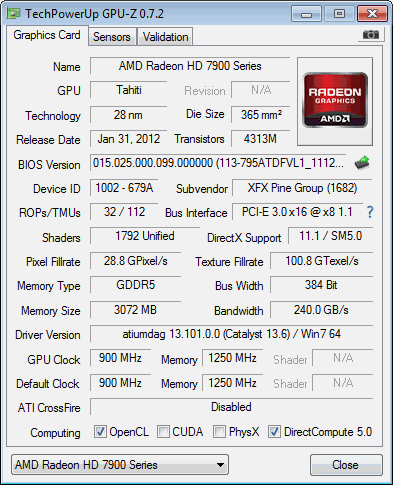
- XFX Radeon HD 7950 Black Edition Double-D (900 MHz GPU/1250 MHz vRAM – AMD Catalyst 13.6 Beta 2)
- NVIDIA GeForce GTX 760 (980 MHz GPU/1033 MHz Boost/1502 MHz vRAM – Forceware 320.39)
- NVIDIA GeForce GTX 670 (915 MHz GPU/980 MHz Boost/1502 MHz vRAM – Forceware 306.23)
- AMD Radeon HD 7970 (925 MHz GPU/1375 MHz vRAM – AMD Catalyst 13.6 Beta 2)
- NVIDIA GeForce GTX 770 (1046 MHz GPU/1085 MHz Boost/1753 MHz vRAM – Forceware 320.18)
FutureMark 3DMark11 is the latest addition the 3DMark benchmark series built by FutureMark corporation. 3DMark11 is a PC benchmark suite designed to test the DirectX-11 graphics card performance without vendor preference. Although 3DMark11 includes the unbiased Bullet Open Source Physics Library instead of NVIDIA PhysX for the CPU/Physics tests, Benchmark Reviews concentrates on the four graphics-only tests in 3DMark11 and uses them with medium-level ‘Performance’ presets.
The ‘Performance’ level setting applies 1x multi-sample anti-aliasing and trilinear texture filtering to a 1280x720p resolution. The tessellation detail, when called upon by a test, is preset to level 5, with a maximum tessellation factor of 10. The shadow map size is limited to 5 and the shadow cascade count is set to 4, while the surface shadow sample count is at the maximum value of 16. Ambient occlusion is enabled, and preset to a quality level of 5.

- Futuremark 3DMark11 Professional Edition
- Settings: Performance Level Preset, 1280×720, 1x AA, Trilinear Filtering, Tessellation level 5)


3DMark11 Benchmark Test Results
| Graphics Card | GeForce GTX650Ti | Radeon HD6970 | GeForce GTX580 | GeForce GTX660Ti | Radeon HD7950 | GeForce GTX760 | GeForce GTX670 | Radeon HD7970 | GeForce GTX770 |
| GPU Cores | 768 | 1536 | 512 | 1344 | 1792 | 1152 | 1344 | 2048 | 1536 |
| Core Clock (MHz) | 925 | 880 | 772 | 915 | 900 | 980 | 915 | 925 | 1046 |
| Shader Clock (MHz) | N/A | N/A | 1544 | 980 Boost | N/A | 1033 Boost | 980 Boost | N/A | 1085 Boost |
| Memory Clock (MHz) | 1350 | 1375 | 1002 | 1502 | 1250 | 1502 | 1502 | 1375 | 1753 |
| Memory Amount | 1024MB GDDR5 | 2048MB GDDR5 | 1536MB GDDR5 | 2048MB GDDR5 | 3072MB GDDR5 | 2048MB GDDR5 | 2048MB GDDR5 | 3072MB GDDR5 | 2048MB GDDR5 |
| Memory Interface | 128-bit | 256-bit | 384-bit | 192-bit | 384-bit | 256-bit | 256-bit | 384-bit | 256-bit |
Aliens vs. Predator is a science fiction first-person shooter video game, developed by Rebellion, and published by Sega for Microsoft Windows, Sony PlayStation 3, and Microsoft Xbox 360. Aliens vs. Predator utilizes Rebellion’s proprietary Asura game engine, which had previously found its way into Call of Duty: World at War and Rogue Warrior. The self-contained benchmark tool is used for our DirectX-11 tests, which push the Asura game engine to its limit.
In our benchmark tests, Aliens vs. Predator was configured to use the highest quality settings with 4x AA and 16x AF. DirectX-11 features such as Screen Space Ambient Occlusion (SSAO) and tessellation have also been included, along with advanced shadows.
- Aliens vs Predator
- Settings: Very High Quality, 4x AA, 16x AF, SSAO, Tessellation, Advanced Shadows

Aliens vs Predator Benchmark Test Results
| Graphics Card | GeForce GTX650Ti | Radeon HD6970 | GeForce GTX580 | GeForce GTX660Ti | Radeon HD7950 | GeForce GTX760 | GeForce GTX670 | Radeon HD7970 | GeForce GTX770 |
| GPU Cores | 768 | 1536 | 512 | 1344 | 1792 | 1152 | 1344 | 2048 | 1536 |
| Core Clock (MHz) | 925 | 880 | 772 | 915 | 900 | 980 | 915 | 925 | 1046 |
| Shader Clock (MHz) | N/A | N/A | 1544 | 980 Boost | N/A | 1033 Boost | 980 Boost | N/A | 1085 Boost |
| Memory Clock (MHz) | 1350 | 1375 | 1002 | 1502 | 1250 | 1502 | 1502 | 1375 | 1753 |
| Memory Amount | 1024MB GDDR5 | 2048MB GDDR5 | 1536MB GDDR5 | 2048MB GDDR5 | 3072MB GDDR5 | 2048MB GDDR5 | 2048MB GDDR5 | 3072MB GDDR5 | 2048MB GDDR5 |
| Memory Interface | 128-bit | 256-bit | 384-bit | 192-bit | 384-bit | 256-bit | 256-bit | 384-bit | 256-bit |
Batman: Arkham City is a 3d-person action game that adheres to story line previously set forth in Batman: Arkham Asylum, which launched for game consoles and PC back in 2009. Based on an updated Unreal Engine 3 game engine, Batman: Arkham City enjoys DirectX 11 graphics which uses multi-threaded rendering to produce life-like tessellation effects. While gaming console versions of Batman: Arkham City deliver high-definition graphics at either 720p or 1080i, you’ll only get the high-quality graphics and special effects on PC.
In an age when developers give game consoles priority over PC, it’s becoming difficult to find games that show off the stunning visual effects and lifelike quality possible from modern graphics cards. Fortunately Batman: Arkham City is a game that does amazingly well on both platforms, while at the same time making it possible to cripple the most advanced graphics card on the planet by offering extremely demanding NVIDIA 32x CSAA and full PhysX capability. Also available to PC users (with NVIDIA graphics) is FXAA, a shader based image filter that achieves similar results to MSAA yet requires less memory and processing power.
Batman: Arkham City offers varying levels of PhysX effects, each with its own set of hardware requirements. You can turn PhysX off, or enable ‘Normal levels which introduce GPU-accelerated PhysX elements such as Debris Particles, Volumetric Smoke, and Destructible Environments into the game, while the ‘High’ setting adds real-time cloth and paper simulation. Particles exist everywhere in real life, and this PhysX effect is seen in many aspects of game to add back that same sense of realism. For PC gamers who are enthusiastic about graphics quality, don’t skimp on PhysX. DirectX 11 makes it possible to enjoy many of these effects, and PhysX helps bring them to life in the game.
- Batman: Arkham City
- Settings: 8x AA, 16x AF, MVSS+HBAO, High Tessellation, Extreme Detail, PhysX Disabled

Batman: Arkham City Benchmark Test Results
| Graphics Card | GeForce GTX650Ti | Radeon HD6970 | GeForce GTX580 | GeForce GTX660Ti | Radeon HD7950 | GeForce GTX760 | GeForce GTX670 | Radeon HD7970 | GeForce GTX770 |
| GPU Cores | 768 | 1536 | 512 | 1344 | 1792 | 1152 | 1344 | 2048 | 1536 |
| Core Clock (MHz) | 925 | 880 | 772 | 915 | 900 | 980 | 915 | 925 | 1046 |
| Shader Clock (MHz) | N/A | N/A | 1544 | 980 Boost | N/A | 1033 Boost | 980 Boost | N/A | 1085 Boost |
| Memory Clock (MHz) | 1350 | 1375 | 1002 | 1502 | 1250 | 1502 | 1502 | 1375 | 1753 |
| Memory Amount | 1024MB GDDR5 | 2048MB GDDR5 | 1536MB GDDR5 | 2048MB GDDR5 | 3072MB GDDR5 | 2048MB GDDR5 | 2048MB GDDR5 | 3072MB GDDR5 | 2048MB GDDR5 |
| Memory Interface | 128-bit | 256-bit | 384-bit | 192-bit | 384-bit | 256-bit | 256-bit | 384-bit | 256-bit |
In Battlefield 3, players step into the role of the Elite U.S. Marines. As the first boots on the ground, players will experience heart-pounding missions across diverse locations including Paris, Tehran and New York. As a U.S. Marine in the field, periods of tension and anticipation are punctuated by moments of complete chaos. As bullets whiz by, walls crumble, and explosions force players to the grounds, the battlefield feels more alive and interactive than ever before.
The graphics engine behind Battlefield 3 is called Frostbite 2, which delivers realistic global illumination lighting along with dynamic destructible environments. The game uses a hardware terrain tessellation method that allows a high number of detailed triangles to be rendered entirely on the GPU when near the terrain. This allows for a very low memory footprint and relies on the GPU alone to expand the low res data to highly realistic detail.
Using Fraps to record frame rates, our Battlefield 3 benchmark test uses a three-minute capture on the ‘Secure Parking Lot’ stage of Operation Swordbreaker. Relative to the online multiplayer action, these frame rate results are nearly identical to daytime maps with the same video settings.
- BattleField 3
- Settings: Ultra Graphics Quality, FOV 90, 180-second Fraps Scene

Battlefield 3 Benchmark Test Results
| Graphics Card | GeForce GTX650Ti | Radeon HD6970 | GeForce GTX580 | GeForce GTX660Ti | Radeon HD7950 | GeForce GTX760 | GeForce GTX670 | Radeon HD7970 | GeForce GTX770 |
| GPU Cores | 768 | 1536 | 512 | 1344 | 1792 | 1152 | 1344 | 2048 | 1536 |
| Core Clock (MHz) | 925 | 880 | 772 | 915 | 900 | 980 | 915 | 925 | 1046 |
| Shader Clock (MHz) | N/A | N/A | 1544 | 980 Boost | N/A | 1033 Boost | 980 Boost | N/A | 1085 Boost |
| Memory Clock (MHz) | 1350 | 1375 | 1002 | 1502 | 1250 | 1502 | 1502 | 1375 | 1753 |
| Memory Amount | 1024MB GDDR5 | 2048MB GDDR5 | 1536MB GDDR5 | 2048MB GDDR5 | 3072MB GDDR5 | 2048MB GDDR5 | 2048MB GDDR5 | 3072MB GDDR5 | 2048MB GDDR5 |
| Memory Interface | 128-bit | 256-bit | 384-bit | 192-bit | 384-bit | 256-bit | 256-bit | 384-bit | 256-bit |
Lost Planet 2 is the second installment in the saga of the planet E.D.N. III, ten years after the story of Lost Planet: Extreme Condition. The snow has melted and the lush jungle life of the planet has emerged with angry and luscious flora and fauna. With the new environment comes the addition of DirectX-11 technology to the game.
Lost Planet 2 takes advantage of DX11 features including tessellation and displacement mapping on water, level bosses, and player characters. In addition, soft body compute shaders are used on ‘Boss’ characters, and wave simulation is performed using DirectCompute. These cutting edge features make for an excellent benchmark for top-of-the-line consumer GPUs.
The Lost Planet 2 benchmark offers two different tests, which serve different purposes. This article uses tests conducted on benchmark B, which is designed to be a deterministic and effective benchmark tool featuring DirectX 11 elements.
- Lost Planet 2 Benchmark 1.0
- Settings: Benchmark B, 4x AA, Blur Off, High Shadow Detail, High Texture, High Render, High DirectX 11 Features
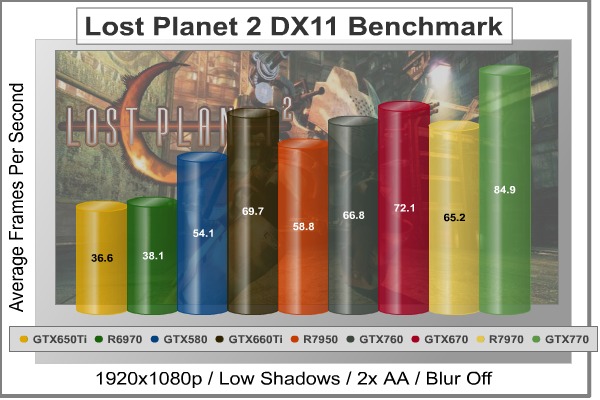
Lost Planet 2 Benchmark Test Results
| Graphics Card | GeForce GTX650Ti | Radeon HD6970 | GeForce GTX580 | GeForce GTX660Ti | Radeon HD7950 | GeForce GTX760 | GeForce GTX670 | Radeon HD7970 | GeForce GTX770 |
| GPU Cores | 768 | 1536 | 512 | 1344 | 1792 | 1152 | 1344 | 2048 | 1536 |
| Core Clock (MHz) | 925 | 880 | 772 | 915 | 900 | 980 | 915 | 925 | 1046 |
| Shader Clock (MHz) | N/A | N/A | 1544 | 980 Boost | N/A | 1033 Boost | 980 Boost | N/A | 1085 Boost |
| Memory Clock (MHz) | 1350 | 1375 | 1002 | 1502 | 1250 | 1502 | 1502 | 1375 | 1753 |
| Memory Amount | 1024MB GDDR5 | 2048MB GDDR5 | 1536MB GDDR5 | 2048MB GDDR5 | 3072MB GDDR5 | 2048MB GDDR5 | 2048MB GDDR5 | 3072MB GDDR5 | 2048MB GDDR5 |
| Memory Interface | 128-bit | 256-bit | 384-bit | 192-bit | 384-bit | 256-bit | 256-bit | 384-bit | 256-bit |
Metro 2033 is an action-oriented video game with a combination of survival horror, and first-person shooter elements. The game is based on the novel Metro 2033 by Russian author Dmitry Glukhovsky. It was developed by 4A Games in Ukraine and released in March 2010 for Microsoft Windows. Metro 2033 uses the 4A game engine, developed by 4A Games. The 4A Engine supports DirectX-9, 10, and 11, along with NVIDIA PhysX and GeForce 3D Vision.
The 4A engine is multi-threaded in such that only PhysX had a dedicated thread, and uses a task-model without any pre-conditioning or pre/post-synchronizing, allowing tasks to be done in parallel. The 4A game engine can utilize a deferred shading pipeline, and uses tessellation for greater performance, and also has HDR (complete with blue shift), real-time reflections, color correction, film grain and noise, and the engine also supports multi-core rendering.
Metro 2033 featured superior volumetric fog, double PhysX precision, object blur, sub-surface scattering for skin shaders, parallax mapping on all surfaces and greater geometric detail with a less aggressive LODs. Using PhysX, the engine uses many features such as destructible environments, and cloth and water simulations, and particles that can be fully affected by environmental factors.
NVIDIA has been diligently working to promote Metro 2033, and for good reason: it’s one of the most demanding PC video games we’ve ever tested. When their flagship GeForce GTX 480 struggles to produce 27 FPS with DirectX-11 anti-aliasing turned two to its lowest setting, you know that only the strongest graphics processors will generate playable frame rates. All of our tests enable Advanced Depth of Field and Tessellation effects, but disable advanced PhysX options.
- Metro 2033 Benchmark
- Settings: Very-High Quality, 4x AA, 16x AF, Tessellation, PhysX Disabled

Metro 2033 Benchmark Test Results
| Graphics Card | GeForce GTX650Ti | Radeon HD6970 | GeForce GTX580 | GeForce GTX660Ti | Radeon HD7950 | GeForce GTX760 | GeForce GTX670 | Radeon HD7970 | GeForce GTX770 |
| GPU Cores | 768 | 1536 | 512 | 1344 | 1792 | 1152 | 1344 | 2048 | 1536 |
| Core Clock (MHz) | 925 | 880 | 772 | 915 | 900 | 980 | 915 | 925 | 1046 |
| Shader Clock (MHz) | N/A | N/A | 1544 | 980 Boost | N/A | 1033 Boost | 980 Boost | N/A | 1085 Boost |
| Memory Clock (MHz) | 1350 | 1375 | 1002 | 1502 | 1250 | 1502 | 1502 | 1375 | 1753 |
| Memory Amount | 1024MB GDDR5 | 2048MB GDDR5 | 1536MB GDDR5 | 2048MB GDDR5 | 3072MB GDDR5 | 2048MB GDDR5 | 2048MB GDDR5 | 3072MB GDDR5 | 2048MB GDDR5 |
| Memory Interface | 128-bit | 256-bit | 384-bit | 192-bit | 384-bit | 256-bit | 256-bit | 384-bit | 256-bit |
The Unigine Heaven benchmark is a free publicly available tool that grants the power to unleash the graphics capabilities in DirectX-11 for Windows 7 or updated Vista Operating Systems. It reveals the enchanting magic of floating islands with a tiny village hidden in the cloudy skies. With the interactive mode, emerging experience of exploring the intricate world is within reach. Through its advanced renderer, Unigine is one of the first to set precedence in showcasing the art assets with tessellation, bringing compelling visual finesse, utilizing the technology to the full extend and exhibiting the possibilities of enriching 3D gaming.
The distinguishing feature in the Unigine Heaven benchmark is a hardware tessellation that is a scalable technology aimed for automatic subdivision of polygons into smaller and finer pieces, so that developers can gain a more detailed look of their games almost free of charge in terms of performance. Thanks to this procedure, the elaboration of the rendered image finally approaches the boundary of veridical visual perception: the virtual reality transcends conjured by your hand.
Since only DX11-compliant video cards will properly test on the Heaven benchmark, only those products that meet the requirements have been included.
- Unigine Heaven Benchmark 3.0
- Settings: DirectX 11, High Quality, Extreme Tessellation, 16x AF, 4x AA

Heaven Benchmark Test Results
| Graphics Card | GeForce GTX650Ti | Radeon HD6970 | GeForce GTX580 | GeForce GTX660Ti | Radeon HD7950 | GeForce GTX760 | GeForce GTX670 | Radeon HD7970 | GeForce GTX770 |
| GPU Cores | 768 | 1536 | 512 | 1344 | 1792 | 1152 | 1344 | 2048 | 1536 |
| Core Clock (MHz) | 925 | 880 | 772 | 915 | 900 | 980 | 915 | 925 | 1046 |
| Shader Clock (MHz) | N/A | N/A | 1544 | 980 Boost | N/A | 1033 Boost | 980 Boost | N/A | 1085 Boost |
| Memory Clock (MHz) | 1350 | 1375 | 1002 | 1502 | 1250 | 1502 | 1502 | 1375 | 1753 |
| Memory Amount | 1024MB GDDR5 | 2048MB GDDR5 | 1536MB GDDR5 | 2048MB GDDR5 | 3072MB GDDR5 | 2048MB GDDR5 | 2048MB GDDR5 | 3072MB GDDR5 | 2048MB GDDR5 |
| Memory Interface | 128-bit | 256-bit | 384-bit | 192-bit | 384-bit | 256-bit | 256-bit | 384-bit | 256-bit |
In this section, PCI-Express graphics cards are isolated for idle and loaded electrical power consumption. In our power consumption tests, Benchmark Reviews utilizes an 80-PLUS GOLD certified OCZ Z-Series Gold 850W PSU, model OCZZ850. This power supply unit has been tested to provide over 90% typical efficiency by Chroma System Solutions. To measure isolated video card power consumption, Benchmark Reviews uses the Kill-A-Watt EZ (model P4460) power meter made by P3 International. In this particular test, all power consumption results were verified with a second power meter for accuracy.
The power consumption statistics discussed in this section are absolute maximum values, and may not represent real-world power consumption created by video games or graphics applications.
A baseline measurement is taken without any video card installed on our test computer system, which is allowed to boot into Windows 7 and rest idle at the login screen before power consumption is recorded. Once the baseline reading has been taken, the graphics card is installed and the system is again booted into Windows and left idle at the login screen before taking the idle reading. Our final loaded power consumption reading is taken with the video card running a stress test using graphics test #4 on 3DMark11.
This section discusses power consumption for the XFX Radeon HD 7950 Double Dissipation graphics card, model FX-795A-TDFC, which operated at at factory-overclocked speeds. Our power consumption results are not representative of the entire Radeon HD 7950-series product family, which may feature modified designs by the various partners. Radeon HD 7950 requires two 6-pin PCI-E power connections for normal operation, and will not activate the display unless proper power has been supplied.
In our test results the XFX Radeon HD 7950 Double Dissipation graphics card consumed 18W at the lowest idle reading, and 158W under full load with fan operating at 100%. If you’re familiar with electronics, it will come as no surprise that less power consumption equals less heat output as evidenced by our thermal results below…
This section reports our temperature results subjecting the video card to maximum load conditions. During each test a 20°C ambient room temperature is maintained from start to finish, as measured by digital temperature sensors located outside the computer system. GPU-Z is used to measure the temperature at idle as reported by the GPU, and also under load.
Using a modified version of FurMark’s “Torture Test” to generate maximum thermal load, peak GPU temperature is recorded in high-power 3D mode. FurMark does two things extremely well: drives the thermal output of any graphics processor much higher than any video games realistically could, and it does so with consistency every time. Furmark works great for testing the stability of a GPU as the temperature rises to the highest possible output.
The temperatures illustrated below are absolute maximum values, and do not represent real-world temperatures created by video games or graphics applications:
| Video Card | Ambient | Idle Temp | Loaded Temp | Max Noise | ||||
| ATI Radeon HD 5850 | 20°C | 39°C | 73°C | 7/10 | ||||
| NVIDIA GeForce GTX 460 | 20°C | 26°C | 65°C | 4/10 | ||||
| AMD Radeon HD 6850 | 20°C | 42°C | 77°C | 7/10 | ||||
| AMD Radeon HD 6870 | 20°C | 39°C | 74°C | 6/10 | ||||
| ATI Radeon HD 5870 | 20°C | 33°C | 78°C | 7/10 | ||||
| NVIDIA GeForce GTX 560 Ti | 20°C | 27°C | 78°C | 5/10 | ||||
| NVIDIA GeForce GTX 570 | 20°C | 32°C | 82°C | 7/10 | ||||
| ATI Radeon HD 6970 | 20°C | 35°C | 81°C | 6/10 | ||||
| NVIDIA GeForce GTX 580 | 20°C | 32°C | 70°C | 6/10 | ||||
| NVIDIA GeForce GTX 590 | 20°C | 33°C | 77°C | 6/10 | ||||
| AMD Radeon HD 6990 | 20°C | 40°C | 84°C | 8/10 | ||||
| NVIDIA GeForce GTX 650 Ti BOOST | 20°C | 26°C | 73°C | 4/10 | ||||
| NVIDIA GeForce GTX 650 Ti | 20°C | 26°C | 62°C | 3/10 | ||||
| NVIDIA GeForce GTX 670 | 20°C | 26°C | 71°C | 3/10 | ||||
| NVIDIA GeForce GTX 680 | 20°C | 26°C | 75°C | 3/10 | ||||
| NVIDIA GeForce GTX 690 | 20°C | 30°C | 81°C | 4/10 | ||||
| NVIDIA GeForce GTX 670 | 20°C | 27°C | 79°C | 3/10 | ||||
| NVIDIA GeForce GTX 770 | 20°C | 27°C | 78°C | 3/10 | ||||
| XFX Radeon HD 7950 Double-D | 20°C | 36°C | 73°C | 4/10 | ||||
| NVIDIA GeForce GTX 780 | 20°C | 28°C | 80°C | 3/10 |
No doubt the Radeon HD 7950 could benefit from improved thermal management, which is exactly why XFX incorporated their premium HydroCell vapor chamber with two Duratec IP-5X dust-free fans, and then surrounds the assembly with an aluminum “Ghost Thermal Technology” shroud. Temperatures reached 73°C after ten minutes of 100% load, which is really not much of a peak temperature by comparison. Idle temperatures were slightly higher than other video cards we’ve tested lately, but still remained at a respectable 36°C.
AMD’s 7950 GPU closely resembles a Radeon HD 7970, but with four of its compute units (representing 256 shaders) disabled. The Black Edition Double Dissipation is XFX’s most expensive version of the 7950; as with the 7970, it’s offered in four different versions: Core Edition, Black Edition, Double Dissipation, and Black Edition Double Dissipation. The highest-end card carries a $50 premium over the base Core Edition. It’s exactly $100 less than the 7970 version of the same card. For this 20% savings you give up a little over 9% in frame rate, measured across these benchmarks.
That seems a reasonable trade off, especially since you can easily overclock the R7950 to virtual performance parity with the stock-clocked R7970. And even when overclocked, the GPU temperatures remained very low (at the cost of some noise under load, although according to XFX the retail cards will be quieter), so you don’t need to fear for your card’s longevity.
IMPORTANT: Although the rating and final score mentioned in this conclusion are made to be as objective as possible, be advised that every author perceives these factors differently. While we each do our best to ensure that all aspects of the product are considered, there are often times unforeseen market conditions and manufacturer revisions that occur after publication which could render our rating obsolete. Please do not base any purchase solely on this conclusion, as it represents our rating specifically for the product tested which may differ from future versions. Benchmark Reviews begins our conclusion with a short summary for each of the areas that we rate.
My ratings begin with performance, where the $315 XFX Radeon HD 7950 Black DD graphics card is positioned between the $250 GeForce GTX 760 and $400 GTX 770 in terms of price. In DirectX 11 tests the XFX 7950 rarely performed to GTX 770 levels, and was a closer match to GeForce GTX 760 in benchmark tests. Ultra-demanding DX11 games such as Batman: Arkham Asylum produced 87 FPS from the factory-overclocked 7950, which outperforms the GTX 760’s 72 FPS while closing in on the GeForce GTX 770’s generated 90 FPS. Battlefield 3 gave the GeForce GTX 760 a small 5-FPS lead over the XFX Radeon HD 7950 when Ultra quality settings were used. Lost Planet 2 played well on all graphics cards when set to high quality with 4x AA, but still forced the XFX 7950 to trail behind the GTX 760 by 8 FPS. In Aliens vs Predator the performance was more competitive, with Radeon HD 7950 enjoying an 8-FPS lead over GTX 760 while GTX 770 was separated by only a few FPS. Metro 2033 is another demanding game that requires high-end graphics to enjoy high quality visual settings, and the XFX Radeon HD 7950 used its factory overclock to outpace the GeForce GTX 760 by 5 FPS while trailing GTX 770 by just as much.
Synthetic benchmark tools offer an unbiased read on graphics products, allowing video card manufacturers to display their performance without special game optimizations or driver influence. Futuremark’s 3DMark11 benchmark suite strained our high-end graphics cards with only mid-level settings displayed at 720p, allowing the XFX Radeon HD 7950 to build a slight lead over the GeForce GTX 760, but not enough power to compete against the upper-class GTX 770. Unigine Heaven 3.0 benchmark tests used maximum settings that tend to crush most products, yet the XFX Radeon HD 7950 and GTX 760 were separated by only 1-FPS.

Appearance is a much more subjective matter, especially since this particular rating doesn’t have any quantitative benchmark scores to fall back on. AMD’s Radeon HD series has traditionally used the same recognizable ‘black and red brick’ design over the past few years, which tends to dull consumer appeal. XFX breathes new life into the aging series with their Double Dissipation twin-fan cooler and GHOST Thermal Technology fan shroud. Unfortunately this modified design exhausts most of the heated air back inside the computer case, which may increase operating temperatures. Fashionably good looks could earn points with some consumers, but it’s the card’s low heat output and quiet operation that should leave the biggest impression.
Nobody likes to RMA their video card because it usually means going without use of the computer, which is why construction is the one area AMD graphics cards continually shine. Thanks to extremely quiet operation paired with highly efficient GPU cores, the Radeon HD 7950 consumes less energy while emitting less heat. The card requires two 6-pin PCI-E power connections, which are available on practically every mainstream PSU. Additionally, consumers have a top-end single-GPU solution capable of driving three monitors with AMD HD3D support using the two DL-DVI ports with supplementary DisplayPort outputs.
As of mid-July 2013, the XFX Radeon HD 7950 Black Edition Double Dissipation graphics card (model FX-795A-TDFC) sells online for $314.99 (Amazon | Newegg). This price tag adds $65 to the GeForce GTX 760, but comes in $85 below the GTX 770. Based on the benchmark tests the retail price is accurate in relation to performance, however XFX’s Double-Lifetime warranty adds to the products overall value. For a limited time, some online retailers are offering a rebate on this graphics card that reduces the final price to $299.
My conclusion: the XFX Radeon HD 7950 Black Double-Dissipation graphics card (model FX-795A-TDF) is ideal for standalone installations, however multi-card CrossFire sets are possible in enclosures with above average ventilation and cooling. This video card already runs cool under full load, so there’s little need for excessive case cooling for single-card installations. Even with a rebate, the XFX Radeon HD 7950 Black DD still has room for better pricing. It’s a good card at $315, a solid buy at $300, but it would really clear shelves at $275.
+ Outperforms GeForce GTX 760
+ Excellent DX11 video game performance
+ Supports CrossFireX and DisplayPort output
+ Triple-display and AMD HD3D support
+ XFX Double-Lifetime warranty
+ Cooling fans operate at very quiet acoustic levels
+ Relatively low power consumption under load
+ 3GB GDDR5 video RAM
+ 4K Super-HD display support
– Heated exhaust is circulated back into enclosure
– Expensive enthusiast product
-
Performance: 8.75
-
Appearance: 9.50
-
Construction: 9.25
-
Functionality: 8.75
-
Value: 7.50
Quality Recognition: Benchmark Reviews Silver Tachometer Award.
COMMENT QUESTION: Do you prefer NVIDIA GeForce or AMD Radeon graphics cards?


One thought on “XFX Radeon HD 7950 FX-795A-TDFC Video Card Review”
Those warranty stickers don’t mean anything on cards with XFX lifetime warranties. One of my 7950 fans started grinding a bit and customer service just sent me a replacement fan module and said I could swap it out myself and that they allow customers to customize their cooling systems without breaking warranty on the card (even water cooling systems). XFX service reps are the best of any part manufacturer I’ve come across. And the card is a beast for the price!
Comments are closed.