By Julian Duque
Manufacturer: Fractal Design
Product Name: Core 3500 Mid-Tower ATX Case
Model Number: FD-CA-CORE-3500-BL-W
UPC: 817301011983 EAN: 7350041081982
Price As Tested: $89.99 (Newegg l Amazon)
Full Disclosure: The product sample used in this article has been provided by Fractal Design.
Whether it’s in the automotive, clothing, or furniture industry, European companies have always brought innovative ideas that make big part of the most elegant and simple designs. One clear example is Fractal Design, a Scandinavian company that has showed Benchmark Reviews what stylish and efficient designs look like. This year Fractal Design is updating many of their product lines, including their Core series, to which we reacted in a very excited manner as we could never get tired of their simple minimalist approach. Today we are going to be taking a look at the Fractal Design Core 3500 Mid-Tower Case.
Last year Fractal Design released the Core 3000, a case that was priced very competitively with many promising features such as outstanding airflow. However, there were some major drawbacks including a lack of cable management features. With the Core 3500, Fractal Design has promised to fix these issues, as well as adding more attributes to make a more compelling case.

Looking at the specifications and features found on Fractal Design’s website, the Core 3500 series comes in two forms. For $79.99 you can get a non-windowed version that comes with two 140 mm fans but with an extra 120/140 mm fan mount on the side panel. For $10.00 more you can get a windowed version that also comes with an extra 140 mm fan.
| Features & Specifications | ||
| Motherboard Form Factor | ATX, E-ATX (up to 295 mm wide) Micro ATX, Mini ITX | |
| Drive Bays | External | 2 x 5.25” |
| Internal | 4 bays 3.5″/2.5″and 2 bays 2.5″ (behind motherboard tray) | |
| Cooling | Front | 2 x 140/120mm (1x140mm provided) |
| Rear | 1 x 140/120mm (1 x 140mm provided) | |
| Top | 2 x 140/120mm (1 x 140mm provided) | |
| Side | 1 x 120/140mm (non-windowed version only) | |
| Bottom | 1 x 140/120mm | |
| CPU | Up to 180 mm in height | |
| Expansion Slots | 7 (ventilated covers) | |
| I/O Port | 2 x USB 3.0 | |
| Audio in/out | ||
| Power Button with white LED | ||
| HDD activity with white LED | ||
| Reset Button | ||
| Power Supply Size | 170mm with bottom fan | |
| 270mm without bottom fan | ||
| Weight | 19.0 lbs | |
| 8.6 kg | ||
| Dimensions | 7.87” x 17.48” x 18.90” | |
| 200mm x 444mm x 480mm | ||
| Graphics Card Support | 430mm in the top four slots, and cards up to 295mm in length in the bottom three slots | |
If you are familiar with Fractal Design you are probably aware of their minimalist case models which include flawless, curved corners that along with a front brushed aluminum finish are signature features from the Scandinavian company. Surprisingly, Fractal Design’s Core 3500 reveals a small change to this philosophy.

At the front we find a completely different face as compared to the previous Fractal Design Core 3000. Instead of a metal mesh, we find a plastic cover with a brushed aluminum finish. The plastic cover from the Fractal Design Core 3500 Case is more than great, it is sturdy enough and we did not find any problems when taking it off. At the bottom we find a stylish Fractal Design logo along the angled figures that mark the end of the “aluminum”. A more noticeable piece of this angled style can be found at the horizontal edges of the front cover. This angled theme is a first time for Fractal Design and we are loving it.
 .
.
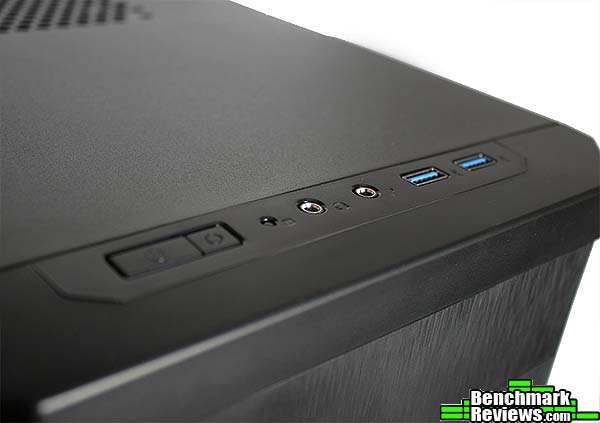
The Input / Output panel comes with 2 x USB 3.0 portts, a headphone and a microphone jack, a power switch, a reset switch and hard drive indicator light that along with the power button are illuminated by white LEDs.
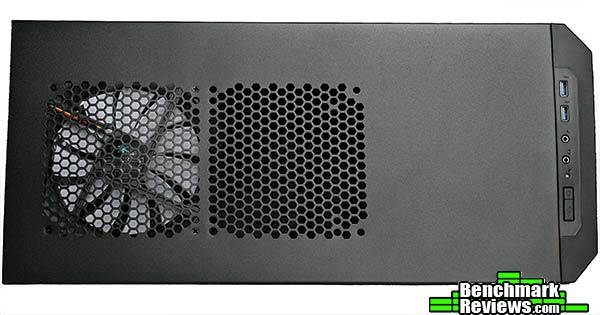
At the top we find layout that is similar, if not identical to some of the other cases from Fractal Design. Both fan mounts support both 120/140 mm fans, Fractal Design also included offset holes for better radiator compatibility, a very important feature for those looking to water-cool. If you are wondering why they did not include a fan filter is probably because they expect you to use these top mounts as exhaust.
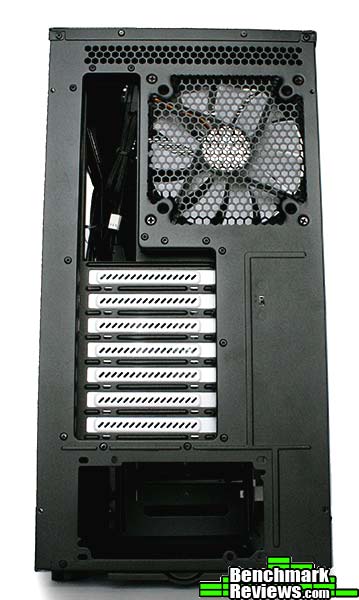
At the back we find a very efficient layout that we had already seen before in the Fractal Design Define R4 Case. The Fractal Design Core 3500 however does have a fan controller instead of the extra expansion slot it’s older predecessor has, another welcomed feature at this price point.

Probably, one of the most prominent features of Fractal Design is the implementation of one of the best looking side panel windows available in the market at this price point. The side panel window is dark enough to hide most imperfections, and it does not compromise the structure of the side panel. Both side panels have little to no flex, making the case extremely solid.
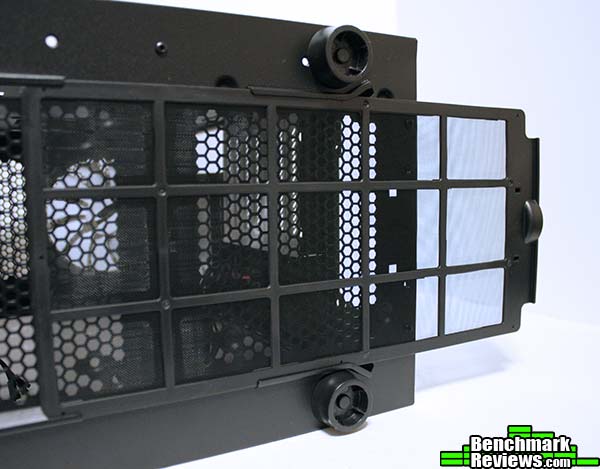
At the bottom we find the only dust filter in the case, however it should be noted that the front panel does have some dust proof foam that should protect the case from any dust unless you plan to use the top fans as intake. The dust filter is long enough to cover the power supply intake, and the fan that can be installed at the bottom.
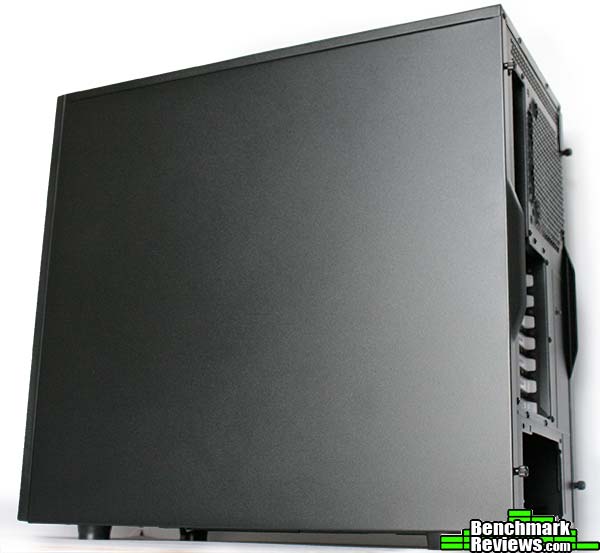
The matte black finish that Fractal Design implemented in the Core 3500 is more than exceptional, but be wary as it can be scratched really easily. A look outside the case revealed a very stylish case overall, and probably one of the most compelling at this price point.
Alright, so the Fractal Design Core 3500 is candy to our eyes, but at this price point a case must be more than good looking to gain our attention. In this section we are going to be taking a close look at the detailed features from the Fractal Design Core 3500 case.
 .
.
First, lets take a look at the included accessories. Included with the case are a multi-language manual, and enough black screws to fill the case entirely. You also get 6 cable zip ties, which is enough for a decent cable management.

The fan controller found in the back of the case is powered by a molex connector. It is positioned right on top of the expansion slots. The 3 x 3-pin fan plugs are enough to power the included fans, however we would have liked to see better compatibility with 4-pin flag plugs instead. The position is also not the best, mainly because the cables are so short that it is very hard to route them through the back of the motherboard tray.

Inside we find a flashback of some of the other cases from Fractal Design. The motherboard standoffs are not installed, however Fractal Design does provide a tool to install them using a regular screwdriver. Another thing to take into consideration is the lack of space between the front intake fans and the drive cage, however the drive cage can be re-positioned so that there is 45 mm of clearance or completely removed. All around the motherboard we find rubber grommets, even at the top, to route those sneaky CPU power cables.

As you can see from the back the drive cages are removable allowing for even thicker radiators to be installed. Some other 2.5″ mounting options can be found on the back of the motherboard tray, however mounting drives in the back can only be achieved if the motherboard is not installed, not a big problem but something to take into consideration. We would have also liked to see more tie-down points on the right portion of the motherboard tray to make cable management a bit easier.
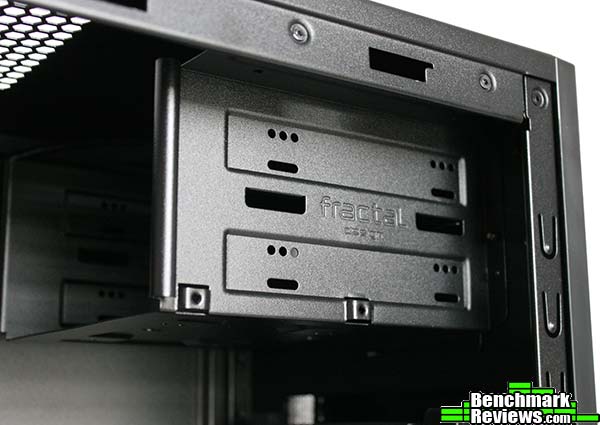
Although the 3500 is very spacious, Fractal Design is only using two optical drive bays, which is more than enough for most users. The 5.25″ bays also show why Fractal Design is renowned for quality, the steel construction found all throughout the body of the case shows no signs of weakness or flex, and the smooth edges also mean you won’t have an undesired cut while working with this case.
Many of the features and specifications can be found on the introduction page, however we also wanted to include a more detailed description pertaining to the water cooling capabilities of the Fractal Design Core 3500 case, as well as a complete list of the features that Fractal Design attributed to this case.
This list can also be found on Fractal Design’s website.
- A remarkably spacious mid tower case with bottom-mounted PSU, designed for exceptional airflow and cooling.
- Brushed aluminum-look front panel with a sleek, three-dimensional textured finish
- Superior water cooling support, supporting one 240/280mm radiator in the front and a 240mm radiator in the top
- A large, tinted, acrylic side panel window to show off your build
- Featuring a 140mm rear exhaust fan for optimal cooling
- Total 6 fan slots with three Silent Series R2 140mm fans included
- Motherboard plate with 22mm of cable routing space behind it, for effortless clean installations
- Supports extremely tall tower CPU coolers, up to 180mm in height
- Featuring an integrated three-speed fan controller
- Multiple easy-to-clean dust filters designed into the case to help maintain a dust free interior
- Four vibration dampening hard drive trays for up to four 3.5″ HDDs, all compatible with 2.5″ drives
- HDD trays split into two cages and strategically positioned with a large space in between to support all long graphics cards up to a maximum length of 430mm in the top four slots, and cards up to 295mm in length in the bottom three slots
- Two additional SSD positions behind the motherboard plate
Cooling system
- Front: 2 – 120/140mm fans (included is 1 hydraulic bearing 140mm Silent Series R2 fan, 1000 RPM speed)
- Rear: 1 – 120/140mm fan (included is 1 hydraulic bearing 140mm Silent Series R2 fan, 1000 RPM speed)
- Top: 2 – 120/140mm fan(included is 1 hydraulic bearing 140mm Silent Series R2 fan, 1000 RPM speed)
- Bottom: 1 – 120/140mm fan (Limits PSU to 170mm in length)
- 1 – integrated fan controller on the backside for up to 3 fans (3-Pin only, Molex powered)
Water Cooling compatibility
- Front –Slim 240 or 280mm radiator. 15mm fan spacing required for full fastening, radiators with 20mm fan spacing fan be used with only the top half fastened to the case. (with lower HDD cage moved to secondary position)
- Front – Thick 240 or 280mm radiators supported with HDD cage in alternate position or completely removed. Motherboards larger than mATX are not fully supported with HDD cage in the tertiary position.
- Top – Slim 240mm radiator (with no components on the upper 11 mm on the motherboard that are taller than 38mm)
- Top – Slim 280mm radiator with slim fans
- Rear – 120/140 mm radiator
So far the Fractal Design Core 3500 has been impressing. As mentioned before, it is very similar to previous cases from Fractal Design like the Define R4, so for us building a complex system is something you probably have already seen in the past. So for this case, we decided to go with a tougher challenge, building a case with budget friendly hardware.
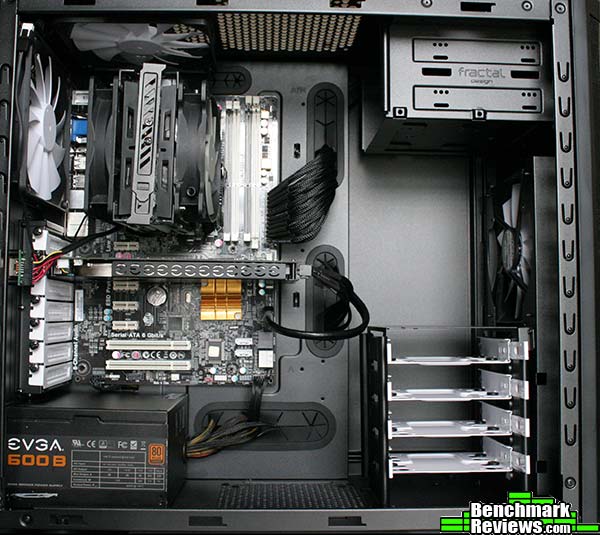
Building inside the Fractal Design 3500 case is an experience that even a person that has never build a computer before will enjoy. The case is spacious, even for those with big hands it should be relatively easy to reach everything including the CPU plug found on top of most motherboards. The case is long enough to support most graphics cards, with 7 expansion slots you might even be able to fit 3 graphics cards, however with the drive cage in its original position you have a limited length of 295 mm for the bottom graphics cards and 430 mm for the top one.
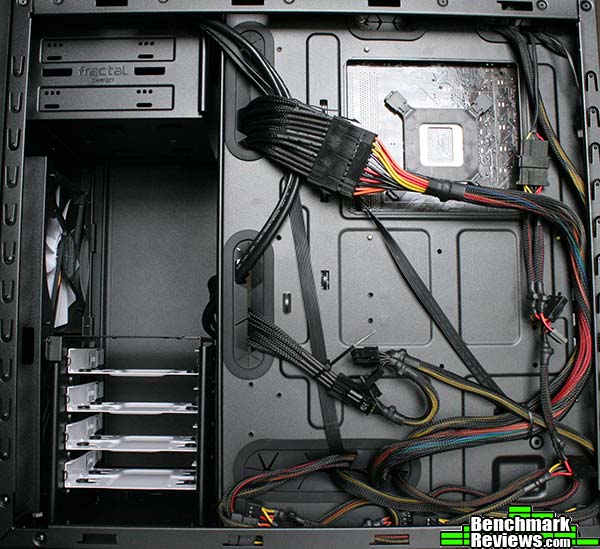
At the back we find 22 mm of space which really is more than enough to stuff cables at the bottom. Just to show how many cables you could stick in there we decided to use a non-modular power supply and we stuffed all the unused cables between the motherboard tray and the bottom of the case. You could probably do a better job than I did if you used a modular power supply.
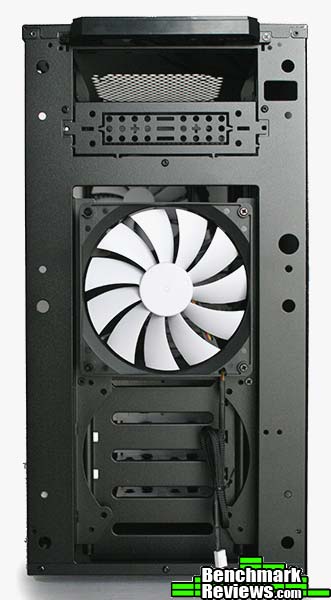
At the front we decided to keep the 140 mm fan on the top as if moved it to the bottom the fan would be chocked by a lack of airflow caused by the hard drive cages. It should be noted that this can be avoided by removing the drive cage or simply moving it to its secondary position.
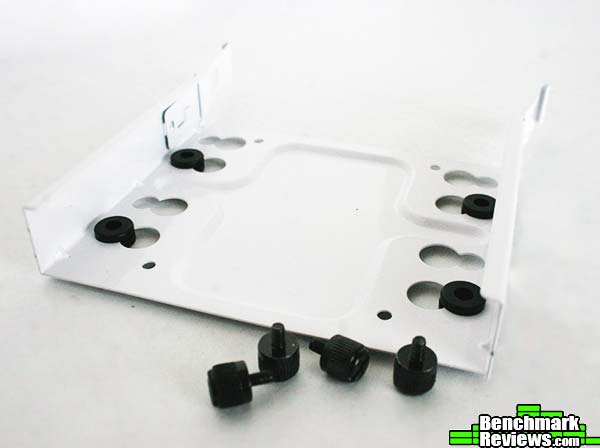
The hard drive bays are also outstanding. The rubber grommets prevent any rattling from occurring, however after loading this case with 4 WD Black 2 TB hard drives the cages were rattling a little bit, but since most people do not use more than 2 hard drives this should not be a problem. The cages are very sturdy, again Fractal Design showing off quality all over the place.
The Fractal Design Core 3500 case is a non-compromise stripped down version of the more expensive options from Fractal Design. It does have some small changes like the front cover which is more aggressive, something we have never seen from Fractal Design but yet we think fits correctly with the rest of this case. The fact that fractal Design can deliver such a good value really leads to the question, what can they bring to the table at a higher price level?
There are still some corrections to be made, such as being able to rotate the hard drive cages for better airflow. We would also like to see this case in other colors, as it is only available in a matte black. The two biggest problems we encountered are a very short HD Audio cable, as well as a very awkward position for the fan controller. In the future we would prefer to see the fan controller placed on the front I/O panel or in the back of the motherboard tray, as well as compatibility with 4-pin fans.
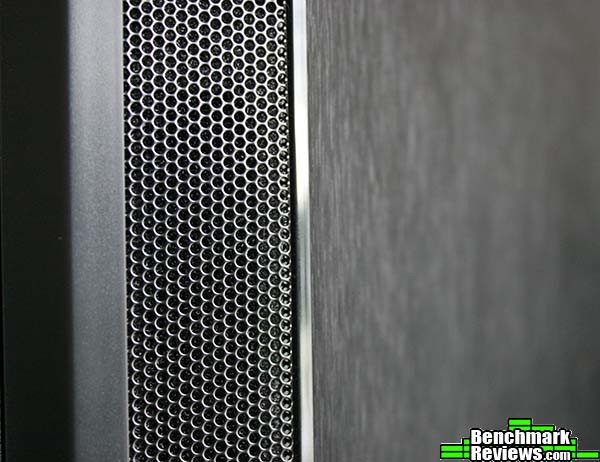
The Fractal Design Core 3500 is a good performer in the cooling section. Along with the 6 fan slots, three 140 mm fans, and support for CPU coolers with up to 180mm you should already have enough cooling for most builds. The metal mesh found on the angled edges of the front panel are more than enough to provide front intake airflow. If you plan on water cooling the Fractal Design Core 3500 provides support for one slim 240/280mm radiator on the top and if you move the hard drive cage, you will find support for most 240/280mm radiators in the front.
Aesthetically the Fractal Design Core 3500 gave us a surprise with a somewhat aggressive look that we were not expecting. However, the case is more than stylish, mostly because of the beautiful aluminum finish found on the front and the tinted window which are both signatures from Fractal Design. The paint finish around the case is also great, it seems well done unlike some of the competitor cases. We did find a problem regarding the fan controller location and the length of the cables, however this was easily corrected by using cable extensions.
If we could pick a reason to describe the success of Fractal Design is the quality of their work. Not only do they make good looking and functional cases, but they also make sure to make each of their cases a solid piece of art. The Fractal Design Core 3500 is no exception, the full steel body did not show any signs of weakness, not even the windowed panel. The drive cages were sturdy and did not rattle.
Regarding functionality, the Fractal Design Core 3500 is able to do as expected with some small sacrifices. It is possible to mount three graphics card inside, however the bottom two would be restricted to only 295mm of length if you do not remove the hard drive cage. If you do remove the hard drive cage, there are two 2.5″ drive slots found in the back of the motherboard tray. When you factor in the included 3 x 140mm fans, the fan controller, and the rubber grommets these are things that are not easily found on cases at this price point.
This year we have seen companies taking a more competitive approach. We have seen manufacturers from the likes of Phanteks, Corsair, and others release premium cases at very low prices. However, Fractal Design does not stay behind, specially with the release of the case we just reviewed. Selling for $89.99 (Newegg l Amazon) online, I consider the Fractal Design 3500 to offer great value.
If you are looking for a Mid Tower case, we highly recommend you look into Fractal Design’s newest line-up. Maybe the 3500 is not for you, but I am pretty sure you might find the other options compelling. However, if you are not planning to build a crazy water-cooled build the Fractal Design Core 3500 is stylish, well constructed and offers a really good value.
+ Outstanding quality
+ Included fan controller
+ 3 x 140 mm fans included
+ Tinted side-panel
+ Great cooling compatibility
+ Quality rubber grommets
– HD-Audio cable is too short
– Fan controller location is not optimal
– Hard drive cage can not be rotated
-
Performance: 8.00
-
Appearance: 9.25
-
Construction: 9.50
-
Functionality: 8.50
-
Value: 8.50


