By David Shields
Manufacturer: Corsair Components, Inc.
Product Name: Graphite Series 780T
Model Number: CC-9011059-WW
UPC: 000414339716 EAN: 843591049849
Price As Tested: $189.99 (White Version) $179.99 (Black Version)
Full Disclosure: The product sample used in this article has been provided by Corsair.
Corsair is a well known brand in the custom PC market, with popular keyboards, AIO cooling units, and cases available for sale. Their Graphite series is one of their most popular product lines, and the Graphite 600T is arguably the most popular case in that series, as well as one of the highest rated mid-tower cases available on the market today. With a much more spacious interior than size might suggest along with a sleek, streamlined look the 600T earned itself a legion of fans.
On September 10th Corsair released what they consider the true successor of the 600T, the 780T. This new full tower uses the same curved design as the 600T and includes a large side panel window. However, being a full tower chassis the Graphite 780T can mount dual 360mm radiators on the front and top panels, up to nine 120mm case fans or a mixture of 120 and 140 with up to five 140mm fans. Fully filtered intakes keep the interior clean and the top panel features a three speed fan controller along with a fully lit I/O panel. In this article, Benchmark Reviews inspects the new Corsair Graphite 780T full-tower computer case.

| Dimensions | 637mm x 288 x 602mm. |
| Materials | Steel, Polycarbonate Window, Molded ABS Plastic. |
| Included Cooling | Dual AF140L with LEDs intakes, one AF140L exhaust. |
| Additional Mounts | Dual 140mm or triple 120mm top mounts, dual 120mm bottom mounts. |
| Radiator Compatibility | Top: 360mm, 280mm, 240mm, Front: 360mm, 280mm, 240mmBottom: 240mm Rear: 140mm or 120mm. |
| Storage Capacity | Three tool-less 2.5″ bays, six 3.5″ / 2.5″ combo bays, Three tool-less 5.25″ bays. |
| Expansion Slots | Nine |
| Motherboard Support | Mini ITX, Micro ATX, ATX, Extended ATX, XL-ATX. |
| Front I/O | USB 3.0 x2, USB 2.0 x2, headphone, microphone, three-speed fan controller. |
| Hardware Compatibility | ATX PSU up to 255mm, 444mm (no HDD cages) 323mm (with cages), 25mm of cable management. |
The Corsair Graphite 780T is a large but very sturdy case. Even the brushed molded plastics are no less sturdy than the steel body itself. With a curved, stylish design the 780T will appeal to many looking for a design that isn’t flamboyant but is not just a box either. Much of its design is taken from the 600T, but in a larger form. The side panel window takes up much more space along the side and the feet have been moved farther out from the body of the chassis. However features such as the angular dust filter, cowled design, and latched side panels remain.
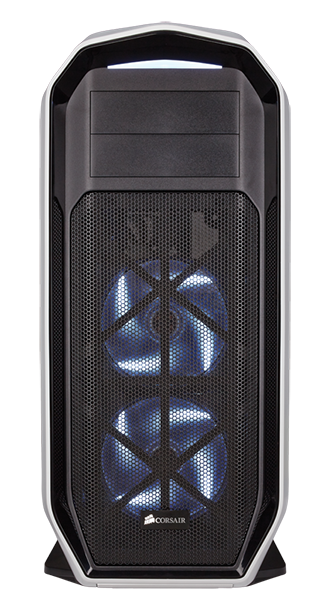
The front of the Graphite 780T features a large removable panel that also has a filter for the 120mm / 140mm intakes. While the 600T front panel was all mesh the 780T’s drive bay covers are matte plastic, which is a more attractive option for builders not installing 5.25″ drives. The top of the front panel features a large LED strip that gives off a nice. muted light. At the bottom of the cowl is a pull-out filter for the dual 120mm fan mounts on the bottom.

Looking at the side of the 780T we can see it features a curvier design than the 600T. The side panel windows has been greatly enlarged in relation to the case size, now providing a view of the entire interior from front to back. This side panel window, unlike many, does not attract inordinate amount of fingerprints or dust to its surface.
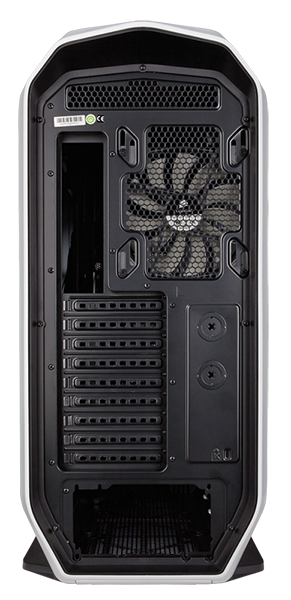
The rear of the Graphite 780T is just like any other case, with a PSU slot, expansions slots, and exhaust fan mount. Nothing special to see here but I have yet to see a case that deviates from this tried and true design method. A pull out filter for the PSU fan is located on the bottom of the cowl.
The top of the 780T features this large I/O panel with plenty of lights (in fact every port and switch is either lit or has a lit symbol nearby). The fan controller has three speed settings (default is max speed) and the case has connectors for eight case fans.
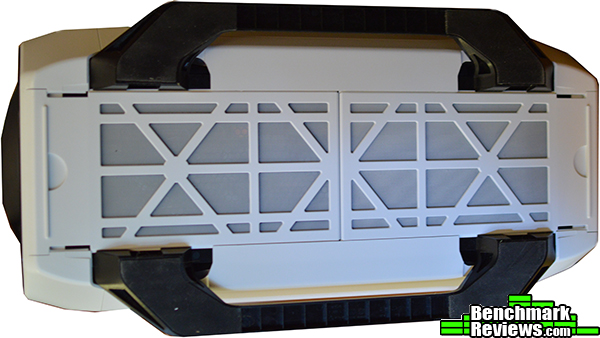
Finally the bottom of the case features two large robber soled feet for ground clearance and dual pull out dust filters. The filters are easy to clean and slide smoothly from the bottom.
The interior of the Graphite 780T is very spacious, and for the most part simple to build in. Lots of cabling holes, including a large one for the PSU, are included. Unfortunately, it is a bit harder to hide cables, especially those from the PSU as there is no shroud and the window is so large This may be a deciding factor for builders who prefer ultra clean cabling. The combo bays at the front of the case can be removed, but they are slightly more troublesome to remove than others. Not only due you have to remove the screws from each cage, but two screws are installed on the front, necessitating removal of the intake fans to reach them. And if you plan to install a radiator, you are required to remove the cages.

The rear of the motherboard plate features your standard assortment of cable tie points and channels. I did think however that Corsair has only included the bare minimum of cable tie points, which restricts the degree to which you can organize your cabling. You’ll also note it includes only one routing hole for the motherboard I/O cables, meaning you may have to really stretch the cables in some places. On the far left of the case you can see the three tool-less 2.5″ drives mounted on the side. I really like this feature, as it uses a space that is present in nearly all tower cases, but is always left for cabling and such. Because of these brackets you can remove the combo bays inside and still retain sufficient storage space for most building needs.

This photo shows the top fan / radiator mounts for the case. I was, to put in mildly, utterly confounded by this design. The filter itself is easy enough to remove by simply pushing down and releasing (same design exists on the front). As you can see Corsair included little rubber washers on the 120mm holes, presumably for vibration reduction. Other reports have stated that these washers can be removed and added to the 140mm holes instead, however removing the washers on my case seemed to require far more force than necessary.

Most of the interior demonstrates strong attention to detail, but is plagued with oversights such as poor fan mount design, missing rubber for the cabling holes, and difficulty of removing HDD / SSD cages.
Installing the motherboard and expansion components in the Graphite 780T was a breeze. Standoffs were preinstalled, and with the exception of one, easy to place screws into. Expansion slots were also a simple job, as was cable management and PSU installation. Unfortunately, this was really the only easy part of installing my system.

Installing my AIO water cooling system was a nightmare, especially considering it was Corsair’s own H100i. Installing on the top mounts, as previously mentioned, was impossible due to the rubber washers. Installing it on the bottom mounts didn’t work because the tubes didn’t reach far enough. Finally, I managed to install it behind the front fan intakes, which of course necessitated removal of the HDD/SDD cages as well as the pre-installed 140mm fans.
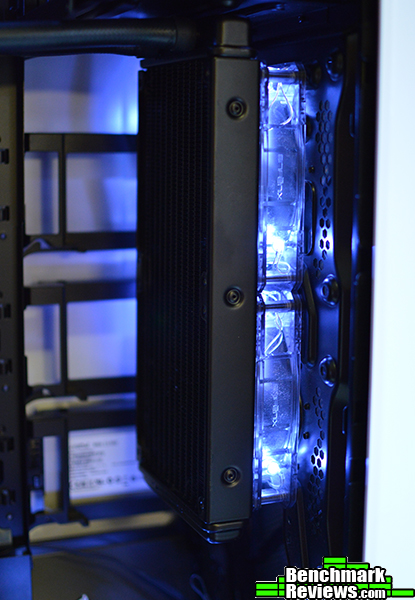
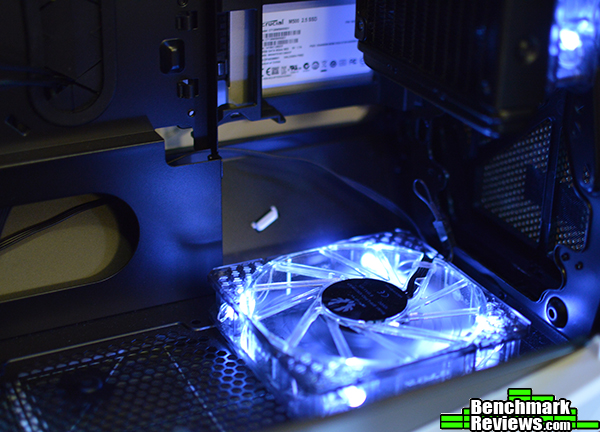
This photo illustrates the bottom fan mounts, neither of which can be used without removing the HDD/SSD bays. Also, you can’t use the 120mm mount shown here if you are using the lowest front mount, another obvious design flaw with the fan mounts in a case plagued with them.
I said it before, but I really like how Corsair has innovated here and used a space that is generally just left open. My only complaint with these tool-less 2.5″ brackets is that they’re made entirely of plastic. If you were to repeatedly remove the brackets they might snap, but otherwise they’ll be just fine, and hold drives securely.

Granted, this isn’t the best cable management job of all time, but I did like the arrangement for several reasons. For one, the slightly curved design of the side panel means that the large 24-pin cable fit easily in the space provided. Aside from the usual mix of front panel connectors the Graphite 780T has eight fan connectors as well as a couple additional power connectors for the LEDs. A large 25mm of space leaves plenty of room for every cable you could possibly install.

The completed build shows a mostly clean interior with a basic system including one drive, two expansion cards, and an AIO water cooler system. Without the hard drive cages, you can fit very long graphics cards of up to 444mms, and with them installed you still get an ample 323mm of space.

The Corsair Graphite 780T is a strong flagship case for the Graphite series lineup, with a sturdy, elegant design and overall simple building experience. However, the seemingly untested design of the fan mounts detracts from what many might consider a premium product. For a big water cooling enthusiast the 780T is definitely a great buy, but for the majority this may be to much. It also faces stiff competition from the cases such as the recently released Phanteks Enthoo Luxe, which retails for about $30 less but can fit an even larger 420m radiator.
The Graphite 780T is not anything particularly special. Corsair has basically taken the 600T, made it bigger, and added a few extra features to justify that increase in price. The rear SSD brackets are innovative, and you can pack alot of cooling and hardware in this chassis, but beyond that it’s still a product thats really only going to appeal to those looking to construct an overblown system to show off.
Aesthetically the 780T is very pleasing. Plenty of lights and a smooth plastic cowling makes for an attractive exterior, while the large side window gives a great view of the components within. While PSU shrouds are pretty uncommon on cases, I really would have liked to see one here because of the window’s sheer size. Like NZXT’s H440 and Phanteks’ Enthoo cases, Corsair wants you to show off you system. But they haven’t provided the simple accessory to do the best job of it.
I often complain how the plastic components of chassis designs tend to be brittle and noticeably different than the metal structure. Here though you definitely get your money’s worth on the exterior, as the plastic cowling almost feels more sturdy than the steel panels and body. On the interior though, the fan mounts could have been done better, as you basically have to mount fans and radiator differently in every spot.
Many cases can’t fit dual 360mm radiators like the Corsair Graphite 780T can. And certainly none of them can fit two 360mm plus a 240mm. That is of course, if you can get them to install in the mounts provided. I will keep my eye out to see if anyone has similar issues with installing their water cooling, especially with AIO coolers, or if Corsair has anything to contribute. Again, I appreciate the SSD brackets, and I think other designers may want to take a look at this design.
Available online for $189.99 (White Version) $179.99 (Black Version), you do get quite a lot of bang for your buck with the Graphite 780T. In the end though, I think value will be best determined by what you’re building. Most builders will likely be satisfied with an Enthoo Pro or Luxe, or even an NZXT H440 (which can also fit dual 360mm radiators despite being $60 less).
When it comes to the Corsair Graphite 780T I think its really going to boil down to price vs. needs. The 600T had a similar drawback vs. its competition as well. Basically your’re paying the price to get a case that will likely be suitable for all the building needs you’ll ever need and will last a long while, not for something that has special features you like or because it fits your build needs. It’s a really basic case that does everything its supposed to one way or another, and thats certainly a success in my book.
+ Very sturdy, attractive design.
+ Nearly every feature you could want.
+ Massive water cooling compatibility.
+ Tool-less 2.5″ drive bays.
– Prince is still on the high side for many builders.
– Fan mounts are not the easiest to use.
-
Performance: 8.75
-
Appearance: 9.25
-
Construction: 8.50
-
Functionality: 8.75
-
Value: 8.50


4 thoughts on “Corsair Graphite 780T Tower PC Case Review”
Could the 120mm fan mount washers be removed to allow installation of the h100?
Case is really beautiful but 180 for plastic? I think not. Bring the price down to 139.99 and I will think about it.
The “rubber washers” at the top of the case (pre-installed on 120mm holes) can be removed and reused on the 140mm spacers.
At least try before assuming Cosair designers are idiots and taking points off for it.
Thank you for the information. I did in fact try to remove the washers, and upon discovering they did not remove with a little effort I concluded they either couldn’t be removed, or required an unnecessary amount of force to remove.
Comments are closed.