Over the past several months, I have read an unreasonable number of discussion forum posts which offer inaccurate and often times incorrect information. It’s not really all that surprising to read poorly conceived information on the Internet, which seems to be an anonymous means of passing off opinion for fact. As a general rule we don’t let too many things go untested, and the advice of wanna-be experts is not doing the hardware enthusiast and overclocker community any good. In this article, Benchmark Reviews dispels myth and establishes fact on the topic of proper application of Thermal Interface Material.
These days, Intel and AMD are producing very efficient central processing units that put out far less heat than prior generations. The CPU powering my primary workstation uses the Intel E8200 processor, which is rated for 65 watts using the 45 nm fabrication process. The constant production refinement has allowed the new 2.66 GHz E8200 to operate at the roughly the same Thermal Design Power (TDP) of an old P4 HT 2.66 GHz, but at the same time offer multiples more performance power. The trend of power efficient central processors is slowly making its way into graphics processors, too. The lesson we are learning in 2008 is that size matters, except that instead of skyscraper sized CPU coolers we are trying to reduce the footprint and shrink the area consumed by our systems.

After discussing this topic with real industry experts who are much more informed of the process, they offered some specific advice that didn’t appear to be a “one size fits all” answer:
-
CPU Cooling products which operate below the ambient room temperature (some Peltier and Thermo-electric coolers for example) should not use silicon-based materials because condensation may occur and accelerate compound separation.
-
All “white” style TIM’s exhibit compound breakdown over time due to their thin viscosity and ceramic base (usually beryllium oxide, aluminium nitride and oxide, zinc oxide, and silicon dioxide). These interface materials should not be used from older “stale” stock without first mixing the material very well.
-
Thicker carbon and metal-based TIM’s may benefit from several thermal cycles to establish a “cure” period which allows expanding and contracting surfaces to smooth out any inconsistencies and further level the material.
The more we researched this subject, the more we discovered that because there are so many different cooling solutions on the market it becomes impossible to give generalized advice to specific situations. Despite this, there is one single principal that holds true in every condition: Under perfect conditions the contact surfaces between the processor and cooler would be perfectly flat and not contain any microscopic pits, which would allow direct contact without the need for Thermal Interface Material. But since we don’t have perfectly flat surfaces, Thermal Material must fill the tiny imperfections. This is where our testing comes into play.
In the next few pages, which we plan to adjust and refine as necessary to meet with industry product changes, Benchmark Reviews will test several different methods of applying Thermal Interface Material to cooling equipment. The object here is simple: define the best methods to apply thermal paste, primary to central processing units. This guide will also be the first of its kind to test the proper application of material on a Heat-pipe Direct Touch (HDT) cooler, which requires a little more attention.
Probably one of the most overlooked and disregarded factors involved with properly mounting the cooler onto any processor is the amount of contact pressure applied between the mating surfaces. Compression will often times reduce the amount of thermal compound needed between the cooler and processor, and allow a much larger metal to metal contact area which is more efficient than having fluid weaken the thermal conductance. The greater the contact pressure between elements, the better it will conduct thermal (heat) energy.
Unfortunately, it is often times not possible to get optimal pressure onto the CPU simply because of poor mounting designs used by the cooler manufacturers. Most enthusiasts shriek at the thought of using the push-pin style clips found on Intel’s stock LGA775 thermal cooling solution. Although this mounting system is acceptable, there is still plenty of room for improvement.
Generally speaking, you do not want an excessive amount of pressure onto the processor as damage may result. In some cases, such as Heat-pipe Direct Touch technology, the exposed copper rod has been pressed into the metal mounting base and then leveled flat by a grinder. Because of the copper rod walls are made considerably thinner by this process, using a bolt-through mounting system could actually cause heat-pipe rod warping. Improper installation not withstanding, it is more ideal to have a very strong mounting system such as those which use a back plate behind the motherboard and a spring-loaded fastening system for tightening. The Noctua NH-U12P is an excellent example of such a design.
In all of the tests which follow, it is important to note that our experiments focus on the spread pattern of thermal paste under acceptable pressure thresholds using either a push-pin style mounting system or spring-loaded clip system. In most situations your results will be different than our own, since higher compression would result in a larger spread pattern and less thermal paste used. The lesson learned here is that high compression between the two contact surfaces is better, so long as the elements can handle the added pressure without damaging the components.
Heat-pipe technology uses several methods to wick the cooling liquid away from the cold condensing end and return back towards the heated evaporative end. Sintered heatpipe rods help overcome Earth’s gravitational pull and can return most fluid to its source, but the directional orientation of heatpipe rods can make a significant difference to overall cooling performance.
For the best results, CPU-coolers should be orientated so that heatpipes span from front-to-rear with fans exhausting upward and not top-to-bottom with fans blowing towards the rear of the computer case. This removes much of the gravitational climb necessary for heatpipe fluid working to return to the heatsink base. In one specific example, the horizontally-mounted ProlimaTech Megahalems heatsink cooled to a temperature 3° better than when it was positioned vertically. While this difference may not be considered much to some people, hardcore enthusiasts will want to use every technique possible to reach the highest overclock possible.
If you’re a painter, it’s important to understand your canvas or else you won’t know which paint to use. The same is true for enthusiasts wanting to overclock, or even just get the most out of their equipment. CPU coolers primarily depend on two heat transfer methods: conduction and radiation (heat-pipes also add convection). This being the case, we’ll concentrate our attention towards the topic of conduction as it relates to the mating surfaces between a heat source (the processor) and cooler.
Because of their density, metals are the best conductors of thermal energy. As density decreases so does conduction, which relegates fluids to be naturally less conductive. So ideally the less fluid between metals, the better heat will transfer between them. Even less conductive than fluid is air, which then also means that you want even less of this between surfaces than fluid. Ultimately, the perfectly flat and well-polished surface is going to be preferred over the rougher and less even surface which required more TIM (fluid) to fill the gaps.

This is important to keep in mind, as the mounting surface of your average processor is relatively flat and smooth but not perfect. Even more important is the surface of your particular CPU cooler, which might range from a polished mirror finish (such as the Noctua NH-U12P), to the absurdly rough (evidenced by the Thermalright Ultra-120 eXtreme pictured above), or the more complex (such as the OCZ Vendetta 2). Surfaces with a mirror finish can always be shined up a little brighter, and rough surfaces can be wet-sanded (lapped) down smooth and later polished, but Heat-pipe Direct Touch coolers require some extra attention.

To sum up this topic of surface finish and its impact on cooling, science teaches us that a smooth flat mating surface is the most ideal for CPU coolers. It is critically important to remove the presence of air from between the surfaces, and that using only enough Thermal Interface Material to fill-in the rough surface pits is going to provide the best results. In a perfect environment, your processor would mate together with the cooler and compress metal on metal with no thermal paste at all; but we don’t live in perfect world and current manufacturing technology cannot provide for this ideal environment.
So it’s up to you to fix these imperfections through sanding or polish, and apply the magic amount of TIM to your project. But how much is enough, and what shape or pattern should be used? Read on to find out.
Manufacturers have made a small fortune off of confusion tactics and misinformation. Marketing departments often times neglect to refer back to solid science when making their bold claims, which is why we have assembled a complete list of thermally conductive elements in the reference chart below.
It’s very well known that Silver, Copper, Gold, and Aluminum together comprise the top four most thermally conductive elements. However, without knowing the thermal conductance of these elements you might be fooled into thinking the performance was close. As it turns out, Silver and Copper both offer nearly twice the performance of Aluminum when transferring thermal energy such as heat. The reason Aluminum is used in so many applications is because it’s the least expensive top-tier metal available. Most Thermal Interface Material and CPU coolers use several different elemental ingredients to work together, but after a careful inspection of the performance levels it comes as a surprise to me that some of the most popular products make use of such poor conductive elements.
|
|
Recipes usually call for only the finest ingredients, and the very same principle is true for overclocker and hardware enthusiast products. Thermal pastes are often times mixed from at least a dozen different components, while heatsink coolers may use only one or two different metals. Armed with the knowledge above, you might expect any silver-based product to be a clear-cut winner… but building a superior product by design is different than what you receive in execution. Production and material costs usually dictate how the product is designed and fabricated.
Keep these materials in mind as we take a look at the new products Benchmark Reviews has collected for this round-up article, beginning with our first contender…
If there’s one thing our recent 33-Way Thermal Interface Material Comparison article has taught me, it’s how the advice freely handed-out in discussion forums can often be wrong. After we wrote the article, many enthusiasts argued that spreading out the TIM with a latex glove (or finger cover) was not the best way to distrubute the interface material. Most answers from both the professional reviewer industry as well as enthusiast community claim that you should use a single drop “about the size of a pea”. Well, we tried that advice, and it turns out that maybe the community isn’t as keen as they thought. The image below is of a few frozen peas beside a small BB size drop of OCZ Freeze TIM. The image beside it is of the same cooler two hours later after we completed testing.


Decidedly, the BB size seems to be a much more appropriate amount for the PGA-478 application since it easily covered the one-inch round copper core of this Intel cooler and then some. Our images above have done sufficiently for depicting how much TIM should be used in a socket 478 cooler, but that’s old news.
To begin our experiments, we have started with the most basic of all designs. Circular coolers are very common equipment, with the product list spanning from small Intel-supplied stock cooler up to the larger Thermaltake MaxOrb aftermarket cooler. But while the round outer design may be popular to designers, it is much less common to find a circular base as the contact surface. To the best of my knowledge, the only coolers I have ever seen with this finish are those from Intel, but I digress. The design has its pros and cons, and regardless of cooling performance the round base is among the easiest to properly apply thermal paste to.
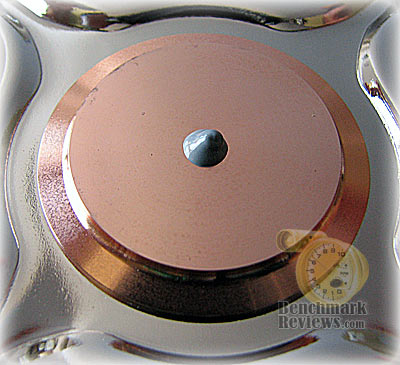
Because the raised copper center core is circular, the most logical application pattern is going to match the shape. A single drop of thermal paste roughly half the size of a BB is placed at the center of the cooler, which will theoretically spread evenly in every direction as pressure is applied.
In all of our experiments, the images showing the depressed material once it has been spread out were all taken only moments after mounting the cooler. The thermal material is not allowed to cure, and the system is not powered on to begin thermal cycles. This is all done so that you can see the initial impact of mounting pressure and the direction that Thermal Interface Material travels. Please note that allowing the system to complete a few initial thermal cycles will thin the viscosity of the material and level out the paste, which will also allow it to bleed out towards the edges.

Judging from our cold test, a single round drop of thermal paste roughly half the size of a BB is more than sufficient to cover the entire mating surface of a stock Intel-included cooler. Ideally, you will want to use slightly less material than the amount shown above. Just remember that once heat is applied to thermal grease the viscosity will thin and spread out towards the edges just a little more, allowing the surfaces to come into closer (or direct) contact with each other. Keep in mind that thermal paste is only meant to fill the gaps, not coat the surface; perfectly flat metal on metal with no material in-between is your ultimate goal.
Without question, the most dominant mounting shape for CPU coolers is the square base. The formula is very simple: the most effect method to cover a square processor and integrated heat spreader is to match it with a square cooler base. Science is simple that way, right? While I have seen some examples of glass slides being used to demonstrate the spread pattern of Thermal Interface Material under ideal conditions, I seldom find myself with two perfectly flat and non-porous surfaces.
If only it could be so simple in the real world of retail thermal cooling solutions. Since the ultimate end-goal is to have the integrated CPU heat spreader surface contact metal-to-metal with the coolers base, it’s necessary to have a perfectly flat and smooth contact surface at both ends. This usually means lapping the processor and cooler surfaces with wet-sanding paper and polishing compounds, along with a few hours of effort. Some manufacturers try to achieve this right out of the box, while others completely ignore thermal dynamics and finish their mounting surface with stone grinding.

Thermalright is probably the biggest offender in the category of poor factory surface finishes, which is ironic if you consider the loyal fan-base who adore their products without question. The image below is of a brand new Thermalright HR-01 CPU cooler (the 120 eXtreme was pictured on the first page of this article), right out of the box. You will no doubt notice that it doesn’t have a very smooth finish… which would have to be be polished before I could continue because thermal paste didn’t seem to spread very well with so many tracks running across the surface.
Since Thermalright products are generally ground flat and level, albeit far from smooth, they can accommodate a wide range of application methods. Ideally my article would have been made better if I had two perfectly flat real-world surfaces to work with, but time and project needs keep me from this goal at the moment. If I didn’t have the Noctua NH-U12P tied-up with another project, I would have just used it for this segment. For now I am working with the tools I have available to me, and not the tools I wish I had… so expect a rewrite at some point.
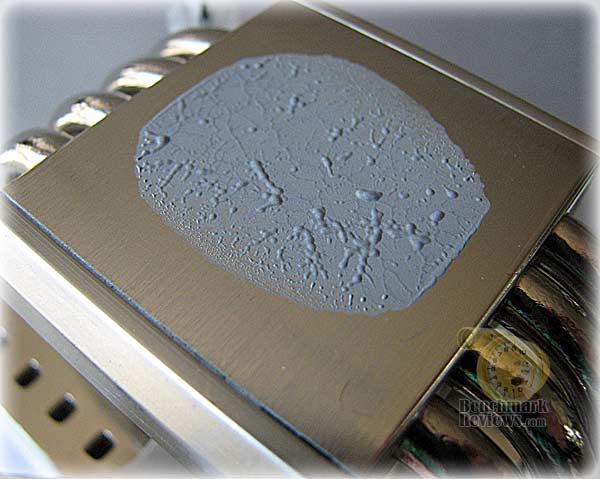
The first thermal paste application pattern to test was the single drop. One single drop of TIM was placed directly in the center of the mounting base surface, roughly half the size of a BB.

Once all four corners of the cooler were depressed, and a bit of extra force pressed down in a circular motion to ensure maximum contact, the entire unit was removed an photographed. My results show that the single drop pattern spread out to reach only two edges of the CPU, while falling short of the other two sides. This could be attributed to several variables: poor mounting system and pressure, uneven mounting surface on the cooler or processor, and perhaps even a warped motherboard.
Next up was the single line pattern, which used a small half-inch long application of paste down the center of the coolers mounting base. The direction of the thermal paste was perpendicular to the direction of the surface grain (which was still present after an hour of effort).
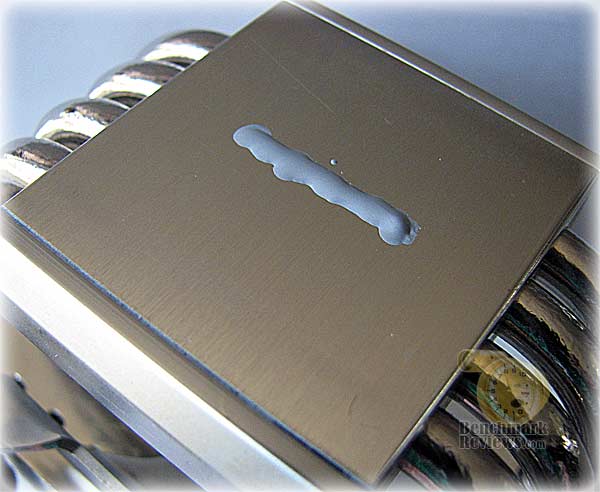
Perhaps I didn’t use enough thermal paste, because it appears as though the pattern might have worked with a slightly shorter yet thicker application of material. With some additional trail and error testing, this application pattern may prove successful for some coolers, but even after another retest using a bit more material there was still less coverage than the single drop method.

Since the one line pattern didn’t quite reach out to the edges, I figured that two lines might do the trick. Spaced apart at an interval of 1/3 the width of the processor, these two lines were slightly shorter than the single line pattern and equalled half the width of the processor in length.

One of the fears I hear about most with this method is that air may get trapped in the middle. However, one look at the image below and I can safely dismiss this potential problem. After the cooler was lifted, I discovered that the two line pattern was able to reach all four edges of the CPU. It seems that this method could have some real world application if correctly applied.
It took some additional cold tests for me to get the amounts correctly tuned. After the retest results (not pictured), the best ratio I found was using line lengths equal to the distance between the lines; or roughly 1/3 the width of the processor.

Next up was the cross method of applying thermal paste to the coolers mounting surface. Since two lines worked well, perhaps overlapping them would have an improved effect? I have not personally used this pattern in my own systems, but other web sites have claimed that it can work.

After a few test applications, the image above is the best coverage I could get. Plenty of material covers the surface, but there are clear signs that too much TIM has reached the edges. Again, the disclaimer here is that this pattern might work for your setup, and every application is different. In my tests however, I wanted more uniform coverage and the cross method took some practice before it could meet my needs.
In the image above my line length was too long, measuring 2/3 the width of the processor. With additional cold tests (not pictured) I learned that lines of the same thickness but only 1/3 in length did a better job and kept the material amounts in check.

Last but not least is my own personal method. Not to harp on the subject, but you don’t want a thick layer of thermal compound between mounting surfaces. There isn’t a magic thickness to suggest, since different surface finishes will require different amounts of material to fill them. If both surfaces were as smooth as glass though, I would need less than half the material used in the above tests to reach the same coverage.
So when I come across a very rough yet level surface, I prefer to smooth out the material using a rubber finger cover or plastic bag in directions opposite to the grain. This does an excellent job of filling in the groves and scratches, and can be used in combination to the above methods as a base. In cases where I use both methods, the “base” coat is extremely thin and the metal beneath it is still visible.
However if I choose to use just the one layer, I leave a coat just barely thick enough to hide the metal surface below it. This method doesn’t leave enough material to spread out across the surface and press out bubbles as it bleeds, so the cooler must not be placed flatly onto the processor surface to begin with. Instead this method must be carefully placed down at a slight angle as it is compressed, similar to how you might apply an adhesive sticker to avoid bubbles.

I will admit that there’s plenty of room for additional testing and improvement in this section, which I forewarned would most likely be the case for an upcoming edit. Please take this information for what it’s worth, because we did still discover a few application patterns that would never work well under any circumstance.
In our next section, careful consideration is given to the application of thermal paste on the new Heat-pipe Direct Touch cooling products.
Heat-pipe Direct Touch coolers have taken the market by storm. In our recent Best CPU Cooler Performance – Q1 2008 article, all of the top-placed products were built from HDT technology. The excellent concept performs very well in practice – but it’s far from perfect.
There are two flaws in the HDT design currently used in CPU cooler products:
-
The surface is rough and occasionally uneven.
-
There are channels created between the mounting base and heat-pipe.
Fixing the first problem required some wet-sand paper and elbow grease (that’s a metaphor for hard work, so don’t go searching the web for another product). By lapping down the surface to a flat even base, you can then polish it down to minimize the grain-like finish inherent of HDT products.

Solving the second problem can be done with potentially less time. Assuming you’re not so hard-core that brazing the heat-pipe and mounting base surface gaps together with tin solder is an option, then I would recommend filling the inner channels with thermal paste as pictured above. I have used a black permanent marker to show where the corners of the CPU contact the coolers surface, so use this as a guide for your own application.
As previously mentioned, it’s best to avoid oxidizing “white-grease” type TIM’s, since they can tarnish the copper surface and bleed out. So with a more solid compound, pack the channels level so that your thermal paste doesn’t fill them when the unit is compressed. I didn’t bother to fill the outside channels, because the CPU doesn’t come in contact with them.

Using a single drop of material resulted in a spread pattern remarkably similar to that of the single line method for square mounting bases in the previous section. The alloy mounting base creates channels which dramatically limits the depth of material spread over the surface. For this reason alone, HDT coolers must not be treated the same way as other traditional cooler surfaces.

Since the single drop pattern pushed most of the material over to the two forward sides, perhaps two drops spaced out roughly 1/3 the width of the processor would prove more successful.

Once the HDT cooler was lifted from the processor, I was humored by what looked like a pair of “kissing lips”. Needless to say, the two drops of material did a much better job of covering the surface, it didn’t reach the to the corners very well.

Thus far, I have learned that channels created by the heat-pipe rods being pressed into the mounting base pose a serious problem for thermal paste spread. To compensate, the two drop method proved that separating the material will offer good coverage over the directional surface.

For my final application method, two short lines measuring half the total length of the processor were placed on the two center mounting base partitions. Keep in mind that for this method, as well as the others, it is important to fill the channels level with thermal compound so that the the additional material may spread somewhat unrestricted to the edges.
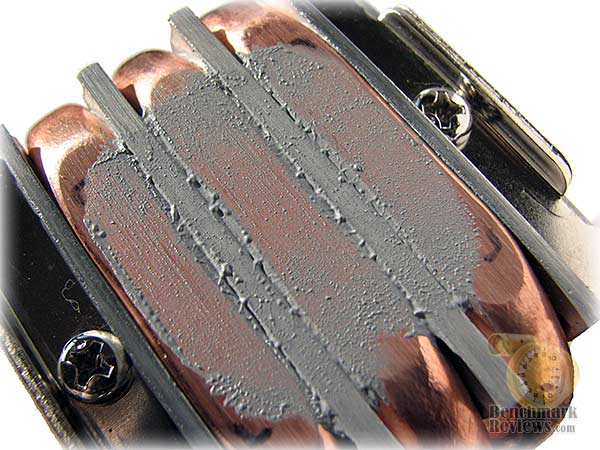
It looks to me like HDT coolers have the uncanny ability to perform well using an unorthodox design, but they also require an equally unique method for properly applying thermal paste to the surface.
This guide wasn’t created to become a set of rules to be cast in stone, but rather a collection of methods which I personally tested to help assist you with your own project. As with anything, the results are relevant to the product and methods used. Use these methods as a starting point, and make your own refinements from there to achieve the best performance possible.
Once you’ve mastered the art of thermal paste application, it’s time to search out the best cooler for your project. Benchmark Reviews constantly tests the Best CPU Cooler Performance and offers perspective on the products worth your time and money.


