By Meng Vang
Manufacturer: Fractal Design
Product Name: Core 2300 Mid-Tower ATX-Case
Model Number: FD-CA-CORE-2300-BL
UPC: 817301011945 EAN: 7350041081944
Price As Tested: $54.99 (Newegg | Amazon)
Full Disclosure: The product sample used in this article has been provided by Fractal Design.
When it comes to building a computer, not everyone needs a ton of LED fans along with a fancy exterior design. A fully-fledged PC with fancy mods may look appealing to the eyes, but it would not be ideal for a professional business environment. As the little brother to the Fractal Design Core 3300, the Core 2300 with its brushed aluminum finish and black exterior maintains the same clean aesthetics commonly found on most Fractal Design computer cases. With the capability to add a total of seven fans, the Core 2300 provides the cooling performance of an actual gaming computer case along with the professional and elegant aesthetics suitable for a business environment. Inside is the innovated vertical hard drive bracket. This allows for three 3.5 inch drives and three 2.5 inch drives to be mounted simultaneously. At Benchmark Reviews, we will take a close look at what the Fractal Design Core 2300 has to offer.

Features
- A compact full-ATX case with bottom-mounted PSU, designed for exceptional airflow and cooling
- brushed aluminum-look front panel with a sleek, three-dimensional textured finish
- Superior water cooling support for its size, supporting one 240/280mm radiator in the front and a 240mm radiator in the top
- Featuring a 120mm rear exhaust fan for great cooling
- Total 7 fan slots with two 120mm fans included
Specifications
- Mini ITX, Micro ATX ATX motherboard compatibility
- 2 drive bays of 5,25″ or 4 bays 3.5″
- 4 -2.5″ dedicated SSD unit position
- 7 expansion slots
- Graphics cards up to 380mm in length may be instaled. One or more 3.5″ hard drives may interfere with side-mounted power connectors on graphics cards longer than 200 mm
- Support cooling system: 7 Fan positions (2 fans included)
- Filtered fan slots in front and bottom
- CPU coolers up to 162 mm in height
- Supports ATX PSUs up to 205/185 mm with a bottom 120/140mm fan. When not using any bottom fan location longer PSUs can be used
- 13.5-18.5 mm of space for cable routing behind the motherboard plate
- Extra cable routing holes for usage with mATX motherboards
- Case dimensions (WxHxD):195 x 431 x 450mm
- Net weight: 5.2 kg
- Package dimensions (WxHxD): 270 x 547 x 492mm
- Package weight: 6.4 kg
Let’s start by looking at the exterior design of the Fractal Design Core 2300. The front of the case looks identical to some of Fractal Design’s previous computer cases with its elegant brushed aluminum finish. Here we are presented with two 5.25 inch drive bays at the top. On the sides of the front bezel are long strips of ventilation to allow fresh air to the built in 120mm front intake fan.

The back of the case has the same generic layout as a standard computer case. There is a preinstalled 120mm rear exhaust fan making a total of two (2) preinstalled 120mm fans. Below the exhaust fan are seven expansion slots. These expansion slots have their own ventilation holes which also look aesthetically pleasing especially in white.

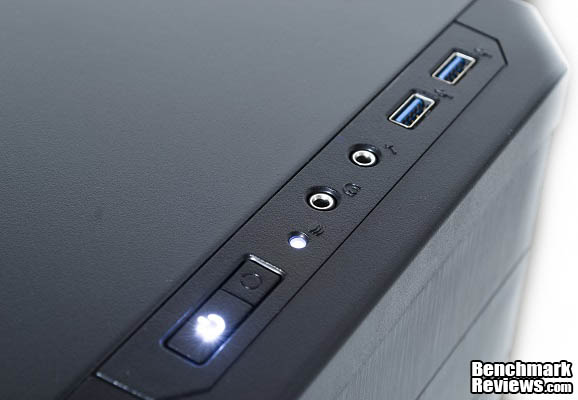
The front I/O ports are located on the very top of the Core 2300. These ports include a power and reset button, hard drive activity LED, 3.5mm headphone and microphone jack, and two USB 3.0 ports. I was a little disappointed by the amount of USB ports as there are only two. But having these being USB 3.0 instead of 2.0 is a bonus. I was also disappointed at the location of the reset button as it is right next to the power button.
Looking at the top of the Core 2300, there is room for two 120mm fans, two 140mm fans, and a 240mm water cooling radiator. A 280mm water cooling radiator will not fit as it will touch the RAM slots on the motherboard. If you wish to install a 280mm water cooling radiator, it may be mounted on the front of the case.

Down on the bottom is a large dust filter covering the mounts for a bottom 120mm and 140mm fan. This dust filter also provides dust protection for the power supply fan. The filter may be easily removed for cleaning.

A loyal Fractal Design customer should be very familiar to the overview features we just covered. On the next page we will take a look at the interior design as well as the vertical hard drive bracket.
Taking off the side panel reveals an elegant and complete interior design. The interior is mostly standard by having a number of cable management and CPU cutouts on the motherboard tray. One thing that does stand out is the innovated vertical hard drive storage bracket. We will talk more about the hard drive bracket in just a moment.

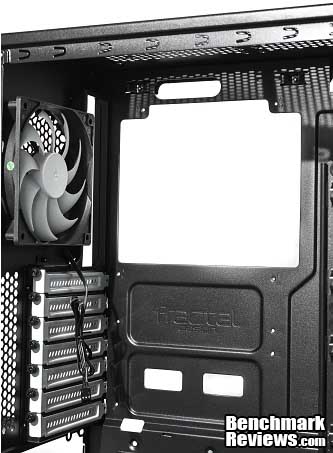
It is always good to see these computer case manufacturers provide a large CPU cutout on the motherboard tray. This cutout is actually larger than the one on the more expensive Core 3300. It is very troublesome to take apart a perfectly built system just to do anything with the CPU. Since Fractal Design has been in the business for such a long time, this does not surprise me. We also see the preinstalled 120mm fan that will exhaust warm air out of the case.
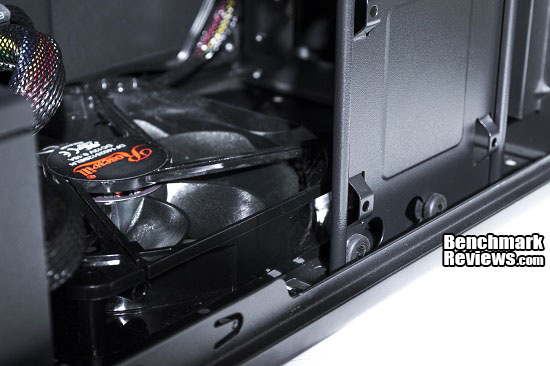
Removing the front bezel requires no tools. Here we are presented with the two 5.25 inch expansion drive bays and a single preinstalled 120mm front intake fan. There is also room for a second 120mm fan which can be installed below the preinstalled fan. You may also toss the 120mm fan to install two 140mm fans or a 280mm water cooling radiator instead.

Having a vertical hard drive bracket can improve the looks and functionality of a computer case. This bracket can hold three 3.5 inch hard drives and three 2.5 inch hard drives simultaneously. Because the Core 2300 uses a vertical bracket instead of a traditional hard drive storage cage, larger graphics cards may be installed without having to worry about hitting the hard drive cage. Rubber paddings are also available on the vertical bracket to prevent vibration noise.

Now that we have gone over the exterior and interior details of the Fractal Design Core 2300, we can take a look at more features and specifications the Core 2300 has to offer.
Here we will go over all of the features and specifications to the Fractal Design Core 2300. These features and specifications can be found on the Fractal Design website.
- A compact full-ATX case with bottom-mounted PSU, designed for exceptional airflow and cooling
- brushed aluminum-look front panel with a sleek, three-dimensional textured finish
- Superior water cooling support for its size, supporting one 240/280mm radiator in the front and a 240mm radiator in the top
- Featuring a 120mm rear exhaust fan for great cooling
- Total 7 fan slots with two 120mm fans included
- Extruded motherboard plate allowing space for additional cable routing; 18.5mm around the motherboard and 13.5mm directly behind it
- Supports tall CPU cooler towers, up to 162mm in height
- Multiple easy-to-clean dust filters designed into the case to help maintain a dust free interior
- Innovative vertical HDD bracket, which simultaneously holds three 3.5″ drives and three 2.5″ drives
- One additional SSD position behind the PSU area with easy installation and access
Cooling system
- Front: 2 – 120/140mm fans (included is 1 Fractal Design silent 120mm fan, 1200 RPM speed)
- Rear: 1 – 120mm fan (included is 1 Fractal Design silent 120mm fan, 1200 RPM speed)
- Top: 2 – 120/140mm fan (not included)
- Bottom: 1 – 120mm fan (not included) or 1 – 140mm fan (not included, bottom HDD position must be empty)
- Side: 1 -140mm fan (not included)
Water Cooling compatibility
- Front – 240mm radiator, up to 30mm thickness
- Front – 240mm radiator, any thickness, push/pull supported (secondary mounting position, three fastening screws per fan only)
- Front –Slim 280mm radiator: 15mm fan spacing required for full fastening, radiators with 20mm fan spacing can be used with only the top half fastened to the case (lower ODD slot may need to be unused depending on tube end chamber size)
- Top – Slim 240mm radiator (with upper ODD slot occupied by a device no longer than 150mm and with no components on the upper 23 mm on the motherboard that are taller than 34mm)
- Rear – 120 mm radiator
Front interface
- 1 USB 3.0 and 1 USB 2.0
- Audio in/out
- Power button with LED (white)
- HDD activity LED (white)
- Reset button
In this section we will look closely at the cooling performance, cable management capabilities, and the amount of work room in the interior of the Fractal Design Core 2300. In terms of cooling performance, I installed a single 140mm bottom fan and two 140mm top fans. This totaled out to five system case fans. Occupying the majority of the fan slots can easily be done by most casual system builders. Cables were managed by running the thin wires from the Corsair CX750M 750W modular power supply to the back of the motherboard tray. Interior room and work space was also assessed for the convenience of installing larger components into the system. Let’s go ahead and look over the finished build and the results of the test.
-
Motherboard: Gigabyte GA-970A-UD3
-
System Memory: 4x4GB 1600MHz DDR3
-
Processor: AMD FX-8350 4.4GHz
-
Audio: Creative Labs SB X-Fi
-
Video: Gigabyte R9 270X 2GB GDDR5 Windforce Edition
-
Disk Drive 1: Crucial MX100 256GB SSD
-
Disk Drive 2: Seagate Barracuda 500GB HDD
-
Enclosure: Fractal Design Core 2300
-
PSU: Corsair CX750M 750W Modular
-
Monitor: Acer G6 Series G226HQLBbd Black 21.5 inch
-
Operating System: Windows 8.1 Professional 64-Bit
Here is what the finished build looks like. With the vertical hard drive bracket, the storage devices are mounted vertically for a much cleaner look and style. Cable management was fairly simple with the Corsair CX750M power supply especially since it was modular. It also featured very thin cables for easy cable managing. These thin cables are perfect since the back side panel of the Core 2300 comes very close to the motherboard tray once it is closed. With a power supply that has thicker cables, managing the cables may be a little more challenging. The Cooler Master V8 cooler just barely touched the side panel as there was roughly 1mm left of space between the side panel and the CPU cooler.

Because I had very thin power supply cables, cable management was fairly simple as everything was tied down perfectly into the available tie-down points on the motherboard tray. The only problem I ran into was trying to put the side panel back on as the huge 24-pin motherboard cable kept the side panel from closing. There is up to 18.5mm of space between the motherboard and the side panel. Eventually, I got it to close but the cable left a slight bulge on the side panel.

Mounting a bottom fan will not allow you to mount a hard drive behind the vertical bracket. If you need to utilize all six available mounts on the vertical hard drive bracket, make sure a bottom fan is not installed and that a dedicated graphics card is not in the way.
The vertical hard drive bracket can also be used to easily swap out storage devices. Removing two of the top screws and one screw on the bottom of the case will release the bracket. When installing the bracket, make sure to not let the SATA data and power cables touch the front fans as it is a tight squeeze for the cables.

Installing the two massive 140mm fans on the top was not as easy as I have expected especially with this large Cooler Master V8 in the way. During the build, I installed the motherboard with the CPU cooler attached and connected the CPU cable to the motherboard. The only way to install the top 140mm fans without removing the motherboard was by sliding them through the front 5.25 inch drive bays. Even if I were to install the fans prior to the motherboard, plugging in the CPU power cable to the motherboard would be a problem as there was no room.

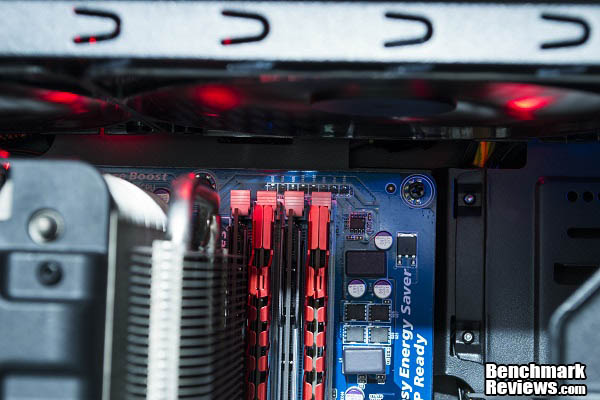
If you are using a water cooling system for your CPU cooler instead of a behemoth of a cooler, you should not run into this issue. Also make note, the clearance is very little for a radiator to go onto the 140mm fans as they will touch the RAM modules. Use a 240mm water cooling radiator with two 120mm fans instead.
The Core 2300 will support graphics cards of up to 380mm in length. This should be more than enough for most graphics cards especially for people on a smaller budget. You cannot install longer graphics cards if you have hard drives already installed on the other side of the vertical hard drive bracket. Doing so will cause the graphics card and hard drives to come into contact with each other making it physically impossible to install.

Even though it may not be the most spacious, the Fractal Design Core 2300 was still a great computer case to work with. There is just enough room for multiple graphics cards even though it is not as wide as the Core 3300. Perhaps in the near future, Fractal Design can begin manufacturing computer cases without the 5.25 front panel expansion bays as people are tuning into digital media. Replacing these expansion bays with hard drive bays will make more sense since you cannot mount six hard drives onto the vertical bracket when there is a bottom fan and a long graphics card installed. There is also a 2.5 inch drive mount on the other side of the motherboard tray behind the power supply.
The Fractal Design Core 2300 makes a great computer case for a professional build and even a gaming PC. It shares many gamer-like features including flexible water cooling options, multiple fan mounts, and plenty of space for long graphics cards. The innovated vertical hard drive bracket allows for easy hard drive swapping and shows off the installed storage devices. Topping it off is a nice brushed aluminum finish with a black professional exterior making it look almost OEM. Let’s go ahead and recap everything we have discussed about the Core 2300.

The cooling performance to the Core 2300 performs very well even straight out of the box. The preinstalled front and rear 120mm fans run at a quiet 1200RPM and provides adequate airflow for a basic build. Adding more fans and even water cooling equipment would improve the cooling capacity tremendously. A slim 240mm or 280mm water cooling radiator can be installed to the front and a slim 240mm radiator can be installed on the top of the case. If you want to install a top 280mm radiator, look into the Core 3300 as it has a wider body design.
The aesthetics look great from a business stand point. The brushed aluminum finish, the simple and primitive design, and the black overall look makes the Core 2300 suitable for a professional environment. This gives it a modern style and allows it to match almost any type of setup. To some, the Core 2300 may look too simple since it lacks LED fans and a side panel window. These are what appeals most to some gamers and the younger generation.
Although it may not have been built like a tank, the Core 2300 is still a decently strong computer case for the money. The motherboard tray was strong enough to prevent itself from flexing while installing the motherboard. The side panels and the 5.25 inch drive bays are the weak areas since they’re made of very thin aluminum. Because the spacing between the side panel and the motherboard tray is very thin, the side panel covering the cables behind the motherboard tray will bulge out a bit. The Core 2300 is not exactly built for easy cable management because of its slim design and thin aluminum side panels.
The Core 2300 includes standard functions similar to most computer cases. The capability to mount three 3.5 inch and three 2.5 inch drives simultaneously on the vertical hard drive bracket is a neat feature. The only problem is you cannot have all six storage devices mounted with long graphics cards and a 140mm bottom fan. This makes only four drive mounts available. There is a 2.5 inch hard drive mount behind the motherboard tray, but removing the drive will be troublesome as the power supply must be removed to replace the screws. Velcro may be an alternative solution instead of screws if it makes life easier.
As of October 2014, the Fractal Design Core 2300 sells for $54.99 (Newegg | Amazon). At this price range, it competes very well with some of the low to mid-range computer cases from competing manufacturers. When it comes to value, the Core 2300 has everything a low to mid-range computer case should have. Seeing something out of the ordinary and surprising the consumer would have been nice. The reason why I say this is because I just could not figure out the selling point to the Core 2300 based on the fact it is only a smaller version of the Core 3300. But then again, it is a smaller Core 3300 at a more affordable price.
The Core 2300 makes a great case for a professional business environment. It may also be expanded to properly cool high-end components in a gaming system. Although cable management and interior space may be limited by the smaller design, there is still enough room for multiple graphics cards and seven fans. Flexible water cooling options are also available to ensure the best cooling performance. Overall, the Fractal Design 2300 is a great buy for new and even experienced system builders.
+ Professional and simple design
+ Flexible air and water cooling options
+ Two quiet 1200RPM 120mm fans preinstalled
+ Vertical hard drive bracket shows off storage devices
+ Side panels are very easy to take off
+ Mostly easy to build for both enthusiasts and beginners
– Very little room behind motherboard tray for cable management
– Front panel LED’s are very bright
– Lack of work room with a lot of components installed
– Thin side panels can potentially cause bending and vibrations
– Cannot utilize all six slots on hard drive bracket simultaneously with long graphics card
-
Performance: 9.50
-
Appearance: 9.00
-
Construction: 7.50
-
Functionality: 8.00
-
Value: 8.50


