By Tom Jaskulka
Manufacturer: BitFenix Co. Ltd.
Product Name: Pandora
Model Number: BFC-PAN-300-KKWL1-RP
UPC: 886027005842
Price As Tested: $139.99 (Amazon / NewEgg)
Full Disclosure: The product sample used in this article has been provided by BitFenix.
It looks like BitFenix are at it again. Fresh off the manufacturing line, Benchmark Reviews has received something a bit different from the company known for cases like the Colossus, Shinobi and Prodigy. As their first case with aluminum panels the slim micro-ATX Pandora brings a sense of style that is a significant departure from some of their recent enclosures. Available in black or silver, with or without a window, and in Core or ICON versions (which contain a 2.4″ LCD display in the front panel) fans of the micro-ATX form factor will have quite a few possibilities to choose from. For those that are looking for something a little more elegant without sacrificing a large footprint, the Pandora may be just the thing. Are there any compromises made to keep this case slim? Let’s dig in and take a look.
It may be useful before getting started to set a few expectations. While cases have surprised me before, generally one can make a few assumptions based on size – that is, the smaller they are, the faster heat builds up inside. Both the top and rear panels of the slim Pandora are effectively mesh though, so perhaps the two included 120mm Spectre fans will be adequate. Of course, as with any small case, your components make the largest impact on heat and noise – an overclocked FX-8320 would have a substantial amount of heat to dissipate compared to something like an Intel Core i3 or i5.

In this review, we’ll take a look at using All-In-One liquid coolers on both the CPU and GPU, as well as an air-cooled CrossFireX configuration to see if the Pandora’s slim dimensions hamper an enthusiast-level gaming build. A Corsair H80i will effectively remove the Intel Core i5-3570K from the temperature equation, but graphics cards are the main source of heat in most gaming builds anyway. Before we get to the details, let’s take a quick look around the outside of the Pandora.
| Materials | Aluminum, Steel, Plastic |
| Colors (Int/Ext) | Black/Black, Black/Silver |
| Dimensions (WxHxD) | 160 x 420 x 465 |
| Motherboard Sizes | Micro ATX, Mini-ITX |
| LCD | 2.4″ TFT, 240 x 320 |
| 3.5” Drive Bays | x 2 |
| 2.5” Drive Bays | x 3 |
| Cooling Top | 120mm x 1 (included) |
| Cooling Front | 120mm x 2 (1 included) |
| PCI Slots | x 5 |
| I/O | USB 3.0 x 2, HD Audio |
| Power Supply | PS2 ATX, up to 180mm in length |
| Extras | Brushed Aluminum Side Panels, BitFenix ICON Programmable Display, Cable Management |
Specifications taken from the manufacturer’s product page.
We’ll start out with a tour around the outside of BitFenix’s Pandora. Keep in mind, this case is a “slim” micro-ATX form factor with a width not much wider than a 120mm fan (the Pandora measures 160mm at its widest point), so there won’t be as much room to play with as we’re used to. It is also the first case from BitFenix to use aluminum panels, so there’s quite a few new things to cover.

We received the windowed version of the Pandora (which can be configured in both black and silver, with or without a window). BitFenix had actually considered at one point using tempered glass for the windowed versions, but ended up sticking with acrylic to make sure the price point stayed reasonable (an understandable decision). Glass would have certainly enhanced the overall look and feel and accompanied the aluminum nicely, but this crystal clear acrylic window still provides a nice view of the internals of the Pandora. Interestingly enough, our sample arrived with a few scuffs on the interior of the window, presumably from the bundled USB and front panel header cables moving around in shipping. Even though the durability of glass would prevent this, I’m not sure if I’d pay the extra – especially not if a simple layer of plastic wrap would probably accomplish the same thing. Of course, the Pandora can be configured with a solid aluminum panel here instead, avoiding any potential scratches entirely.

Anyway, back on track – the alternate side of the Pandora showcases the all-aluminum side panel. It isn’t quite the same quality as the Phanteks Enthoo EVOLV’s panels, coming in one millimeter thinner (2mm vs 3mm of the EVOLV – and some of that might be due to the thick coat of paint on the EVOLV). Thankfully that doesn’t seem to compromise their rigidity too much; the brushed finish is very nicely done as well. As with any brushed aluminum finish it will show fingerprints pretty easily (although it isn’t hard to wipe down). Overall, the exterior is pretty good for BitFenix’s first use of aluminum.

The aluminum side panels wrap around in a smooth curve to the front, leaving enough of a gap for airflow to the vents concealed within. A glossy black front panel hides underneath, consisting of a plastic vented frame that covers two 120mm fan mounts and a magnetic dust filter. The aluminum also wraps around to the back panel where five PCI expansion slots and the motherboard I/O panel take up most of the real-estate. A standard ATX-size PSU just fits in the bottom, and a vented section should allow some heated air to escape even without the typical fan mount seen in this location.

Both side panels simply pull off, no thumbscrews or slots to worry about. Four aluminum posts per panel press smoothly into circular holes where a plastic retaining clip secures the panels with an appropriate amount of force. The slotted vents in the front panel are obscured by the side panel, but only visually – airflow didn’t seem to have much of an issue making its way through the chassis.

Perhaps a better perspective of that gap can be seen from above. It isn’t much, but the overall accessible volume is probably enough to feed any fans on the front panel (one 120mm Spectre fan is included here, with another on the top panel) with ample fresh air. Large power and reset buttons flank the headphone/mic jacks and two USB 3.0 ports, with the power and HDD activity LEDs illuminating the power and reset symbols with a soft white glow.
 The wrap-around theme continues around the entire perimeter of the Pandora. The top portion primarily consists of a removable dust filter – most of the space up here is open to allow heat to escape. If you can imagine three 120mm fans sitting on the mesh, you’ll have an idea of the dimensions of the Pandora (the depth of the Pandora measures 465mm – a fourth 120mm fan wouldn’t quite fit). Only one fan mount hides under the mesh though, with the rest of the space taken by a 3.5″ drive mount.

The bottom of the Pandora again shows off those slim dimensions – a standard size ATX power supply barely squeezes between the side panels, with a removable dust filter over the intake an always appreciated feature. The series of eight holes towards the front are for 2.5″ or 3.5″ drives, and the slots can be used to tie down cables with the included hook and loop straps provided in the accessory box. Note the large open area behind the front plastic panel, allowing for easy access to the front magnetic dust filter (not to mention providing a source of cool air to the dual 120mm fan mounts in this location – one 120mm fan is included here in the Pandora’s stock configuration).
We’ll get a closer look at some of these features in the next section, so let’s take the side panels off and see what the interior of the Pandora holds.
The aluminum panels are great to look at, but as always the interesting features are found underneath. Let’s take a look at some of the more detailed features of the Pandora.

The top dust filter is secured by two spring-loaded plastic clips. A light press on the top mesh, and the whole thing swivels open to reveal a 3.5″ drive mounting point and a 120mm BitFenix Spectre fan. At first glance it looks like a second 120mm fan could fit up here, but unfortunately you’ll need to do some case modding to make that happen as the rubber drive mounts would get in the way. It seems like a missed opportunity, but 240mm radiators won’t fit up here anyway (too close to the motherboard) – you’ll need to use the front panel for those.

The left side view shows a relatively standard micro ATX layout. The bracket in front of the PSU can be removed with two screws, so if you want the extra space virtually any size power supply could fit in the Pandora. This bracket is primarily an SSD mount/wiring management cover so you wouldn’t miss out on too much if it had to be removed. That being said, if you have the window version of the Pandora you’ll probably be inclined to keep it in place to help hide cables (and display your SSD). BitFenix thoughtfully ships the Pandora with the motherboard standoffs pre-installed for most common micro-ATX boards.
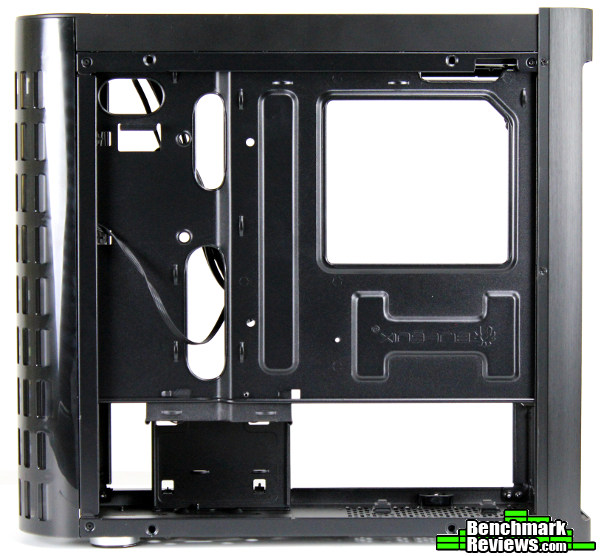
The back side of the Pandora shows a relatively bare motherboard tray, but there’s a bit more to see if you look closely. In the upper left of the picture there is a 2.5″ drive mounting point (the two small circular holes are for included rubber grommets through which the drive would be secured by screws, with the other side of the drive held in place by two little nubs). The multiple tie-down points will undoubtedly come in handy when it comes time to put that side panel back on, but the hole in the upper right for the CPU 8-pin connector looks a little cramped.

A single 120mm fan hides behind the front panel and magnetic mesh filter. This panel doesn’t actually need to be removed to access the dust filter; a very appreciated decision since you can’t remove the front panel without also removing both side panels due to the wrap-around curves. We also get our first look at the included LCD display which is included in the ICON versions of the Pandora (this chassis also ships in a Core edition sans LCD).

The ICON version of the Pandora adds a 2.4″ LCD display (320×240 TFT) behind a tinted window in the front panel. It uses a USB header on a motherboard for power and allows one to upload their own custom image to the display through a simple executable program (you can use larger images, but the application will stretch/resize them to fit the display). By default it will display the BitFenix “phoenix” logo, and an alternate is included in the display application (which you can download here). Even though the default picture is in black and white, the LCD is a full color display.

A quick glance at the bottom floor of the Pandora showcases the cable management/SSD display bracket up front – make sure to take note of the multiple tie-down points on this bracket, which makes this doubly useful for keeping things tidy. It’s a bit close to that front panel though, so if you opt to add a push/pull arrangement of fans on a 240mm radiator you’ll need to remove this bracket (one layer of fans would fit without a problem). The mechanisms for holding the side panels are also visible in this picture – while they seem to have survived the build process without a hitch, I do hope the plastic used won’t become brittle over time. While snap-on panels are very nice, my experience with an FT03 Mini makes me approach these plastic pieces with a fair amount of trepidation (to SilverStone’s credit, they’ve been great about replacement parts) – at least the posts are aluminum rather than plastic as in the FT03 Mini.

The SSD/cable management bracket doesn’t obscure this side of the chassis, so it’s easy to hide extra cables if a non-modular power supply is used (a nice move, considering the slim dimensions of the Pandora). This bracket conceals a 3.5″ and 2.5″ drive mount location in the floor of the Pandora as well.
Now that we have a decent idea of what to expect, let’s see if we encounter any pitfalls by placing some components in the Pandora. While I’ve built systems in BitFenix’s cases before, this is my first experience with one of their slim cases – well, it’s everyone’s first experience with one of their slim cases, since it’s the first one they’ve made!

The Cooler Master V700 shown here is a 170mm modular power supply. It’s a bit overkill for most mATX builds, but it wasn’t difficult to get it into place in the Pandora. Still, if I were purchasing a new PSU specifically for the Pandora, I’d probably look for a slightly shorter model to make plugging in the modular cables a little easier. Again, one could easily remove the SSD bracket and install it later…

…as long the power supply used isn’t too long. The bracket will need to slide back a few millimeters to be removed (and installed), and you can see how that might be an issue with the modular connectors of certain PSUs. Ultimately, it’s a small and easily-avoidable issue, but something to be aware of nonetheless.

One 3.5″ drive mount is located along the top rail right behind the power/reset buttons and USB 3.0 ports. The SATA power and data connections will face the front of the chassis, and those cables will have to fold back over the frame to be routed back into the main portion of the Pandora. I would have really liked to see another 120mm fan mount here as an option instead of a 3.5″ drive; I would even be okay with forgoing the semi-tool-less mount to do so (only two screws are required to secure a drive up here, as the other side is again held in place with two rubber nubs). There’s another 3.5″ drive mount in the base of the Pandora anyway… oh well, we still have to find out if that extra fan mount would even be necessary I suppose. Besides, it’s nothing a quick mod couldn’t fix…

While it wouldn’t be a problem to fit a hard drive in the top *or* bottom of the Pandora, I think I’ll stick with just an SSD for this build. At least the motherboard, CPU and RAM installs were free from any issues – well, except for one (you’d think I’d LEARN by now!!!). We’ll get to that in a bit, but if you look closely you can probably see where I messed up in the photo above… Anyway, there is a CPU cooler cutout in the motherboard tray to access backplates if necessary, making CPU cooler installation possible after the motherboard is installed.

Mounting the H80i fans and radiator revealed a potential (although minor) issue. I shouldn’t have used the washers that came with the H80i bolts, since they caused the bolt head to stick up past the recessed fan mounts. Since the magnetic dust filter covers these mounting holes, any protruding screws could prevent the filter from making full contact with the chassis. As shown in the picture the magnets were still strong enough to keep the filter in place, but a small bump would have been enough to dislodge it. Again, a relatively minor issue that can be avoided without much trouble – it’s certainly not a fault of the Pandora – but it’s something to be aware of.
 Speaking of something to be aware of… Yep, here’s what I forgot to do before installing the motherboard. With most cases, one could just route this 8-pin CPU cable through a cutout after the motherboard is installed – not so in the Pandora. While a bit more space would have been nice, I wanted to make sure to mention this as a potential pitfall (there’s nothing more enjoyable than having to remove a motherboard right after you install it for ONE connector!). Again, a PSU with flat cables would be highly recommended, as you can probably see.

A plastic cover clips over the PCI slot thumbscrews. You won’t be able to access these with the aluminum exterior in place – you could remove the aluminum that wraps around the rear of the Pandora with a few screws, but it won’t be necessary if you use the tool provided with the case by BitFenix (a simple hex wrench). You’ll need it to loosen these thumbscrews initially; it’ll be much faster just to use your fingers once you break them loose, even if it is a bit cramped.

You’ll need to choose your SATA cables carefully – with the H55 radiator installed underneath the H80i, you can barely clip in a SATA data connector to an SSD mounted here. I stubbornly refused to move the SSD from this location to one of the other two mounting points throughout the chassis (there’s a window for a reason!), although if I had to do it again I’d probably just use the SSD mount on the back of the motherboard tray.

The Pandora is a slim case which doesn’t leave a lot of room behind the motherboard tray for cable management. While there are enough tie-down points to help organize cables back here I wouldn’t suggest the Pandora for someone’s first build. You’ll definitely get a lesson in cable management if this is your first case… The secondary 2.5″ drive mounting location in the upper left corner is offset enough to route the thicker cables without an issue, but that troublesome 8-pin EPS connector on top is going to be interesting if you aren’t using a PSU with flat cables. Out of habit, I just tied down the main 24-pin cable directly behind the motherboard – of course forgetting this is a slim case…

It’s a little easier to see from the perspective above – there just isn’t much room for those thicker cables. I quickly realized my mistake and was easily able to shift the main bundle of cables over to the recessed portion of the motherboard tray (where the 2.5″ drive mount is located). With the cables positioned as shown above, I didn’t have any problems getting the side panel back on. There are enough tie-down points back here to keep almost any system in check, but it’ll take a little dedication to get it right.

The final product displays nicely through the clear window. Graphics cards with side-facing power connectors may experience a bit of squeeze (or rather, the power cables will) – there’s just enough room for the PCI-E power connectors themselves, you’ll have to tuck those wires out of the way using a pretty extreme bend. Any card having a heatsink that extends past the PCI slot thumbscrews will probably have a bad time in the Pandora…unless its power connections are in line with the card instead of perpendicular.
Installing a micro-ATX system in the Pandora had its share of frustrations, but that’s to be expected for this form factor. There aren’t that many slim cases on the market, and certainly none that can fit the amount of enthusiast hardware you can install in the Pandora.
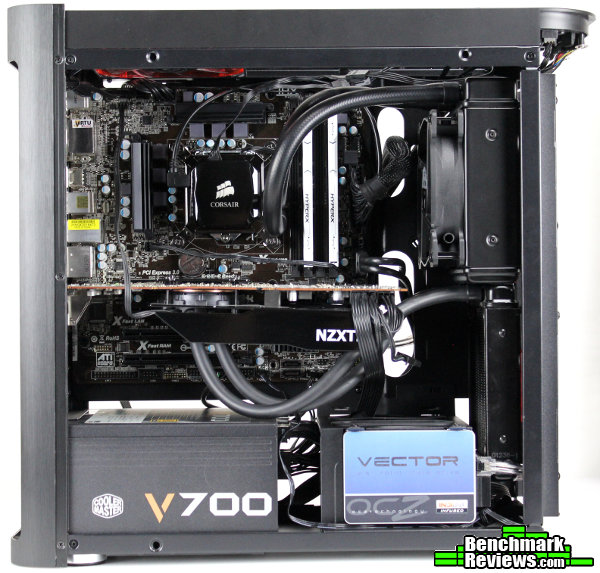
Even though some components might be a tight fit (it is a slim micro-ATX case after all) it’s still pretty impressive what you can cram into the Pandora. Two double-thick 120mm AIO coolers would be possible – while the G10 bracket isn’t compatible with the CoolIT style of AIO coolers, there’s still enough room to fit two H80i coolers in the front panel (or, obviously, a 240mm AIO like the H100i, H220 etc.). You’ll need to make use of the fan slot spacing to keep the hoses clear of the other radiator and remove the lower SSD bracket but it’s a surprisingly comfortable arrangement for such close quarters. It isn’t really worth discussing temperatures with the above configuration – even with the i5-3570K overclocked to 4.6 GHz and the R9 290 to 1000 MHz (core), temps rarely went above 60C for the CPU and 55~58C for the Radeon. Again, that’s impressive for a slim case but more due to the aftermarket liquid cooling than the case itself.

What is impressive is the Pandora’s efficiency with what amounts to three 120mm intakes (well, two intake / one exhaust). Even CrossFireX configurations weren’t as hot as I thought they would be in the Pandora. With the help of some BitFenix Spectre Pro series 120mm fans for intake and exhaust (each adds about 10 CFM of additional airflow over the stock Spectre fans), the Pandora managed to keep two XFX 270Xs at acceptable temperature levels. After a warm-up stress test to heat up the interior a few runs of 3DMark Firestrike were in order. With an ambient temperature of approximately 17C, the top 270X reached 62C and the bottom card didn’t make it past 53C. I would assume these temperatures would increase slightly with an air-cooled CPU instead of the H80i, but overall that’s a pretty good result for a small, slim case. As a worst-case scenario I also used AIDA64’s GPU stress test, boosting temperatures to 78C (top) and 65C (bottom). Frankly, I don’t have any complaints – these are better results than I would have expected, although I suppose it helps that the two intake fans are positioned directly in front of the components needing to be cooled (SilverStone uses a similar design in many of their cases to great effect).
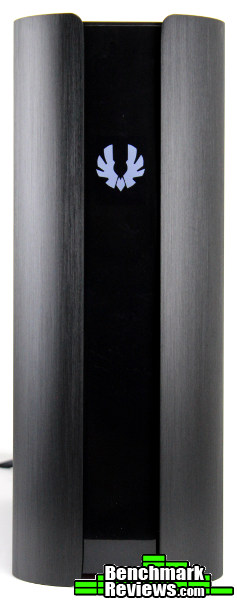
While the cooling performance of the Pandora was surprisingly good there’s one more thing to cover: the ICON display. Viewed from an ideal angle, the LCD display actually looks pretty good. Full color images can be uploaded to the display, but I’d recommend sticking to a black background if possible as that will help the image blend in to the rest of the panel.

Unfortunately, since most users don’t sit directly in front of their computer cases, the primary way you’ll see the display is from an angle. While the photo above is a bit cropped/zoomed in, it does a decent job of displaying the poor viewing angles of the 2.4″ TFT LCD. It doesn’t take much for any image to lose its contrast when viewed from any angle other than straight-on. It’s a bit of a disappointment considering how unique of an approach this is; adding a display to a case and all. It sounds like the unique aspect was a bit of a factor in choosing the display. As the first manufacturer to really put a full color LCD in a case, the display was a bit of a compromise from BitFenix since they weren’t sure how popular the ICON version of the Pandora would be (and they were already moving pretty quickly away from the price point they wanted to hit). They wanted a display with better viewing angles and deeper blacks, but weren’t sure how much people would be willing to pay. Since the ICON chassis ships for about $30 more (depending on window/color), the current display alone accounts for almost 30% of the price.

It’s really too bad as the Pandora is, overall, a very attractive case. If I wouldn’t have been so stubborn and insisted on displaying an SSD through the window, I probably would have had an easier time working inside the slim internals. The finished product is worth the effort though, especially if you like the look of the Pandora in the first place. There really isn’t anything else like it right now – if nothing else, kudos to BitFenix for bringing such a beautiful, slim case to the market.
I think the Pandora makes more sense if you think of it as a slim, unique, attractive enclosure. It isn’t the easiest case to build in, but that’s to be expected for a slim micro-ATX case (the snap-on aluminum side panels were at least easier to work with than slotted panels would have been). Style is definitely first and foremost, but there’s a compelling amount of performance here too – especially when upgraded a bit.
About the ICON display – while a great idea, I think an LCD capable of displaying changing data would be drastically more useful (think along the lines of Logitech’s G19 keyboard LCD). Even if BitFenix would have used the same screen/controller as Logitech and just added a G19 LCD to the case instead of the current static display…barring any copyright/licensing issues of course. The quality of the display, in this world of 5-inch 1080p LCD displays, is…well, it’s too much of a compromise in my opinion. If it were capable of animation (such as displaying a CPU temperature for example) this would be a lot easier to shrug off as unimportant. As it is, since the sole purpose of the display is to show an image, the novelty wears out far too quickly. It simply isn’t up to the task. Of course, this is all very easy for me to say – I’m not even that familiar with the G19’s LCD or the API it uses to display data, so I’m sure this is FAR easier said than done. I suppose the number of units that sell with the ICON display will be telling…but I can’t help but think there would be more interest with a more capable display (an “if you build it, they will come” approach). Am I off on this? Would you spring for the ICON display version as is? Or would you pay more for a better/stats-capable display? At least the Pandora’s LCD is easy enough to remove…with BitFenix offering parts and components through their own online store now, maybe we’ll see an upgrade in the future.
While I’m not disappointed with the Pandora, frankly it feels like an experiment. This is BitFenix’s first case that uses aluminum and I’m not sure if they’ve worked out all of the kinks yet. It was tough to get that “premium” sense from this chassis, with wiggly power/reset buttons, machining marks on the inside of both the aluminum and plastic fascias, and a top mesh filter with a tendency to warp. Most likely, my perception was irrevocably altered after just having finished working with Phanteks’ Enthoo EVOLV, another mATX case with aluminum sides. While the EVOLV has a larger footprint and volume, its construction was on another level entirely. Some of these details stood out more than they might have otherwise – while I think BitFenix has a unique enclosure in the Pandora, it was tough to find any advantages over other micro-ATX cases (other than appearance and form factor) like the Prodigy/Phenom/Colossus M, EVOLV, and Node 804. Still…the Pandora has a style all its own; there just isn’t anything else like it.

I’ll try and summarize my experience with the BitFenix Pandora in terms of Performance, Appearance, Construction, Functionality and Value categories, but as always I feel like I should add a disclaimer. You must understand that my own preferences and uses for cases differ from most; while I try to view each case as objectively as I can, I probably can’t avoid my own bias from affecting my conclusion in some manner. I implore you to think in depth of your OWN uses and preferences, and use my reviews as a guide or simply as another perspective.
First up: performance. I’ll admit, I didn’t expect the Pandora to handle CrossFireX graphics cards as well as it did. It seems almost contrary to common sense – it’s small, it couldn’t possibly be good at cooling things!! However, placing two 120mm fans directly in front of the motherboard really works, which isn’t that surprising when you consider other chassis that use a similar arrangement (direct airflow is always better). A chassis as slim as the Pandora is a natural fit for an all-in-one liquid cooling unit although with the right components it isn’t entirely necessary. I’d love the option for an additional exhaust fan up top, but it was pretty apparent that wasn’t necessary. I was pleasantly surprised at the level of performance exhibited by the Pandora.
I get the feeling that the Pandora’s appearance takes precedence over the other categories. While it’s no slouch performance-wise, it’s the curved aluminum panels that dominate the feature list. If you opt for the ICON version, you also get a nifty LCD that you can customize with whatever appearance you’d like. However you feel about the Pandora’s looks, they’re certainly unique – this is the only case on the market right now that dared to fit full-length GPUs, AIO liquid cooler compatibility and full-size ATX power supplies in a slim case. It’s both bigger and smaller than you’d think, if that makes sense (although I secretly hope BitFenix is working on a mini-ITX only version – who else would love small, medium and large options of a case with the Pandora’s looks?!). The point is, I have no complaints with the Pandora’s appearance – if you like the way it looks, you’ll probably be satisfied too.
BitFenix typically produces sturdy cases that pack in a lot of features for the money, normally striking a great balance between price, looks and performance. They have a few budget models in their lineup too, but the Pandora is positioned in a higher bracket. The problem is, it didn’t really feel like it. Sure, the aluminum panels were exquisite, without a doubt – for a first try they’re really well done. There’s just some minor details throughout that started to pile up: the power and reset buttons would shift and wiggle when pressed, the top mesh bracket developed a bit of a curve (and therefore wouldn’t latch on one side), machining marks on the inside of the aluminum panels and the mold marks behind the plastic front panel – while admittedly not visible or even that pertinent – just added to that “rough around the edges” feeling. The gloss black surface on the plastic portion could use even more gloss as it seemed a bit dull, especially toward the corners. I wouldn’t expect piano black (if you’ve ever tried to paint a piano black finish on anything, you’ll know what I mean) but if you’re going to make it glossy give it that deep, rich, wet gloss they talk about on all those car wax products. At least the visible portion between the two side panels is uniform, and nothing about it really detracts from the case whatsoever (it’s still a beautiful case). The aluminum is sturdy though, and the rear curved portion doubles as a sturdy handle for moving the Pandora around – I felt comfortable and confident carrying the Pandora with one hand using the top/rear aluminum frame. That’s the thing – when it’s put together, it feels like a million bucks; it just doesn’t retain that feeling when really digging in to the internals. For those “install-once-and-it’s-done” builders, this won’t be an issue; they’ll hardly notice. For someone like me who just can’t leave well enough alone, the construction could use a bit more substance.
It’s also tough to talk about functionality with a case like this since the dimensions and appearance are the main selling points (functionality tends to take up some room); thankfully the Pandora packs a surprising amount of functionality that belie its slim dimensions. You’re limited to 120mm fans, but most popular AIO coolers are a perfect fit. Full size ATX power supplies are just fine, and have less compatibility issues than some of BitFenix’s previous enclosures (like the Prodigy cases). Graphics cards up to 350mm are supported too; overall, you can build a pretty powerful system in the Pandora despite the slim interior. Given the “appearance as a priority” feel of the Pandora, I can’t complain about the wide variety of components that it can accommodate.
Finally, the question on everyone’s mind: how much do the aluminum panels, sleek looks and LCD display cost? Available online for $139.99 (Amazon / NewEgg), I feel like the Pandora is priced appropriately for what you receive. That places it beside cases like the Enthoo EVOLV and Corsair’s Graphite 380T, while the Core version sits among more familiar territory (BitFenix’s own Prodigy/Colossus/Phenom M, Fractal Design’s Node 804 and Arc Mini R2, Aerocool’s DS Cube, etc.). It’s difficult to pin down the Pandora’s value, as that can change depending on your utilization of the LCD display (the ability to personalize an image might be a the main selling point for some, while the quality of the display might be a deal-breaker for others) and your preference for slim cases. $30 might not be that much of a premium, but I feel it’s too difficult to justify without a better (or more functional) display; the Core version is ultimately a better value.
The next Prodigy this is not; it has the feel of a somewhat niche product. Still, it’s an attractive case full of some promising ideas – if you’ve ever questioned BitFenix’s boldness (how could you after the Colossus??) and their desire to push the envelope, the Pandora will set you at ease. Frankly, there’s really nothing like it. It’s attractive, efficient, surprisingly accommodating, and definitely different. I’d hesitate to recommend the ICON version (at the risk of stifling innovation further – I’ll be the first in line for a G19-type LCD though!), but the Core edition would be an excellent choice if you like what you see.
+ Attractive
+ Unique, slim form factor
+ Compatible with a surprising amount of hardware
+ Snap-on aluminum panels
+ Removable dust filters on every fan intake
+ Efficient airflow keeps things surprisingly cool
+ Lots of tie-down points for cable management
– You’ll need those tie-down points for cable management – no lazy option with this case!
– Construction falls short of “premium”
– ICON display is limited
-
Performance: 8.00
-
Appearance: 9.25
-
Construction: 7.00
-
Functionality: 8.00
-
Value: 7.00


2 thoughts on “BitFenix Pandora Micro-ATX Slim Case Review”
Excellent review, and I appreciate the effort you went to with the multiple GPU setups and LED lighting. For small form factor builds I’ve found Silverstone modular power supplies with the PP-05E short cable kit– which uses flat cables– to be very helpful.
Hey David, thanks for your comment! I’m definitely glad the CM V700 PSU I used for this case had flat cables – there really isn’t any room for that 8-pin EPS cable otherwise 🙂 I can’t really knock the Pandora for that though, since that’s generally the point of a slim case…I just wanted to make sure everyone had a heads-up, but hopefully they consider your recommendation too! I appreciate SilverStone’s aftermarket accessories for applications like this, it definitely makes the build process a lot easier.
Comments are closed.