By David Shields
Manufacturer: Razer Inc.
Product Name: Deathstalker Expert
Model Number: RZ03-00800100-R3U1
UPC: 879882005375 EAN: 8886419340935
Price As Tested: $57.99 (Amazon | Newegg | B&H)
Full Disclosure: The product sample used in this article has been provided by Razer Inc.
Razer is a common name in the peripherals market, with many, many products including mice, keyboards, speakers, and even their own customized clothing lineup. The Razer Deathstalker Ultimate is their premier gaming keyboard, including a multi-touch LCD track panel, on the fly macro recording, and more. But at $200, it is also prohibitively expensive. Razer has attempted to remedy this with the Deathstalker Expert, a much cheaper version that still has many of the same core features.
The Razer Deathstalker Expert has many of the basics needed for a gaming keyboard, such as macro recording, anti-ghosting, 1000mhz polling rate, and a key to disable the windows key while gaming. In this article for Benchmark Reviews , I will give an overview of this keyboard and Razer’s Synapse 2.0 software before delivering my final verdict on the package.

- 469.9mm by 215.9mm
- Low-profile chiclet keys
- Extreme anti-ghosting capability for up to 10 simultaneous key presses
- Razer Synapse 2.0 enabled
- 1000Hz Ultrapolling
- Fully programmable keys
- On-the-fly macro recording
- Dedicated Gaming Mode for deactivation of the Windows key
- Multi-media controls
- Fixed wrist rest
- 2m rubber sheathed cable
This keyboard, from the exterior shell to the keys, is made of entirely plastic. At this price range that’s to be expected, and it’s not to flimsy. Exerting a little force on the board does revel a small amount of bending in the frame, but that’s all. The LEDs are pleasantly lit with a green glow that isn’t to bright but shows up nicely. An integrated wrist rest is included.

Nothing particularly special about the bottom of this board, just a pair of hinges that raise the board up to make it more comfortable and natural to use.

Looking down the side its obvious that the Deathstalker is a pretty slim board overall, and the keys are barely raised above the board. Razer doesn’t use mechanical switches but membrane, and while they respond promptly they do lack the clack of Cherry MX switches.

Other features include with the Deathstalker Expert are media keys, on the fly macro recording, a dedicated gaming key, and brightness keys, all right on the board. This means that you don’t need any software to make use of this keyboard. Razer does however provide you their Razer Synapse 2.0 software, which offers a couple additional features.
Installing the software and plugging in your peripheral will require you to download an update before it will recognize your keyboard. Once done, you are greeted with this profile tab, which of course lets you create, edit and select custom profiles for your keyboard. You an also click on a key to bind it to a function, such as a macro, program launch, multimedia, etc.

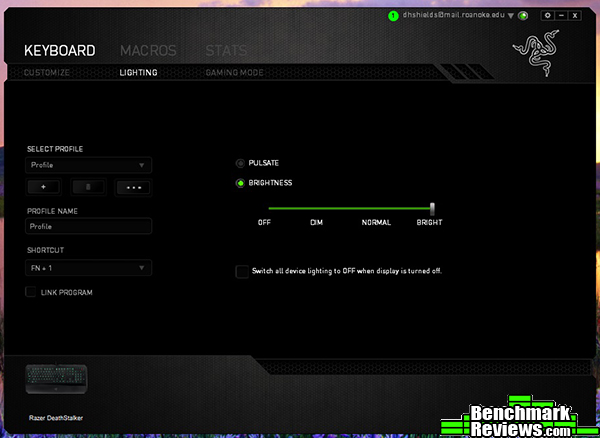
The next tab let’s you change the lighting, although you are limited to merely changing brightness and whether or not the LEDs are always on or using a pulsating effect.
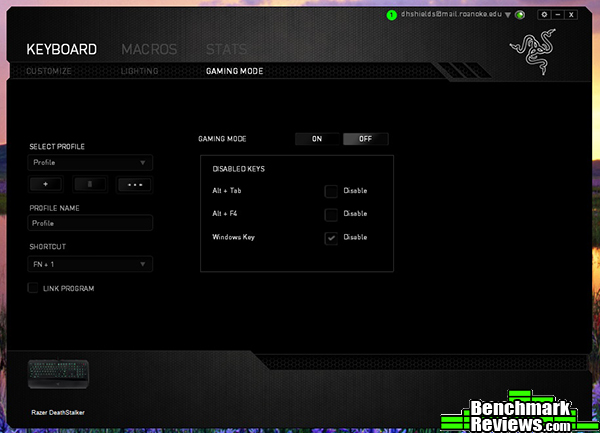
The third tab let’s you modify the gaming mode key, changing what keys it disables or doesn’t, such as the windows key, Alt-F4 shortcut, and Alt-Tab shortcut.
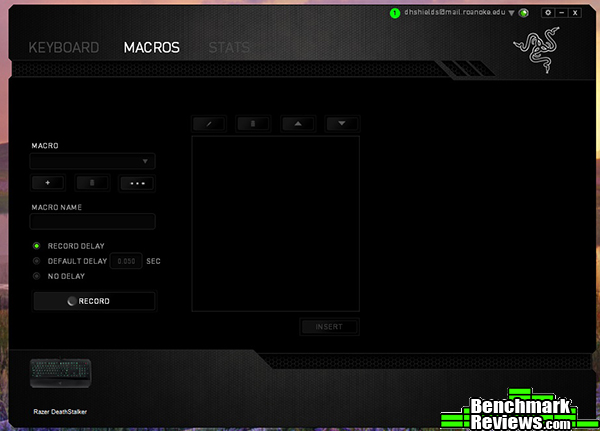
On this screen, you can create custom macros for the keyboard. To actually assign them you have to go back into the first screen and select a key, but it’s a simple system. Select record, input your macro(s), and create / name the combination. It’s that simple.
Razer Synapse 2.0 is nothing new or extraordinary in a market filled with peripheral software. It gives you a little more control over your keyboard, but beyond that you can control the majority of the functions the Deathstalker Expert has without it.
We will use Aqua’s Key test to look for N-Key rollover and ghosting, as well as the responsivness of Razer’s membrane keys. We want to see if our PC recognizes inputs without skipping, and how quickly pressing a key translates to input on your screen.
-
GIGABYTE GA-990FXA-UD3
-
8GB
-
AMD FX-8350
-
Operating System: Windows 7 64-bit
- Software: Aqua’s Key Test

The Razer Deathstalker Expert fared well in the test. No ghosting was noted when pressing multiple keys simultaneously or when using common gaming keys. Input was near instantaneous as well, with only a bit of minor lag. My primary concern that having such low keys would lead to unitentional key pressing was mostly unfounded, as it only occurred on a few occasions.
It’s cheaper than many gaming keyboards while still offering a plethora of features. I think that the issue at hand is what features you want and what you can do without. If you need macros, this is probably your best bang for buck keyboard. But if you prefer the feel and response of mechanical keys, something like the Tesoro Excalibur may suit you better for only $20 more.
As demonstrated in the testing this keyboard performs well, with near instant key recognition and strong anti-ghosting across the entire board.
It’s nothing special. The LEDs at least are bright, which is more than I can say for a lot of boards I’ve had in this price range. As a drawback though, I find it harder to see where I’m typing without the LEDs, because of how dark the keyboard is.
I honestly dislike such slim keys on any keyboard, especially a gaming board. I feel like it creates a higher tendency to press a key you don’t mean to, or not press it far enough to register. This is just a personal issue, but I’m sure some of you my take this into consideration.
Available online for $57.99 (Amazon | Newegg | B&H), the Deathstalker Expert is definitely a top choice for a gamer on a budget. Few keyboards in this price category offer this many features, especially when it comes to macro programming.
If you want a macro enabled, budget keyboard, the Deathstalker Expert may be for you. Others may be turned off by the chicklet keys and plastic quality though, so it’s by no means perfect.
+ Lighting is visible and not overdone.
+ Customization options are extensive, especially macros.
+ Responsive, no ghosting issues.
– Plastic build and chiclet keys are not for everyone.
– Macro programming not as intuitive as it could be.
-
Performance:8.75
-
Appearance: 8.75
-
Construction: 8.25
-
Functionality: 9.25
-
Value: 9.00


