By Tom Jaskulka
Manufacturer: COUGAR
Product Name: Cougar 500K Gaming Keyboard
Model Number: KBC500-WRNSB
UPC: 871520002634
Price As Tested: $79.99 (Newegg)
Full Disclosure: The product sample used in this article has been provided by COUGAR.
After Cougar’s fully featured 700K mechanical keyboard & 700M aluminum gaming mouse were released in 2014, a streamlined mechanical 600K & ergonomic 600M followed close behind. It’s not surprising then, in early 2015, that Benchmark Reviews has the opportunity to take a closer look at Cougar’s newest gaming keyboard; the 500K.
Working their way down the product stack, the 500K offers similar features as their flagship gaming keyboard (the 700K) at a lower price point, including features not found even on the 600K. While full N-Key rollover, amber LED backlit keys, dedicated macro/media keys and on-board switching profiles are still part of the package, the Cherry mechanical switches won’t make the jump from the 700K’s $150 price point to the more mainstream 500K. Offering as much or more than other $79 gaming membrane keyboards, the 500K offers a more affordable option for users looking for modern feature sets in a keyboard. Is it worth stepping down from the high-end? Will the membrane planks of yester-year forever live in the shadow of their mechanical “superiors,” or will the feature set of the 500K justify its place? Join us as we take a closer look!

The COUGAR 500K is nothing less than a full revolution in the gaming keyboard market. A fully featured gaming keyboard, loaded with all the functionality you are ever going to need for both enthusiast and pro level gaming. All this with the COUGAR design that has already changed the way gaming peripherals are seen. A Full-NKRO Membrane Keyboard that shatters forever the limits of what this class of keyboards was thought capable of.
The 500K is the first membrane keyboard ever to be able to compete face to face, in any kind of environment, with high end mechanical keyboards several times its price. Its Full NKRO, reliability, ultra-fast reaction speed and professional level functionality are totally state-of-the-art technology that will take you to the apex of the gaming food chain.
|
Product name |
COUGAR 500K gaming keyboard |
|---|---|
|
Key switch |
Membrane switch |
|
Processor |
32-bit ARM Cortex-M0 |
|
N-key rollover |
Yes |
|
Full key backlight |
Yes |
|
Game type |
FPS / MMORPG / MOBA / RTS |
|
On-board memory |
Yes |
|
Polling rate |
1000Hz / 1ms |
|
Repeat rate |
1X / 2X / 4X / 8X |
|
Material |
Plastic |
|
Software |
COUGAR UIX™ SYSTEM |
|
Additional programmable G-keys |
6 |
|
Palm rest & FPS palm rest |
Yes |
|
USB pass-through |
Yes |
|
Interface |
Golden-plated USB plug |
|
Cable length |
1.8m Braided |
|
Dimension |
230(L) X 487(W) X 40(H) mm |
|
Weight |
0.9kg |
Specifications taken from the manufacturer’s product page.
The Cougar 500K is their first membrane keyboard. Yes, membrane – you know, those keyboards that gamers “back in my day” used. Ignoring for a moment that the previous statement is more accurate when referring to mechanical keyboards…it seems a bit surprising, given all the attention mechanical keyboards have received over the past year or so, that any effort has gone into developing products for this former “bread and butter” mainstream segment. However nice they may be, it can be tough to justify that $120+ price on a peripheral especially when that amounts to 20% of the budget on some gaming systems. While both membrane and mechanical keyboards still have their place in the market, keyboards like the Cougar 500K can offer a tremendous value over basic keyboards. At first glance the 500K seems to check all of the right boxes – let’s get a quick overview of Cougar’s newest keyboard, then dive in for some more details.

While we normally don’t review packaging here at Benchmark Reviews, I was honestly surprised at the size of the box the 500K shipped in. It seemed worth mentioning the level of protection the keyboard receives while being shipped – it might be a bit overboard even, but perhaps the same arrangement was used for the heavier 600K and 700K keyboards (where the extra padding would make more sense).
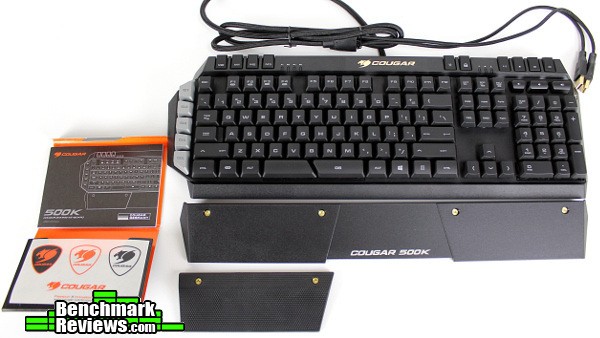
There aren’t many extras included with the 500K which is normal for many products in this category. While the booklet and stickers are nice, the magnetic textured rubber wrist pad is a surprisingly nice addition. The main wrist rest is detachable as well (it attaches with two plastic clips, which allow for a bit of flexibility in the angle of the rest).
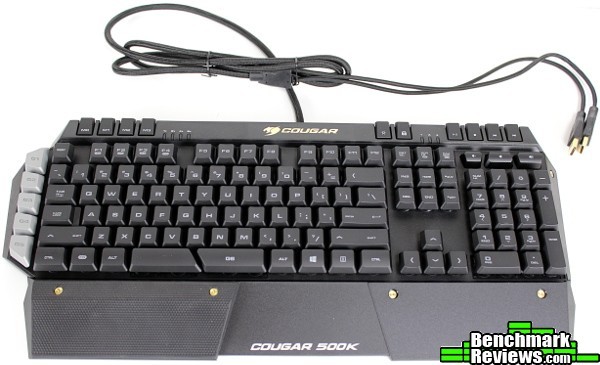
The 500K is a pretty standard size for a keyboard – 487mm wide and 230mm in depth (front to back). A relatively traditional layout dominates the majority of the keyboard, with dedicated media, profile, and macro keys flanking the left side and top row of the keyboard. There are a few layout oddities, with the space bar split into two keys and the Windows key found only on the right side (a function key taking it’s place on the left, between Ctrl and Alt). A thick, braided 1.8m cable ends in two USB plugs, with one providing the pass-through for the port located on the top right corner of the 500K.

The textured rubber wrist rest makes for a comfortable WASD-oriented platform, although it is wide enough to fit a variety of alternate keymaps (for those ESDF gamers out there). In very bright light, the amber-colored LED membrane backlight can be a little hard to see, but it’s an excellent (and relatively unique) color that is bright and still comfortable for dim conditions.
So far, the 500K appears to be a membrane-based copy of the 700K. However, there are a few changes Cougar has made. Let’s take a closer look.
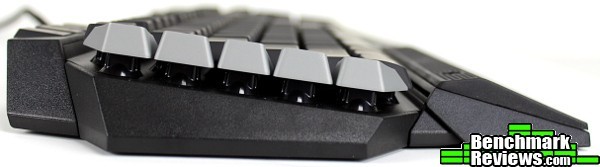
Overall dimensions, including the slight incline remain similar to the Cougar’s brethren. The cylindrical full-size keycaps are the same size and shape as those on Cougar’s mechanical keyboards (other than the mounting/switch mechanism of course).

The 500K loses the aluminum backplate that the 600K and 700K use; replacing it with a textured plastic backing. The full-size keys remain perched on pedestals making it a simple matter to blow out debris from between the keys (unlike many other keyboards that trap everything in a tray).
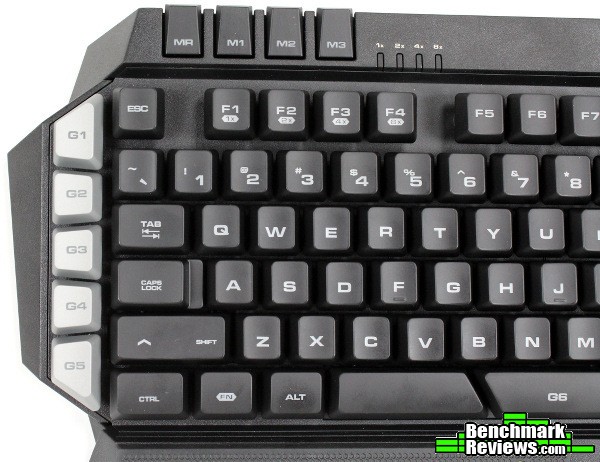
There are five “G” dedicated macro keys on the left, within easy reach of the user’s left hand. A sixth G key is located on the right half of the spacebar, which can take some getting used to. By default, this key isn’t set to do anything (you’ll need to program it yourself). I feel it may have been a good idea to have this key mapped to the space key by default, but it’s very easy to change. It’s a perfect location for gaming though – thumb keys have made an appearance on other keyboards, but a split space bar is a simple and elegant way to add a programmable key to a commonly-used area. Dedicated profile keys sit in the top row of the 500K, with a built-in macro recording key as well.

The media keys are found on the right corner of the 500K, along with the backlight-setting key and a Windows key lock (a “Gaming” mode, as other keyboards may call it). The backlight key can be set to toggle between multiple brightness levels in Cougar’s UIX software, or simply turn the lights on and off (a breathing mode is available as well).
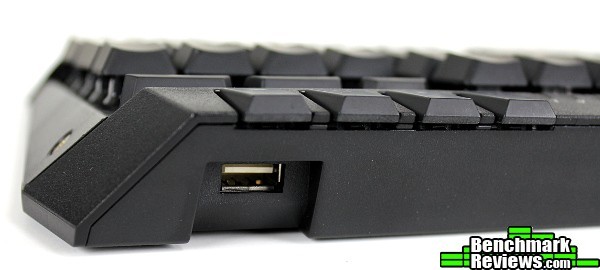
A single USB 2.0 port is located at the top right corner of the 500K which is traditionally used to connect a gaming mouse (although any USB device should work just fine, as it is just a pass-through to a motherboard USB port). I’m personally a proponent of these on-board USB ports, as it saves me the trouble of having to route yet another cable behind a desk!
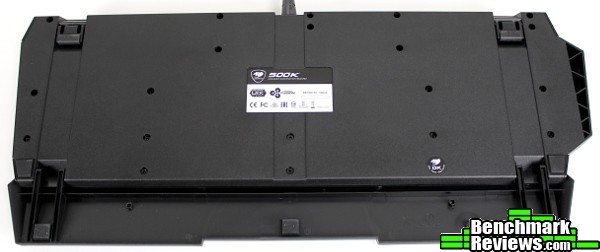
It’s a bit unfortunate there aren’t any cable routing channels underneath the keyboard, which can make for a nice stand-in for a cable clamp or other mouse cord management solution. A small nitpick, to be sure – more importantly, there are soft rubber pads at six locations around the keyboard which should prevent the 500K from sliding around on most surfaces.
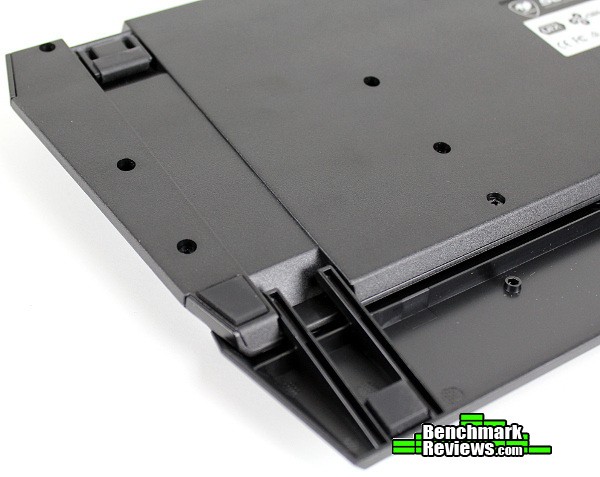
The detachable wrist rest contains its own anti-slip pads as well, which is a very nice touch (and assists greatly with keeping the board in place, since most users will place the weight of their hands here).

Even the pivoting keyboard feet utilize wrap-around non-slip rubber, something other keyboards still refuse to use. Cougar gets extra points from me on this small detail – while I normally use keyboards in as flat of a plane as possible, there are a few that are positioned right next to a monitor and the extra height helps the center cord clear the monitor base. It’s incredibly annoying to have a stable keyboard when the feet are lowered, then have it slide all over the place when raised. Cougar wisely avoids this issue altogether. The wrist rest pivots slightly to accommodate the keyboard’s raised position as well.

The textured rubber wrist rest is much more comfortable than I would have expected. It forces your hand into a more “poised” position, and seemed to help reduce strain during the hours I tested the 500K. It is easily removed, and can even be swapped to the other side if you use the arrow keys/numpad more than WASD.
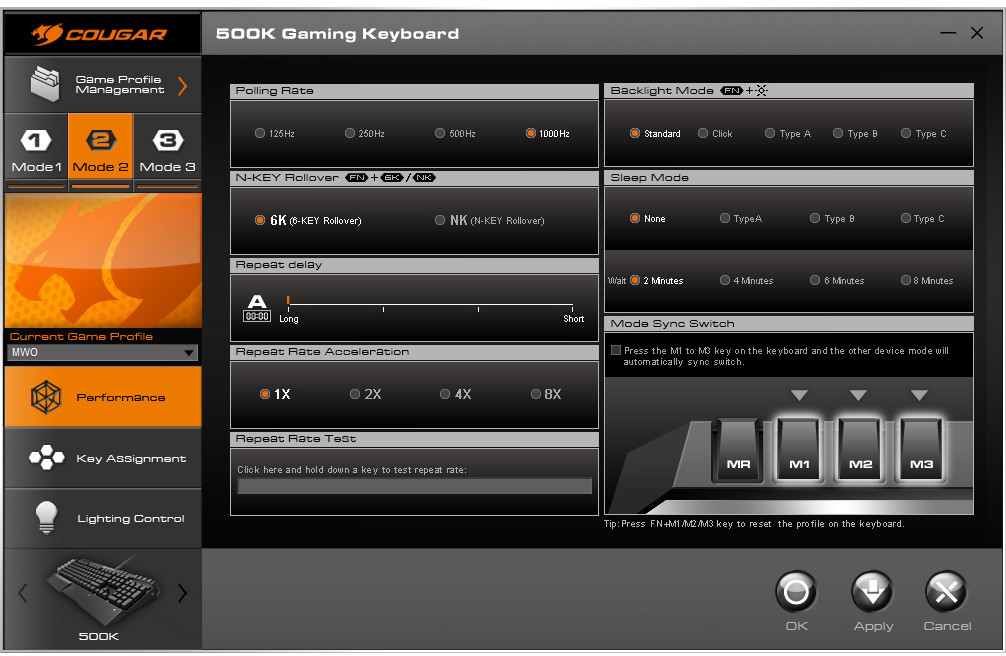
The 500K, like the other Cougar peripherals Benchmark Reviews has tested, uses Cougar’s UIX software for programming and configuration. Most of the same features are here: Synchronized Profile switching, LED controls, macro creation/editing, etc. – let’s take a closer look to see what differentiates the 500K’s software package.
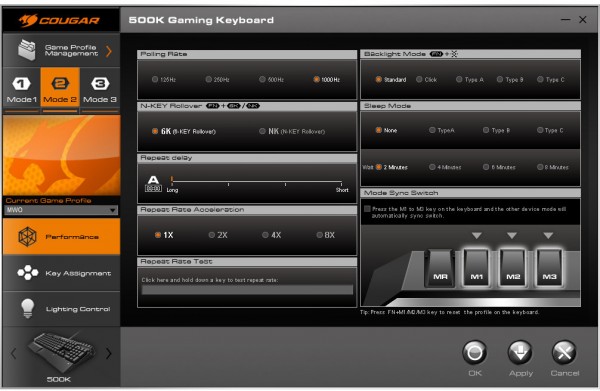
The main Performance tab contains the repeat rate/delay and polling rate settings, as well as the N-Key, sleep, repeat and backlight mode configuration.
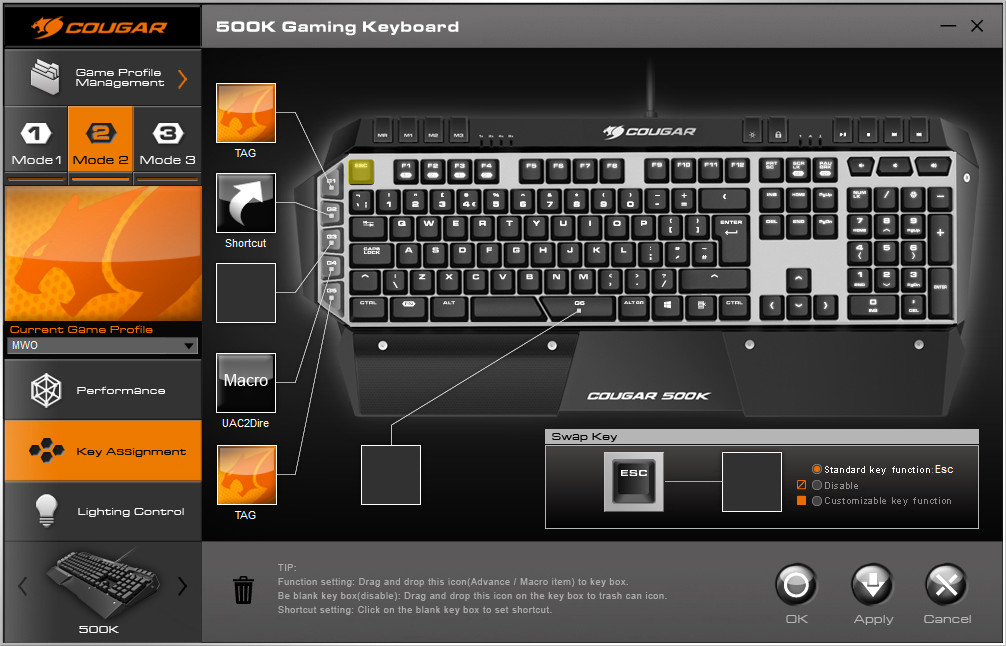
The Key Assignment tab is where many users will spend most of their time. It isn’t immediately intuitive, but after a few glances it’s easy to see how the different options work. The G-keys are assigned functions by dragging and dropping them (whether it’s a macro, key shortcut, etc.) onto the corresponding key’s square on the left. You can also click on individual keys and assign functions to them as well.
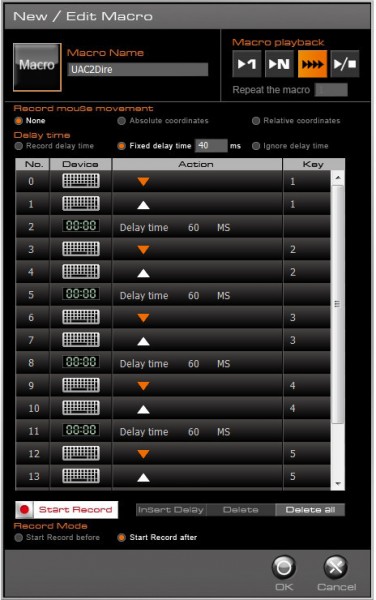
The Macro Editor is surprisingly powerful, with all of the options one would expect to see when programming custom key sequences. You can even record mouse movement! Many products only deliver half-way here, I was glad to see that Cougar’s implementation was quite robust. It was a simple matter to review a macro and edit portions of it later, which is always a welcome function.
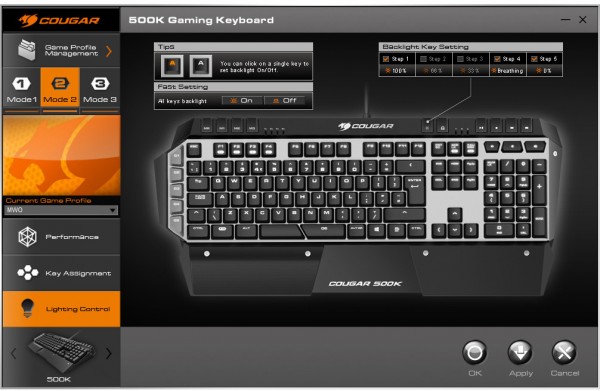
The lighting control may have had a leftover function from the 700K that didn’t seem to work on the 500K. The 700K contains many custom lighting effects, and while none of those make an appearance on the 500K, there is a UI element here that suggests you can turn that individual key’s backlight on or off. The idea would be to only highlight those keys currently in use. Unfortunately, it doesn’t seem to work on the 500K – I’m assuming this UI element/option will be removed in future revisions of the driver software for the 500K, as most LED-backlit membrane keyboards I’ve used don’t use individual LEDs for each key (they’re generally diffused through an acrylic panel, with the LEDs themselves located around the perimeter) – I wouldn’t expect the 500K to be any different.
The breathing effects do work, along with the various brightness settings (although there wasn’t much difference between the 100% and 66% settings).
While all macros worked as expected, and the key-rate can be checked in the UIX software, the N-Key features and 6-Key rollover (default setting) can be tested with the use of Aqua’s KeyTest software.
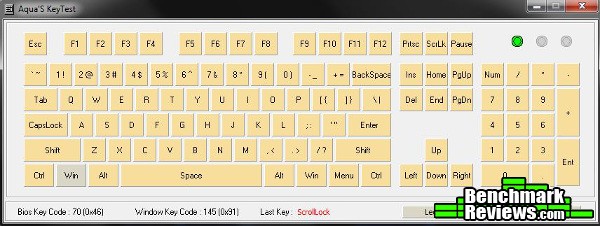
The 500K performed as expected in the 6-Key mode (any key after the sixth pressed – at the same time – would be lost). However, most users would undoubtedly keep the 500K in N-Key mode, where every key registered correctly, no matter how many were pressed at the same time. Quite an accomplishment for a membrane keyboard. Many other membrane boards will use some type of 6+ key rollover, but there aren’t that many with full NKRO.
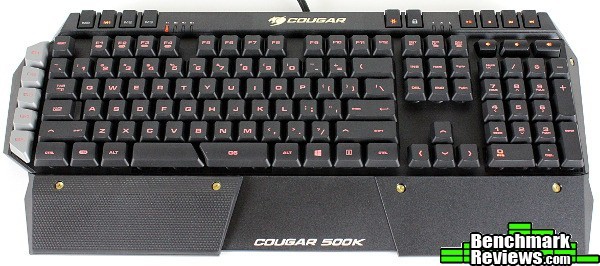
In well-lit conditions, the amber/orange LEDs aren’t particularly bright but the font on the keys is perfectly readable regardless.

Dim conditions reveal a pleasant amber/orange. It’s bright and readable without being glaring like blue or green tend to be. Cougar picked a great color for their lineup as far as readability/visibility are concerned. Orange may not be everyone’s personal favorite, but colors on the warmer end of the spectrum are arguably more comfortable to view in low-light settings.
I always thought it was beneficial to share my own perspective in this section. Peripherals are notoriously subjective and many reasons to choose one over the other fall to personal preference. When comparing products like this, it is only natural to compare it to the logical competition. The 500K is positioned to compete against the likes of the Razer Lycosas/Deathstalkers, Roccat ISKUs, Logitech G110s and Steelseries Apexes of the world. When compared to these products, I personally feel Cougar has an extremely compelling product on their hands with the 500K.
That being said, perhaps a quick “story time” is in order. One of the first gaming keyboards I bought was a Razer Lycosa (actually, a Razer Tarantula, but backlighting was still a new thing then – when the fully backlit Lycosa was released I picked one up). It is my opinion that the Cougar 500K surpasses the Lycosa in almost every way. As well it should – that product (the Lycosa) was released a little more than seven (!!!) years ago. Frankly, the 500K checks all of the boxes that products in this category have provided for years – backlit membrane keys, programmable macro keys, a USB pass-through (although that particular feature is more rare than it should be), on-board memory, dedicated media keys, etc… It punches above its weight class with a few Cougar-specific quirks, like the surprisingly comfortable rubber wrist rest and split space bar (while it should be set to space by default, I still maintain this is a good location for a macro key).
Even though it checks all the right boxes (and then some), I wonder if Cougar will be able to command the typical $79 price of this category. They’re certainly off to a good start – I find myself hoping a 500M gaming mouse will be announced so I can experience more of what Cougar has to offer. Still, with many mechanical options that start around the same price point, will users opt for a membrane option?
I didn’t experience any issues with the 500K’s performance. The Cougar UIX software was usable, the keys registered accurately in-game, and the N-Key rollover worked as intended. The typing feel was quite good for a membrane keyboard, with a decent, crisp action; while no match for mechanical switches, the 500K was comfortable to game and type on.
I liked the appearance of the 500K as well. The textured rubber wrist rest, angled surfaces, textured plastic and overall profile were attractive. I actually preferred the black plastic backing as opposed to the silver aluminum on the more expensive versions (although black anodized aluminum would be just fine), and would have preferred the G-keys to be black (or orange!) as well. The silver makes sense with the aluminum 600K and 700K, but they seem a bit out of place on the all-black 500K.
The 500K loses the aluminum accents of its more expensive brethren, but the overall construction is right in the league of this style of membrane/gaming keyboard. The relatively tough textured plastic, along with the angles and overall wedge shape lend a lot of stability to the overall board. However, the long, detachable palm/wrist rest had a tendency to flex in the middle while keeping your hands on home row for typing (it wasn’t an issue while gaming). This could be easily fixed by one more rubber post in the center of the palm rest (and it would be ridiculously easy to add this on your own). The “pedestal” style of key posts caused some of the keys to wobble, but no more than any other membrane keyboard (or even mechanical keycaps, for that matter).
The functionality of the 500K is what really sets it apart, in my opinion. I’ve said throughout the review that the 500K checks all of the normal “gaming keyboard” boxes and then some. About the only thing missing from my own personal wishlist would be full RGB LEDs, for those days that I can’t decide what my favorite color is (interestingly enough, after the Lycosa, I originally searched for a color-switching keyboard specifically to match an orange system – Cougar takes care of that check box as well, and it’s about time!). The macro functions, dedicated media keys, on-board memory, adjustable backlight, split space bar (although it should be set to space by default!) and detachable wrist rest with additional textured rubber rest…Cougar brings more functionality to the table than most other products in this category.
The 500K’s value proposition is interesting. When this review was written, the 500K could be found online for $79.99 (Newegg), which is the typical price for membrane keyboards containing backlit and programmable keys (and other “gamer” features). There’s enough functionality here to justify the price, but I still have to wonder if it’s enough to get users to forgo a mechanical option instead (for the same price). Compared to other membrane gaming keyboards, the feature set is enough to provide a great option for the price – placed up against mechanical versions though…well, you’d still have to spend up at least $10-20 in most cases to get LED backlit keys, but there are some mechanical options that start at the same $80 price point. For those that prefer the feel of membrane switches (and the 500K does have a pretty good key feel), the 500K is a decent value for what you receive.
Cougar manages to bring a great value to the popular ~$70-$80 “gaming keyboard” segment. A decent typing feel, backlit keys in a unique orange color, dedicated macro/media/profile keys, detachable wrist rest and a USB pass-through port place the 500K in front of other popular options. Peripherals can be subjective with many aspects reduced to personal preference, but I’d have no problem recommending the Cougar 500K to anyone looking for a fully-featured membrane gaming keyboard at a decent price.
+ Great feature set for this category
+ Decent typing feel for membrane keyboard
+ Key backlighting (in a unique color!)
+ “FPS” wrist rest is surprisingly comfortable, nice texture/feel
+ Software is simple, easy to use, good macro editor
– Software could use some polishing – not bad for a new release though…
– While sufficient in dim lighting, backlighting hard to see in daylight
– Some features in software don’t match up to the keyboard (per-key illumination)
-
Performance: 8.25
-
Appearance: 8.25
-
Construction: 8.00
-
Functionality: 9.25
-
Value: 8.75