By David Ramsey
Manufacturer: MyDigitalSSD
Product Name: Super Boot Drive 42mm SATA III (6G) M.2 2242 NGFF SSD
Part Number: MDM242-SB-256 (256GB)
UPC: 728028335873
Price As Tested: $99.99 (Amazon)
Full Disclosure: MyDigitalSSD provided the product sample used in this article.
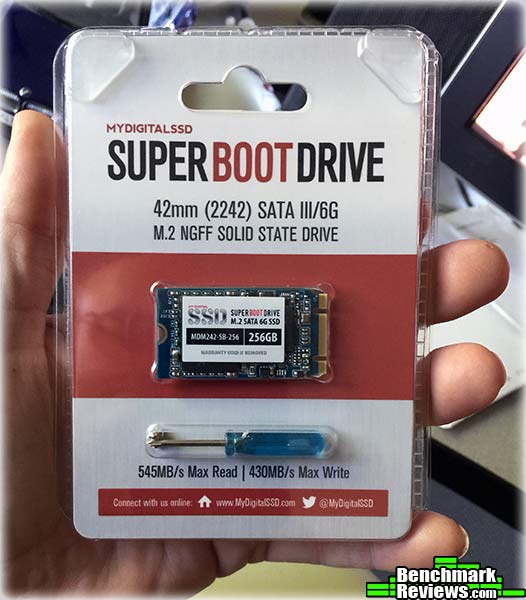
As computers become ever smaller, their storage devices shrink as well. The Next Generation Form Factor (NGFF), also known as m.2, provides not only a smaller envelope for storage devices to fit in, it defines new PCI-E based interfaces as well as the legacy SATA 6G interface. MyDigitalSSD’s Super Boot Drive is equipped with Toshiba toggle NAND and a Phison PS3109 controller, and is Benchmark Review’s test subject for today.
| Capacity | 256GB |
| Interface | SATA |
| Form Factor | m.2 (NGFF) 2242 |
| Controller | Phison PS3109 |
| NAND | Toshiba 19nm MLC toggle |
| Dimensions | 42mm x 22mm x 1mm |
| RAID? | Yes |
| TRIM | Yes |
| NCQ? | Yes |
| Max. Read | 545MB/sec (ATTO) |
| Max. Write | 410MB/sec (ATTP) |
| MTBF | 1 million hours |
| Warranty | 3 years |
No matter how fast your processor, memory, or video card is, your computer will still be limited by its slowest component: the hard disk. While hard disk speed has improved tremendously since the “early days”, with large caches and 10,000RPM spindle speeds, even the fastest hard disk’s performance is glacial compared to the rest of the computer. The situation only gets worse with modern pre-emptive multitasking operating systems, where dozens of threads are running simultaneously and competing for your disk’s limited response time and bandwith.
Consider: the average time to move a high-performance hard disk’s read/write head to a new track will be less than 10ms, which seems pretty fast. But your CPU is galloping along at billions of cycles per second, and will spend a significant amount of its time just waiting for the hard disk to fulfill its last request. Hard disk performance has plateued in the last few years, running up against the physical limitations of spindle speeds, magnetic media density, and head servomotor performance. At the end of the day, disks are limited by the fact that they’re comprised of physical, moving parts.
With no moving parts, Solid State Drive technology removes this bottleneck. The difference an SSD makes to operational response times and program speeds is dramatic: while a faster video card makes your games faster, and a faster processor makes compute-bound tasks faster, Solid State Drive technology makes your entire system faster, improving initial response times by more than 450x (45,000%) for applications and Operating System software, when compared to their mechanical HDD counterparts. The biggest mistake PC hardware enthusiasts make with regard to SSD technology is grading them based on bandwidth speed alone. File transfer speeds are important, but only so long as the operational I/O performance can sustain that bandwidth under load.
As we’ve explained in our SSD Benchmark Tests: SATA IDE vs AHCI Mode guide, Solid State Drive performance revolves around two dynamics: bandwidth speed (MB/s) and operational performance I/O per second (IOPS). These two metrics work together, but one may bemore important than the other. Consider this analogy: bandwidth determines how much cargo a ship can transport in one voyage, and operational IOPS performance is how fast that ship moves. By understanding this and applying it to SSD storage, there is a clear importance set on each variable depending on the task at hand.
For casual users, especially those with laptop or desktop computers that have been upgraded to use an SSD, the naturally quick response time is enough to automatically improve the user experience. Bandwidth speed is important, but only to the extent that operational performance meets the minimum needs of the system. If an SSD has a very high bandwidth speed but a low operational performance, it will take longer to load applications and boot the computer into Windows than if the SSD offered a higher IOPS performance.
The only reason that most SSDs you’ll see today look like 2.5″ hard drives is so they can more easily fit into existing computers. The 2.5″ form factor and SATA power and interface cables are much smaller than the 3.5″ SATA drives that still dominate the consumer storage market, but are still quite large when compared with the actual circuitry comprising a modern SSD.
MyDigitalSSD is a division of My Digital Discount, and they offer a wide variety of SSDs in PATA, SATA, half-SATA, micro SATA, mSATA, and m.2 form factors…so whatever your system needs, they’ve got it. (The PATA products are handy for collectors to modernize older computers.) The m.2 form factor is displacing “intermediate” form factors like mSATA, providing a more universal standard with the potential, in its PCI-E variants, of much higher performance.
An m.2 drive is a stick of circuitry with a connector on one end. While all m.2 drives are 22mm wide, the m.2 standard defines four lengths: 30, 42, 60, and 80mm. Depending on your motherboard, your m.2 slot may not offer enough room for the larger 60 and 80mm variants, so check this before you buy an m.2 drive. The MyDigitalSSD’s MDM242-SB-256, at 42mm long, is the second variant. m.2 also supports direct connection to PCI-E lanes for much faster performance than SATA, but the MyDigitalSSD we’re reviewing today uses the legacy SATA interface.
A “2242” m.2 drive is tiny. Here’s the MyDigitalSSD drive on top of the ADATA 256GB SSD in the standard 2.5″ form factor that I reviewed recently. Note that both drives have roughly the same capacity.

With no case to put labels or stickers on, vendors are forced to simply place a label directly on top of the electronics.

The opposite side of the MyDigitalSSD m.2 drive has a single chip covered by another sticker. Is it the controller? Cache RAM? Who knows? What is interesting is that the sticker on one side says it’s a 240GB drive, while the sticker on the other side labels it a 256GB drive. Since a simple Windows volume created on this drive has under 230GB of space, I’ll refer to it as a “240GB drive”.

Since our SSD test rig doesn’t have an m.2 slot, I used a StarTech SAT32M225 M.2 NGFF SSD to 2.5in SATA adapter ($22.99 at Newegg). Since this is a SATA m.2 drive rather than a PCI-E m.2 drive, the use of the adapter will not affect performance.

The Super Boot Drive comes unformatted, and includes no backup or other utility software. Let’s start running this drive through our benchmark suite in the next section.
Solid State Drives have traveled a long winding course to finally get where they are today. Up to this point in technology, there have been several key differences separating Solid State Drives from magnetic rotational Hard Disk Drives. While the DRAM-based buffer size on desktop HDDs has recently reached 64 MB and is ever-increasing, there is still a hefty delay in the initial response time. This is one key area in which flash-based Solid State Drives continually dominates because they lack moving parts to “get up to speed”.
When we test storage devices, the two main metrics to consider are access time and transfer rate. Simply put, access time is the time is takes the storage device to start delivering data once the request has been received, while transfer rate is how fast (megabytes per second) the data comes once the transfer operation begins. With a hard disk, data transfer cannot begin until the disk’s head servo physically moves the read/write head to the correct track, and the rotation of the disk brings the designated sector under the head. Although modern servos are very fast, in the best case you’re still looking at several milliseconds to do this, while an SSD’s access time is always under a millisecond. The disadvantage is even worse if the data isn’t all in a contiguous space on the disk, since the head will have to be repositioned on the fly, leading to more delays.
Early consumer SSDs actually had slower transfer rates than the best hard disks, although their instantaneous access times more than made up for it. The zenith of consumer hard disk performance was probably reached in 2012 with the release of the Western Digital Velociraptor 1 terabyte disk. Spinning at 10,000RPM, this disk could under ideal circumstances (i.e. a synthetic bandwidth test) reach a sequential transfer rate of over 230MB/s. Keep this figure in mind as you read this review.
Early on in our SSD coverage, Benchmark Reviews published an article which detailed Solid State Drive Benchmark Performance Testing. The research and discussion that went into producing that article changed the way we now test SSD products. Our previous perceptions of this technology were lost on one particular difference: the wear leveling algorithm that makes data a moving target. Without conclusive linear bandwidth testing or some other method of total-capacity testing, our previous performance results were rough estimates at best.
Our test results were obtained after each SSD had been prepared using DISKPART or Sanitary Erase tools. As a word of caution, applications such as these offer immediate but temporary restoration of original ‘pristine’ performance levels. In our tests, we discovered that the maximum performance results (charted) would decay as subsequent tests were performed. SSDs attached to TRIM enabled Operating Systems will benefit from continuously refreshed performance, whereas older O/S’s will require a garbage collection (GC) tool to avoid ‘dirty NAND’ performance degradation.
It’s critically important to understand that no software for the Microsoft Windows platform can accurately measure SSD performance in a comparable fashion. Synthetic benchmark tools such as ATTO Disk Benchmark and Iometer are helpful indicators, but should not be considered the ultimate determining factor. That factor should be measured in actual user experience of real-world applications. Benchmark Reviews includes both bandwidth benchmarks and application speed tests to present a conclusive measurement of product performance.
- Motherboard: ASUS P8P67 EVO (Intel P67 Sandy Bridge Platform, B3 Stepping)
- Processor: Intel Core i7-2600K 3.4 GHz Quad-Core CPU
- System Memory: 4GB Dual-Channel DDR3 1600MHz CL6-6-6-18
- SATA 6Gb/s Storage HBA: Integrated Intel P67 Controller
- AHCI mode – Intel Rapid Storage Technology Driver 11.7.0.1013
- SATA 3Gb/s Storage HBA: Integrated Intel P67 Controller
- AHCI mode – Intel Rapid Storage Technology Driver 11.7.0.1013
- Operating System: Microsoft Windows 7 Ultimate Edition 64-Bit with Service Pack 1
The following storage hardware has been used in our benchmark performance testing, and may be included in portions of this article:
- Crucial RealSSD-C300 CTFDDAC256MAG-1G1 256GB SATA 6Gb/s MLC SSD
- Crucial m4 CT256M4SSD2 256GB SATA 6Gb/s MLC SSD
- Crucial M550 Solid State Drive515GBCT512M550SSD1
- Crucial MX100 Solid State Drive 512GBCT512MX100SSD1
- Crucial BX100 Solid State Drive 500GB CT500BX100SSD1
- Intel SSD 311 Series Larson Creek SSDSA2VP020G2E
- Intel SSD 320 Series MLC Solid State Drive SSDSA2CW160G3
- Intel SSD 335 Series Solid State Drive SSDSC2CT240A4K5
- Intel SSD 520 Series MLC Solid State Drive SSDSC2CW240A3
- OCZ Agility 2 OCZSSD2-2AGTE120G 120GB MLC SSD
- OCZ Agility 3 AGT3-25SAT3-240G 240GB MLC SSD
- OCZ Vertex 2 OCZSSD2-2VTXE120G 120GB MLC SSD
- OCZ Vertex 3 VTX3-25SAT3-240G 240GB MLC SSD
- OCZ Vertex 3.20 MLC SSD VTX3-25SAT3-240G.20 MLC SSD
- OCZ Vertex 4 VTX4-25SAT3-256G MLC SSD
- OCZ Vertex 450 VTX450-25SAT3-256G MLC SSD
- OCZ Vertex 460VTX460-25SAT3-240G MLC SSD
- OCZ Octane OCT1-25SAT3-512G MLC SSD
- OCZ Vector VTR1-25SAT3-256G MLC SSD
- OCZ Vector 150VTR150-25SAT3-240G MLC SSD
- Patriot Torqx 2 PT2128GS25SSDR 128GB MLC SSD
- WD SiliconEdge-Blue SSC-D0256SC-2100 256GB MLC SSD
- AS SSD Benchmark 1.6.4067.34354: Multi-purpose speed and operational performance test
- ATTO Disk Benchmark 2.46: Spot-tests static file size chunks for basic I/O bandwidth
- CrystalDiskMark 3.0.1a by Crystal Dew World: Sequential speed benchmark spot-tests various file size chunks
- Iometer 1.1.0 (built 08-Nov-2010) by Intel Corporation: Tests IOPS performance and I/O response time
- Finalwire AIDA64: Disk Benchmark component tests linear read and write bandwidth speeds
- Futuremark PCMark Vantage: HDD Benchmark Suite tests real-world drive performance
This article utilizes benchmark software tools to produce operational IOPS performance and bandwidth speed results. Each test was conducted in a specific fashion, and repeated for all products. These test results are not comparable to any other benchmark application, neither on this website or another, regardless of similar IOPS or MB/s terminology in the scores. The test results in this project are only intended to be compared to the other test results conducted in identical fashion for this article.
Alex Schepeljanski of Alex Intelligent Software develops the free AS SSD Benchmark utility for testing storage devices. The AS SSD Benchmark tests sequential read and write speeds, input/output operational performance, and response times.
AS-SSD Benchmark uses compressed data, so sequential file transfer speeds may be reported lower than with other tools using uncompressed data. For this reason, we will concentrate on the operational IOPS performance in this section.
Beginning with sequential transfer performance, the MyDigitalSSD m.2 solid state drive produced speeds up to 486.87MB/s for reads and a leisurely 116.06MB/s for writes. The read speeds are reasonable if not exceptional, but the sequential write speed (as measured in this particular benchmark) wouldn’t have been impressive three years ago. Single-threaded 4K IOPS performance tests delivered 38.32MB/s reads and 45.60MB/s writes, while the 64-thread 4K read test recorded 141.17MB/s with write performance at 61.87 MB/s.

MyDigitalSSD Super Boot Drive Results
The chart below summarizes AS-SSD 64-thread 4KB IOPS performance results among a variety of enthusiast-level SSDs. The MyDigitalSSD MDM242-SB-256 turns in very poor results on this benchmark, which means its IOPS (I/O operations per second) performance is poor. Admittedly this isn’t a metric that has much relevance for most consumer workloads.

In the next section, Benchmark Reviews tests transfer rates using ATTO Disk Benchmark.
The ATTO Disk Benchmark program is free, and offers a comprehensive set of test variables to work with. In terms of disk performance, it measures interface transfer rates at various intervals for a user-specified length and then reports read and write speeds for these spot-tests. There are some minor improvements made to the 2.46 version of the program that allow for test lengths up to 2GB, but all of our benchmarks are conducted with 256MB total length. ATTO Disk Benchmark requires that an active partition be set on the drive being tested. Please consider the results displayed by this benchmark to be basic bandwidth speed performance indicators.

240GB MyDigitalSSD ATTO Benchmark Results
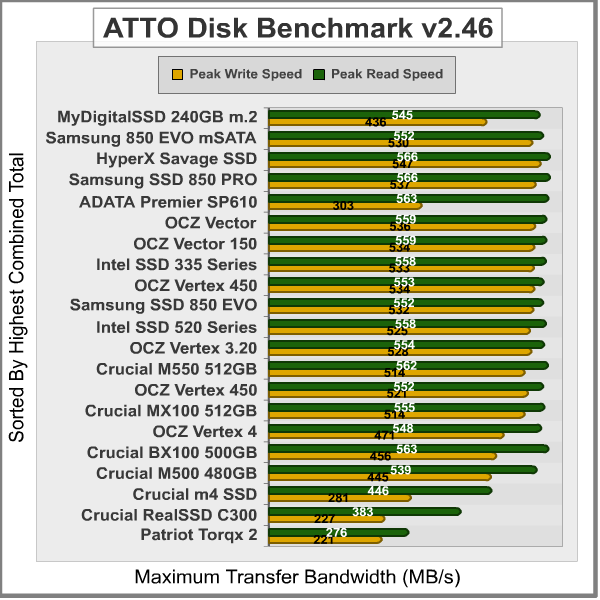
The MDM242-SB-256 m.2 drive provided to Benchmark Reviews for testing produced 545 MBps maximum read speeds that plateau when the file size reaches about 256KB, and 431 MBps peak write bandwidth that plateaus starting at 64KB. Both of these numbers meet or exceed the specs for this drive, which are 545MB/s for reads and 410MB/s for writes. While the sequential write speeds are a little below state-of-the-art, the read speeds are very good:
In the next section, Benchmark Reviews tests sequential performance using the CrystalDiskMark 3.0 software tool…
CrystalDiskMark 3.0 is a file transfer and operational bandwidth benchmark tool from Crystal Dew World that offers performance transfer speed results using sequential, 512KB random, and 4KB random samples. For our test results chart below, the 4KB 32-Queue Depth read and write performance was measured using a 1000MB space. CrystalDiskMark requires that an active partition be set on the drive being tested, and all drives are formatted with NTFS on the Intel P67 chipset configured to use AHCI-mode. Benchmark Reviews uses CrystalDiskMark to illustrate operational IOPS performance with multiple threads. In addition to our other tests, this benchmark allows us to determine operational bandwidth under heavy load.
CrystalDiskMark uses compressed data, so sequential file transfer speeds are reported lower than with other tools using uncompressed data. For this reason, we will concentrate on the operational IOPS performance in this section.
CrystalDiskMark 3.0 reports sequential speeds reaching 525.6MB/s reads and 169.7 MB/s writes. 512K test results reached 302.9MB/s read and 125.5 MB/s write performance. 4K tests produced 36.68MB/s read and 64.98MB/s write performance. While the sequential read speeds were again very good, sequential write speeds in this benchmark were poor; the 4K results were sub-par, and once the queue depth is expanded to 32, performance craters, with read speeds among the slowest we’ve ever seen in this benchmark.

240GB MyDigitalDiscount m.2 SSD CrystalDiskMarkResults
The chart below summarizes 4K random transfer speeds with a command queue depth of 32. The MDM242-SB-256 m.2 drive performs very poorly in this test, being handily beaten in read speeds by the Intel SSD 311 series, which was launched in 2011.
While most consumer workloads will never approach QD32, this drive’s performance in this test is still disappointing.

In the next section, we continue our testing using Iometer to measure input/output performance…
Iometer is an I/O subsystem measurement and characterization tool for single and clustered systems. Iometer does for a computer’s I/O subsystem what a dynamometer does for an engine: it measures performance under a controlled load. Iometer was originally developed by the Intel Corporation and formerly known as “Galileo”. Intel has discontinued work on Iometer, and has gifted it to the Open Source Development Lab (OSDL). There is currently a new version of Iometer in beta form, which adds several new test dimensions for SSDs.
Iometer is both a workload generator (that is, it performs I/O operations in order to stress the system) and a measurement tool (that is, it examines and records the performance of its I/O operations and their impact on the system). It can be configured to emulate the disk or network I/O load of any program or benchmark, or can be used to generate entirely synthetic I/O loads. It can generate and measure loads on single or multiple (networked) systems.
To measure random I/O response time as well as total I/O’s per second, Iometer is set to use 4KB file size chunks over a 100% random sequential distribution at a queue depth of 32 outstanding I/O’s per target. The tests are given a 50% read and 50% write distribution. While this pattern may not match traditional ‘server’ or ‘workstation’ profiles, it illustrates a single point of reference relative to our product field.
All of our SSD tests used Iometer 1.1.0 (build 08-Nov-2010) by Intel Corporation to measure IOPS performance. Iometer is configured to use 32 outstanding I/O’s per target and random 50/50 read/write distributionconfiguration: 4KB 100 Random 50-50 Read and Write.icf. The chart below illustrates combined random read and write IOPS over a 120-second Iometer test phase, where highest I/O total is preferred:

The 256GB Samsung SSD 850 PRO produced ourall-time best recorded score with 94,985 IOPS, but as with the CrystalDiskMark test, the MyDigitalDiscount m.2 Super Boot Drive turns in very low scores– in fact, the lowest scores we’ve ever recorded in this benchmark.
It bears mentioning, though, that even this poor result is much, much better than even the very fastest hard disk. For example, a Western Digital Velociraptor 1TB drive turns in less than 400 IOPS on this benchmark.
In our next section, we test linear read and write bandwidth performance and compare the speed of the ADATA SSD against several other top storage products using the AIDA64 Disk Benchmark.
Many enthusiasts are familiar with the Finalwire AIDA64 benchmark suite, but very few are aware of the Disk Benchmark tool available inside the program. The AIDA64 Disk Benchmark performs linear read and write bandwidth tests on each drive, and can be configured to use file chunk sizes up to 1MB (which speeds up testing and minimizes jitter in the waveform). Because of the full sector-by-sector nature of linear testing, Benchmark Reviews endorses this method for testing SSD products, as detailed in our Solid State Drive Benchmark Performance Testing article. One of the advantages SSDs have over traditional spinning-platter hard disks is much more consistent bandwidth: hard disk bandwidth drops off as the capacity draws linear read/write speed down into the inner-portion of the disk platter. AIDA64 Disk Benchmark does not require a partition to be present for testing, so all of our benchmarks are completed prior to drive formatting.
Linear disk benchmarks are superior bandwidth speed tools in my opinion, because they scan from the first physical sector to the last. A side affect of many linear write-performance test tools is that the data is erased as it writes to every sector on the drive. Normally this isn’t an issue, but it has been shown that partition table alignment will occasionally play a role in overall SSD performance (HDDs don’t suffer this problem).

We run the AIDA64 linear read and write tests with a 1M block size. Charted above, read performance on the 240GB MyDigitalDiscount m.2 SSD returned average speeds of 490.2MB/s. While most SSDs will show a slower initial read rate, the Super Boot Drive’s “slow section” is larger than most.
AIDA64 linear write-to tests were next…

As you can see from the graph above, the MDM242-SB-256’s write performance is very inconsistent, varying from 79MB/s to 156.8MB/s in this benchmark, with an average of 142.3MB/s. This “stuttering” on linear writes is a well-known characteristic of the Phison 9 series SSD controllers.
The chart below shows the average linear read and write bandwidth speeds for a cross-section of storage devices tested with AIDA64. The MyDigitalDiscount SSD turns in competitive linear read speeds, but the Phison controller’s slow write speeds place it at the very bottom of the pack.

Linear tests are an important tool for comparing bandwidth speed between storage products, serve to highlight the consistent-bandwidth advantages of SSDs, which don’t suffer the performance drop-off that HDDs do as the test proceeds away from the fast outer edge of the disk.
In the next section we use PCMark Vantage to test real-world performance…
PCMark Vantage is an objective hardware performance benchmark tool for PCs running 32- and 64-bit versions of Microsoft Windows 7. PCMark Vantage is well suited for benchmarking any type of Microsoft Windows 7 PC: from multimedia home entertainment systems and laptops, to dedicated workstations and high-end gaming rigs. Benchmark Reviews has decided to use the HDD Test Suite to demonstrate simulated real-world storage drive performance in this article.
PCMark Vantage runs eight different storage benchmarks, each with a specific purpose. Once testing is complete, results are given a PCMark score while and detailed results indicate actual transaction speeds. Held back by its poor write and IOPS performance, the 240GB MDM242-SB-256 SSD produced a total PCMark Vantage (secondary) HDD Test Suite score of 46107, barely competitive with SSDs from 3-4 years ago.

240GB MyDigitalDiscount m.2 SSD PCMark VantageResults
The Super Boot Drive’s combined score of 46107 is barely competitive with first-generation 256GB drives.

In the next section, I share my review conclusion and final product rating.
IMPORTANT: Although the rating and final score mentioned in this conclusion are made to be as objective as possible, please be advised that every author perceives these factors differently at various points in time. While we each do our best to ensure that all aspects of the product are considered, there are often times unforeseen market conditions and manufacturer changes which occur after publication that could render our rating obsolete. Please do not base any purchase solely on our conclusion, as it represents our product rating specifically for the product tested which may differ from future versions. Benchmark Reviews begins our conclusion with a short summary for each of the areas that we rate.
The MyDigitalDiscount MDM242-SB-256 m.2 SSD has competitive linear read and write performance– in some benchmarks– but that’s about it for the good news. It’s hobbled by very poor random write and IOPS performance, falling to the very bottom of the charts, with scores behind those of SSDs we tested many years ago. This is probably the fault of the Phison series 9 controller, which has a reputation for poor performance in these areas.
Now it’s certainly true that even the lackluster write and IOPS performance of the Super Boot Drive is far, far better than even the very best hard disk. For example, just under 20,000 I/O operations per second isn’t competitive with other SSDs, but it’s still about 50 times the performance of a 1TB Velociraptor drive. If you’ve moving up from a hard drive– even an array of very fast hard drives– the MyDigitalSSD MDM242-SB-256 will rock your world…but so would any other SSD.
That said, it’s not really fair to compare an SSD to a mechanical drive these days, and the truth is that you can get much better performance in the same capacity and price range from other vendors…as long as you’re willing to make do with a standard 2.5″ drive. At the time of this writing, I can’t find a less expensive m.2 drive in this capacity, so if you’re building an HTPC or other small form factor machine and really want to go m.2, this is certainly a product to consider, as its performance weaknesses will not be apparent in most consumer use.
Normally at this point I’d discuss the physical appearance and perceived construction quality of the item I was reviewing, but an m.2 drive is just a bare circuit board. Once installed, you’ll never see it, and it’s not interesting to look at if you do. The near-microscopic components on the board are all installed by automated equipment, resulting in a very high and consistent level of quality…at least from what I can see without trying to peel off labels.
The MyDigitalDiscount 240GB m.2 SSD is available for $99.99 (Amazon), which at the time of this review is the least expensive m.2 SSD in this capacity that I can find. However, bear in mind that this is a very “no-frills” package, without any supporting software or utilities (although you do get a tiny screwdriver and mounting screw in case you’ve lost the one supplied with your motherboard).
You can move up to a PCI-E m.2 drive for $30-$40 more, but in most cases the performance improvement won’t be noticeable outside the world of benchmarks, and of course you would want to make sure that your motherboard (a) has an m.2 slot, and (b) supports m.2 PCI-E.
And please note: SSDs are becoming commodity items, and competition has led to “price compression” at the lower end of the market: in many cases an entire class of drives can fall within a $15 window. Today’s “best buy” can become tomorrow’s “overpriced”, so it always behooves the careful buyer to do their research and select the best product for them based on current price and availability.
It’s true that in most consumer uses, the difference between the performance of this drive and others won’t be noticeable; on the other hand, why not get more performance for the same amount of money (albeit in a 2.5″ form factor)? At $15 less, this would be a more compelling product; as is, I can recommend it only for building SFF systems where m.2 capability is the most important factor.
+ Least expensive m.2 SSD in this capacity…for now.
+ Supports TRIM, NCQ, and RAID
+ 3-Year product warranty support
+ Very compact storage solution
+ Competitive linear read speeds
– Write and IOPS performance considerably below competitive products
– Bare-bones package doesn’t include any software
– Better performing 2.5″ SSDs available for the same price
- Performance: 7.25
- Appearance: 8.00
- Construction: 9.50
- Functionality: 9.00
- Value: 8.00
Recommended: Benchmark Reviews Seal of Approval.
COMMENT QUESTION: Which brand of SSD do you trust most?


One thought on “MyDigitalSSD 240GB SATA m.2 SSD Review”
Awesome review, thank you for all the details mate!!
Comments are closed.