By Tom Jaskulka
Manufacturer: SilverStone Tek Co., Ltd.
Product Name: Fortress FTZ01
Model Number: SST-FTZ01B
UPC: 084476101190
Price As Tested: $119.99 (Amazon | NewEgg)
Full Disclosure: The product sample used in this article has been provided bySilverStone Tek Co., Ltd.
There’s an interesting relationship between the Raven and Fortress series of cases from SilverStone. The Raven series is the experimental, anything goes arm of the engineering labs at SilverStone. Known for the sometimes (okay, usually) outlandish designs like the original RV-01, they also pioneer new techniques like 90-degree rotated motherboard trays and the use of exotic materials in chassis design. The Raven series gave us some of the most interesting approaches to computer cases in recent memory; each one has contained a design or feature that catches the attention of the current market. With the RV01, it was the 90-degree motherboard orientation. The RV02 upped the ante with 3x180mm AP fans, positioned directly in front of – well, everything. The resulting Fortress version (the FT02) is still widely regarded as an excellent air-cooled premium chassis. There have been five versions of the ATX Ravens, but the ITX form factor remained unaddressed until early 2015.
Generally, a few months after the Raven version is released, a premium Fortress version – sporting clean lines and a few tweaks here and there – will follow. This was the case with the RV01/FT01, RV02/FT02…well, you get the idea. When SilverStone released their first ITX Raven case – the RVZ01 – it was only a matter of time before the Fortress variant emerged. The RVZ01 was a unique chassis even by Raven standards; how would the FTZ01 manage to maintain that premium Fortress look and feel? Well, wrap it in a unibody aluminum exterior for starters. Follow along with Benchmark Reviews as we see what else has changed in the SilverStone Fortress FTZ01.
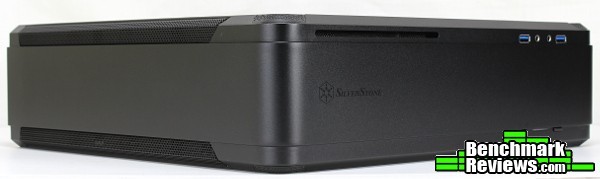
As usual, we’ll building a mini-ITX system in the FTZ01 and noting any peculiarities along the way. With a chassis this small, there’s bound to be some interesting decisions made inside. At the end, some experimental thermal testing is in order – can this Fortress take the heat? Read on to find out!
In early 2014, a revolutionary slim form factor case called the RVZ01 was created by SilverStone’s RAVEN team that exceeded and redefined what a slim HTPC or console-styled PC case could do. As a follow up, SilverStone created another new line called the Fortress Z to cater to enthusiasts with affinity for all metal design in slim form factor cases, thus the FTZ01 was born. Similar to RVZ01, the FTZ01 utilizes a PCI-E riser and custom designed fans to accommodate the biggest consumer graphics card on the market with superb air cooling performance and the ability to support liquid cooling*. Designed for use in either vertical or horizontal orientation, it can be placed comfortably in any space-constrained environment that requires a powerful PC. For those looking to build a premium, all-metal slim form factor PC, there is no better choice than the FTZ01.
-Source: FTZ01 Manual, SilverStone Tek Co., Ltd.
| Model No. | SST-FTZ01B (black) | |
| SST-FTZ01S (silver) | ||
| — | ||
| — | ||
| Material | Aluminum unibody frame, steel chassis | |
| Motherboard | Mini-DTX, Mini-ITX | |
| Multimedia | — | |
| Drive Bay | External | Slim slot-loading optical x 1 |
| — | ||
| Internal | 3.5” x 1, 2.5” x 3 | |
| Cooling System | Front | — |
| Rear | — | |
| Side | — | |
| Top | 1 x 120mm fan, 1500rpm 18dBA | |
| Bottom | 1 x 120mm fan, 1500rpm 18dBA 1 x 120mm fan slot |
|
| Internal | — | |
| Expansion Slot | 2 | |
| Front I/O Port | USB 3.0 x 2 audio x 1 MIC x 1 |
|
| Power Supply | SFX, SFX-L | |
| Operating system support | — | |
| Expansion Card | Support graphics card up to 13”, width restriction – 5.88” | |
| Limitation of CPU cooler | 83mm | |
| Limitation of PSU | — | |
| Net Weight | 4.6kg | |
| Dimension | 376mm (W) x 107mm (H) x 351mm (D), 14 liters | |
| Extra | Support Kensington locks | |
| Support VESA Mount | — | |
The FTZ01 isn’t technically the first mini-ITX Fortress – that honor belongs to the FT03 Mini, the only Fortress without a Raven counterpart (well, other than the mATX FT03). SilverStone went in a different direction with this chassis though, leaving the stack cooling behind and utilizing a PCI-E riser card to free up a little more room for long graphics cards. Let’s start with a look around the outside of this Fortress; we’ll see some of the differences as we go.

The front panel is comprised entirely of aluminum. In fact, this aluminum panel wraps around in a single piece to the “sides” (top/bottom in a vertical orientation). Not surprising, considering the luxurious touch often given to the Fortress series; impressive to see nonetheless. A cutout allows for an optical drive (albeit of the very rare slim slot-load variety). USB 3.0 / headphone / mic jacks sit on one side of the panel, and the power/reset switches (as well as power/HDD activity LEDs) adorn the other.

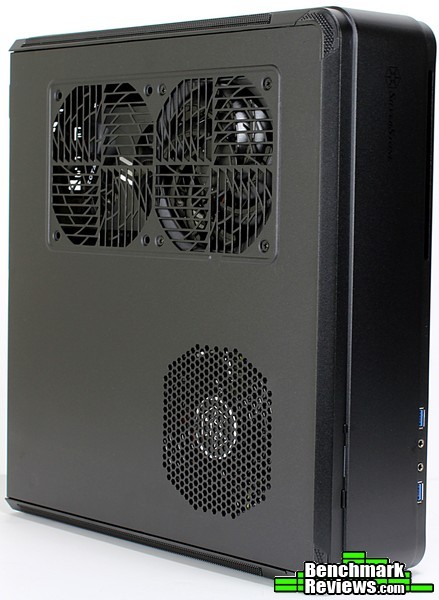
While the Fortress FTZ01 can be used in either vertical or horizontal orientations, I suspect most users would opt to use this chassis vertically – if only to keep the fan mounts and intake vents on these panels clear (rubber feet are included in the accessory package so the chassis would still have a little airflow if used horizontally). Looking at the panel above, the vaguely octagonal-shaped mesh up top is for the PSU while the two 120mm fan mounts underneath feed fresh air to the GPU area. A single 120mm slim fan is mounted here (two are included with the FTZ01).
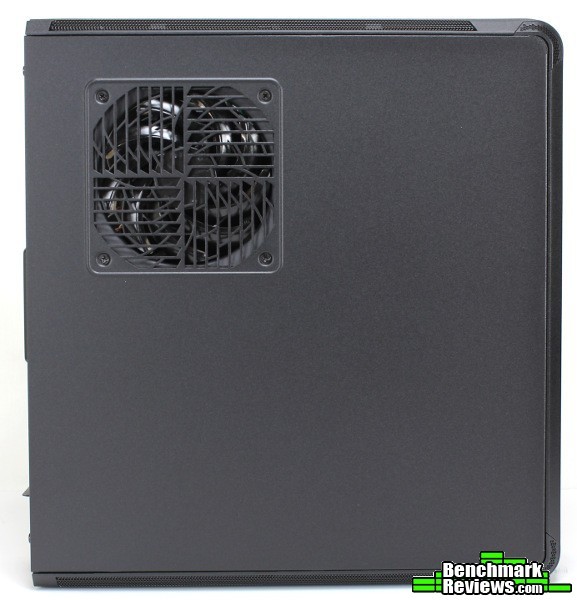
The other 120mm slim fan is mounted above the CPU compartment. This panel is otherwise featureless, although take note of the mesh strips on top and bottom…
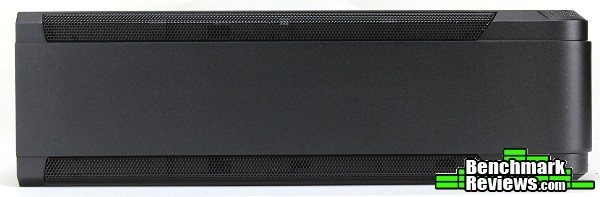
Those mesh strips are the main “exhausts” for the chassis. The Raven version makes this a little more obvious, but the Fortress’ solution is much more elegant in my opinion. Underneath the aluminum, the FTZ01’s steel frame is almost completely permeated by a series of circular holes.

The opposite side of the Fortress FTZ01 appears exactly the same. It even has the same series of circular holes underneath, to allow the heated air from a graphics card to escape.

The back of the FTZ01 shows the same layout as the Raven, with the double-width GPU area turned on its side and facing “down.” No thumbscrews here – the top access panel is fastened with two regular cross-tip screws. A Kensington lock slot keeps everything secure as an option (something SilverStone is pretty good at including by default on their cases).
The internal layout – while the same as the Raven RVZ01 – still takes a little getting used to.

In the photo above, the bracket in the lower left corner holds the PSU (and an optional 3.5″ hard drive). Just above that is the space for a slim, slot-load optical drive, with two 2.5″ drive mount locations sharing the same plastic bracket that spans the “top” (which is the support for the graphics card). A portion of the PCI-Ex16 riser card can be seen in the middle, with the motherboard tray positioned in the lower right corner.

It’s a bit busy inside initially; thankfully it’s pretty straightforward once everything is removed. The GPU/HDD/ODD bracket removes as essentially one piece with the PSU/3.5″ HDD bracket easily removed as well. SilverStone includes quite a few accessories with the Fortress FTZ01 – vertical stands, a fan splitter, GPU support bracket and fine mesh magnetic filters (don’t forget the rubber feet and various screws) complete the package.

The power and activity LEDs are combined into a single blue bar with a hint of a “KITT” look (no scanning, unfortunately!). It’s pretty subtle in use and fits the chassis well. The power and reset buttons flank the LED, and each have a precise, tactile action to them.

Two 120mm slim fans (positioned over the CPU and GPU ventilation) feed cool air directly to the hottest components in the Fortress.

The included magnetic fan filters fit nicely over the fan mounts. It may not be the most integrated/hidden solution (although you could always mount them in between the panel and fan internally), but it certainly makes it simple to swap them out for cleaning.
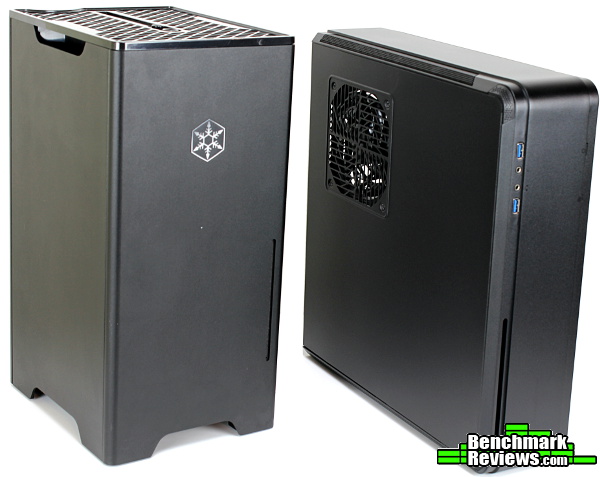
I thought it would be interesting to show a comparison to the first mini-ITX Fortress, even though the two chassis take two entirely different approaches to design. They’re very similar in total volume with the FT03 Mini occupying 17.6L vs the 14L of the FTZ01; however, each have quite different footprints (especially depending on the orientation of the FTZ01). The FT03 Mini will occupy a 9″ x 7.5″ (~230mm x 190mm) due to it’s mostly square base and vertical-only orientation.
The FTZ01, if used vertically, is quite a bit narrower at 107mm, but you’ll need 350mm of space to fit the depth of the chassis. Horizontally, that’s a 351 x 376mm area that you’ll need to free up on your desk (about the size of an XL mouse pad).
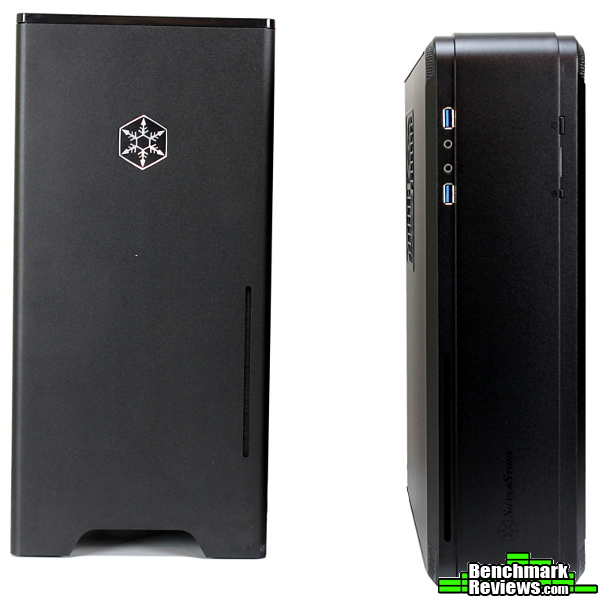
They both offer similar part compatibility with the FTZ01 accommodating slightly larger GPUs. The FT03 Mini uses only a single 140mm fan to provide cooling for the entire chassis – “stack effect” orientation or not, I’m willing to bet the Fortress FTZ01 has a greater potential for cooling overall, even if it may not be as efficient. Each component in the FT03 Mini shares the same compartment, where the FTZ01 is separated quite neatly into compartments containing the hottest components (CPU, GPU, PSU). They both have very solid aluminum exteriors, with the typical SilverStone quality permeating throughout. Overall, they’re two different chassis for two different tastes – I’m not sure if it would be fair to say one is better than the other, but the FTZ01 seems like an appropriately advanced version of the previous Fortress cases.
Now for the fun part! Building a system in a tiny, unique case like the FTZ01 is sure to be interesting at the very least. Let’s see if we can uncover any potential issues that may not be obvious at first glance.

We’ve already taken the panels off and looked inside so let’s get right to the assembly. First up: the GPU. Wait a second – isn’t that a bit backwards from most builds!? I mean, we haven’t even installed the motherboard yet, why the GPU? While you don’t have to start with the GPU, we might as well get it installed in its bracket right away (when the time comes, the whole thing installs as one piece into the PCI-E x16 slot). The entire thing lifts out, and a small PCI-E spacer installs onto the GPU.

From there, the GPU+spacer slots neatly into the 90-degree riser. Two cross-tip screws secure the graphics card in place. Depending on the design of the graphics card you choose, the included GPU bracket accessory installs along the outside edge of the card to keep it supported in a horizontal orientation (the 970 pictured above is pretty short, and wouldn’t really benefit – it’s a wonderful addition for longer cards to prevent PCBs from warping over time though; SilverStone is one of the few companies that still includes a way to brace GPUs in their cases). With this done, the entire assembly can be set aside for later installation.
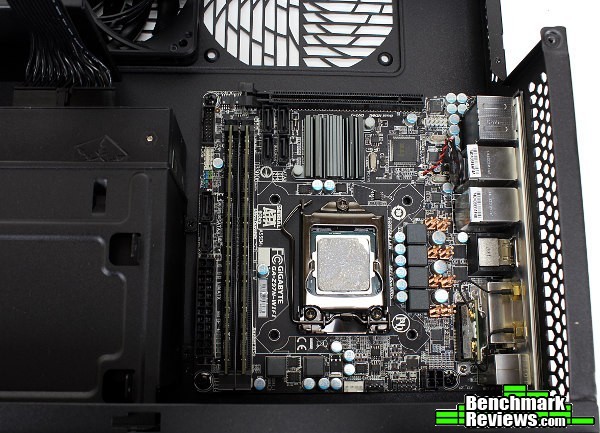
To be fair, the FTZ01 manual starts the system assembly in the same place most (normal) builders would start – the motherboard. In fact, they take it a step further and walk you through removing all of the internal brackets first to free up room. Those are just suggestions, though, right? Well (surprising perhaps no-one), it might be a good idea to read the manual before you dig into a chassis like the FTZ01. Of course, in my infinite wisdom and years of experience stubborn desire to see if I can do it a different way the hard way, I decided to just start cramming components in. The motherboard barely clears the PSU bracket – you may want to take that out…especially since you’ll have to in order to install the power supply anyway.

Alright, you win SilverStone, but this is the last time! Four screws later the PSU bracket removes easily, and a SFX-L unit gets fastened to the bracket – remember to plug in the 90-degree power cable! Now to reinstall the bracket with the power supply in place and start connecting some cables…and there’s another bracket in the way. Touché. (Fine! I’ll read the manual! I’m sorry!!)

See, that’s a whole lot easier. Granted, you probably wouldn’t have to remove that 2.5″ drive bracket if you didn’t want to or if you were using a non-modular PSU, but it certainly frees up a lot of room. As a side note, you’d want to install a 3.5″ hard drive on top of the PSU bracket before fastening it down (you won’t be able to access two of the HDD mounting points otherwise). If you’re following along in the manual, now’s a good time to attach any SATA cables or other motherboard connections.

Routing those cables gives us a quick opportunity to look at the ventilated interior of the FTZ01. Underneath the two sides of that solid one-piece aluminum exterior, the frame is actually quite open. You can’t mount any fans here, but the positive pressure from the included fans should force most of the hot air out of the chassis through these vents anyway. If nothing else, they make quick tie-down points to keep cables out of spinning fans, as that 4-pin CPU cable will need to stretch along the top edge of the motherboard.
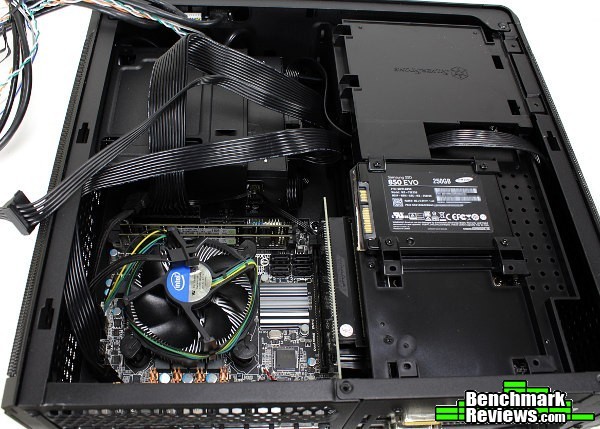
With the GPU bracket re-installed, 2.5″ drives install along the top. You’ll have to find a way to prop up thin SSDs to fasten them down (or just install them with the GPU in an earlier step – no points to those that already saw this mentioned in the manual…speaking of which, you did attach the GPU power cables before installing this bracket, right?), which makes me wish for a tool-less option here. SSDs are light, contain no moving parts, and can be installed virtually anywhere – why can’t a simple retention clip take the place of those four screws?

Most of the connectors (other than the graphics card) are easily accessible even with everything installed, so it’s a simple matter to hook everything up.

You’ll have to get a bit creative though to keep cables from getting stuck in any spinning fans. A low-profile aftermarket cooler like SilverStone’s NT06 or AR06 might be a decent option if only to be provide a little more fin surface area to keep cables away from the CPU fan. SilverStone includes a fan splitter to connect the two included slim 120mm fans to the motherboard (necessary for most, as mini-ITX boards commonly have only a single spare fan header aside from the CPU fan). With the Gigabyte Z97N-Wifi board pictured, that fan header was positioned in such a way to make it a little difficult to keep those chassis fan cables out of the Intel stock cooler fan. Carefully replacing the side panel ensured it wasn’t too much of an issue, although some dedicated tie-down points wouldn’t go amiss.

The completed package’s clean lines belie the advanced interior. I wouldn’t suggest the FTZ01 for a beginning system builder; however, if you read the manual (*ahem*) it’s not as bad as it might look at first glance. The above orientation places the GPU at the bottom in a somewhat-typical ATX format, although I noticed after I took these photos that SilverStone generally depicts the FTZ01 with the GPU section on top…
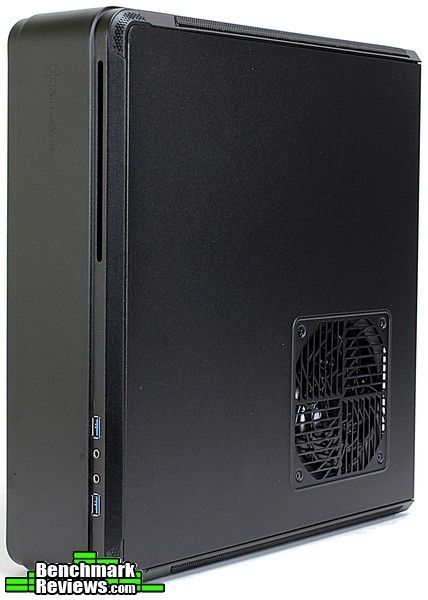
…like so. Flipping the chassis over places the GPU on the left side up top, with the motherboard/CPU occupying the lower right. Interestingly enough, if you were to trace the barriers formed by the top edge, GPU bracket, PCI-E riser and bottom edge it would form a decently-accurate figure of the letter “Z”. Perhaps the model number isn’t so much an accident? Either way, the two “hot zones” formed by the GPU / CPU areas are pretty contained, and the stock photos got me thinking.
How much of a difference does orientation make in the FTZ01? Is there a preferred way to use this case? Graphics cards generally pump out between 150-200 watts, so unless you’ve managed to source a mini-ITX AM3+ board that can power an FX-9590 wouldn’t it make sense to keep the warmer component up top? After all, heat rises, right? Sounds like something that should be pretty easy to test…
Small cases generally require some due diligence in selecting components. While larger cases have the volume and airflow to accommodate practically anything, ITX cases usually won’t have that luxury. An i3 or i5 seem to be a shoe-in for a processor, and even with an i5 overclocking is probably out of the picture as there just isn’t room for massive cooling (APUs, while getting better over time, still have a 100W thermal budget to work with. A Haswell i3 will cut that in half or more, keeping heat and noise in check even on a stock cooler).
Similarly, blower-style GPUs take the responsibility of cooling on themselves rather than leaving that to the chassis. This makes them a good fit for space-constrained enclosures (we’ll uhh…forget about the R9 290 reference cooler…), as the surrounding components won’t have to deal with the 150W+ of heat that is shed from a typical GPU. If someone were to ask me what type of system to build in the SilverStone FTZ01, that’s what I’d recommend.
Are you handicapping yourself if you don’t follow that advice? Just what can you get away with in a chassis as small as the FTZ01? While I didn’t have time to test all possible iterations out there, I at least wanted to see how an open-air, twin fan Nvidia GTX970 made by Zotac would perform in this Fortress – and if it mattered if it was up or down!
-
Motherboard: Gigabyte Z97N-Wifi
-
System Memory: 2x4GB Samsung DDR3
-
Processor: Intel Core i5-4790K @ 4.0 GHz / Stock cooler
-
Audio: On-board
-
Video: Zotac GTX 970, no overclock, custom fan curve
-
Disk Drive 1: Samsung EVO 250GB
-
Enclosure: SilverStone FTZ01
-
PSU: SilverStone 500W SFX-L
-
Monitor: 1920×1080 27″ LCD
-
Operating System: Windows 7 Ultimate 64-bit
So – does the orientation in which the FTZ01 is used really make a difference? Should users put the hot GPU up top, or keep the CPU in its usual spot above the graphics card? After idling for a while to normalize temperatures inside the case, a few benchmarks should heat things up a bit.
| “CPU Top” Orientation | CPU Temp | GPU Temp |
| 3DMark Demo/Benchmark | 70C | 71C |
| Unigine Heaven | ~52C (max spike 57C) | 72C |
| Unigine Valley | ~53C (max spike 59C) | 72C |
With the FTZ01 in a fairly normal vertical orientation shown above (motherboard/CPU above the GPU) and a custom fan curve to limit any throttling, a 3DMark demo/benchmark run left the CPU running to a peak of 70C (it would vary depending on the portion of the benchmark – the combo test at the end was the most taxing). The GPU wasn’t much cooler – in fact, even being below and essentially separated from the rest of the components, the Zotac 970 reached a temp of 71C. The graphics-heavy Unigine benchmarks saw similar temps but were easier on the CPU (max spikes hit 59C, but generally hovered around 52C across all cores).
| “GPU Top” Orientation | CPU Temp | GPU Temp |
| 3DMark Demo/Benchmark | 72C | 70C |
| Unigine Heaven | ~52C (max spike 60C) | 72C |
| Unigine Valley | ~53C (max spike 62C) | 73C |
After letting everything settle, the FTZ01 was flipped upside down and the same tests were run again. I expected the above orientation to have better temps across the board – after all, heat rises right? The CPU wasn’t putting out as much heat overall as the GTX970, so theoretically chassis temps should be better?
Well, that’s what I thought. Turns out, every temperature was higher. “Well of course,” you say, “the chassis was already warmed up from the previous tests! No WONDER it’s warmer!” That’s just it – I performed this sequence of testing first! Even in a pre-warmed case, placing the hotter GPU on the bottom resulted in cooler temperatures.

Didn’t see that one coming. To be fair, the temperatures are close enough to really be a wash, but the slight trend was undeniable. I’d bet extensive testing would probably have the two orientations within a degree or two of each other though – the two compartments inside seem to be thermally isolated from each other enough to render the orientation essentially irrelevant. In the end, a blower style cooler (like the NVTTM reference cooler pictured above) is still a better fit for the FTZ01 in my opinion (if only for the quieter overall operation), but it’s nice to know this Fortress can handle some heat as well.
I enjoyed my time with the FTZ01. I was originally excited to see manufacturers branch out in mini-ITX case design by utilizing a PCI-E riser like SilverStone did with the RVZ01. Just think about the possible case designs one could enable by using a flexible PCI-E ribbon… maybe that’s a few Ravens down the line yet. Still, there are very few cases on the market this small that allow for full-size GPUs in such a small overall form factor. Add the premium Fortress treatment and it’s easy to be impressed with the FTZ01.
It has that typical SilverStone quality and tenacious distaste for anything tool-less, although somehow it wouldn’t be quite the same if you didn’t have to pull out your screwdriver to put it together. (Just in case, some tool-less 2.5″ drive mounts would be incredible!) You may not like the minimalist design at first (there’s always the RVZ01), but you can’t deny that unibody exterior is well put together. It’s clear this Fortress is a notch above other chassis of its type. Other than restricted water-cooling options (which SilverStone has apparently thought of) and my preference for tool-less SSD trays, I’m not sure if I could come up with any negatives that can’t be explained by its diminutive size and purpose (a dual GPU monster case this is not). I think it’s perfectly capable of housing a typical gaming system in a compact form factor with finesse.

I was pretty impressed with the Fortress FTZ01’s performance. I couldn’t fit high-end coolers in it to really unlock the potential of the i5-4790K like some other (larger) mini-ITX cases, but even with the stock cooler things stayed relatively quiet and cool. The GPU I used performed the same as in other small cases, and while I ran out of time I bet swapping the included fan from the CPU area down to the GPU intake would keep things even more manageable. Blower-style graphics cards would still be the ideal match, but the FTZ01 handled a non-optimized build surprisingly well.
Appearance has always been a strong point of the Fortress series – that is, if you like the monolith/minimalist aesthetic. I’m one of those people that leans more towards the Raven side of design, although I have to admit this Fortress is an eye catcher. It admittedly took a little while to grow on me (I thought it looked a bit too much like a VCR at first), but when you actually work with the chassis you begin to really appreciate the fine details that showcase what the Fortress series is known for. Just stare at that unbroken front/side panel for a while, and realize how rare that really is…
Speaking of one-piece panels, the construction of the FTZ01 is top-notch (as one would expect from SilverStone). While some of the internals still use some plastic, I never really got the impression of anything being flimsy. There’s a reason why Fortress FT02’s are still expensive if you can find them – SilverStone is known for their craftsmanship, and I don’t think the FTZ01 is a detriment to that reputation at all.
All things considered, the FTZ01 has a good amount of functionality. There’s only so much you can expect from a small form factor case, but even so this Fortress still accommodates 3×2.5″ drives, a 3.5″ HDD, optical (even if it’s only the slim slot-load type), any GPU on the market and quite a few aftermarket C-type heatsinks. You could even cram in some of SilverStone’s new thin AIO coolers if you were so inclined. All wrapped up in a sturdy, one-piece aluminum exterior in a chassis that can be used in both vertical and horizontal orientations. Not bad for something 14L in volume. I still would like to see those 2.5″ drive mounts go tool-less though…
The Fortress series always carried a premium over their Raven counterparts. The refined style and extensive use of metals have a cost, and they usually run at least 20% more than the Raven series. As of Fall 2015, the Fortress FTZ01 could be found online for $119.99 (Amazon | NewEgg). It’ll require a few sacrifices (SFX power supplies only, water cooling dubious, blower-style GPUs ideal), but chassis this small have always had compromises. The functionality, appearance and overall build quality of the FTZ01 is worth the price of admission if you require something with a bit more sophistication. The Raven version is of course a better value, but it comes with an entirely different aesthetic – I’d say the Fortress is priced well for a unique case in a still-somewhat-niche category.
I wasn’t entirely sure what to expect with the FTZ01, and I ended up pleasantly surprised. There’s a lot contained within the tiny frame of this Fortress. If you’re looking to build a typical one-GPU ITX gaming system in as small of a case as you can, the Fortress FTZ01 is a very compelling option with a premium touch. Knowing SilverStone, even a case as refined as the FTZ01 won’t go untouched for long; something tells me they aren’t done yet…
+ Premium-feel throughout
+ Unique interior layout
+ Hot components seem thermally separated
+ Lots of aluminum!
+ Fits full-size GPUs
+ Decent performance
+ Sophisticated looks
+ Two included slim fans, fan splitter
– Needs some tool-less 2.5″ drive trays…
– Could use some more tie-downs or cable routing channels around the motherboard
– SFX PSU required; only a few currently on the market
– Somebody needs to make some aluminum feet / an aluminum stand for this case!
-
Performance: 8.25
-
Appearance: 9.25
-
Construction: 9.50
-
Functionality: 8.50
-
Value: 8.25


3 thoughts on “SilverStone Fortress FTZ01 Mini-ITX Case Review”
Excellent and informative! I’ll have this article close by for my first build!
Silly question (pc building newbie here) – When using the NT06-Pro cooler, does this mean due to cooler clearance that the supplied case fan gets removed in that area?
Hey James, glad you found the article helpful! Yes, you’ll have to remove that case fan in order to fit the NT06-Pro cooler (82mm “tall”), as the FTZ01 only has about 83mm from the top of the CPU to the side panel. Relocating that fan to the GPU area should keep everything flowing nicely! If you want to double-check all clearances before starting, SilverStone usually does a really good job of putting all of that information in their manuals (start at page 16 for CPU coolers). Have fun with your build!
Thanks again! I did have a look at the manual in your link. The picture showed that the clearance was covering the fan, but it just didn’t have it in words about the fan! I had to make sure. It will be good for a second gpu fan.
🙂
Comments are closed.