By Jason Maxfield
Manufacturer: Antec, Inc.
Product Name: GX505 Window SC
UPC: 0761345155076
Price As Tested: $69.99 (Amazon)
Full Disclosure: The product sample used in this article has been provided by Antec
Antec was kind enough to ship me their GX505 Window SC mid-tower case to review. The Antec GX505 is part of the GX series of cases designed for gamers on a budget. The GX505 is a slight revision of the GX500 case. The main difference is the all new front and top panels, and a built-in fan controller switch.
There are also two variants to the GX505 design. There is the GX505 Window, and the GX505 Window SC, which is the version I’ll be reviewing. The difference is the GX505 Window has a side mount 120mm fan option on the window, and the Window SC version just has a window.
In this article for Benchmark Reviews, I’ll be going over all the features of the GX505 Window SC and see if it really is up to the job of being a budget gaming PC case.
| Model | GX505 Window SC |
| UPC | 0-761345-15507-6 |
| Unit Dimensions | 19.0”(D) x 8.1″ (W) x 18.5″(H) 481mm (D) x205 mm (W) x 469 mm (H) |
| Maximum video card size | Up to 380 mm / 14.95″ long |
| Water cooling support | Rear water cooling grommets |
| Case Type | Mid-Tower |
| Front Ports | 2 x USB 3.0 Audio In / OutFan ControlPower / Reset |
| Drive Bays | 2 x 5.25″ tool-less drive bays 4 x 3.5” HDD1 x 2.5” SSD /HDD |
| Maximum CPU Cooler Height | up to 158 mm |
| Motherboard Support | Standard ATX, microATX, Mini-ITX |
| CPU Cutout | Enlarged CPU Cutout |
| Weight | Net Weight: 10.8 lbs / 4.8 Kg
Gross Weight: 13.5 lbs / 5.8 Kg |
| Expansion Slots | 7 expansion slots |
Features and specifications taken from Antec’s website.
After opening the box, we see the Antec GX505 sandwiched in between two pieces of styrofoam and wrapped with a giant plastic bag for protection.

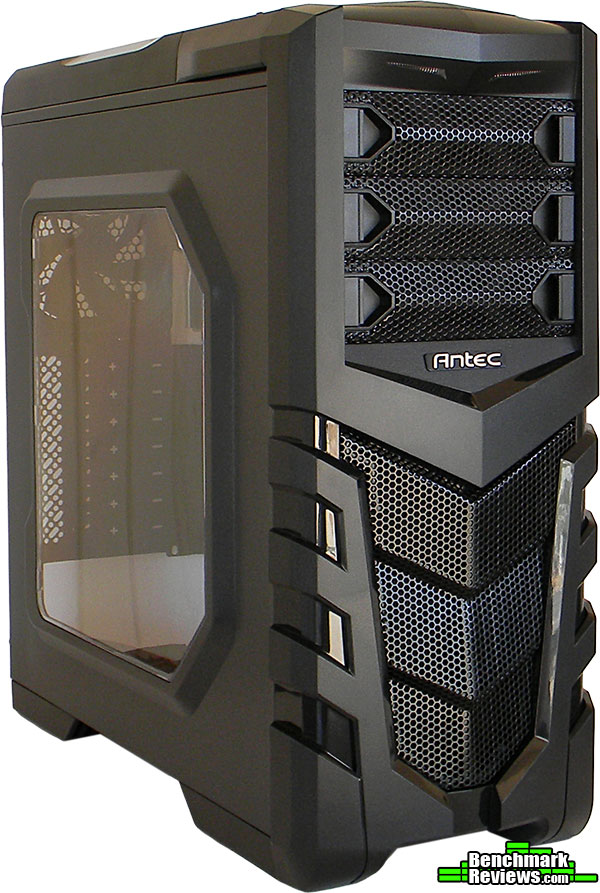
After we get rid of all the packaging, we are left with a shiny new Antec GX505 Window SC. This is the front of the case with the bold new design and hefty mesh grille. We can see the Antec logo and three 5.25″ bay slots. Just above the 5.25″ bays you can see the two LED lights.

Here is the back-side of the Antec GX505 Window SC. We have a pre-installed 120mm fan, some grommet pass through holes, 7 PCI expansion slots, and a bottom mount PSU.

This is the window side of the Antec GX505. The window allows a good view of your components inside the case. You also have a bit of a punched out panel on the side to give a bit more room for CPU heat sink clearance.

This is the cable management side of the GX505 Window SC. You also have a removable side panel with the same shape punched out to help with cable clearance when building your PC.

At the top of the Antec GX505 Window SC, you have a very stylish venting cover on the back end for the two pre-installed 120mm fans. At the front, we have your power, reset, headphone, mic, HDD activity LED, fan controller, and two USB 3.0 ports. The audio and USB ports have rubber covers inserted into them to help keep dust out. The power switch has a blue LED indicator to let you know when your PC is powered on.

We have a look at the belly of the GX505 Window SC, and you’ll notice rubber feet and a PSU fan filter. Right in the middle you’ll see four holes that are slightly indented into the interior of the chassis, and this is for mounting an optional 2.5″ SSD drive.
Now we’ll take a look at the interior of the Antec GX505 Window SC.

Here is everything that is included with the Antec GX505 Window SC. You have a product overview pamphlet, GX505 window installation guide, product warranty information, and all the hardware needed to mount everything inside the case.
You’ll notice the GX505 Window SC uses snap on rails, and there is optional foam washers you can use to help keep vibration down with any HDD drives. They also included some twist ties for cable management. Normally I expect to see zip ties. This is kind of an odd choice even when this is a budget case.

I’ve taken the panels off of the GX505 Window SC so we can get a good look at what we are dealing with. We have two 5.25″ bays, with the third bay dedicated to a 3.5″ floppy drive. I’m a bit stumped as to why Antec would include this. I do not know anyone that uses floppy drives anymore.
Moving on, You’ll notice the two 5.25″ bays are tool-less design. Below that you have an open space, which allows enough room for graphics cards up to 15″ in length. The cage at the bottom allows the installation of four 3.5″ HDD drives and there is a mount on top of the cage for one 2.5″ SSD.
The rest of the case is pretty standard. You can mount ATX, M-ATX, and M-ITX motherboards. You have slots along the side for cable management and 7 PCI expansion slots.

On the other side of the Antec GX505 Window SC you can see the cable management section. At the bottom section of the case is punched in, which gives you more space for your cables. There are a decent number of tie down locations, and the size of the slots for cables is good too.
You might notice some white labels, and these are for your fan controller. There is a switch on the top of the case that gives you the ability to run the fans on low, high, or turn them off completely. Although the later, I wouldn’t recommend.
Then you have the usual assortment of front panel cables, power, HDD LED, reset, audio, and USB 3.0.

This is the front fan filter. This filter is snapped into the front panel of the GX505 Window SC. I’m surprised that Antec designed it this way. It’s inconvenient to have to pull the front panel off just to get at the filter for cleaning.

Speaking of the front panel, here it is. The front panel just snaps off, and the filter is held in place by 4 plastic tabs. There is also a power lead that connects the front panel blue LED light. This is another bothersome feature. If you decide to use the LED you are going to have to unplug it every time you want to clean the filter. This is the PSU filter for the GX505 Window SC. It comes off by pulling the plastic tab down slightly then pulling it straight back out of the chassis.

Here’s what the GX505 Window SC looks like without the front panel on. You can see mount locations for two 120mm fans. Antec put some pegs on the diagonal so you only need to use 2 screws per fan.

After taking the top venting panel off, you can see the two pre-installed 120mm fans. The fans are above the top of the chassis just enough so that they are about flush with the interior roof of the case.

Removing the top panel is easy. You do need to use a screw driver to remove the 2 screws that hold it in place, but once they are removed you just slide the panel toward the rear of the case and lift up.
In this section of the review I want to go into some details about building with the Antec GX505 Window SC.
Here is a close up shot of the USB ports, and the tiny little HDD activity LED along the bottom of the photo. At the top is the fan controller switch. It’s a simple 3-way switch. The options are low, off, and high. All the fan leads are labeled so you’ll know exactly what fan is connected and which ones are not.

There are a few things I thought I might mention about the 5.25″ drive bays. As I mentioned before, you have 3 bays available, but the 3rd one is dedicated to a 3.5″ floppy drive. I think Antec really could of ditched this in favor of another 5.25″ bay, or better yet, another 2.5″ SSD drive. Also, at the very top of the case, you can see all the front panel wires spilling out of the area where the top most 5.25″ drive bay is. That mess of wires is going to have to be dealt with if you want to use that top bay. The wires are clumped up and get in the way of the optical drive I tried to install to test clearance.
Connecting optical drives is easy. The white knobs simply screw into the mounting holes on the side of the optical drive. Aligning the drives to the front of the panel should be a breeze since the knobs can slide a few inches in either direction.
The HDD cage at the bottom has enough room for four 3.5″ HDD drives. Sadly, instead of using trays, so that you could use either HDD or SSD drives, we have a snap-on rail system. The rails are imprinted with an ‘R’ and an ‘L’ for which side of the HDD they are to be mounted on. The rails snap on easy enough, then slide in and click into place snuggly. It is a very simple system that allows you to get your HDD drives installed very quickly.
The lone 2.5″ SSD mount on top of the HDD cage doesn’t seem to have been thought out very well. Mounting an SSD requires 2 screws to lock it into place. Which kind of ruins the point of tool-less with all the other drives.
Lastly, on the bottom of the chassis you have a mounting location for another 2.5″ SSD drive. This spot here really seems like it doesn’t belong here. I’ve seen the space behind the PSU used for this before, but with the mounts squarely in the middle of the chassis, it looks like cables connecting to the back of the SSD might get a bit cramped since that space directly behind it is the main area of the cable management space. I think if Antec moved the mounting holes another inch toward the windowed side of the chassis it could lesson those potential problems.

First thing I’d like to mention is the PCI expansion slots. I’m really disappointed in Antec for this one. The PCI slots are the break away type, so once you remove a slot you’ll have to find another PCI bracket if you change configurations and need to cover any of the slots back up again.
Everything else here is fine. Antec has pre-installed standoffs for a full ATX motherboard. The CPU cut-out area of the motherboard tray is generous and shouldn’t get in the way of any aftermarket CPU heat sinks you’ll want to use. I could not find any official CPU heat sink clearance data. But judging from the case dimensions you are not going to stuff anything too large into this case.
There is water cooling grommets just above the 120mm exhaust fan, but the only type of cooler I can feasibly see being used is a 120mm unit mounted in the exhaust fan location. There is just absolutely no clearance in the top of this case to run a 240mm unit. You can tell just by taking a look at where the top mounted fans are sitting in the case compared to where the motherboard input/output shield is going to be mounted. The motherboard sits very high up in the case. If Antec had made this case just another inch or so taller, that option would probably work.
The PSU mounting location is fairly standard. You can mount the PSU with the fan facing down or up. Antec included some nice foam rails for the PSU to sit on giving it some clearance from the bottom of the chassis so you do not scratch your PSU or the case.
Overall I found the Antec GX505 Window SC to be an adequate budget gaming case. There are some issues with the design that I personally did not like. The inclusion of the 3.5″ floppy drive bay is a waste of space. Antec should of used this space for another 2.5″ SSD bay instead.
I found the use of twist ties and pop out PCI slots to be a bit on the cheap side. I’ve reviewed other cases in this price range that did not skimp out on the zip ties or the PCI brackets.
Also, this case is strictly for those that are using air cooling. It is a budget case, so that is fine. If you really wanted to set up a case for water cooling there are numerous other options that will allow you to do that properly, and the GX505 Window SC is not one of those options.
On the plus side of things, the amount of drive options and inclusion of 3 pre-installed 120mm fans should suffice for most gaming set ups. I personally only use 2 HDD drives and 1 optical drive for my gaming PC.
The Antec GX505 Window SC is also very light. It weighs in at 10.8 pounds. This may not matter to some, but for others after building a PC, the weight can add up, and thankfully this case is not going to add that much more to the total.
The performance of the Antec GX505 Window SC should be fine for anyone needing an inexpensive budget gaming case. I personally think there are other cases that do better in this price range, but it will get the job done.
The GX505 Window SC aesthetic redesigned panels look pretty cool. I think it’s a big improvement over the GX500. Granted aesthetics do little for a cases function, but when all other things are equal, the looks of a case can be the clincher.
The construction of the Antec GX505 Window SC is good. Considering how light the case is, it doesn’t feel flimsy at all.
The functionality of the Antec GX505 Window SC is a bit of a mixed bag. The inclusion of a 3.5″ floppy drive mount, and the HDD rail system doesn’t allow the use of 2.5″ SSD’s. The mounting for the two possible SSD locations are not tool-less either, which isn’t terrible, but Antec went through the trouble to design the rest of the case to be tool-less then dropped the ball with the SSD drive mounting systems.
Then you have the nagging issue of the front fan filter. Every time you want to clean it you are going to have to remove the front panel to get at the filter. Also, if you use the front panel LED, you are going to have to possibly unplug it, or be very careful not to yank the wire and break it.
Available online for $69.99 (Amazon), the Antec GX505 Window SC is a competitive value in the budget segment of cases they are marketing it against. Retail price is likely to be lower, but I can’t say for sure.
Antec did cheap out a bit with the twist ties and knock-out PCI expansion slots, which makes me feel the value of the case should be slightly less. Granted, twist ties are probably not a huge deal to others, but I really did not like the cheap knock-out PCI expansion slots.
I have used a few different Antec cases for personal PC’s, and this one is hard for me to recommend. The GX505 Window SC does everything it’s suppose to do, but that’s it. It’s a normal case with some cool looking aesthetic panels.
If you just need a basic case that happens to look cool, and do not mind the faults of this case, then I’d say check it out. Otherwise, I would pass on this one, and look at other cases in this price range that do things just a bit better than the Antec GX505 Window SC.
+Built-in fan controller
+Light weight case
+Dust covers for front audio and USB ports
-Front dust filter is annoying to get to
-Wasted space for a 3.5″ floppy drive
-2.5″ drive installation is not tool-less
-
Performance: 7.50
-
Appearance: 8.25
-
Construction: 8.75
-
Functionality: 7.00
-
Value: 8.00


20 thoughts on “Antec GX505 Window SC Mid-Tower Case Review”
Have you considered the possibility that what you call a 3.5″ floppy slot is actually where most folks would mount a 3.5″ card reader?
You could mount a 3.5″ card reader there. You can also mount a 3.5″ card reader in a 5.25″ slot, since you can get adapters, or even have adapters already included with a 3.5″ card reader. With the brackets already part of the cage, that space is limited in function, and that is my main gripe about the 3.5″ slot.
I am unable to screw my GPU (zotac GTX 960) after mounting on the PCI slot. How to fix the GPU in that position any solution?
This particular case doesn’t have brackets screwed on like most other cases. The brackets have to be popped out to place anything in the corresponding PCI slots lining up with your motherboard. Antec did include screws for the PCI mounting locations once the tabs are popped out.
Sorry for the late response, I never received the alert in my email for this comment.
Horrible review. 5.25 is not just for floppy smh. and the ssd spot use thumb screws and its still tool less. just saying.
Mike, I never said 5.25 was just for floppy. I referenced the 3.5 as a ‘floppy drive mount’. Obviously you can put a card reader in that section. The SSD bays did not use thumb screws. I recently gave this case to a friend for better air flow over her old case, and I installed everything for her.
Thanks for the feedback.
Do you think h100i gtx will fit on the top?
https://www.tomshardware.com/answers/id-2588957/corsair-h100i-gtx-cooler-fit-case-antec-500.html
I’m seriously thinking of buying H100i GTX for my config.
Lemor, I think if the H100i GTX were to fit at all you would have to install it in a pull configuration. The top section of the chassis has just enough room to mount two 120mm fans. The radiator for the H100i GTX is 276mm wide and would not fit in the top where the fans mount.
However since the fans are almost flush with the top of the case, there might be room for the 30mm thickness of the radiator below the fans. Antec’s information about water cooling for this case is non-existent. Tech specs mention water cooling grommets and that’s it.
Careful measurements will be your best guide, if you already own the case. If you have other options open, I would look for a case that specifically lists compatibility with the H100i GTX to ensure a proper installation and functionality.
I just check the information you provided. The top fans are just above the motherboard. But there is space below the fan and above the mobo. Any modding advice you would suggest?
There is space below the fans since the fans are mounted above the roof of the case. Just how much space, that is the question. A lot of how things will fit depends on your motherboard and where your 4/8 pin CPU power are located. The thickness of the radiator could interfere with the 4 pin headers for CPU fans and DIMM slots as well.
Careful measuring and looking at the layout of your motherboard is all I can suggest to see if the H100i will fit in the case. Also, you might lose out on the top-most 5.25″ drive bay, depending on the orientation of the radiator once installed.
Alright I’ve purchased the radiator. I’ll give it a shot. If it doesn’t work I’ll remove the top cover over the two 120mm(s) and mount them in push pull config. None the less pull (intake).
Or I’ll buy a new case. What would you suggest?
Any suggestions I might make would depend on if the cooler fits the case or not. Just have to see what happens.
Hello Jason , Do u think that a ASUS GeForce GTX 1070 ROG Strix Gaming would fit into this case? A quick reply would be very much appriciated! //Joel
Sorry for responding late. My notifications keep ending up in my spam folder… Gmail is being bad.
Anyhow, to answer your question, the Asus 1070 ROG Strix will fit in that case easily. I checked the specs on the case and it can accommodate GPU’s up to 14.95″ long. The Strix is just under 12 inches.
The way the Antec GX505 is designed leaves room for long GPU’s since it doesn’t have a drive bay in the way, where your typical single GPU will be seated on your motherboard. This also allows the front-top 120mm fan that is included to blow air directly at your GPU to help keep it running cool.
can i fix RX 480 in this casing…??
It depends on which RX 480 you intend to use in the case? Although, as I mentioned in a previous reply, the case can accommodate GPU’s up to 14.95″ in length. The PowerColor Red Devil RX 480 is about 12.2 inches long, and I believe it’s one of the longest RX 480’s on the market, and that one should fit just fine in the GX505.
I’m struggling to find much other info on this case online. Did you have any issues getting your fans (other than front, controlled by top switch) running? I haven’t been able to get the other two going.
Thanks.
Hi Emily,
I don’t recall how many leads were on the fan connector for the switch. I think the 2 front fans and the rear exhaust were already hooked up to the fan switch. I don’t think there was room for any others. You could use a Y adapter to hook more fans up to the controller.
Otherwise, you can connect extra fans directly to the motherboards fan headers. With most modern boards you can also set fans to spin (in the BIOS/UEFI) at certain percentages based on thermal output of your CPU or system temps. Using a combination of both you can probably find a good mix of air flow to noise while keeping everything running cool.
I know this is super old but do you know what kind of pins did the fans have? My motherboard has only 1 chassis fan connector, is there any way I can still run all 3?
You can get a molex to 3 pin adapter for powering the fans. Might need two of them, or one with a Y connector to hook two up to one lead.
Comments are closed.