By Tom Jaskulka
Manufacturer: SilverStone Tek Co., LTD.
Product Name: Milo Series ML08
Model Number: SST-ML08B-H
UPC: 844761012564
Price As Tested: $84.99 (Newegg | Amazon)
Full Disclosure: The product sample used in this article has been provided by SilverStone.
Hot on the heels of Benchmark Review’s look at the Fortress FTZ01, SilverStone sent over their latest iteration of the mini-ITX “Z” chassis. Based off of the Raven RVZ02, today we have a chance to look at the Milo version: the ML08B-H. Following the same internal layout the Milo ML08 squeezes the same component clearances into an even slimmer chassis with some new tricks. New tool-less drive trays, a more accessible interior and two completely thermally isolated compartments identify this HTPC-oriented “Z2” case. Follow along as we take a closer look at the SilverStone ML08.
As we had just finished looking at one of the cases that the ML08 draws its inspiration from, we’ll have a unique opportunity to set them side by side and really dig in to some of the changes. First, a look around the exterior, but after building a system in the ML08 we’ll do a quick transplant and comparison to one of the first Z cases (the FTZ01).

| Model No. | SST-ML08B (black) | |
| SST-ML08B-W (black + window) | ||
| SST-ML08B-H (black + handle) | ||
| SST-ML08B-HW (black + handle & window) | ||
| Material | Reinforced plastic outer shell, steel body | |
| Motherboard | Mini-ITX | |
| Multimedia | — | |
| Drive Bay | External | Slim optical 12.7mm or 9.5mm x 1 |
| (9.5mm compatibility limited to tray type) | ||
| Internal | 2.5” x 2 (one additional 3.5” or 2.5” space depending on expansion card installed) |
|
| Cooling System | Front | — |
| Rear | Passive exhaust vents | |
| Side | Oversized vents over CPU/motherboard and expansion area | |
| Top | — | |
| Bottom | — | |
| Internal | — | |
| Expansion Slot | 2 | |
| Front I/O Port | USB 3.0 x 2 audio x 1 MIC x 1 |
|
| Power Supply | SFX & SFX-L | |
| Operating system support | — | |
| Expansion Card | *Compatible with 13” long, width restriction – 4.78” | |
| Limitation of CPU cooler | 58mm | |
| Limitation of PSU | — | |
| Net Weight | 3.2kg~3.5kg | |
| Dimension | 380mm (W) x 87mm (H) x 370mm (D), 12 liters | |
| Extra | Support two Kensington locks | |
| Support VESA Mount | — | |
The ML08 ships in two main models (both with an additional option for a handle, designated by an -H): a version with clear acrylic wrap-around windows and the version pictured here; featuring black plastic snap-on dust filters instead of windows.

At first glance, the sheer slimness of the chassis really makes an impression. The Milo series is HTPC-oriented; the ML08’s conservative styling should easily blend in to any home theater setup. It’s a little deep to fit alongside many receivers and other audio equipment although the slim lines should allow this chassis to fit pretty much anywhere else.

The front panel contains a transparent window that houses the two USB 3.0 ports and the audio jacks. The power/reset buttons sit under this smoke-tinted sliding window as well, keeping the buttons out of reach (always handy for equipment that commonly sits at eye-level for a two-year-old). It’s a bit difficult to see, but a rectangular cutout for a slim optical drive sits in one of the channels formed by the front panel design.
The back of the ML08 showcases a similar but more efficient layout than its predecessor (the RVZ01/FTZ01 chassis). No removable GPU portion this time – we’ll see how that works over the next few pages.

Like the previous version of the “Z” chassis, the ML08 is reversible. In its standard configuration, the CPU/motherboard area would be located at the bottom of the case, facing out of the right panel.

That means the GPU area is located up top facing the other direction (left). On the non-windowed version pictured here, two black plastic dust filters snap over the case ventilation sections.

The “top” and “bottom” of the case (if used in a vertical orientation) are essentially duplicates of each other. A thin strip of ventilation holes allows heat to escape out of the top…

…or cool air to be drawn in from the bottom. The ML08 ships with two case feet for use when the case is oriented vertically, so this section won’t be sitting directly on a surface. It won’t be a lot of clearance but it should still allow for some air movement. On both sides of the ML08 four holes can be seen; these are the mounting holes for the optional handle (which can be mounted on either side).
The ML08 isn’t terribly smaller than the ML07 it follows. It does iterate on a few notable features though; let’s take a closer look.

The smoked transparent window slides down to reveal the front I/O panel. A similar mechanism is used on the Raven version of this chassis. When in the closed position, the front panel appears pleasingly symmetrical, and the blue power/HDD activity LEDs are nicely subdued but still visible through the sliding panel.

The optional carry handle adds a bit of height but a lot of utility to this slim chassis. It can be mounted on either side – which makes me wonder if this accessory can be ordered on its own…a handle on *both* sides of the ML08 used horizontally would be interesting to say the least! (Or at least a set of rails for a rack mount…?) Perhaps more useful would be a bolt-on set of “feet” that could be used on the bottom instead of the free-standing brackets included with the ML08. I’m sure some enterprising 3D printer users could come up with even more ideas, but the handle itself is a welcome addition to a small, portable case. There is a caveat to the handle though – before we broach that subject, let’s look at the side panels.

What do the side panels have to do with a handle on the top?? Well, after looking at the picture above, it’ll be pretty obvious. These aren’t purely “side” panels – each of the two wrap around their respective corners and actually overlap the other side about an inch or so. The handle mounts to the chassis frame with four bolts *through* one of these panels – that’s right, the use of the handle will mean you’ll need to remove it whenever you need to access anything inside that particular panel. For most users, that may not be much of an issue (especially with small builds such as these – most components that go into a case like this tend to be chosen specifically for that particular build, not as much tinkering as an ATX case built to house many different types of systems).

For such a small case there are quite a few accessories included with the ML08. This includes snap-on dust filters for each panel, two stands to keep it upright when used vertically (and four rubber feet for horizontal use), the PCI-E riser card and extender, a PSU bracket, a bracket for the GPU, a bracket for the optional optical drive, a SilverStone case badge and the bag of assorted screws and cable ties.

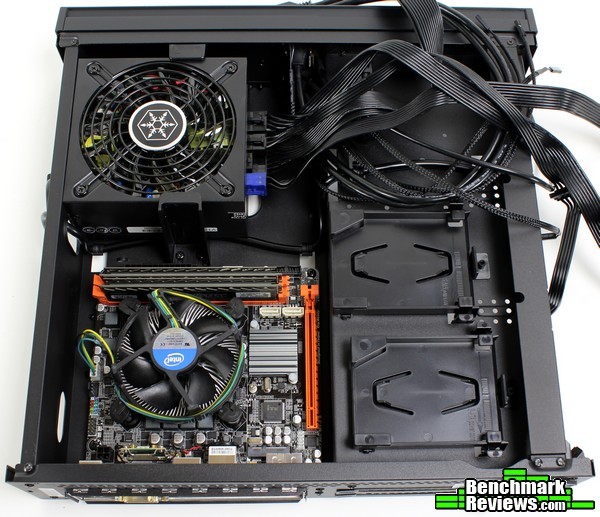
The interior layout is reminiscent of the first “Z”. The motherboard goes in the lower right corner of the picture above, with the PSU sitting in the lower left. Above are the optical drive bracket and (tool-less!) 2.5″ drive trays, located on the back of the GPU section.

The other section is relatively bare. A large cutout allows access to the CPU backplate, which is a nice improvement over the first “Z” series. The GPU sits in its own compartment up top, essentially completely isolated thermally from the rest of the system. If the GPU used is short enough (or not used at all) a 3.5″ drive can be fastened down in this location as well.
So let’s get to it! Don’t worry, I read the manual this time…

…and promptly installed the PSU upside down. No, it’s correct in the photo above, but…let’s just say this wasn’t the first photo I took. Anyway…see those two holes right below the PSU? You may not find it necessary, but those two holes are for the plastic PSU bracket included in the accessory package. If the PSU/CPU area is facing “down” when the ML08 is used horizontally it may help prevent this area from warping, but it seems more for peace-of-mind when transporting the ML08 than anything else (most users would probably omit it entirely).
The motherboard installs easily enough alongside the PSU. There’s even enough room for cables beside the RAM and along the chassis sidewall, although there aren’t any holes in the frame to assist in ventilation like the first “Z” cases.

There are cable routing holes in that side wall though, making it a little easier to keep cables out of the way of the CPU fan. The PSU bracket gets in the way of the main 24-pin cable on the Gigabyte B85 Phoenix WiFi board pictured here, but only marginally.

Those front panel header cables need a lot more room than the PSU bracket could give them. The reset button’s cable only just reached – I had to route it directly over the CPU fan in order to connect it to the front panel header on this motherboard. Most ITX motherboards tend to include this front panel header by the RAM slots, which would be ideal in the ML08. Still, for a worst case scenario, with some dedicated cable routing skills it probably isn’t impossible. If you’re using an ITX board with the front panel header in the same location as pictured above you may want to consider picking up some extensions.

At least the USB 3.0 and audio cables didn’t suffer the same fate. There was even enough room to route the front panel audio cable along the PCI-E slot – remember, this will use a riser card anyway, which should nicely bracket the cable and keep it out of the way.

Remember that part about reading the manual? Well…I was so excited that the ML08 had tool-less 2.5″ drive trays (my main complaint from the first “Z” cases) that I figured I was safe. They’re very easy to use – just pop up one end and slide your SSD in. There’s even markings on the drive tray to orient your SSD correctly! Who needs a manual, right?? I lined up the connectors with the markings and slid in the Samsung 840 to the stops, then connected the power/data cables and…couldn’t snap it into place. What have I done.

A quick check of the manual highlights my error. I had lined up the SATA connectors marked on the tray with the SSD upside down (drive label facing out). At least they’re tool-less…it took mere seconds to pop it out and flip it around. It even gives us a nice opportunity to see how SilverStone cleverly dealt with the two main sizes of SSDs on the market (7mm/9mm): a series of four nubs that keep tension on a slim 7mm drive (or slide out of the way of a thicker 9mm drive).

Ah, there we go. Frankly, this orientation is much better for cable management – the power/data cables will overhang the PCI-E slot, which won’t be a problem since the GPU doesn’t mount there anyway! Drives are easy to connect at any point and easy to move/add later. These tool-less drive trays are my favorite part of the ML08 and one of the best improvements to the second iteration(s) of the “Z” chassis.

Let’s move to the graphics. The PCI-E riser card slides in easily enough (even after the first drive tray is filled). To secure it in place, we’ll need to move to the GPU compartment by flipping the case over.

The brass standoffs are fastened to the chassis by two screws, which makes this portion of the assembly very secure. Adding and removing GPUs from this point on feels much better than any case I’ve worked in previously, since there’s no hint of the motherboard warping/sagging etc. Simple and effective engineering.

In order to clear the chassis frame that separates the two sections an additional riser (included) will need to be used. It works the same as the extension included with the RVZ01/ML07/FTZ01 cases – simply slide it over the PCI-E connector and it will span the gap to the riser card.

The whole thing slots directly into the PCI-E riser assembly. There’s quite a bit of room here – even the 10.5″ Nvidia reference cooler, longer than the (9.5″) pictured GTX 660, would fit with room to spare. It’s actually pretty nice not having to worry about clearing motherboard components or reaching around a large GPU to connect SATA cables/USB motherboard headers/etc. – this whole area is very easy to work in and a noticeable improvement over the (already quite accessible) GPU compartment of the earlier chassis.

The ML08 has room for graphics cards up to 13″ in length (and 4.78″ in width) which would accommodate cards as large as the R9 295 – not that there would be any place to mount the radiator portion… The most powerful card likely to see use in this case would probably be the GTX 980ti (although the Titan X would have the same dimensions, if all used the NVTTM reference cooler), which would fit with ease.

Even wider cards like MSI’s Twin Frozr series fit just fine in the ML08. How can that be, you ask? After all, the official width limit is 4.78 inches (121.4 mm) and the GTX 960 pictured above is 5.5 inches (not quite 139mm) wide! The main purpose of the width limit is to prevent any conflict right at the corners, where the chassis frame is braced. The middle is completely clear out to the outer panel that wraps around the top. While it’s an approximation, the red line in the photo above should show how much room there actually is in the ML08’s GPU compartment (about 165 mm).

An optional GPU support bracket is included with the ML08. It won’t really fit the wider cards like the MSI GTX 960 shown above, but it does expand to fit most other cards and mounts in a series of holes in the frame. It probably won’t be necessary if the ML08 is used in a vertical orientation, but it’s a welcome option for a case that is likely to be transported often.

Three distinct mounting points allow for a range of card sizes/widths. There is another set of mounting points for shorter GPUs further towards the back of the case.

I wanted to include a quick snapshot of the “bottom” of the ML08, since there is actually some cable management area here. The ATX power supply can be connected without having to remove the entire assembly, and the CPU power cable routes easily through here too. It’s too bad the front panel cables aren’t long enough to route up here, there’s certainly enough width to accommodate more cables.

The tinted “I/O window” does an excellent job of subduing the (already pleasant/not blinding) blue power LED, which is lit indirectly (ever an important detail for any chassis potentially used as an HTPC).

Even with the tinted panel open the power and HDD activity lights aren’t overwhelming. The USB ports are recessed a few millimeters, but there should be enough clearance around the port for most devices (exceptionally wide flash drives might have a bit of trouble, but at least you’ll be able to use both ports without a device blocking the other one).
Having freshly reviewed the FTZ01 I thought it would be interesting to quickly compare the two cases. Keep in mind, the Milo and Fortress series are designed for very different purposes; they may have the same internals but they feel quite different to build in and use.

I was surprised to find the ML08 was taller than the FTZ01 (even without the handle). It’s no doubt a slimmer case, but the FTZ01 is much closer to the ML08 in size than I expected.

The overall dimensions are similar. The ML08 is much lighter and generally feels more portable (especially with the handle attached, as would be expected). Being able to access both sides of the ML08 is a nice advantage as well, but it doesn’t lend to as sturdy of a chassis as the “one-sided” FTZ01 (of course, not much compares to that unibody aluminum wrap-around in the sturdiness department). Both have a very console feel to their sizes.

The ML08 feels purpose built to be more portable. It’s simpler, it has less moving parts (well – it doesn’t have any moving parts, unless you count the front sliding panel), and it’s just more tidy in general. I can’t help but wonder what the impact of forgoing any active cooling is though. Component choice is going to be extremely important…or is it?
Let’s do a bit of a thought experiment here. I’m not sure if CPU cooling is going to be the issue – there isn’t enough room for much of an aftermarket cooler anyway, so even the best C-type coolers will potentially limit any overclocking. Let’s be fair – this isn’t an overclocking chassis anyway, it’s more suited to HTPC type builds with low TDP CPUs. The most thermally “expensive” CPU you’re likely to see in such a small case is a 100W APU from AMD (there aren’t any ITX AM3+ boards, so FX CPUs aren’t even an option). These types of cases are much more naturally suited to the Intel i3 and i5 processors, and since overclocking is a limited option due to space, that leaves us with 3.5-3.9 GHz Intel CPUs…averaging around 60W.
How about that GPU though? Those could potentially draw 200W or more. As with any space-constrained chassis, a blower-style cooler keeps the responsibility of cooling to the card (not the case) – ideal for the ML08. While I don’t have time to test every arrangement possible, the pictured system from the previous build page should do nicely – an i3 on the stock cooler and a blower-style GTX 660. Let’s place that system in both cases and do a few 3DMark runs to see how high the temperatures get.
-
Motherboard: Gigabyte GA-B85N-Phoenix WIFI
-
System Memory: 2x4GB Crucial Ballistix Tactical Tracer DDR3 1600/CAS 8
-
Processor: Intel Core i3-4170 w/stock cooler
-
Audio: On-board (Realtek® ALC898)
-
Video: EVGA GTX 660
-
Disk Drive 1: Samsung 840 250GB SSD
-
Enclosure: SilverStone FTZ01 vs. ML08
-
PSU: SilverStone SFX-L 500W Modular
-
Monitor: Acer GN246HL 144Hz LCD 1920×1080
-
Operating System: Windows 7 Ultimate 64-bit
After a warm-up period, a single run of 3DMark’s Firestrike (including the demo) was run. The temperatures in the below table were the maximum temperatures reached, actual temperatures would fluctuate below the max.
| Case | Ambient Temp | Max CPU Temp Reached | Max GPU Temp Reached |
| ML08 | ~20C | 76C | 74C |
| FTZ01 | ~20C | 62C | 77C |
| FTZ01 (no fans) | ~20C | 69C | 80C |
Color me surprised – the ML08 keeps up with the FTZ01, and actually outperforms it in GPU temps (both chassis were tested in a vertical orientation with the GPU on top). The CPU temps in the Fortress were much better, although there were many more options for cooling in the Fortress than the ML08. More testing might have uncovered a unique fan arrangement in the FTZ01 that would have resulted in better temperatures across the board (perhaps it could use an exhausting fan instead of the stock “intake only” configuration as the heat from the GPU seemed to build up over time), but for now the ML08 does a remarkable job of keeping heat manageable with the above setup – without any chassis cooling fans.
It’s a bit confusing. To be honest, I expected the second evolution of the Z series chassis to be smaller in every way – trimmed up completely. It’s less of a sequel and more of an iteration on the original – a complimentary chassis to be sold alongside the first, if that makes sense. The improvements found on the ML08 are noteworthy indeed – but they don’t seem to be enough to completely supplant the original Z cases. If SilverStone ever retrofits the tool-less 2.5″ drive trays into the FTZ01, I’m not sure if I ever would have considered the ML08/RVZ02.
That is, until I saw how well it performed even without any active chassis cooling whatsoever. I’m still in a bit of disbelief over this one, and perhaps there’s a flaw in my methodology. The earlier Z cases seemed to deal with the heat a little better (the ML08 got uncomfortably warm to the touch in certain spots by the GPU exhaust area), but overall temperatures were comparable or even lower in the newer ML08. I can’t really explain it – perhaps I’ll have to revisit my results sometime, but that’s what the sensors showed. Perhaps there was too much room for heat to “accumulate” in the FTZ01? Frankly, it’s going to keep me boggled for a while, but there’s no denying the ML08 with its revised internals was just as good (if not better) of a performer than the FTZ01.

I was pleasantly surprised at the performance of the ML08. Unfortunately CPU temps were up a little – even more unfortunately, you’ll be very limited in ways of dealing with it (at least the ML07 had options for cooling). Still, it should be obvious this isn’t a chassis for chasing high overclocks and custom liquid cooling loops – viewed in that aspect, I can’t complain much about my results with the ML08. In fact, the performance was far better than I expected.
I like the appearance of the ML08, perhaps even more than the Raven version (and I’m generally one for the more outrageous designs!). With the handle it looks like some sort of futuristic ammo box – without it, it looks like a conservative, modern piece of A/V equipment. It should blend in well with most setups. It’s almost so thin it’s beginning to look out of proportion – while I have no problems with the current appearance, I find myself wondering what the ML08 would look like folded in half with the same aesthetic. You know, with the GPU using a flexible PCI-E ribbon to mount directly behind the motherboard… Perhaps for the ML09…
Similarly, I can’t complain about the construction of the ML08. The panels can be a little wobbly when working with the chassis, although any panel that wraps around three sides is going to be difficult to line up on your first try. The Milo series isn’t designed for the same purpose as the Fortress series – coming directly from the Fortress review I had to constantly remind myself that this chassis wasn’t supposed to be an equivalent to the ~$45-pricier FTZ01. Working inside the ML08 was a treat though, no complaints there. Overall I think it’s about right for its intended purpose and market.
It’s tough to rate the functionality of a case like the ML08 – it’s almost purpose-built for a specific build and that’s it. Not much for functionality from that perspective, but I don’t believe anyone purchases a case like this to fit just any type of build and component (as is typical with many ATX cases). It isn’t an “everything and the kitchen sink” case. For a slim HTPC or mid-range gaming system (Steam machine, etc.), the ML08 functions perfectly. It’s easier to build in than its predecessors, and slim enough you can almost wall-mount it. There’s enough room for adequate storage, tool-less drive cages to make swaps easy, and a slim form factor to keep everything portable. It’s tough for an obsessive tinkerer like me to be restricted (there isn’t even an option to mount fans/liquid coolers/etc.), but this isn’t a tinkering case. With a case like the ML08, the form is the function.
Finally, the value question. As of November 2015 the ML08B-H was selling online for $84.99 (Newegg | Amazon), with the handle-less versions $10 cheaper at $74.99. As purpose-built mini-ITX cases go, that’s a very fair price, especially for such a unique form factor and approach. The previous versions of this chassis (the RVZ01/ML07) are currently selling for the same price, but the ML08 adds tool-less drive trays, an easier experience to build in overall, and an even slimmer profile. If you find value in those things, this latest Milo is a great value for such a unique enclosure.
There are still a few things to fix, but when you take a step back and think of what SilverStone has accomplished with this chassis it’s hard not to be impressed. It’s more efficient, tidier overall, easier to build in, less expensive, more portable, and performs about the same as the first versions without any fans! I’m sure there are other mini-ITX chassis out there that perform better but I doubt they can match the 12L volume of the ML08. There’s enough little quirks to make me look forward to the ML09, but there’s no denying in my mind the accomplishments of this chassis. Well done, SilverStone!
+ 12L and can still fit full size GPUs
+ Thermally-isolated compartments for CPU and GPU
+ Tool-less drive trays!
+ Easier to build in than the first versions
+ Conservative styling fits in anywhere
– No active cooling – although it doesn’t seem to suffer much for it…
– Performance highly dependent on component choice
– Front panel cables can be short (depending on motherboard)
– Must remove handle to access GPU
-
Performance: 9.00
-
Appearance: 9.25
-
Construction: 8.75
-
Functionality: 8.50
-
Value: 9.50


5 thoughts on “SilverStone ML08 Mini-ITX Slim Case Review”
My biggest question comes to which custom cpu coolers can work with this case. I am having a hard time finding info on this.
Hi Rex.
I plan on building an SFF PC using this case. And while searching in details in the I found this:
This means that the CPU cooler should be around 58mm high, like the that I plan to use. This CPU does fit as it has been used in an RVZ02 case (the RVZ02 and the ML08 share the same internal structure, only the exterior differs). You could also go for a SilverStone AR06 but I reckon it would be louder.
VERY VERY USEFUL review , especially details about the recommended actual graphics card size requirements, interior passive cooling temps and building experience!
Thank you, glad you liked it! The ML08 surprised me in many ways, I hope SilverStone continues to develop cases like these.
I would really love to know if blowerstyle GPUs have lower temps than dual fanned ones in this case? There are lots of different opinion on this. I have an MSI GTX 760 dual fanned in it and it runs a little bit too hot. Actually it throttles when playing for extensive periods. So I am wondering if a blowerstyle GPU keeps cooler.
Thanks
Comments are closed.