By Tom Jaskulka
Manufacturer: ROCCAT GmbH
Product Name: Kova
Model Number: ROC-11-502AM
UPC: 4250288164062
Price As Tested: $47.99 (Newegg | Amazon)Full Disclosure: The product sample used in this article has been provided by ROCCAT GmbH.
A year ago, I had the opportunity to review a Roccat Tyon – my first Roccat product since I purchased one of their Pyra and Kova mice many years ago. I remember the original Kova fondly, but it wasn’t…quite there yet. I liked the ambidextrous design, price point, Lamborghini-esque styling, and simple approach to performance (an optical sensor with driver-less configuration); I wasn’t quite as impressed with the overall build quality, lack of granular customization options or lighting. Will the new Kova change my mind? Will the improved sensor, new looks, lighting, and robust construction replace my first impressions? Benchmark Reviews has the opportunity to take the new Kova (ROC-11-502) for a spin, so let’s find out.

Courtesy Roccat
7000DPI PRO-OPTIC SENSOR R6: from 3500 native dpi via overdrive mode
ROCCAT® EASY-SHIFT[+]: duplicator technology: 22 functions
12 MOUSE BUTTONS: programmable + solid 2D Titan Wheel
AMBIDEXTROUS SHAPE: optimized for both left- and right-hand use
16.8M MULTICOLOR ILLUMINATION: customizable two-level light system
32-BIT ARM MCU + ONBOARD MEMORY: for rapid macro storage and execution
ROCCAT® SWARM: integrated next-gen driver system
TALK® FX + ALIENFX™ ILLUMINATION: lighting effects for your favorite games
SMART CAST TOP BUTTON LAYOUT: intuitive control via reflexive button layout
- Pro-Optic Sensor R6 with up to 3500dpi
- Up to 7000dpi with Overdrive Mode
- 1000Hz polling rate
- 1ms response time
- 20G acceleration
- 12-bit data channel
- 72MHz Turbo Core V2 32-bit Arm based MCU
- 512kB onboard memory
- 1.8m braided USB cable
Dimensions / Weight
- Width 6.6cm, Height 3.8cm, Length 13.1cm, Weight 99g
SYSTEM REQUIREMENTS
- Windows® 8, Windows® 7, Windows® 10
- USB 2.0 Port
- Internet connection for driver installation
Like always, we’ll start with a quick overview, then move into some detailed features of the new Kova.

The box is typical fare for Roccat, complete with the angled corner. The main features are listed prominently on the front, with the 7000-DPI figure reflecting the maximum doubled DPI (a software-assisted 3500 DPI, as it were). The asterisk tells the real truth, although that particular fact isn’t mentioned anywhere on the front. I don’t use anything over 1800 DPI anyway (and I’ve long stopped paying attention to the DPI numbers race – anything over 2000 seems far too quick to be precise in my opinion), but it would be nice if there wasn’t so much pressure to post big numbers on the box – it’s the quality of the sensor that matters, and the new Kova uses Roccat’s Pro-Optic R6 optical sensor powered by an ARM Turbo Core V2 chip.
 There isn’t much included with the Kova, just a quick start guide and the Kova itself. The driver was still in beta when this Kova was received, but even retail users will need to download the newest version of Roccat’s Swarm driver from their website.

The Kova 2016 uses a beautiful matte grey finish that feels excellent to the touch. It almost feels like primer in a way, having enough texture to feel grippy without rubber’s tendency to cause sweaty hands. Two side buttons are positioned directly above where your thumb would rest. They use a slight concave shape; it’s very comfortable for most of the grip styles I tried (works nicely for both palm and claw).

Being an ambidextrous mouse the right side of the Kova is a direct reflection of the left. These two buttons are still usable by a right-hand user’s ring finger, and the surface below provides an excellent place for claw grip users to place their fingertips.
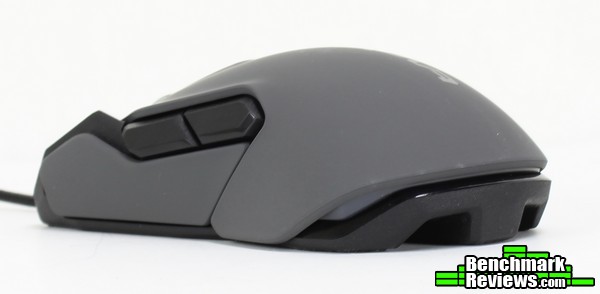
The Kova is pretty low-profile making it excellent for claw grip users. The mouse body widens a bit towards the palm area making it surprisingly comfortable for palm grip users as well.

“Bumper” buttons flank the main left and right mouse buttons. There is a single DPI switch button behind the scroll wheel, although all buttons are programmable for any function or macro.
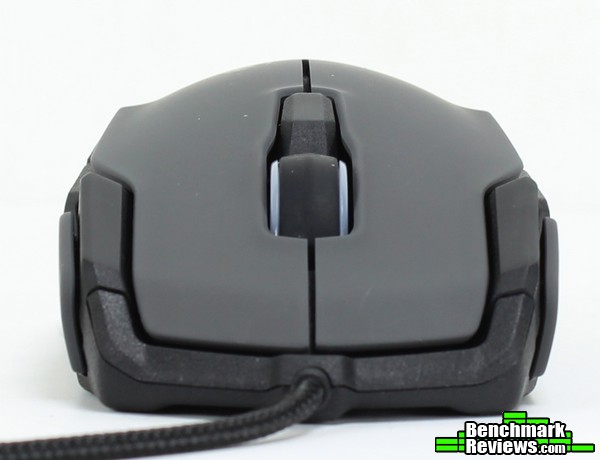 The front is shaped such that your fingers will rest naturally beside the additional buttons, making them easy to press in the middle of a heated game. The buttons themselves are raised enough to make them easy to press independently of any other button. The scroll wheel – despite its appearance – is notched, with an angular shape in a nod to the original Kova.
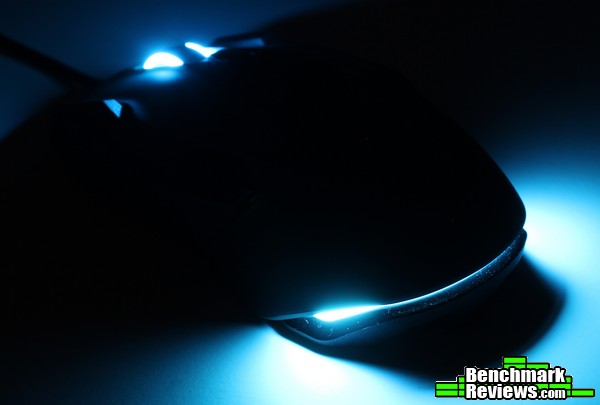 Overall, it makes a good first impression. Let’s dig into some details and see if that impression will last.
The Kova 2016 is a major update of the original. Let’s take a look at the differences.
 The styling has received a major boost. The original Kova was one of the first multi-color gaming mice – when everyone else was using a solid red, blue or green theme Roccat added a blend of each one (yellow, cyan, purple). This Kova has two configurable RGB LED zones, with the lighting zone in the back evoking a sports car aesthetic.
 That sports car theme seems to inspire much of the design of the Kova – especially a machine with wrap-around features like McLaren’s P1. Given the original Kova had angular styling reminiscent of a Lamborghini, the completely refreshed style of the new Kova is both surprisingly different and refreshingly familiar…
 The overall grip is flat enough to be comfortably used by either hand. A small indention of the mouse body in the middle helps with grip and makes the side buttons more accessible.

The subtle flare of the edges form a distinct edge, nudging your fingers away from accidental presses of the side buttons. It’s pretty effective in use and comfortable overall.

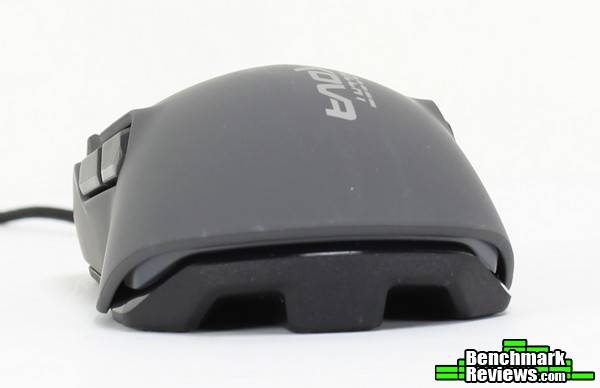
The bottom of Kova showcases the five mouse feet and the relatively thin body (5.5cm at the narrowest point). The ample pad area provides for a consistent sliding feel across most surfaces.

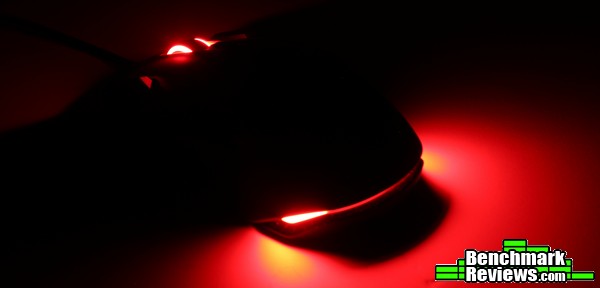
While the new Kova doesn’t contain the wrap-around lighting like the Tyon, there are still two different RGB configurable zones. Each zone is bright, even, and vivid without being overdone.

The rear “taillight” adds a nice effect. The lighting is very tasteful in my opinion – it’s enough of an accent to add some bling, but subtle enough to add a splash of color without going overboard.
 The two zones are independently configurable, and can display the full spectrum of colors. Even difficult LED colors like yellow, orange, pink and purple display vividly. Each zone can be set to cycle through the spectrum as well using the new Roccat Swarm driver.
The new Kova comes with a new driver named SWARM: gone are the standalone installers. The new Swarm driver hosts the Nyth and Kiro devices as well as the new Kova – it sounds like more devices will be added in the future, along with ever-expanding functionality. Let’s take a look at the current (v1.40) version of Swarm.

Upon first installation, this driver will detect your Kova and download the appropriate software. It isn’t purely cloud-based like some other manufacturer’s drivers (looking at you, Razer Synapse), so you won’t need to sign in with an account to use all of the features of the new Kova. It seems there will be an app available eventually as well (similar to the Roccat PowerGrid app) that will eventually integrate into the Swarm driver.

The Swarm driver seems like a streamlined version of Roccat’s standalone device drivers, with tabs available showcasing the Roccat products you have installed. This should make it easier to manage multiple Roccat devices. The first, “home” tab is any setting that has been pinned – allowing a user to customize the main tab with only the features they use is a great way to reduce complexity.

The pinned sections occupy their own blocks and populate wherever they have room. If the number of setting windows exceeds the available space, a scroll bar will appear to scroll through the list. You can’t rearrange or change the order of the sections at this point (without unpinning/pinning sections), which would be especially handy.

The different tabs act just like you would expect, containing the various settings for the Kova. This tab specifically contains options for horizontal/vertical scroll speeds, double-click speeds, DPI and Windows pointer speeds.
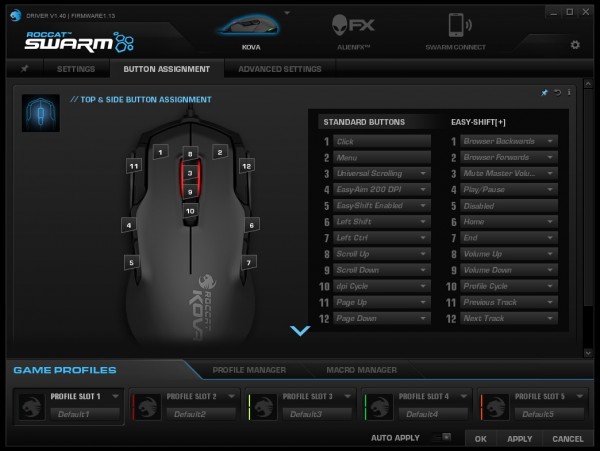
The Button Assignment tab is where most will probably spend a majority of their time. A list of main button functions accompanies a picture of the Kova’s button layout, with the Easy-Shift[+] functions listed right alongside.

The Advanced Settings tab contains features more specific to the Kova – an orientation setting for left-handed users swaps all button assignments to the other side, and the color zones can be configured here as well as the polling rate and driver sound feedback (if you like your devices speaking to you, that is – it can be a bit surprising the first time your mouse announces what profile it is using in Windows!).
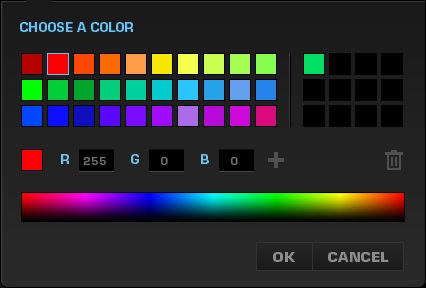
The color chooser is pretty standard fare – a range of pre-populated options should satisfy most users, but the ability to choose a custom color is available as well (or you can just type in RGB values) – the “+” sign will save your custom color to a grid for later use.
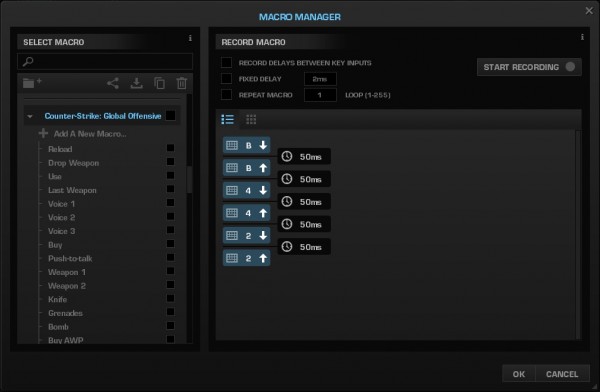
Below the main settings windows, a Macro Manager tab can be clicked at any time to program a macro for later assignment to a specific button. You’ll need to create a macro as a file of sorts – the macro itself will be contained within your new listing. There are quite a few presets for many popular games to choose from or you can just record your own by pressing the sequence you require.

Finally, five different profile slots are available to store settings on-board the Kova. Auto-switching profiles is supported, but the associated application shortcuts aren’t stored on the device (just in the driver). You can keep your Kova’s settings from machine to machine, but setting up the auto-switch feature will need to be done on every system.
Over the span of a month, I used the new Kova endlessly for both office work (photo-editing, web browsing, etc.) and gaming (Mechwarrior: Online, ARMA 3, Elite: Dangerous and Battlefield 4 are the mainstays for me – with a stint of Star Wars thrown in due to a certain movie released over the last few weeks…).
The new Kova was my daily driver throughout all of it – I didn’t experience any strange cramps or discomfort even after extended periods of use, which is nice to experience on an ambidextrous mouse (they aren’t always known for their comfort). I used multiple mouse pads with the Kova – its optical sensor performed without an issue at 800 DPI on every surface I tried (Roccat Taito Control, Razer Goliathus Speed, Razer Destructor 2, Razer Sphex, Func Surface 1030r2, Roccat Sense). All testing shown below was performed on a Razer Destructor 2 mouse pad.

Speaking of testing sensor performance, let’s move to the ever-popular “Paint” test. Drawing some lines in Microsoft’s Paint program can give an idea of how the sensor performs various actions, and if there is any acceleration or prediction present.
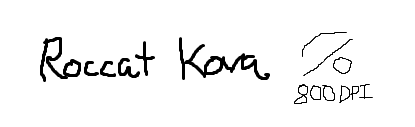
I normally use 800 DPI for my mice even on a 2560×1440 monitor. The cursor movement seemed to follow every move perfectly and smoothly, including my errors and random movements. It felt very smooth and predictable – my motions felt like they were accurately and directly represented on screen.
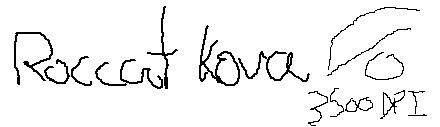
3500 DPI was much harder to control, and it felt like I might be reaching the limits of the sensor – I noticed a tiny movement could result in a “stair-step” result, but this could very well be the sensor tracking the textured surface of the Razer Destructor 2 mouse pad.
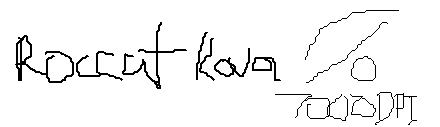
Bumping the sensor to the software-assisted 7000 DPI “doubled” setting, I began to question why this was even necessary – there seems to be some obvious prediction in place, with mouse movements difficult to control. Personally, I don’t find this to be an issue. 1000 DPI is the highest I’ll generally go in normal use, even across multiple screens – 3500 seemed to be too much, let alone 7000. I wouldn’t recommend the new Kova for those that expect excellent sensor performance at 7000 DPI, but…I’d recommend those users turn their DPI down anyway!
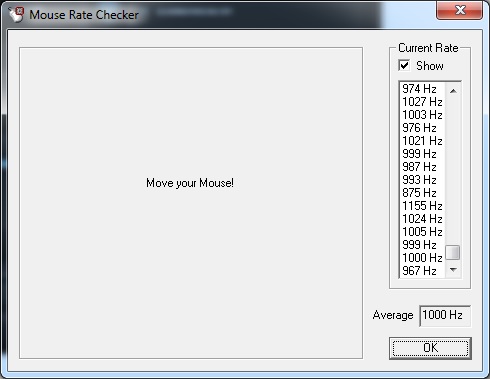
The polling rate was set at 1000 Hz from the factory, and the Kova seemed to experience zero issues responding at that rate.
Overall, I was happy with the performance of the Kova. There are better sensors out there for sure, but at the settings I personally use I didn’t experience any issues. I was glad to see I could use the Roccat Kova on every surface I had available, as some mice I’ve tried needed to be paired with a particular surface to work well.
Did the new Kova change my opinion on Roccat’s original ambidextrous mouse? It absolutely did. In fact, I can’t think of a revision that made as drastic of an improvement over an original than this Kova (the new Proteus Core G502 from Logitech might be a contender over the original G5, but I haven’t personally used one yet). Most mice take the DeathAdder route:simply changing the sensor and adding a splash of color. Roccat re-engineered virtually every aspect of the Kova – while the new Kova certainly bears a resemblance in spirit, it is an entirely new experience. The texture, the shape, the driver, the lighting, even the number of buttons… It’s all new, and yet somehow retains everything that was great about the original Kova and improved upon everything else. I’ll save it for the final recommendation, but only one other mouse (the Tyon) has performed a feat now shared by the new Kova…
I didn’t have any issues with the performance of the Kova. I tend to prefer optical sensors myself, as they seem to accommodate every mouse pad texture/pattern in existence (the laser sensors, in my experience, are far more particular). I would take slight issue with the claimed maximum 7000 DPI, except…I never use anything over 1800 myself anyway. Those that do may want to look at a higher-tier sensor, but I didn’t experience any tracking problems during my time with the new Kova with the settings I normally use.
If the old Kova had a Lamborghini feel to it, the new seems to exude more of a McLaren look – I’m not sure why the car comparison seems so fitting (the “tail-light”? The “fenders”?), but if that isn’t a rear diffuser… Maybe it won’t increase the downforce on the Kova as you drag it across your mouse pad, but it does do a good job of preventing heat buildup and looks pretty cool to boot.
The Kova feels sturdier than any $50 mouse I’ve used. I’m not exactly sure why – it’s not like it uses a metal frame or anything. I suspect the tough plastic frame and sturdy “primer grey” panels have something to do with it – either way, the new Kova feels much improved over the original. I can squeeze with the strongest fingertip grip I can muster, and there isn’t a hint of flex or creaking (something I wouldn’t dare try with some other mice). All of the buttons feel crisp with great tactile feedback. The scroll wheel felt a bit vague at first; after a break-in period it was just fine for gaming sessions. It feel the Kova’s wheel could use a bit more tactile feedback but I’ve been positively spoiled by Roccat’s Titan scroll wheels on some of their mice – that’s a tough bar to beat.
While it’s missing the sheer number of buttons and some unique features of the Tyon, the new Kova still packs a surprising amount of functionality. The AlienFX effects are a nice touch even if there aren’t too many games that use them. The EasyShift feature is still one of my favorites though, and the overall layout and number of buttons lends the Kova to easily accommodate my favorite games and applications. The on-board memory and RGB lighting are icing on the cake – and it’s comfortable too!
I received a review version of the Kova and had started using it prior to learning the retail cost. I had expected something in the $60-$70 area – after all, to get multicolor RGB lighting, more than seven programmable buttons and that level of styling and construction, I thought for sure it was at least $60. Granted, they might have saved some money by using an optical sensor instead of laser, but the latest optical sensors are nothing to scoff at. When the new Kova hit the online retail locations for $47.99 (Newegg | Amazon), it honestly surprised me. The new Kova is one of the best deals I’ve seen.
My final recommendation? How’s this: the new Kova is the best ambidextrous mouse on the market. In fact, I liked the Kova so much I went out and bought another one. The Sensei RAW is close, but the Kova feels tougher, has more lighting options and includes the EasyShift/AlienFX/RoccatTalk technologies. The Tyon became my favorite gaming mouse of last year; the Kova is my new favorite as 2015 is wrapped up. It’s going to be tough to justify spending more than $50 on a gaming mouse with mice as good as the Kova on the market – nicely done, Roccat.
+ Ambidextrous grip is surprisingly comfortable
+ Materials feel durable, modern, robust
+ Coating is unique – feels great to the touch, maintains grip
+ Lighting is brilliant, configurable – above par for price range (and AlienFX compatible)
+ Array of buttons in well-placed locations
+ EasyShift / RoccatTalk features are relatively unique in market and very useful
+ Excellent price point – one of the best values on the market
+ Better than the original Kova in every way
– A bit small for palm-grip users
– Scroll wheel not as tactile as the Titan wheels on the Kone Pure
– DPI software-doubled after 3500
-
Performance: 9.00
-
Appearance: 9.75
-
Construction: 10.00
-
Functionality: 9.00
-
Value: 9.75