By David Ramsey
Manufacturer: A4 Tech USA Corporation
Product Name: Bloody B188 Light Strike Keys Gaming Keyboard
UPC: 843591078047
Price As Tested: $62.99 (Newegg | Amazon)Full Disclosure: A4TECH’s Bloody Division provided the product sample used in this article.
A4Tech is a Taiwanese company whose “Bloody” gaming division was launched in 2012. Bloody produces gaming keyboards and mice using a unique switch technology: rather than metal contact points closing an electrical circuit when a key is pressed, Bloody’s mechanical switches use infrared LEDS and photosensors, which Bloody claims provides faster key response and a more reliable and durable switch.
In this article, Benchmark Reviews looks at the A4Tech Bloody B188 Light Strike Keys Gaming Keyboard, the low-cost entrant in Bloody’s keyboard lineup. Bloody keeps the cost down by using rubber-dome switches for most of the keys, saving their pricier infrared mechanical switches for the 8 special gaming keys.

- Bloody Light Strike infrared mechanical switches for gaming keys
- Double-shot key caps
- Screw-enhanced space bar
- Media control via Fn function keys
Let’s take a look at this keyboard in the next section.
Unlike the Bloody B720, the B188 Benchmark Reviews received uses a European layout with a large ISO-style Enter key. Since the double-shot keys use transparent legends, the key markings are hard to see without the backlighting turned on.

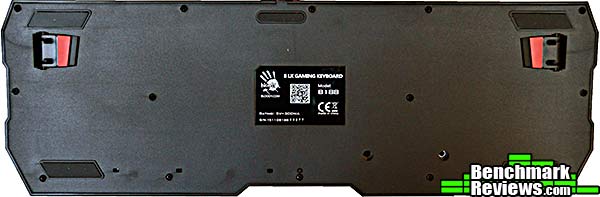
The back of the keyboard is blank except for the fold-out support feet.
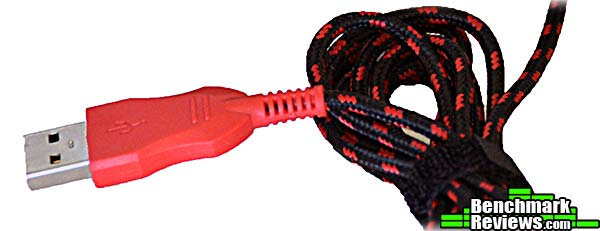
The nicely-sleeved USB cable is not detachable, and thankfully does not waste any money gold-plating the USB connector.
This is a “hybrid” keyboard. Most of the keys, such as the (removed) “T” key here, use standard rubber-dome switches. The eight gaming keys– Q,W,E,R and A,S,D,F– use Bloody’s Light Strike infrared optical switches for the best feel and response when gaming. This dual-switch design has other consequences: first, the feel of the 8 Light Strike gaming keys is dramatically different from that of the remaining rubber-dome keys, which can be a little jarring when typing. Second, the gaming keys use standard Cherry MX-mount key caps, while the other keys do not, meaning that you can’t easily replace all the key caps. Since the Light Strike keys use a top-mounted LED, the letters on those keys are above the letters on the rest of the keys: compare the “F” and “G” keys in the image belo.w

Also, the key backlighting is different: the gaming keys have individual blue LEDs, while the other keys rely on an electroluminescent lighting that can vary between blue, teal, and green.

Overall, the EL backlighting is smooth, even, and much brighter than the backlighting of the B720.

Since, like the B720, the B188 eschews a standard top plate bezel around the keys, the white plastic support structure is clearly visible and looks a little jarring with the backlighting off.

Like many other keyboards (but unlike the much more expensive B720), the B188 provides basic media playback and volume control via Fn-shifted function keys.

Let’s check out the keyboard utility software in the next section…
The Bloody keyboard utility software is called Key Dominator. With this utility you can define macros and assign them to any of the keys on the cursor control or numeric pads, as shown in the image below; you can also assign macros to the number keys 1-6 on the main keyboard. For any definable key you use a pop-up menu to select from a number of pre-defined functions (generic Office functions and such) or assign macros that you create. All macros are stored in the keyboard’s memory and you do not have to have Key Dominator running to use loaded macros.

The top bar of the utility contains five buttons: Ultra Core, Button, About, Oscar Macro, and Super Combo. To the right of the buttons are a joystick icon (that controls “No Detection” mode; more on this later) and a light bulb that controls the lighting features. The latter offers three choices: On, Off, and “Neon Glare System”, which strobes the EL backlight between blue, teal, and green for a few minutes at seemingly random intervals. The 8 gaming keys are always blue and are unaffected by the Neon Glare System, although you can adjust their brightness as well as turn them on and off.
The Ultra Core and About buttons open advertising screens, but the oddly-named Oscar Macro button takes you to the heart of this utility: macro definition. And here I must say that this utility shines. While Bloody offers a number of standard pre-defined functions for things like Office work and standard file manipulation, the macros are where the real fun is: in addition to key strokes, macros can contain defined or recorded pauses between each step as well as absolute and relative mouse movements that will work with any mouse. A limited programmability feature lets you define, control, and query two separate “variables” (A and B) as counters for simple looping and branching inside a macro, and best of all, macros are fully editable: you can easily insert and delete steps inside an existing macro.
Once a macro is defined, you can return to the main screen to assign it to a key. There doesn’t seem to be any pre-set limit on the number of key strokes or other actions in any individual macro.

Macros you define are grouped into one of three profiles: Standard, Gaming2, or Gaming3. There are several options for how you select a profile, some of which– such as Shift driver free as shown below– have non-obvious modes of operation. But after playing around I finally figured out that the colors associated with each profile refer to the color of a tiny Bloody hand icon that floats partially off-screen (until you mouse over it, whereupon it slides into view). So for Shift driver free, you switch profiles with Fn and the left or right arrow key, and look at the color of the partially on-screen hand icon to verify your profile selection. You’d think this would be described in the documentation, but…
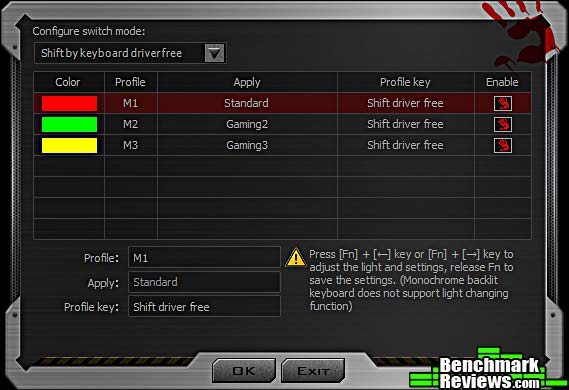
…documentation for this utility is spread across two downloadable documents: Bloody Oscar Macro II Manual and Bloody Super Combo. While the manuals seem complete and are copiously illustrated, they are obviously written by someone who’s not a native English speaker, and the resulting tortured syntax and off wording (see “shift driver free”) can sometimes be impossible to follow. Also, the manuals seem to describe features that don’t exist in the software I downloaded from Bloody’s web site, and completely ignore other features like profile selection. In fact the word “profile” doesn’t occur in either manual.

Clicking the joystick icon at the top right of the utility window opens the dialog below. It seems to be designed to assign a group of macros to a specific game, automatically load them when the game is launched, and then quit the Key Dominator utility. The idea here is to apparently bypass checks made by online games that prohibit the use of any sort of “assistive” software.
Which would be nice if I could figure out how to add a game to the list, but I couldn’t; and the use of this feature doesn’t seem to be documented anywhere.

I’ll present my final thoughts and conclusion about this keyboard in the next section.
I have to admit that I like the Bloody B188 keyboard better than I liked its more expensive cousin, the B720. Functionally, these keyboards are virtually identical, with the only real difference being Fn-activated media keys on the B188 that the B720 lacks.
The kicker is the price: for $62.99 (Newegg | Amazon), the B188 is less than half the price of the B720, and with identical functionality, and that makes all the difference. The tradeoff, of course, is that only the QWER and ASDF keys use Bloody’s innovative Light Strike optical key switches, while the remainder of the keys are traditional rubber dome switches. Still, this price compares favorably with programmable gaming keyboards from other companies that use all rubber-dome switches.

Of course, there’s the issue of the mixed switches: you get both a visual– as shown above– and tactile disconnect between the optical switch gaming keys and the rubber dome everything-else keys. Still, after using the keyboard for a week and typing much of this review on it, I found that I grew used to the tactile difference between the keys and it ceased to bother me. One could argue the aesthetics of the mixed keys, I suppose (Bloody does not supply replacement standard key caps for the gaming keys of the B188 as they do with the B720, but in this case the different key switches used would make that clumsy anyway), but gaming peripherals are expected to be dramatic in appearance, right?
As for the Light Strike switches: well, they have a smooth, linear feel, very similar to Cherry MX Red or Black switches (the spring weight seems to be somewhere between the two). They’re somewhat quieter at the end of their stroke, although not as quiet as the new Cherry MX Silent switches. Bloody says they actuate 1.5mm into the stroke, quicker than the 2mm actuation of standard Cherry switches, although whether this brings any sort of real-world benefit is hard to say.
I do wish Bloody would invest some time in properly documenting their macro utility. The documentation they have, while excellent in sections, is incomplete, and the user is left to attempt to figure out how to use some features on their own.
The Bloody B188 is a very functional and reasonably priced gaming keyboard with the advantage of unique mechanical keys for the “gaming” part of the keyboard. A robust macro utility provides extended functionality, including absolute and relative mouse positioning and full editing of macros, although parts of the utility are poorly documented and can be difficult to figure out.
Although there is no metal evident in the construction of the keyboard, it feels very robust and doesn’t flex at all, even when twisted; I imagine it will hold up well to the rigors of gaming. For the price, it’s a competitive entry in the field.
+ Unique “Light Strike” switches for gaming keys
+ Extensive and versatile macro system even allows mouse movement to be programmed
+ Double-shot key caps and quality construction
– Lighting effects are limited
– Key Dominator software needs better documentation
– “Tactile disconnect” between gaming and normal keys
– Only a 1-year warranty?
-
Performance: 8.75
-
Appearance: 8.75
-
Construction: 9.00
-
Functionality: 9.00
-
Value: 9.25
Quality Recognition: Benchmark Reviews Silver Tachometer Award.
COMMENT QUESTION: What do you demand most from a gaming keyboard?


