By Tom Jaskulka
Manufacturer: SteelSeries
Product Name: Rival 700 Gaming Mouse
Model Number: M-00005-01
UPC: 813682020033
Price As Tested: $79.99 (Amazon | Newegg)Full Disclosure: The product sample used in this article has been provided by SteelSeries.
SteelSeries, a company known for many innovations and their support of eSports, has released a new weapon in the competitive gamer’s arsenal: the Rival 700. While they’ve been busy refreshing all of their product lines to update previous models with new features, the Rival 700 is a brand new entry entirely. Positioned as the premier offering in the Rival line of mice, the SteelSeries Rival 700 has a new twist – or, more appropriately, a buzz. Modular sensors, interchangeable cords, Prism RGB illumination and swap-able panels compliment a first-of-its-kind tactile feedback system and customizeable OLED display panel. Will these features justify the price of entry? Follow along as Benchmark Reviews takes a closer look at the new Rival 700.

DESIGN
- Material: Matte Top Cover
- Ergonomic, Right-Handed
- Grip Style: Palm, Claw, and Fingertip
- Number of Buttons: 7
- SteelSeries Switches: Rated for 30 Million Clicks
- Reinforced Left and Right Clicks
- Weight: 135g, 0.3lbs
- Height: 124.85mm, 4.92in
- Width: 68.46mm, 2.70 in
- Depth: 41.97mm, 1.65in
- Short cable length (non-braided): 1m, 3.28 ft
- Long cable length (braided): 2m, 6.5 ft
SENSOR
- Sensor Name: PixArt PMW3360
- Sensor Type: Optical
- CPI: 100 to 16,000
- IPS: 300
- Acceleration: 50g
- Polling Rate: 1 ms (1000 Hz)
- Zero Hardware Acceleration
- Tracking Accuracy: 1:1
CUSTOMIZATION OPTIONS
- GameSense Support
- OLED Display Customization
- Tactile Alert Customization
- SteelSeries Engine Support: SSE3
- Multiple CPI Options
- Programmable Buttons
- Onboard Profile Storage
- Acceleration Customization
- Deceleration Customization
- Color Options: 16.8 Million
- Swappable Pixart 9800 Laser Sensor
- Swappable Rival 700 Top Cover Pack
- Printable 3-D Nameplate
The Rival 700 follows the original Rival and its replacement, the Rival 300 (a Rival 100 is a new entry-level model with an adjusted shape in the product stack). Positioned as the most expensive of the series and 2nd-most expensive mouse in SteelSeries’ lineup, the Rival 700 is without a doubt a flagship offering. Let’s take a quick look at what sets the Rival 700 apart from the other options.

The exterior packaging is instantly recognizable as a SteelSeries product. The bold logotype, red/orange stripe and marketing datapoints ensure the Rival 700 stays consistent with the brand.

The packaging has a unique touch – it opens at an angle, almost like cracking open an artifact to reveal a treasure within. Many manufacturers do their best to provide a bit of a premium experience throughout, before even using the device; the Rival 700 is no exception to that rule.

The Rival 700 is accompanied by the accessory box (which contains the two included cords and the product manual). A quick start guide and a few stickers complete the included items.

Despite the mouse’s initial appearance sitting in the box, the Rival 700 is not a wireless mouse. A modular cord system gives a user a choice of a long (2m) braided cord or a shorter (1m) soft PVC coated USB cable.

The mouse end of the USB cables terminate in a typical Micro-USB A connector; however, it is encased in a 90-degree proprietary housing. The two black posts should provide some strain relief but good luck finding replacements out of warranty… At least a “spare” is included, although each cable’s composition provides a distinct feel (and a full meter difference in length) so the experience will be a little different.

The overall profile of the Rival 700 makes it suitable for both palm and claw type grips. Those familiar with the original Rival (or Rival 300) will feel at home here, although the 700 is a bit smaller. Additional accessories – a palm rest cover pack and laser sensor – are available for the Rival 700 from SteelSeries’ online store; neither of those items will change the dimensions or shape of the Rival 700. Let’s take a closer look at the additional features of this particular mouse on the next page.
It bears repeating: the Rival 700 is positioned at the top of SteelSeries’ product stack for mice (other than the Sensei Wireless). Let’s take a closer look at the features and details that differentiate this Rival over the others.

Eschewing the rubber-coated flat black of the Rival 300, the 700 adds a patterned palm rest that strikes a good compromise between grip and feel. The overall shape stays relatively true to the Rival’s origins as a more claw-friendly DeathAdder, but the sharper angles towards the rear hint at more changes to the profile than one may expect at first glance (we’ll see a direct comparison later in the article).

The bottom of the Rival 700 reveals three large mouse feet that provide a nice glide on hard or soft pads. The four screws surrounding the PixArt PMW3360 optical sensor aperture release the sensor module from its home in the bottom of the mouse.

Two large thumb buttons flank the left side of this Rival – the 700 adds an additional thumb button bringing the total number of programmable buttons to seven, one more than the Rival 300 or 100. The two smaller orange details in the thumb rest area are not buttons – they seem to function primarily as a “thumb-finder,” merely providing a tactile difference in the thumb rest pattern to orient your thumb accordingly to the Mouse4/Mouse5 side buttons.

The included matte palm rest can be swapped with aftermarket covers (glossy and rubber versions are sold through SteelSeries) which is a nice option. While I generally prefer the soft-touch rubber finishes popular on many gaming mice, I couldn’t imagine needing to switch away from the matte patterned default palm rest as it had the perfect combination of grippy texture and cool-to-the-touch hardness that help lend a premium feel to the whole device. I could see this feature being much more useful if there were differently-shaped palmrests available as well as different colors and textures.

Speaking of textures, the sides of the Rival 700 are patterned with a series of raised circles. I find this particular pattern to be more comfortable than ridges or “sandpaper” textures of other mice, although it’s hard to beat a well-done soft touch rubber finish…

There are two RGB zones on the Rival 700, with the SteelSeries logo as the primary color zone (the scroll wheel is illuminated as well). Both zones are nicely diffused, resulting in evenly-lit blends of any color.

The side grips have been updated for the Rival 700 using a new double-injected blend of rubber. It does feel improved over the older Rival, with more durability and more grip.

I’m not sure why SteelSeries refuses to use a DPI up/down button configuration instead of the single (default DPI toggle) button behind the scroll wheel, but given most mice use these buttons for cycling through DPI settings a single button accomplishes the same thing just as easily.

SteelSeries claims the main mouse buttons “are built with a special reinforced plastic, unlike any other mouse to-date. This makes the mouse more durable, and helps to evenly distribute the force of each click, making for a more consistent feeling.” While it’s pretty subjective, the tactile response of the main mouse buttons is nicely tuned so SteelSeries might be on to something. The rubber treatment on the notched scroll wheel provides for a nice tactile feel as well.
Let’s get into some of the details that make the Rival 700 unique.

Four cross-tip screws secure the sensor module in place. The included PixArt 3360 optical sensor can be swapped for a PixArt 9800 laser sensor (purchased separately) if desired. I’m not sure how many users will take advantage of the modular nature of the sensor assembly, but the engineering is pretty well done. Modules are easy to install or replace, making it a near plug-and-play option for a different tracking feel.
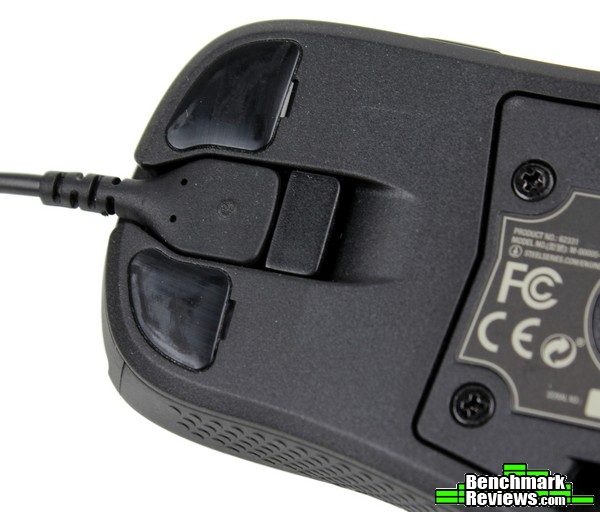 A slightly recessed locking mechanism keeps the detachable cable in place. There didn’t seem to be any extra drag associated with placing the connection at the bottom of the mouse instead of at the front, and the locking lever is easier to use in practice than some other “slide-to-unlock-cable” mechanisms on other mice.
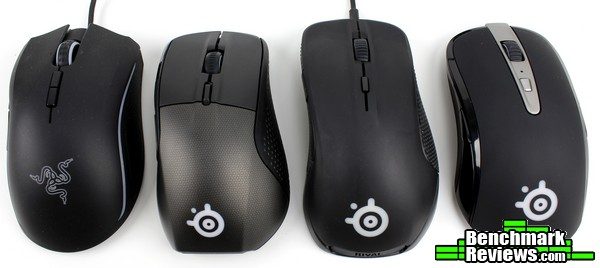
Placing the Rival 700 next to the original Rival is the best way to describe the evolution of the Rival line. The Rival 700 is a little more compact than the other Rival (original or 300), with slightly more angular lines tapering towards the rear and a more “cleaned up” shape overall. Handling both the original Rival and the Rival 700, the 700 definitely lends a more premium feel (the original Rival feels a bit lightweight / hollow in comparison to the more solid Rival 700).
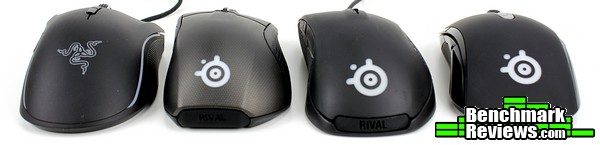
The shape of the Rival 700 has progressed from its original dimensions as a DeathAdder clone as well (while the two were never identical, they were natural competitors in almost every aspect – button count, shape, tracking, price, etc.). While the pictured mouse from Razer is the Mamba TE instead of the DeathAdder, they use approximately the same shell. The Mamba TE and original Rival fill more of your palm when gripping the mouse, while the Rival 700 seems much more versatile to use switching between claw and palm grips.

The OLED screen is the remaining feature unique to the Rival 700. To be fair, SteelSeries has had more experience than most with the use of screens on mice; their Sensei laser mouse used a configurable LCD screen to display custom images and could even be used to navigate profiles and settings. That level of usability was exchanged for a high contrast OLED screen capable of displaying animations at 10fps and changing in real-time based on in-game events.

The default SteelSeries logo showcases a bit of a screen-burn issue with the OLED technology. It’s a little difficult to see due to the reduced file size of the image above, but setting the screen to all white still noticeably displays the SteelSeries logotype. This is mitigated somewhat as the OLED will turn off after about 20 seconds of inactivity, but this will only take place when not using the mouse at all – very few gaming sessions have periods of 20 sec+ downtime. Still, in the month I’ve been using the Rival 700 I haven’t noticed any other custom image “burned” into the display, so perhaps it’s just an effect that will fade over time. It is only noticeable in this very specific scenario, so it’s more something to be aware of rather than concerned about.
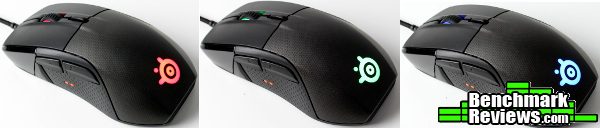
The Prism RGB LED system used by SteelSeries does a good job of displaying vibrant colors, from the typical red/green/blues to the trickier colors like yellow, teal and pink (even white is surprisingly neutral and free of tint). I especially appreciate how well the LEDs are diffused through the scroll wheel and palmrest logo, making the lighting effects look evenly lit and nicely blended.
Most of SteelSeries’ products have switched to their new all-encompassing driver suite, SteelSeries Engine 3. A main launcher serves as the starting point for any compatible SteelSeries product.

The My Gear tab will populate a list of attached peripherals that are compatible with SSE3. We’ll take a look at the other tabs later, but the Library tab allows a user to set profiles that automatically launch with specific applications and the GameSense tab controls the GameSense functions (peripheral features that respond in real time to in-game events) for compatible games.

Devices that have firmware updates available will be labeled as such with a message directly on the My Gear tab. Performing firmware updates is remarkably smooth and user friendly – simply click the message and follow the steps.

Selecting your device (in this instance and throughout the rest of the screenshots, the Rival 700) will launch the appropriate configuration tool. In the case of multiple devices (headset/keyboard/mouse), each configurator can run concurrently with the others.

If it’s the first time you’ve connected a particular device, helpful tips and prompts walk you through need-to-know features and help get you oriented to the driver.

The Rival 700 contains on-board memory and will prompt you to import the stored profiles into the Engine 3 software. I especially appreciated this feature – as I use devices across multiple systems, the ability to retain profiles on a brand new install or instance saves a lot of time and frustration (not to mention realizes the main benefit of on-board memory).

If you’ve forgotten the specifics of each profile, simply hover over the name and a quick overlay will show a summary of that profile – another very user friendly and appreciated touch.

All settings are accessible from the main window. Simply click the button or area that needs adjusting and a window will appear with the available options.

Keyboard buttons/functions, media buttons, application launches, macros and mouse buttons are all available bindings for the buttons on the Rival 700. Users can even adjust tactile feedback on specific button clicks with the Rival 700’s vibration motor. Quick macros can be recorded directly from this menu…

…or by using the standalone Macro Editor utility. Delays can be adjusted after recording the macro (or set to a fixed amount).

Individual actions can be edited or deleted from the macro string. This is a feature that is always welcome, especially with long or complicated macros. Once saved, each macro can be programmed to a button press (or edited later) by selecting it from the list of stored macros on the left.

Other than the buttons, the right side of the Rival 700 SSE3 configuration window contains options for setting acceleration, angle snapping, counts-per-inch and polling rate. The defaults are adequate for most users and generally won’t need to be adjusted (other than CPI), but each function is described with intuitive graphics and controls. It’s impressive that SteelSeries went a bit beyond the usual checkbox or slider to provide a very friendly user interface.

The Prism RGB system used by SteelSeries is easy to use and shows most colors quite well, although I feel Roccat’s Tyon and Razer Chroma devices have slightly more vibrant yellows and blues. Still, SteelSeries does a better job of diffusing colors which seems to allow for better blends and a wider range of distinct colors, and their illumination utility is far easier to use and quite powerful. Clicking on any color zone of the Rival 700 allows a user to set multiple illumination effects (or static colors). Most changes take effect immediately, and the previously-used colors cascade in order in the color picker section (making it simple to synchronize colors between zones or devices rather than remembering RGB values). Even the preset patterns can be customized and adjusted.
We’ll get to GameSense in a bit, but the OLED screen can be configured directly through the Rival 700 driver as well. Simply click on the OLED portion in the main window and a small Bitmap Editor window allows for easy editing – you can even draw directly on the OLED (changes take effect immediately). Of course, preset .gif files and animations can be imported too – the utility will even resize images to fit the screen (with varying results of course – it’s difficult to compress an image to fit a 128px x 36px area).

The real power of the OLED screen is revealed with any GameSense enabled applications. However, this requires the application/game developer to integrate SteelSeries’ GameSense SDK into their specific game or app. So far, only two games support the Rival 700 (with a mod for Minecraft that adds GameSense abilities). If you play Dota 2 or CounterStrike: Global Offensive, you’ll be able to display game stats, kill counts, round timers and many more.

The LEDs can be controlled by GameSense-enabled applications, just like the OLED screen and tactile feedback. In-game events or statuses can be displayed through LED colors. The example pictured (health) would be especially interesting to watch during tournaments; each player’s device would fade from green to red as the in-game health meter depleted.
 Tactile events can be configured for compatible games too. When the Rival 700 first launched, this was the only method available to set tactile alerts – clearly, this was a bit limiting. It was more than a little unfortunate that this game-changing feature seemed doomed to suffer an early death, it’s very existence dependent on a game developer for integration. Why not simply allow the user to program timers, just like macros, for each profile as they see fit? Sure, it’s not as smoothly integrated as GameSense, but it’s much more accessible – making it much more likely that a gamer could actually use a feature that they paid for.

Thank goodness that changed. As of SSE3 version 3.8.3, the ability to custom program your own timers became an option. A new window on the right (“Tactile Cooldown”) allows Rival 700 owners to set their own timers on a configurable button press. Simply click “Add a timer”, choose the button that activates a configurable countdown, and the vibration motor will kick in after the set time.
This doesn’t work just for mouse button presses either; any button or keyboard press can be bound to activate a tactile cooldown. This review would have gone very differently before this particular update. I’m very pleased to see a defining feature of the Rival 700 become much more accessible; placing the control in the hands of the user instead of waiting on another entity to make use of hardware already purchased.
Over the span of a month, I used the new Rival for both office work (photo-editing, web browsing, etc.) and gaming (Mechwarrior: Online, ARMA 3, DOOM and Battlefield 4 are the current mainstays for me – of course, I had to add CS:GO due to the GameSense capabilities of the Rival 700). Doom and BF4 cover the twitch-shooter categories, with ARMA 3’s infantry simulator / sandbox gameplay providing a counterpoint across a wide range of weapons and vehicles.
Mechwarrior: Online’s slower-paced, precision gameplay (which requires a very steady hand to keep a laser burn duration on a specific component while tracking a moving target) highlights intricacies of mouse tracking most other games don’t uncover, while also providing an opportunity to test the tactile feedback/timers for the various weapon cooldowns.
The new Rival was my daily driver throughout all of it. I found no jarring issues with comfort even after extended use, although the “not quite claw/not quite palm” grip style of the Rival 700 took a little getting used to.
I used multiple mouse pads with the Rival 700– its optical sensor performed without an issue at 800 DPI on every surface I tried (Roccat Taito Control, Razer Goliathus Speed, Razer Destructor 2, Razer Sphex, Func Surface 1030r2, Roccat Sense). All testing shown below was performed on a Roccat Hiro mouse pad.

There are many tests that can be used to extrapolate sensor performance. Other than using a mouse in your favorite application, drawing a few simple lines in Microsoft’s Paint program can readily highlight any glaring issues in tracking, accuracy or prediction. At my usual 800 DPI, the Rival 700 felt as controllable as any high-end mouse I’ve used. Movement was predictable and felt smooth and accurate.
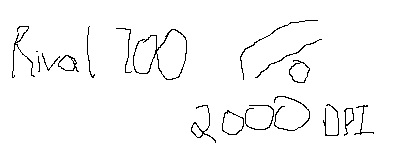
At a still-controllable 2000 DPI (sorry SteelSeries, CPI) movement was still very precise. No obvious acceleration or prediction seemed to affect the results, although very precise movements become noticeably more difficult due to the increased speed. Given that these types of speeds are more appropriate for displays in the 4K resolution spectrum this is to be expected.

This one was admittedly a bit absurd – the sensor will track up to 15600 CPI, but I found that setting to be completely unusable on my 2560×1440 display (much less trying to draw on a < 400px area). It seemed to track accurately, but “overkill” doesn’t begin to describe it – a user would have to add some negative sensitivity or acceleration to get any use out of that setting – and what’s the point of tracking 15600 CPI if you’re just going to cut the result in half or more anyway? So here’s a snapshot of sensor performance at 10,000 CPI instead – it’s still accurate enough, but my hand most certainly isn’t! For this setting, I definitely should have used a larger surface to draw on, but we can get an idea that the sensor is still tracking accurately at the higher settings.

The polling rate is set at 1000 Hz from the factory, and the SteelSeries Rival 700 didn’t have any problems reporting at that rate.
Tactile Cooldown Timers
Allow me to nerd out for a bit, as this was the feature I was most excited to test out on the Rival 700. First, a bit of backstory:
I’m a sucker for big stompy robots and lasers. It’s just a truth I’ve come to accept about myself. While I can’t say there’s an ideal experience out there for those that just want to stomp around in ten-meter tall machines of walking destruction, the 25-year old BattleTech universe seems to be the most fleshed-out franchise that feature these walking tanks. Featured in the prominent-but-niche MechWarrior games since the late 90s, the PC platform was one of the first places that could begin to capture the stompy robot experience from the pilot’s seat. Other than a few notable alternatives (EarthSiege series, Heavy Gear, Titanfall, Hawken), the MechWarrior games have been the only way to scratch this particular itch.
The latest iteration of this franchise is the online, multiplayer-only MechWarrior: Online which features many staples of the genre – multiple aiming reticules, heat management, configurable weapon groups and customizeable loadouts. Managing up to six different weapon groups that aim at two different locations at any given time can quickly get complicated, making the right choice of peripherals critical in having many options at your fingertips.

That brings us to the Rival 700’s tactile cooldown timers. Each weapon in MWO discharges upon firing one of the six weapon groups, where each individual weapon begins its respective cooldown/re-load time. To add to the complexity, certain weapons will have a chance to jam if fired before their cooldown period is complete. The ability to set a timer to coincide with a button press and have the vibration alert signal the end of a cooldown period would allow a user to keep their eyes on the action with clear advantages. It’s an obvious fit for the Rival 700’s vibration alerts feature.
Of course, when the Rival 700 was released, the only place option to set these timers lay with GameSense-enabled titles. With the release of SSE3.8.3, custom timers could be programmed and I set out to see if tactile alerts were as game-changing as they sounded…
It was certainly an advantage. Not so much so that any player with enough practice could make up for it by getting a feel for it over time (and there are in-game indicators that assist with this as well), but the vibration alerts from the Rival 700 were much more noticeable than anything happening on-screen. The cool-down bars and pips on the HUD are easily lost amidst frantic action – not so with the vibration alerts. I grew to really appreciate the additional reminder that a certain weapon group was now ready to fire, as it allowed me to keep more mental attention on lining up the next shot. I could immediately see the benefit for any application that has an ability/weapon/timed event on cooldown.
Is it an unfair advantage? Not even close. It doesn’t provide any notification that most games display for you anyway, and without GameSense they need to be individually programmed for each application. For MechWarrior, this means a separate profile would need to be configured for each individual ‘Mech and weapon used in the game! I can’t see too many players going through that much trouble for a slight advantage; for those competitive players looking to squeeze an extra percent or two out of their gameplay, it may be just the thing.
Over the multiple weeks using the Rival 700 as my main device I didn’t notice any issues with tracking or performance in any application. Mouse clicks remained solid and tactile; while I myself couldn’t tell much of a difference in the new plastic used for the main mouse buttons it certainly didn’t hurt the ample and nicely-tuned tactile feedback present in the left/right click buttons. That goes for the other buttons as well – the entire experience felt solid and crisp.
“Solid and crisp” sums up my experience with the Rival 700. The additional features (modular components, OLED screen, vibration alerts) are of dubious value depending on the application, but they are otherwise useful features added on to a very solid gaming peripheral at the core of the Rival 700. It’s unfortunate that more games don’t support the GameSense feature(s), but at least the tactile cooldown timers are now configurable on their own – bringing this unique (and surprisingly helpful) feature to a wider range of users.
I enjoyed my time with the Rival 700 overall. It’s a solid choice with some great features, and at no time did I feel I wouldn’t have gotten my money’s worth – after the 3.8.3 update, that is! Now, if SteelSeries can apply the same treatment to the OLED screen as the tactile cooldown timers…

I’ll try and summarize my experience with the SteelSeries Rival 700 in terms of Performance, Appearance, Construction, Functionality and Value categories, but as always I feel like I should add a disclaimer. You must understand that my own preferences and uses for gaming peripherals differ from most; while I try to view each mouse as objectively as I can, I probably can’t avoid my own bias from affecting my conclusion in some manner. I implore you to think in depth of your OWN uses and preferences, and use my reviews as a guide or simply as another perspective.
As I’ve mentioned throughout the article, I didn’t experience any problems with the performance of the Rival 700. The PixArt 3360 optical sensor never skipped a beat even across multiple surface types, and buttons/actions/movement all executed flawlessly in every application I tested.
Similarly, I enjoyed the appearance of the Rival 700. Aesthetically it’s an improvement over the other Rivals, with more sophisticated touches and a profile that lends a premium feel to the entire device. Even if you’re not a fan of the default patterned palmrest, the more classic gloss and soft-touch rubber finishes are available as additional options in the SteelSeries online store.
As far as construction, the Rival 700 is the best-feeling Rival to date. It’s solid, substantial and worthy of a flagship mouse. It’s hard to describe, but everything about the Rival 700 feels “tightened up” compared to the original. Not a hint of flex anywhere, and even the removable components snap in tightly and securely.
It’s the functionality where I’m a bit torn. For GameSense titles, the functionality exceeds that of almost every other device available, making it a seriously advantageous tool for competitive-minded players. The problem is, GameSense exists for…three titles total. Unless you play CS:GO or Dota 2 (or some Minecraft), you can’t get the most out of the Rival 700. SteelSeries recently added the ability to program your own tactile cooldown timers, so the situation has improved somewhat (even though this really should have been a feature available from launch). The ability to swap sensors and other modular parts is welcome, but it still relegates features like the OLED screen and responsive Prism RGB system to borderline gimmicks outside of GameSense-enabled titles, especially when compared to the Rival 300.
At the end, only you can decide how much value is left on the table with these features. There isn’t another mouse on the market right now that brings to the table everything the Rival 700 does, and even outside of GameSense titles the customization aspects of the OLED screen and nameplate/palmrests are unmatched with other devices (to say nothing of the modular sensors). After using this device for a month and after the 3.8.3 SteelSeries Engine 3 update, I wouldn’t feel disappointed at $79.99 (Amazon | Newegg).
In summary, the Rival 700 could be a serious tool for a competitive gamer – especially with a compatible GameSense game. If you’re able to utilize all of the features the Rival 700 offers it is well worth the price and deserving of a “flagship” status. However, you may hard-pressed to make full use of the OLED screen, rendering it a gimmick outside of GameSense-enabled titles. With the recent tactile timer option in SSE3.8.3 the vibration alerts can at least be programmed individually, avoiding the dependency on game developers to add a niche function for a minority of users. Overall, it is certainly worthy of the title “the best Rival.” I’d have no problem recommending this particular mouse to anyone that could take full advantage of its features (namely, CS:GO or Dota 2 players…), but others may want to think hard about the value these features will bring over the Rival 300.
+ Solid, all-around offering with some game-changing features
+ Modular sensors and components
+ Comfortable, familiar shape that lends itself well to accuracy
+ Powerful, easy to use software suite
+ Tactile alerts can now be custom programmed (as of SSE3.8.3)
+ GameSense features work well with compatible games
+ Enough features to earn “flagship” status
+ Tactile cooldown timers have lots of potential
– OLED panel/Prism RGB only update in real-time with GameSense enabled titles, no options for configuring responsive events otherwise
– Very limited number of GameSense titles (3).
– Without GameSense integration, additional features are of dubious value over competition
-
Performance: 9.50
-
Appearance: 9.00
-
Construction: 9.00
-
Functionality: 8.25 (9.75 for GameSense titles)
-
Value: 8.00 (9.50 for GameSense titles)
Quality Recognition: Benchmark Reviews Silver Tachometer Award.
COMMENT QUESTION: What do you think of the GameSense features?


