By Greg Schepers
Manufacturer: GAMDIAS Technology Co., Ltd
Product Name: HERMES Mechanical Keyboard
Model Number: GKB2010
UPC: 848475000749
Price As Tested: $149 MSRP
Full Disclosure: The product sample used in this article has been provided by GAMDIAS.
Mechanical gaming keyboards continue to pour into the market, and it is blatantly obvious that this is more than merely a passing fad. More and more companies continue to throw their hats into the ring in order to capitalize on the popularity of this gaming peripheral. One of the latest entries is the GAMDIAS HERMES GBK2010 Mechanical Gaming Keyboard. I know what you’re thinking… “who?” GAMDIAS was recently established (2012) and has a singular focus, which is to “redefine the Electronic Sports (eSports) landscape for gamers worldwide.”
With a goal to become one of the top three gaming peripheral manufacturers globally, GAMDIAS is committed to not only developing high-quality gaming gear with innovative features, but also to providing products that appeal to all levels of gamers. This particular device, the HERMES, which Benchmark Reviews will put under the microscope today, certainly appears to be on par with that statement. It has many of the features that we expect in a high-end mechanical gaming keyboard, such as Cherry MX switches, individually back-lit keys, anti-ghosting with N-key rollover, and so forth. However, GAMDIAS snuck in a few innovative features as well. The real question is, are people going to pull the trigger on a $149 price tag for a keyboard from a newly-established brand?

The GAMDIAS HERMES has been adorned with an eye-popping number of features and specifications as you can see below. What I’m sure we all want to know is how well all of these features performed during several days of extensive use, which included both typical daily tasks and plenty of gaming duty. I encourage you to read on in order to find out.
- GAMDIAS Element increases clicking speed by 20% and reduces keyboard clanking noise
- Fully Cherry MX mechanical switches with 50 million click life cycle
- 32-bits ARM Cortex premium micro-processor offers superior computing performance
- 512KB onboard memory for key and profile assignments
- 13 additional macro keys
- Anti-ghosting with full N-key roll over
- On-the-fly macro recording
- Ergonomically designed wrist rest magnetically attches with keyboard for gaming comfort
- Wrist rest doubles as a protective cover when keyboard is not in use
- Windows key lock during Gaming mode
- Built-in USB port pass through earphone and microphone jacks for quick peripheral access
- Military grade braided cable with Gold-plated USB connector
- Fitted for right and left handed gamers.
| Cable Length | 2.2M |
| Polling Rate | 1000 Hz |
| Onboard Memory | 512KB |
| Dimension(LxWxH) | 474.85 x 310.83 x 39 mm(w/ Wrist Rest) |
| Switch Lifecycle | 50 Million |
| Graphical UI | Yes (GAMDIAS HERA) |
| Key Switch | Cherry MX mechanical switches |
| Additional Macro Keys | 13 |
| Multimedia Keys | 6 |
| Backlit | All Keys with 6 Levels Brightness |
| N-Key Rollover | Yes, N-Key / 6-Key Option |
| OTF Macro Record | Yes (with HERA) |
| Windows Key Disable | Yes (Game Mode) |
| All-Keys Lock | Yes |
| Onboard Audio Jacks | Audio-Out / Mic-In Jacks |
| Onboard USB Port | One USB Pass-through Port |
| Interface | USB |
As many of you already know, there are several types of mechanical keys and everyone has a different opinion as to which type is best for gaming. The GAMDIAS HERMES has MX Cherry Blue keys, which are typically known for being the preferred mechanical key type for true typists. Blue mechanical keys have a distinct tactile bump feeling to them and they are probably the loudest mechanical keys out there. These two factors are a turn-off to a segment of gamers. In order to ensure that the HERMES is a well-rounded keyboard with wide appeal, GAMDIAS developed what is called the “GAMDIAS Element.” The GAMDIAS Element is a rubber insert that was designed to dampen the clacking of the blue keys while increasing the overall depression speed of each key.
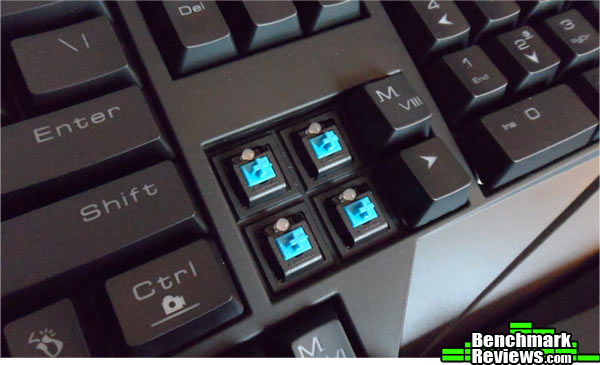
According to GAMDIAS, the GAMDIAS Element increases typing speed by approximately 20%. I am a traditional-style typist (about 70 WPM) and have been at it for many years on many different keyboards starting with electric typewriters. I did not notice an increase in my typing speed due to the GAMDIAS Element. In fact, the GAMDIAS Element felt as if it cut off the keystoke, which initially made typing more difficult for me. I eventually adapted to the feel delivered by the GAMDIAS Element and like to type on the HERMES, but it is not my first choice when it comes to everyday typing.
Having said that, the GAMDIAS HERMES is a Mechanical Gaming Keyboard, so the GAMDIAS Element was designed to improve gaming performance. Does it dampen the click of the Cherry MX Blue keys? A little. Does it speed up key depression? Well, it does shorten the keystroke, so it is plausible to assume that it helps with speed. However, I do not know the testing methodology employed by GAMDIAS to determine keystroke speed, so I cannot confirm their findings. What I will say, if you are looking for a keyboard for both gaming AND for everyday use, this might not be your first choice. Most gamers do not prefer Cherry MX Blue keys and opt for something more along the lines of a Red, and typists prefer a straight-up Blue, which these are not anymore unless you take the Element out. Oh, that reminds me; GAMDIAS recommends that the Element be taken out and cleaned after about six months of use, yet no key puller was included, nor are there instructions for that procedure.
Let me add this; I am speaking as an individual that has used many mechanical keyboards. If you are coming over from a rubber-domed keyboard, it is possible that you will think the typing experience on the GAMDIAS HERMES is the best thing since sliced bread.

You will notice two USB gold-plated plugs at the end of the braided cord. Pointing out the obvious, one is to power the keyboard. The other is an extension for the USB 2.0 slot located on the keyboard. You will have an opportunity to see that later on in this section.

The USB plugs for the HERMES are large. In fact, they are almost too large to be placed in adjacent USB slots. The above image shows how the plugs are touching and even slightly leaning away from each other due to the contact.
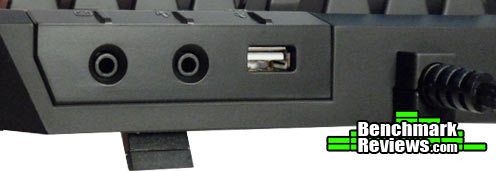
As promised, I provided an image that shows the USB 2.0 slot located on the back of the keyboard near the area where the braided cord meets the device. You will also find jacks for a headset and microphone.

Gamers will be able to appreciate the value of this next feature. GAMDIAS integrated On-The-Fly macro recording into the HERMES. To engage recording, all you have to do is hit Fn & Ctrl. After depressing the key or keys for your macro, hit Fn & Ctrl again to stop recording. Finally, hit the macro key you want assigned to the macro you just recorded, and you’re all set.

The GUI, which is named the Hera, has many of the standard features we have come to expect from a GUI. You can assign the macro keys a task from predefined commands, record macros and assign those to the macro keys, adjust the back-lighting, and save commands to a number of different profiles. The Hera application supports other GAMDIAS devices, so you only need the Hera GUI. This linking of devices allows for the creation of macros that use keyboard/mouse combinations.
The Hera also comes with a number of other features that seem to be geared towards professional gamers, or they seem just downright gimmicky. Anyway, you have the ability to record and customize sound effects and voice messages that can be used on other GAMDIAS devices. These pre-recorded voice messages can be sent to teammates at will by the touch of a button. There’s the GAMDIAS Olympics feature, which allows you to assess your gaming abilities and compete with other GAMDIAS gamers. And then there’s the muscle memory section, which collects keystroke data and is apparently supposed to help you improve your keystroke speed and proficiency? I’m not sure; there’s really no documentation included, nor is there much online to explain any of these functions. In my opinion, the average, everyday gamer is not going to use these functions.
Testing gaming peripherals is a subjective affair, since there is no way to really quantify this process. What I can tell you is that I have used the GAMDIAS HERMES Mechanical Gaming Keyboard for over two weeks for approximately seven hours per day on average, employing it for both typical daily use and for gaming. Keep in mind that the following results are based solely on my experience with the GAMDIAS HERMES.
- Motherboard: Gigabyte GA-990FXA-UD3
- System Memory: 16GB (2 x 8GB) DDR3 1333 G.Skill Ripjaws X Series
- Processor: AMD FX-6100 Zambezi 3.3 GHz Six-Core Processor
- Audio: ASUS XONAR DG Headphone Amp & PCI 5.1 Audio Card
- Video: EVGA GeForce GTX 550 TI
- Optical Drive: Pioneer Black Internal BD/DVD/CD Writer BDR-207DBKS
- PSU: Corsair HX Series HX750 750W GOLD Certified Modular Active PFC Power Supply
- Monitor: AOC e2752Vh (27″) & Samsung SyncMaster PX2370 (24″)
- Operating System: Windows 7 Ultimate
The GAMDIAS HERMES was used extensively for completing a number of different work-related tasks. The programs/software I used during this phase included Microsoft Office (Outlook, Word, Excel), Adobe CS5 (Dreamweaver, Photoshop), a variety of browsers (Chrome, Firefox, Internet Explorer), and miscellaneous software, such as Skype. The number of macros available really come in handy. I use them mainly for opening programs, but they also come in quite handy other tasks as well, like going to the desktop. However, it really comes back to typing. I like typing on the HERMES, but these keys are not my first choice. While the GAMDIAS Element may dampen the MX Cherry Blue clacking noise, it shortens the keystroke substantially and there is definitely an adjustment period for people with prior mechanical keyboard experience.
On the other hand, putting the GAMDIAS HERMES through a number of different gaming trials offered a far more positive experience. The layout, especially the number and placement of macros, was extremely beneficial. The shorter keystrokes, offered by the GAMDIAS Element, seemed to work well for me while gaming. However, I did not notice a performance improvement, which you are led to believe by GAMDIAS and its statement that the GAMDIAS Element will improve keystroke speed by 20%. In fact, if you aren’t wearing headphones and not accustomed to MX Cherry Blue keys, you may not appreciate the clacking noise.
There are a number of positives from which to draw regarding the GAMDIAS HERMES Mechanical Gaming Keyboard; adjustable back-lighting, several well-positioned macros, a wrist rest that doubles as a dust cover, plug and play capability, on-the-fly functionality that includes profile switching and macro recording, and much more. Considering that it has yet to establish a reputation, the challenge for this new organization is to effectively market the product and price it to sell.
The wrist rest/dust cover is a great feature, but due to its extraordinarily large size, it has its limitations. More flexibility should be integrated into this feature by making it expandable. Having it fold in half or providing a portion that can be extended/retracted would work. Also, a shorter version of the magnetic wrist rest could be either provided or sold separately.
Manipulating the media keys is a bit of a hassle. For example, having to use two hands to adjust the volume is inconvenient. I have to hold down the Fn key and adjust the volume by hitting F7 or F8. My personal preference is a scroll wheel, which can be found on the Gigabyte Aivia Osmium or Corsair Vengeance K70. Sure, you can program macros to control the media keys, but why would you want to use up most of your macro keys or switch profiles for that purpose?
Many of the high-end mechanical gaming keyboards come with additional keys and a key puller. This is not a deal-breaker if it does not come with additional keys, but I think gamers are getting accustomed to receiving this benefit with a new keyboard, especially an expensive one, so it would be a nice touch. At least include a key-puller, since GAMDIAS does recommend cleaning the Element after about six months of use.

When it comes to the performance of a keyboard, there are two phases to consider; the gaming phase and the daily task phase. The GAMDIAS HERMES Mechanical Gaming Keyboard performed quite well while employing it for gaming purposes. The Cherry MX Blue keys with the GAMDIAS Element does help dampen the clacking noise of the keys and it shortens the keystroke. I cannot definitively determine if my gaming performance improved, but I am certain that it did not deteriorate.
One of the claims that GAMDIAS has made regarding the Element is that it increases keystroke speed by 20%. Since this is a gaming keyboard, I can assume this claim is targeted at gamers. However, plenty of us want a keyboard that can play fill both the gaming and professional roles. The HERMES can play both roles, but it would not be my first choice to do so, and that opinion is mainly due to the keys. When utilizing the HERMES for daily tasks, the 20% speed advantage was not noticed. In fact, the keys almost made typing seem a bit sluggish, since most mechanical keyboards have keys with a longer stroke. These are not the Cherry MX Blue keys that typists rave about. However, the more I use them, the more I do get accustomed to them.
Initially, the GAMDIAS HERMES looks a bit odd due to its size with the wrist rest attached. After getting past that, it is actually quite an attractive keyboard. It has some great styling; even the font on the individually back-lit keys is sharp. The matte black finish just looks good.
Not unlike the majority of gaming keyboards out there, the GAMDIAS HERMES is made of plastic. However, nothing feels loose, nothing rattles, and nothing shakes. The only discrepancy worth sharing is barely worth sharing. However, a rubber pad did fall off of the bottom of the wrist rest. I glued it back on, and all was well with the world once again.
There is plenty to appreciate about the HERMES when it comes to functionality. The plethora of well-positioned macro keys comes in extremely handy while gaming, surfing the internet, or taking care of some daily tasks. On-the-fly macro recording certainly is a benefit. The wrist rest is comfortable to use, and then it can be utilized as a dust cover. However, the lack of independent multimedia keys and having to hit the function key followed by F7 or F8 to manipulate the volume is annoying.
The GAMDIAS HERMES Mechanical Gaming Keyboard has plenty of features and is a solid device, but it is not perfect. Also, GAMDIAS has no reputation to go on. Therefore in terms of value, the high-end sticker price of $149 is a tough one to justify.
If this keyboard had a name like Logitech, Razer, or even Corsair on it, it might be easier to convince consumers to spend $149 for it. However, I can say that, for a keyboard at this price point, I have received a lot less. The GAMDIAS HERMES has what it takes to compete at this level, but more people need to get their hands on it so that a reputation can be established for this organization. A rethink on that MSRP might be in order.
+ Quantity and placement of macros
+ Attractive, individually backlit keys
+ MX Cherry Blue keys with GAMDIAS Element for gaming
+ On-the-fly macro recording and key assignment
+ Wrist rest/dust cover
+ USB & headphone jacks on board
+ Anti-ghosting with full N-key roll over
– Lack of multimedia keys
– Size of wrist rest
– No optional keys/key puller
– Cherry MX Blue keys with GAMDIAS Element for typing
– Rubber pad failure on bottom of wrist rest
– Plastic portion of USB plugs too large
– $149 MSRP
-
Performance: 8.75
-
Appearance: 9.00
-
Construction: 8.75
-
Functionality: 8.50
-
Value: 7.50
Recommended: Benchmark Reviews Seal of Approval.
COMMENT QUESTION: What keyboard do you like to use for gaming?


