By David Ramsey
Manufacturer: SilverStone Technology Co. Ltd.
Product Name: m.2 SATA External SSD Enclosure
Model Number: MS09 (MS09C)
UPC: 844761015428
Price As Tested: $34.82 (Newegg | Amazon)Full Disclosure: SilverStone Technology Co. Ltd. supplied the product sample used in this article.
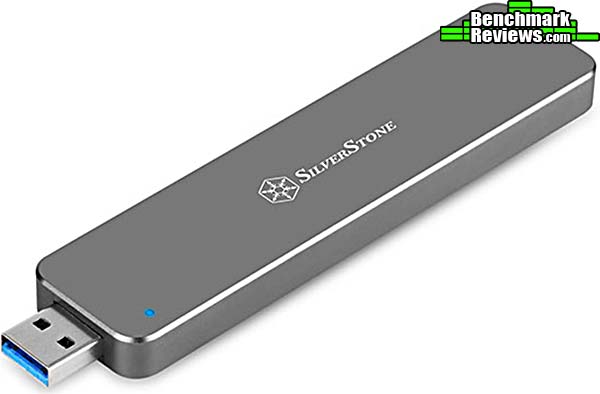
It could be the product you didn’t know you needed… at least, if you’re someone that has a spare m.2 SATA SSD laying around. SilverStone Technology has something you might be interested in: a way to turn that old m.2 SATA drive into a function USB drive! That fact that this product even exists surprised me, but there you go. Today Benchmark Reviews looks at the SilverStone MS09 m.2 SATA External SSD Enclosure.

| Data Transfer Rate | Up to 10GB/s (on USB 3.1 Gen 2 port w/Tape A connector) |
| m.2 SSD Support |
B Key SATA Type M.2 SSD x 1
22mm x 60mm or 22mm x 80mm size |
| Drive Interface Support | SATA 1/2/3 |
| Weight | 33g ± 5g |
| Dimensions |
110mm (W) x 9mm (H) x 26mm (D) |
Let’s take a look at this dock in the next section.
- Motherboard: ASUS ROG STRIX Z270-i Socket LGA 1151
- Processor: 4.2 GHz Intel Core i7-78700K Kaby Lake CPU
- System Memory: 16GB DDR4 2133MHz
- Operating System: Microsoft Windows 10 Pro
- m.2 SATA: MyDigitalSSD MDM242-SB-256
It’s important to remember that “m.2 SATA” is completely different from “mSATA”. The former, which this device supports, looks exactly like an “B key” PCI-E m.2 SSD and in fact uses the same socket. mSATA SSDs, on the other hand, use a different mounting socket and a different retention mechanism. mSATA SSDs will not work in the MS09.
The only m.2 SATA SSD I had was the 256GB MyDigitalSSD Super Boot Drive, which Benchmark Reviews tested here. It’s not a high-performance drive, but then again you probably wouldn’t want to put a high performance drive into a USB enclosure.
The MS09 uses an m.2 retention mechanism I haven’t seen before. Normally, the tip of the drive’s circuit board would be secured to a small post with a screw. On the MS09, it’s a little clumsier: you have to insert the drive into the m.2 connector, then press it down while simultaneously inserting the support post, which has a notch to engage the edge of the drive’s circuit board:
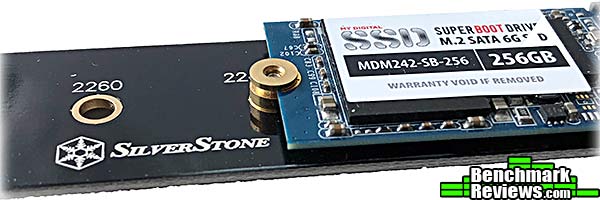
You hold this assembly in place while securing the post with a screw from the bottom, using your third hand.
Anyway…my first test was to run a straight linear read across the entire volume of the drive using AIDA64; and record the average throughput. I repeated this test with the drive connected to a native SATA interface, as well as installed in the SilverStone MS09 and connected to both 10Gb/s and 5Gb/s USB 3.1 ports. The results are in the graph below:
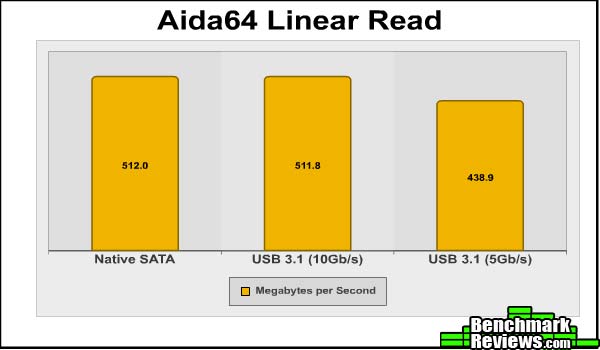
As you might expect, the performance in this test on both the native SATA port and a 10Gb/s USB port was identical. Since modern SATA ports run at 6Gb/s, a 10Gb/s USB port offers better overall throughput. However, the SATA controller on the SSD can’t handle anything faster than 6Gb/s, so plugging the drive into a 10Gb/s port gains nothing in this test. The 5Gb/s USB port does reduce the performance on this test by 14.28%, which matches the 16.67% drop from 6Gb/s to 5Gb/s pretty well.
So at this point you might be thinking that connecting your m.2 SATA drive to a USB 3.1 port at 10Gb/s doesn’t affect things at all…and you’d be right, until you saw the result of the IOMeter test:

While USB 3.1 Gen 2 aka “Superspeed+” doesn’t hinder raw throughput, the USB Mass Storage protocol simply isn’t as efficient for deep queue depth, rapidly changing workloads, which is what IOMeter measures. Benchmark Reviews’ standard IOMeter script performs a random series of operations, 50% reads and 50% writes, at a queue depth of 32. As you can see from the massive 67% drop in performance, even a 10Gb/s USB port just can’t keep up with SATA. And when you drop to 5Gb/s…wait, what? Yeah, this is one of the moments that makes benchmarking such fun, in a “I ran the tests three times and got the same inexplicable results” way. But there you go. I suspect I’m seeing some sort of weird synergy with the MyDigitalSSD m.2 SATA drive and the VIA VL715 bridge chip in the MS09…oh, heck, I dunno. It is what it is.
In the next section I’ll present my final thoughts and conclusion.
SilverStone’s MS09 External SSD Enclosure is a unique and rather niche product. It only works with m.2 SATA SSDs, not mSATA or PCI-E SATA, and m.2 SATA has just never been very popular, seeing most of its use in lower-end laptops a year or two back. You can still buy them; Samsung offers a number of models, as does Western Digital and Intel. I’m just not sure where they’re used any more or why someone would have one in the first place, unless they were upgrading the storage in one of those aforementioned low-end laptops.
While the MS09 does allow you to repurpose an old SSD as a high capacity USB drive, note how much larger the MS09 is than a typical USB drive:

It’s just…big. Really big. Not too large for a pocket, but large enough to snap off the interior connector of your computer’s USB port should you bump it accidentally while it’s plugged in.
The performance of the MyDigitalSSD will of course depend on the m.2 SATA SSD you install in it. If you have a 10Gb/s USB 3.1 Gen 2 port– with a Type A connector– available, you’ll see no drop in linear performance, although you may see a dramatic drop in IOPS. However, since USB drives are most commonly used for linear I/O– think data transfer and backup– the poor IOPS performance shouldn’t be much of a real-world issue.
So where does this leave us? Even a lower-end SSD like the MyDigitalSSD Super Boot Drive I tested with will provide much better performance than virtually any standard USB drive. So if you have an m.2 SATA drive gathering dust somewhere, this is your chance to make it useful.
The SilverStone MS09 External SSD Enclosure is an interesting product; I could wish that it handled m.2 PCI-E SSDs, and a number of companies make PCI-E to USB 3 bridges, so perhaps we’ll see such a product some day. In the meantime this is what we’ve got.
Since it’s from SilverStone, solid construction is a given, and the MS09 doesn’t disappoint: you can feel the quality in your hand. Bead-blasted aluminum with beautifully chamfered edges is just the kind of thing we’ve come to expect from this company.
It’s a little fiddly to open it up, install the SSD, and screw it all back together (I had to do it twice, since the first time I forget to put the slider switch into place before screwing the MS09 together), but it’s not something you’ll be doing often. And the slider operation itself is very stiff, a consequence of trying to slide a long printed circuit board though an aluminum tunnel…there’s just a lot of friction.
The performance of the MS09 will obviously vary depending on the SSD you install; still, even a low-end SSD like the MyDigitalSSD Super Boot Drive I used will provide much better throughput than even the best “standard” USB drives; for pure linear data transfers, the MS09 won’t inhibit your SSD at all. Of course high queue depth workloads will, but that’s a consequence of the USB Mass Storage Protocol, not the MS09. Still, it’s something to consider.
For $34.82 (Newegg | Amazon), it’s a little pricey, and although the metal construction is nice I’d personally prefer plastic with a price of $19.95. Still, that’s what’s out there, and if you’ve a spare m.2 SATA drive you’re not using, the SilverStone MS09 can make it useful again.
+ High quality metal construction
+ Unique product for repurposing m.2 SATA drives
+ Did I mention the metal construction?
– Much larger than any “real” USB flash drive
– How many computer have USB 3.1 Gen 2 on Type A ports?
– Slider for extending USB connect is stiff
-
Performance: 8.50
-
Appearance: 9.50
-
Construction: 9.50
-
Functionality: 8.75
-
Value: 8.50