By Jason Maxfield
Manufacturer: ROCCAT GmbH
Product Name: Horde AIMO Membranical RGB Gaming Keyboard
Model Number: ROC-12-351-BK
EAN: 4250288125964
Price As Tested: $83.04 (Amazon | NewEgg)Full Disclosure: The product sample used in this article has been provided by Roccat
Roccat is a German based company that focuses primarily on peripherals for PC. Roccat has sent us a sample of their new Horde AIMO RGB keyboard. Roccat has a patent pending design with it’s AIMO lighting system. AIMO is an intelligent lighting system that is supposed to change lighting conditions based on your usage of the Horde AIMO keyboard. Roccat claims that over time this feature will get more in tune with your habits the longer you use it.
Roccat also states that using the AIMO system with other AIMO products, such as the Khan AIMO headset, and Kone AIMO gaming mouse will further the AIMO experience when combining more AIMO enabled products, for a seamless lighting experience.
In this article for Benchmark Reviews, I will put the Roccat Horde AIMO keyboard through it’s paces, and see if the keyboard is up to snuff when it comes to gaming and general use. Roccat claims that the Horde AIMO has the perfect balance between membrane and mechanical keys, calling them ‘membranical’ keys.

I’ll be testing the Roccat Horde AIMO playing a variety of games and general use typing, including writing this article. Comparisons will be made to other keyboards I have used in the past, including the Razer Lycosa, and Microsoft Desktop 4000 keyboards.
- ARM Cortex-M0+ 50MHz
- 512kB onboard memory
- 1000Hz polling rate
- 1.2mm actuation point for macro keys
- LED driver, 256 steps PWM control
- Six-zone illumination with 12 RGB LEDs
- Wheel encoder with 20 steps
- 1.8m braided USB cable
Internet connection for driver installation
USB 2.0 Port
The ROCCAT Horde AIMO keyboard is available online, and as of April 2018 this product was sold for $83.04 (Amazon | NewEgg). We’ll have a look at what comes with the Roccat Horde AIMO keyboard and go over it’s looks and some basic functions below.

Roccat includes a quick installation guide, disposal information, and a set of Roccat stickers, if you feel so included to label your PC or other gear with them.

The Roccat quick installation guide is more of a poster than a manual. You do get some basic information on the functions of the board, so it is somewhat useful.

Once you open the box, you are greeted with the plastic smell of keyboard goodness. Hope I’m not the only one that notices new keyboard smell.

Now that we did away with all the plastic wrap we get a look at the layout of the Roccat Horde AIMO keyboard. This is a full size board, with a USA key configuration. It’s nice that Roccat didn’t do away with the number pad keys and other functions, as so many gaming keyboards are doing these days. I do more than gaming on my PC and having things like the number pad on a keyboard come in handy for me on almost a daily basis.
Up top we have the multi-media keys and the jog dial that controls each function. More on that later in the details section of this article.
You might also notice the key-spacing is a bit tighter and a bit smaller than your typical keyboard. I have large hands and this makes the keyboard feel a bit cramped when typing, but much better when gaming, as I can reach further across the board to function or number keys with ease.

The bottom of the Roccat Horde AIMO has 4 rubber feet in the corners, a slot for the palm rest to attach on either side, and two height adjusting feet recessed in the top corners, that give the Horde AIMO a nice tilt upward if you choose to use them.

Here is a shot of the Horde AIMO from the side. It’s a bit thicker than other keyboards, but doesn’t really affect the amount of desk space it takes up.
You’ll notice the keys are lower on the macro keys in front. Roccat claims they have a much faster actuation time than standard keys, but more on that later in the detailed features section of this article.
Now we’ll get into the details of the Roccat Horde AIMO keyboard.

This is the backside of the quick installation guide. Too bad the folding ruins this for being used as a poster. I figured I would include this since Roccat went through all the trouble of putting their logo on the back of the guide.

The palm rest of the Horde AIMO is made of plastic. I’m kind of used to it after using a Razer Lycosa for a while, but I do miss the padding that my Microsoft 4000 series keyboard offered.
Although, sweat from long gaming sessions is easier to clean on the plastic surface than the vinyl covering on the Microsoft 4000 series that eventually gets eaten away from sweat and friction.

Here’s a better look at those macro keys. When not gaming, this is what you get from using M1 through M5, ‘!@#$%’. Not super handy for typing, but if you got used to using those keys, it’ll save you the trouble of having to hit the shift key.
In games, however, you can set up custom keystrokes, or select from any number of preset ones that are included with the keyboard’s Swarm software. I’ll elaborate on that more in the testing section of this article.

This is the multi-media function keys section on top of the Horde AIMO. From left to right they function as: play/pause, previous track, next track, volume mute, volume level, mic volume, RGB brightness level on the keyboard, lighting color of the keyboard, lighting FX, task switcher, and a windows dial / custom button.
The last button, I have no idea how to set or use it. Roccat doesn’t have any instructions on how to use this button that I am aware of either.

Here’s what the Roccat Horde AIMO looks like when the palm rest is attached. The palm rest isn’t as comfortable as a padded palm rest, but is better than having your palms sit on your desk.
Next page I’ll go over my testing and results of the Roccat Horde AIMO keyboard.
I tested the Roccat Horde AIMO with various games including, GTA V, Mass Effect: Andromeda, Skyrim, and few others. General typing uses were also tested.
For gaming I mostly used Grand Theft Auto 5, as you have a variety of different keys to use when gaming. Flying for example, you have to use the number pad instead of the WASD keys. Also, since it had built-in macros for GTA V, I didn’t have to create any custom macros to use them.
I did some testing on typing test.com to assess my typing speed in comparison to other keyboards I have used in the past. And I included results from a keyboard theoretical polling rate site: https://blog.seethis.link/scan-rate-estimator/.
I’ll be going over the functions of the Swarm software that is used by the Horde AIMO in the results section below. I also tested the various multi-media function keys during my time with the Horde AIMO.
-
Motherboard: Asus Prime X370-Pro
-
System Memory: Corsair Vengeance 16GB (2X8) @ 2800 CL14
-
Processor: Ryzen R5 1600 @ 3.9Ghz
-
Audio: On-board
-
Video: XFX R9 3900
-
Disk Drive 1: Samsung 850 Evo 500GB
-
Disk Drive 2: Western Digital Black 750GB
-
Optical Drive: N/A
-
Enclosure: Corsair Spec-Omega (white)
-
PSU: EVGA SuperNova 850 Gold
-
Monitor: Acer X223w
-
Operating System: Windows 10 Pro
We’ll start with the typing test results. Using typingtest.com, I scored 55 WPM and 6 errors, using Aesop’s test. I have scored as high as 65 WPM with the Razor Lycosa and Microsoft 4000 keyboards in the past.
I think my loss of typing speed is from the spacing and size of the Horde’s keys. They are smaller and a bit more tightly spaced. I have large hands so this makes typing a bit more tedious for me. I’ve never been a speed demon on the keyboard but this is only slowing me down. Not a good result.
Gaming, however, is another story all-together. Since typing isn’t really the main focus of a gaming keyboard, the Horde felt really comfortable and I had much further reach of function and number keys at the top of the board without having to move my left hand much to access them. This has a huge part to do with the function keys being placed lower on the keyboard as well. Most normal keyboards have at least double to triple the gap of the Horde AIMO to their function keys. Roccat even put a little plastic stub on the ‘W’ key so you can find it easier, just like your typical home keys, ‘F’ and ‘J’.
On my Razor Lycosa keyboard I would have to stretch to reach function keys, but on the Horde I don’t have to move my hand to reach F-1 through F-4 nearly as much to hit them. In a quick twitch game this could mean you hit that button in time to keep you from dying or not.

Anti-ghosting wasn’t an issues with the Horde AIMO. Not all the keys are capable of anti-ghosting, but as you can see in the image above, the keys highlighted in blue are anti-ghosting.
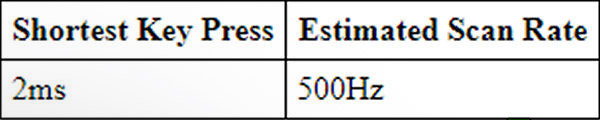
Roccat states the Horde AIMO has a 1000Hz polling rate, and according to the results I have, this seems accurate. I achieved this result from randomly tapping the keys to get as short of a response from the keys as possible. If you take 2ms time and the 500Hz estimated scan rate you come up with a theoretical 1000Hz polling rate.
From a feel standpoint, the ‘membranical’ keys do not feel any different from other membrane keyboards I have used in the past. The actuation of keys feels a little bit stiffer than other membrane keyboards, and has a quick rebound to them once you are done pressing the key down.
Roccat claims actuation speed is increased over normal membrane keyboards:
Horde macro keys: 5.0ms
Horde Membranical keys: 7.8ms
Standard membrane keyboard: 9.0ms
I find this information to be pretty useless. 1.2ms is such a small difference that we can’t even notice this. Roccat also claims that because the macro keys are shorter they actuate even faster than the normal keys. I can’t confirm if they actually do actuate faster, but when using the macro keys they do seem to have a shorter throw when pushing them down, which might mean faster actuation is happening, but is not something I can measure accurately.
I have not owned any mechanical keyboards but I have used a few friends or sampled some at the big box stores and the Horde AIMO does not sound or feel like any of those mechanical keyboards I have used. I’m quite thankful for the sound not being the same, as I find the ‘clacking’ of mechanical keyboards to be annoying. The Horde AIMO is a bit noisier than other membrane keyboards, and I guess you could call it a muted mechanical sound, rather than the full-on ‘clicks’ you get with real mechanical keyboards.
A quick note about the Swarm Connect module. This module allows your smartphone to connect and view various stats about your gaming, such as, actions per minute. At the time of this writing, this module would not install to my PC, so I was not able to evaluate it’s performance. Roccat has stated they patched the Swarm software to fix this issue, but it appears to be an ongoing issue for myself.
Moving on to the software that ties the board’s functionality all together. Roccat’s Swarm software is needed to control the functionality of the RGB lights, macros, and AIMO. The software also auto-updates and downloads various modules that are used for Roccat’s keyboards, mice, or headsets that are part of the AIMO product line.

The Swarm software is easy to use and pretty intuitive. The general features tab let’s you set sound feedback and your typical keyboard functions, including repeat delay, repeat rate, and cursor blinking rate. Just below the sound feedback options you can choose to reset your settings to default.
I found the sound feedback to be pretty annoying. You can select from several different sounds, and I’m not quite sure why Roccat included these sounds with their software.
At the bottom of the page you can access your profile and macro managers for any custom profiles or macros you create. The custom profile option I’m not sure how to use. Roccat needs to have clear instructions on how to use this option, but I can’t find any.
As far as the macro profile goes, that’s easier to use. You can create custom macros by recording key presses, and even the interval between them for precise macros. Once you have created a new macro, or want to use some of the preset ones included with Swarm, you have to go to the key assignment tab to assign the macro keys.

Next tab is the key assignment page. You can drag commands or keys from the functions panel and drop macro commands on one of the five macro keys, or you can remap your entire keyboard if you so desire. You have the choice between keyboard view or list view. I found the keyboard view to be the quickest and easiest way to drag and drop a macro command onto the key I wanted.

This is the key illumination page. From the drop down menu on the left you can select from a variety of RGB color patterns. AIMO is listed at the top, and mostly seems to mimic the colorwave pattern for me so far. It fluctuates depending on how much I’m using the keyboard, but I do not know exactly what actions make it do things. In gaming, I haven’t really noticed a difference.
Also, I would like to point out that the illumination on the keys is not very bright. This is a nice feature, as I have seen many RGB keyboards that overdue the brightness level and it becomes distracting. In contrast, the Horde AIMO almost seems too dim at it’s brightest settings. At night this is a bonus though, as you do not have to turn down the illumination if you game in the dark or a dimly lit room. While the full light of day is out or in a well lit room, some of the colors can be hard to spot on the Horde AIMO.

In the image above you can see that each of the other patterns (other than colorwave) have a selection of color schemes to choose from. You can set the speed and brightness of the pattern. The pattern only seems to start from the right side of the board and moves left. An option to have the pattern move from left to right would be nice.

The AIMO tab at the top has various options depending on what piece(s) of hardware you have connected to your PC.
I have the AIMO activated for the Horde keyboard. The percentage has gone up from 33% to 35%. This level climbs with new features added, as well as other AIMO products. Roccat claims the higher the level, the richer your experience is. Having only one of their AIMO products, I can’t comment on that statement.

Lastly, we have the Swarm settings page. You can access this by hitting the cog wheel in the upper right corner of the program.
The general tab allows you to update your software automatically, or if you prefer, manually.
The update center gives you an overview of the Swarm software version, and if it’s up to date or not. Below that you have your hardware version and if the firmware is up to date. This is also where any modules you need, like the Swarm Connect would be updated from, but is not downloading for me as I explained earlier in the article.
Next page I’ll go over my final thoughts and conclusions of the Roccat Horde AIMO keyboard.
The Roccat Horde AIMO has some interesting ideas, but in reality it doesn’t seem any different than the next RGB keyboard on the market.
‘Membranical’ keys comes off as some kind of marketing gimmick that doesn’t really mean a whole lot. I certainly can’t tell the difference. The feel of the keys on the Horde AIMO is essentially the same as any membrane keyboard, but the membrane just feels stiffer than that of other membrane keyboards I have used in the past.
The keys and smaller size slow my typing speed down. Although, not designed to be an office keyboard, I would of liked to be able to type as comfortably as possible.
Gaming with the Horde AIMO is just as good as any other board I have used. The only advantage I gleaned from this board is the smaller keys make it easier to stretch to number keys farther to the right and the function keys are closer and easier to use thanks to their placement and size of the keys being smaller than normal.

In the end the Roccat Horde AIMO just really isn’t any different than other keyboards I have used. Sure, you have the macro keys, but this is hardly anything new to gaming keyboards, nor is the RGB or software functions.
What you end up with is an over-priced keyboard with gimmicky features that don’t really add up to a different experience the way Roccat would have you believe.
One other thing before I get on with the ratings. I would really like to see Roccat come out with a thorough manual, instead of a quick start guide. Not being able to figure out some functions of the software is irritating.
Lastly, it was sad that I couldn’t get the Swarm Connect software module to install on my PC. I really thought this feature was one of the things that did make the Horde AIMO different from other keyboards. If this functionality is fixed, I can edit the article to reflect that.
Performance is mixed for me with the Horde AIMO. Typing was impaired due to the size of the keys, but gaming was easier thanks to the size of the keys. This makes it hard to give an overall rating for this category. As this is a gaming board, I’m going to give my performance rating based on my gaming experience. Just keep in mind the typing aspect may not even be an issue for others. I imagine if I had smaller hands, typing would of been easier or at least the same as other keyboards.
Appearance is always a subjective rating. I tend to have varied tastes. The Roccat Horde AIMO looks pretty good to me. I like that it isn’t a straight edged rectangle. Roccat added enough angled lines to this board to keep it from being boring. The lighting of the RGB system is understated, and I appreciate that as well.
Construction feels solid. Nothing rattling and the keys don’t really wiggle around like they do on some other boards. The only point of concern I have with construction is the palm rest. The palm rest has thin plastic tabs to keep it locked into the main part of the keyboard and it can move up slightly to accommodate the slant provided by the front feet, and it can also tilt down much more than it needs to. If this were to get moved or knocked about quite a bit, say if it was to be used in a LAN environment from time to time, I worry those plastic tabs won’t hold out from the abuse of being moved around a lot.
Functionality is incomplete without the use of the Swarm Connect app on the smartphone. This feature really doesn’t hinder performance of the keyboard in any way, as the app is just for monitoring stats. That’s much more important for a LoL or StarCraft player who is competitive, and not a normal gamer.
Value of the Roccat Horde AIMO is a hard sell to me. There is plenty of competition from Logitech and Corsair at this price level of $83.04 (Amazon | NewEgg). If the price was to drop by another 20 dollars, I think that’s a better value than it’s current price.
Given the current price at the time of writing this article, if you were to put 90 dollars into a gaming keyboard, I would recommend checking out other boards before purchasing the Roccat Horde AIMO.
+ Good gaming performance
+ Reprogramable keys
+ 5 macro keys
+ Dim RGB lights
– Overpriced
– Membranical keys are gimmicky
– Swarm Connect module won’t install
-
Performance: 8.5
-
Appearance: 9.0
-
Construction: 8.75
-
Functionality: 7.25
-
Value: 7.5


