By Olin Coles
Manufacturer: Envision Peripherals, Inc. (subsidiary of TPV Electronics (Fujian) Co., Ltd.
Product Name: AGON AG352UCG6 Curved 35” VA Panel 3440×1440 G-SYNC Gaming Monitor
Model Number: 350LM00005 (MSIP-REM-TPF-350LM00005)
UPC: 685417718689
Price As Tested: $849 (Newegg | Amazon)Full Disclosure: The product sample used in this article has been provided by AOC.
AOC impressed gamers with their AGON AG352UCG series, which delivered a 35″ WQHD panel with 1800R curvature that naturally conforms to how the eye sees the screen to reduce fatigue while creating a more immersive experience. Refreshing the AG352UCG series with AG352UCG6, AOC delivers their third-generation 35″ AGON curved gaming monitor. In this article for Benchmark Reviews, I test the updated AOC AGON AG352UCG6 gaming monitor with 35” curved VA panel and 120 Hz NVIDIA G-SYNC support at WQHD 3440×1440 native resolution.
The most significant improvement with AG352UCG6 is support for a 120 Hz refresh rate, boosted from 100 Hz. Also added are AOC’s eye-protecting AOC Flicker-Free Technology and LowBlue Mode to reduce strain and fatigue during long gaming sessions. NVIDIA G-SYNC continues to improve the gaming experience by synchronizing the refresh rate between monitor panel and GeForce graphics card to eliminate screen tearing and display stutter.

| Model Name | AG352UCG6 |
| Screen Size | 35″ / 889.81 mm |
| Pixel Pitch | 0.2382 (H) x 0.2402 (V) mm |
| Display Area | 819.408 (H) x 345.888 (V) mm |
| Brightness | 300 cd/m² |
| Contrast Ratio | 2500:1 (Typical) |
| Smart Response | 4ms (GtG) |
| Viewing Angle | 178°(H) / 178°(V) |
| Scan Frequency | HDMI 1.4: 30-140 KHz (H)/24~60 Hz (V) DP 1.2: 73 – 180KHz (H) / 30 – 120Hz (V) under OC |
| Optimum Resolution | HDMI 1.4: 3440 x 1440 @ 50Hz DP 1.2 : 3440 x 1440 @ 120Hz |
| Display Colors | 16.7 M |
| Color Gamuts | 100% sRGB (CIE1931) |
| Input Signal | HDMI 1.4 & DP 1.2 |
| Power Supply | 20Vdc, 6A |
| Power Consumption | 70W |
| Speakers | 2W x 2 |
| Safety & Regulations | CE, FCC,KC, KCC, RCM, MEPS, e-Standby, VCCI, J-Moss, PSB |
| Wall-Mount | 100 x 100mm |
| Cabinet Color | Black & Silver |
| Mechanical Function | Tilt: -5.5° ± 1.5° ~ 28°± 2° Height Adjustment: 110 ± 5mm, Swivel: -30° ± 2° ~ 30° ± 2° |
| W×H×D (w/base) mm | 847 x 593 x 266 mm |
| W×H×D (package) mm | 980 x 527 x 300 mm |
| Weight (Net /Gross) kg | 11.8/15.3 |
Updated from the original AG352UCG model released in March 2017, one year later the AOC AGON AG352UCG6 35” curved LCD gaming monitor became available online for $849 (Newegg | Amazon). The same 4ms WQHD 3440×1440 MVA panel with NVIDIA G-Sync support is used in both models, but AG352UCG6 introduces an ‘OverClocked’ mode that boosts the display’s refresh rate from the default 100 Hz to a more responsive 120 Hz.

AOC offers the AGON AG352UCG6 in two varieties: standard black display panel with satin aluminum stand, or their ‘Black Edition’ with black panel and black painted stand. The bezel measures 15 mm on AG352UCG6, and has a piano black gloss finish while the backside offers textured silver and black. There are translucent accents at the back and bottom of the panel, which can be configured to light red, green, or blue using the display’s menu options.
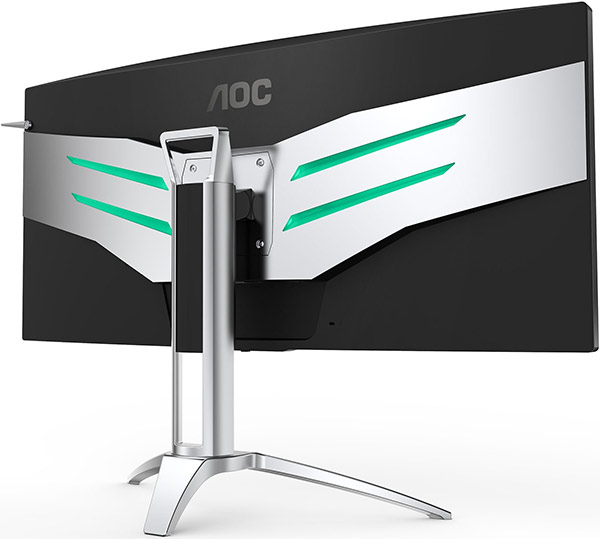
While the panel may be the same as seen last year, this new AGON monitor does include additional AOC monitor technologies such as AOC’s FlickerFree feature and LowBlue mode. FlickerFree helps to reduce eye strain, discomfort, and fatigue during long gaming sessions. Low Blue Light mode reduces harmful short wavelength blue light, which studies suggest could cause serious long-term eye damage over time.

A durable metal stand mounts to the back of the display panel, and secures with four screws. This allows the massive monitor to swivel approximately 30° left or right of center. The panel may also be tilted about 6° down and almost 30° up. The height can be adjusted around 120 mm, or about 4.5 inches.

AOC has kept gamers in mind, adding a headphone hook to the upper corner of their 35″ AGON AG352UCG6 curved monitor. This feature swings out when desired, or turned in behind the panel when it’s not needed. A pair of integrated 2-watt speakers offer basic audio output, and fire downward from vents near the connection ports.

AOC’s AGON AG352UCG6 has all the modern connections a gamer could need, offering 3.5mm analog microphone and headphone jacks, a SuperSpeed USB 3.0 downstream + fast charging port, another USB 3.0 downstream port, and a third USB 3.0 upstream port. At the bottom are a single DisplayPort 1.2 connection (3440×1440@100Hz), HDMI 1.4 port (3440×1440@50Hz), 3.5mm microphone out (to PC), and the DC power adapter port.
Comprised of an extra-wide Multi-domain Vertical Alignment (MVA) LCD panel, the AOC AGON AG352UCG6 gaming monitor offers a reasonably good contrast ratio and response time.
Absent professional calibration and measurement tools for testing gamut and color accuracy, I have relied on Blur Busters UFO Motion Tests to verify 120 Hz refresh rate and the onset of ghosting.
Connected via DisplayPort 1.2 cable to a NVIDIA GeForce GTX 1080 Ti graphics card, I also used a few popular video games to demonstrate the benefits of AG352UCG6 extended field of view.

In relation to other gaming monitors, most of which still offer 1920×1200 resolution, the AOC AG352UCG6 substantially improves the field of view by increasing the horizontal field out to 3440 pixels while bumping vertical to 1440 pixels. First-person games such as PlayerUnknown’s Battlegrounds were significantly improved because of the increased peripheral vision, made easy to see by the panels curved design.

While sound plays a huge role in PUBG, imperfect directional audio requires that players keep a keen eye. The extended widescreen field of view really opens up the landscape, requiring less free-look head turning. Less motion (from turning) allowed me to more easily recognize enemy character movement among the trees and bushes.

In games such as Dota 2, I discovered as many benefits as there were detractors. For example, the extended landscape view was helpful at seeing more of the map, but since this game uses edge panning for movement the player must push the mouse much further to bump the screen. Vertical movement seemed shorter, conversely.

The added visibility was beneficial, but players much reach farther out to the edges for mini-map actions. On the other hand, the item purchase menu can be left open without much impact on the viewable battlefield.

Unlike Dota 2, games such as Civilization VI allows player to drag the map in the desired direction. Fog of War is still going to shadow areas with indirect visibility (removed for the screen shots above and below), but when your units are scattered around the map, AOC’s AG352UCG6 really helped me keep tabs on faraway happenings.

Similar to PUBG, the increased view of the battlefield improved player awareness, and I was able to complete unit actions without losing sight of each war zone. As the game develops, this is especially helpful for managing multiple cities, and keeping tabs on neighboring civilizations amassing armies at multiple borders.
Out of the box this monitor is set to 100 Hz, but can be manually adjusted up to a 120 Hz ‘OverClock’ from the display’s menu. Both refresh rates were tested true and accurate.
Ghosting is a problem for most MVA panels, and the AG352UCG6 is no exception. Using the ‘Overdrive’ feature from the menu, users can adjust the backlight strength from none (off), to Weak, Light, Medium, and Strong. The ‘Strong’ setting caused significant oversaturation, and so I cannot recommended its use. Weak was exactly that, and Light offered the most acceptable compromise. Medium was artificially brighter, but with less ghosting.
In terms of power consumption, AOC’s AGON AG352UCG6 measured quite similarly between modes:
- 1W – Disconnected AC Power Adapter Standby
- 21W – Monitor (Off) Standby
- 66W – 100Hz Standard Mode
- 68W – 120Hz Overclock Mode
In the next section, I offer my final thoughts on gaming monitors, and rate the AG352UCG6…
Ultra-wide curved gaming monitors are all the rage, with plenty of offerings available with the 21:9 aspect ratio. While most share the same 3440 x 1440 resolution and ghastly 4 ms response time, they differ in other ways that matter, such as color gamut and contrast. High Dynamic Range is a feature that sets 4K televisions apart from their newer and more technically astute 4K HDR counterparts, and this is no different for these WQHD monitors. On their heels are true 4K variant with 16:9 aspect ratio and 3840 x 2160 resolution, but typically ghosting remains an issue.
Panel technology plays an important role in response time, refresh rate, contrast and color gamut. That being said, the traditional characteristics found on certain panel types is quickly evolving, so it’s more meaningful to chase the panel’s specifications rather than a particular panel type. TN panels once known for their fast refresh speeds are slowly creeping into the realm of vibrant IPS panels, and vice versa.
Ideally, your graphics card will synchronize a games frame rate to the display’s refresh rate, producing, for example, 120 FPS for a 120 Hz monitor. But pixels require processing power, and modern GPUs are still trying to keep up with the 144 Hz refresh rate for 2.1-million pixels found on many 1920 x 1080 gaming monitors that also feature 1 ms ghost-busting response times. Doing the math, your video card would need to compute nearly 5-million pixels on a 21:9 WQHD monitor such as the AG352UCG6, or 8.3-million pixels on a 3840 x 2160 UHD 4K gaming monitor.
Going beyond basic vertical scan synchronization (v-sync), proprietary solutions exist such as AMD’s Active Sync or NVIDIA’s G-Sync. If you want to enjoy v-sync (or G-Sync) with a 3840 x 2160 WQHD monitor such as the AOC AG352UCG6, you should plan to use a GeForce GTX 1070 or better. If that desire stretches to a 3840 x 2160 UHD gaming monitor, then a GeForce GTX 1080 Ti should be considered required equipment.

The first area we rate is performance. While testing the AOC AGON AG352UCG6 gaming monitor, I was surprised to find that the refresh rate was set to 100 Hz by default. After enabling 120 Hz using this display’s ‘OverClock’ function, the refresh rate tested accurate. Ghosting is a problem for VA panels, and AG352UCG6 was no exception. Using the Medium setting on ‘Overdrive’ was artificially brighter, but with less ghosting.
AOC’s AGON AG352UCG6 comes in two styles: standard with silver stand, or Black Edition with all-black appearance. Both varieties offer user-selected red, green, or blue lighting accents at the back and bottom of bezel, which can be matched to the color scheme of your gaming PC. The glossy black bezel on this panel measured 15 mm around the top and sides, which is average.
Construction was solid, overall, save for one pixel in the lower left that was stuck red. AOC offers an industry leading 3-year warranty paired with 90-days of Ease Replacement program, so if that stuck pixel was a real problem I could contact AOC at (510)-770-9988 and they would ship out an advance replacement, allowing me to use this display while I await delivery of the new unit.
In terms of functionality, the AOC AGON AG352UCG6 received top marks. The ultra-wide 3440 x 1440 UWQHD resolution is the primary reason for owning this monitor, paired with a 120 Hz refresh rate. Proprietary features such as AOC’s FlickerFree feature and LowBlue mode further enhance (and improve) the user experience. While USB 3.0 passthrough seems commonplace these days, the articulating stand was a noteworthy standout from others.
As of June 2018, the AOC AGON AG352UCG6 curved 35” G-SYNC gaming monitor was in-stock and available online for $849 (Amazon | Newegg). This is an expensive enthusiast product, but in relation to other displays the price is fair and affordable. Matched against other curved 35″ displays, AG352UCG6 is quite competitive.
In summary, I can recommend the AOC AGON AG352UCG6 to gamers wanting to expand their field of view without breaking their budget. For hardcore gamers, ghosting will remain and issue with ultra-wide monitors utilizing VA panel technology with 4 ms response time, so look for panels that offer 1 ms response with 120 Hz or better refresh.
+ 3440 x 1440 UWQHD Resolution (Ultrawide 2K)
+ Extended widescreen peripheral field of view
+ Gamer-friendly 120 Hz refresh rate
+ 3-Year warranty / 90-day Ease Replacement program
+ Smooth swivel, tilt and height adjustments
+ Includes HDMI, DP, and USB cables
– Ghosting evident (4 ms response time)
– Lacks High Dynamic Range color output
– Lacks DVI input (HDMI & DP only)
– 1 stuck pixel (red)
-
Performance: 8.50
-
Appearance: 9.25
-
Construction: 8.75
-
Functionality: 9.25
-
Value: 8.00
2 thoughts on “AOC AGON AG352UCG6 Gaming Monitor Review”
Thanks for the great review, I just picked one up myself! You mentioned the 4 ms response time as a Con–are there other WQHD ultra-wide monitors where this isn’t an issue? Do the Acer, Asus, and Alienware IPS panels solve the ghosting issue?
The 4 ms response time on this AOC AGON AG352UCG6 isn’t bad at all, and the ghosting isn’t game-ending, but it was clearly evident in all my tests so I couldn’t easily forgive it. Most other 21:9 WQHD monitors typically offer the same 4 ms response time, so if you want ultra-wide, be ready to accept some amount of image ghosting. If you want less ghosting, IPS panels have a slight edge. Most 16:9 panels are 2 ms or better, but you lose the ultra wide aspect.
Comments are closed.