By Austin Downing
Manufacturer: Kobo Inc.
Product Name: Arc
Model Number: K107-KBO-16W
UPC: 681495000616
Price As Tested: $199 (Kobo | Amazon)
Full Disclosure: The product sample used in this article has been provided by Kobo..
For many people carrying a book around to read has become a thing of the past, replaced by a phone, tablet, or e-Reader. Kobo’s e-Reader line has been one of the primary competitors for Amazon’s Kindle, that is until Amazon brought out their Kindle Fire. The Kindle Fire helped bring an Android tablet to the masses, and allowed Amazon to distribute its music and movies directly to their device. Kobo is fighting back and Benchmark Reviews tests their new 16GB Kobo Arc 7″ Android Tablet eReader (model K107-KBO-16W), which features a 1.5GHz dual core TI OMAP 4470 CPU and a POWERVR SGX 544 GPU.
In order for Kobo to differentiate itself from its competitors, Kobo has introduced Tapestries, a tool that helps make a user’s content easy to find and organize. The more a user reads, watches, and listens to, the better Tapestries gets at recommending new content to the user. These customizations are for the most part locked to the home page of the Arc, while leaving the stock Android 4.0 experience in place everywhere else.

Testing a product is about being able to produce consistent results, which can be reproduced by our readers. For our CPU and GPU benchmarks this means that we run a stock system with no other applications running at the time of the test. We run each benchmark three times, throwing out the lowest result and the two remaining results are then averaged to give us our final score.
When we benchmark the battery performance, we start with a 100% charged battery and then run our tests. For our web surfing and e-Reader tests, we will run the benchmark for three hours and then see how much of the battery has been used up during the test. For our video benchmarks we run the tests until the system is at 5%, and then record how long the system has been on battery.
Kobo has powered the Arc with TI’s OMAP4470 processor running at 1.5GHz. This is an ARM Cortex A9 based processor, which runs the ARMv7 instruction set. The graphical muscle needed for gaming and to run the Android interface is provided by the Imagination Technologies PowerVR SGX 544, which supports OpenGL ES 2.0, and DX 10.1. Split between these two processors is 1GB of LPDDR2, which is an adequate amount, but since DRAM prices are so low right now, it would have been nice to see Kobo add another gigabyte of RAM to bring the total up to 2GB.
The screen on the Kobo Arc is a 7″ 800 x 1200 IPS screen. Kobo claims that this display is able to display 16.4 million colors (8-bit display), and I will admit it is quite beautiful to look at. This screen has been designed to help reduce glare, with a claimed 29% reduction in glare (When compared to untreated glass I assume).
Kobo uses Android Jellybean build 4.1.1 on the Arc. This allows users to run almost any application in the Play Store on the Arc. One of the big additions in Jelly Bean was the addition of Google Now, a landing page that contains almost everything a user will need to see in a day. For example if I have a tracking number of a package in my GMail, Google now will automatically add the tracking information to my Google Now page. The information on this page is constantly updated based on what a search, where I go, what e-mail I receive, and what items I have on my calendar.
A tablet needs to look great, and be comfortable to hold. The Kobo Arc doesn’t try to buck the current trends of 7″ tablets but it is by no means a bad looking tablet.

Kobo gave the Arc no physical buttons on its front, instead opting to use the software buttons available through the Android interface. Kobo used the traditional raised bezel on the Arc, instead of opting for a flush bezel and screen like on the Nexus 7.

The Kobo Arc comes with a textured rubber back that is quite comfortable to hold, and should user want to customize his or her Arc it can be removed and replaced with another color or style. Currently Kobo is offering the colors blue and purple as options for the Kobo Arc.

Kobo gave the Arc a large battery, listing a 10-hour battery life as part of its features and as we will see later on many of our tests, it comes quite close to this number or even surpasses it.

Kobo has given the Arc a 1.3MP front facing camera. This allows a user to use Skype or other video-based communication services. It also enables Google’s face unlock feature which was introduced in Android 4.1

The two speakers on the Kobo Arc are adequate for their size; they are loud enough to be heard but they sound tinny and hollow. I wish that manufacturers would spend more money on the speakers in their tablets and provide something better to listen to than the typical speakers being used in the current generation of tablets.

Kobo uses a standard Micro-USB port to charge and connect to the Arc. This means that as long as the user has an Android phone with them they can use the same charger for their phone and tablet. This helps a user cut down on the number of cables they need to carry with them as they travel, a true godsend for those of us who are frequently spending time on planes and in airports.
Since anyone can build an Android tablet companies generally try to set themselves apart through “useful” customizations to the stock Android interface. Kobo’s custom interface is called Tapestries and I found it to be minimally invasive, should a user dislike the interface it can be removed easily by applying a custom interface from the Google Play Store.

Kobo has created a home page that allows a user to put different applications and widgets into folders that can easily bring new notifications to the user’s attention. At the bottom of the screen, Kobo has added a “Discover” section that helps a user find new movies, music, and books based on what they have read, watched, and listened to.

Inside of the default social group a user can expect to find links to all of the most popular social networking sites, along with Facebook and Twitters widgets. This allows a user to easily access all of the social networking information they might need without cluttering up their home screen.

Inside of the browsing folder by default is a set of common website that Kobo expects many of its buyers to use.

The native web browser on the Kobo Arc is a WebKit based browser. For the most part, it is the stock Android 4.1.1 browser but with one major addition, the pin button next to the address bar will let a user add any web page to their tapestries for easy access. For example, a user could make a tapestry all about traveling to Europe, and one of the things that could be included is a web page linking to their itinerary.

Kobo uses the standard pull down menu found inside of Android to allow an enthusiast to see and interact with notifications that the system may be generating.
Before the Arc, Kobo was focused on building the more traditional E-Ink based e-Readers. With the Arc this shows, as many of the best features of the Arc appear while using it as an e-Reader.
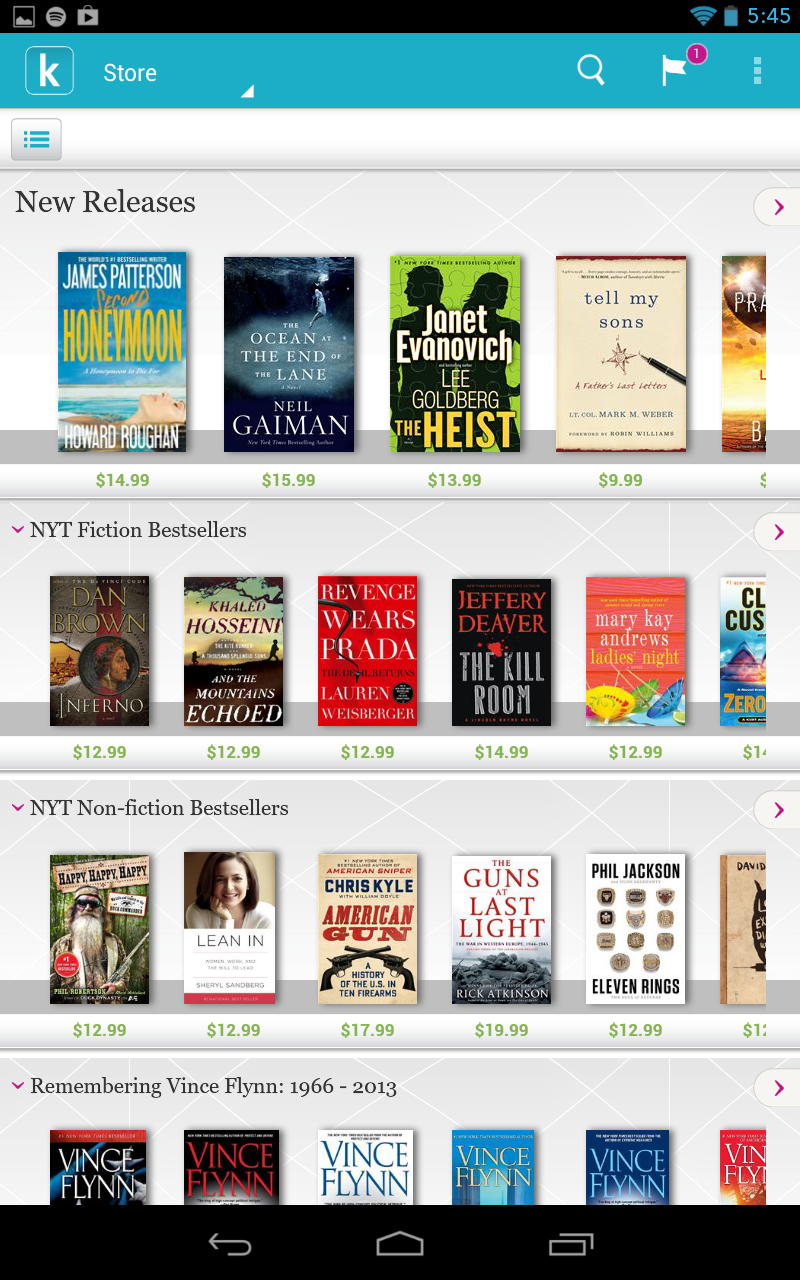
Kobo’s book recommendations connect the user directly to the Kobo store. This is both very nice, but also frustrating because if a user does not use the Kobo service to get their books then the recommendation service doesn’t work, which ends up locking a user to a single type of service if they want to use the Arc to its full potential.

Because Kobo’s history with e-Readers many of the Arc’s best widgets revolve around the Kobo Arc bookstore. For example, in this screenshot the top widget lets you see what books you are in the process of reading, tracking how long you have been reading and how long they estimate it will take to finish that book at your current pace.

Kobo’s e-Reader app is quite good, providing an easy to use system that has quite a few features. By default the Kobo app uses a plain black on white color scheme for its pages but depending on what a user would like it can be customized to be white on black, or my personal favorite a sepia toned background. In the bottom right is a barely visible dot that opens a menu allowing for all kinds of customization of the Kobo Reader application.

In the previous photo you might have noticed a pink dialogue box in the top left corner. Selecting that opens a comment page where people can ask questions and discuss what is happening in the book. This comment box only shows up if there conversation that has already been started on the current page of the book.

When a user opens the book statistics page they can see a multitude of sections all containing different information about the current book being read. Starting at the top we have the basic statistics about the current book being read, including the number of times it has been read, and the number of likes/dislikes it has. Under that is a listing of everyone who is actively reading that book currently. Lastly, we have the book feed, by default this feed only shows comments that have shown up on or before the page the user is currently on, by selecting the no spoilers section though a user can open up the entire comments section.
The Kobo Arc performs well in our CPU tests, trading blows with the Samsung Galaxy S3 throughout our tests, a device that has an MSRP of more than twice that of the Kobo Arc. Each test was run three times with the lowest result thrown out and the final two scores averaged.

The SunSpider 1.0 benchmark is an update of the 2007 SunSpider 0.9 benchmark. It is a JavaScript based benchmark that tests a system’s ability to run short snippets of hard to optimize code, such as cryptography tests, 3D raytracer tests, and code decompression. The end result of the SunSpider benchmark is measured in the time in milliseconds it takes the benchmark to complete.

Google Octane V1 is also a set of Java Script benchmarks that Google claims aligns more with real world Java Script applications than tests like Webkits SunSpider. Some of the benchmarks run are an encryption and decryption based benchmark, Mandreel which is a 3D bullet physics engine, and a Gameboy emulator. Each of these tests provides a number indicating its performance where bigger is better, and at the end of the series all scores are averaged to provide the final results.

Geekbench is a cross platform benchmark designed to allow dissimilar systems to be benchmarked against each other.


The AndEBench benchmark created by EEMBC was designed to test both a systems native CPU performance, and its Java interpreter performance. During the benchmark many different features of the OS are tested including OS layer calls, graphics, audio, networking, floating point, and SIMD operations. This application is open source so should an enthusiast like they can verify and understand how each result is reached.
Throughout each of our tests, we see the Kobo Arc and the Samsung Galaxy S3 trading blows, each wins some tests and loses others. On both of browser tests, we see the Kobo Arc quite handily surpasses the Samsung Galaxy S3 by 20-25%. Once we moved on to application based benchmarks we see the Galaxy S3 and the Arc trading places, with the Kobo Arc just behind the Galaxy S3 in our Geekbench test and just barely ahead of the S3 on AndEBench Native test.
Where things get interesting is our AndEBench Java benchmark where the Galaxy S3 demolishes our Kobo Arc having a score 30% lower than its competition. The only reason I assume for this drastic swing in performance is the fact that the Kobo Arc is running Android 4.1.1, while the Galaxy S3 is running the recently released 4.1.2 update which does come with some performance upgrades.
As games become a bigger market, mobile GPU performance will become increasingly more relevent. Users will expect the games they buy to run smoothly and look beautiful. Benchmark Reviews will be using GFXBench 2.7.2 and 3Dmark Ice Storm. Both of these benchmarks push the GPU of a system much harder than games will providing a worst case scenario for any system.


GFXBench 2.7.2 T-Rex HD benchmark runs on Android, iOS, and all Windows platforms. This benchmark allows enthusiasts to directly compare disparate systems. On Android and iOS it is testing OpenGL ES 2.0 performance, while on Windows 8, Phone, and RT it tests the DirectX performance of a system. The number given is the number of frames that the benchmark was able to render before the end of the test.

3DMark known for their series of Window’s based benchmarks, has created a new benchmark designed to be cross platform. The benchmark known as Ice Storm is a series of tests designed to test a systems graphics and physics performance of Mobile Devices. We run this benchmark on the extreme setting, which pushes texture and post-processing to their highest levels while rendering this benchmark at 1920 x 1080. This allows us to test systems with dissimilar resolutions against each other without having the results skewed by some of the ultra-high resolution displays available on tablets.
Kobo uses a PowerVR SGX 544 on the Arc. This mobile GPU runs at 384MHz and should be able to process 12.3GFLOPS of data, on the other hand its competition the Galaxy S3 which runs a Adreno 225 at 400MHz is able to process 25.6GFLOPS of data, exactly twice as much. Throughout our benchmarks this shows with our Kobo Arc unable to catch up to the raw power of the Galaxy S3.
On our GFXBench tests the Kobo Arc scored a respectable 311 on the onscreen test and 173 on the 1080P offscreen test. Although not as good as the Galaxy S3 when we check the scores on GFXBench’s website we see that this is comparable to the Nexus 7’s score of 185.
The 3DMark test is even less friendly than GFXBench to the Kobo Arc with it scoring nearly 1/2 the score the Galaxy S3. This makes sense since the Galaxy S3 has a GPU with nearly twice the raw horsepower of the Kobo Arc. Still, the score 1803 is within spitting distance of the Nexus 7, and in my experience perfectly adequate for gaming.
Having a high performance device doesn’t matter if the device discharges in two hours. Thankfully, even during constant usage the Kobo Arc was able to obtain respectable battery lives.

During our browsing test we burned through 35% of the battery in three hours and at this rate of use I would expect the Kobo Arc to be dead in around 8.5 hours.

During our E-Book test, I opened a book using the Kobo Application and started streaming music through Spotify. During this 3 hour tests the Arc used up 27% of its battery, which if this rate were to remain constant means that in 11.11 hours the Kobo Arc would be dead. Quite respectable for a device that Kobo claims to have a 10 hour battery life.

During our local 720p test we loaded a simple video file and let it loop until the battery died. During this test, I was able to get a measly 3hr 50min of charge out of the device. I was quite surprised by this and ran the test one more time, using the same video, only to get an almost identical score. This means that the average user should only expect to get through one or two HD movies stored locally.

Things get a bit more interesting with our Netflix test. I selected the show Battlestar Galactica as our test show. I let Netflix continuously play until the battery died and received quite a surprise, ending up with a 7hr 10min run time. This is long enough to watch at least three movies, or 7-8 episodes of show and quite impressive since our local test was only able to get 3hr50min of battery life out of the Kobo Arc.

I started our charge test right after I ran our local video test, during which I turned off the screen and let the tablet charge until it was at 100%. To go from 5% to full took around 3:50 the same amount of time it took to discharge.
After a couple weeks with the Kobo Arc I am left feeling, well nothing to be honest. It is a competent 7″ Android tablet, with a decent screen, decent battery life, and a decent custom interface. I use it daily for note taking, reading manuals, and documentation and it worked well, but at no point was I ever amazed by it. The most unique feature of the Kobo Arc the tapestries interface works great with Kobo’s native applications, but loses much of its uniqueness when you add third party applications into the mix.
The Kobo Arc performs well, with comparable stats to other 7″ tablets on the market, and keeping up with the CPU performance of one of last year’s flagship smartphones. The GPU is a little bit more lackluster but is in line with its major competitor the Nexus 7 and I would expect the Kobo Arc to be able to play most games available on the market.
Along with its average performance is the average looks the Kobo Arc has. It isn’t bad looking but it isn’t something I find particularly great looking either, inoffensive is the best word I can think of to describe it. My only complaint is the large pronounced bezel, which feels very last generation. I hope that with Kobo’s next tablets they can make the device with a flush thin bezel, and bring down the weight slightly.
The Arc feels like a solid device and Kobo backs it up with a one year parts and labor warranty. After a couple of weeks using the Kobo Arc regularly I would expect as long as a user takes care of their Arc that it will last quite a long time.
Since the Kobo Arc is able to access the full Google Play store, its uses are virtually limitless, it can be a note taking device, an e-Reader, a mobile gaming platform, a music player, or virtually anything a user could want it to be. Since it is missing a GPS chip, there are some limits to what it can do but overall the Kobo Arc is an extremely versatile device.
As of July 2013, the 16GB Kobo Arc we reviewed is available online for $199 (Kobo | Amazon). The price is fair, and for the most part aligns with other 7″ Android tablets available in the United States.
If I had to pick one word to describe the Kobo Arc it would be “safe”. In many different aspects Kobo played it safe, it picked a safe processor that performs well but isn’t extraordinary, an inoffensive exterior design that doesn’t have any surprises, and an OS with some minor modifications but no major changes to the stock Android experience.
Overall the Kobo Arc is a competent 7″ Android tablet that I would have no qualms about buying but it just isn’t at the top of my list for this class of tablets. Because of this I award the Kobo Arc 7″ Android Tablet the Benchmark Reviews Recommended Product Award.

+ Great CPU performance in an Android tablet for a low cost
+ Fantastic native e-Reader application
+ Mostly stock Android 4.1 interface
– Highly reflective screen can be hard to read in the sun
– Many of the best features only work with Kobo applications creating a closed environment if a user would like to get the most out of the Arc
– Very middling battery performance
– Large pronounced bezel
– Only 1GB of LPDDR2
- Performance: 8.50
- Appearance: 8.00
- Construction: 9.00
- Functionality: 8.50
- Value: 9.00
Recommended: Benchmark Reviews Seal of Approval.
COMMENT QUESTION: Who makes your favorite tablet device?

