By Steven Iglesias-Hearst
Manufacturer: Fractal Design
Product Name: Arc Mini R2
Model Number: FD-CA-ARC-MINI-R2-BL-W
UPC: 817301011105 EAN: 7350041081104
Price As Tested: $89.30 (Amazon | NewEgg)
Full Disclosure: The product sample used in this article has been provided by Fractal Design.
The second revision of the Arc Mini micro ATX chassis brings a few revisions while keeping the essential styling that differentiates Fractal Design from other PC case manufacturers. The original Arc Mini PC case was well received by PC enthusiasts and system builders alike, and now Benchmark Reviews has the Arc Mini R2 for testing and we will detail what sets it apart from the crowd.
The first and most noticeable feature is the smoked side panel window. Secondly, for a mid-tower m-ATX form factor PC case, the Arc Midi surely knows how to pack in the cooling features desired by today’s hardware enthusiast and performance system builder. The Arc Mini R2 has three fans pre-installed as standard and space for a further four fans. If water cooling is your thing then you will find the Arc Mini R2 is much more accommodating than you would expect. There is support for either a 240mm or 280mm radiator in the roof as standard, or a 360mm radiator which requires the removal of the optical drive bays. Removing the HDD bays alloys you to install a 240mm radiator in the front of the case too.
The air intakes feature easily removable filters for cleaning (front intake and bottom PSU intake). Cable routing is supported with lots of grommeted pass through ports and ample space behind the motherboard tray. ATX PSUs up to 170 mm deep are supported when using the bottom fan location. If you don’t install a fan in the bottom you can install longer PSUs up to 220 mm deep. Video cards up to 260mm in length are supported with the top HDD cage installed. With the top cage removed, video cards up to 400mm are supported.

The features and specifications detailed below were taken directly from the ARC Mini R2 product page on the Fractal Design website.
- A compact micro ATX case designed for exceptional airflow and cooling
- Superior water cooling support for its size, accommodating multiple thick 240mm radiators or even a 360mm radiator for an uncompromised cool system build
- Three Silent Series R2 fans included, giving you excellent cooling straight out of the box! 4 additional fan positions are available
- Featuring an integrated three-speed fan controller and USB 3.0 on the front panel for easy access
- Multiple easy-to-clean dust filters designed into the case to help maintain a dust free interior
- Great storage capacity for a mini chassis, with up to six 3.5” drives and two additional 2.5” drives
- Innovative SSD position mounting, using brackets to allow for easy access once your system is completely built
- Featuring a large stylish window side panel to show off your set up in style
- Designed with ample space for easy, tidy cable routing and an overall a neat build
- Micro ATX, Mini ITX motherboard compatibility
- 2 – 5.25″ bays
- 6 – 3.5″ HDD trays – all compatible with SSDs
- 2 – 2.5″ dedicated SSD positions behind the mothboard plate
- 4 + 1 expansion slots
- 7 – Fan positions (3 Silent Series R2 fans included)
- Filtered fan slots in front, top and bottom
- CPU coolers up to 165 mm tall
- PSU compatibility: ATX PSUs up to 170 mm deep when using the bottom fan location; when not using this fan location longer PSUs (up to 220 mm deep) can be used
- Graphics card compatibility: Graphics cards up to 260mm in length with the top HDD cage installed – With the top cage removed, graphics cards up to 400mm in length may be installed
- 20 mm of space for cable routing behind the motherboard plate
- Thick rubber grommets on all holes on the motherboard plate
- Window side panel included
- Colors available: Black
- Case dimensions (WxHxD): 210 x 405 x 484mm
- Net weight: 9kg
- Package dimensions (WxHxD): 280 x 475 x 565mm
- Package weight: 10kg
Source: https://www.fractal-design.com/
In this section of the review we will be taking a look at the detailed exterior features of the Fractal Design Arc Mini R2 mATX PC case. This product is currently available online for $89.30 (Amazon | NewEgg).

The front styling of the Arc Mini R2 keeps Fractal Designs’ traditional look. The Arc Mini R2 will allow high air-flow thanks to the large meshed front panel.

A new revision in the second revision Arc line-up from Fractal Design is the addition of a side panel window as standard. It is a very dark smoked side window that will only showcase what you light up inside your case, otherwise you just get reflections.

The right side of the Arc Mini R2 features a plain side panel. there is not much sense in wasting time and style on this side as it is generally hidden from view. The panels are reversible however, so if you wanted to you could swap the panels over.

The rear of the Arc Mini R2 is tidy and organised. There are two grommeted water cooling pass through ports at the top of the case for external water cooling options. There is an extra PCI bracket located to the right of the PCI slots to support PCI fan controller or other accessories, also very useful if you use a PCI/PCIe riser card. 120mm exhaust fan and bottom mounted PSU are the norm on today’s PC cases.

The top of the Arc Mini R2 keeps the styling of the front for aesthetics and functionality. Much like the front of the case the top is merely a panel. This panel is removable and reveals an interesting feature of this mATX case that we will cover in more detail deeper into the review.

Looking at the bottom of the Arc Mini R2 the first thing you notice is the large intake dust filter. The filter removes from the back of the case which could be a bit of an issue if space is a premium. Four reasonably sized rubber feet provide adequate ground clearance and anti vibration properties too.
In this section of the review we will be taking a more detailed look at the exterior styling and features of the Fractal Design Arc Mini R2 mATX PC case.

In the previous section I mentioned that the top panel of the Arc Mini R2 is removable. Removal is as simple as removing these two thumb screws and sliding the panel backwards and lifting it off. As the case comes from the factory the thumb screws are secured pretty tight and will need the use of a screw driver for first time removal.

As a general rule the top of the case is used as exhaust when planning your air flow. When water cooling this rule can be negated and this top panel filter will come in very handy.

With the top panel removed completely we get access to the fan mounts of the Arc Mini R2. The panel is a nice fascia to hide these non uniform vents that would otherwise ruin the exterior styling.

Moving forward towards the front of the Arc Mini R2 we focus in on the front I/O panel. From left to right we have: Reset switch, Microphone and Headphone ports, Power switch with integrated power and activity LED, Two USB 3.0 ports (also double as USB 2.0 ports if your motherboard doesn’t support USB 3.0), and lastly we have a 3 point fan controller switch. The fan controller supports up to three fans via internal connections.

The front fascia of the Fractal Design Arc Mini R2 is made of ABS plastic with a brushed aluminium look. This effect is not a vinyl, it is actually cut into the plastic and it has the right feel too.

The front mesh and filter is secured into place by a pair of click lock tabs. I found this out by chance when I was removing the Arc Mini R2 from its box.

Two tabs secure the mesh filter at the bottom and it is very easily removed. The build up of dust is very visible in the foam filter so you will get a good visual indicator as to when it’s time to clean it out. The foam is well enclosed so a strong blow or a can of compressed air is what it takes to get the dust out.
In this section we take a look at the interior of the Fractal Design Arc Mini R2 mATX PC case.

The interior is very well laid out in the Arc Mini R2. From the side mounted HDD bays and the cable pass through holes you can tell that t this is going to be a neat and tidy build if you put the effort in.
ATX PSUs up to 170 mm deep are supported when using the bottom fan location. If you don’t install a fan in the bottom you can install longer PSUs up to 220 mm deep. Video cards up to 260mm in length are supported with the top HDD cage installed. With the top cage removed, video cards up to 400mm are supported. CPU air coolers up to 165mm tall are supported in the Fractal Design Arc Mini R2 PC case.

Round the back of the motherboard tray there is plenty of room and tie down points for a nice clean install. Also noticeable are the two SSD mounts. These SSD mounts are removable to allow you to first secure your drive in place and then install the complete unit in place. By my measurements there is 18mm depth behind the motherboard tray which will accommodate the thickest of cables with ease. Installing thicker mechanical 2.5″ drives in the SSD mounts may pose a problem as the drives are offset from the motherboard tray.

The Fractal Design Arc Mini R2 doesn’t use any tool free options in it’s cases but it does use thumb screws where possible. These thumb screws are secured pretty tight from the factory and will need a screwdriver for first time removal.

Both of the HDD caddies are removable as is the ODD cage too. Removing these will make way for the use of water cooling radiators. The front of the case will support a 240mm radiator and the roof will support up to 360mm (3x120mm) or 280mm (2x140mm) with the standard 15mm spacing for the fans.
In this section we take a more detailed look at the interior features of the Fractal Design Arc Mini R2 mATX PC case.

Intake is taken care of by a single 120mm fan with the option of installing a second fan at the front panel and an extra 120mm fan in the floor. Exhaust is taken care of by a 120mm fan on the rear panel and a 140mm fan up in the roof. The exhaust can be changed to support an extra 140mm fan in the roof or remove the 140mm fan and install up to three 120mm fans in the roof.

ATX PSUs up to 170 mm deep are supported when using the bottom fan location. If you don’t install a fan in the bottom you can install longer PSUs up to 220 mm deep. There are four rubber discs installed undewr the PUS to allow for a small amount of clearance and to reduce vibrations from the PSU fan.
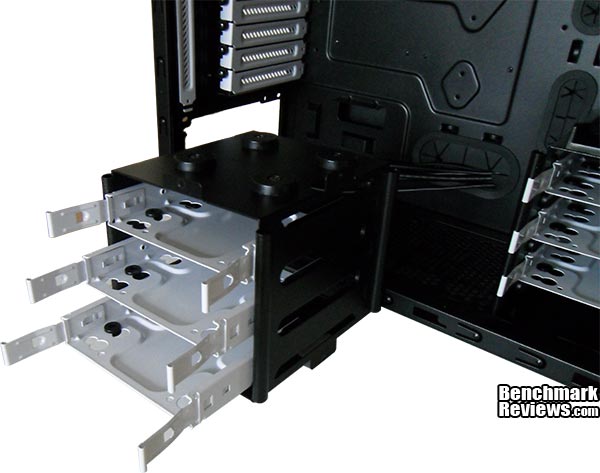
Removing the top HDD caddy only requires two thumb screws to be taken out. The bottom HDD caddy and the ODD cage are secured by regular screws and require only a little more effort. This is a simple task that really doesn’t require any guidance.

A quick peek into the ODD bay will reveal the fan controller cables, these can be routed the same way as the front I/O cables. There are 3 fan headers and a molex power connector attached. There are 3 settings on the fan controller: 5v, 7v and 12v.
I built an ITX system into the Fractal Design Arc Mini R2 mATX PC case to showcase its potential. ITX cases are all well and good, but I like lots of room for my build, and I like the tower case form as well. This isn’t so much of a build log, it’s just some notes I thought might might be useful to anyone looking to build inside this case. There are some little things that I thought were interesting but I left them out as they are quite intuitive and will be noticed anyway.

The Fractal Design Arc Mini R2 really allows you to get a very neat install. The cable routing is well placed and with a little time and patience you can get an awesome looking install. One option I hadn’t thought about until after the install was moving the front 120mm intake fan to the lower position to give the GPU some cool air. Also, when using an AIO sealed loop CPU cooler, you could relocate the 120mm exhaust fan to the front panel and have two 120mm intake fans.

My Palit GTX 770 video card (fan shroud and all) measures a touch below 280mm and there is still a little bit of space between it and the HDD caddy. I had to remove the caddy to install the video card, but I was able to replace the caddy afterwards which was a bonus. The conservative 260mm size guide in the features and specifications will be relevant for a problem free install, but we now know you can push the boundaries a little. Cable routing is an absolute breeze. The SSD mounts posed a little challenge and I think they would be better mounted horizontal, but this was overcome with some 45 degree folds in the cables.

An innovative approach to supporting water cooling into a relatively small PC cas is the offset mounting points for the fans. Instead of the traditional uniform central mounting Fractal Design have moved over to the side of the case to allow clearance of motherboard heatsinks and tall RAM while using thicker than standard radiators or push/pull fan configurations. Above is a rough guide to show the mounting points for water cooling radiators.
The mATX Fractal Design Arc Mini R2 is a great looking PC case that really breaks the mould compared to other inexpensive plastic and metal PC cases. The looks rival that of high end PC cases that will double your budget. The build quality is awesome but the Arc Mini R2, being mostly made of steel, is very heavy for its size. The total weight, including the install detailed in the previous section, is a touch under 15KG. The Arc Mini R2 is very intuitive to navigate when installing your system and makes for a pleasant experience and a tidy build. The airflow possibilities for a small case are awesome and the completed system is very quiet.

Before we think about ratings I will write a brief summary for each of the following; Performance, Appearance, Construction, Functionality and Value. This will aid me in giving the Fractal Design Arc Mini R2 mATX PC case a final score and give you a consolidated summary of the entire review. I do strongly suggest that you read the entire review, if you have not already, so that you can arrive at your own conclusion.
Performance of the Fractal Design Arc Mini R2 PC case is really good. The fans move enough air to keep component temperatures well within the safe range while remaining very quiet. The HWMonitor screen capture above shows idle temperatures with an ambient room temperature of 23C.
Appearance is always difficult to rate. Where I see a great looking PC case, many will see it differently and want to make improvements or changes. Others will say it’s too plain or will simply just love it. I like the look, it is nice and simplistic and stays in line with the Fractal Design style that I really cant fault.
Apart from the plastic fascias, which really aren’t that bad, the Fractal Design Arc Mini R2 is really well made. It would be nice to see a case from Fractal design that doesn’t use plastics and I would be willing to pay the premium too. The construction is solid, the corners and edges are well turned and the finish is brilliant.
Functionality is the strongest point of the Arc Mini R2. First up is the air flow capabilities – Up to three 120mm intake fans and up to four 120mm exhaust fans (or 1x120mm and 2x140mm). Next is the water cooling support – There is support for a 240mm water cooling radiator in the front of the case if you remove the HDD caddies, and the option to install either a 280mm or up to a 360mm water cooling radiator in the roof of the case. All of the air intakes are filtered as is the roof should you decide to use these vents as intake.
ATX PSUs up to 170 mm deep are supported when using the bottom fan location. If you don’t install a fan in the bottom you can install longer PSUs up to 220 mm deep. Video cards up to 260mm in length are supported with the top HDD cage installed. With the top cage removed, video cards up to 400mm are supported. CPU Tower coolers up to 165mm tall. Cable routing has been given a lot of attention and makes for a very pleasant install process.
At the time of writing this article I found the Fractal Design Arc Mini R2 mATX PC case on sale for only $89.30 (Amazon). Be prepared to pay around $99.99 elsewhere (NewEgg) unless you can find it on sale at your local retailer. The Amazon price makes this case a very attractive prospect, but the Newegg price is not exactly a hurdle. When I started writing this article the prices on the two websites quoted were equal, I can only imagine that the Amazon seller is taking a cut in profits to sell the case at such a low price.
I think it goes without saying that I would recommend this case. You have so much flexibility and room, and you get a great looking build to boot.
+ Looks great
+ Good value
+ Intuitive cable routing
+ Excellent cooling
+ Water cooling support
+ Supports ATX PSU up to 22cm
+ Supports video card up to 28cm (40cm if you remove top HDD bay)
+ Removable HDD caddies and ODD cage
+ Solid Construction
+ Reversible side panels
+ Up to six 3.5″ HDD’s plus two SSD’s behind motherboard tray
+ Two USB 3.0 ports on front panel (internal header also for USB 2.0 if no motherboard support)
+ Smoked side panel window
– Heavy case when full system installed
– Plastic roof and front panels
– Bottom air filter hard to access
-
Performance: 8.75
-
Appearance: 9.25
-
Construction: 9.00
-
Functionality: 9.75
-
Value: 8.75
Excellence Achievement: Benchmark Reviews Golden Tachometer Award.
COMMENT QUESTION: What features do you look for when choosing a PC case?


