By Greg Schepers
Manufacturer: ADATA Technology Co., Ltd.
Product Name: ADATA DashDrive Air AE800 Wireless HDD and Power Bank
Model Number: AAE800-500GU3-CUSBK
UPC: 4713435797662
Price As Tested: $115.99 (Amazon)
Full Disclosure: The product sample used in this article has been provided by ADATA.
The ADATA DashDrive Air AE800 Wireless HDD and Power Bank, which Benchmark Reviews recently had a chance to look at in detail, is a very interesting device indeed. It is clear that the goal here was to develop a piece of hardware that could fill a number of different voids for people constantly on the go. One of the ADATA AE800’s features is to serve as a power bank, ensuring that you can continue remain productive and stay in communication when unable to find an outlet to charge your devices. Considering that the AE800 has 5200 mAh on-board capacity, it should have no problem keeping you up and running. Also, it comes with 500GB of storage, so you have plenty of space for movies, music, and other files. Finally, the ADATA AE800 can serve as a wireless hotspot. Sound interesting? Read on to find out more.

Our goal is to determine how well the ADATA DashDrive Air AE800 can perform the functions that it advertises. So, we will employ a few different devices and test its Samba/WebDAV streaming protocol and its 5200 mAh power bank. In addition, we will see how quick it’s USB 3.0 transfer rates are when compared to a dedicated USB 3.0 external hard drive.
- Portable Charger: 5200 mAh
- Portable Wireless Hotspot
- State-of-the-Art Wireless Technology
- Up to 3 users can simultaneously stream 1080P video, and up to 5 users can simultaneously stream 720p video
- Supports up to 8 users at once when utilized as a wireless hotspot
| Ports | Micro-B USB 3.0 (data transmission & battery charging), USB AF(Power Bank function) |
|
| Capacity | 500GB | |
| Battery | Li-Polymer 5200mAh rechargeable battery | |
| Dimensions (L x W x H) | 134 X 80 X 22mm (5.3 X 3.2 X 0.9in) | |
| Weight | 280g (9.9oz) | |
| Wireless Standard | IEEE 802.11b/g/n | |
| Power Bank | 5200 mAh | |
| Warranty | One Year Warranty |
The DashDrive Air AE800 is not the first device of this type developed by ADATA. The AE400, which has been on the market for a bit longer than the AE800, is not quite as capable as the AE800. It has a 5000 mAh battery and does not have an internal storage option, but it does allow wireless data transfers between mobile devices and an SD card, a USB flash drive, or an external hard drive. However, having 500 GB of storage on-board and only having to tote one additional device along rather than two or more is very appealing.

The retail box contents include the AE800, a USB 3.0 cable, a wall adapter, and a quick start guide. The quick start guide is helpful, but more literature should have been included with this device.

The ADATA DashDrive Air AE800 has a nice glossy finish to it and is a fairly compact device. It is advertised as a 2.5″ wireless HDD.

On the front-end of the device, you will find two ports; the port on the left is a USB port that is used to charge external devices. The port on the right is the micro USB port that is put to use when the ADATA AE800 is used as an external hard drive.

The status indicator lights are located on the top of the AE800 and include (from left to right) the power indicator, external HDD indicator, bridge mode indicator, and wireless signal LED. The power indicator will change colors depending upon the battery’s status:
- Power level 50-100% – Green
- Power level 25-49% – Yellow
- Power level 0-24% – Red
- Unit charging – Flashing light

The perimeter of the ADATA AE800 is constructed of metal and has a chrome finish. The reset and power buttons are located on the left-side of the device. The image above gives you the idea of the device’s thickness, which is at least twice as thick as your garden-variety smartphone.
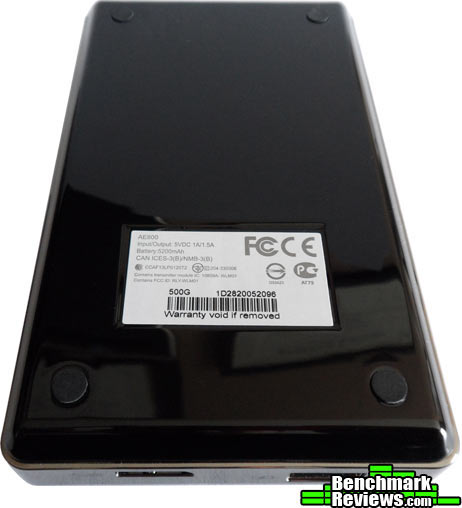
I appreciate the fact that ADATA was kind enough to place some rubber feet on the bottom of the AE800, which helps to prevent desktop slippage.
The ADATA DashDrive Air AE800 certainly has the potential to be that go-to, irreplaceable device for many of us. Why carry around a bunch of different devices when one can do the job?

Utilizing the ADATA DashDrive Air AE800 as a power bank couldn’t be any easier; connect the AE800 with the device that needs charging with a USB cable (not supplied), and the power transfer commences. It is recommended that the AE800 not be in wireless mode during the charging operation.

In order to use the ADATA DashDrive Air AE800 as more than a power bank, you must download the DashDrive Air Elite app for you device. The app is available through both Google Play and iTunes, so whether you’re an Android or Apple user, you’re covered.

After tapping on “Settings,” there are a number of different options available to you. The setting most of us will be concerned with is the “Internet Access” setting. Tapping on this selection will bring you to a screen that allows you to connect to a wireless network.

Once connected, the ADATA AE800 is ready to serve as a hotspot. In order to put the device in wireless mode, you must hold the power button down for three seconds. Also, connecting to the device couldn’t be easier. All you have to do is remember the base station password, which is 12345678.
Considering the number of equipped features of the ADATA AE800, the testing phase was fairly extensive. Utilizing my desktop PC, a Motorola Razr Maxx, a Samsung Tab 2, and an ASUS Memopad HD, I tested the wireless speed, the USB 3.0 transfer rates, and power bank features. In order to test the wireless speed, I utilized the OOKLA Speedtest Android App.
- Motherboard: Gigabyte GA-990FXA-UD3
- System Memory: 16GB (2 x 8GB) DDR3 1333 G.Skill Ripjaws X Series
- Processor: AMD FX-6100 Zambezi 3.3 GHz Six-Core Processor
- Audio: ASUS XONAR DG Headphone Amp & PCI 5.1 Audio Card
- Video: HIS Radeon HD 7950 IceQ Boost Clock 3GB GDDR5 PCI-E Graphics Card
- Optical Drive: Pioneer Black Internal BD/DVD/CD Writer BDR-207DBKS
- PSU: Corsair HX Series HX750 750W GOLD Certified Modular Active PFC Power Supply
- Monitor: AOC e2752Vh (27″) & Samsung SyncMaster PX2370 (24″)
- Operating System: Windows 7 Ultimate
The primary function of the ADATA DashDrive Air AE800 is not to serve as an external hard drive. However, it does have that capability and that amount of storage clearly comes in handy. One of the tests conducted was to check out the USB 3.0 speed of this device.

The image above is the result for the ADATA HV620 while utilizing ATTO Disk Benchmark.

The results above are from the ADATA DashDrive Air AE800. While coming in a tad under the speeds recorded by the HV600, the results are negligible. So, the AE800 performs very well while using it as an external USB 3.0 hard drive.
There a plenty of reason I’m sure we can all come up with to justify the need for a hotspot. Providing a bunch of people with access to streaming music and video that is contained on the AE800’s hard drive is just one of those reasons. However, maybe it’s just me, but I don’t yet fully appreciate this feature in terms of connecting it to a wireless network. If there is a wireless network in range, why not connect directly to it? This could be a short-sighted view, but that’s beside the point. Let’s test the speed…

The above results were generated by using the ASUS Memopad HD and reflect the overall speed of the wireless network used for testing the AE800.

After connecting the ADATA AE800 to the wireless network, I ran the speed test once again. As expected, the resulting speeds are lower, but not as low as anticipated, especially the upload speed.
I would like to point out that streaming music and video from the AE800 to the test devices went well, with one exception. The ASUS Memopad HD had problems generating a stable stream. My guess is that it is ADATA’s firmware. In any event, I tried everything I could think of to get it stabilized, to no avail. Basically, if the stream wasn’t choppy, the “loading” icon hovered over the picture. It looked something like this:

The final test was to see how well the power bank performed. Even though there is no real tangible data to present, I can report that the ADATA DashDrive Air AE800 is capable of fully charging two devices from critically low battery statuses as long as the AE800 is fully charged and not utilized for any other purpose before initiating a charge. According to the Quick Start Guide, the AE800 takes approximately 5.5 hours to fully charge a device. That time frame was consistent with my experience.
Power banks are pouring into the market thanks to the fact that we are more and more becoming a mobile society. Having access to data and communications at all times for many of us is a must, and the ADATA DashDrive Air AE800 helps to ensure we stay connected. In addition, the AE800 offers features in as single device that are hard to come by; in addition to serving as a power bank, it is a wireless hotspot and and a 500GB external hard drive.
As compelling as this device seems, there are a few items that could have made it better. First, I’m still wondering why ADATA would not include a comprehensive user’s guide for this device. The supplied Quick Start Guide gives you a very basic operational overview, but more guidance is required. For example, troubleshooting would have been helpful when I was trying to get the ASUS Memopad HD to stream music and video. Also, when streaming music and video from the device, you are required to use the audio and video player incorporated into the app. I’m sure many of us would like to use our favorite music and video app instead.

In all phases of testing, the performance of the ADATA DashDrive Air AE800 lived up to the company’s claims for the most part. It’s function as a power bank was right on the money, if not slightly exceeding expectations. The transfer rates while utilizing the AE800 as a USB 3.0 external hard drive are consistent with other USB 3.0 external hard drives that I have used. The wireless capability also lived up to ADATA’s claims. The only glitch was the unstable music and video streaming on the ASUS Memopad HD.
The ADATA DashDrive Air AE800 has a very simple, yet elegant appearance. The glossy black finish is complemented with a chromed metal band around the perimeter of the device, both of which will be littered with fingerprints. The LED status indicator lights are not overdone and add some contrast to the top of the device.
Many external hard drives I have encountered in the past left me with the impression that they could fragment into a million pieces if dropped. That is certainly not the case with the ADATA AE800. Consisting of a hard plastic shell and a metal band protecting the perimeter, you will appreciate the quality of construction implemented into this design. ADATA did not cut any corners to ensure that the AE800 would withstand the rigors that a portable device is certain to experience.
The testing phase went well as all facets of this device functioned as ADATA had claimed, which makes the AE800 a unique and desirable device. The ADATA DashDrive Elite app is very straight forward and easy to use. Again, I would like to mention that ADATA should seriously consider producing, at the very least, an in-depth online user manual so owners will understand and be able to take advantage of the full capabilities of this device.
The ADATA AE800 is in the price range of a 2TB external hard drive, but it is far beyond merely being an external hard drive. Considering the fact that it has 500GB of storage, can provide several users with access to streaming audio, video, files on-board, and the internet, it is hard to pass up at the suggested retail price.
As of December 19, 2013, the ADATA DashDrive Air AE800 is advertised for $115.99 (Amazon). This device is a great value if you consider all of the devices it replaces, all at a reasonable cost to the consumer. I can foresee it becoming a popular device and spur a surge in like devices.
Pros:
+ USB 3.0 Transfer rates
+ Power bank performance
+ Stable wireless connection
+ App is user-friendly
+ Solidly built/made to travel
– Quick start poster lacks documentation
– Holy fingerprints, Batman!
– Choppy stream on 1 of the 3 test devices
-
Performance: 8.00
-
Appearance: 9.00
-
Construction: 9.50
-
Functionality: 9.00
-
Value: 9.00
COMMENT QUESTION: What features do you require from a device that is meant to complement your tablet or smartphone?

One thought on “ADATA DashDrive Air AE800 Wireless HDD Review”
Thanks for the Review.
It is a little disappointing that it requires that certain types of streaming to be thru a specific app.
It would have been nice to at least include some comparison data from another USB 3.0 HDD.
In one section there is a statement: “The primary function of the ADATA DashDrive Air AE800 is not to serve as an external hard drive.”. This sort of seems counter to the device’s name.
But overall, the review is appreciated.
Comments are closed.