By Meng Vang
Manufacturer: Thermaltake (USA) Technologies Co., Ltd.
Product Name: POSEIDON Illuminated
Model Number: KB-POI-BRBLUS-01
UPC: 884102017926
Price As Tested: $69.99 (Newegg | Amazon)
Full Disclosure: The product sample used in this article has been provided by Thermaltake.
Thermaltake has made some very high quality products in the past and continues to do so even today with their new Poseidon Mechanical Gaming Keyboard. This mechanical gaming keyboard is available in Cherry MX Blue and Brown switches. Unlike many other expensive LED mechanical keyboards, the Poseidon comes in at a very aggressive price and offers a few similar features and specifications that are only included in the more expensive alternatives. In this review, we will be looking specifically at the Thermaltake Poseidon Mechanical Gaming Keyboard with Cherry MX Brown switches.

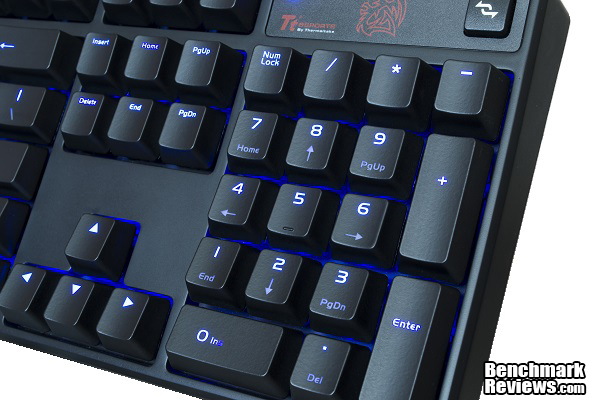
This mechanical keyboard also comes with individual blue LED’s behind every key. The brightness level can also be adjusted from very dim to very bright depending on personal preferences. It also comes with a very handy button at the top right to enable or disable the Windows’s key. The Poseidon is made of plastic but it is a very durable plastic and the overall keyboard feels very heavy and robust. Have a look at the features and specifications of this mechanical gaming keyboard.
FULLY BACK-LIT KEYBOARD. With an LED under each cap, the POSEIDON Illuminated is a fully back-lit keyboard, offering 4 levels of adjustable brightness via the Fn (function) + F11/F12 keys.
CHERRY MX BROWN SWITCHES. Widely-regarded as the best mechanical switches available for gaming, the Cherry MX Brown switches offer the right balance between tactile feedback and actuation force.
ANTI-GHOSTING FUNCTION. With 6-8 key N-Key Rollover, the POSEIDON Illuminated will allow you to hit combinations of keys at once to make sure your gaming session is as fluid as it can be.
ACCESSIBLE MEDIA KEYS. With the Fn (function) + F1-F7 keys, you can control your volume and media player anytime, without having to minimize your current game or program.
DISABLE WINDOWS KEY FUNCTION With the disable windows key button, you can prevent accidental presses of the windows key while in-game.
| COLOR | BLACK |
| WEIGHT | 995 GRAMS |
| DIMENSION | 440 X 133 X 37MM(L X W X H) |
| INTERFACE | USB |
| MEMBRANE, MECHANICAL, PLUNGER | MECHANICAL, CHERRY MX BROWN |
| ANTI-GHOSTING KEYS | 6-8 (USB) |
| POLLING RATE | 1000 HZ |
| BACK-LIGHT | YES, FULL BACK-LIGHT |
| MULTIMEDIA KEYS | 7 |
| KEYSTROKE LIFECYCLE | 50 MILLION |
| CABLE LENGTH | 1.8M BRAIDED |
Now let’s dive deeper and see what Thermaltake has to offer on their new Poseidon Mechanical Gaming Keyboard with Cherry MX Brown switches.
As to any test with peripherals, it takes time to become familiar to that particular peripheral. The reason is because there are no numbers to indicate if something is superior or inferior to another product. Core components do have numbers for their tests and benchmarks, which makes it is easier to rank which products are better. I spent a lot of time playing and getting familiar with the Thermaltake Poseidon Mechanical Gaming Keyboard, so let’s dive into the test and see the results.
-
Motherboard: Gigabyte GA-970A-UD3 AM3+ Motherboard
-
System Memory: 2 x 4GB G.SKILL Ripjaw X Series 1600MHz DDR3
-
Processor: AMD FX-8350 Eight-Core Processor @ 4.4GHz
-
Audio: Creative Sound Blaster X-Fi Titanium
-
Video: Gigabyte Radeon R9-270X 2GB
-
Disk Drive 1: ADATA SP900 64GB SSD
-
Disk Drive 2: Seagate Momentus Thin 320GB HDD
-
PSU: Raidmax Hybrid II 630W Modular PSU
-
Monitor: Acer G226HQLBbd 21.5″ 5ms LED Monitor
-
Operating System: Microsoft Windows 8.1 Professional 64-Bit
- GRID 2
- Starcraft 2
- Planetside 2
- Battlefield 4
- Adobe Photoshop CS5
- Sony Vegas Pro 12
- Microsoft Office Applications
- Eclipse Java Programming
- Google Chrome Internet Browsing
Having Cherry MX Brown switches, I was able to type faster with the Thermaltake Poseidon Mechanical Gaming Keyboard. The keys felt very good to type on as I was able to use it to edit videos and finely tune graphical settings within Photoshop CS5. I found that using brown switches were much easier to use for typing and productivity. I could type faster with brown switches, but just the slightest miss can be enough to cause a spelling error. This is not a major problem, but once I got use to this keyboard, I was typing with great speed and accuracy.
In terms of just basic computing and surfing the web, the Poseidon easily surpasses that. Media controls were limited but they do get the job done with only four media keys. When using Eclipse to write code, I made a lot of mistakes with this keyboard at first, which was normal for first time use. As I got more familiar, I was able to write code faster with less mistakes. This keyboard will do a great service to casual users and programmers.
Because I normally have the lights in my house at a dim level, the blue back-lights really come in handy whenever I have to look down to search for the key I want to press. Being able to adjust the brightness level was also a huge plus and can save a bit of energy as well. I normally turned the LED’s off when there was a lot of sunlight. The only problem I had was that it becomes a little difficult to see the labels on the keys when the back-light was off. But who buys an LED back-lit keyboard just to turn off the LED’s?

Battlefield 4 and Planetside 2 were FPS genres and were the easiest to adjust to. Although I did become frustrated as my fingers did slip several times, which caused me to eject from my airborne Reaver in Planetside 2 or accidentally throwing a grenade at my teammates in Battlefield 4, this was just something that everyone goes through when using a new keyboard for the first time. GRID 2, which I do prefer to play using a controller, was an enjoyable experience as it was not a keyboard demanding game. I was able to play the game just fine with the Poseidon.

Starcraft 2 was rather a completely different story and was the most difficult to adjust to because of all of the hotkeys. I just wished there were programmable along with macro keys to help enhance gameplay. Sometimes I would try to group units but it was difficult to do so because Cherry MX Brown switches require so little force to press, causing me to press random keys at times in a scenario where time was precious. This is not the fault of the keyboard; I just had to become familiarized to Cherry MX Brown switches during gaming.
Overall, I had a great time using and playing with the Thermaltake Poseidon Mechanical Gaming Keyboard with Cherry MX Brown switches. The keyboard never moved anywhere as the rubberized feet kept it in place. Even though the keys can be easily pressed with the slightest amount of force, I was able to overcome that after a few weeks of extended use.
I was very impressed at the build quality and durability of the Thermaltake Poseidon Mechanical Gaming Keyboard. Even at an affordable price, it is difficult to find an alternative mechanical gaming keyboard with adjustable LED back-lighting effects with a sturdy construction. It took me some time to become familiarized with it at first, but that was just part of the learning process to every new peripheral.

The Poseidon does not try to be something that it’s not; it works just as it should for a typist, programmer, video editor, and even a casual gamer. It may not be considered the best gaming keyboard on the market due to its lack of programmable and macro keys, but it does get the job done if you are looking for an affordable mechanical keyboard for typing, productivity, and casual gaming.
In terms of performance, the Thermaltake Poseidon Mechanical Gaming Keyboard does perform as expected. Because of the Cherry MX Brown switches, I was able to type faster and become more accurate with my typing once I became familiar with it. Because brown switches require very little force to activate, I would not recommend going straight into an RTS game right when you take the keyboard out of the box. You will be having a very difficult time trying to play the game especially when you are new to mechanical keyboards. But if you are someone who is familiar to using Cherry MX Brown switches, this keyboard will give you a great gaming experience.
When it comes to appearance, the Poseidon will look great on a professional desk in the office. It has a very classical and traditional look that will blend in with other basic looking keyboards. With the built-in LED’s, this makes it stand out from a normal keyboard. Because the Poseidon is classified as a gaming keyboard, I thought there could have been more features, such as programmable key, macro keys, a palm rest, and LCD screen. But this keyboard would have been priced well over $100 if it were to have these features. This is an entry-level gaming keyboard and the consumers buying this keyboard will most likely not care so much about how it looks.
The build quality is just as good as the more expensive mechanical gaming keyboards. I was very impressed because I had a very hard time trying to get this keyboard to flex. The reason to why it has such a strong body is because it is constructed with a very strong thermoplastic material called Acrylonitrile Butadiene Styrene, or ABS. Producing ABS is about twice the cost of producing a regular plastic material used in other keyboards, but amazingly the Poseidon still comes at a very affordable price for consumers who want the best build quality and durability in a mechanical keyboard. The only thing I have against the construction is that when I have the plastic legs flipped out, the keyboard did not feel even on my desk. This might have been a production flaw only to my sample, but hopefully other users are not experiencing the same effects I did.
This keyboard is perfect for a typist, video editor, or just someone who casually browses the internet. Media and volume controls also work so there is nothing wrong here. The only thing that disappointed me was the fact that this keyboard is classified as a gaming keyboard but lacks a few essential gaming features. Ideally, a gaming keyboard should have features like programmable and macro keys to enhance gameplay. Although it would have made the price a little more expensive, consumers would pay the premium just to get what they need if they have no other alternatives. I do like the fact that this keyboard uses Cherry MX Brown switches since brown switches are perfect for typing.
When it comes to value, the Poseidon will be a great value for a consumer who is looking for a good mechanical keyboard to type on and surf the web. This keyboard will last many years for a typist. But looking at it from a gaming stand point, there are improvements that could have made it better. Yes it is $69.99 (Newegg | Amazon) as of April 2014, but some consumers would have expected more gaming features on a keyboard at this price.
Overall, I am very satisfied with this product that Thermaltake has provided. This will fit the bill of many consumers on a tight budget. Even though there could have been more improvements, you just have to accept the fact that nothing in life is perfect. I will highly recommend this keyboard to anyone who is looking for their first mechanical keyboard or just an affordable product for typing, productivity, web browsing, and casual gaming.
+ Cherry MX Brown switches
+ ABS body construction
+ Durable and very heavy in weight
+ Great for typing, gaming, and productivity
+ Individual blue back-lit keys
+ Plug and play with no software to install
+ Windows enable/disable button
+ Compact space saving design
+ Excellent rubberized grips
+ Cable routing trail for USB cable
– No built-in palm rest
– No programmable or macro keys
– No dedicated volume control buttons
– Lower half of keys are very dim
– Limited media control functions
– Very bright NUM/CAPS/Sroll lock LED’s
-
Performance: 9.25
-
Appearance: 8.75
-
Construction: 9.75
-
Functionality: 8.50
-
Value: 7.75
Quality Recognition: Benchmark Reviews Silver Tachometer Award.
COMMENT QUESTION: What do you like/dislike about the Thermaltake Poseidon Mechanical Gaming Keyboard?



One thought on “Tt eSPORTS POSEIDON Mechanical Keyboard Review”
No commentary of the KB’s water cooling capabilities ? I mean any component / peripheral named after the “King of the Sea” must be water cooled right ? 🙂
Comments are closed.