By Joey Peng
Manufacturer: Micro-Star International (MSI)
Product Name: MSI GK-601 Mechanical Gaming Keyboard
Model Number: GK-601
UPC: 816909105315
Price As Tested: $119.99 (Newegg)
Full Disclosure: The product sample used in this article has been provided by MSI
Mechanical Keyboards have been a popular item lately for its tactile response and long lasting quality. Numerous manufacturers, including the likes of Corsair and Mad Catz, have all been jumping onto the bandwagon. MSI does as well, bringing us a new mechanical gaming keyboard, the GK-601. In this article, Benchmark Reviews tests performance for the MSI GK-601 macro-enabled mechanical gaming keyboard.
The MSI GK-601 comes with a full list of standard features, including back-lighting, macro profiling, and audio/USB ports. It sports Cherry MX Red Switches, a type of mechanical switch that offers the least amount resistance on key presses. This switch has linear resistance and triggers key presses on the way down. It is said to be one of the best switches for gaming due to its low actuate force.

The MSI GK-601 Mechanical Keyboard is a solid all-rounder mechanical keyboard. For a macro-capable keyboard, the price is slightly on the high side. Benchmark Reviews will test out the MSI GK-601 to see if it stands out among its peers.
Features
- Cherry MX mechanical red switches – The Cherry™ Black Switch is treated as the favorite “gaming switch” by gamers. Now, Cherry™ Red Switch features all the benefits from Black Switch such as high reliability but with less actuated force, that is to say, GK-601 allows much higher rate of presses due to less force to actuate. The result is a feel that most perceive as “smoother” and “faster”, making them especially popular among gaming enthusiasts.
- N-Keys rollover under USB connection – In some gaming session like FPS or ARPG games, you may need to press multiple keys at once. GK-601 features advanced performance with N-Key Rollover and anti-ghosting technology through USB connection. You can have multiple keys pressed at the same time without any interruption.
- Gaming/PC Mode Key – Windows key might be useful in certain situation, but it’s disturbed when you’re in gaming session and even let you lose the game. Just simply click the dragon key as a function key + F12 to lock windows key and click both buttons again to enable it.
- Macro keys with MSI Gaming Keyboard software – Re-program all keys to activate the software functions or trigger sequences of moves by macro keys. You can save your favorite key combination and 5 profiles for different games. Switch your weapon like lightning by your exclusive Macro Keys!
- Multimedia Keys – In Gaming World, only speed is truth. Multimedia Key is a quick access to your media function that you can tune volume immediately. GK-601 helps you focus on your fight.
- LED Backlit with four modes – GK-601 provides 4 different modes of backlit lighting with breathing mode. Don’t be afraid of darkness anymore because LED backlit helps you target your enemy precisely in any situation.
- Ergonomic Design – Ergonomic design of GK-601 minimizes muscle strain and a host of related problems. Preventing physical injury from using keyboard for a long gaming time.
- USB and Audio ports – A lot of gamers need headset-mic while playing game. Quick access to this adapter behind keyboard wherever you are.
- Gaming Keycap – The unique WASD gaming keycaps let you have accurate moves in exciting fight any time.
- Surface Treatment – Laser engraving letters won’t wear out easily and special coating provides excellent tactile feedback.
- Gold Plated Connector – Gold-plated connectors promise high durable and low latency that help you always keep fighting in games.
- Braided Wire – Qualitative braided wire makes sure your keyboard endurable enough and keeps in sharp transmission.
Specifications
- Keyboard interface: USB 2.0
- Dimensions: 18.11″(L) x 6.38″(W) x 1.18″(H)
- Weight: 1300g
- Keystroke life: 50 million
The MSI GK-601 comes in a solid cardboard box with a flip cover that highlights all of the keyboards core functionalities. Like most mechanical keyboards, the GK-601 has a matte finish and omits any flamboyant designs.

The GK-601 is a standard qwerty keyboard with only 1 extra “Fn” key used to access multimedia and macro functions. The keyboard uses Cherry MX Red switches, which are known for having low key press resistance. It has no “click” on trigger. Instead, the key press is triggered on the way down. This allows for extremely fast response times and “spam”-ability. The draw back is the lack of tactile feedback that some prefer for typing.

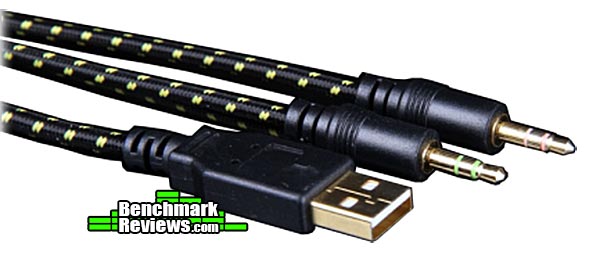
You can find audio and USB connectors on the GK-601, something that’s quickly becoming a standard among high-end keyboards. While the audio jacks may be redundant as most computer cases have them in the front, the USB ports prove to be very useful in handling the ever growing list of USB accessories.

The Fn (function) button is located on the right side of the space bar, next to the ALT key. MSI’s GK-601 keyboard has multimedia controls, lighting adjustments, and 10 programmable macros. Instead of adding additional buttons for each functionality, MSI overloaded F1-F12 and the number pad keys with duo functionalities that are activated when the Fn key is held down. On first impression, this seems like a usability issue if Fn needs to be pressed whenever you want to use a macro. But after closer inspection it turns out that MSI made a really good design choice here.
Instead of having special dedicated macro keys like most other keyboards, MSI’s macros are simply bound to a regular key and replaces its default functionality. Using the Fn key you can easily toggle between different profiles including a default one that just uses the basic keyboard and disables all macros. This solves a bunch of usability issues and is a great design choice. Of course the drawback is that you’ll have to be careful of which keys are being used for macros, otherwise typing into a chat box may prove to be an odd experience.

From a construction perspective, MSI also pays attention to details. All four corners of the keyboard are rubberized as to prevent slipping and shifting during usage.

Unlike alternative keyboards, the GK-601 does not support PS/2 connections. This is fine as most people use USB anyway. The connectors of the MSI GK-601 are gold-plated to ensure optimal connection.
The back-lighting of the GK-601 also looks great. It has 4 different brightness settings: three basic and one slow pulsating glow. The yellow lighting matches perfectly with the Black/Yellow color theme of the keyboard. The lighting controls are built right into the keyboard. You can use the Fn key and the num pad to make adjustments
One problem here is that the keyboard does not seem to turn itself off when the PC hibernates. I’ve had to manually turn off the back lighting after every use. This seems like a possible driver issue that needs to be fixed.
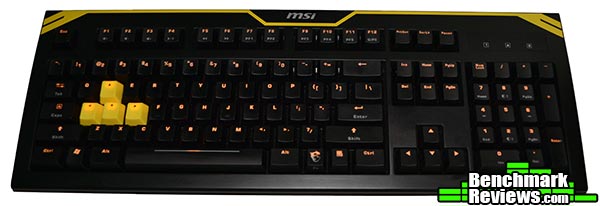
Overall the GK-601 gives a great first impression. Its macro capabilities definitely stand out among competing products. In the next section Benchmark Reviews will take a more detailed look at the GK-601.
The MSI GK-601 comes with 4 additional key caps and a key puller. The additional key caps have a rough texture that can be easily distinguished from the rest. This is also a common goody you get with other mechanical keyboards, though competitors such as Corsair offer many more replacement key caps.
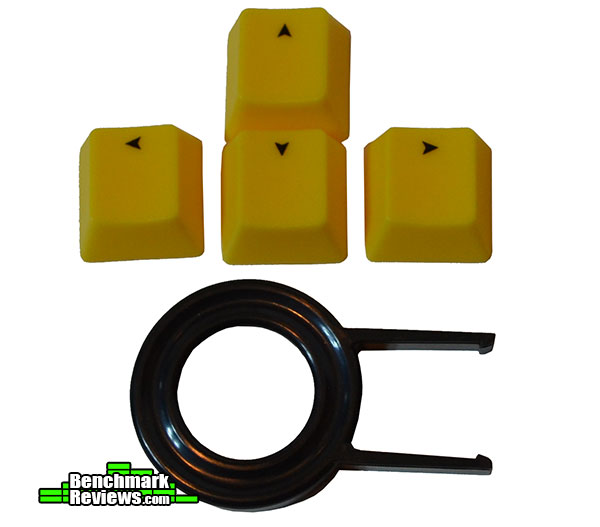
The keys can be easily removed to expose the Cherry MX Red switches and the yellow LED lights. This allows you to wash the key caps and clean the inside of the keyboard when needed.

The yellow key caps are primarily for FPS games, where the WASD keys are removed in favor of textured arrow keys. I personally find it a little odd that they replaced the letters with arrows as most people don’t need explicit indication of what’s up/down/left/right. Only the texture is needed to make it stand out so that they never lose touch of the primary keys. Omitting the letters and (subsequently) blocking the lighting seems like an odd choice.

From a hardware perspective, MSI did a great job and nailed many details. However the software side is a completely different story.
First of all, it took me 5 minutes just to figure out the basics of the UI. I couldn’t figure out why clicking the M1-M10 buttons or the drop-downs did nothing. It turns out you have to click M1 -> a key in the picture above -> press drop-down to select action. This if the first configurator I’ve used in years that required me to look for the manual.
Also, the app lagged and hung frequently as I toggled between different profiles or tried to carry out actions like save. There are definitely some quality and performance issues here that I’ve never met with other drivers.
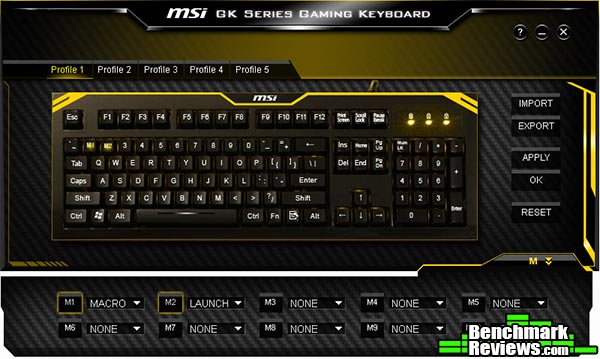
If you manage to get past the initial steps, you’ll realize the functionality is pretty complete. There are many types of macros you can set, including system operations like copy and paste, launching programs, disabling the button (actually happens to be rare among other keyboards but a very useful function) and of course, macros.
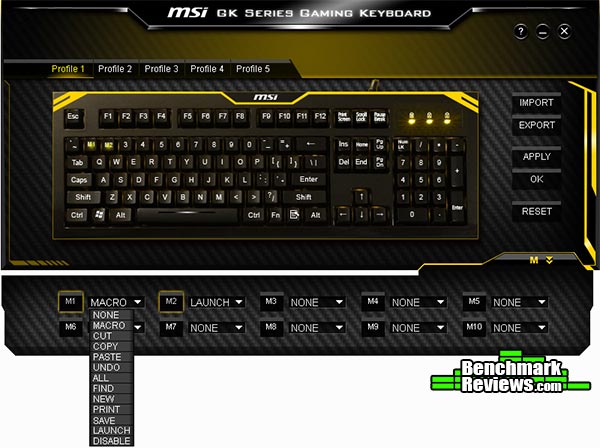
Macro recording is pretty straightforward. What I couldn’t figure out is how to remove the delay between keystrokes. From the UI it seems as if the exact time of the key presses are being recorded, but when using the macro, it always has a minimum delay between each stroke that can’t be removed. This is unfortunate as I tried using macros for League of Legends to cast a sequence of spells, but the delay made it seem less performant than just trying to spam myself.

There are unfortunately other usability issues with the software as well. It takes a while to get used to the driver but I definitely don’t want to be making constant adjustments in there, especially when saving a single macro and publishing the change can take some 30 seconds. Overall the driver quality is a little disappointing even though the functionality is mostly there.
In the next section we’ll go into some of the additional goodies that come with the product.
When MSI shipped the GK-601 Mechanical Keyboard for review, they also mentioned that a gaming mouse pad would be included as part of the shipment. This section will detail the testing results for this mouse pad.
There was no naming information other than “G-Series – Just Game!”. The mouse pad is quite wide, around 380mm x 260mm or 15″ x 10″. This is a soft surface mouse pad.

The surface texture is very interesting. While it may appear grainy, it’s actually very smooth and has low friction. Personally I find it a little too smooth even compared to my SteelSeries plastic hard-surfaced mouse pad.

The bottom is fully rubberized and designed to stay in place. Having a strong grip is very important. A slipping mouse pad is probably the worst thing that can happen during any competitive gaming.
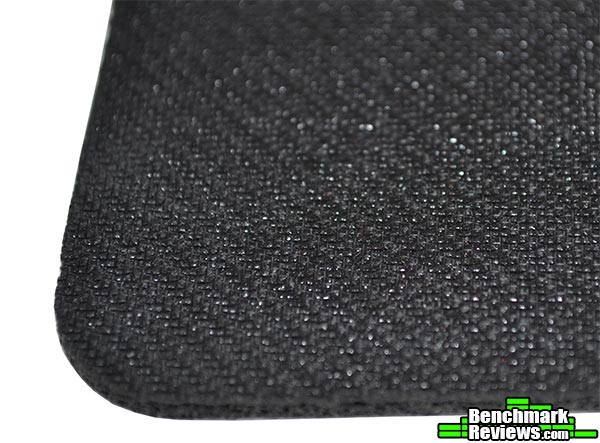
Overall it’s a very simple mouse pad and suitable for those that like soft textile surface that have very little resistance. The advantages of this over a hard surface is that it doesn’t have any scratching noises during movement and better for the Teflon feet in the long run. If this is included free with the keyboard, I would say great, it’s a nice goody to have. However looking at websites with the GK-601 for sale, I don’t see this detailed there. Not a big deal as I don’t think the mouse pad is by any means a make or break reason to buy the keyboard.
The MSI GK-601 was used over a period of 3 weeks in various activities including day-to-day typing, work, and of course, gaming. The games I primarily play are League of Legends, StarCraft II, and Diablo III.
The first point to talk about is general comfort. The MSI GK-601 is actually quite tall for a keyboard, over a full centimeter/half inch above the desk. This would usually call the need for a palm rest. Unfortunately it didn’t come with one. The initial adoption phase took a couple days as I wasn’t accustomed the the rise in height over my previous keyboard. You will find your palms frequently hovering in mid-air where you use your elbow and fingers to pivot the weight. I haven’t found any discomfort or tiring of the wrist even after 2-3 hours of continuous gaming. For long typing sessions however, that’s different story. When gaming, you can easily rest your thumb or pinky on the edges of the keyboard to offset weight. When typing, your fingers will constantly be moving. I’ve found myself occasionally feeling some wrist/arm fatigue. It’s not a very serious issue if you’re used to not having a palm rest.
The MSI GK-601 overall feels great. Each key cap is slightly arched to help direct an accurate key presses. The surface is smooth and untextured. I did not use the extra key caps included as they don’t offer much. The hardware is impressive in looks as well as performance. Typing on it was quite smooth. Unlike some of the competitors’ keyboards, I did not notice much accidental double-registering of keys, something that Cherry MS Red switches do often if not careful. They GK-601 also has N-key rollovers so that games requiring simultaneous key presses are guaranteed to work. Initial trials show 10 simultaneous key presses registering with little problem.
The Macro functionality, if you can get through the software issues, is flat out awesome. There are a total of 5 profiles that you can toggle between, and a switch for game/PC mode. In PC mode, macros and the windows button are disabled. In game mode, it’ll use the profiles settings. This is a simple and efficient way of toggling on and off macros. When activated, the macro functionality replaces the default keys. This solves a big issue of usability. Most keyboards have auxiliary buttons for macros which can be annoying to use in split second situations. Finally here we have a keyboard that ditches the norm.
There is one improvement change I would ask for if MSI is releasing a driver update. There’s a minimum delay right now per registered action when a macro is being recorded. This means there’s a limit to how fast it’ll crank out the key-presses recorded. If they can update the driver to handle real-time macro replays, and fix the software bugs, this keyboard would be left with very few flaws.
Overall the MSI GK-601 Mechanical Keyboard is a great product. It functions extremely well and I’m happy to retain it as my primary keyboard. There’s definitely some areas to improve, but if we focus on just the gaming scenarios, the GK-601 hits the spot.
The MSI GK-601 Mechanical Keyboard has many attractive features and is a great keyboard. Mechanical keyboards are becoming increasingly popular among gaming fans, the real question is whether or not its worth the additional cash. There are plenty of good articles out there that summarize the pros and cons of using a mechanical keyboard. One of the biggest advantages is quality. Mechanical keyboards last a ton longer than rubber dome keyboards. This might sound unimportant but if you plan to use the same keyboard for 1-2 years for serious gaming, many hours a day, quality is going to matter.
The key press feedback is also better in a mechanical keyboards. Trying to spam key presses on rubber dome keyboards is guaranteed to be slower and less responsive. I’ve started going with mechanical keyboards a while back and have never switched back.
I’ve been with the MSI GK-601 for three weeks now and I would say it’s been a fun journey . The GK-601 performs very well. The Cherry MX Red switches live up to its name. I’ve had much less problems with keys registering multiple times compared to competing mechanical keyboards like the Corsair Vengeance. The Macro system is absolutely fantastic. There are some quirks with the keyboard, such as lights not turning off after hibernation, and lack of a palm rest, but the macro design makes it worthwhile. Having a keyboard where you can overwrite any key on the keyboard to perform another action is the best way to handle macros in a fast paced game. Additional multimedia keys are available by holding the Fn key down. This eliminates the need for more buttons. Unfortunately the media keys only work with the system settings and not integrated for example with Media Player Classic.
Appearance-wise, the MSI GK-601 is also fantastic. It has a matte yellow & black finish. The designers have stayed away from using distracting logos and decals. Even the lighting colors match the yellow paint perfectly.
The MSI GK-601 has a very solid construction. The Cherry MX Red switches perform great without any hiccups. The keyboard feet are rubberized to ensure slip-free usage. The key puller is an effective tool to remove key caps and that works great as well. The key caps are on tight but can be easily removed and re-installed.
While most of the keyboard is pretty impressive, there are definitely some functionality quirks. The functional capabilities are impressive, but the driver desperately needs an update in order to eliminate performance/hanging issues. I would also advocate for a UI revamp to enhance usability.
The MSI GK-601 Mechanical Keyboard can be purchased online for $119.99 (Newegg). Similar keyboards are priced anywhere between $70 to $300. Most are around $90-110. I would say the GK-601 is priced at the right place. It has many competitive advantages compared to rival keyboards.
My final recommendation is this: in the current state, the GK-601 is a great product for heavy macro users if you don’t mind the small software annoyances. The GK-601 will step up your game for sure. However if MSI can get things rolling and fix the software issues, improve on the macro recording capabilities, and release an updated configuration software, then the GK-601 mechanical keyboard would be an instant recommendation for everyone.
+ Solid construction and pleasant design
+ Best macro system out there, allowing macros to overwrite any key
+ Includes key-puller and extra textured keys for better customization
+ 10 Macro keys, 5 profiles, instant toggle between game mode profiles and default keyboard behavior
+ Multimedia keys and lighting adjustments built in and accessible using the Fn key.
+ Minimalistic, one of only macro keyboards without a bunch of extra buttons
– Driver software has quality and usability issues even though the functionality is there
– Macro recording has built-in delays that cannot be removed
– No palm rest
– Lighting does not auto turn off when computer hibernates
-
Performance: 8.75
-
Appearance: 9.50
-
Construction: 9.50
-
Functionality: 8.50
-
Value: 8.75
COMMENT QUESTION: What is your all-time favorite keyboard?



One thought on “MSI GK-601 Mechanical Gaming Keyboard Review”
I have been waiting for MSI to release a review on this keyboard. I will probably get one now. Awesome review!
Comments are closed.