By Tom Jaskulka
Manufacturer: Fractal Design
Product Name: Node 804
Model Number: FD-CA-NODE-804-BL-W
UPC: 817301012010
Price As Tested: $109.99 MSRP
Full Disclosure: The product sample used in this article has been provided by Fractal Design
Last summer, I had a chance to review Corsair’s cube-shaped Carbide Air 540. A bit of a unique enclosure, it isolated the motherboard, CPU and expansion cards into a separate chamber from the hard drives and power supply. The “double-wide” ATX approach had quite a few advantages, but the wider footprint meant the large enclosure would struggle to fit anywhere – certainly not on top a desk, and even placing it below was cumbersome for some workstations. Even with the tradeoff, it was a great performer and a solid concept. If only it were a bit smaller…
Enter Fractal Design’s Node 804. While it isn’t an exact scaled-down replica of cases like the Carbide Air 540 or HAF XB, it still uses a cube/split chamber layout – this time in a micro-ATX size. With dimensions of 344 x 307 x 389 mm or 13.5 x 12.1 x 15.3 inches (WHD), the Node 804 is just a bit wider than a BitFenix Prodigy and almost exactly a third larger than the Node 304 (in the height and width dimensions – depth differs by only 15mm). The Node family is designed with a focus on Home Entertainment; with the vast array of fan, radiator and storage combinations that are possible the Node 804 could easily take on any number of roles. Benchmark Reviews has received the Node 804 for some testing, so let’s take a look at the newest member of Fractal Design’s Node family.

- Highly effective dual chamber case layout for best possible cooling.
- Minimalistic design with an elegant brushed aluminum front panel
- Unique hard drive mounting system, fitting up to 8 x 3.5″, 4 x 2.5” or up to 10 x 3.5”, 2 x 2.5″ drives HDD/SSD
- Three Fractal Design Silent Series R2 fans included with the case and space for an additional 7 fans.
- Excellent water cooling support with space for up to 4 radiators simultaneously.
- All intakes feature removable dust filters providing a dust-free interior.
- Featuring a window side panel to show off your set up in style.
- Additional space in the front to mount a slim optical bay drive and 2 x 2.5″ drives.
- Fan controller included.
- Five expansion slots that allows for multiple GPU setups.
- Micro ATX and Mini ITX motherboard compatibility
- 8 – 3.5″ HDD positions
- 2 – 2.5″ dedicated SSD unit positions
- 2 – Extra positions for either 3,5″ or 2,5″ drives
- 5 expansion slots
- 10 – Fan positions (3 x 120mm Silent Series R2 fans included)
- Filtered fan slots in front, top and bottom
- CPU coolers up to 160 mm in height
- PSU compatibility: ATX PSUs up to 260 mm deep
- Graphics card compatibility: Graphics cards up to 320mm in length. Graphics cards up to 290 mm in length may be installed if a fan is installed in the lower position in the front.
- Velcro strap for easy cable management
- Clear Window side panel included
- Colors available: Black
- Case dimensions (WxHxD): 344 x 307 x 389 mm
- Net weight: 6 kg
- Package dimensions (WxHxD): 370 x 468 x 412 mm
- Package weight: 7.7kg
- Front: 4 – 120mm fans (included is one hydraulic bearing 120mm Silent Series R2 fan, 1000 RPM speed)
- Rear: 1 – 120/140mm fan (included is a hydraulic bearing 120mm Silent Series R2 fan, 1000 RPM speed)
- Rear: 1 – 120mm fan slots (included is 1 hydraulic bearing 120mm Silent Series R2 fan, 1000 RPM speed)
- Top: 4 – 120x140mm fans (not included)
- Fan controller: 1 – Integrated fan controller for up to 3 fans (included)
- Front (right chamber) – 240 mm radiator configurations up to 60 mm thick (with fans) and 278 mm tall are allowed.
- Front (left chamber) – 240 mm radiator configurations up to 60 mm thick (with fans) and 278 mm tall are allowed. Using a radiator in this position prevents the use of a fan in the top position just next to it.
- Top (right chamber) – 240/280 mm radiators up to 130mm thick (with fans) may be fitted if the HDD drive bays are taken out or placed elsewhere. No limitation to thickness.
- Top (left chamber) – 240 mm radiator configurations up to 130 mm thick (with fans) will fit. Radiators in this position limits the height of memory modules to 48 mm tall.
Maximum radiator configuration: 1x240mm,1x280mm and 2x120mm radiators simultaneously.
The Node 804 joins two others in Fractal Design’s “Node” series of chassis. Currently comprised of the mini-ITX Node 304 and the ATX Node 605, the new Node 804 fits nicely in its own niche between the two. Focusing on cooling performance and configurability, this Node is probably the most “high performance” capable Node yet.

The Node 804 uses a very similar approach to design as the other members of the Node family. The familiar Scandinavian conservative lines, rounded corners and brushed aluminum over a steel internal frame maintain the tastefully elegant design associated with all of Fractal Design’s enclosures. The front of the 804 has almost identical proportions as the Node 304, with an additional mesh intake under the brushed aluminum front panel. The I/O cluster and power button are still located along the lower right side, but while the smaller 304 hid two 92mm fans behind its front panel the micro-ATX 804 has a few more surprises. Two dust filters, four 120mm fan mounts, a slim slot-load optical drive bay and two 2.5″ drive mounts sit directly behind the wrap-around brushed aluminum. This is shaping up to be a different chassis, indeed…

The Node 804 uses the typical slotted sliding panels common to many cases. I almost universally prefer hinged side panels, but the smaller size and almost square construction of the Node 804 means these panels are effortless to take off and put on – I have no complaints when slotted side panels are this painless to work with (a rarity among cases that use this design). With a crystal clear window on the left panel offering a view of the motherboard, CPU and GPU(s), you won’t need to worry quite as much about the window revealing a mess of cables as those are all contained on the right half of the case.

The right side panel is featureless, although the front panel I/O ports and power button are visible in the front (along with the slim slot-load optical drive port). The optional optical drive won’t have any external eject button (I assume this is common with the slim slot-load variety) so you’ll need to rely on software to remove discs if you plan to install a drive here. Incidentally, the side panels are not reversible – not that you’d prefer to show off your drives and power supply rather than your graphics card and CPU cooler, right?

The rear of the Node 804 reveals many details about the internal layout. The “right” side in the photo above (left chamber of the case when viewed from the front) is obviously the area that houses the motherboard, central processor and expansion cards (with five PCI slot covers allowing for cooler Crossfire/SLI configurations). Two Silent Series R2 120mm fans (hydraulic bearings, 1000 RPM) arrive stock for this section, and their linear positions should result in decent stock performance. Of course, there are many more fan positions available (another 120mm in front, 2×140 or 2×120 up top) – and we haven’t even gotten to the other side yet. That side (left above, right chamber when viewed from the front) houses two racks of four 3.5″ drives, as well as the power supply and another Silent Series R2 120mm fan in an exhaust configuration. You probably guessed that there were some fan mounts available on this side as well – with the exception of being able to fit a larger 140mm exhaust fan, the top (2×120 or 2×140) and front (2×120) mirror the other chamber. The three included 120mm fans are all controlled by a switch on the back panel, with High / Medium / Low settings.

The optional top fan mounts are filtered just like the front (and bottom) with the entire top panel acting as a mesh intake/dust filter. This panel can be removed on its own, no need to remove any side panels or the front panel first which comes in handy for cleaning. Under the mesh there are a series of plastic baffles that help redirect any noise away from the front of the case, which should help keep component noise down. The mesh used is a very fine round-hole mesh, hopefully it isn’t too restrictive… Since it is comprised of smaller holes, it’s structurally very sound for a giant mesh panel. When viewed from an angle it almost blends into the rest of the chassis, simply looking like another panel.

All of the bottom fan mounts are filtered as well, although for the PSU filter you’ll need to lift the entire chassis up to access it – same for the front dust filters, for that matter. It’s a relatively small chassis overall so that shouldn’t be that much of an inconvenience. Certainly not as inconvenient as dusting out all of your components (instead of just a few filters) anyway. Four rubber feet keep the Node 804 from sliding around, but the wide footprint especially results in a very stable chassis. Otherwise, the bottom of two velcro straps (for cable management) are the only other points of interest on the bottom of the Node 804 (other than the two optional 2.5″ drive mounts on the floor of the main chamber).
The interior of the Node 804 is where it really starts to get interesting, so let’s take a closer look.
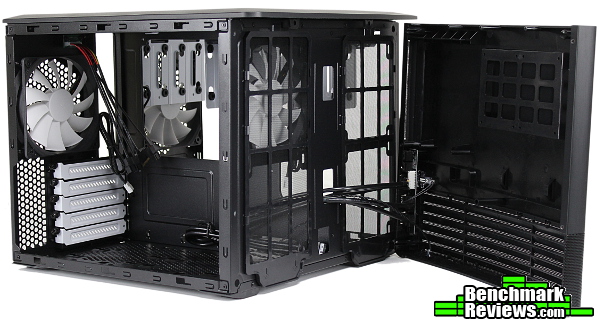
The front panel (alongside the split-chamber design) is one of the most interesting parts of the Node 804. Two 240mm radiator (or fan) mounts, the plastic cage for the two 2.5″ drives and the slim slot-load optical drive mount are all visible. The front panel removes with an easy application of force like the Node 304 and doesn’t seem to be in danger of breaking anything with multiple removals (Fractal Design’s cases generally fit together nicely, I’ve never felt like I was going to break a peg or snap something when removing a panel). If you look closely at the inside top edge of the front panel, you’ll see a series of three posts. The two outer posts are a bit shorter, but act as anchors for the top mesh panel in its normal position – a short slide rearward, and those posts will allow the top panel to be removed without removing anything else other than two thumbscrews.

The left (main) chamber has just enough room for a micro-ATX motherboard and PCI expansion cards. The included fan controller (with SATA power connector) will need to be connected to each of the three fans. The floor has a filtered mesh intake too, but strangely there aren’t any mounting holes for 120mm fans here – but any fan that can fit on or between the raised mounting holes for the drives can just sit on the mesh (Fractal Design’s promotional material shows two 92mm/80mm fans sitting in the bottom location). There are two 3.5″ drive mounting points in this location along with the two 2.5″ mounts if you need some extra storage that doesn’t get in the way of radiators.

The right chamber houses the removable 3.5″ drive cages and the power supply. Another 120mm Silent Series R2 fan is mounted as an exhaust fan, providing some active cooling for a drive array. The Corsair Carbide Air 540 didn’t include any fan mounts on the “storage” side of the cube, so this is a welcome decision in the Node 804. Of course, the front contains two filtered 120mm fan mounts (along with the 2×120 / 2x140mm locations up top).

The top fan configurations that are possible become much clearer by viewing the top of the Node 804 with the mesh filter panel removed. Both sides are essentially duplicated, although the “motherboard side” offsets the 120mm mounts more than the “storage side” to clear motherboard components. It’s also pretty obvious that you’ll need to remove a drive cage or two if you want to use the top fan mounts on the storage side of the Node 804 – there’s still the two 2.5″ mounting points in the front panel, and two 3.5″ mounting points located on the motherboard side if you do want to use this space for fans or radiators instead.
With the tour of the outside complete, we can really see what types of configurations are possible by building a system into the Node 804. The stock configuration seems like it would perform acceptably well for most configurations, but I’m going to see if I can fit a Radeon R9 290 graphics card as well as a Cooler Master Nepton 280L 280mm all-in-one liquid cooler in this Node to see how it handles some larger components.

First, the PSU. The entire “floor” of the right chamber is usable power supply space, so you shouldn’t run into any clearance problems with larger power supplies. The unit pictured is about 150mm (not including the modular connectors), so if you want to make use of the cable management straps in front of the PSU you probably wouldn’t want anything much larger (most of the typical models that would power a mATX system would do fine in the Node 804). Fractal Design is one of the few companies with a 140mm power supply that supplies more than 500W (the Integra R2 series has 500W, 650W and 750W models), so there are options out there if you want smaller but more powerful power supplies to save space in the Node 804.

The motherboard, CPU and RAM install without any problems and the tie-down points underneath are a very welcome sight. The audio and front panel header cables usually end up a bit of a mess, so the ability to tie those down out of the way is very appreciated. A cutout for the 8-pin CPU cable up top provides easy access for cables, but the cutout itself could stand to be a bit larger if only to accommodate multiple cables (I routed the fan controller cables through this hole as well).

The two 3.5″ drive cages accommodate four HDDs each. The drives end up hanging vertically, and there’s enough space between them to get a bit of airflow through them all to keep them cool. The smaller Node 304 managed to pack six drives in a very small enclosure – it looks like the Node 804 follows suit with eight drives (not to mention the other two mounting locations in the other chamber). Undoubtedly some will claim there would be a way to fit even more drives in the Node 804 for file server/NAS duty, but I think Fractal Design has targeted this chassis perfectly. You can fit more drives in this mATX Node than any other mATX enclosure (and many ATX cases, for that matter) anyway, and for dedicated mechanical storage you’d think some hot-swap bays and rack-mounted configurations would be a better fit. I think this is a great use of space, and you get to decide on your own if you want the space for storage or for more radiators/fans (I love chassis that don’t force a certain configuration; ones that allow me the option to build different systems in the same case).

Now’s the time to wire up the motherboard as things may get a little cramped with the Nepton 280L installed. I liked the split chamber design of the Corsair Carbide Air 540 as it made accessing everything a cinch; the Node 804 is no different. It’s nice not having to worry about laying that large 24-pin ATX cable flat against the motherboard tray – instead, you can just strap it down wherever. Or don’t even bother. If you aren’t installing a large amount of drives, the drive/PSU chamber won’t be affected by messy cables.

The Nepton 280L install was a bit interesting. With the two 120mm stock fans in the main chamber, a 280mm radiator would not clear the fans (the reservoirs on the end of the Nepton’s radiator were just large enough to get in the way – if you could manage to find a radiator that was exactly 280mm long including barbs, it may fit). Two 140mm fans would fit snugly up here, but the radiator was a no-go. 240mm radiators would be ideal if you needed it to fit in the main chamber. What’s the point of two separated chambers if you can’t isolate your CPU from the hot graphics cards anyway? If you follow the hoses from the Nepton 280L’s water block, they lead through the convenient opening up front and wrap around to the other side.

Here, the Nepton’s 280mm radiator and twin 140mm JetFlo fans fit perfectly – well, almost. The rear 140mm fan encroached on the stock 120mm rear exhaust fan. I could have simply used a 120mm fan on the radiator instead (the Nepton has mounting holes for 120mm fans as well), but I figured I’d use it to add a bit more airflow to the main chamber. A larger all-in-one cooler does fit and performs well in this chassis, but you’ll probably have more flexibility (and less frustration) with 120mm or 240mm radiators and fans. It goes without saying the drive cages will need to be removed to accommodate this type of configuration. Something that may be less obvious is the requirement of flush-head screws for attaching the radiator. Thankfully, the Nepton 280L comes with screws to mount the radiator directly to a case, but if you wanted to put the fans above the radiator instead of below the thumbscrew portion would stick up too far and prevent the top panel from sliding back into place. It would be nice to see a bit of extra room up here, and it might help improve airflow too with a little less restriction up top.

At this point there’s only one thing left: the graphics card. To test the limits of the Node 804 I figured a Radeon R9 290 (this one using XFX’s Double Dissipation cooler) would generate enough heat for some interesting results. At just under 300mm in length, the XFX R9 290 was only a few millimeters away from touching the newly relocated bottom 120mm fan – without the fan, there would be another 25-30mm of space for even larger cards (official specs say 320mm without the fan). For a micro-ATX enclosure, that’s impressive. I’m very glad to see five PCI slot covers, as that means (depending on your motherboard) Crossfire/SLI configurations are much more manageable. I’m not sure if I’ll have time to test it, but this is one of the few micro-ATX enclosures that I’d seriously consider installing two graphics cards.

With everything assembled and powered on, the 1000 RPM Silent Series R2 fans don’t make any more noise than the water pump or graphics card fans. The top baffles really do help direct most of the escaping sound towards the rear of the chassis, making the Node 804 quieter than I originally expected. I shouldn’t be surprised though, the Node 304 was a very efficient chassis as well.
Unlike the way I test CPU coolers (by trying to isolate a single, tested item), “case testing” is a loosely defined term in my reviews. Generally, I’ll just make observations along the way, since the results are generally specific to the exact configuration I used for testing (making it next to impossible to reproduce the results…therefore not very objective or relevant). I’ll commonly build a different system into each different case, as I try whenever possible to build something that matches the case (not much point in placing an ITX board in a full tower, etc.). Be wary of comparing my impressions with objective data, since my results are decidedly unscientific. Hopefully, my impressions combined with your planned build will help give you an idea of what you could potentially expect.
I’m always interested to see how well smaller chassis can handle hot enthusiast-class hardware. I generally won’t push anything too hard, but I at least want to know if a particular chassis will actually cool a typical gaming build. I’ll start with the configuration pictured above, and let the case warm up with a few gaming or benchmark runs. After that, I’ll run through Unigine Heaven or 3DMark to simulate a consistant gaming environment, and see if I can get an idea of what someone could expect with similar hardware.
Tested System Configuration:
– Core i5-3570K @ 4.2 GHz
– 2x4GB DDR3 1866MHz CL10
– AMD Radeon R9 290 (945 MHz Core, 1250 MHz Mem)
– Samsung EVO 250GB SSD
– Rosewill Lightning 80+ Gold 800W PSU
– Integrated fan controller on high setting
Since the Cooler Master Nepton 280L is already installed and I’m still working on a 24/7 CPU overclock for this machine, I’ll be primarily interested in the GPU results. High-end GPUs like the R9 290 consume at least twice the power as Intel’s Ivy Bridge processors, so the graphics cards will be the major culprit of heat anyway. The ambient temperature varied between 24C and 24.4C during the tests, and internal case temperature measured at the front panel (with the Samsung EVO’s temperature sensor) was 33C.
In the Node 804’s stock configuration, a 3DMark 11 benchmark run resulted in temperatures of 71C for the GPU and 60C for the CPU – this was with the Nepton 280L’s two 140mm fans on the lowest possible setting, so better CPU performance would easily be obtained (the JetFlo fans get LOUD though!). The nice part about two chambers is the ability to almost completely isolate the CPU temperature from the GPU temperature with the use of a radiator. As I mentioned before, I’m primarily concerned with the graphics card temperatures.
In the “Stock +” configuration (with the right rear 120mm moved to the front intake of the main chamber) I saw slightly improved temperatures of 70C for the GPU (and 59C for the Core i5). Incidentally, the additional intake fan must have cooled the SSD a bit since the sensor on the EVO dropped to 32C during this 3DMark run.
Adding a spare 140mm Fractal Design Silent Series fan as a top exhaust in the main chamber didn’t change the story much – the graphics card still hit a temp of 70C. I actually noticed this with the top exhaust fans on an Arc Midi R2 (it uses a primarily mesh top cover as well) – most fans don’t have the static pressure to shove air through the relatively dense filter. The Silent Series R2 fans do a better job than some, but you may want to find some fans designed to be mounted against a restriction for this area.
The Heaven benchmark is primarily graphics-intensive, it doesn’t use excessive CPU/physics like the 3DMark 11 benchmarks. Consequently, the R9 290 ran a bit warmer during that run (73C), while the CPU was much cooler (52C).
Finally, while a mining enclosure this is not, I had to see how the Node 804 would perform under a full GPU compute load. 87C (with a quick spike to 89C) was about the maximum temperature the aftermarket-cooled R9 290 reached – even adding a fan pulling air from the bottom of the chassis didn’t change temperatures more than a degree. I’d be interested to see how some Noctua NF-F12s or Corsair SP120s would perform against the top mesh, and maybe that would help exhaust the heated air faster.
Crossfire Results
While I originally ran out of time for some Crossfire results, I was still curious if the direct cooling method that was so effective for the Carbide Air 540 would work in this smaller chassis. I finally got a chance to throw two XFX Radeon 270X graphics cards in the Node 804 to see what type of temperatures they’d produce. Again, I’m mostly concerned with GPU temps; the CPU’s radiator is in the other chamber and positioned as an intake (and is essentially independant of the heat on this side). The below temperatures were all achieved with the case fans on High and the fan configuration shown in the photo below (the additional 140mm Silent Series R2 exhaust fan remains from the last test).

To heat things up right away, a full GPU compute load across both of the 270Xs (running at 1050 MHz, memory at 1400 MHz) resulted with top GPU temps of 82C and bottom card temps of 73C. That’s about the same result as some full tower enclosures! The recently reviewed Thermaltake Core V71 full tower kept the same cards (on a different chipset and board, remember!) at 85C and 61C, although the ambient temperature where I tested that case was MUCH cooler (14.3C vs 23C). That’s a pretty impressive result for such a small chassis regardless, and the setup was actually a bit quieter than the fans on the R9 290 running at 100% during the same test.
A few 3DMark 11 benchmark runs told the same story – 63C top / 59C bottom, with a few rounds of Battlefield 4 confirming it (63C top / 57C bottom). It seems my suspicions were not far off; even open-air coolers like the XFX Radeon R9 270Xs used here were manageable in the Node 804. That’s pretty uncommon for micro-ATX enclosures.
If this is the future of PC cases, count me in. I’m excited to see such potential in the micro-ATX category. While my main desktop machine uses a NZXT Phantom 820 full tower enclosure, I was able to fit an equivalent system in the Node 804 (with about the same accommodations for water cooling!). Naturally, there’ll always be a place for full towers and extravagant chassis (especially for multi-GPU systems) but I feel products like the Node 804 represent how refined the desktop market is starting to become. There’s very little wasted space, and an incredible amount of versatility. This chassis can perform equally as well in a file server role, HTPC or high-end gaming configuration. I was impressed with the first dual-chamber “side by side” cube case I reviewed (the Carbide Air 540 by Corsair), and I’m happy to see that formula was improved upon by Fractal Design with the Node 804.

I’ll try and summarize my experience with Fractal Design’s Node 804 in terms of Performance, Appearance, Construction, Functionality and Value categories, but as always I feel like I should add a disclaimer. You must understand that my own preferences and uses for cases differ from most; while I try to view each case as objectively as I can, I probably can’t avoid my own bias from affecting my conclusion in some manner. I implore you to think in depth of your OWN uses and preferences, and use my reviews as a guide or simply as another perspective.
First up: performance. While cases like the BitFenix Prodigy M will still outperform the Node 804 when fully kitted out with fans, the differences weren’t game-breaking. The Prodigy M has the advantage of two 120mm fan ports providing cool air directly to a graphics card (and a large 230mm fan dispensing with the heated air), but the Node 804 in stock configuration was surprisingly capable. I didn’t have a chance to fill every available fan slot to see how that would affect performance, but I was very impressed with the Node 804’s ability to tame some hot components. It seems a bit quieter as well – with careful tuning I could find a balance of noise and performance with the Prodigy; the Node 804 was noticeably quieter even with the included fans at full RPM. Overall, there isn’t much to complain about – the Node 804 is a very capable enclosure and it includes the ability to expand with your needs.
I’ve always appreciated the appearance of Fractal Design’s cases. There’s something about the understated design language employed by Fractal Design in their cases that catches the eye. As I’ve said before, I can’t quite nail down what draws my eye to their cases, but they’re all very attractive in their simple elegance. The Node 804 uses brushed aluminum on the front panel like the other Nodes; the cube design, contrasting fans/drive cages and mesh all come together in an attractive case that tends to blend in (in a good way) rather than stand out.
Similarly, I’ve come to expect a certain fit and finish to Fractal Design’s cases, and the Node 804’s construction as just as solid as any of their other cases. The overall shape and split chamber design greatly enhances the stability of the case, the panels (even though they are of the slotted variety) slide on and off with a perfect fit (they’re the first slotted panels I can’t complain about whatsoever!) and the top and front panels remove easily as well – the tolerances for all of the press-fit and sliding pieces are very nicely done. The mesh is of great quality, and every removable filter snaps in nicely without so much as a rattle. The only complaint I have regarding the actual construction of the Node 804 are the PCI cover thumbscrews. Maybe it’s just the angle, but they all feel like their threads need to be re-tapped – perhaps the final coat of paint got in the way. Use a screwdriver instead of your thumbs the first time and it seems to work itself out.
The Node 804 is, in my opinion, brimming with functionality. While I’d prefer a bit less restrictive of mesh on the top panel to make better use of the fan mounts, the sheer number of fan mounts in general is incredible for a micro-ATX case. I love building PCs because of the options available, and the Node 804 seems to capture that aspect and become a true “blank slate” that can form the foundation of a wide variety of builds. The storage capacity is there for a home/file server/NAS, or the looks and optical bay are there for an HTPC / home entertainment build. Otherwise, you can strip out all the extras and just add FANS (and radiators!) for some impressive cooling that will handle almost any gaming rig or other builds with some extreme components .
Finally, we arrive at potentially the most important category: value. The Node 804 should be available by the time you read this, and has a U.S. MSRP of $109.99. For a micro-ATX enclosure with a competitive level of stock performance (and a down-right impressive level of aftermarket capacity) the Node 804 offers tremendous value at that price. Very few chassis can “do it all,” but the Node 804 comes close. When you consider that similar-performing micro-ATX cases are at least that price (and that’s before upgrades) I’d be surprised if these stay in stock for the first few weeks of release. If you like the Fractal Design/Node aesthetic, you’ll be hard-pressed to find a better case for the price.
I think the Node 804 is one of the most unique and attractive cases released yet this year. The Corsair Carbide Air 540 was one of my favorite cases from last year, and the Node 804 takes the concept into the micro-ATX realm and adds a dash of sophistication. The plethora of configuration options available are exciting for such a small enclosure. It’s easy to build in, offers a unique layout that has some real advantages with very few tradeoffs, and looks great with that subtle and efficient Scandinavian design. Fractal Design has a great performer on their hands that can house a wide variety of systems (although I’d love to see even more of a focus on airflow in an ARC version using the same form factor…). Right now, it’s the only one of its kind – and it’s the best Node yet.
+ Classic Fractal Design looks in a new form factor
+ “Maximum Configurability” not just marketing
+ Unique, attractive enclosure that uses the split-chamber design to great effect
+ Able to accommodate a huge variety of builds – and it’s micro-ATX!
– High static pressure fans needed to push through restrictive top mesh
– Non-flush screws for additional fans/radiators won’t be usable with top panel
-
Performance: 8.50
-
Appearance: 9.25
-
Construction: 9.25
-
Functionality: 9.75
-
Value: 8.50


One thought on “Fractal Design Node 804 Micro ATX Case Review”
Great review, almost missed the part covering the front panel and optical drive. I still use one for blu ray and dvd movie back up to NAS, home cloud products. I am glad to have seen this option for another or next project. Fantastic possibilities and all this in a more manageable size.
Comments are closed.