By Tom Jaskulka
Manufacturer: Rosewill, Inc.
Product Name: Legacy W1-B
Model Number: 11-147-221(B)
UPC: 898745071672
Price As Tested: $119.99 (Newegg | Amazon)
Full Disclosure: The product sample used in this article has been provided by Rosewill.
Rosewill’s Legacy series of cases brought a new image with them to the Newegg in-house brand’s typically budget-oriented lineup. That’s not to say there weren’t splendid offerings available previously – I still maintain that Rosewill’s Thor V2 chassis is one of the best “price for performance” cases produced in recent memory. Even excluding the stand-out cases, there was a chassis at almost every price point that usually offered just as much as the competition at a lower price (even though they may have sacrificed a feature or a little build quality – usually negligible – to do so). Still, Rosewill’s penchant for penny-pinching produced (alliteration!) a few compromises along the way. Looking to provide some premium offerings and possibly shed their “budget” image of the past, Rosewill may just end up revamping their legacy with the new Legacy W1 Mini-ITX computer case. Available in black or silver with or without a window, this aluminum-clad mini-ITX case appears to be a premium answer to enclosures like the BitFenix Prodigy.
You might as well forget everything you’ve heard about Rosewill when working with the Legacy cases, as they appear to be in a different class entirely. With brushed aluminum everywhere, conservative design and precise construction the Legacy W1 looks like it brings quite a few new factors to the equation. I’ve learned you can’t always judge a case by its panels though, so let’s build a system in the W1 and see if it can stand up to its initial impression. Benchmark Reviews has a chance to take a closer look at the non-window version of the Legacy W1 (model 11-147-221B), so let’s get started!

Expansion Bays:
- Internal 3.5″ Drive Bays: 4
- Internal 2.5″ Drive Bays: 2
- Slot-in ODD Bays: 1
- Expansion Slots: 2
Cooling System:
- 120mm Fans: 2 x top 120mm/140mm Fans, support liquid cooling system(optional)
- 140mm Fans: 1 x Front 140mm Fan (pre-installed), 1 x Rear 140mm Fan (pre-installed)
Physical Dimensions:
- Dimensions: 9.53″ x 14.25″ x 14.02″ (W x D x H)
- Weight: 16.31 lbs.
Features
NOTICE: Please make sure your motherboard is equipped with on-board USB 3.0 socket before purchasing.
- – CPU Cooler: Not Higher than 215mm
- – Display Card: Not Longer than 320mm
- Ideal for Intel & AMD Systems
- Support Standard ATX PSII PSU
- Sturdy Construction
- Ventilations for Display Card (within 280mm).
- One Built-in 140mm Front Fans
- One Built-in 140mm Rear Fan
- Support double 140mm or 120mm liquid cooling radiators
- Front I/O Ports : 2x USB3.0, Audio Out, MIC in
Specifications taken from the Newegg product page.
Let’s start with a look around the outside of the Rosewill Legacy W1 computer case…
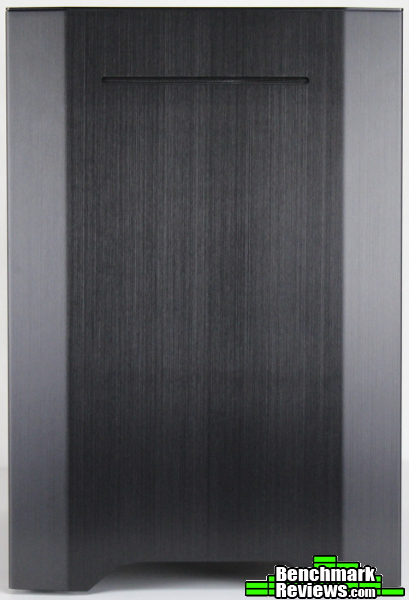
The W1 uses a 2mm-thick brushed aluminum alloy for the exterior panels like many other cases in the Legacy line. The entire front, sides and top are comprised of single aluminum sheets for each panel (2mm thick on the sides and top, 1.5mm thick for the front), lending a clean appearance to the entire product. The front bears a passing resemblance to a certain NCase M1, but this version is quite a bit larger.

While the rear of a case typically showcases the interior layout, the Legacy W1 also reveals a level of workmanship that I’m not accustomed to with Rosewill cases (Rosewill generally contracts with other OEMs for their cases, for the Legacy series that looks to be Jonsbo). It’s almost a bit unfair to the Rosewill brand, since as far as cases go that brand is made up of many different manufacturers. For example, my previous mention of Rosewill’s Thor V2 was based on Aerocool’s XPredator line of gaming cases. Anyway, although it’s hard to capture in a picture, there’s something about the clean lines and smooth machining that tells you this case is in a different category. The mesh that covers the included 140mm exhaust fan (also drilled to accept 120mm) is nicely crafted and extruded a little to reduce noise. It should be simple to remove too, if you want zero restriction for additional airflow.
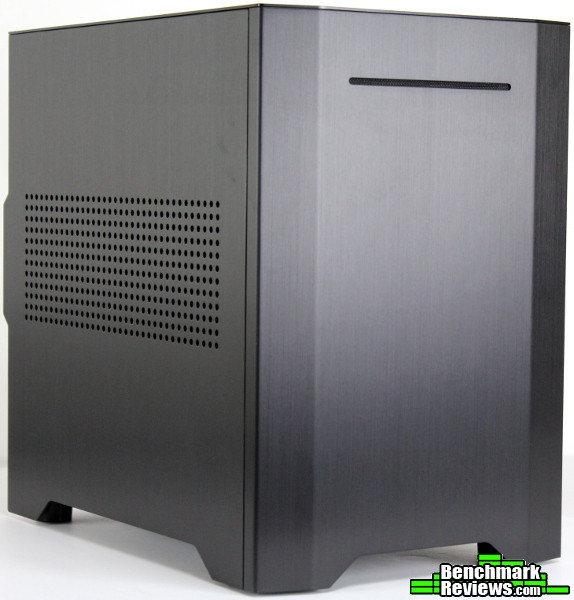
The overall profile is reminiscent of BitFenix’s Prodigy-based enclosures. At 242 x 362 x 357 mm (or 9.53″ x 14.25″ x 14.02″), the dimensions of the Legacy W1 almost match those of the mini-ITX Prodigy (the Prodigy is a little taller with the addition of the curved handles). If you thought the Prodigy was somewhat large for a mini-ITX enclosure, you’ll likely feel similar about the W1 – although it is ever so slightly more compact without the curved handles.

All of the machining is very exact and smooth. The aluminum alloy panels fit together with a minimum of flex, and the tolerances seem to be very precise. The gaps between the panels (remember, these are completely tool-less panels – no sliding rails or thumbscrews!) are practically non-existent, and everything just gives the impression of quality. I’ve worked with similar tool-less panels with SilverStone’s FT03 Mini, and while these feel a little thinner than the panels on the FT03 the mounting pegs are quite a bit more substantial.

The right side of the Legacy W1 contains a few cutouts for the headphone/microphone jacks and the two USB 3.0 ports, but is otherwise featureless. The windowed version of the Legacy W1 adds a window to this side that showcases both the motherboard and power supply compartments – we’ll see how those are arranged on the next page.
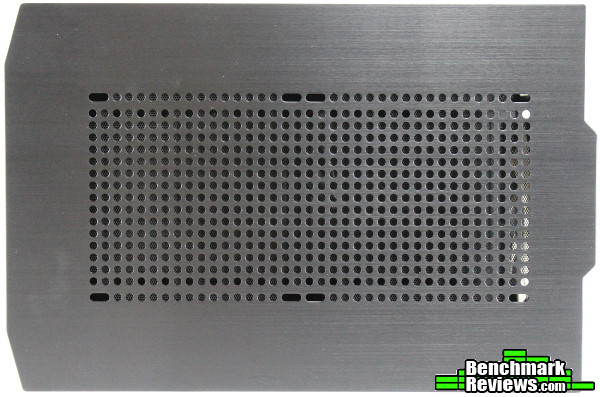
The top panel also uses a single 2mm aluminum alloy sheet, and those slots are drilled to accept 140mm fans (both 240/280mm radiators and fans should fit up here as well). There’s a fine mesh underneath to trap dust on the way in (or out), but you’ll have to clean it out with compressed air since the filter itself is non-removable.

The bottom displays a few tie-down points for cable management, and the two 2.5″ drive mounting points on the “floor” (complete with vibration-dampening grommets). The intake filter for the power supply fan is removable, and slides rearward pretty easily. You might find it tricky to replace by feel though, as the sliding “rails” are just screw posts with wider heads – you’ll have to get your angles exact on the way in, since the filter has a tendency to rotate around those first two posts. Ultimately, a minor complaint though – the fact that the filter is removable is the main thing. Other than that, the front panel hides a pretty wide channel for airflow to the front fan – everything behind those front-panel curves is available to feed the included 140mm intake fan.
So far the Legacy W1 seems to be a straightforward chassis – let’s take a look at some more detailed features to see what Rosewill has done with the W1.
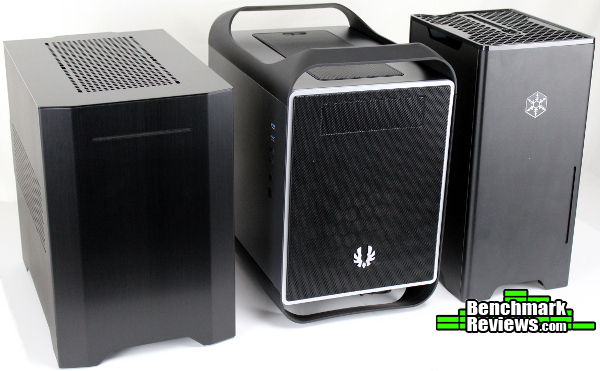
First, I thought it would be helpful to do a quick lineup. These are all mini-ITX chassis (the Prodigy is the “M”/mATX version, but externally identical to the ITX Prodigy). Joining the Legacy W1 on the left is the BitFenix Prodigy M and SilverStone’s FT03 Mini on the right.
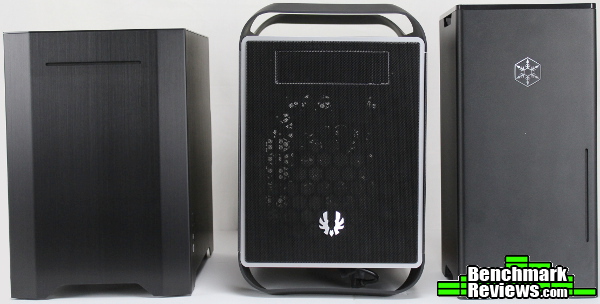
Perhaps the most appropriate comparison would be to the FT03. While they’re all similar in price (give or take ~$10), the FT03 also uses aluminum for its exterior panels. It sacrifices the capacity for an ATX PSU (requiring a SFX power supply) to keep its dimensions down, but can still mount a slim slot-load optical drive with a 3.5″ and 2.5″ drive(s) to boot. Obviously you’ll have much more room to work in the Legacy W1 and Prodigy enclosures, so if large graphics cards, oversize CPU coolers and ATX PSUs are a requirement these two are the only real options.

The Legacy W1 uses an interior layout that is very similar to the Prodigy ITX (and many other cases this size). The panels need a proper application of force to remove – they aren’t too stiff or too loose, but if you don’t pull with a quick jerking motion you may find a few pegs still coupled. This can be a bit disconcerting at first, but the pegs themselves seem to be sturdy enough to survive repeated removals (they’re round too, so they swivel pretty easily instead of snapping off you pull in the wrong direction). Any of the surfaces where the aluminum panels would touch the frame are covered in a 1.5mm foam strip which helps reduce noise and any chance of rattle. It’s very effective – at no time in working with the side panels did I get the sense a rattle would develop anywhere, and it subdued the noise from snapping in the panels nicely.

While the general layout is similar to BitFenix’s Prodigy, the Legacy W1 takes it a step further by completely isolating the power supply compartment from the hard drive rack and motherboard area. The two 2.5″ drive mounts can be seen in front of the power supply area (the tray in that location is an extra attachment that can be used in place of an optical drive – it is designed to replace the stock optical drive tray to allow clearance for radiators in the top panel). The I/O panel stays with the chassis when removing the side panels, which makes wiring drastically easier.
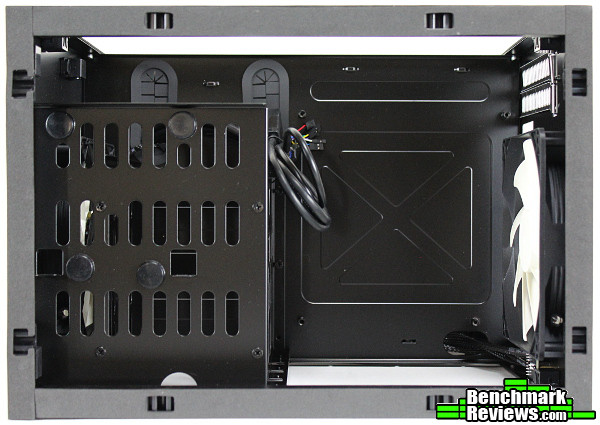
There’s only a few millimeters of space in front of the motherboard, but it wasn’t as tight of a fit as some ITX chassis I’ve worked in. Once we start installing components in the Legacy W1 you’ll be able to see this better. The picture above shows a great view of the “default” ODD top rack for installing a slim, slot-load optical drive. When installing a radiator/fan combo in the top panel, you’ll want to switch this out with the included “water cooling radiators converter” tray.
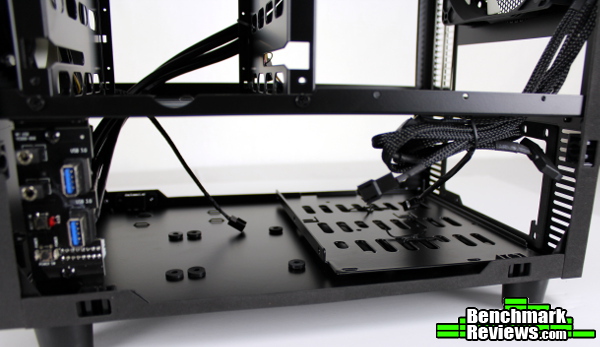
That extra tray is located here, and you’ll need to remove it before installing your power supply (it’s just twisty-tied to the PSU intake vent for shipping). There aren’t that many differences between the two – this one just lacks the vibration dampening and mounting tabs of the ODD tray. The included fan controller connectors (three 3-pin) are bundled up here too, along with the SATA power connector (nice to see one of these instead of the typical 4-pin Molex – those with modular PSUs will appreciate not needing to plug in an entire string of cables for a single Molex).
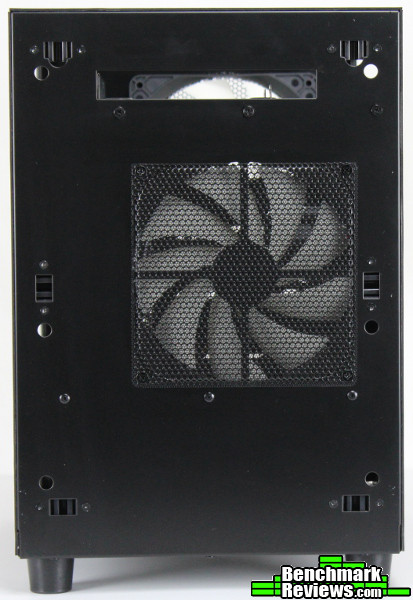
The intake fan at the front doesn’t arrive connected to the controller, but it’s a simple matter to plug it in. The fan filter/mesh is attached by fan screws, so while not tool-less it can still be removed for additional airflow or cleaning. The front is pretty featureless otherwise. While I didn’t have any complaints about the chassis performance, it would have been nice to see an option for a 200mm/230mm fan here, if only to provide a direct, aluminum competitor to BitFenix’s Prodigy cases. Still, it’s not like any components in the bottom chamber need an abundance of airflow, and the twin 140mm fans seem to do a decent job as-is.
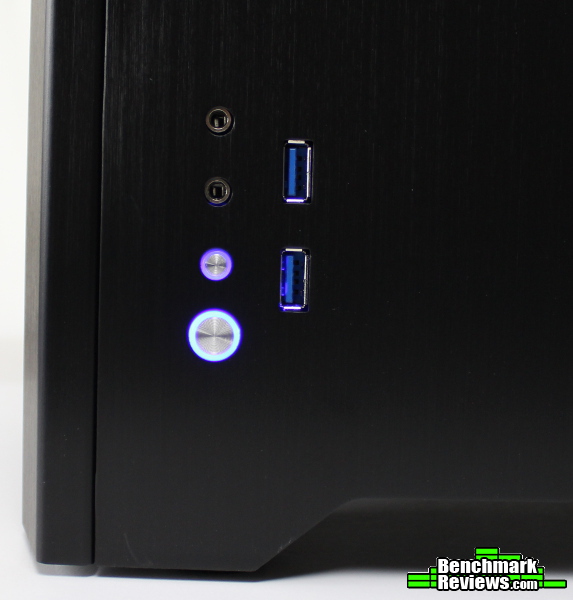
The included power/HDD activity LEDs aren’t distracting in the least, as they indirectly illuminate rings around the power and reset buttons (there is a bit of bleed-through from one ring to the other, but you’ll have to decide if that bothers you or not). They have a nice, tactile feel to them as well, and the cutouts around the audio jacks and USB 3.0 ports are cut with precision.
So far the Legacy W1 is shaping up to be a quality chassis, but the build process has a way of highlighting any quirks. Let’s start placing some components in the Legacy W1 to see if we can discover any further details.
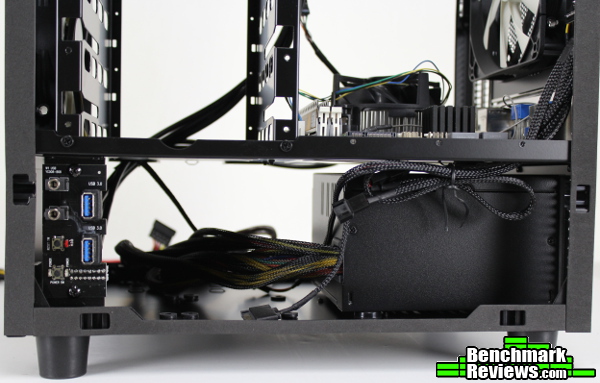
The power supply installs like in any other case, but the bottom will need to be clear of any other components (since you’ll need to slide it in from the side). At least there aren’t any length limitations like in the Prodigy cases, and there’s more than enough room for cable management.
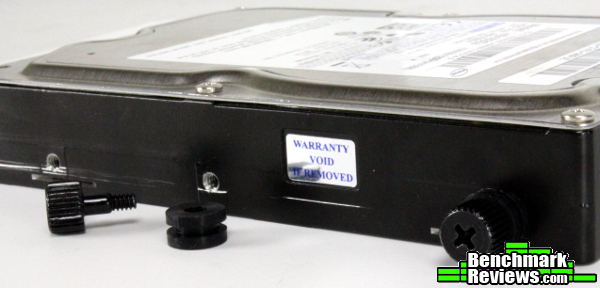
Hard drives are next. While 2.5″ drives will install in the “floor” of the chassis with the power supply, 3.5″ drives will need to be slid into the existing drive cage rails using these thumbscrews and rubber/silicone grommets. Only two out of the three mounting points can be used (the middle and the front), so some drives may run into issues here. These mounting points are pretty standard among hard drives, but I can remember a 3.5″ SSD that only had screw holes at the front and back of the drive (of course, that particular drive could just be left sitting on the bottom of the drive cage).
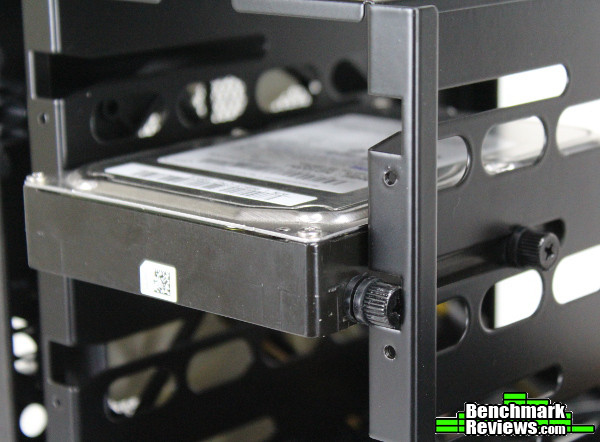
While it isn’t completely tool-less, this mounting system seems stable enough. Once the thumbscrews and grommets are attached, simply slide the drive in. The SATA power/data connectors will face the GPU side of the chassis.
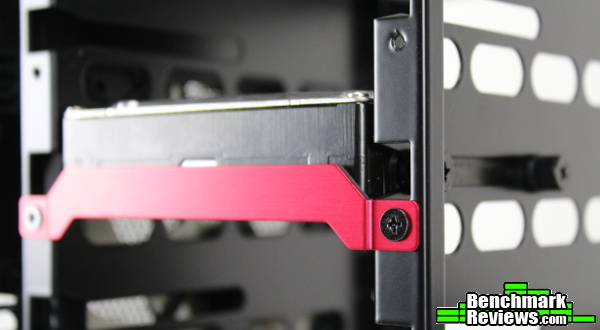
To completely secure the HDD a red bracket is attached with two screws (the bracket is backed with foam/vibration dampening material too). There isn’t clearance here for thumbscrews, but I wish there would have been. It seems unfortunate to get this far and have to pull out a screwdriver, but I’d rather have more room on the other side for graphics cards anyway. The threads here seemed a bit out of spec – I thought I was using the wrong screws at first, but according to the manual they were the correct ones. The threads didn’t seem as precisely tapped as the rest of the chassis, and I wonder how long they would hold up under repeated installs. A minor issue to be sure, as it only stood out due to the high level of finish throughout the rest of the chassis. I suppose you could forgo these brackets altogether, as the rubber grommets do a pretty good job of keeping the drives in place.
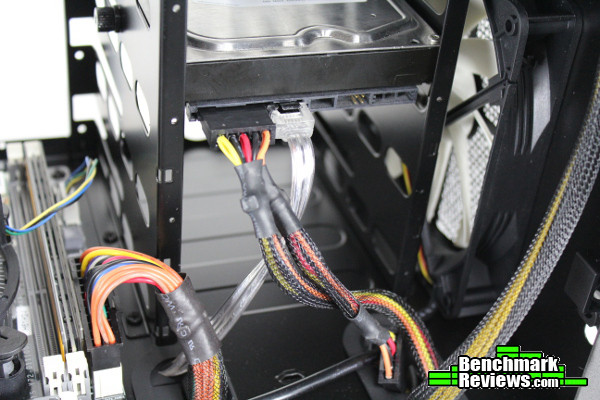
The installed drives are easy to connect to the rest of the system and the two grommeted cable routing holes make it easy to keep cables managed (although now that I look at it, I really should have run the data cable through the right grommet and power alongside the 24-pin connector on the left!). There’s enough spacing between the drives to let some airflow through to the motherboard too. If you’re only using 2.5″ drives (in the bottom compartment), you could opt to remove this drive cage entirely for even more airflow – you can see two of the cross-tip screws securing this cage in place in the picture above. Simply remove the screws and take out the cage – this would free up room for push/pull 120/140mm AIO coolers (even those with thick radiators) for use in the front intake location.
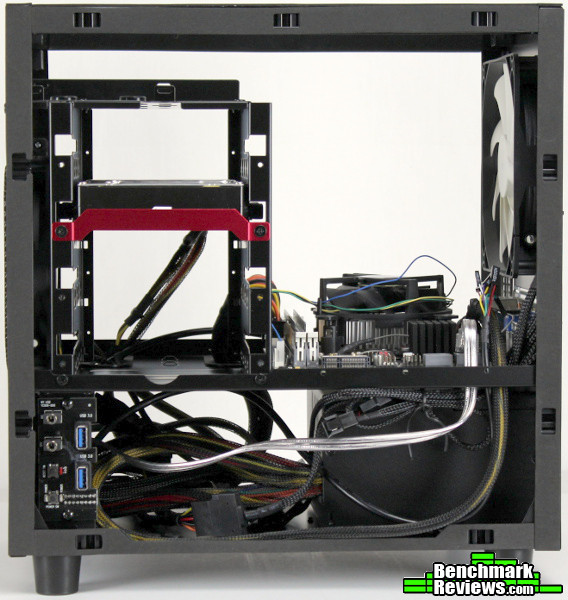
The specifications list enough room for 215mm-tall CPU coolers (do they make any that large? Someone will prove me wrong in the comments…), and you can easily see that practically any large CPU cooler would fit in the Legacy W1. I’ve often found the motherboard is the most limiting factor for CPU coolers and ITX builds anyway, but it’s nice to know the case itself won’t get in the way (if anything, it just gives you easier access to components during the build process).

I would have liked to see a slightly larger cable opening by the motherboard though – by the time it’s filled with fan controller cables and other miscellaneous cables, it’s tough to thread that 4-pin CPU connector through there too. Thankfully I didn’t have to deal with an 8-pin connector for this motherboard, but if you do I’d recommend routing that cable first.

There was more than enough space available to fit EVGA’s version of the GTX 660, and cards up to 320mm should fit without much of an issue (most cards that long have their power connectors on “top” as well). I didn’t bother with any cable management, since the bottom compartment doesn’t receive any active airflow anyway – there are a few tie-down points to help though if you’d like to bundle up those cables. I would have like to see a few more tie down points, even along the top edge of that compartment (especially on the other side for the fan controller cables). Still, there’s a lot of area under here, and adding a few adhesive-backed cable tie mounts would solve that problem if you really needed a way to keep cables in line.
Overall, I think Rosewill has a great case in the Legacy W1. The build quality especially was a (pleasant) surprise for me. While the system I chose to build in the W1 wasn’t a high-end system (Core i3, ECS H61 motherboard, 8GB DDR3 1600, GTX 660) I was again (pleasantly) surprised by the noise efficiency of this case. There aren’t any sound dampening sheets of foam (although they’d be easy to add), and even with the built-in fan controller on high the entire system was noticeably quieter than most ITX cases I’ve worked with. I’m sure that would change a little with some really hot overclocked components, but with the provisions for watercooling and some flexibility with the airflow, I think I’d be pretty comfortable putting a high-end system in the Legacy W1. At least it’s easier to fit larger power supplies in than the ITX Prodigy to supply those power-hungry components, although I do miss the ability to add a 200/230mm fan (it would remain to be seen how much of a difference that would make…). I just don’t have much to complain about with the W1 – it looks great, performs great, feels great, and provides enough options to accommodate almost any mini-ITX system.

I’ll try and summarize my experience with Rosewill’s Legacy W1 mini-ITX computer case in terms of Performance, Appearance, Construction, Functionality and Value categories, but as always I feel like I should add a disclaimer. You must understand that my own preferences and uses for cases differ from most; while I try to view each case as objectively as I can, I probably can’t avoid my own bias from affecting my conclusion in some manner. I implore you to think in depth of your OWN uses and preferences, and use my reviews as a guide or simply as another perspective.
I feel like the Legacy W1’s performance was sufficient, and downright impressive with regards to noise. Of course, that had a lot to do with the types of components I chose. Whereas the Prodigy seems to encourage customization and limit-seeking, the Legacy W1 exudes a more reserved and refined aura of performance. You may not have as many options for airflow as BitFenix’s popular ITX case, but what is there seems to be sufficient for any sensible build – and there are still additional fan slots up top and some rearranging of drive trays that can be explored to unlock additional performance. I still wish I had an option to add a 200/230mm fan in front, but the twin 140mm fans seem to be more than adequate anyway.
The appearance of the Legacy W1, as with any aesthetic, is probably open for debate. Personally, I feel that it is one of the better looking mini-ITX chassis available right now. However you feel about the conservative design, the use of brushed aluminum for the exterior panels confidently declares this a “premium” case. The metal looks great – while I generally prefer matte finishes, I bet the silver version would be especially effective at showcasing the brushed aluminum (while at the same time hiding fingerprints more effectively than the black – the only downside to the beautiful aluminum panels). There are some familiar design inspirations at work, but the overall look is interesting and edgy enough to catch the eye while remaining subtle enough to avoid screaming “look at me!” (this is a good thing – while I’m no expert on design or fashion, it seems to me “hey, I look good” is better than “LOOK AT ME!!!”).
You can tell the build quality is a notch above the other OEMs under the Rosewill brand. While their other cases were perfectly sufficient (after all, it’s just a box that holds the really interesting stuff anyway right?), the precision machining and tight tolerances everywhere just add to the luxury/premium feel. The 2mm thick side and top panels were a little on the light side compared to the panels on SilverStone’s FT03, but they seemed strong enough to avoid warping or bending (and the attachment pegs are vastly superior). The foam-lined frame really subdued any noise and cushioned the panels. Everywhere you look you just get the feeling of a high-end product – the only misstep was the threads for the HDD bracket, but I’m not sure if I’ve worked with a case yet that didn’t experience that somewhere (usually with the PCI slot covers or motherboard standoffs).
Functionally, the Legacy W1 is a small step above similar ITX enclosures; there’s the capacity for large graphics cards and CPU coolers, ATX power supplies of any length and some water-cooling compatibility. It can’t shrink to FT03-type sizes, or deliver the customization of the BitFenix Prodigy/Phenom/Colossus Minis, but instead manages to combine the premium construction of the FT03 with the performance capacity of the Prodigy. It’s almost the ideal blend of the two, really. When you factor in the built-in fan controller, removable drive cage and tool-less panels all around, the only thing missing in my opinion is a spot for a 200/230mm fan (yeah, I realize I’m pretty stuck on that). It seemingly has abundant airflow in stock trim though, so perhaps that’s just me.
As of late June 2014, the Legacy W1 was already available for $119.99 (Newegg | Amazon). While the mini-ITX Prodigy can generally be found for quite a bit less, the FT03 tends to hover around $20 more. Since the Legacy W1 seems to blend the two, I suppose it only makes sense that its price sits in between the two as well. The construction really is a notch above what I’m used to with other Rosewill cases, and I think the stock offering adds enough value over the Prodigy to justify its price premium – of course, that’s if you prefer the tool-less aluminum panels and slightly more conservative/subdued styling. If not, the Prodigy offers most of what the Legacy W1 does for a generally better price, making it a hard-to-beat chassis for value.
I think it’s apparent why Rosewill labeled their new series of cases with the name “Legacy.” If you wanted to shift the perception of your brand, the W1 is a great start. It’s a premium, no-nonsense offering that manages to bring a fresh option to a lineup typically associated with budget cases. If you liked the size and capabilities of the Prodigy but felt it could use a little different style and a lot more aluminum, I’d recommend you take a look at the Legacy W1.
+ Tool-less aluminum panels executed well
+ Panels make it easy to build, tinker, make adjustments
+ Solid construction
+ Space for large GPUs, PSUs, and CPU coolers
+ Water-cooling accommodations
+ Attractive design
+ Surprisingly light for such a sturdy chassis
– Yeah, I’m going to complain about no 200mm fan again…
– Aluminum looks and feels great, but more susceptible to fingerprints than matte finishes
– Will probably be endlessly compared to the Prodigy
-
Performance: 8.75
-
Appearance: 9.25
-
Construction: 9.00
-
Functionality: 8.50
-
Value: 8.25
Quality Recognition: Benchmark Reviews Silver Tachometer Award.
COMMENT QUESTION: What form factor size do you build with?


3 thoughts on “Rosewill Legacy W1 Mini-ITX Computer Case Review”
That’s a very nice layout inside. I especially like two things: the horizontal motherboard with lots of room for cooling, and the HDD cage design. The looks aren’t bad, either….!
Rosewill is a good brand.
I have two Rosewill cases, a Blackhawk, and a Blackhawk Ultra. They’re both of quality construction and well designed with the consumer in mind.
Lots of room in both of them.
I bought a pair of Rosewill Hive 750W power supplies about six months ago too. They are quality too.
I was thinking if I can not replace these rosewill for quieter fans…I can?
Comments are closed.