By Julian Duque
Manufacturer: Phanteks Co.
Product Name: Enthoo Mini XL
Model Number: PH-ES414M_BK
UPC: 886523300267
Price As Tested: $179.99 MSRP
Full Disclosure: The product sample used in this article has been provided by Phanteks.
Here at Benchmark Reviews we admire those companies who not only give relentless effort to create the best product designs in terms of efficiency, quality, and functionality, but we also applaud those who try to set themselves apart in what is an already crowded market by bringing forth new ideas and daring to take risks. Surprisingly, this seems to be a trend for Phanteks; the relatively young company that is looking forward to create it’s own market of dual system cases with the release of the Enthoo Mini XL “Super Micro-ATX” Computer Case.
2014 must have been a great year for Phanteks. With the release of the Enthoo Pro, they have set a new standard for the sub $100 Mid Tower market, and their increased popularity can be clearly seen in the “sold out” notices found on many listings for their cases. Like the rest of the Phanteks Enthoo family, the Mini XL is all about bringing a ton of enthusiast friendly features packed in an elegant exterior very similar to the steel chassis found on the Phanteks Enthoo Luxe. Similarly, it is also surrounded by aluminum face-plates and it’s fully dust proof. Phanteks also gives support for their 10 color LEDs which are sold as a separate accessory for both the Enthoo Luxe and the Enthoo Mini-XL.
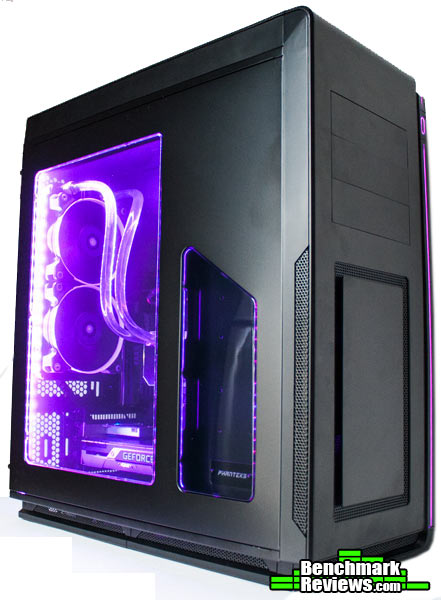
Surprisingly, the Phanteks Enthoo Mini XL can house two full systems by being similar in size to many Mid Towers. Of course, being around 70 liters in volume, this is probably the biggest Micro ATX case in the office. I wouldn’t go ahead and call it gargantuous, although it is wider than most cases, even than it’s bigger brother the Enthoo Primo. Note that if you decide to install a dual boot system you will need to buy the ITX Upgrade Kit that I will cover in the accessories section of this review. Installing the kit will also change some of the compatibility of rear and top cooling support.
Courtesy Phanteks.com
|
Dimension
|
260 mm x 550 mm x 480 mm (W x H x D)
10,2in x 21,7in x 18,9in |
||
|
Form Factor
|
Super Micro Tower
|
||
|
Material(s)
|
SandBlasted Aluminum, Steel Chassis
|
||
|
Motherboard Support
|
uATX, mITX (optional dual Motherboard support)
|
||
|
Front I/O
|
2x USB 3.0, Mic, Headphone
|
||
|
Side Window
|
Yes, split-window design
|
||
| Expansion & Drive Bays | |||
|
Expansion slots
|
5
|
||
|
External 5.25″
|
3
|
||
|
Internal 3.5″
|
6 (2x 3 HDD cages)
|
||
|
Internal 2.5″
|
8 (2x SSD brackets )
|
||
|
Cooling
|
120mm fan
|
140mm fan
|
200 mm fan
|
|
Front
|
2x
|
2x (2x included) | – |
|
Top
|
3x
|
2x | – |
|
Rear
|
2x
|
2x (1x included) | – |
|
Bottom
|
3x
|
2x | – |
|
In front of HDD Cages
|
2x
|
– | – |
|
Side (with bracket)
|
2x
|
– | – |
|
Clearance
|
|||
|
Graphic card
|
289 mm (410 mm without HDD cages)
|
||
|
CPU cooler
|
215 mm
|
||
|
Cable management
|
30 mm
|
||
|
Radiator (TOP)
|
206 mm to motherboad | ||
|
Warranty
|
|||
|
Length
|
5 Years Limited
|
||
The panels on the Phanteks Enthoo Mini XL are all constructed from steel topped with a sheet of sandblasted aluminum that along with the rectangular plate found on top of the front intake give it that recurring Enthoo look. In contrast, there is an exterior 10-color LED that goes across the top and front panels. Following the path of the line is a semi-open section of the frame that gives the Mini XL a wider posture.
 .
.
Remember the fake 5.25″ bay of the Enthoo Luxe? Well this time, Phanteks decided that 5.25″ bays should not be sacrificed for the sake of stealthiness, specially if you decide to install a second system which will probably need it’s own front I/O panel. Below the bays is the front intake, which if you feel is heavily obstructed by the aluminum plate, you can easily remove it by unscrewing four screws in the back of the front cover. It could be argued that this plate might do some noise dampening, but due to it’s construction it might be just minimal.
 .
.
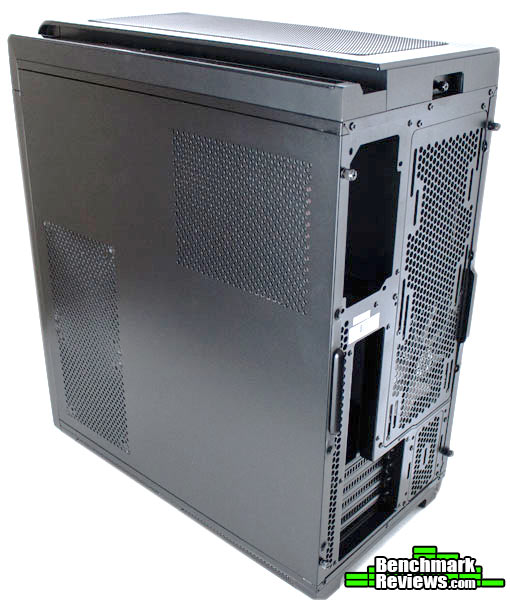
Construction of both side panels is as expected, with very little flex, although the left one can easily be bent if both the fan covers are taken off. However, once you place fans on here, this should not be an issue. On the back of this same panel there is a magnetic dust filter covering the power supply, which can be easily taken off and cleaned if needed. One issue here, is that to remove the top panel you must first take off a thumb screw located in the back, which you might not want to tighten too much if you decide to place your tower next to a wall or under a table.
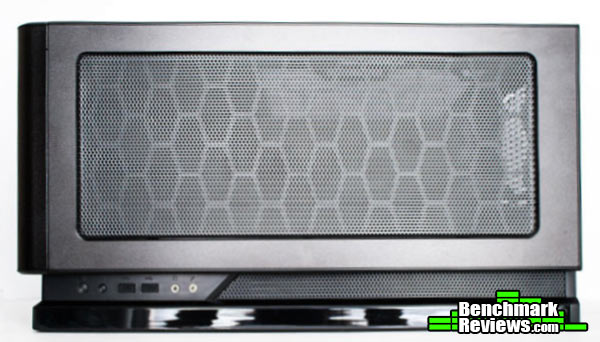
Fortunately the top does have a mesh which is pretty capable of maintaining dust from settling inside the case. Unfortunately, if you do decide to clean the mesh, you will have to remove the entirety of the top panel, as there is no removable filter. In addition to this, to remove the top panel you also have to remove the front panel and that small screw at the back. I would have preferred to see the same type of filter that was found on the Phanteks Enthoo Luxe, that simply popped out once you pressed on it.
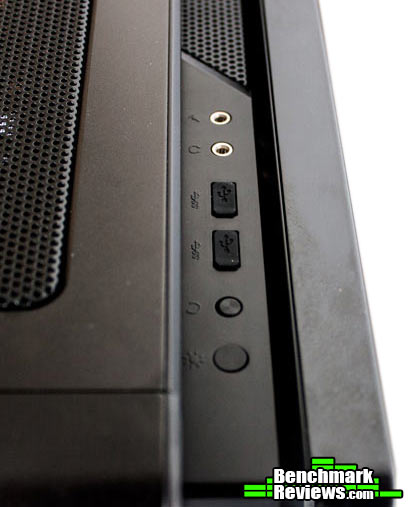
Although the power button is located at the front, illuminated by the exterior LED strip, the rest of the I/O panel is located at the top, squeezed between the metal top cover and the glossy LED strip (which as you may notice is a finger print magnet). The reset and LED color changer buttons are very similar, which may lead to resetting your computer when you simply wanted to change the LED colors of your case. Both USB 3.0 ports are covered to prevent dust from settling inside them, and really show Phanteks’ attention to detail.
Although the Mini XL is the second smallest member of the Enthoo family, Phanteks has made sure that the Mini XL is ready for any enthusiast build. To do so they have given users plenty of flexibility when it comes to cooling, and most importantly, they have built the Mini XL so that it is almost impossible for dust to get inside of it. Of course, they do expect you to use the back as an exhaust, and I would not be using the top as an intake as the top mesh is hard to clean.
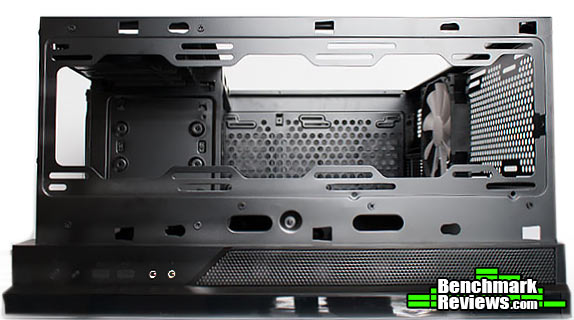
Because the case measures 19 inches from front to back, this means that there is only space for triple 120 mm, or dual 140 mm fans or radiators at the top. The holes are enlarged, allowing for multiple radiator spacing configurations, but if you decide to install the mini ITX kit, you might find that thick radiators will not fit as they will hit the ram modules or heatsinks of the motherboard.
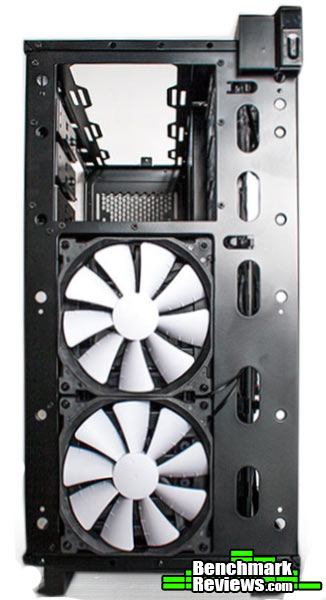
The Phanteks Mini XL comes with two 140 mm fans installed at the front. If you decide to install a radiator here you will be left with no hard drive cages. At the front there is also room for two 120 mm fans, and by the removing the 5.25″ drive bays and some simple modding you might even make space for a third fan at the top. There is plenty of cable management holes behind the front cover. Just be careful when removing it as you may damage the LED strip cable that connects to the top right of the panel.
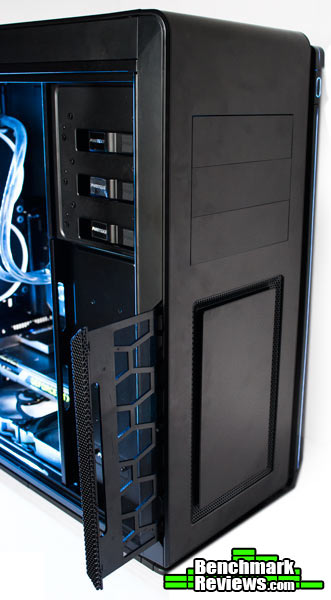
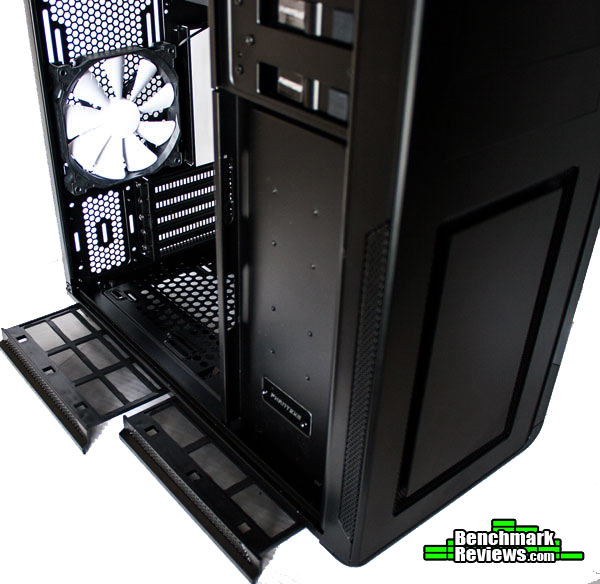
Friendly usability would be the exact words that describe this magnificent way to remove the dust filters of the Phanteks Mini XL. Whenever I would find a bottom dust filter, I would always say to myself that I would never clean it because it is too hard to remove, as it required moving the case and it was too much of a hassle. Now this was easily fixed by making the filter removable from the front, but Phanteks has taken a different approach here by making the filters removable from the side. Simply press them to release them, and you install them the same way.
The exterior revealed that the Phanteks Enthoo Mini XL is more than just a cramped version of other Enthoo cases. It still manages to fit plenty of hardware, despite it’s somewhat smaller size, while bringing elegance to a very futuristic looking design. As so, it’s expected that the interior follows with the same concept of elegance while being more spacious than other Micro Atx Cases.
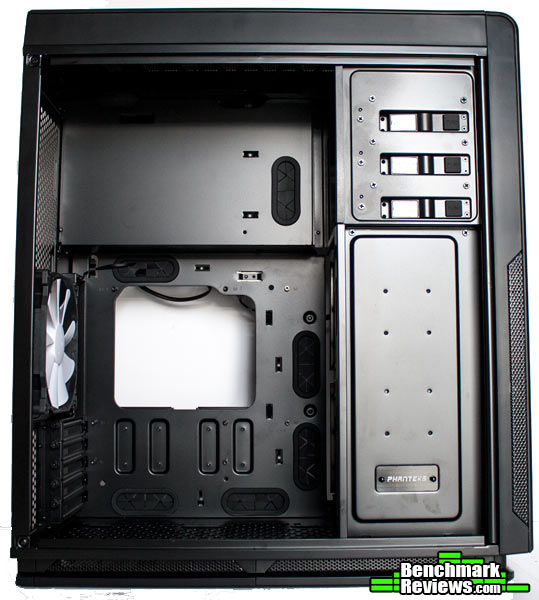
A first glance inside reveals a fairly unique layout with a lot of empty space at the top, and a very cramped bottom. Like the rest of the case it is coated in a black finish that does not scratch easily. We also get rubber grommets, a lot of them around the micro-ATX portion of the case, but not that many near the top were the Mini-ITX system would be mounted. To the right there is a plate that covers the hard drive cages on the back, you can mount two 2.5″ drive trays which you can obtain from Phanteks website, or you can use the ones included which are located in the back. Installing drives here will make one of the drives visible through a small window on the side panel, however there is no cable management holes.
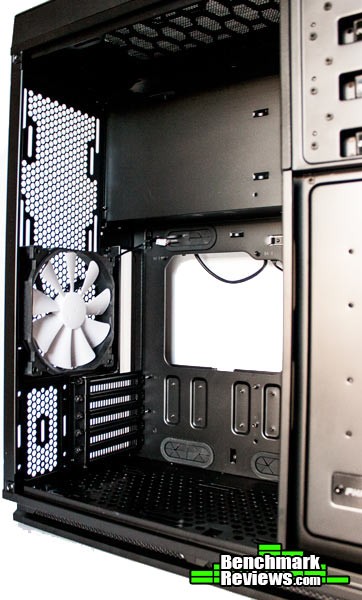
Aside from the curious choice of interior layout, Phanteks did a really good job on giving enthusiasts enough fan mounts to make most mid-towers jealous. Towards the top you get up to a 360 mm radiator, or a 280 mm with up to 206 mm clearance until it reaches the motherboard, at the back you can also install any 240 mm or 280 mm radiator available. At the bottom you can install three 120 mm, or two 140 mm fans if you decide not to use the bottom PCI slot, however if you only have one graphics card installed in the uppermost PCI slot, you will get enough clearance for a 360/280 slim radiator at the bottom. At the front you also get room for for a 240 mm or a 280 mm radiator given you decide not to install a pump in this area or have any drive cages.
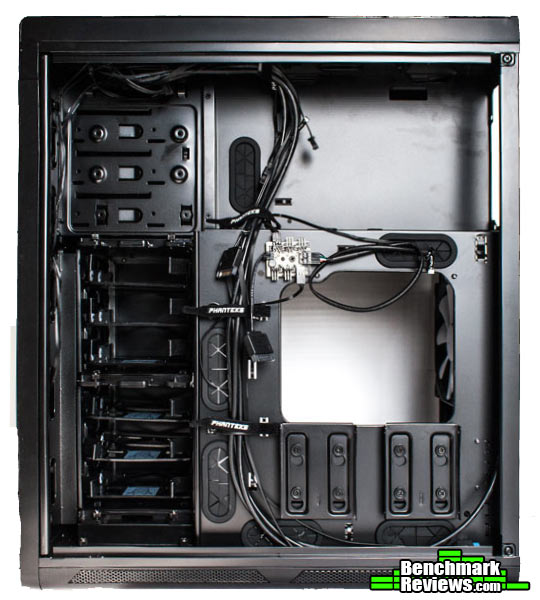
If you thought Phanteks forgot that you need a place were to put a standard power supply, it is located behind the motherboard tray. In the back we find lots of cable management options that should make building in the Enthoo Mini XL enjoyable. You also get two 2.5″ drive trays that can be accommodated in the front behind the 3.5″ drive cages. Some of the cables are already routed for you, including those of the exterior LED strip, and the three included fans that are all connected to the included fan hub.
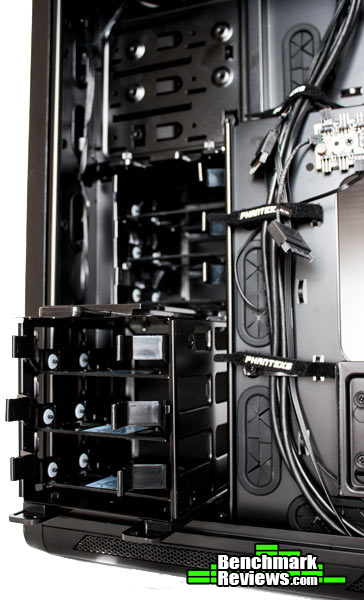
Towards the front we find the allocated spots for the two drive cages which can hold up to six 3.5″ or six 2.5″ drives. Both drive cages can be removed by simply unscrewing dedicated thumb screws located at the top and bottom of each cage. Each drive cage also has holes that allow air through from the front intake. If needed, each drive cage can also accommodate a 120 mm fan on it’s side, or they can both be removed to mount a radiator at the front, or more fans on the side of the case.
Because there is no true way to test or benchmark a case, the only real input we can give is that of a builder’s perspective when installing everything on the case. A great case not only looks great and offers a ton of features that could on paper be a nerds dream, but it is functional and practical to use. It doesn’t have some weird drive spot that is impossible to reach, or any of sort of design flaw that takes away from the building experience.
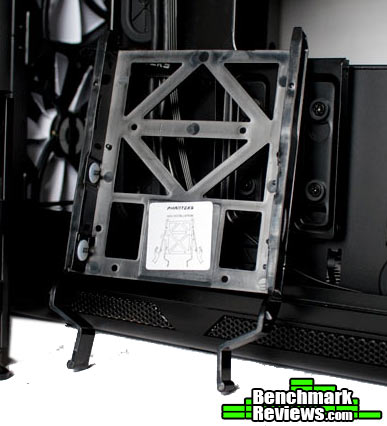
One common mistake case manufacturers make a lot, is taking for granted things like noise dampening, which can heavily impact rattling noises from things like fans, or hard drives. All hard 3.5″ hard drive trays have a wing like design which I first saw on the Enthoo Pro, and since give it the best drive tray system award on enthusiast cases. It is absolutely tool-less, and does not require bending the tray risking to brake it, or simply breaking the pins off place making them unusable.
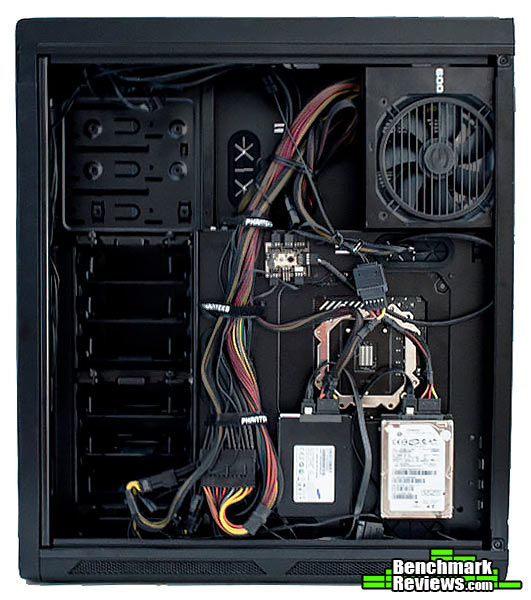
Cable management is so simple than not trying will still yield good results. Since the side panel is very sturdy, you can easily get away with having a cable mess and it will still close. Since I used extensions for both the 24 pin, and both 6 pin cables, I had to route them through the bottom as leaving them behind the motherboard tray will probably cause the plastic to bend. One thing to note is that I only installed one system, and with a second system on the top, and a power supply in the front, the process will be a lot easier if you connected the ITX system to the standard power supply, and the Micro-ATX system to the SFX power supply located at the front. A short cable set will also come in handy as the power supply would be seated right below the system.
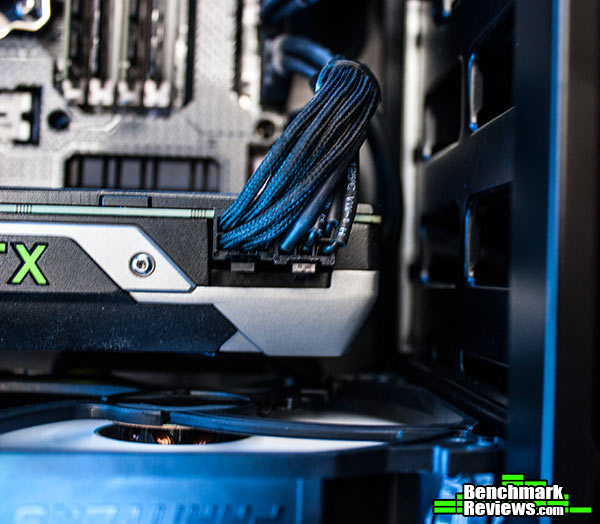
Another concern I have with the Phanteks Enthoo Mini XL, is the lack of GPU clearance when both drive cages are installed. 290 mm is just enough to install the latest reference cooler design from NVIDIA, but it might not be enough for graphics card such as the Gigabyte Wind-Force 3x cooler. You can easily gain more clearance by removing both drive cages, but this means that you will only have space for 3.5″ drives if you buy the optional drive tray that can be accommodated in the bottom 5.25″ drive bay, or at the back.

Aside from the many minor flaws, the Phanteks Enthoo Mini XL is worthy of any enthusiast build. There is plenty of space for two systems, although cable managing for the second power supply is not convincing. There is also plenty of space for drives, radiators, and pumps, which if you decide to just have a Micro-ATX system might be more than enough to host a killer water-cooled setup with dual graphics cards, a reservoir at the top, and a pump hidden behind the drive cover.
As with any case, Phanteks provides you with some a variety of accessories to fill the Enthoo Mini XL completely. Due to the amount of accessories they have provided, I decided to make a section dedicated only for accessories. Phanteks was also kind enough to send us some optional accessories, which you can obtain from their website.
As with the rest of the Enthoo line-up, the Mini-XL includes a very detailed manual, some cable management ties, a small tool box filled with enough screws to fill the entirety of the Mini XL, a reservoir bracket, and a pump bracket which can be installed near the drive cages.

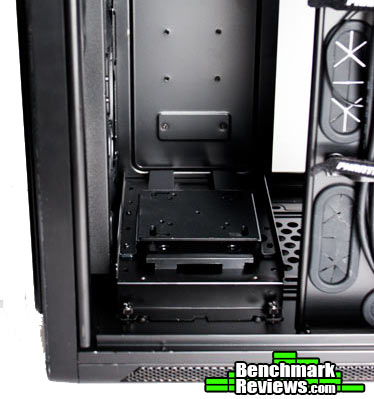
The pump bracket can accommodate most pumps available from most companies, and it can be installed behind the drive cage plate by removing both drive cages. If needed, it can also be installed in any 120 mm fan spot. The pump bracket is also rubberized near the top which provides some noise dampening to prevent the pump from rattling against the chassis structure of the case.
Phanteks also makes a lot of accessories not just for their cases, but for many water cooling enthusiasts. In their website you can find a variety of fans, fan hubs, pump brackets, hard drive trays, and many more products which may some day find their way into your build. Specifically for the Enthoo Mini XL, you can buy two additional 3.5″ drive trays, 10-color LED strips that match to the exterior LED, and the Mini-ITX upgrade kit.

Since the most interesting thing about this case is the dual system option, I would have preferred that Phanteks included the Mini-ITX upgrade kit included with the rest of the case. It should be noted that when installing the Mini-ITX system you will sacrifice the fan mounts in the back, as well as clearance for your top radiator, depending on your motherboard. The kit also includes as front which can be mounted on one of the 5.25″ bays.
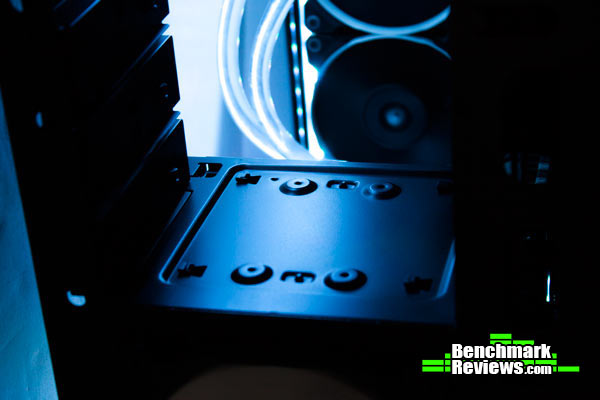
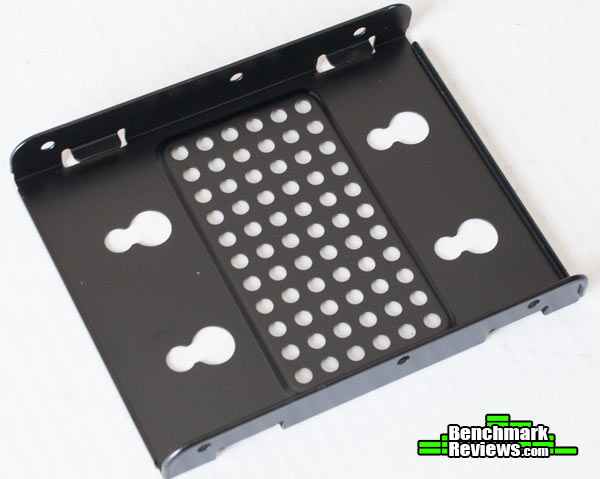
| Item | Model Number | Pricing |
| ITX Upgrade Kit | PH-ITXKT_01 | $29.99 |
| 3.5″ HDD Upgrade Kit (1x) | PH-HDDKT_01 | $7.99 |
It is always interesting to see new products emerge, specially when they are so unique and have a very specific functionality. As a whole the Phanteks Enthoo Mini XL is a really good case, with plenty of features including a lot of flexibility in terms of cooling support and drive support. You also get superb build quality with a sturdy steel chassis and very minimal plastic use. Due to it’s bigger size, the Phanteks Enthoo Mini XL is probably not what most micro-ATX users are looking for, however it’s size is justified with a possible dual system configuration.
But unfortunately, the dual system configuration is still a work in progress. Starting with having to buy a separate kit to add support for the second system. Add to that having to install a second power supply, unless your motherboard supports one. The second power supply is installed right in front of the micro-ATX motherboard, leaving you with a gigantic power cable mess that hides away your graphics cards. Considering the height of the case, you will probably need some extensions to route the cables from the SFX power supply to the ITX motherboard. I also had some trouble with the bottom dust filters as they rattled when I installed two fans, but this was easily fixed by adding some rubber strips that came with a cooler .
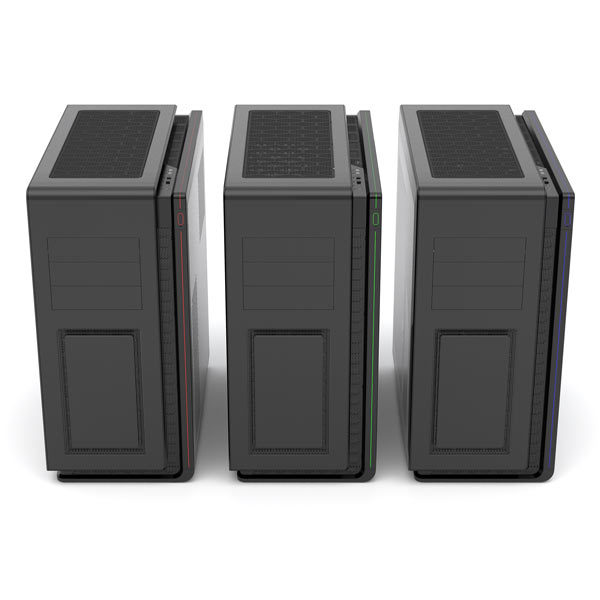
With 14 possible different fan mounting options, the Phanteks Enthoo Mini XL case is probably the only micro ATX case that can support a triple radiator, and two dual radiators at the same time on the sub $200 level. Phanteks has also provided a reservoir and a pump bracket to install a custom water cooling system which is mainly what this case is suited for. What sets the Phanteks Enthoo Mini XL apart is being able to fit two full systems, each with it’s own power supply, and dedicated PCI slots.
Phanteks designs are far from minimal, they are rather futuristic but not tacky or flashy. The whole exterior is covered in aluminum covered in a sandblasted black finish, which is easily cleaned and does not attract a lot of fingerprints. Along the top there is an LED strip which makes itself down the front, the LED has 10 different colors which can be changed with a button along the top I/O panel. The side panel windows reveal the entirety of the system, with the exception of the drive cages as these are covered by a plate.
One reason why Phanteks has gained a lot of popularity, is due to the quality and support they have for each of their products. The strong steel construction of the Enthoo Mini XL means that the case is robust all throughout, including the drive cages, and motherboard tray. The attention to detail also adds to the whole quality of the case; the Enthoo Mini XL, can be disassembled completely with a screw driver, no need to remove rivets , and if you are wondering how to do so the manual goes as far as explaining were each screw is.
Unfortunately, one place were the Phanteks Enthoo Mini XL lacks greatness is functionality. Being the first dual system case, it is very surprising that to add a second motherboard, you do have to buy an upgrade kit. The lack of cable management for the SFX power supply leads to some area of improvement. However, if you plan to build a crazy micro-ATX water cooling system, the Phanteks Enthoo Mini XL case will probably be your best option under $200.
For $179.99 you can obtain the Phanteks Enthoo Mini XL without any accessories. Meaning that if you want to install the second motherboard you will have to pay an extra of $29.99. Considering what you get with the Phanteks Enthoo Mini XL, it is still a really good value for a this price range. You also get three 140 mm fans with the Enthoo Mini XL from their Phanteks PH series which are actually really good fans, a fan hub, and even a small tool box to keep your screws organized.
+ Ample space, and water cooling options
+ Very robust design
+ Fully dust proof
+ Included Pump, Reservoir brackets, and toolbox
+ Installed three 140 mm PH fans, and a fan hub
– SFX power supply lacks cable management
– Top dust filter is hard to remove
– ITX upgrade kit is not included
-
Performance: 9.75
-
Appearance: 9.5
-
Construction: 9.25
-
Functionality: 7.0
-
Value: 8.25


