By Jason Maxfield
Manufacturer: Fractal Design
Product Name: Core 2500
Model Number: FD-CA-CORE-2500-BL
UPC: 817301011952 EAN: 7350041081951
Price As Tested: $66.99 (Amazon | Newegg)
Full Disclosure: The product sample used in this article has been provided by Fractal Design
Fractal Design has sent me their Core 2500 ATX mid tower case for review. Anyone that is familiar with Fractal Design will recognize the Core series of computer cases. The Fractal Design Core 2500 is an updated version of the Core 2300, with the main difference being the hard drive mount cage. Most of the other design features of the Core 2300 are in the Core 2500.
The Fractal Design Core 2500 has various cooling options for air or water cooling, including 120mm and 140mm fans, and support for 240mm or 280mm radiators. Water cooling options at this price range are a nice bonus.
The Core 2500 is in the sub-100 dollar category, which has some really heated competition at the moment. Computer cases are becoming less expensive, while adding more features.
I’m going to put the Fractal Design Core 2500 through it’s paces in this article for Benchmark Reviews, and see how it stacks up to the competition.

Specifications
- Mini ITX, Micro ATX ATX motherboard compatibility
- 2 drive bays of 5,25″ or 4 bays 3.5″- all compatible with SSDs
- 1 -2.5″ dedicated SSD unit position
- 7 expansion slots
- Supports graphic card up to 380mm without any HDD removal
- Support cooling system: 7 Fan positions (2 fans included)
- Filtered fan slots in front and bottom
- CPU coolers up to 162 mm in height
- Integrated fan controller
- Supports ATX PSUs up to 155 mm deep when using the primary bottom fan location; when not using this fan location longer PSUs can be used
- 13.5-18.5 mm of space for cable routing behind the motherboard plate
- Extra cable routing holes for usage with mATX motherboards
- Available in Black
- Case dimensions (WxHxD):195 x 431 x 450mm
- Net weight: 5.7 kg
- Package dimensions (WxHxD): 270 x 547 x 492mm
- Package weight: 6.9kg
Cooling system
- Front: 2 – 120/140mm fans (included is 1 Fractal Design silent 120mm fan, 1200 RPM speed)
- Rear: 1 – 120mm fan (included is 1 Fractal Design silent 120mm fan, 1200 RPM speed)
- Top: 2 – 120/140mm fan (not included)
- Bottom: 1 – 120mm fan (not included, PSU length limits apply) OR 1 – 120mm fan (not included, requires removal of lower HDD cage) OR 1 – 140mm fan (not included, requires removal of lower HDD cage)
- Side: 1 -140mm fan (not included)
- 1 – integrated fan controller on the backside for up to 3 fans
Water Cooling compatibility
- Front – 240mm radiator, up to 45mm in thickness (with lower HDD cage repositioned in case, upper HDD cage removed)
- Front – 240mm radiator, any thickness, push/pull supported (with both lower and upper HDD cages removed)
- Front –Slim 280mm radiator: 15mm fan spacing required for full fastening, radiators with 20mm fan spacing can be used with only the top half fastened to the case (with lower HDD cage repositioned in case, upper HDD cage removed, lower ODD slot may need to be unused depending on tube end chamber size)
- Top – Slim 240mm radiator (with upper ODD slot occupied by a device no longer than 150mm and with no components on the upper 23 mm on the motherboard that are taller than 34mm)
- Rear – 120 mm radiator
Front interface
- 2 – USB 3.0
- Audio in/out
- Power button with LED (white)
- HDD activity LED (white)
- Reset button
Package contents
- Core 2500 computer case
- Accessory box
- User manual
Product features and specifications taken from Fractal Designs website.
The Fractal Design Core 2500 is shipped in a standard cardboard box with black print on it. The Core 2500 is sandwiched between two pieces of styrofoam and wrapped in plastic. My packaging came to me with a few dings and cuts in the side of the cardboard box, but thankfully nothing inside was damaged.
Inside the box you’ll find a user guide and a box with all your various mounting hardware and zip ties to build your Core 2500. The user guide shows you all the various mounting positions for hard drives, fans, and water cooling options.

The front of the Fractal Design Core 2500 is really understated. There are vents along the front edge that allow air for the front mount fans. On the inside of the vent grilles there is foam filters that can be cleaned by removing the front panel. Inside the front panel there is a pre-installed Fractal Design silent 120mm fan.
You also get a nice brushed aluminum finish to the plastic panel. I’m seeing this done to a lot of cases now to add a bit of visual flare. At the bottom of the front panel you have the Fractal Design logo printed on it.

At the back end of the Fractal Design Core 2500 we have a pre-installed Fractal Design silent 120mm fan and 7 expansion slots, with white PCI slot covers that give the case some nice contrast.

The Fractal Design Core 2500 side panel has mounting holes for a 140mm fan (not included).

At the top of the Fractal Design Core 2500 we have mounting options for two 120mm and 140mm fans, or a 240mm water cooling radiator. At the front end you can see the power, reset, HDD activity light, headphone, mic, and 2 USB 3.0 ports.

On the underside of the Core 2500 you have a plastic mesh filter that is removable for cleaning. This filter covers the intake area for the PSU and optional 120mm bottom fan mount.

Now for a look at the innards of the Fractal Design Core 2500. We’ll start below with a look at the various hardware mount locations.
There is mounting options for MATX, ATX, and Mini ITX motherboards. We have 4 vibration damping HDD/SDD sled-style mounts for mounting your various drives. The HDD cages are modular and can be removed or relocated for some water cooling options at the front of the case. With the front cage moved and the top cage removed, you’ll have space to fit a 240mm radiator up to 45mm in thickness in the front of the Core 2500. With both cages removed entirely you can set up a push/pull configuration with a 240mm radiator. A slim 280mm radiator can be used with 15mm fan spacing required for full fastening. Radiators with 20mm fan spacing can be used with only the top half fastened to the case (with lower HDD cage re-positioned in case, upper HDD cage removed, lower 5.25 slot may need to be unused depending on tube end chamber size).
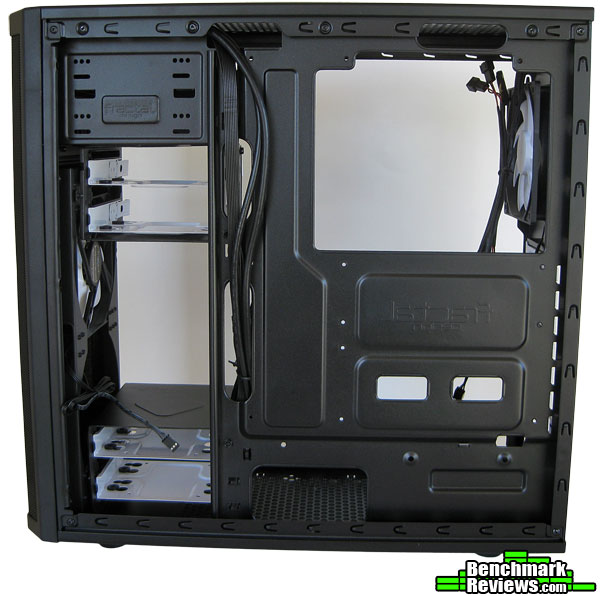
The cable management section you’ll see all your various connectors for power, reset, HDD, headset, mic, and 2 USB 3.0. At the back we have the fan connectors for the 3-speed fan switch, which has 3 fan connectors, and is powered by a SATA power cable from your PSU.
At the bottom of the Core 2500 there are mounting pads the PSU will sit on, and just in front of that is a mounting location for an optional 120mm fan.

The cable management side of the Fractal Design Core 2500 has just enough cut-outs to manage your plethora of power and connector cables. There are a few tie down points near the front end of the motherboard tray that come in handy to tie down those stray cables for a tidy look.
At the bottom, there is an optional mount for a 2.5in SSD drive if you plan on not using any of the drive cages, or just only need the one drive and wish to remove the HDD cages for cleaner air flow.
Here is a closer look at your front panel. The power and reset switches are right next to each other. The power switch has a white LED underneath it and lights up when powered on. Next to this we have the HDD activity light, which is also white, and extremely bright I might add.
Then we have the headphone and mic jacks, marked with little icons stamped into the plastic of the chassis. Lastly, we have 2 USB 3.0 ports.

At the back end, we have a shot of the fan speed selector switch. You have the choice of low, medium, or high. I’m assuming these settings correlate to 50%, 75%, and 100% power as there isn’t any specifics listed for the fan controller. There are 3 leads for connecting fans. One lead is shorter than the other 2, and I believe the short one is intended for use on the back exhuast fan. And to power the fans, you use a SATA power connector.

The building phase of the Fractal Design Core 2500 was fun and easy. There isn’t the ease of a tool-less design with the Core 2500, but mounting the HDDs and optical drive didn’t take that much longer. I only needed a philips screw driver to mount the HDDs. The optical drives have thumbscrews for mounting, so that at least helps speed up the build process any time you can omit using some tools.
-
Motherboard: MSI 870 G45
-
System Memory: Crucial Ballistix 4GB (2×2) DDR3 1600Mhz CL8
-
Processor: AMD Phenom II x2 555 @ 3.5Ghz
- CPU Cooler: Cooler Master Hyper D92
-
Audio: Onboard VIA VT1828S 7.1 channel audio
-
Video: Sapphire HD 5750 1GB
-
Disk Drive 1: WD Black 750GB SATA II
-
Disk Drive 2: WD Scorpio 2.5″ 320GB SATA II
-
Optical Drive: GSA-H30L SATA
-
Enclosure: Fractal Design Core 2500
-
PSU: OCZ ModXstream Pro 700W
-
Monitor: Acer X223w 1680×1050
-
Operating System: Windows 7 64 Ultimate Edition
After installing all the hardware, I had some issues with cable management. Some of the cables on my PSU are a bit long for this case and I had to bundle them up on the backside of the PSU. I had thoughts of installing the optional 120mm fan in the bottom, but after putting it together it became apparent that I would not have the space to do so with all the wires piled where it would mount.
I removed the upper HDD cage since I only have 2 HDD’s installed. I like this configuration because the top 140mm fan I installed has a clear path to push air to the back side of the case and provide fresh air for the GPU, NB, and CPU.
You’ll notice at the top of the case the two white Fractal Design 120mm fans are installed. I moved these there to make room for my two 140mm fans to be installed at the front and the 120mm fan I installed in the rear of the case.
You’ll notice that I installed the optical drive in the lower bay instead of the top bay. I had to do this because the optical drive is longer than 150mm and would not have clearance when mounting the 120mm fan on the top above it. Fractal Design does specify this in there specs, but keep that in mind if you plan on using top mounted fans or water cooling rads, as this will affect whatever optical drives you may want to install into the Core 2500.
As you can see the Cooler Master D92 has plenty of clearance even with a 120mm fan installed above it. It’s kind of like a push/pull/pull set up with the other fan so close to the cpu cooler.
The HD 5750 has more than enough room in the Core 2500. The HD 5750 is hardly a large graphics card, but you can see there is plenty of room for GPUs up to 380mm (14.9in) in length.

At the backside of the cable management I tried to tuck as many wires back into the cavity behind the PSU as to not have issues closing the side panel. There is roughly 1/2 to almost 3/4 inch of space for cable management. This is pretty tight. My 24 main power cable is over a 1/2 inch thick itself. I think if some of the other cables on my PSU were ribbon style rather than sleeved, there may not of been as much of an issue for me getting the panel closed. I think if Fractal Design were to add some pop-outs in the side panel to give another 1/4 inch to 1/2 inch it would of fit just fine.
The other mess of cables you see behind the motherboard is the fan controller cables from the back of the Core 2500. I plugged the 2 top 120mm fans into this controller and ran the power cable to a SATA connector for power. The switch works flawlessly. I can’t tell much of a difference in noise because the Fractal Design 120mm fans are pretty quiet. Even on high I can’t hear them over the sound of my 140mm intake fans at the front.

Here’s a look at the front with the 2 140mm fans I installed. I had some issues with this, because the front of the case uses screws that have threads on the inside of the case. You can’t use self-tapping screws to mount fans on the front of the Core 2500.
The problem stems from missing screws. The parts list shows 4 (6-32) screws but none were found in the parts bag. I ended up using the 4 screws from the pre-installed 120mm fan and just using 2 for each 140mm fan I installed.
I have contacted Fractal Design since this case supports mounting of 2 front intake fans, and the hardware you get with fans are usually self-tapping screws and those just won’t work on the front of the Core 2500.
Fractal Design customer service was fast and painless. I contacted them via their support website and received an email response back in less than 24 hours. They wanted my contact information and serial number on the case, and another day after that they sent me a UPS tracking code for the replacement screws. They should arrive no later than April 16th. Excellent customer service Fractal Design!
If this was to happen to you, you can easily contact Fractal Design to get replacements as part of the Core 2500 warranty coverage. Not really a big deal, as this happens from time to time.
In any event, the 140mm fans I installed are secure enough and not vibrating or have any other issue. I will eventually install the other 4 screws when I receive them.

At the back of the Fractal Design Core 2500 we can see the motherboard shield and PSU. Both of which mounted and installed perfectly. The motherboard shield actually installed so easily I thought I hadn’t gotten it on right. One of the easiest installs for an input shield on any case I’ve used so far.
 Here is a closer shot of the 140mm fans installed on the front from the inside of the case. You can see all the mount options are pre-threaded, so you must use the supplied screws to mount the fans on the front of the Core 2500.

Here is a closer shot of the two 120mm Fractal Design silent case fans that I re-positioned as top exhaust fans. They work well and are pretty quiet compared to all the other fans I have running on the Core 2500. The white fans also look nice and it’s kind of sad the Core 2500 doesn’t really have any way of showing them off either since the case has no window on the side and you can’t see the front fans tucked away with the front bezel covering over the front of the Core 2500.

Fractal Design has done a nice job with the Core 2500. It brings all the strengths of the Core 2300 and improves upon it with the Core 2500. The primary change is the HDD cage, which allows more options for water cooling compared to the Core 2300. The ability to remove both cages opens up the front of the Fractal Design Core 2500 for water cooling radiators up to 280mm in size, although with a few caveats for the 280mm radiators.
The inclusion of a 3-speed fan controller is a nice touch as well. Although, the location is a bit inconvenient being located on the back of the Core 2500, it is still useful none the less.
There are a couple negatives I have found, those mostly dealing with the cable management area of the case, and the limitation on the optical drive space of 150mm with top fans or water cooling units used. Fractal Design could of made the chassis a bit wider, or simply punched a recessed area into the side panel to add more cable management space. I’m not sure how they would solve the issue with optical drives, other than making the chassis a bit longer overall as to not interfere with top optical drive bay when using both top mounted fan locations or water cooling solutions.
The Fractal Design Core 2500 is a good performer. If it wasn’t for a few nagging issues with the cable management and optical drive limitations it would be almost perfect!
The Fractal Design Core 2500 is a rather understated looking case. This is a plus for some, but for me it was a bit too plain looking. Fractal Design does add some highlights with the white fans, white PCI slot covers, and white HDD sleds, but none of it is visible from the front of the case. The front plastic bezel gets a brushed aluminum treatment and is one of the few things that breaks up the looks of the case and gives you something to look at.
Even while taken apart, the Fractal Design Core 2500 felt solid. Some cases tend to feel like they are going to flex after you take the doors off and before you bolt any hardware into them to add some rigidity. The fit and finish of everything was perfect.
With this being a sub-100 dollar case, the Fractal Design Core 2500 adds a lot of functionality to it. I do not see many cases this size and price that have as much cooling options as the Core 2500 does. I would of scored functionality higher if it wasn’t for the issue with the optical drive length limitation of 150mm. But, if you do not want/need an optical drive or plan on using top mounted fans or water cooling, this won’t have any impact for you.
Considering the price at the time of review, $66.99 (Amazon | Newegg), the Fractal Design Core 2500 packs in a lot of features while keeping the price down. There isn’t anything packed with the Core 2500 you don’t need, it’s just the basics, and the basics work for the Fractal Design Core 2500.
I think a bit more tweaking with this design to get rid of the optical drive limitation when using certain configurations of top mounted fans, and a bit more cable management space would have made the Fractal Design Core 2500 a perfect ATX mid tower design.
If you are looking for a good budget case for your next build that will give you options for bigger fans and/or water cooling, I would recommend giving the Fractal Design Core 2500 a look!
+ Solid build quality
+ Air and water cooling options
+ Included fan controller
+ Configurable HDD cages
– Tight cable management
– Some optical drives may not work with certain fan and water cooling configurations
-
Performance: 8.75
-
Appearance: 8.25
-
Construction: 9.50
-
Functionality: 9.50
-
Value: 9.00


