By Greg Schepers
Manufacturer: ROCCAT GmbH
Product Name: ROCCAT NYTH Modular Gaming Mouse
Model Number: ROC-11-900
UPC: 4250288159259
Price As Tested: $119.99 (Amazon)
Full Disclosure: The product sample used in this article has been provided by ROCCAT.
ROCCAT is an organization that will clearly not be satisfied until it is at the top of the gaming peripheral peak looking down at the competition. Just look at its recent history in terms of successful gaming mice, mechanical gaming keyboards, gaming headsets, and other various gaming accessories. In addition, ROCCAT has established a relationship with Alienware in order to provide AlienFX to some of the popular gaming mice and keyboards in the ROCCAT lineup. One of the new devices that is to benefit from this revolutionary lighting system is the ROCCAT NYTH Modular Gaming Mouse.
The NYTH is billed as an MMO mouse, but ROCCAT is confident that it can be a world-beater no matter what game you are playing. In fact, ROCCAT states that the NYTH possesses, “deep button modularity that fluidly transitions into a MOBA or FPS master tool with ease.” Considering the features and specification that have been equipped on this well-endowed mouse and considering the track record of this company, it is easy to take ROCCAT’s word for it and believe that the NYTH will be another successful addition to what is already considered an outstanding gaming peripheral lineup. I have plenty of ROCCAT devices, so I have no reason not to believe the good folks over there, but still, let’s have some fun, put this mouse to work, and see what she’s made of.
Oftentimes, when a company places so much focus on a new and innovative feature on a device, they fall short in other areas. Considering the features and specifications of the ROCCAT NYTH, that does not appear to be the case here. ROCCAT seems to have been able to successfully achieve a truly modular design and produce a mouse that delivers the performance that gamers demand. So, alongside that modular custom button layout, the NYTH comes fully-loaded and even includes a 12000DPI Twin-Tech laser sensor R1.

- 12000DPI TWIN-TECH LASER SENSOR R1
new generation: adjustable in 1dpi increments - ROCCAT® SWARM
integrated next-gen driver system - TALK® FX + ALIENFX™ ILLUMINATION
lighting effects for your favorite games - CUSTOM BUTTON LAYOUT
modular design for thumb area - SOLID CARRY CASE
for 33 × buttons and sidegrip - MID-FINGER FIN SWITCH
for lightning-fast and instinctive control - 2 × HOTSWAPPABLE SIDEGRIPS
suits palm and claw grip styles perfectly - 18 BUTTONS + 39 FUNCTIONS
with ROCCAT® Easy-Shift[+]™ technology - 3D PRINTING SUPPORT
design your parts or download via library
- Twin-Tech Laser Sensor R1 with up to 12000dpi
- 1000Hz polling rate
- 1ms response time
- 50G acceleration
- 3.8m/s (150ips) single axis / 5.4m/s (212ips) both axis
- 16-bit data channel
- Adjustable lift-off distance
- Adjustable click accuracy to mitigate against minuscule movements
- Tracking & Distance Control Unit
- 72MHz Turbo Core V2 32-bit Arm based MCU
- 576kB onboard memory
- Zero angle snapping/prediction
- 1.8m braided USB cable
Versatility is not necessarily the first quality that we look for in a gaming mouse. I would venture to guess that the majority of us are initially attracted by the other fixed elements of the device, such as the DPI, button placement, size, and so forth. What ROCCAT has produced here is a gaming mouse that can be modified to accommodate the needs of anyone for any game. That right; the ROCCAT NYTH Modular Gaming Mouse is designed to end the days where we did our best to live with the limitations of our mouse and do our best to incorporate it into our games. It is the first in a next generation of gaming mice; customize away.

The box not only provides a safe and secure environment for the ROCCAT NYTH, it is a great piece of marketing material. All of the mouse’s features are attractively and descriptively displayed on the box. Also, this box has a magnetic cover that, when opened, displays the NYTH.

The contents of the box are what you see above, plus a very nice case that was inadvertently omitted from the image. I’ll tell you what… I’ll cover the case in the next section and show you what is all included with it. The plastic package that contains the quick-installation guide also includes some ROCCAT stickers and some literature explaining disposal information.

I have always been a fan of the subtle, yet attractive styling that ROCCAT opts for on its devices. When it comes to the NYTH, the buttons and dorsal fin are the eye-catching features; there’s no need for ridiculous graphics and for lighting that rivals a nightclub. Still, I think this particular version of the NYTH is a bit bland. It has the same styling you’d expect to find on a U.S. Air Force transport aircraft, like a C-17 Globemaster. However, once you plug it in and start messing around with the lighting options, all is forgiven.
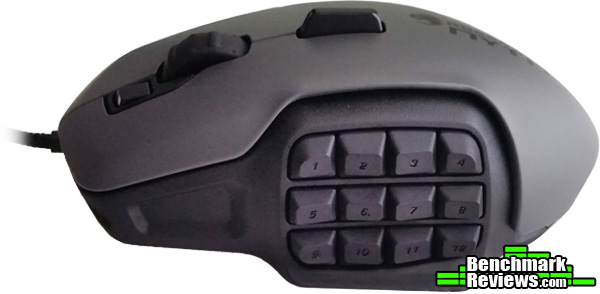
Take a gander at the left-side of this thing. That’s a lot of buttons, folks! More about that later. What I want to point out from this angle is the contouring of the mouse. I’m a palm-gripper, and I can tell you that the ROCCAT NYTH fits my hand like a glove. Heck, it fits my hand better than a glove. Clearly, ergonomics was not overlooked on a mouse that is loaded with innovative features.

I know the above is a top-down view, but I would like to discuss the element that is likely to capture your attention here; the right-side of the mouse and what ROCCAT describes as its “hot swappable side grips.” It could not be easier to change grips, since they are magnetically attached to the device. Pull one out, slap the other one on; it’s as simple as that. The grip that is not attached in the image above is the grip I employ. It works very well for palm-gripping. I can imagine that the other grip will be the choice for those of you that claw the mouse.

Before I actually had one in my hands, I had the preconceived notion that the ROCCAT NYTH was going to be huge. I fact, I was thinking I may have to use two hands to handle this thing. I was wrong. It certainly is not small, but it is pretty much the same size as your garden-variety gaming mouse out there. I think the image above will provide you with a realistic perspective; it is about the same size a a ROCCAT KONE XTD.
In the previous section, we discussed the features that are fairly evident by merely taking a look at the ROCCAT NYTH Modular gaming mouse. The goal on this page is to look at the features of this device in greater detail in an effort to assuage the curiosity of those of you that have been anticipating the release of this mouse for the past several months.
Let’s start with the obvious; the buttons on the left-hand side of the ROCCAT NYTH. As you can see in the image above, there are a maximum of 12 buttons that can be included on that side of the mouse. One of the challenges that ROCCAT addressed was to ensure NYTH owners had the ability to distinguish between the mouse buttons during game play. In other words, the shape and separation of each button gives you the ability to easily identify the proper button you need to actuate. Many of you can relate to a common problem that some mice present; it’s hard to find the button you need at crunch time. Some are too close together and some are the same shape. You won’t have that problem here.

The release button is on the bottom of the ROCCAT NYTH and it allows you to remove the buttons on the left-hand side of the mouse so you can replace them with your desired configuration. It’s a pretty simple operation; push the release button to the right and let gravity help you remove the buttons.

Check out the configuration above. This is what I decided to go with for Battlefield 4. Button 1 is for my primary weapon, button 2 is for my sidearm, button 3 toggles a grenade, button 5 allows me to pull out my knife, button 6 is for a gadget (RPG, defib paddles, etc…), button 7 is for the other gadget (blowtorch, medkit, etc…), button 9 is for in-game voice, and button 11 is for TeamSpeak.

The buttons on the top of the mouse include a dorsal fin, the mouse wheel, and what ROCCAT describes as the Easy-Shift[+] button. The dorsal fin is positioned between the index and middle fingers around the first knuckle area. It clicks to the left or to the right. I imagine that this takes place of the lateral clicks on mouse wheels. Anyway, it seems useful. The mouse wheel works as it was intended; it scrolls up and down and it clicks down as well. The Easy-Shift[+] button is intended to act as a sort of shift key. For example, button 1 on the side of my mouse is set up to switch to my primary weapon in Battlefield 4. I can set it up so that when I actuate the Easy-Shift[+] button and then button 1, it will perform another function, such as going to prone position. For FPS games, I can’t imaging needing this ability, but I’m sure MMO gamers just got more interested in this mouse.

I promised I would show you the side-grip and button carry case. Here it is. It doesn’t do anything special; it just carries mouse parts. However, it is a very nice hard-shell plastic and foam-lined case and it is much better than having a bunch of parts provided in a plastic bag or some other cheap toting alternative.

On the bottom of the mouse you will find the aforementioned release button, the centered 12000DPI Twin-Tech Laser Sensor R1, and some very nice gliding surfaces. If you look at the bottom of the above image, you may notice the section that appears to be separate from the rest of the mouse. That is actually the removable side-grip portion of the ROCCAT NYTH.
The GUI for the ROCCAT NYTH is actually called ROCCAT SWARM. As you will see, this GUI is very easy to use, intuitive, provides the NYTH with tremendous functionality, and has been designed to scale well. ROCCAT has big plans for the SWARM driver, so the latter is detrimental.

The GUI’s screen that we arrive at initially allows for setting up a number of different basic functions, such as the DPI levels, the Windows pointer speed, and illumination effects. As we scroll down the page, we arrive at areas that allow us to manipulate all of the buttons assignments; the same GUI sections that can be found when clicking on the “Advanced Settings” tab.

The “Settings” tab includes two of the sections that are located on SWARM’s first page, which we discussed earlier. Those two sections are the DPI switcher and the Windows pointer speed sections. There are four other sections located on this page, which include “Sensitivity Options,” “Vertical Scroll Speed,” “Horizontal Tilt Speed,” and Double-Click Speed. I hope that I am not assuming too much, but I doubt that there is any need to elaborate on what functionality these sections provide the ROCCAT NYTH.

Ah yes, the “Button Assignment” section. The options for button assignments are literally endless. Okay, maybe not literally, but ROCCAT reports that the NYTH has the ability to field 18,369 different button configurations. Holy Schnikies! The GUI makes it very easy to do some dragging and dropping so that you can match the SWARM configuration with the actual physical configuration on the NYTH. You can pick from a bunch of preset button configurations, as you can see above, or you can design your own configuration. Missing from the above image is the section that can be found after scrolling to the bottom of the page, which contains the layout for the top buttons and provides you with the ability to customize top button assignments.

The “Advanced Settings” page provides sections that allows us to manipulate the functionality of the ROCCAT NYTH even further. The Tracking Control Unit (TCU) is a feature allows you to calibrate the sensor to the surface that it is “tracking.” In other words, the TCU ensures that your mouse and mouse pad get along well. The Distance Control Unit provides different settings for mouse lift-off. With the “Off” setting engaged, cursor movement when lifting the mouse off of the surface is significant. When the “Extra Low” setting is selected, the cursor stands fast during lift off. The other notable feature here is the “Sound Feedback.” This feature notifies you of events through the use of the ROCCAT voice; you know, the guy with the raspy voice in the ROCCAT commercials. For example, if “profile switch” is selected, the voice will let you know when you switch profiles.

The profile manager is self-explanatory. I would like to point out that I love the fact that ROCCAT SWARM gives us the ability to assign programs to a specific profile. Once you populate the “autoswitch” box for the desired profile, you are all set. This isn’t the first mouse that I’ve had with this feature, but more often than not, this feature is missing. Also, you can assign a profile to be your default desktop profile, which is indicated by a “DP” being affixed to the profile.

The Macro Manager is very useful. I appreciate the pre-programmed macros from which to choose that the SWARM provides. There are not only macros for games, but also macros for popular programs, such as Photoshop. I found those macros to be useful.
I did not include screenshots of some tabs from the GUI, since I did not feel there was enough substance to warrant inclusion. The AlienFX tab provides a box to check in order to engage that feature. It also has a link to a ROCCAT webpage that has more information about AlienFX. Also missing is a screen shot of SWARMCONNECT. Since this feature was not yet available at the time this review was conducted, it was obviously omitted.
The ROCCAT NYTH in my possession has been used extensively for the past week and a half, and I have logged approximately 60 hours with it. I must confess, about a third of those hours were dedicated to Battlefield 4, yet I set up profiles for and employed it in other games as well, such as Company of Heroes, Company of Heroes 2, Wargame, Star Trek Online, Far Cry 3, and Sleeping Dogs. The NYTH was also used outside of the gaming arena in order to perform other tasks, such as writing this review, editing images in Photoshop, checking email, browsing, and so on.
- Motherboard: Gigabyte GA-990FXA-UD3
- System Memory: 16GB (2 x 8GB) DDR3 1333 G.Skill Ripjaws X Series
- Processor: AMD FX-6100 Zambezi 3.3 GHz Six-Core Processor
- Audio: ASUS XONAR DG PCI 5.1 Audio Card
- Video: HIS Radeon HD 7950 IceQ Boost Clock 3GB GDDR5 PCI-E Graphics Card
- PSU: Corsair HX Series HX750 750W GOLD Certified Modular Active PFC Power Supply
- Monitor: AOC e2752Vh (27″) & Samsung SyncMaster PX2370 (24″)
- Operating System: Windows 7 Ultimate

Comfort during long gaming sessions and ergonomics that help to prevent aches and pains is a necessity for many of us. So, can a mouse loaded with buttons provide these comfort-related benefits? Absolutely! Well, at least the ROCCAT NYTH can. The surface of the NYTH has a very similar material to what covers the ROCCAT Kone XTD. I described that surface as being, “as soft as a baby’s backside” in that device’s review. So yeah, it is comfortable feeling. With the larger side grip, the NYTH is the perfect shape for my hand, so it passes the ergonomics test with flying colors as well.

The ROCCAT NYTH is capable of performing at four different polling rates, which includes 125, 250, 500, 1000Hz. For our purposes here, the maximum setting of 1000Hz was utilized for all tests. Two separate tools, the Direct Input Mouse Rate (Inset) and the Mouse Rate Checker were used. The results confirm that the NYTH actually exceeds what ROCCAT advertises as the maximum polling rate.
The main feature that we are most concerned with when talking about this gaming mouse is the modularity of it and the incredible number of button configurations that are available to the NYTH. During testing, I tried a variety of different button layouts for a number of different games. The result from game to game was consistent; the ROCCAT NYTH performed brilliantly. For the sake of making things simple, I decided upon one configuration that can be used for any game I decide to play. Others may choose to swap buttons out frequently.
As you are most likely aware, I employed a wide variety of games from different genres in order to truly test the versatility of the ROCCAT NYTH. I did not notice any drop off, regardless of the genre. The caveat here is that, if you decide to activate a large number of buttons on this mouse, it is likely to increase the amount of time it takes to become familiar with the layout. For example, I know that I initially had some pretty bad moments while playing Battlefield 4. Accidentally pulling out a knife while in a gunfight is a bad thing. However, once I adapted to the layout, it was on! Having that much functionality at your disposal on your mouse is incredibly useful, no matter what game is being played.
I found the SWARM GUI to be an improvement over the ROCCAT Talk GUI. The best word to describe it when comparing it to ROCCAT Talk is that it is “cleaner.” Everything is easier to find and manipulate. Once the SWARM GUI is updated to include all of the features that are still in development, owners of the ROCCAT NYTH will be able to take advantage of all that this mouse has to offer.
Two features that I wanted to test on the NYTH, but were not available for this device at the time of this review, were the ROCCAT Talk feature, which utilizes the Easy-Shift[+] function between multiple ROCCAT Talk-enable devices, and the SWARM CONNECT feature. The Easy-Shift[+] function was tested on the NYTH itself, and it worked as expected. This feature allows you to assign a button that acts as a “shift” button, which doubles the number of button assignments available on the NYTH (as if that is really necessary!). However, the ROCCAT Talk feature with Easy-Shift[+] working between two ROCCAT devices is on the way and not yet available. The word is that the popular ROCCAT peripherals will be made ROCCAT Talk compatible with the NYTH.
There is no doubt that the ROCCAT NYTH is a revolutionary gaming mouse, providing gamers with not only a ridiculous number of button layouts through its modularity, but also with the ability to alter its shape in order to accommodate both palm-grippers and claw-grippers. Having said that, we cannot forget all of the other physical features that this thing is packin’, which includes the 12,000DPI Twin-Tech Laser Sensor R1, which is capable of being adjusted in 1DPI increments. We’re not done yet! What about the ROCCAT Talk and AlienFX features that are incorporated into the NYTH? A final word on the feature topic; there’s plenty more to come once ROCCAT rolls out everything that is currently in development, such as SWARM CONNECT.
Okay, now that I’ve taken a breath, let me mention a couple of things that could be improved. First, the dorsal fin, well, I’m not sure I’m the biggest fan of it. I believe that the dorsal fin is a replacement for the lateral clicking ability that a scroll wheel provides on some mice out there. Its position is right around the first knuckle area between my index and middle fingers. With some practice, I have been able to adapt to it, but it’s still a bit awkward to use. Using the dorsal fin reminds me of when I have an itch in the middle of my back and I’m contorting my arms to try to scratch it; it just doesn’t seem to be a natural movement. I’ll keep trying to use it and I hope to end up loving it, but even if I don’t, at least it’s not in the way. And second, I’m not sure that the “Easy-Shift[+]” button, which is the button on the opposite side of the scroll wheel from the dorsal fin, is in a position to be effectively utilized. Unless you have a freakishly long index finger, it is likely that you will inadvertently spin or actuate the scroll wheel when trying to get to that button.
One feature that is missing from the NYTH is that it does not come with any weight-changing options. To be honest, there is so much going on here that I didn’t miss it. This mouse’s weight works very well for me and I doubt that there will be an uproar due to the lack of weights. I think weight-changing ability would be overkill on the ROCCAT NYTH.

All good things must come to an end and, as much as I’ve enjoyed sharing my experience with the ROCCAT NYTH, it is time to hit the high points and wrap up this review. The way we will proceed is by segmenting this concluding section into categories. These categories include appearance, performance, construction, functionality, and value. Keep in mind that you’ll be reading my opinion, which is mainly subjective, on this modular gaming mouse and, even though I have tried to provide an accurate and unbiased review, it is likely that another person’s experience with the ROCCAT NYTH might just be different. In other words, this is not the NYTH gospel; just material to reference if you so desire.
My first impression of this mouse, from an atheistic point of view, was that it had a matte color scheme similar to what you might find on a U.S. Air Force military transport. As a USAF vet, I have no problem with that. Anyway, once the ROCCAT NYTH is plugged in and the lights come on, it is a different ballgame. The logo on the top-side lights up beautifully and is accented well by the Tron-like light located on the back of the mouse. The shape does nothing to detract from what is a mouse that has a subtle attractiveness to it.
The ROCCAT NYTH performed well in every phase of the testing. What I came away with in terms of performance is that, even though this is touted as an MMO mouse, it far exceeded expectations regardless of the game genre. I was particularly satisfied with its performance while playing FPS games, such as Battlefield 4. Once I adapted to the generous button layout that I slapped on the NYTH frame, I was kicking tail and taking names. Don’t let the MMO tag fool you; this gaming mouse will help you to dominate in any game you play or will help you in terms of productivity if you choose to use it for non-gaming purposes.
Is this thing bullet-proof? I doubt it, but it feels like it just might be. It is rock solid, which is an impressive feat considering the fact that it is a modular mouse. Even with all of the interchangeable parts, the ROCCAT NYTH is one of the best constructed gaming peripherals I have ever had my hands on. What is most impressive is that the buttons on the side feel as if they were supposed to be permanently affixed to the mouse. I put the NYTH to the test and tried multiple button configurations; same result. Most garden-variety gaming mice out there that are not of the modular variety are not as solid as this modular mouse.
I could talk about functionality all day, but let me hit the high points. Let’s see, it can accommodate 18,369 different button layouts, it has ROCCAT’s Easy-Shift[+] feature on-board, it carries the 12,000DPI Twin-Tech Laser Sensor R1, it comes with two different side grips so that it will work for both palm and claw grippers, it has AlienFX, it’s SWARM GUI is fantastic, and so on, and so forth. Honestly, there are too many features to list in a concluding section of a review. Oh yeah, let me just say that ROCCAT isn’t done packing the NYTH with features. ROCCAT Talk is coming for it and so is SWARMCONNECT.
One last point to share regarding the ROCCAT NYTH; the buttons are incredibly easy to change. Simply push the “Release” button to the left, point the buttons to the ground, and let gravity do the rest. Putting buttons in is just as simple. Oh yeah, changing the side grips is even a simpler process, since they are magnetically attached. Just pull of one and slap on the other.
Throughout the process of this review, I simply had a hard time finding anything that I didn’t like about the ROCCAT NYTH. It is unbelievably versatile, solid, and slammed with features. I had to nit pick in order to provide some bullet points in the cons section.
As of August 9, 2015, the ROCCAT NYTH was available online for $119.99 (Amazon). Even at that price-point, I found the NYTH to be a value. The only reason why I would use another mouse is in the event that my NYTH breaks. Considering that it is built like a Panzer, that is unlikely to happen. No longer do we have to settle for the fixed configurations and obvious limitations of other gaming mice.. thanks ROCCAT! The only worthless thing about it is the disposal information card that is supplied with it. I mean, come on! Who is really going to throw this thing out? Simply stated – the NYTH is a world-beater.
+ Ridiculous number of button layout options
+ Rock-solid construction
+ Ease with which it can be customized
+ Soft, smooth cover material
+ Ergonomically-sound shape
+ 12,000DPI Twin-Tech Laser Sensor R1
+ Side-grips – gripping options
+ Carry case for modular pieces
+ SWARMCONNECT GUI
+ ROCCAT Talk
+ AlienFX
+ 3D print support
– Dorsal fin a bit awkward
– Easy-Shift [+] button accessibility (or lack thereof)
-
Performance: 10.00
-
Appearance: 8.00
-
Construction: 10.00
-
Functionality: 9.75
-
Value: 10.00
Excellence Achievement: Benchmark Reviews Golden Tachometer Award.
COMMENT QUESTION: The ROCCAT NYTH allows for the customization of physical button positioning. Do you find this feature useful?



10 thoughts on “ROCCAT NYTH Modular Gaming Mouse Review”
This mouse is like a dream come true for me. The second I see it for sale somewhere here in Canada, I will be buying it. It never fails, the mouse that fits my hands, doesn’t have the button positioning that I want. I can’t wait to (literally) get my hands on this. Great review, thanks.
Hi Paul. I’m pretty confident that the NYTH will meet the criteria that you’re looking for in a mouse. Thanks for your feedback!
Hi
I’m interested in picking this up but I wonder how you think the sensor compares to a non-laser one (I’ve never used laser sensors before and haven’t heard the best things about them.)
Hi Jack! I’m going to assume that you’re accustomed to an optical mouse? Optical sensors are great; plenty of gamers out there, especially FPS gamers, prefer them over laser sensors. The consensus is that optical sensors track better and are more accurate. It’s hard to argue those points.
What I will say is that I’ve been using laser sensors for several years, and the technology has steadily improved and will continue to evolve. A laser mouse with a good GUI will give you the ability to tweak the settings until you find something that suits you well. One stated advantage of a laser mouse is that it has high DPI availability. I don’t pay much attention to the massive DPI settings available, since I generally game at around 1500 DPI. However, if you need 12,000 DPI, the NYTH has it.
One of the complaints that people had with the laser sensor is that it continues to track as it is lifted off of the surface. On the NYTH, you can adjust the lift-off distance setting. I turned lift-off completely off, so when I lift my NYTH, it doesn’t track at all. That an example of the evolution of the laser gaming mouse.
Let me wrap this up, since I’ve been long-winded enough. I personally have been using laser sensors since the Logitech G9x, and I haven’t looked back. Some people out there claim the laser sensor is a “gimmick.” I’m obviously not one of those people. But I’m also not a professional gamer. What I will say is that the ROCCAT NYTH is a fantastic laser gaming mouse that has a great GUI and is tremendously customizable. I’m not sure I helped you much here, but my preference in a mouse sensor will be different than the next person’s.
Take care!
Greg
Hey Greg I have a couple questions for you.
I currently have a Logitech g600 where I have to program the buttons in the software as a game profile and link it to a game launch file.
I don’t like the feature of the g600 because i have to do every game I play even if its only a game that lasts half an hour and then most the time the software stops working anyway haha.
So I was wondering could I skip this all together on the nyth. So straight from getting it out of the box open battlefield 4 and put knife to one of the side buttons?
Or if that’s not possible have one default profile with enough buttons like internet forward and back to act as mouse buttons 5-14 for example.
Be a big help if you could check for me,
Thanks in advanced :’)
Jordon
Jordan! I haven’t used it in a while, but I remember having a similar issue with the Logitech G9x.
The SWARM GUI for the NYTH allows you to create profiles, but you have the option to either link them to programs or not. When you receive it, all 12 of the small buttons are on the side of the NYTH and they are assigned their corresponding numbers by default. In other words, when you actuate button #1, it will produce a “1.” So, yeah, you could change your in-game key bindings instead of creating a profile for each game. And, with 12 buttons just on the left side of the mouse, you would be able to reserve two for internet forward and back, yet still utilize those buttons while in your game of choice. One thing I should point out is that the SWARM GUI currently requires you to designate a default “desktop profile.” I say “currently” because ROCCAT SWARM is still a work in progress. Anyway, the desktop profile scenario seems as if it would work for you anyway, since you want to standardize your button layout for everything you do and forgo the creation of and program assignment of profiles.
I think that, once you get the NYTH, you’ll want to play with the customization options a bit. That’s the intriguing aspect of this mouse, all of the modular and GUI customization options. Oh yeah, I didn’t mention that there are a bunch of predefined profiles for games and for tasks. So, if you want to create a profile for BF4 and just choose the “Battlefield 4” button layout, you’re good to go in no time. They even have predefined profiles for programs like Adobe Photoshop, which comes in very handy for me.
I hope I answered your questions. If not, give me a holler! Take care!
Greg
Hi Greg thank you for the in-depth reply there Greg.
With the internet forward and back thing i was emailing a guy from roccat and he said that mouse buttons 4 and 5 like on my ls razer lachesis are actually a rebaged internet IE forward and back i was just wondering if there were more functions like that on the nyth?
thanks Jordon 🙂
Hello again Jordan! The information that you received from the guy at ROCCAT is news to me. I remember the side buttons, prior to customizing the desktop profile, producing numbers by default when actuated. If buttons 4 and 5 moved you forward and back in the browser by default, that would be a bit strange, since they are positioned on opposite ends of the button array and in different rows.
When I look at the button layout for the top of the mouse, 4 and 5 are considered scrolling up and scrolling down on the wheel. Maybe he misunderstood you? Then again, maybe I did! I’m not sure I helped you much here. But let me say this to you, with so many options available to you, I have no doubt you’ll be able to set up a profile that works in all of your games and tasks. I know that’s one of your goals. It’s achievable on the NYTH. Oh yeah, you also have the Easy Shift [+] capability at your disposal. Basically, this allows you to reserve a button to use in the same manner as the shift key on your keyboard. In other words, you can essentially double the number of functions available on the mouse, since each button can have two functions.
Take care!
Greg
Hello,
I’m having issues with the Swarm software. I successfully installed the Swarm software, updated it for the Nyth module, and was able to customize the buttons/layout/lift settings within Swarm. Then the software randomly stopped showing the Nyth as a peripheral, and thus, I am unable to adjust any settings. I did not install any new software or change anything that may have caused this issue.
I have tried reinstalling, replugging, and restarting the software. The Nyth works and is recognized under the Windows Hardware menu in the Control Panel, but the Swarm software opens up to a blank screen…
I’m using v1.30 of the Swarm software.
Do you have any recommendations on how to fix this?
Thanks
Hi Kyle,
That’s odd. The first thing I would recommend is to uninstall the software for other mice that you may have been using. You may want to even uninstall the SWARM software as well. After uninstalling all of the software for the mice you’ve been using, restart, and then reinstall the SWARM software. You may have some sort of conflict going on there. I hope this helps.
Take care!
Greg
Comments are closed.