By David Ramsey
Manufacturer: A4Tech / Bloody Division
Product Name: B720 Light Strike Mechanical Keyboard
Model: A4TKLA45415
UPC: 4711421921749
Price As Tested: $179.89 (Amazon)Full Disclosure: A4TECH’s Bloody Division provided the product sample used in this article.
A4Tech is a Taiwanese company whose “Bloody” gaming division was launched in 2012. Bloody produces gaming keyboards and mice using a unique switch technology: rather than metal contact points closing an electrical circuit when a key is pressed, Bloody’s mechanical switches use infrared LEDS and photosensors, which Bloody claims provides faster key response and a more reliable and durable switch. Benchmark Reviews checks out the Bloody B720 Light Strike gaming keyboard to see how it compared to other premium gaming keyboards.
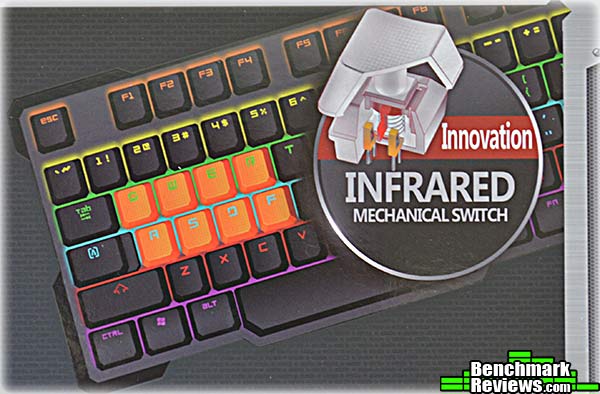
- LK key switch technology provides key response < 0.2ms
- No double-clicking or key bouncing
- Spill and dust resistant
- Wear-resistant double-shot key caps
- Screw-stabilized space bar
- 8 silicone key caps for gaming keys
- Gaming mode disables Windows key
Let’s take a look at this keyboard in the next section.
The Bloody B720 Light Strike keyboard has a no-bezel design with the case cut as close to the keys as possible. This minimizes the size of the full 104-key keyboard.

The back of the keyboard contains only the product label and fold-out feet.

The sleeved USB cable is permanently attached to the rear of the keyboard. There are no USB pass-through ports.

Bloody’s proprietary infrared key switches have standard Cherry MX stems and a backlight LED at the top of the switch. Note the raised 6mm “brim” around the periphery of the actual switch mechanism: Bloody says this will help prevent liquid spills from getting inside the key.

A palm rest fits in a recess on the left of the keyboard, and the “gaming keys” have separate silicone rubberized key caps. A key cap puller and standard replacement keys are provided if the rubbery orange keys are not to your taste.

Each horizontal row of keys is backlit in a different color. From the bottom row, the colors are purple, red, blue, green, yellow, and orange for the function keys. The brightness of the backlighting can be adjusted, but even the brightest setting is noticeably dimmer than most other illuminated keyboards.

Let’s check out the utility software in the next section.
The Bloody B720 keyboard’s utility software is called Key Dominator. With this utility you can define macros and assign them to the main number keys 1-6, highlighted in red on the main screen of the utility, as well as any of the keys on the numeric pad and cursor control keys to the right of the main keyboard (you select the latter keys by clicking the subtle red arrow at the lower left of the macro list in the screen shot below). For any definable key you use a pop-up menu to select from a number of pre-defined functions (generic Office functions and such) or assign macros that you create. All macros are stored in the keyboard’s memory and you do not have to have Key Dominator running to use loaded macros.

The top bar of the utility contains five buttons: Ultra Core, Button, About, Oscar Macro, and Super Combo. To the right of the buttons are a joystick icon (that controls “No Detection” mode; more on this later) and a light bulb that controls the lighting features. The latter offers three choices: On, Off, and “Neon Glare System”, which flashes the lights in random patterns for a few minutes before settling down to steady on. Remember, each horizontal row of keys is a fixed color– these are not RGB LEDs.
The Ultra Core and About buttons open advertising screens, but the oddly-named Oscar Macro button takes you to the heart of this utility: macro definition. And here I must say that this utility shines. While Bloody offers a number of standard pre-defined functions for things like Office work and standard file manipulation, the macros are where the real fun is: in addition to key strokes, macros can contain defined or recorded pauses between each step as well as absolute and relative mouse movements that will work with any mouse. A limited programmability feature lets you define, control, and query two separate “variables” (A and B) as counters for simple looping and branching inside a macro, and best of all, macros are fully editable: you can easily insert and delete steps inside an existing macro.
Once a macro is defined, you can return to the main screen to assign it to a key. The Bloody B720 Light Strike keyboard has 160K of onboard memory for macro storage, and there doesn’t seem to be any pre-set limit on the number of key strokes or other actions in any individual macro.

Macros you define are grouped into one of three profiles: Standard, Gaming2, or Gaming3. There are several options for how you select a profile, some of which– such as Shift driver free as shown below– have non-obvious modes of operation. But after playing around I finally figured out that the colors associated with each profile refer to the color of a tiny Bloody hand icon that floats partially off-screen (until you mouse over it, whereupon it slides into view). So for Shift driver free, you switch profiles with Fn and the left or right arrow key, and look at the color of the partially on-screen hand icon to verify your profile selection. You’d think this would be described in the documentation, but…
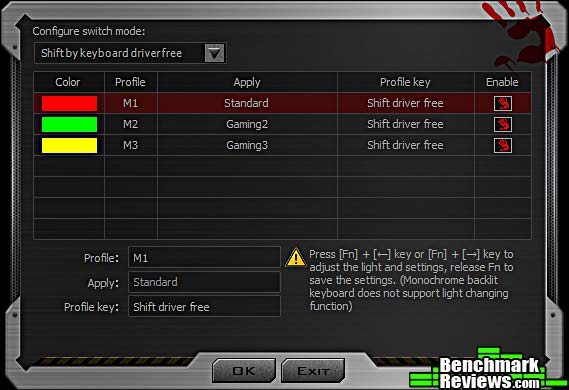
…documentation for this utility is spread across two documents: Bloody Oscar Macro II Manual and Bloody Super Combo. While the manuals seem complete and are copiously illustrated, they are obviously written by someone who’s not a native English speaker, and the resulting tortured syntax and off wording (see “shift driver free”) can sometimes be impossible to follow. Also, the manuals seem to describe features that don’t exist in the software I downloaded from Bloody’s web site, and completely ignore other features like profile selection. In fact the word “profile” doesn’t occur in either manual.

Clicking the joystick icon at the top right of the utility window opens the dialog below. It seems to be designed to assign a group of macros to a specific game, automatically load them when the game is launched, and then quit the Key Dominator utility. The idea here is to apparently bypass checks made by online games that prohibit the use of any sort of “assistive” software.
Which would be nice if I could figure out how to add a game to the list, but I couldn’t; and the use of this feature doesn’t seem to be documented anywhere.

Bloody also includes a Key Response utility that purports to show the performance advantages of the optical key switches. In testing alongside a standard mechanical keyboard– you set the two keyboards up with a bar covering both space bars, and use the bar to press both at the same time– the utility did seem to show a response advantage for the B720 keyboard (this is the “Target PC” test):

I’m not sure what the “Knock PK” test is, but all I ever got it to do was complain that “This PK is invalid”:

I’ll present my final thoughts and conclusion about this keyboard in the next section.
The Bloody B720 Light Strike keyboard offers a unique and technically advanced key switch that promises to be faster and more reliable than existing mechanical contact switches. In a week of daily use, I found the key feel to be similar to a Cherry MX Red or Black switch in that it’s a linear switch with no tactile bump or audible click throughout its travel; the key weighing– i.e. the force required to press the key– seems to fall in between the lighter Red and heaview Black switches. The sound the key makes at the bottom of its travel is damped and much quieter than the rather sharp “clack” of a standard Cherry or clone switch, although it’s not as quiet as the new Cherry MX Silent switches in the Corsair Strafe RGB MX Silent keyboard. All in all, it’s a very satisfying keyboard to type on.
Premium keyboards these days are heavy, due to the thick metal base plates the key switches are mounted to. The construction of the B720 covers the key switches with plastic except for the stems, and removing all the screws on the bottom of the keyboard had no apparent effect, so I couldn’t disassemble it to check for this feature. However, the keyboard feels very solid and didn’t flex at all when I grabbed both ends and tried to twist it.
The backlighting effects are minimal: each horizontal row is a fixed color, and your only options are on, off, four different brightness levels (ranging from “use only in absolute darkness” to “not very bright”, and a “neon glare mode” that plays some random effects for a few minutes before reverting to a solid on. Even at the highest level, the backlighting is none too bright, and appears very subtle in a normally-lit room in daytime. Perhaps the extra power required by the infrared LEDs in each key switch diminish the amount of power available for the backlighting.
The macro facility is very capable, but is hampered by a poor user interface and documentation.

But if you’re a keyboard geek– and you probably should be if you’re interested in this keyboard, given its price– the infrared-actuated switches are the draw. And that’s somewhat of a conundrum, as I couldn’t discern any actual real-world difference in use. Bloody claims their keys register in as little as 2ms (presumably from the time the IR beam is broken when the key is pressed) as compared to as long as 30ms for a mechanical switch, which must be “debounced” in software before a key code is generated and sent to the computer. And, yes, their included utility does seem to indicate that when compared to a standard mechanical keyboard, the keys on the B270 Light Strike are in fact much quicker.
But here’s the thing: even at 30ms, you’d have to be pressing a key more than 30 times per second before you overran the keyboard. And while the key signal may be sent to the computer 28ms sooner than it otherwise would be, if you can notice this difference in your gaming, you’re a genetically-enhanced cyborg alien of some sort.
The contactless Light Strike keys might well be more robust and reliable long term than keys using metal contacts. But most Cherry and clone switches are rated for tens of millions of cycles, and other keyboard vendors back up their products with long warranties: Corsair’s premium keyboards carry a 2-year warranty, while 3 and even 5-year warranties can be found on others. Bloody, however, offers only a 1-year warranty.
While Bloody’s B720 Light Strike keyboard is a robust, well-made item that benefits from several clever design features and has unique technology in its optical key switches, its $179.89 (Amazon) online price tag puts it at the very top of the premium keyboard market. And at that level, you need more than a clever switch design whose real-world advantages seem largely theoretical: you need a keyboard that competes well in all areas.
Compared to other premium keyboards at this price level, the B720 falls short on both features (no media controls, even with Fn functions; limited lighting controls) and function (no pass-through USB ports, no pass-through audio ports, no detachable USB cable, all-plastic construction with no visible metal structure or trim) and is hobbled with utility software that, while capable, is poorly documented and difficult to use in some areas. I also experienced several crashes using this software, which doesn’t inspire confidence.
Last, the short warranty is surprising considering both the competition’s longer warranties and the fact that Bloody specifically touts the robustness of their optical key switches as a feature.
This is a solid, capable keyboard that would be a much more compelling choice at the $149 or less price level. At $179, it’s overshadowed by its competitors.
+ Unique optical key switches promise faster response, more reliability
+ Solid, quality construction
+ Fully editable macros
+ Snap-on wrist rest and double-shot key caps
– Limited, and rather dim, key lighting
– Clumsy utility software
– Only a 1-year warranty?
– Very high price
-
Performance: 8.25
-
Appearance: 9.00
-
Construction: 9.50
-
Functionality: 8.00
-
Value: 7.25


