By David Ramsey
Manufacturer: A4Tech / Bloody Division
Product Name: B830 Full Light Strike Gaming Keyboard
UPC: 4711421925594
Price As Tested: $99.99 (Amazon | Newegg)Full Disclosure: A4TECH’s Bloody Division provided the product sample used in this article.
A4Tech is a Taiwanese company whose “Bloody” gaming division was launched in 2012. Bloody produces gaming keyboards and mice using a unique switch technology: rather than metal contact points closing an electrical circuit when a key is pressed, Bloody’s mechanical switches use infrared LEDs and photosensors, which Bloody claims provides faster key response and a more reliable and durable switch. Benchmark Reviews checks out the Bloody B830 LK Optic Mechanical Gaming Keyboard, equipped with next-generation “clicky” optical key switches.

- LK key switch technology provides key response < 0.2ms
- No double-clicking or key bouncing
- Spill and dust resistant
- Wear-resistant double-shot key caps
- Keys rated for 100 million strokes
- 25% faster keys (3mm travel as opposed to 4mm)
- 8 silicone key caps for gaming keys
- Aluminum alloy top panel
- Gaming mode disables Windows key
Let’s take a look at this keyboard in the next section.
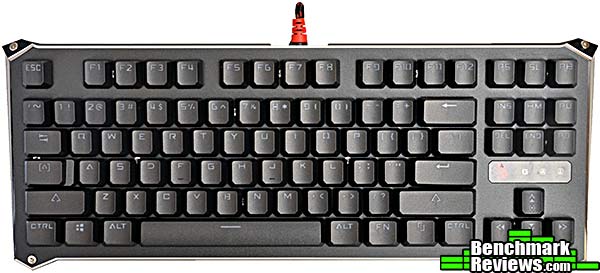
The Bloody B830 LK Optic keyboard basically a ten-keyless (TKL) version of the Bloody B840. It’s available in two versions: orange-backlit keys with a gold-toned aluminum upper plate, and the version we reviewed, with rainbow-style lighting (each row of keys lit in a different color) and a black-toned aluminum upper plate.
The back of the keyboard contains only the product label and fold-out feet.

As with the previous Bloody keyboards, the sleeved USB cable is permanently attached to the rear of the keyboard. There are no USB pass-through ports. The entire top of the keyboard is covered with a screwed-on aluminum plate, the top surface of the plate is coated with a textured black finish, with the edges showing brushed aluminum.

Bloody’s proprietary infrared key switches have standard Cherry MX stems and a backlight LED at the top of the switch. A raised rim around the key switch provides some protection against liquid spills.

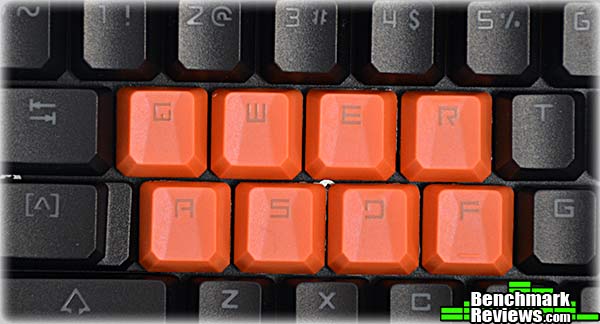
Bloody provides 8 bright orange, rubberized replacement key caps for all your gaming needs.
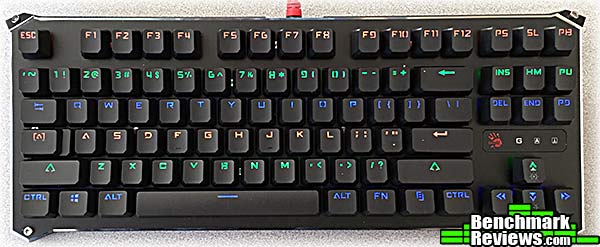
The B830 keys are backlit, but each row is a static color. In our review sample the colors orange, green, and blue are used; the side panels are lit with orange. You can turn the lights off, set them to three different intensities, and invoke a “breathing” mode, but that’s it as far as lighting effects go. Although our review sample came with a black-finished top plate and differently colored LEDs, a version of the B830 is available with a gold-tone top plate and orange backlighting on all keys.
Let’s check out the utility software in the next section.
The Bloody B830 keyboard’s utility software is called Key Dominator. With this utility you can define macros and assign them to the main number keys 1-5, highlighted in red on the main screen of the utility, as well as any of the keys on the numeric pad and cursor control keys to the right of the main keyboard (you select the latter keys by clicking the subtle red arrow at the lower left of the macro list in the screen shot below). For any definable key you use a pop-up menu to select from a number of pre-defined functions (generic Office functions and such) or assign macros that you create. All macros are stored in the keyboard’s memory and you do not have to have Key Dominator running to use loaded macros.

The top bar of the utility contains six buttons: Ultra Core, Button, RGB Animation, About, Oscar Macro, and Super Combo. The RGB Animation button opens a panel for configuring this feature, but since the B830’s LED backlights are a fixed color, the keyboard has no RGB capability and the controls in this section of the utility do nothing. It’s odd that Bloody doesn’t disable or hide this button when the utility is used with a non-RGB keyboard.

Key Dominator will also allow you to define functions and macros for the 10-key pad, even though the B830 doesn’t have one.
To the right of the buttons are a joystick icon (that controls “No Detection” mode; more on this later) and a light bulb that controls the lighting features. The latter offers three choices: On, Off, and “Neon Glare System”, which flashes the lights in random patterns for a few minutes before settling down to steady on. Remember, each horizontal row of keys is a fixed color– these are not RGB LEDs.
The Ultra Core and About buttons open advertising screens, but the oddly-named Oscar Macro button takes you to the heart of this utility: macro definition. And here I must say that this utility shines. While Bloody offers a number of standard pre-defined functions for things like Office work and standard file manipulation, the macros are where the real fun is: in addition to key strokes, macros can contain defined or recorded pauses between each step as well as absolute and relative mouse movements that will work with any mouse. A limited programmability feature lets you define, control, and query two separate “variables” (A and B) as counters for simple looping and branching inside a macro, and best of all, macros are fully editable: you can easily insert and delete steps inside an existing macro.
Once a macro is defined, you can return to the main screen to assign it to a key. The Bloody B830 Light Strike keyboard has 160K of onboard memory for macro storage, and there doesn’t seem to be any pre-set limit on the number of key strokes or other actions in any individual macro.

Macros you define are grouped into one of three profiles: Standard, Gaming2, or Gaming3. There are several options for how you select a profile, some of which– such as Shift driver free as shown below– have non-obvious modes of operation. But after playing around I finally figured out that the colors associated with each profile refer to the color of a tiny Bloody hand icon that floats partially off-screen (until you mouse over it, whereupon it slides into view). So for Shift driver free, you switch profiles with Fn and the left or right arrow key, and look at the color of the partially on-screen hand icon to verify your profile selection. You’d think this would be described in the documentation, but…
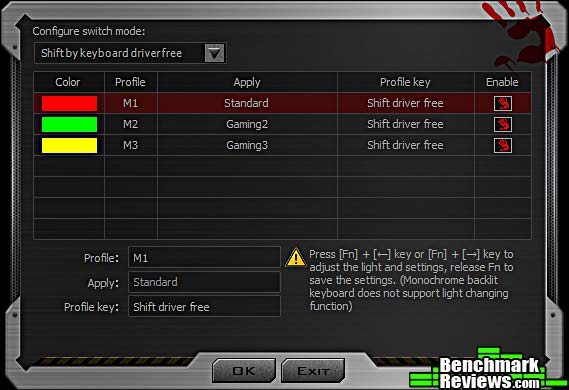
…documentation for this utility is spread across two documents: Bloody Oscar Macro II Manual and Bloody Super Combo. While the manuals seem complete and are copiously illustrated, they are obviously written by someone who’s not a native English speaker, and the resulting tortured syntax and off wording (see “shift driver free”) can sometimes be impossible to follow. Also, the manuals seem to describe features that don’t exist in the software I downloaded from Bloody’s web site, and completely ignore other features like profile selection. In fact the word “profile” doesn’t occur in either manual.

Clicking the joystick icon at the top right of the utility window opens the dialog below. It seems to be designed to assign a group of macros to a specific game, automatically load them when the game is launched, and then quit the Key Dominator utility. The idea here is to apparently bypass checks made by online games that prohibit the use of any sort of “assistive” software.
Which would be nice if I could figure out how to add a game to the list, but I couldn’t; and the use of this feature doesn’t seem to be documented anywhere.

Bloody also provides a Key Response utility that purports to show the performance advantages of the optical key switches. In testing alongside a standard mechanical keyboard– you set the two keyboards up with a bar covering both space bars, and use the bar to press both at the same time– the utility did seem to show a response advantage for the B720 keyboard (this is the “Target PC” test):

I’m not sure what the “Knock PK” test is, but all I ever got it to do was complain that “This PK is invalid”:

I’ll present my final thoughts and conclusion about this keyboard in the next section.
In the past couple of years, the mechanical keyboard market has simply exploded. Much of this is due to the expiration of the patents on Cherry’s MX mechanical switches, which led to the proliferation of Chinese clone switches which in turn led to a price and features war. Simple backlighting gave way to multi-color and full RGB; this combined with expanded macro capabilities meant keyboards had to be equipped with their own processors and memory. Cherry responded with new variations such as their MX Silent and MX Speed switches. And now Bloody comes along with their optical switches.
We’ve previously reviewed the Bloody B720 and the Bloody B188 Light Strike keyboards, and found them to be quality items, but with high prices relative to the competition and macro software, that while capable, is clumsy and non-intuitive to use. With the B830, we see another problem: the software happily allows you to configure functions for features that don’t exist on this keyboard, like RGB lighting effects and macros for the `0-key pad. The “missing features” thing seems to be a generic problem for Bloody: for example, the web page for the B830 touts its included wrist rest, but our review sample did not include one.
The switches on the earlier Bloody keyboards were linear, and felt almost identical to Cherry MX Red switches. These new LK Optic Blue switches have a clicky feel, like Cherry MX Blue switches, but a reduced 3mm travel as opposed to the 4mm travel that’s standard for most desktop keyboards. Although keyboard preference is a very individual thing, I found that I liked these switches a lot better than the original linear optical switches.
However, Bloody’s original weak points of a high price and poor software remain. With an MSRP of $159.99, this keyboard is playing in the high end keyboard market, and– key switches aside– the hardware and features are several steps behind the best in class designs.
Bloody claims the LK Optic Blue switches will last for 100 million strokes (on their web site, at least; the box claims only 50 million key strokes), but their 1-year warranty is much shorter than most of their competitors’ warranties.

Still, the key switches are the draw here. You might think they’re similar to Cherry MX Speed switches, but they’re not: the Cherry switches actuate 1.2mm into the key travel, as opposed to the 2mm standard, but the total key stroke is still 4mm. Bloody’s LK Optic Blue switches have a total travel of only 3mm, and while the actuation distance isn’t specified, the B840 keyboard feels quicker to me in a way that the Corsair Rapidfire MX Speed-equipped keyboard does not. Right now these are my second-favorite mechanical key switches, right behind the buckling-spring capacitive switches use on the IBM Model F keyboards.
But: the competitive keyboards have more features, much better lighting, much better utility software, a longer warranty, and a lower price. (Although at the time of this review, the Bloody B830 LK Optic keyboard is being offered at a huge discount from several online vendors.)
Bloody’s new LK Optic Blue switches are a significant improvement to their original Light Strike switches– at least if you like clicky switches.
But the Bloody B830 shares the same good and bad points of its predecessors: while it has a unique and clever key switch design and is well-made, its plain backlighting, clumsy utility software, lack of hardware features (no media controls, no detachable USB cable, etc.) and short warranty place it at a disadvantage relative to its competitors.
At the time of this review, this keyboard is being heavily discounted from its $159.99 MSRP, now available online for $99.99 (Amazon | Newegg). This price makes the keyboard much more appealing and I’d have no trouble recommending it for gamers looking for a unique typing experience.
+ Unique optical key switches promise faster response, more reliability
+ Solid, quality construction
+ Fully editable macros
+ Metal top plate
– Limited key lighting
– Clumsy utility software
– Only a 1-year warranty?
– Very high MSRP
-
Performance: 8.50
-
Appearance: 9.00
-
Construction: 9.50
-
Functionality: 8.00
-
Value:8.50


