By David Ramsey
Manufacturer: Corsair Components Inc.
Product Name: Lapdog Game Control Center
Model Number: CH-9500000-NA
UPC: 843591083294
Price As Tested: $79.99 (Amazon | Newegg)Full Disclosure: Corsair provided the product sample used in this article.
Real gamers – and you are a real gamer, right? – know that consoles cannot provide the performance and graphics quality of a good PC-based gaming rig. But giant 4K televisions provide an excellent canvas for immersive game play. You can set up a PC connected to your TV, but those console controllers just don’t cut it if you’re using to a good gaming keyboard and mouse. Too bad there’s no way to really use a keyboard and mouse on your lap. Or… is there?

Corsair thinks they have the answer in the Corsair Lapdog Game Control Center, a device that does let you use a full sized gaming keyboard and mouse in your lap, and Benchmark Reviews will see if it makes a difference in this review.

- Large 11″ by 11″ mouse pad
- Powered USB 3.0 hub for keyboard, mouse, gaming headset, USB key, and more
- Memory foam underside cushion for user comfort
- Hidden compartment to neatly store cables
- Fast charging for your smartphone or tablet
- Available as a stand-alone station or complete with Corsair K70 gaming keyboard
Let’s take a look at this intriguing device in the next section.
Think of the Corsair Lapdog Game Control Center as a “case” for your keyboard and mouse. As with a computer case, the Lapdog encloses and provides power for the parts that will comprise the final product: in this case, a “Game Control Center.” It’s a rather large metal and plastic shell designed specifically for a Corsair K65 or K70-series keyboard, and a mouse of your choice.
At 29″ wide, 10.5″ deep, and almost 4″ high, it’s a large thing to plop in your lap. It exudes quality, though: in the image below, all the top surfaces other than the mouse pad area are brushed aluminum. Plastic would have worked just as well, and been cheaper, but this is Corsair…
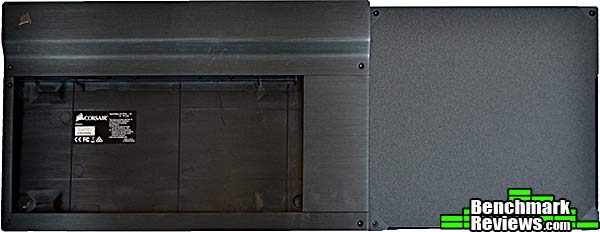
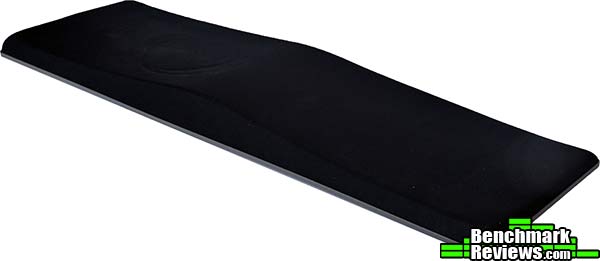
The Lapdog actually has two main parts: the keyboard enclosure/mouse pad/USB hub part shown above, and a thick, heavy, contoured memory foam pad. The keyboard enclosure sits on top of the foam pad, which in turn rests in your lap.
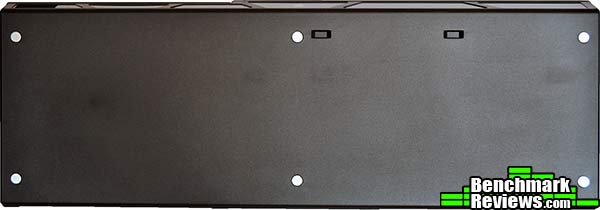
The enclosure and foam pad attach to each other magnetically, with six small magnets on the bottom of the enclosure.
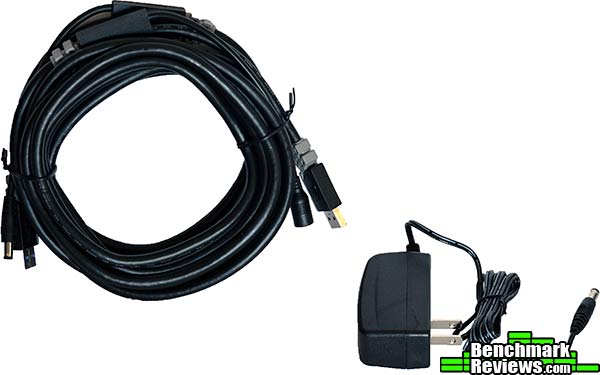
Corsair includes a small power supply and special cable to connect the Lapdog to your PC. The cable is a combination USB 3.0/power cable and is over 15 feet long. If you’re connecting the lapdog to a USB 3.0 port, and not using power-hungry components like backlit keyboards, mice, headsets, phone charging, etc. you can do without connecting the power supply. If you’re using lots of devices or connecting to a USB 2.0 port, you should use the power supply. The small supply is rated at only 0.5A at 12V, so I’m skeptical of Corsair’s claim that the lapdog supports “fast charging” of phones and tablets, although I suppose they could pull extra power from a USB 3.0 port (if you’re plugged into one), since these ports can supply up to 900mA.
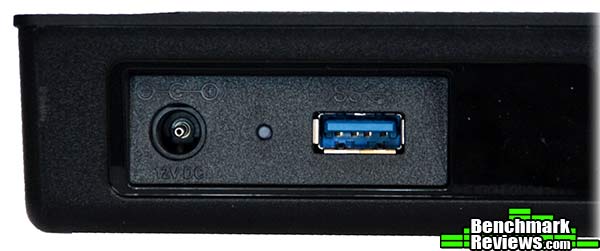
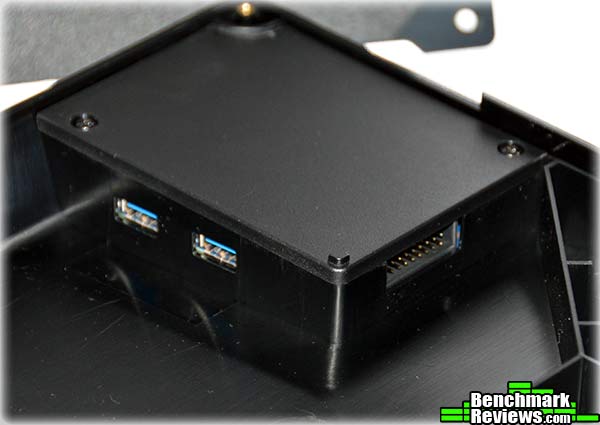
The rear of the Lapdog has USB 3.0 and power connectors for the custom cable…
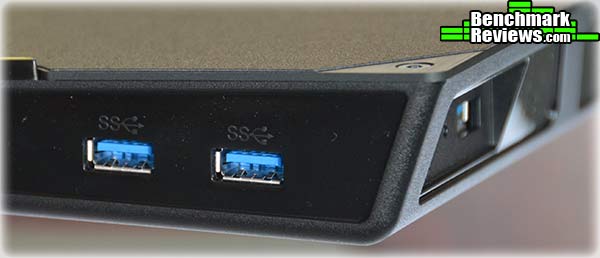
…and there are two additional USB 3.0 ports on the side.
Join me in the next section as I assemble and try out this device.
While Corsair sells Lapdog configurations with included keyboards, our review unit was “bare”. The Lapdog accommodates Corsair K65 and K70-series keyboards; the fit is very precise and it’s unlikely other vendor’s keyboards would fit well enough to work. To install a keyboard you’ll need to remove a number of small hex-head screws, and Corsair includes a small hex driver in a recess on the side of the foam lap pad that mates with the bottom of the shell.

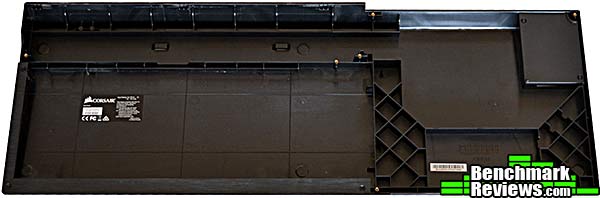
Once you remove the top cover, side cover, and mouse pad, you’re left with this open space. At the upper right of the enclosure is the USB 3.0 hub.
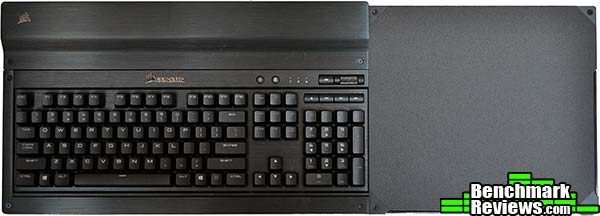
My Corsair K70 LUX RGB keyboard, which I reviewed here, fits perfectly, although the thick dual cables were a tight squeeze. Since the K70 LUX RGB has a ten-key pad, the center portion of the case won’t be re-attached.
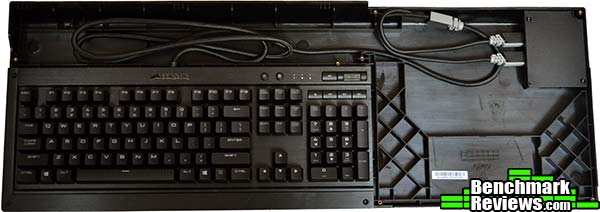
Corsair’s instructions show a keyboard and mouse plugged into the two internal USB 3.0 ports, but if your K65/K70 keyboard is backlit, it’ll have two USB cables as mine did, and you’ll have to plug your mouse in externally. In addition to the two internal and two external USB 3.0 ports, the hub has this odd multipin connector. Corsair won’t say what it’s for.
Once everything’s screwed back together, the keyboard is held firmly in place. It looks pretty sleek…but how well does it work?
Give me a moment while I drag my large and heavy gaming PC into the next room…
I really wasn’t sure what to expect with the Lapdog, since using something like this was a completely new experience for me. With the keyboard and Corsair mouse I used, it’s a heavy beast: my bathroom scale reads just north of 8 pounds. However, the contoured foam leg pad works very well and the weight wasn’t a problem for even extended gaming sessions. There’s no software to install or settings to configure since you’re just using your standard keyboard and mouse as you normally would, albeit with a really long cable.
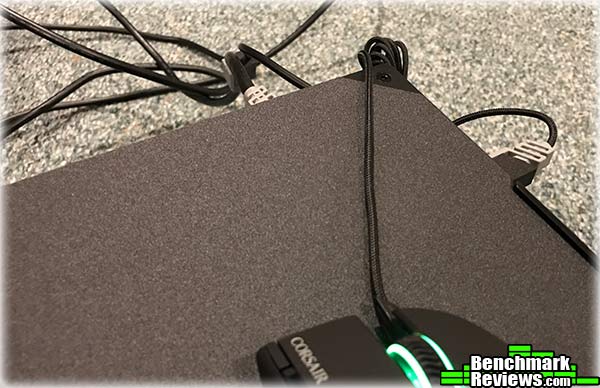
I did run into one small, but annoying, issue: the edges of the mouse pad area are quite sharp, and with the mouse plugged into one of the two side USB 3.0 ports, its fabric-sleeved cable would snag slightly on these edges during gameplay. This resulted in in some jerkiness while I was trying to nail demons in DOOM 2016. I think Corsair could have addressed this issue either by using a vertical cable support as seen for some desk mice, or perhaps just rounding the top and right edges of the mouse pad a bit.
In the last section I’ll present my final thoughts and conclusion.
Although the concept of a “keyboard and mouse lap-top platform” isn’t new– the strange and decidedly non-gaming Phantom Lapboard has been available for years, and the concept dates from the stillborn Phantom gaming console circa 2004– the Lapdog is still unique. Designed very specifically for gamers, it’s an expensive piece of equipment at an MSRP of $119.95 (although it’s discounted online as of the time of this review).

My mouse cable snagging problem would not have occurred had I routed the mouse cable to the internal USB connectors, as shown in the Corsair publicity shot above. However, I would point out that the shot above is fake: since the K70 keyboard shown is backlit, it must use both internal USB ports…which is probably why the internal lighting on the Scimitar Pro RGB mouse shown isn’t on. Still, the snagging problem was minor.
Since you must remove and replace small hex screws to install the keyboard (and the mouse, if it’s connected to the internal USB port), the Lapdog probably isn’t something you’re going to set up and take down for each gaming session: you’re going to want to dedicate a keyboard at least to this device, so plan on spending another $90.00-$170.00 (MSRP) for a compatible Corsair keyboard.
The Lapdog’s a one-of-a-kind product for serious gamers who want the best possible living room gaming experience, without the limitations of a console-style controller. Despite its size and weight, the design and ergonomics are excellent, and extended gaming sessions are no problem.

My complaints are few: sharp mouse pad edges that can snag a sleeved mouse cable; the de facto requirement to dedicate a keyboard, and the overall cost. Some might wish for wireless, but personally I’m glad Corsair went with the versatility and reliability of a physical cable. Corsair is a premium enthusiast brand, and it’s impressive to see them try to create a new product category like this. I’d like to see a smaller version optimized for TKL keyboards (you can use a TKL Corsair keyboard with the Lapdog, but obviously that does not change the size)…
While the Corsair Lapdog Game Control Center is available with an included Corsair keyboard, the “bare bones” version Benchmark Reviews tested is available for $79.99 (Amazon | Newegg) and can make all the difference for dedicated gamers tired of the limitations of console controllers. You’ll pay several hundred dollars for the privilege once you include the cost of a dedicated keyboard (and probably mouse as well), but for many it will be money well spent. Oh, and if you’re building a living room system from scratch, Corsair stands ready to help you with the computer, too: check out the Bulldog!
+ Use a real gaming keyboard and mouse for your living room PC
+ Internal USB 3.0 hub
+ High quality construction with lots of metal
– Expensive. Big.
– Pretty much requires a dedicated keyboard
– External mouse cable can snag
-
Performance: 9.75
-
Appearance: 9.50
-
Construction: 9.50
-
Functionality: 9.00
-
Value: 8.00


