By Meng Vang
Manufacturer: ROCCAT GmbH
Product Name: KONE EMP Wired Optical 12000 dpi Gaming Mouse
Model Number: ROC-11-812
UPC: 4250288135307
Price As Tested: $79.99 (Amazon | Newegg)Full Disclosure: The product sample used in this article has been provided by Roccat.
Being the successor to the Kone XTD, the Kone EMP (Empowered) brings a few new things to the table. The Kone EMP weights less than its predecessor and maintains the same body shape as before. It also includes the new Owl-Eye 12000 DPI optical sensor, known as the PixArt 3361 optical sensor. This is a modified version of the PixArt 3360 with improved responsiveness and manual surface calibration. The Kone EMP now features RGB lighting along with customizable profiles via the Swarm software. Benchmark Reviews will be taking a look at the Roccat Kone EMP with its new Owl-Eye optical sensor, so let’s jump in to a quick overview of this mouse.

- ROCCAT Owl-eye Optical Sensor – Owl-eye Is The Exciting New Optical Sensor From Pixart, Modified To The High And Exacting Standards Of ROCCAT
- Ergonomic, Robust Design Weighing Only 116 g, The Kone Emp Is Lighter Than Its Predecessor, Giving It A Light, Competitive Weight
- Customizable Illumination The Kone Emp Lets You Customize Two Illuminated Led Light Stripes Which Are Configurable In A Stunning 16.8 m Vivid Colors
- Easy-shift[+] Technology The Kone Emp Features World-famous Easy-shift[+] Button Duplicator Technology, Which Lets You Assign A Secondary Function To Your Mouse Buttons
- Roccat Swarm Is The Software Incarnation Of Roccat’s Future Ready Philosophy. It’ll Cover You For All Relevant Gaming Platforms And Devices
- ROCCAT® Owl-Eye optical sensor with 12000dpi
- 1000Hz polling rate
- 1ms response time
- 50G acceleration
- 250ips maximum speed
- Mouse acceleration: no
- Angle snapping: no
- Adjustable lift-off distance
- ARM Cortex-M0 50MHz
- 512kB onboard memory
- 1.8m braided USB cable
- Width 7.7 cm , Height 4.2 cm , Length 13.1 cm , Weight 116 g
The Roccat Kone EMP gaming mouse is currently available online for $79.99 (Amazon | Newegg). The box has a picture of the product along with its features and specifications listed around it.

Once opened, we can see the Kone EMP nicely packaged underneath a plastic cover surrounded by a thick layer of cardboard. This prevents any physical damage to the product during shipment.
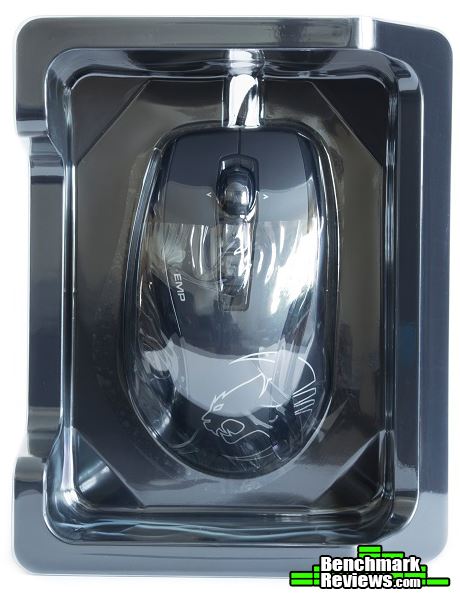
In terms of accessories, we find a quick installation guide, a few stickers, and a disposable information booklet.

The Kone EMP shares a similar body shape and design as its predecessor, the Kone XTD. It now has a plastic body with no rubberized textured grips, which should improve durability over time. Roccat has also omitted the front button and the weight system to bring the weight of the Kone EMP down to 116g. We can also see all of the standard buttons along with some additional buttons at the top for DPI toggling.

Now that we have seen a quick overview of the Kone EMP, let’s go into more details on what this product has to offer.
Taking a look at the top of the mouse, we can see the standard left and right buttons along with the rubberized 4D Titan scroll wheel. There are two buttons at the top for DPI toggling and the Omron D2FC-F-7N switches have a 10 million click life cycle. Towards the rear is the company logo and the two glossy streams represent the LED light stripes.

At the bottom, there is a glide pad at the front and rear of the Kone EMP. The mouse does not include a weight system, but that is perhaps due to its stock weight of 116g without the cable. We can see the 12000 DPI 3361 optical sensor towards the center of the mouse.
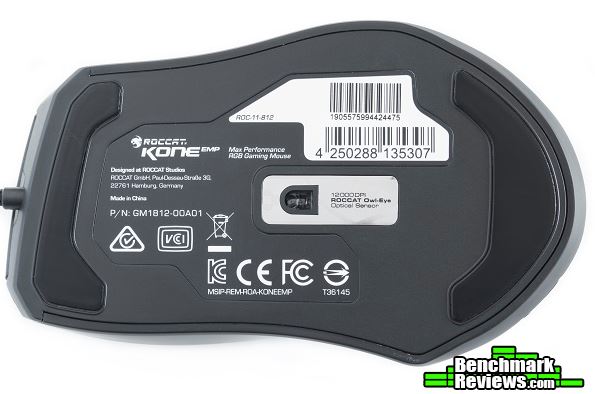
The left side of the Kone EMP includes two large buttons for forward and backward controls. Like its predecessor, the thumb grip curves inward to allow a better grip but can also prevent the thumb from accidentally hitting the side buttons.

No additional side buttons are present on the opposite side. Instead, we can see the smooth surface with an edge towards the rear for the little finger.

At the front of the Kone EMP, the braided USB cable attaches to the center of the mouse. The 4D Titan wheel does not illuminate, but it feels extremely durable and provides horizontal scrolling.
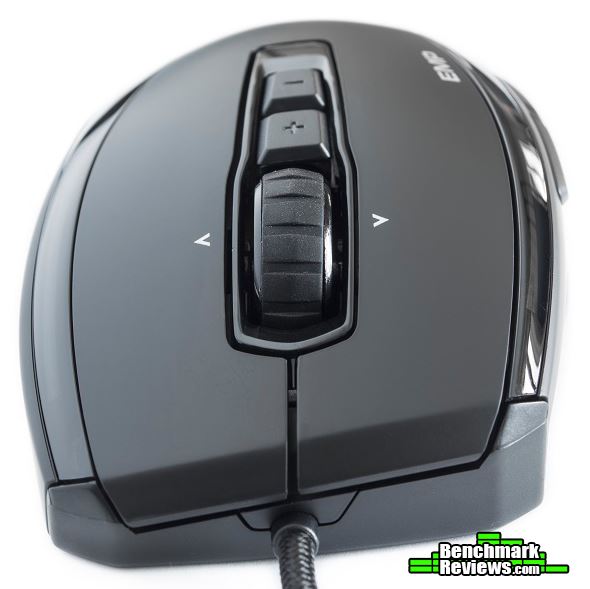
At the rear, the surface maintains a smooth design with only the company logo. The left side of the mouse is slightly higher than the right making it more comfortable for the wrist.

The Kone EMP has a soft braided 1.8 meter USB 2.0 cable with the name of the product printed on it. This makes it easier to distinguish which plug belongs to which device.

Let’s take a look at the Roccat Swarm Gaming software in the next section.
The Roccat Swarm Gaming software has a nice graphical user interface with plenty of options to go through. Like the Corsair Utility Engine and the Razer Synapse software, Swarm can manage all of your Roccat gaming peripherals in one software. In the Settings tab, you may create, edit, and delete custom profiles. Five separate profiles allow us to store multiple key assignments, lighting effects, and other settings within the mouse.
In the Settings tab, you can adjust Windows sensitivity, vertical and horizontal speed, and double-click speed. You can have up to five DPI levels with their own DPI settings. The DPI range is from 100 to 12000 and can be adjusted in steps of 100.

In the Button Assignment tab, you can assign different functions to each mouse button. These functions include media, internet, macro commands, and Easy-Shift[+] technology. If you are familiar to the Cooler Master Storm TactiX (TX), Easy-Shift[+] works the same way. Assigning a button to the Easy-Shift[+] function will switch all the mouse buttons to their secondary functions when pressed. Of course, you can rebind the Easy-Shift[+] functions as well.

The Advanced Settings tab allows us to customize the report rate, lift-off distance, and lighting effects. You may also choose if you want the program to play a sound when switching DPI, profiles, volume, and sensitivity. This only works when the Swarm software remains running in the background. There are four lighting zones and four lighting effects to choose from. A few lighting effects will allow you to adjust the speed of which the colors transition.

Inside of the Macro Manager, you may record and edit macro functions in order to assign them to different keys. The Swarm software does have plenty of popular games to choose from where you can edit and reassign key functions in a specific game.

In the next section, we will take a look at how the Kone EMP performs.
Sensor Tracking Performance and Polling Rate
The Kone EMP performed well and was able to handle very fast flicks across the surface thanks to the 12000 DPI 3361 optical sensor. No acceleration was present during testing and the average polling rate was around 1000 Hz as advertised. I did not notice any major effect when gaming at 12000 DPI, but Roccat recommends using the mouse at a DPI of 400-3000. At 2600 DPI, the mouse performed just as well as other gaming mice I had tested. Some users may benefit from using a higher DPI setting, but more DPI does not mean better performance.
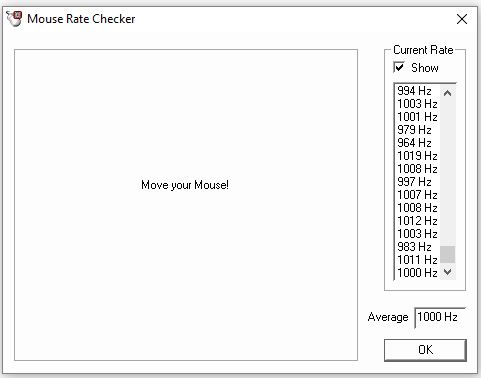
The Owl-Eye 3361 optical sensor originated from the popular 3360 optical sensor. It offers true 1:1 accuracy along with a Distance Control Unit (DCU) for adjusting surface calibration. Roccat recommends a DPI of 400-3000 for optimal performance, but the sweet spot is somewhere between 2000 and 3000 DPI.
With that being said, why would anyone purchase a 12000 DPI mouse only to use it at 400 DPI? The Razer Mamba Tournament Edition and the SteelSeries Rival 700 both have crazy 16000 DPI sensors (or CPI for SteelSeries). Not sure if that makes you a better gamer but that 16000 DPI sure looks good on paper, doesn’t it? Like the megapixels to a camera, we cannot say a mouse is better than the other just by comparing DPI sensitivity. There is so much more to a mouse than just DPI. We need to consider other crucial factors, like sensor performance, body shape, weight, and button placement.
There is a lot that goes into a topic like this; should you use a low DPI or a high DPI for gaming? I personally prefer something over 2000 DPI but nothing more than 3500 DPI for gaming. The optimal DPI zone of the 3361 sits right around here, which is something I am happy to see. With older sensors, I can notice quite a bit of jittering with slow movements at a very low DPI, but the jitter was nonexistent at the 2600 DPI I am using now. But if you can pull off fancy moves and headshot every enemy that gets in your way, stick with whatever you have and be happy with it.
Button Response and Placement
Most of the buttons on the Kone EMP were nicely placed. The two side buttons sat directly above my thumb allowing easy access. They were also harder to mis-click since the thumb rest curved into the body of the mouse. The 4D Titan scroll wheel was one of the best scroll wheels I have seen. It felt very sturdy and the bump provided enough resistance to prevent accidental scrolling. On some occasions when trying to scroll, I did find myself accidentally pressing the DPI+ toggle switch. The switch does protrude from the body, but I did wish it was flatter.
RGB Lighting Accuracy
Replicating a pure white color can be difficult for some RGB peripherals. When it came to color reproduction, the Kone EMP did a fair job. When set to white, the light stripes were a bit on the pinkish side with more red towards the middle of the mouse.

Reds, greens, and blues looked good all-around except when mixing up the colors. When mixing red and white together, the lighting just was not accurate.

The whites looked good at the top, but the reds were pink and not fully saturated.

Colors did not mix very well at all.

Greens looked okay, but the blues looked mostly purple. The reds by the left side of the mouse looked pink, while it was orange on the opposite side.

Firmware Updates
I did run into a bit of trouble updating the firmware to the Kone EMP. I had to unplug several times to get the Swarm software to update correctly. There were a few times where the mouse completely bricked itself, but the software was able to recover the previous firmware after several update attempts. Aside from some spelling errors in the software, I eventually got the new firmware onto the mouse.

Size Comparison with Other Mice
The Kone EMP was a bit larger than the Gamdias Zeus P1. It had more of a curved body shape compared to the Zeus P1 and felt more natural when compared to the ambidextrous body shape of the G Pro. On the scale, it was about 12 grams heavier than the Zeus P1 without the cable, but much lighter than the 175g ROG Spatha.

I had no problems adapting to the shape of the Kone EMP. Those of you who are familiar with the Kone XTD should have no problems gripping the Kone EMP. Although this is purely subjective, I do like the overall shape. Roccat kept the same body shape from its predecessor because it was good from the beginning. It is not the most comfortable, but better than a lot of mice I have seen in the past. If the mouse was smaller and lighter, it would make it very competitive to the Zeus P1 and the DeathAdder Elite.
Let’s go into my final thoughts and end this review with my conclusion in the next section.
The Kone EMP may not be an upgrade if you are coming from the Kone XTD. It no longer includes the front button and the weight system, but it does have a reduced weight. The responsive Owl-Eye 3361 optical sensor tracks very smoothly and the mouse shape is suitable for players with large hands. RGB lighting is not the best, but the build quality feels great with only a small rattle in the scroll wheel. I would have liked the mouse even more if it was smaller and lighter weight.

As expected, the Owl-Eye optical sensor on the Kone EMP performs very well against other mice with a 3360 optical sensor. Buttons respond well and the shape of the mouse feels very comfortable in my hand. The 4D Titan scroll wheel feels tough and the braided cable is more flexible compared to its predecessor. Roccat took the right path to exclude the front button and the weight system on the Kone EMP. Perhaps the next version will have a lighter body weight to make it even more competitive.
Although appearance depends on personal preference, I do like the looks of the mouse. Of course, it has not changed from the Kone XTD, but it still maintains a simple and clean design. The RGB lighting does add some character, but they are not the best when it comes to color reproduction. Gaming peripherals are all about RGB nowadays, so the Kone EMP will need to see some improvements in the next version to stay competitive.
The Kone EMP feels solid all around. Its 4D Titan scroll wheel should last a very long time, although there is just a small rattling noise coming from it while shaking the mouse. The Owl-Eye sensor is in the center of the mouse making it easy to control and aim. I did accidentally hit the DPI+ button a few times. The button is somewhat large, but if it were just a bit flat this would not be an issue.
In terms of functionality, the Kone EMP performs very well in games, but I also used it to edit all of these pictures in this article. The Swarm software works well, although I did brick the mouse several times trying to update the firmware. Luckily, the software was able to recover the previous firmware and I eventually got the mouse to work with the new firmware.
As of April 2017, the Roccat Kone EMP gaming mouse currently sells online for $79.99 (Amazon | Newegg). With that said, the gaming market is full of different gaming mice with RGB lighting and top optical sensors making it difficult to choose which one to buy. For this price, you are getting the Owl-Eye 3361 optical sensor, which in fact performs very well with no acceleration, spin outs, and angle snapping. But the average Joe may not notice this difference coming from a mouse with a 3360 or 3366 optical sensor. RGB lighting is not the best and it weighs a bit heavier than the DeathAdder Elite and Zeus P1, so I hope the next version will fix these issues.
+ Excellent build quality
+ Comfortable body shape
+ Solid 4D Titan scroll wheel
+ Excellent 12000 DPI Owl-Eye (PixArt 3361) optical sensor
– RGB lighting is not the most accurate
– Heavier than the competition (although this can be a pro for some)
-
Performance: 9.75
-
Appearance: 8.75
-
Construction: 9.25
-
Functionality: 8.75
-
Value: 8.50


