By David Ramsey
Manufacturer: Kingston Technology
Product Name: HyperX Alloy FPS RGB Gaming Keyboard
Model Number: HK-KB1SS2-US
UPC: 740617278668
Price as Tested: $109.99 MSRP
Full Disclosure: HyperX Gaming provided the product sample used in this article.
HyperX is the “high performance product division” of Kingston Technology– that is, they make the gamer-centric stuff. They have a complete line of gamer-oriented mice, keyboards, headsets and the like, but with the fierce competition in the field these days, they’re constantly expanding their product line. Their HyperX Alloy series of keyboards boasts a solid steel frame, anti-ghosting and N-key rollover, and Cherry MX key switches. Well, most of them use Cherry key switches: today, Benchmark Reviews has in hand the new HyperX Alloy FPS RGB keyboard with ultra-responsive RGB-lit Kailh Silver key switches. With a shortened actuation distance compared to other switches, the Kailh Silver switches should help amp up the responsiveness of this keyboard for the most hardcore gamers.

- Solid steel frame
- Portable design with detachable cable
- Game Mode allow configurable disabling of any keys
- 100% anti-ghosting with N-key rollover
- Programmable, dynamic RGB lighting effects
Let’s take a look at this keyboard in the next section.
HyperX Gaming’s FPS RGB gaming keyboard is a standard 104-key design, with a dark gray metal top plate (in fact it’s the base plate for the key switches), and a black plastic bottom. The keyboard feels much heavier that you’d expect due to the aforementioned steel frame, which probably comprises the top plate since it’s magnetic.

There’s nothing at the bottom of the keyboard except the expected label and fold-out feel to prop the rear of the keyboard at a convenient angle.

From left to right we have indicator LEDs for Game Mode, Num Lock, and Caps Lock.
 Function keys F1 through F3 are overloaded to select a stored profile– the keyboard can hold three in its internal memory– while other function keys can control media playback.

Keyboards with per-ley LEDs as well as an internal CPU and memory take a lot of power, thus the need for a dual-headed cable.

Let’s continue our examination of this keyboard in the next section.
The detachable, dual-headed cable is braided along its length. Although the USB Type A connectors are gold colored, HyperX does not call them out as “gold plated”, so they’re probably not.

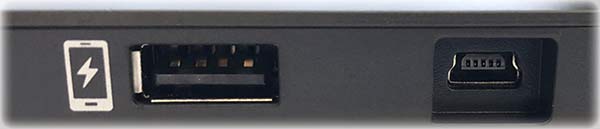
There are two connectors at the rear of the Alloy FPS RGB: one USB Mini-B connector at the right for connecting the keyboard to the computer, and what appears on first glance to be a USB A pass-through port. Curiously, though, as the icon indicates, it’s not a pass through port: it only supplies power, perhaps to charge your phone. Personally I think it would have been much more useful to be able to plug in my mouse.
The Alloy FPS RGB keyboard abandons the Cherry MX switches used in the other versions of HyperX’ Alloy line for Kailh Silver Speed switches. This is a linear (non-clicky) switch with a 50 gram spring and a reduced actuation distance of 1.1mm, rather than the 2mm that is standard on desktop keyboard switches. The RGB LED is surface-mounted on top of the switch and covered with a diffuser dome to spread the light. The result is an exceptionally bright keyboard, much brighter than those using the older design with a non-surface mount LED deep inside the switch.

Like many other gaming keyboards, HyperX’ Alloy series keyboard use a “floating” key design, dispensing with a traditional top bezel. The steel top plate the key switches mount to is the top of the keyboard.

In the next section I’ll go over the keyboard’s built-in functionality as well as the operation of the HyperX Gaming utility software for this keyboard.
The HyperX Alloy FPS RGB keyboard has onboard processor and memory, and can store three profiles, quickly accessible by pressing the Fn key in combination with the F1, F2, or F3 keys. Each profile comprises a set of defined macros as well as lighting effects.

The lighting effects and macros are created with HyperX’ “NGenuity” (get it?) utility.

As is sadly the case these days, NGenuity is essentially undocumented and you must spend some time playing with it to figure it out. Fortunately it’s not too hard. You being by clicking the subtle “+” icon at the lower left of the screen to create a new profile, which consists of lighting effects, macros, and Game Mode keys (keys that are disabled during a game to avoid problem with accidental key presses). NGenuity supplies a (rather small) list of pre-recorded profiles for some popular games, and you can assign these or any profile you create to load automatically when the associated game is run.

The Alloy FPS RGB’s super-bright LEDs are controlled via the Lighting section of the utility. You can apply predefined effects like color waves, breathing, or explosions to the entire keyboard; specify color for individual zones, or select FREESTYLE to make any key any color.

The ZONES feature is an easy way to colorize specific areas of the keyboard and is something I haven’t seen before.

The Alloy FPS RGB lacks dedicated macro keys, but has a pretty good macro editor nonetheless. As with other similar utilities, you create a macro by recording a series of keystrokes. Delays (to the millisecond) are included, but you can edit them out if you wish. It’s amazing how many competing keyboards don’t allow macro editing.

One minor nitpick is that you select keys to assign macros to by clicking on the keyboard image; thus, you can’t assign macros to modified keys; that is, you can assign a macro to F1, but not to Shift-F1 or Ctrl-F1. I think the ability to assign macros to modified keys is more important on a keyboard like this without dedicated macro keys. Anyway, clicking the “Recorded Macro” selection in the key assignment menu will present a list of existing macros to select.

It’s not clear what limits there are on the number and complexity of macros.
The keyboard’s internal memory can hold three different profiles at once; when you create a profile, you designate the “slot” it will load into. Since profiles can load automatically with games the three-at-any-one-time limit really doesn’t affect your use of the keyboard. I like to keep Profile 1 set to a generic color wave, and have my game profiles load into the second or third slots. Note that although profiles load automatically with their associated games, quitting the game doesn’t unload the profile, so it’s nice to keep at least one generic non-game profile loaded so you can switch to it when you’re not actually gaming.
In the last section I’ll give you my final thoughts on this keyboard.
The intense competition in the mechanical gaming keyboard field has spawned fierce levels of innovation and design, but perhaps most important for the consumer is the price competition, helped by the influx of high quality clones of Cherry’s MX switches since the patent on Cherry’s design expired. At an MSRP of just $109.99, the HyperX Alloy FPS RGB keyboard is very competitive, and a fraction of the price you’d have paid for a keyboard of this quality and feature set a few years ago.
My only real complaint about the keyboard hardware is the lack of a pass-though USB port. A charge-only port is better than nothing, I suppose, and I realize that to have a pass-through port would require more electronics and raise the price, but it’s convenient to be able to plug your gaming mouse or lighted mouse pad into your keyboard…
This aside, I was pretty impressed with this keyboard. The LEDs on the Kailh Speed Silver switches were not only very bright, but the lighting animations and transitions were the smoothest I’ve seen of late. Higher LED refresh rate enabled by a faster CPU? Who knows? Sure looks nice though. And while I’ve used keyboards with Cherry MX Silver speed switches before and not noticed much of a difference, the Kailh Silver Speed switches in the HyperX product really do feel “faster” to me.
Overall this keyboard makes a great impression with its metal top plate, heavy substantive feel, smooth, brilliant lighting effects, and detachable cable.
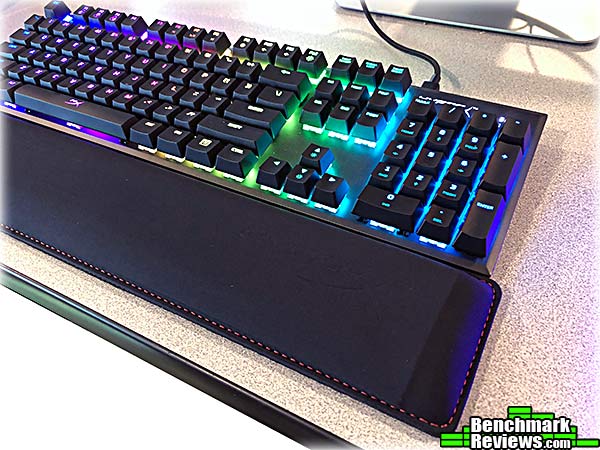
Pictured above with the optional HyperX gel-pad wrist rest, the HyperX Alloy FPS RGB gaming keyboard with Kailh Silver Speed switches has an MSRP of $109.99. This is a great price for this level of features and construction and I can recommend it for anyone interested in a 104-key gaming keyboard.
+ Smooth and brilliant LED lighting effects
+ Heavy steel top plate
+ Reasonably easy to use utility software; editable macros!
– No pass through USB port
-
Performance: 9.25
-
Appearance: 8.50
-
Construction: 9.25
-
Functionality: 9.00
-
Value: 9.25



One thought on “HyperX Alloy FPS RGB Gaming Keyboard Review”
Great keyboard for money but i wish that they could have gone for cherry mx switches instead of kailh switches.
Comments are closed.