By Joe Gulczinski
Manufacturer: SHARKOON Technologies GmbH
Product Name: Sharkoon DarkGlider
Model Number: 000SKDGM
UPC: 857603002548
Price As Tested: $50.85 (Amazon)
Full Disclosure: The product sample used in this article has been self-supplied.
Sharkoon technologies have been manufacturing pc peripherals since 2003 encompassing unique designs and convincing performance. Their philosophy states that “premium quality and affordable prices do not have to contradict each other.” Keep in mind that this statement is going to be put to the test. The DarkGlider has recently become available worldwide offering a plethora of features (common and unique to gaming mice). Benchmark Reviews is going to run this mouse through the gamut and expose what makes this product stand out from the pack (and if the Sharkoon philosophy stays true).
The DarkGlider doesn’t take it’s name for granted! Not only are all components completely black, but the mouse actually does glide due to it’s special ceramic lenticular pads. This will be covered in more detail later, but rest assured, the features and specifications of this mouse at this price point will make you raise an eyebrow. Check out the complete list below before we take a closer look.

Features:
- Avago 9500 V2 Pro Laser sensor
- 10 programmable buttons
- Omron switches for left and right mouse button
- Programmable 4-way scroll wheel
- 5 lenticular ceramic slide pads
- LCD display for DPI indication
- 256 KB internal memory for user profiles
- Gold-plated USB connector
- Cable with textile sheathing
- Weight Tuning System
- Ergonomic design
- Rubberized surface for maximum grip
- Configuration software included
- Supported operating systems: Windows XP/Vista/7/8 (32 and 64 bit)
Specifications:
| Max. DPI | 6,000 |
| Max. acceleration | 30 G |
| Mouse weight | 158 g |
| Dimensions (L x W x H) | 130 x 82,4 x 42 mm |
| Sensor | Laser (16 bit data channel) |
| Connector | USB2.0 (gold-plated) |
| Cable length | 180 cm (textile sheathing) |
| Max. FPS | 11,750 |
| Max. IPS | 150 |
| Button reaction time | 1 ms |
| Onboard memory | 256 KB |
| Number of buttons | 10 |
| DPI indication | LC display |
| Scroll wheel left/right | yes |
| Illumination | yes, configurable via software |
| Mouse slide pads | 5, ceramic, lenticular |
| Chip | Avago 9500 v.2 (72 MHz) |
| Lifting sensitivity | 1-5 mm |
| Weight Tuning System | 4x 3,1 g / 4x 3,7 g |
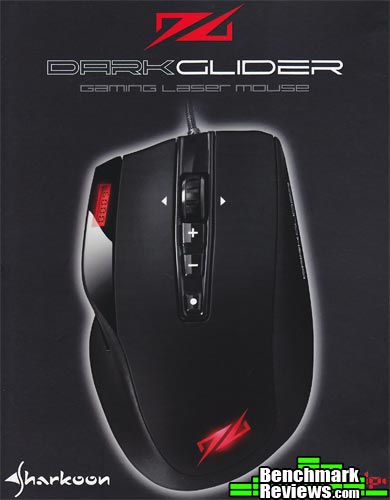
The Sharkoon DarkGlider comes in a matt-finished box with a magnetic-flap cover. It is no nonesense in the fact that it lists the specs on the inside cover and that’s about it. A minimal package design yet still effective in showcasing the product.
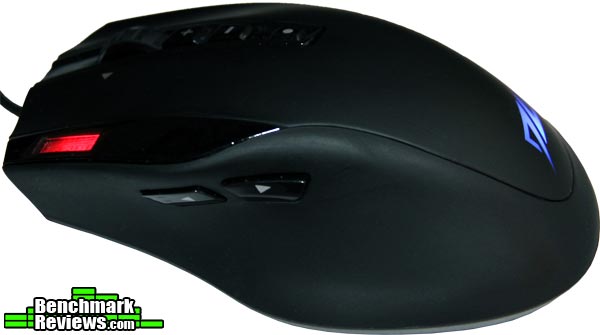
Thumb buttons are almost recessed flush with the body with only a 2mm extension at the center of each button. They are designed in such a way that the thumb covers both buttons easily (zero slippage). The entire surface of the mouse is covered with a type of synthetic rubber material. The advantage of this is that the porous nature of the synthetic rubber wicks moisture away from the palm easily and has the advantage of not being a fingerprint magnet.
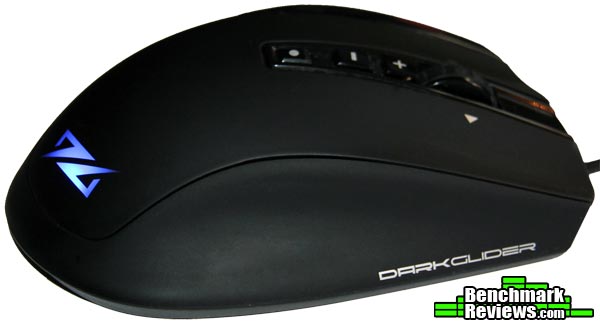
The right side of the DarkGlider provides support for either the last two fingers or just the pinky. This is important to note since on this type of mouse you want to keep all fingers on it (versus dragging the last finger on the pad like some with larger hands prefer); otherwise, the “glide submersion factor” is broken (more on this below). Being that this is one of the largest mice on the market, users with larger hands will not have to be concerned particularly with that, but keep in mind that using the “claw” method may be a put-off. The best technique for the DarkGlider is the “palm” method, or wrapping the hand over the mouse with the entire top of the palm touching.
The bottom of the DarkGlider not only provides access to the weights, but reveals the nano-coated ceramic lenticular pads. Up close the pads possess a shine very similar to dark chrome and are completely smooth. These pads make an incredible difference in contact surface dynamics, creating a precise and jitter-free experience. Recommended surface to use would be a soft mouse pad (cloth material with a rubber undercoating).

Another key feature is the DarkGlider’s backlit LCD display, which displays the current DPI. The screen is backlit red and is not adjustable for color or intensity (as the logo is). The 4-way all black scrolling mouse wheel can also be seen here: it has distinct notches when scrolling and provides pin-point control.

Aesthetically the DarkGlider has the lines and feel of the Mionix NAOS series mice, yet even more interestingly, it looks like a carbon copy of the limited edition Feenix Nascita mouse (a premium mouse that sells for more then double). Let’s examine the finer elements of this product and discover any more unique qualities.
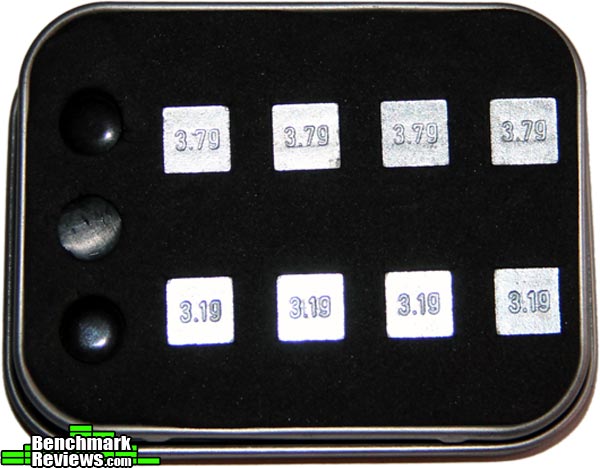
The choice of 3.19g or 3.79g weights may be utilized in the SharkGlider. Considering how slippery the mouse is (when using the ceramic pads), the more weight the better was used in testing. The Sharkoon tin conveniently holds all the accessories, including an extra full set of Teflon pads, and 2 spare ceramic pads. One thing to note is that the mouse weight chamber is exceedingly difficult to remove unless tweezers are involved. To remove the weights from the removable plastic nest they need to be poked out via a small hole on the back.
 |
 |
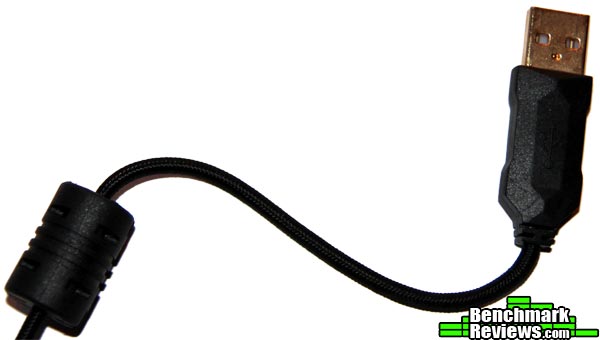
For those on the go, there is a durable Velcro bag included that fits the mouse and cord snugly. The cord is non-binding and is sheathed in a synthetic fabric material. The gold-plated USB 2.0 plug is covered in heavy-duty plastic, slightly thicker then a standard USB plug.
 |
 |
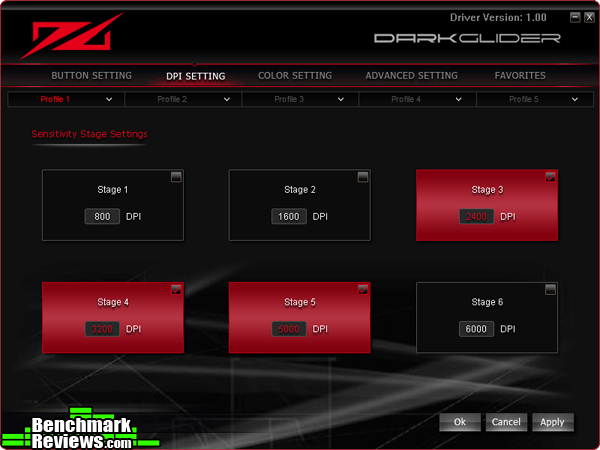
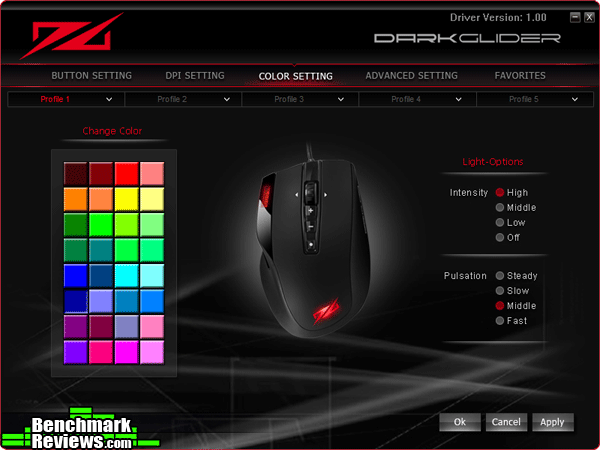
Moving on to the included software, the DarkGlider drivers are streamlined, logically organized, and displayed in an attractive fashion. The Button Settings panel is very straight forward, allowing to customize all mouse buttons. In the DPI Settings panel, there is 6 stages that you can toggle on or off. Oddly enough there is no way of fine-tuning the specific DPI for each stage. The Color Setting panel has 32 custom colors to illuminate the logo, with a choice of intensity and pulsation frequency.
 |
 |
 |
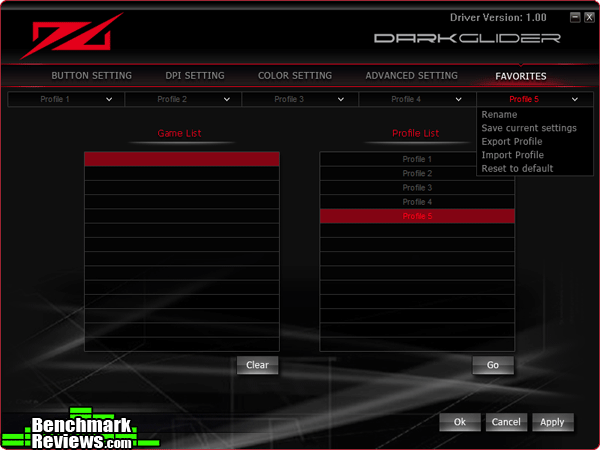
The Advanced Settings panel is for selecting polling rate (maxing out at 1000 HZ), tracking sensitivities, and an optional boot-up sound wave (which is very satisfying to hear by the way). The Favorites panel is where all 5 profiles can be associated with games (or programs).
 |
 |
The Sharkoon DarkGlider doesn’t actually need drivers installed to work perfectly right out of the box. They are only needed for the customizations. Once the parameters are flashed to the DarkGlider’s memory, the mouse may be moved to other machines with all settings intact.
The Sharkoon DarkGlider was tested over a period of six weeks. The programs used for the review consisted of Adobe CS5 (Photoshop and Dreamweaver) and the new IE11 for Windows 7. The games chosen required a more diverse range of sensitivity and consisted of: Alien Rage, Metro: Last Night, Sniper Elite: Nazi Zombie Army 2, Path of Exile.
- Motherboard: Asus P8Z77-M
- Processor: Intel i5 3570K Ivy Bridge @ 4.0 GHz
- System Memory: Corsair Vengeance 16GB (8x2GB) DDR3 1600 MHz
- Video: Gigabyte Windforce GTX 670 TI (2GB)
- Audio: HT Omega Claro Plus
- PSU: Cooler Master Silent Pro M700 (Gold)
- Monitor: LG 27EA83-D 27″ 5ms IPS @ 2560 x1440
- Operating System: Windows 7 (64 bit)
The Sharkoon DarkGlider has three polling rates available (per each of the five profiles) which include: 250Hz, 500Hz, and 1000Hz (the maximum polling rate was used for all tests). According to two separate polling tools, Direct Input Mouse Rate for DirectX (highlighted in orange), and Mouse Rate Checker, there was less then a 2% deviance in the for the advertised polling rate.

Desktop Applications: The Sharkoon DarkGlider excelled easily in everything thrown at it in this arena. With a native desktop resolution of 2560×1440 the DPI setting mostly used was 5000 DPI. In Photoshop when doing fine detail work such as airbrushing (zoomed up to pixel level), dropping the DPI down to 3200 was sometimes necessary. As long as the mouse pad was free of particles the gliding was indeed not only effortless and spot-on, but there was not even a quiver in the mouse pointer. Macros were setup to use multimedia features such as track forward and back using the side-scrolling features of the 4-way mouse wheel.
Gaming: The first person shooter games required the DarkGlider to be set down to 3200 DPI ideally, due to it being almost too sensitive despite the higher native resolution. After a short adjustment period of 10 minutes or so, it became almost effortless to frag in Alien Rage, where precision targeting is tantamount in obtaining the kill (you don’t really get a second chance at a good shot if there is over-correcting issues with the mouse). Path of Exile is a Diablo 3 type of game that was also effective in the respect of torture-testing the Omron switches in the left and right main buttons. Omron switches possess a characteristic of light switch activation sensitivity coupled with a positive tactile feedback. Gaming is what this mouse seems best suited for and it does it exceptionally well.
The DarkGlider far exceeded expectations: even with an extended use of over 8 hours at a time, there were no signs of fatigue or perspiration. Definitely heading in the right direction concerning ergonomics and comfort. Unexpectedly, the favorite feature was the implementation of the ceramic lenticular pads. The unprecedented “glide factor” completely added to the whole mouse experience. As a bonus these pads are seriously tough and there will be little to no wear on them as long as an appropriate surface is used.
There is room for improvement on this particular model. The most glaring factor is how difficult it is to remove and replace the included weights. In reality you probably only do this once or twice, but a much smoother interface should be considered. The LCD display is convenient, but would have been better if angled 45 degrees parallel to the left side for optimal viewing; furthermore, the ability to change the LCD backlighting similar to the logo would have been aesthetically pleasing.

It is evident that Sharkoon has done its job in researching the best features while asking a price that is seriously discounted. The DarkGlider is tough, comfortable, and completely accessible even to those who have never had a gaming mouse before. The laser sensor in itself is of premium quality and even the pickiest of users will be satisfied. Sharkoon has held true to it’s philosophy of combining premium quality and affordable prices.
As far the DarkGlider’s performance goes, there was not one instance in which the laser sensor or buttons misbehaved. With 6000 DPI, monitors with resolutions as high as 2560 x 2048 may be implimented with ease and precision. Sharkoon also paid close attention to the appearance of this mouse: from the elegant and ergonomic lines, to the subtle glowing logo, to the completely black on black component assembly really does make it “dark.”
The construction of the DarkGlider certainly does not feel cheap for the price point asked. Even though it consists mostly of heavy plastic, it is engineered well. The only criticism would be to have a more easily accessible method of changing the weights.
Sharkoon took more of a minimalistic approach concerning functionality and only included 6 default DPI toggle settings per each of 5 profiles. Under real-world testing this isn’t that big of deal-breaker; however, it would have been a benefit to have the choice of setting a custom DPI. The ability to flash the memory with custom settings and ditch the drivers all together does add to the overall functionality, especially for those with multiple computers.
As for value, the DarkGlider offers a tremendous amount of it. Selling for $50.85 (Amazon) there is not only the core high-end features, but additional accessories above and beyond such as the extra lenticular pads and the custom travel bag. If precision and style are important factors in choosing your next mouse, I can solidly recommend the “DarkGlider Experience.”
+ Elegant and ergonomic design.
+ Nano-coated ceramic lenticular pads for the “glide experience.”
+ Omron switches on main left and right buttons.
+ Streamlined drivers / none needed for basic functionality.
+ Excellent price point vs. features.
– Not able to fine-tune DPI settings.
– LCD readout not completely visible when in use.
– Weights are difficult to change out.
- Performance: 9.00
- Appearance: 9.00
- Construction: 8.25
- Functionality: 8.00
- Value: 9.50
COMMENT QUESTION: What one special feature can you not live without on a high-end gaming mouse?


