By Bruce Normann
Manufacturer: QNAP Systems, Inc.
Product Name: Turbo NAS
Model Number: TS-470
UPC: 885022004706
Price As Tested: $968.99 (NewEgg | Amazon | B&H)
Full Disclosure: The product sample used in this article has been provided by QNAP Systems, Inc.
I love it when I can predict the future. In the last year, I’ve shared with you some of the consistent signs that 10GbE Ethernet would continue its push down into lower cost products. Plain old Gigabit Ethernet has been holding back the performance of mid-range NAS devices for a while now. This is the third QNAP NAS Server that Benchmark Reviews has tested with 10GbE capability, and each successive model has occupied a spot further down the product line. The latest product on our test bench is the TS-470 Turbo NAS, a small unassuming tower with just four drive bays, and it looks much more consumer-oriented than the 8-bay rack mount units that we looked at before. This latest Turbo NAS series also gets a brand new set of consumer features – Audio and Video I/O, and an IR receiver on the front panel for a remote control. Enhanced features that benefit all user classes include a beefier CPU from the Celeron family, multiple USB 3.0 ports, and a PCIe expansion slot that provides more network connectivity options than we’ve seen before at this price point. In addition, there’s even a new version of QTS software that includes even more functionality.
The QNAP TS-470 Turbo NAS is part of a new model line that brings a higher level of performance to the small tower-based format. The TS-x70U rack mount series which launched earlier this year served up the basic technology package that’s been slimmed down here, in order to fit into the smaller form factor. The new TS-x70 towers are being promoted as business-class NAS servers, based on their high performance and networking package, but QNAP includes an HDMI port and IR receiver for good measure. Also included in the base package is a 2-port GbE NIC, installed in the PCIe expansion slot. Most business users will be able to increase the network throughput of this NAS with Port Trunking, thereby making effective use of all four GbE ports on the rear panel. Those who need more bandwidth can just replace the 2-port NIC with a 10GbE model.
With four 3.5″ drive bays available, there is a potential for 16TB of storage, plus the ability to link up an expansion chassis through the eSATA ports. If both capacity and redundancy are needed, RAID 5 is a minimum. If you want to go to RAID 6 or RAID 10, you need a minimum of four disks, with two spindles completely occupied by providing multiple levels of redundancy for your data. A four-bay device is really the bare minimum for a high availability NAS appliance, and that’s why the smallest unit in this series is the TS-470, which is the exact unit we have here for review. This new series also supports SSD caching, but I’ll discuss that in a future article. As with all things SSD, it gets complicated…..

Benchmark Reviews has tested a wide array of QNAP NAS products, ranging from the QNAP TS-119 NAS single-disk offering made for home users, to the Goliath QNAP TS-879U-RP 8-Bay NAS for the storage needs of large businesses. Most recently we tested the 8-bay TS-870U-RP which paved the way for this new TS-x70 tower-based series. Let’s see how this latest Turbo NAS compares to those 8-bay corporate animals, and to a variety of siblings and competitors.

Some of the Quick Setup features were introduced with version 3.8, but QTS 4.0 expands on them, and provides a smoother user experience. The setup process is flexible, in that there are three automated ways to do it: online at https://start.qnap.com and click “Start Now”, a “Cloud” version of the online setup, which is easily accessed with a QR code that is printed on a label, and the old-fashioned way of using the supplied CD to access the startup files. There’s also the full manual setup, which is easy enough, once you know which files to download from the QNAP support website. We’ll take a closer look in the NAS Server Setup page of this review.

It seems a bit odd to be talking about file management as a “new” feature for a NAS server…. I mean, what else have NAS devices been doing for the last five years? Well, they haven’t always been stellar at cross-platform file sharing, for one. They also have almost always had strange, non-standard user interfaces for file management. The applications always showed their backup software heritage, which means that they were all non-intuitive and obtuse. With QTS 4.0 File Station, things look more like a typical O/S file manager, something we’re all a lot more familiar with.

The integration of TV and home network continues apace. For those who don’t want to ditch their large screen TV, just because it’s not a “SMART TV”, or if you’re afraid that it might spy on you when you’re not looking, QTS 4.0 offers a rich set of interfaces that use the built-in HDMI connection on the Turbo NAS. HD Station is able to display movies or videos stored on the NAS directly on the big screen, with controls that are conveniently integrated into your iOS or Android mobile device. On top of that, HD Station supports the Chrome browser, so the entire internet experience is available in your living room, via the TurboNAS network connection. The AirPlay and QAirplay apps stream media content to Airplay-enabled devices. QAirplay works without your iOS mobile device, so you don’t have to use up precious battery life on your mobile.

Qsync offers the file sharing and synchronization of cloud tools like Dropbox, without the fees and storage limitations that commercial sites impose. Your TurboNAS is much bigger, much faster, less expensive, and more secure than most of the alternatives available on the market today. Go ahead, ask Amazon what 12TB of storage on AWS will cost you, on a yearly basis…. All the same features are available with Qsync like selective synching per folder, anonymous download links for less sensitive documents, and shared team folders for more intense collaboration efforts.
Those are the highlights for a typical home user. Now, let’s focus on some of the new features that will benefit the business user.
It seems silly to be talking scale-up in a review of a four-bay NAS, but the TS-x70 series only starts with a 4-bay model; it ends with an 8-bay server, and the scale-up capability built into the new QTS 4.0 software means it doesn’t really end there either. The new Storage Manager built into the latest version of software makes a lot of things possible, including the ability to add about 400 TB to an existing NAS, all in the background without losing access to existing data. That’s right – no disruption in service, including apps that are running in the background.

If you are taking advantage of the expansion capability that QNAP offers with QTS 4.0, there will come a day when, even with 20+ multi-TB disks in play, some business unit runs out of storage space. Maybe it’s the Marketing team, with all their product videos, maybe it’s the Product Support team with their huge archive of legacy product data; it doesn’t matter. Someday it will happen, and on that day you will be eminently thankful for the Intelligent Storage Manager, Storage Pools, and Flexible Volume Allocation. Trust me on this!

Performance is a team effort. Big, efficient drives and fast drive controllers can’t push the data out any faster than the network interface can send it. SSDs have been hamstrung by their data controllers since day one. Every single NAS benchmark I did, before I got a 10GbE network up and running, was compromised by network throughput that topped out at ~ 125 MB/s. As much as I understand the controversy behind “You didn’t build that.” there is a time and place for viewing things from a systems perspective. The TS-470 offers SSD caching, SMB 2.0 support, and optional 10GbE networking, which combine together to deliver extraordinary results. Check out our benchmarks, later in this article, if you don’t believe me.

Hot RAID spares, global hot spares are pretty standard these days, but the RAID rebuilding process is usually slow and it impacts performance. With QNAP SMART data migration, data from a failed or misbehaving drive can be proactively migrated to a spare without going into a RAID rebuild process. In addition, read errors are tackled head on with an advanced RAID read error recovery technique. When bad blocks are encountered, data is recovered from other drives in the array and rewritten to new blocks. This process runs in the background, keeping all data up-to-date and correct.
Now that we’ve seen some of the new software features, let’s focus on the hardware for a moment.
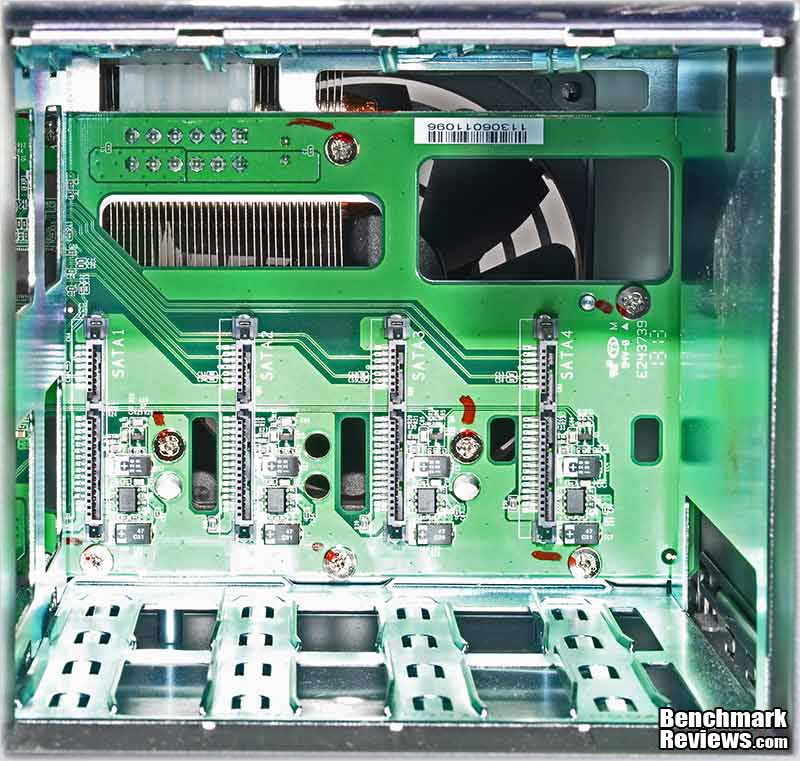
Before we dig into the real innards of the QNAP TS-470, here’s the “drives eye” view of the NAS. Twelve pins worth of power enter from the upper left, and it’s easy to see the traces that angle down towards the power portion of the SATA connectors. The signal portion of the SATA interfaces are located right below them, and although the backplane looks like it’s just a passive connector board, there is a Marvell SATA controller chip located on the upper left, just out of sight behind some sheet metal. The main cooling fan is partially visible from here, and the fins from the CPU cooler are too, although they’re tougher to see when viewed on edge.
The top cover is easily removed once three small screws on the back panel are removed. The modular layout is quite evident; the main board takes up the whole left side of the unit, and the PSU is sitting right on top of the drive bay. The cooling fan is mounted on the rear panel, right in line with the drive bay. The CPU back plate dominates the back surface of the controller board, evidence that this is no Atom-based device, and that there is more power on tap than usual. The QNAP TS-470 Turbo NAS server is equipped with an Intel Celeron G550 processor, which is based on the 32nm Sandy Bridge architecture, and is clocked to 2.6 GHz, according to QNAP. The TS-470 doesn’t have the top-of-the-line CPU in QNAP NAS servers – that would be the systems with Xeon processors, but a modern dual-core Celeron is still a huge step up from any Atom-based model. The only question is whether it has enough horsepower to max out the system performance in a four-bay unit, and we’ll find that out shortly. That long, dense row of pins above the CPU is the 16x PCIe 2.0 expansion slot, which makes all the difference in terms of performance flexibility. On the lower right of the controller is where the DRAM modules are located, and you can see that the SO-DIMM slots do not face this direction, they are pointed towards the internal drive bay. This makes it very difficult to upgrade the DRAM, and QNAP does not officially support any memory upgrades for the TS-x70 units, anyway.

Looking straight down from the top, you can see the installed expansion card better, as well as the power supply wiring to the main board and the backplane. The wiring from the PSU to the main PCB is very straightforward and short. The main controller board has a familiar ATX arrangement, and the backplane PCB gets its own dedicated power connector direct from the PSU, for all those power-hungry HDDs. If you think about how much current it takes to spin up large capacity drives, with three or four heavy platters inside each one of them, it’s clearly a good idea to have substantial power cables feeding the backplane PCB directly. The blue expansion card is a dual port NIC, with a 4x PCIe 2.0 interface. The expansion slot uses a 16x connector and is wired for all 16 lanes, but the two GbE ports only need 4x to get by. I’ll be doing a portion of the testing for this model with the QNAP LAN-10G2T-U, Dual-port 10 Gigabit Network Expansion Card, which has two 10GBASE-T ports, with standard RJ-45 connectors. The firmware instantly recognized the 10GbE NIC and there was no manual configuration required to get it up and running. Several models from Intel and Emulex are also supported, with options for fiber optic cabling and SFP+ ports, too. I’ve personally tested the Intel X520-T2 (E10G42BT) adapter on a similar QNAP Turbo NAS and also had a solid, carefree experience with that combo.

Once the rear panel is removed, if you look back inside the TS-470 chassis, the secret CPU cooler is revealed. Power has a price, and in the case of CPUs, part of that price is excess heat, that must be dissipated out of the electronic package and into the atmosphere. Fitting this miniature heat pipe style cooler in here was probably a bit of a challenge for the packaging engineers. It did make disassembly of the NAS unit a little more difficult, but otherwise it fits in like it was always there, from the beginning. One other thing that’s clear to me is that there’s room left for expansion, if a more powerful CPU is needed. All that’s needed is to make the heat pipes a little longer and add more fins towards the left. The Intel G550 does everything this 4-bay NAS needs, but the TS-870 might benefit from an i3 or i5 solution.

If you could crawl inside the drive bay, and had X-ray vision, this is the view you would get of the main controller board for the QNAP TS-470. Typical for SFF computing, the CPU cooling solution dominates the physical landscape. Although all the elements of a mini-ITX board are present here, the overall layout and feature set don’t match up. In the rack mount NAS units, there’s a bit more flexibility in packaging, and more standard designs can be used. A case in point on this board is the small 4x PCIe connector towards the bottom, that’s mounted 90 degrees out of phase from the 16x expansion slot at the top. The small 4x connector is for the SATA backplane, which you won’t find on a typical mini-ITX PC.

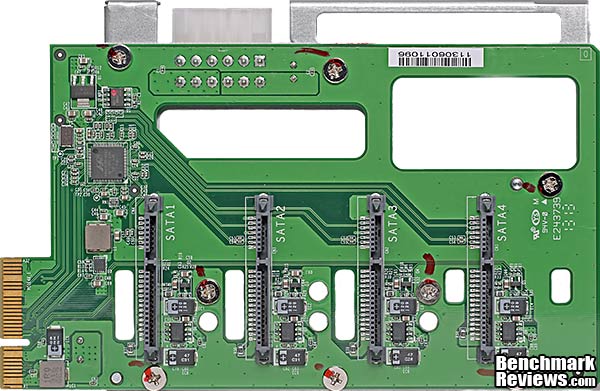
Speaking of the SATA backplane, here it is, in its entirety. The edge connector transfers the PCIe signals to this vertical board that serves as the backplane for all the SATA HDD connectors. It’s not just a passive board, as there is a drive controller IC located on the backplane. This is consistent with how QNAP builds their larger tower models, putting the controllers closer to the drives they are responsible for. The Marvell 88SE9235 SATA controller chip handles all four drives, so the board isn’t littered with active ICs, but it’s easy enough to spot. All the other larger components mounted on the board are power supply and monitoring chips.
The memory controller is integrated on the Intel G550 Celeron CPU, and it’s designed to handle DDR3-1066 memory modules in its native configuration. The QNAP TS-470 comes standard with 2GB of DRAM, which is installed in one of the two SO-DIMM sockets located on the main board. The specs for the TS-470 don’t call out a maximum memory capacity more than the 2GB that’s already installed, but it’s more than adequate for a NAS running Linux. Similar models have been running OK on 512MB for several years. Based on my testing, straight data transfers use very little of the NAS memory capacity. There are dozens of more challenging apps that you can run on a QNAP NAS though, and the extra memory might have a bigger impact on some of those. Installing additional memory would surely invalidate the warranty, since the only way to get the SO-DIMM into the second socket is to take the NAS almost completely apart. Based on QNAP forum postings, this does not bother everyone…..

So far we’ve had a good look at what there is to observe as far as hardware goes, but let’s dig down one more layer, down to the chip level where the technology really starts to get interesting. I love my hardware just as much as the next person, but it’s only half the story….
The biggest chip on the board is the Intel Celeron G550 CPU, a dual-core member of the 32nm Sandy Bridge family. It’s certainly got the biggest heatsink, a finned aluminum block held in place by four heavy-duty springs, and two heatpipes coming off at a right angle, leading to a small fin assembly which is strategically placed in the airflow created by the 92mm rear cooling fan. I’ve often wondered why almost all NAS vendors seemed to be stuck on the Intel Atom platform, and now I can see why. It’s been a question of thermal packaging all along. QNAP had to use a few tricks to get enough cooling capacity into the same size chassis as the Atom-powered servers, and their work paid off. The marketing material is very vague about exactly what CPU is inside the TS-470; that’s what drove me to pull the whole thing apart and remove the newly designed heatsink from the Socket 1155 CPU mount. Part of me thinks that there is an upgrade coming down the line, as the G1610 CPU, from the Ivy Bridge family is pretty much a one-for-one replacement in this application. With a 22nm technology, instead of the 32nm employed on the G550, TDP is reduced from 65W to 55W. Now that the cooling puzzle has been solved, I expect QNAP to up the ante at least once more, in a future model upgrade somewhere down the line. The G1610 is only about 5% faster than the G550, but the lower TDP is a nice bonus and the price difference may cross over sooner, rather than later. Technically, the G550 is listed as “end of life” by Intel, but I’m sure there are lots of chips in the pipeline.

As much work as the CPU does, it’s isolated from directly communicating with most of the subsystems by the Intel Platform Controller Hub (PCH), which we all used to call the Southbridge (back when there was this thing called a Northbridge…). This is the second hardest working chip on the main board, and it’s also got a heatsink on top, although it’s less that 1/10 the capacity of the one on the CPU. The Celeron CPU in the TS-470 does not have native CPU support for the Advanced Encryption Standard New Instructions (AES-NI) set. These new instructions speed up the encryption/decryption process by anywhere from 3x to 10x, depending on the implementation. As slow as the Atom-based and Marvell-based models are with encryption enabled, the QNAP TS-x70 models are the minimum level that can realistically support AES 256-bit Volume-based data Encryption. Even with the enhanced computing power offered by a Sandy Bridge CPU, the extra load of data encryption is just too much to handle without a major performance hit. If you need volume-based encryption, you really should consider spending the extra to get a CPU that will offer reasonable performance, which means a model that has native support for the AES-NI instruction set. So far, I have yet to see a NAS product based on an AMD CPU, but the Bulldozer and Piledriver cores are both supporting AES-NI now.

To mate with the much more powerful CPU employed in the TS-470, QNAP chose the H61 Platform Controller Hub. Its direct support for HDMI is one reason to choose it. The fact that it’s the go-to reference design for mini-ITX motherboards means it’s easy to source, and programming support is widespread.

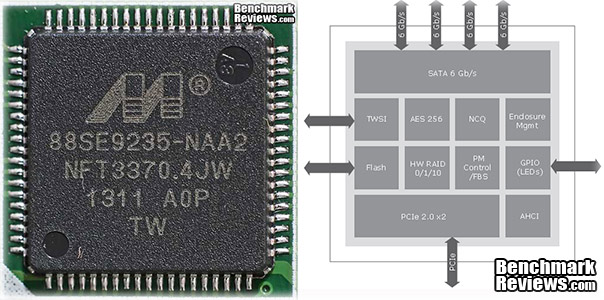
Marvell supplies the SATA interface ICs for many of QNAP’s products, as well as for other manufacturers. There is only one used on the TS-470, marked 88SE9235, and it serve as the interface between the system’s PCI-Express lanes and the four SATA devices. The controller is physically located on the SATA backplane and it supports four 6 Gb/s SATA interface ports and a two-lane 5.0 GT/s PCIe 2.0 host interface back to the Intel H61 PCH. The primary usage of the TS-470 is with traditional 3.5″ HDDs in all the bays, none of which operate anywhere near the full capabilities of the SATA 6Gb/s interface. QNAP has provided an option in their latest QTS 4.0 software to add one or two SSDs as cache devices, and the Marvell controller will have to deal with their much higher throughput. I didn’t test that capability yet, but I will.
USB 3.0 is not one of the features supported by the Intel H61 Platform Hub Controller, so an extra chip is needed, and QNAP chose the EtronTech EJ188H. This is the first time I’ve anything besides the Renesas (nee NEC) µPD720200 controller for USB 3.0 duties. Someone had to break u the monopoly, and it looks like EtronTech finally did it. Every PC (…errrrr, NAS) needs a Super I/O + Hardware Monitor. In this case, those duties are handled by the Fintek F71869AD. It’s unlikely that QNAP needed the IEEE 1284 Parallel Port, Keyboard Controller, or Floppy Drive Controller that are included here, but they no doubt used the auto-controlling fans and temperature sensor pins for the CPU thermal diode. Once again, Fintek is a new name for me, and in this very mature application they are probably competing on price.

QNAP relies heavily on Intel for their Ethernet controllers in the high-end models of their product line. It’s a smart move, as Intel is a leader in this area, even though they’re not very well known for it by the public. The Intel WG82574L provides the interface for the twin GbE network ports on the rear panel. Additional network ports are available on a variety of PCIe NICs that can be added to expand the capability of the TS-470. We’ll see later, in our RAID testing, just how critical Ethernet performance is to a product like this. We’ll also see the impact of switching to 10GBASE-T, with QNAP’s LAN-10G2T-U, Dual-port 10 Gigabit Network Expansion Card. A Realtek ALC662 5.1 Channel High Audio Codec is used to drive the audio ports on the rear panel, and the embedded audio in the HDMI interface. This is a typical audio solution, just like you would find on a mid-range PC motherboard. Not over the top high-end sound, but a perfectly serviceable audio controller, nonetheless.

To measure isolated NAS power consumption, Benchmark Reviews uses the Kill-A-Watt EZ (model P4460) power meter made by P3 International. Obviously, power consumption is going to depend heavily on the number and type of drives that are installed. The power draw also depends on the fan speed that’s required to keep the unit cool. When the device first starts up and the system completes its boot process, it then gets into idle standby mode, where it consumed 42W. This is slightly higher than the 38.4W specified by QNAP for a system with four 500GB drives installed. With all drive bays filled and during heavy file transfer operations, it drew 63W. When the system goes into Sleep Mode and spins all the drives down, the power is reduced to 22 watts. When the unit is turned off, it still consumes 1-2W in Vampire mode; be aware that even when it’s turned off, the internal switch-mode power supply still pulls a small amount of power.
We’ve seen the ins and outs of the hardware, the new software, and the technology under the hood; now let’s take a detailed look through the extensive list of features that you get with most every QNAP Turbo NAS. I know the next couple of sections are overly long, but it’s critical to understand just how much these units can do. You don’t want to be fooled into thinking it’s just a big box full of drives. It’s capable of so much more than that.
As the data value and volume of business data continue to rise, corporations need high-performance storage solutions which are secure, reliable, and easy to manage. The QNAP® TS-470, which serves as both IP-SAN (iSCSI) and NAS, can be easily utilized in different business and enterprise applications such as backup center, disaster recovery, file sharing, virtualization, and video editing storage.
NAS + iSCSI/IP-SAN Solution for Server Virtualization
With increasing virtualization of IT resources, the need for high performance storage is more essential than ever. The TS-470 offers class-leading system architecture matched with optional 10 GbE networking performance designed to meet the needs of demanding server virtualization, such as VMware®, Citrix®, and Windows® Hyper-V. 10 GbE network speeds greatly increase the agility of data transmission in a virtualized environment intensifying NFS and iSCSI connection performance.
The Feature-rich and Integrated Applications for Business
The NAS supports file sharing across Windows, Mac, Linux, and UNIX platforms. Versatile business applications such as file server, FTP server, printer server, web server, and Windows AD support are provided. The dominant features, such as WebDAV, Share Folder Aggregation (also known as DFS), IPv6 and IPv4 dual-stack, Wake on LAN, schedule power on/ off, HDD S.M.A.R.T, comprehensive log systems, and policy-based unauthorized IP blocking are all included features of a QNAP NAS server.
Secure – Data might seem insecure being open in a network, but the QNAP® TS-470 offers a variety of security options such as encrypted access, IP filtering, policy-based automatic IP blocking, and more. In addition, full control of the NAS is offered down to the user and folder access rights to determine who can access the NAS and what can or cannot be accessed. The TS-470 is packed with security features to stop all unauthorized data access such as AES-256 volume-based encryption. The AES-256 volume-based encryption prevents sensitive data from unauthorized access and data-breach even if the hard drives or the device is stolen.
Reliable – The TS-470 is reliable with built-in safety precautions to safeguard all data from any unforeseen problems. With multiple built-in features to guarantee no interruptions to the work flow of a business, the TS-470 is an efficient asset. The advanced RAID configurations and hot-swap capabilities are included to give RAID performance, protection and reduced rebuilding time. Moreover, the dual OS embedded on the DOM architecture ensures the system will boot up. If one of the two operating systems fails, the healthy operating system will boot up and operate normally while repairing the failed operating system. The four Gigabit LAN ports in the standard configuration can also be configured for failover which allows the NAS server to sustain the failure of multiple network ports and still provide continuous services.
Simple – Setting up local or remote access with the TS-470 is painless and does not require any IT skills. All setup processes have been simplified so that most of the process is either automatic or can be completed by an installation wizard. The user-friendly web GUI allows administrators to easily manage the NAS so there is no need for an extensive knowledge of complex commands. Simple management tools such as instant SMS/Email alert, the hard drive S.M.A.R.T. (Self-Monitoring, Analysis and Reporting Technology) feature, and system resource monitor are provided to keep administrators up-to-date on their NAS at all times.
High Network Bandwidth – The TS-470 offers network expansion options which include dual-port 1 GbE and dual-port 10 GbE network expansion cards, to aggregate and boost network performance. The TS-470 includes two Gigabit (GbE) LAN ports on the rear panel, and another two Gigabit (GbE) LAN ports on a PCIe NIC in the standard configuration. The standard NIC can be swapped with a dual port 10 GbE NIC, and this does not affect the operation of the two integral GbE ports.
Blazing Fast Data Backup via USB 3.0 – The TS-470 features USB 3.0 ports for high speed backup to external hard drives. EXT3, EXT4, NTFS, and HFS+ file systems are supported to ensure compatibility with Windows, Mac® OS X, and Linux operating systems.
Cross-platform Sharing with Antivirus – The TS-470 supports SMB/CIFS, NFS, and AFP protocols for file sharing across Windows, Mac, Linux/UNIX networks. User accounts and shared folders can be created via the user-friendly web-based interface without IT expertise. The integrated antivirus solution for the Turbo NAS ensures business continuity by offering detection against the latest viruses, malware, worms, and Trojan horses.
iSCSI for Virtualization Deployments
The Turbo NAS provides flexible and secure storage server deployment with the following enhanced iSCSI features:
NAS + iSCSI storage solution
The Turbo NAS can serve as a NAS for file sharing and iSCSI storage concurrently.
Flexible multiple LUNs management
The NAS supports multiple LUNs (Logical Unit Numbers) and iSCSI targets. The LUNs can be flexibly mapped to, unmapped from, and switched among different iSCSI targets.
Secure IP SAN environment deployment
Designed with CHAP authentication and LUN masking, the advanced ACL (Access Control List) offers you the capability to block unauthorized access from the initiators.
Designed for virtualized and clustered environments
Comparing with the high cost of Fibre Channel SAN, the Turbo NAS is an affordable system that can be deployed as a storage center for virtualized and clustered server environments, such as VMware and Microsoft Windows Failover Cluster.
Advanced RAID Management with Hot-swap Design
The NAS offers advanced RAID 0, 1, Single, and JBOD disk configurations. It also supports hot-swap design that a failed drive can be replaced by hot swapping without turning off the server. Besides, the best-in-class RAID on the NAS brings users a higher level of data security by allowing one more hard drive failure than other NAS of the same level.
Online RAID Capacity Expansion
The storage capacity of a RAID configuration can be expanded by replacing the hard drives with larger ones. All the data will be kept and seamlessly moved to the newly installed hard drives. There is no need to turn off the server during the process.
Online RAID Level Migration
You can upgrade the disk configuration to higher RAID level with the data retained. There is no need to turn off the server during the process.
Virtual Disk Drive (VDD) adds flexibility to storage expansion along with ease of management
The unique “Virtual Disk Drive” adds flexibility to expand the capacity of NAS. By using the built-in iSCSI initiator, the NAS can connect to other iSCSI targets on the network and turn them into virtual disks, which become multiple single volumes on the NAS. The NAS serves as the storage stack chaining master. The user only needs to connect to this single entry (QNAP NAS) and is able to reach and use all the iSCSI target storages on the network.
S.M.A.R.T & Advanced HDD Health Scanning (HHS) The NAS supports Hard Disk Drive S.M.A.R.T (Self-Monitoring Analysis and Reporting Technology) for monitoring the hard drive status. Moreover, the NAS is embedded with HHS Technology which supports disk checking and bad blocks scanning.
UPS Support
The NAS supports the majority of USB UPS devices which enables the users to store the data in time and avoid critical data loss when power outage occurs during data transfer.
Video Editing
Digital film and video production produces volumes of data that require high performance RAID storage with sustainable throughput to balance with the demanding output of video editing. The TS-470 fulfills storage and video editing needs with an optional high speed 10 GbE network interface. Digital videos can be quickly stored and edited on the TS-470 directly over the network.
QNAP Backup Software – NetBak Replicator
The backup software, NetBak Replicator, is provided for the NAS users to perform real-time synchronization or schedule backup from multiple PCs to the NAS.
3rd Party Backup Software Ready
The NAS works well with other backup software, e.g. Acronis True Image, CA BrightStor ARCserve Backup, EMC Retrospect, Symantec Backup Exec, and LaCie Silverkeeper.
Encrypted Remote Replication
The data on the NAS can be backed up to or from another Turbo NAS over the network securely.
Sharing Files across Windows, Mac, Linux, and UNIX
The NAS is designed for users to share the files across Windows, Mac, Linux, and UNIX environment.
Windows Active Directory (AD) and LDAP Directory Service
The Windows AD and LDAP (Lightweight Directory Access Protocol) directory service features enable the system administrator to retrieve user accounts from Windows AD or Linux LDAP server to the TS-870U-RP reducing time and effort in account setup. Users can use the same login name and password to access the TS-470.
Web File Manager The NAS provides Web File Manager for you to easily download, upload, and manage the files on the server by web browser.
Ease of User and Share Folder Management
The NAS supports batch creation of users and share folders to save the time and effort of the server manager in account and folder creation. For the security of Windows network environment, server managers can hide or show network share folders.
Hard Disk Standby
You can configure the hard disks to enter standby mode if there is no disk access within the specified period.
Schedule Power on/ off
The flexible schedule power on/off feature is now provided on the NAS for IT administrators to manage the NAS server’s up time according to the working hours. You can set the time for automatic system power on, power off, or restart on any days of the week.
Secure data storage, access, and sharing
- Comprehensive event logs: Detailed logs of file-level data access to the NAS via samba, FTP, AFP, HTTP, HTTPS, Telnet, and SSH, and networking services accessed by online users are all recorded.
- SSL security (HTTPS): The NAS can be accessed and configured by web browser securely.
- Remote login to the NAS by SSH (secure shell) or Telnet connection is supported.
- Secure FTP: The data can be transmitted with SSL/TLS (explicit) encryption. Passive FTP port range setup is also supported.
- Write-only access right on FTP server: The third party partners are allowed to upload data to the NAS but not able to read or edit the data on FTP server.
Policy-based Automatic IP Blocking
To prevent the NAS from malicious attacks, the server manager can create an IP filter policy to allow, deny, or auto-block the IP address or network domain which attempts to connect to the NAS via SSH/ Telnet/ HTTP(S)/ FTP/ samba/ AFP.
The most comprehensive support for numerous brands of IP cameras
The Surveillance Station of QNAP NAS supports over 1400 models from all the leading network camera brands such as AXIS, D-Link, IPUX, LevelOne, Linksys, Panasonic and Vivotek etc. Each of the supported cameras has been put through stringent tests with the NAS series in QNAP’s laboratory to guarantee 100% compatibility and reliability with all these camera brands.
The first thing you need to do with most NAS devices is discover them on your network and set them up. Most NAS vendors bundle a small, lightweight “finder” application with their products that has some system utilities included. The QNAP Qfinder 4.0 application provides device discovery, login to the main admin app, access to the folders on the NAS, multiple connection choices, device configuration, a report of device details, a resource monitor widget, a bookmark command, drive mapping, firmware update utility, and Startup/Shutdown functions, all before you log in to the full monitoring & control applications via the web browser. There are a number of sub-menus that you go through during initial setup; once you do that, the same setup wizard is still available, from the Configuration button, in case you get forget your password or need to reconfigure the NAS. Otherwise, just use your browser and login to the IP address that the NAS is configured to; the factory default is 169.254.100.100.
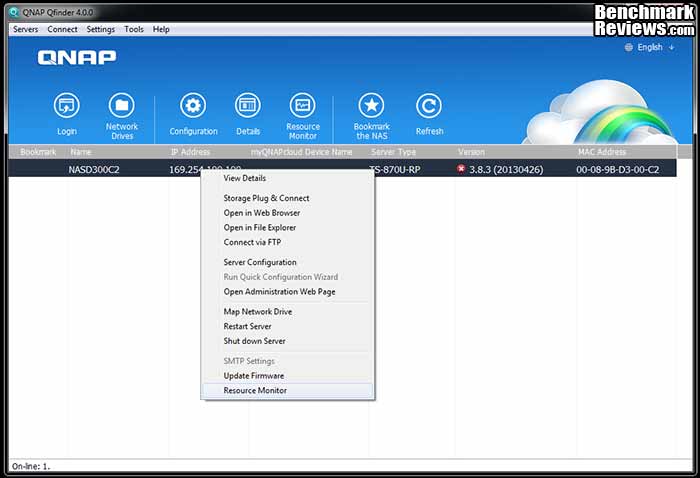
The setup process is flexible, in that there are three automated ways to do it: online at https://start.qnap.com and click “Start Now”, a “Cloud” version of the online setup, which is easily accessed with a QR code that is printed on a label, and the old-fashioned way of using the supplied CD to access the startup files. There’s also the full manual setup, which is easy enough, once you know which files to download from the QNAP support website. No matter which way you choose, it’s going to be a series of screens that guide you through the basics. The first three are easy; name of the NAS server, choose an Admin password, and set the clock. Then you need to establish the basic network settings of IP address, subnet, default gateway, and DNS server. The default settings are mostly designed around simple network structures, but the LAN techs will have no problem setting them to match a more complex corporate environment. Then comes network services, which offer the choices of Microsoft, Apple, NFS Service, FTP Service, Telnet/SSH, SNMP, Web Server, and Network Service Discovery. Again, the defaults will work for novices and the extensive options will keep the tyros happy. Finally, the disk or disks are initialized. You can start with one disk and migrate to the desired configuration later, or you can fill all four drive bays at once and configure the array from the start. Synchronizing a large array can take several hours, so if you want to do all the setup work at the beginning and then let the NAS server build the array overnight, that’s not a bad strategy.

Once you log in to the NAS the first time, you’ll have one more opportunity to set up some of the more advanced capabilities of the TS-470. After the Welcome screen, you get the following:
- First is the drive mapping feature
- Second is the Multimedia setup
- Third is the HTPC configuration
- Fourth is the Personal Cloud setup
- Fifth is the File Sync application, which was in Beta during the test period
- Sixth is the APP Center.

Once the initial setup is complete, you need to log in to the main admin application, which QNAP calls QTS 4.0. The default main screen presents you with several large icons:
- Control Panel
- Photo Station
- Music Station
- Video Station
- Download Station
- File Station
- Backup Station
- myQNAPcloud
- Qsync
- Surveillance Station
- Antivirus
- APP Center
Each of these icons spawns a new window, much like any app would do. The old Administration icon has been renamed to “Control Panel”, and that is where experienced users will probably head first, in order to complete the customization process.

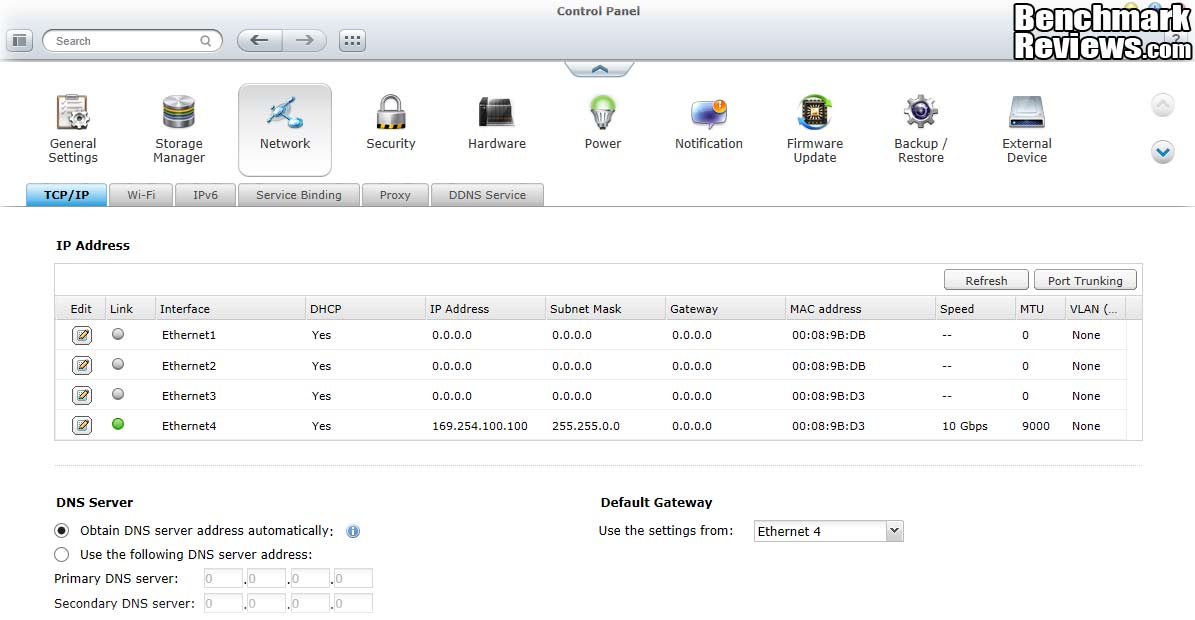
One of the critical aspects of setting up a NAS is the networking configuration. It’s so easy to get it wrong and accidentally shut down access, that QNAP includes tools in their setup wizard application, which you can still access after you inadvertently locked yourself out. If you get it completely out of whack, it’s still possible to recover by using the system reset button, which can be accessed through a small hole in the rear panel. Once you’re inside, this screen lets you change global settings and individual settings for each of the four Ethernet ports available on the system. IPv4 and IPv6 are both accommodated and a Port Trunking is also available as an option. The two integral ports on the TS-470 are labeled “Ethernet 1” and “Ethernet 2” in the software; and I’m happy to say that the ports on the back panel are physically labeled as well. The additional ports that are contained on the expansion card(s) are not always labeled; YMMV since there are about half a dozen cards from three different vendors that are supported. Some may have labels, most probably won’t. Once the ports are configured, you can make changes on the fly from this screen, just click the “Edit” button on the far left, for the adapter you want to update.
Let’s look at the RAID expansion and Migration process a little. The Storage Manager screen is used to configure the individual disk volumes, storage pools, and the disk arrays. Storage Pools are a new addition to the QNAP range, and they increase storage capacity allocation flexibility quite a lot. This is the first time I’ve seen them on a Linux-based NAS server, but they’re a mainstay in the Solaris operating system, with its ZFS file system. Our testing protocol at Benchmark Reviews uses both single disk and RAID 5 storage configurations. Besides the raw test scores we get from those setups, it also allows us to go through the RAID Migration process to see how well that works. Plenty of people start small when they get a new NAS, and expand the capacity later. After I added the remaining three disks to the system, I chose RAID 5 from the pick list and the new volume only took a couple of minutes to initialize. The TS-470 migrated from no RAID to RAID 5 in one easy step. Then I noticed that the system was ‘synchronizing’ the disks. This process took the normal 2-3 hours to complete. I’ve definitely gotten spoiled by the Solaris systems I’ve tested recently, that used pools to manage disk configurations. On those systems, I was able to make this same transition in a few minutes. Maybe the synchronization was still going on in the background, but I never noticed any impact on performance immediately after a volume migration.

Ok, if you’ve been following along this far, there’s not much more I can show you except how fast it is. So let’s get down to some benchmarking, and compare it to a variety of other NAS products that we’ve looked at recently.
Benchmark Reviews primarily uses metric data measurement for testing storage products, for anyone who is interested in learning the relevant history of this sore spot in the industry, I’ve included a small explanation below:
The basic unit data measurement is called a bit (one single binary digit). Computers use these bits, which are composed of ones and zeros, to communicate their contents. All files are stored as binary files, and translated into working files by the Operating System. This two number system is called a “binary number system”. In comparison, the decimal number system has ten unique digits consisting of zero through nine. Essentially it boils down to differences between binary and metric measurements, because testing is deeply impacted without carefully separating the two. For example, the difference between the transfer time of a one-Gigabyte (1000 Megabytes) file is going to be significantly better than a true binary Gigabyte (referred to as a Gibibyte) that contains 1024 Megabytes. The larger the file used for data transfer, the bigger the difference will be.
Have you ever wondered why your 500 GB hard drive only has about 488 GB once it has been formatted? Most Operating Systems utilize the binary number system to express file data size, however the prefixes for the multiples are based on the metric system. So even though a metric “Kilo” equals 1,000, a binary “Kilo” equals 1,024. Are you confused yet? Don’t be surprised, because even the most tech savvy people often mistake the two. Plainly put, the Kilobyte is expressed as 1000 bytes, but it is really comprised of 1,024 bytes.
Most network engineers are not fully aware that the IEC changed the way we calculate and name data chunks when they published the new International Standards back in December 1998. The International Electrotechnical Commission (IEC) removed the old metric prefixes for multiples in binary code with new prefixes for binary multiples made up of only the first two letters of the metric prefixes and adding the first two letters of the word “binary”. For example, instead of Megabyte (MB) or Gigabyte (GB), the new terms would be Mebibyte (MiB) or Gibibyte (GiB). While this is the new official IEC International Standard, it has not been widely adopted yet because it is either still unknown by institutions or not commonly used.
All the NAS devices we test cannot accommodate all the different disk configurations, so our current test protocol has been based on two of the most popular setups: a basic (single) disk and RAID-5 configurations. Most NAS products that can support RAID 5 go beyond the minimum number of drive bays, to a total of four, so that is the number of drives that I typically use to test with, even though I could get by with only three. During initial setup, the NAS was upgraded to the latest v4.0.5 firmware by flashing the DOM with binary files from QNAP’s website. The installed firmware and the files on the included CD were only about one month behind the latest versions, but I always look for the newest before starting a round of testing. QNAP makes the firmware update process quite painless and foolproof; I’ve never had a problem updating Turbo NAS firmware. I connected the TS-470 NAS directly to an Intel X520-T2 10Gbps Ethernet NIC in the test-bench system, with a ten-foot CAT6 patch cable. I set up a static IP address on the host PC, consistent with the default address of the Turbo NAS unit, and we were in business.
With the networking taken care of, the next potential bottleneck that needed attention is the disk system on the host PC. In previous tests, I relied on the third generation OCZ Agility SSD, which is good for at least 500 MB/s, input or output, on the appropriate Intel Platform Controller Hub. I decided it was time to bypass the SSD on the test rig and install a RAM Disk. There are at least a dozen products on the market that will create and manage a RAM Disk on Windows systems; I chose RAMDisk v3.5.1 from Dataram based on performance tests in several reviews (we read ’em, too….) and its reasonable cost structure. I assigned 10GB of space to the RAM Disk, in order to replicate the test protocol I’ve been using for all my NAS testing. One other trick was necessary to get the RAM Disk to transfer files larger than 2GB. I had to use the “Convert” utility in Windows to make the RAM Disk into an NTFS volume. Then I was able to perform the file transfers with 10GB files, no problem. If you want to avoid this extra step, be sure to look for a RAM Disk product that directly supports the NTFS file system.

For basic throughput evaluation, the NAS product received one test transfer followed by at least three timed transfers. Each test file was sent to the Western Digital Caviar Black 750GB (WD7502AAEX) hard drives installed in the NAS for a timed NAS write test, and that same file was sent back to the RAM Disk in the test system to perform a NAS read test. Each test was repeated several times, the high and low values were discarded and the average of the remaining results was recorded and charted.
The Read and Write transfer tests were conducted on each NAS appliance using the 1 GB file and then a 10 GB file. A second set of tests are conducted with Jumbo Frame enabled, i.e. the MTU value for all the Ethernet controllers is increased from 1500 to 9000. Most of the NAS products tested to date in the Windows 7 environment have supported the Jumbo Frame configuration. Only the NETGEAR ReadyNAS NV+ v2 uses the 1500 MTU setting by default, and has no user-accessible controls to change that; you’ll see that reflected in the charts. I used a single Ethernet connection for all tests; I have not been able to achieve consistent results with various units using the IEEE 802.3ad Link Aggregation Control Protocol (LACP) mode, and I didn’t need the fail-over redundant connection for my testing. The TS-470 comes standard with four GbE ports, which is useful for a typical SMB LAN and servers with a real server-type O/S. My test bench PCs use consumer operating systems (Win7), which lacks full support for LACP, but they all run 10GbE like a champ.
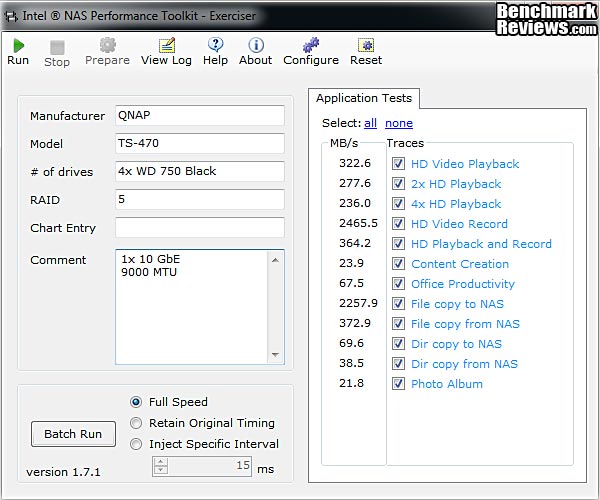
I also ran the Intel NAS Performance Toolkit (NASPT) version 1.7.1, which was originally designed to run on a Windows XP client. People smarter than me have figured out how to run it under Windows 7, including the 64-bit version that is used more often than the 32-bit version these days. NASPT brings an important perspective to our test protocol, as it is designed to measure the performance of a NAS system as viewed from the end user’s perspective. Benchmarks like ATTO use Direct I/O Access to accurately measure disk performance with minimal influence from the OS and the host platform. This provides important, objective data that can be used to measure raw, physical performance. While it’s critical to measure the base performance, it’s also important to quantify what you can expect using real-world applications, and that’s exactly what NASPT does. One of the disadvantages of NASPT is that it is influenced by the amount of memory installed on the client, and it was designed for systems that had 2-4 GB of RAM. Consequently, two of the tests give unrealistic results, because they are measuring the speed of the buffer on the client, instead of the actual NAS performance. For that reason, we will ignore the results for “HD Video Record” and “File Copy to NAS”. I’m also not going to pay too much attention to the “Content Creation” test, as it is too heavily focused on computing tasks that aren’t really handled by the NAS.
Benchmark Reviews also measures NAS performance using some throughput tests that are traditionally used for internal drives. The ATTO Disk Benchmark program is widely recognized and offers a comprehensive set of test variables to work with. In terms of disk performance, it measures transfer rates at various intervals for a user-specified length and then reports read and write speeds for these spot-tests. CrystalDiskMark 3.0 is another file transfer and operational bandwidth benchmark tool from Crystal Dew World that offers performance transfer speed results using sequential, 512KB random, and 4KB random samples. Benchmark Reviews uses CrystalDiskMark to illustrate operational IOPS performance with multiple threads, which allows us to determine operational bandwidth under heavy load. The sequential file transfer test is the most relevant on for NAS products, and that’s the one we report on, although I tend to run the full test suite just in case I need the data at a later date.

We are continuing our NAS testing with the exclusive use of Windows 7 as the testing platform for the host system. The performance differences between Win7 and XP are huge, as we documented early on in our QNAP TS-259 Pro review. The adoption rate for Win 7 has been very high, and Benchmark Reviews has been using Win 7 in all of our other testing for some time now. It was definitely time to make the jump for NAS products.
NAS Comparison Products
- QNAP TS-870U-RP Gigabit 8-bay SATA NAS Server
- EonNAS 1100 NAS Network Storage Server
- ASUSTOR AS-604T NAS Network Storage Server
- EonNAS 850X NAS Network Storage Server
- Thecus N5550 4-Bay SATA NAS Server
- Netgear ReadyNAS NV+ v2 Gigabit 4-bay SATA NAS Server
- QNAP TS-879U-RP Gigabit 8-bay SATA NAS Server
- QNAP TS-219P+ Gigabit 2-Bay SATA NAS server
- QNAP TS-259 Pro Gigabit 2-Bay SATA NAS server
- QNAP TS-659 Pro II Gigabit 6-Bay SATA NAS server
- QNAP TS-419P II Gigabit 4-bay SATA NAS Server
Support Equipment
- (4) Western Digital Caviar Black WD7502AAEX 750GB 7200 RPM 64MB Cache SATA 6.0Gb/s 3.5″
- Intel E10G42BT, X520-T2, 10Gbps Ethernet NIC, PCIe 2.0 x8, 2x CAT6a
- QNAP LAN-10GT2-U, 10Gbps Ethernet NIC, PCIe 2.0 x8, 2x CAT6a
- Dataram RAMDisk v3.5.1.130R22
- Intel NAS Performance Toolkit (NASPT) version 1.7.1
- ATTO Disk Benchmark v2.47
- CrystalDiskMark 3.0
- 10-Foot Category-6 Solid Copper Shielded Twisted Pair Patch Cable
- 1 metric Gigabyte Test File (1 GB = 1,000,000,000 bytes)
- 10 metric Gigabyte Test File (10 GB = 10,000,000,000 bytes
Test System
- Motherboard: MSI Z68-Express Z68A-GD80 (1.23.1108 BIOS)
- System Memory: 4x 4GB Corsair Vengeance LP DDR3 1600MHz (9-9-9-24)
- Processor: Intel Core i5-2500K Sandy Bridge 3.3GHz (BX80623I52500K)
- CPU Cooler: Thermalright Venomous-X (Delta AFB1212SHE PWM Fan)
- Video: Intel HD Graphics 3000
- Drive 1: OCZ Agility3 SSD 120GB (AGT3-25SAT3-120G)
- Drive 2: OCZ Agility3 SSD 120GB (AGT3-25SAT3-120G)
- Optical Drive: Sony NEC Optiarc DVD (AD-7190A-OB 20X)
- Enclosure: Lian Li Armorsuit PC-P50R
- PSU: Corsair CMPSU-750TX ATX12V V2.2 750Watt
- Monitor: SOYO 24″; Widescreen LCD Monitor (DYLM24E6) 1920X1200
- Operating System: Windows 7 Ultimate Version 6.1 (Build 7600)
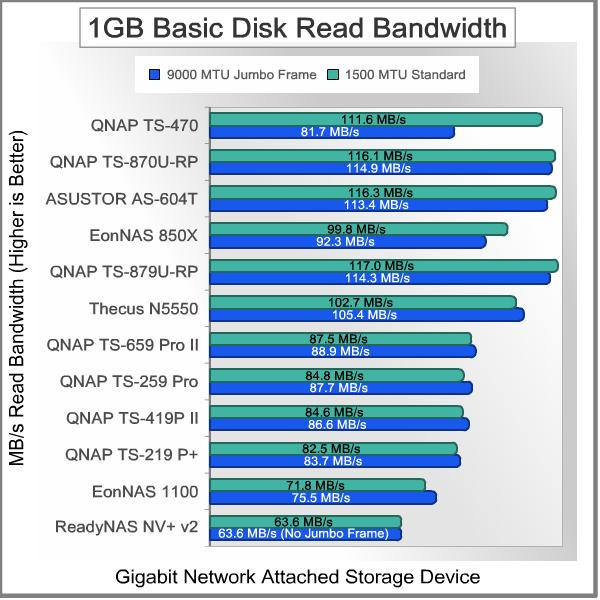
The bottom line for any storage device is the combination of capacity and transfer speed. For a network attached storage server, the differences are all about the infrastructure that is placed around the basic HDD array. Since capacity is something that’s easy to define and measure, the real question for any NAS product is how fast will it Read and Write data. For this reason, Benchmark Reviews measures NAS performance as the bandwidth achieved during a file transfer test. The first tests we perform utilize a single 1GB (1000 megabytes / 1,000,000,000 bytes) file in a transfer to and from the NAS.
With all the NAS units operating in single disk mode, the performance of the NAS units is largely dictated by the choice of CPU and operating system. The QNAP TS-470 puts in a very strong showing on the 1 GB Read tests, primarily due to the Celeron CPU under the hood. The Jumbo Frame results lag behind in this particular file transfer benchmark, but the 1500 MTU results are right up near the top. The Intel Core i3-based TS-879 unit has about 50% more horsepower under the hood than the TS-470, but in this test the two QNAP NAS models perform about the same. Of course they both can sprint past most of the Atom-based units, and they in turn, the Marvell-based models. The EonNAS units have a measurable performance penalty due to their Solaris-based O/S and the ZFS file system that comes with it. It’s a tradeoff with data integrity, so there is a significant benefit to compensate for the slightly lower performance. Most people won’t use a single disk configuration, but it’s useful to get an understanding of any possible issues with the basic architecture of the system. In this case, none of these NAS servers have any major issues, and they all turn in good performance numbers.
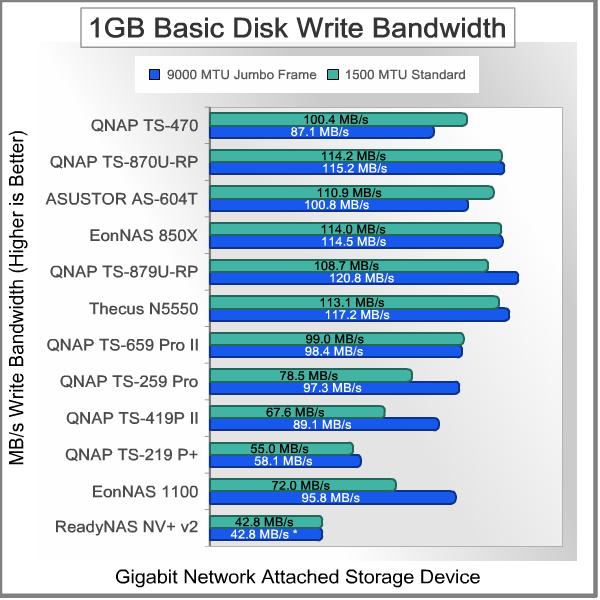
Moving on to the 1 GB write bandwidth test, our results suggest that while it may sometimes be faster to read files from a hard drive than it is to write files onto it, the opposite is often true for a NAS appliance. As the performance levels of the NAS devices go up, this test has a hard stop at the upper limit of GbE transfer rates, and so Rear and Write performance get closer to equal. The good news is that the TS-470 also turns in some strong numbers for Write performance, comfortably sitting a few MB/s below the top tier. The EonNAS 850X proved itself to be a much better performer in Write tests, and that’s reflected in these benchmarks. All the top performers are affected by the GbE cap on transfer speed, even with only a single SATA III (6Gbps) disk loaded in the drive bays.
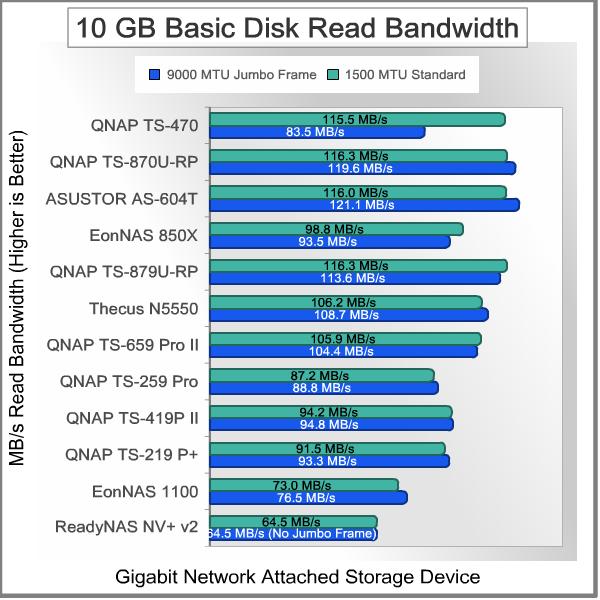
Next up is 10 GB (1000 metric megabytes / 10,000,000,000 bytes) file transfer testing. Using the single-disk configuration in each NAS, and a Gigabit Ethernet connection, network throughput will be put to the test, and the effect of any system or hardware caches will be minimized.
Examining 10GB basic file transfer speeds, the QNAP TS-470 delivers top notch read performance, better than most of the other two-bay or four-bay units. The ASUSTOR does better in combined results by virtue of its Jumbo Frame performance. These small differences in single-disk performance aren’t going to make a huge difference to anyone’s day-to-day work, but they do show a clear, steady evolution of NAS infrastructure performance over time, and as you move up the product structure. Of course, you get none of the advantages of redundancy with a single disk or JBOD, so most NAS users will go for one of the many possible RAID configurations.
In our 10GB write performance tests, the performance of the TS-870U-RP sits just below the top tier again, offering clearly better performance than many NAS models in the test group. The Celeron CPU in the TS-470 really helps it keep up with the high-end SMB devices, like the TS-870U-RP, and also keeps it well ahead of the lower cost devices. The Thecus and the ASUSTOR are still hanging in there, despite their reliance on the low-power Intel Atom CPU. They will both have to put up a fight to remain competitive once we start RAID 5 testing, but for now they look very competitive. The EonNAS shows off its Write performance again, and it isn’t bothered by large file sizes, for certain.

Next we’re going to look at RAID 5 performance, where the TS-470 should have an easier time staying on top of the chart, based on the superior power of its Celeron CPU. Since the QNAP TS-259 Pro and TS-219P+ don’t support the RAID5 configuration that we normally use to test large format NAS products, we won’t be able to include their results in this comparison.
NAS Comparison Products
- QNAP TS-870U-RP 8-bay SATA NAS Server
- EonNAS 1100 NAS Network Storage Server
- ASUSTOR AS-604T NAS Network Storage Server
- EonNAS 850X NAS Network Storage Server
- Thecus N5550 4-Bay SATA NAS Server
- Netgear ReadyNAS NV+ v2 4-bay SATA NAS Server
- QNAP TS-879U-RP 8-bay SATA NAS Server
- QNAP TS-219P+ 2-Bay SATA NAS server
- QNAP TS-259 Pro 2-Bay SATA NAS server
- QNAP TS-659 Pro II 6-Bay SATA NAS server
- QNAP TS-419P II 4-bay SATA NAS Server
If you’ve got more than three HDD spindle to put in play, it makes sense to use one of the more advanced RAID configurations. RAID 5 is one of the most popular setups, primarily due to the balance it exhibits between capacity and redundancy. Not surprisingly, most NAS units that can support more than three HDDs also support RAID 5, so it makes sense to use it for test purposes. Most NAS products that can support RAID 5 go beyond the minimum number of drive bays, to a total of four, so that is the number of drives that I typically use to test with, even though I could get by with only three. I’m also showing results for several different NAS units with 10GbE interfaces, which really show the true capability of those models with this superior NAS interface.
The top three pairs of results in each of the RAID5 charts are the results for the models that have the option of one or more 10GbE interfaces. Normally, I arrange all the results in descending order, but with the mix of 8x HDD v. 4x HDD and GbE v. 10GbE, I thought it would be easier to understand this way. Plus, the unit that’s the subject of this review is the first pair of results, right on top where they’re easier to find. The fact is, these models would have ended up on top, anyway. All these results are based on a single workstation interfacing with the NAS, and the larger models in this group are designed to handle data requests from multiple servers at one time. That doesn’t invalidate these results, because it’s still important to know what level of performance is available for a single user, as well as the overall aggregate.
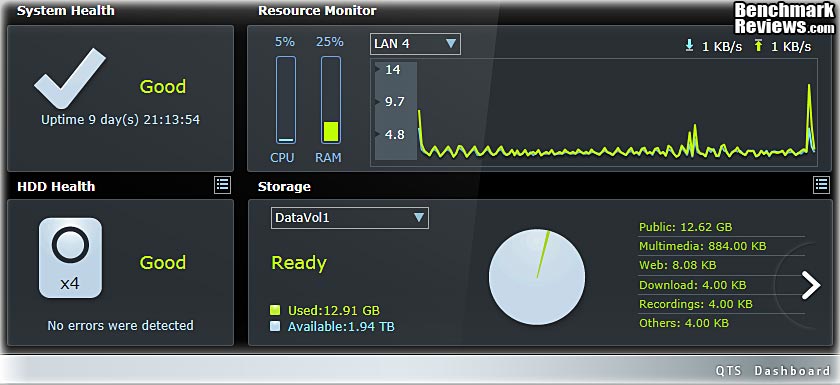
Before we look at the benchmark results, I want to show you the typical NAS CPU and Memory loading that occurred during these timed file transfer tests. As you can see, they are both quite low, and they stayed that way throughout the whole test. This chart is from a new widget that’s included in the QTS 4.0 application, which you can put on your desktop to monitor system resources, network activity, etc. The QFinder widget from version 3.8 is still there, and the old resource monitor screens are still available in the main software, and offer run charts instead of real-time “meters”.
Given all the behind-the-scenes processing that goes on to calculate parity bits for RAID 5, these results show that the QNAP TS-470 Turbo NAS has more than enough power under the hood to keep the drives performing at their highest potential during read operations. The TS-470 actually outperformed all of the other NAS systems, when set up with the 10GbE interface. There was also a huge difference in performance between the two 4-disk configurations, with the 10GbE results tripling the performance available with the GbE interface. CPU and memory utilization on the TS-470 were always quite low during READ tests. Read performance is clearly very strong with this system, which is a real bonus if you use it as frontline storage. Here we have network storage performance that’s on par with the local SSD in a high-end workstation. If you’re going to use it primarily as a backup system, you also want top-notch write performance, which we’ll test next.

The 1 GB RAID 5 disk write test shows very strong results, as well. Given the similar hardware specs between the TS-470 and the TS-870U-RP, I’m going to have to go back and retest the TS-870U-RP, after updating its firmware. There shouldn’t be this large of a performance gap. The performance scaling, as the NAS configuration went from GbE to 10GbE was similar for the TS-470 in both READ and WRITE tests, about 3:1. It’s well known that RAID 5 write performance can be a weak point, with all the computation overhead involved and the extra parity bits that need to be calculated and written to each of the drives. The only way to overcome that is with raw computational horsepower, and there may have been concerns that the Celeron CPU in the TS-470 wouldn’t be up to the task. These results clearly show that QNAP made wise choices when designing the TS-x70 platform. They picked the lowest cost CPU that would meet the performance requirements and keep up with the rest of the system. Between the two 8-bay NAS models, the EonNAS consistently did better in Write tests than Read, and it also turns in a top tier performance here. Both of the QNAPs had more balanced performance and usually were able to read data as fast as they could write it to disk.

Next up is 10 GB (1000 metric megabytes / 10,000,000,000 bytes) file transfer testing. Using the 4-disk RAID 5 configuration in each NAS, and a combination of 10GbE and single Gigabit connections, network throughput will be put to the test, and the effect of any system or hardware caches will be minimized. This is almost pure sequential disk access testing, combined with a real-world application that gets repeated millions of times a day – file transfer.
Looking at Read tests with a single 10GB file, the TS-470 keeps its top place in Read performance. The Read results with a single 10GB file are over 350 MB/s, which is the fastest performance of any other 4-bay system I’ve ever tested before. No worries about the budget CPU in the TS-x70 series not having enough performance, that’s for sure. The performance scaling was consistent again, as the number of disks increased and the network bandwidth opened up the bottleneck that we usually see when NAS units are constrained by their GbE connections. The bottom half of this chart is filled with excellent NAS products that could post much better numbers in this benchmark, if only they were equipped with better network interfaces.

Looking at write tests with a single 10GB file, the TS-470 comes out on top again, by a wide margin. I used to say that if you’re writing large files to a NAS, you can’t afford to scrimp on system hardware; you need the biggest, baddest CPU you can afford. This Celeron-based NAS has made me re-think that a bit, in favor of a more optimized systems approach. Clearly, the 10x improvement in network bandwidth that you get with 10GbE is a critical factor in getting the maximum available performance from a high-capacity NAS. There are a number of other elements that must actively support the system as well, like the Platform Hub Controller (nee Southbridge) and SATA-to-PCI interfaces. In addition, the Operating system has a big influence, as we’ve seen lately with a couple of NAS units that feature a Solaris based O/S. The TS-470 has just the right blend of internal components to maximize the performance v. cost equation. The lower cost of the tower configuration hardware, compared to the rack mount form factor, helps improve the cost-benefit ration even further.

All in all, after these series of file transfer benchmarks, I have to give a lot of credit to QNAP for delivering almost all of the performance of their high-end business class rack mount devices, in a lower cost tower format. The tagline for the TS-870U-RP model that Benchmark Reviews tested earlier this year was, “Economical, yet Powerful…”, but i think this new TS-x70 tower series is an even better bargain. This time I only had a 4-bay device on the test bench, so I can’t say for sure how the larger versions in this series perform, but I have no reason to doubt they will hold up under scrutiny.
If you combine this NAS with some of the new economical 10GbE switches, like the NETGEAR XS708E ProSafe Plus 10GbE Switch that was reviewed here in Benchmark Reviews, the potential is there to radically improve the productivity of the high-end workstation user, at a much lower cost than was recently possible. With such a wide performance envelope, it’s suited for any task you might think of: front-line storage, backup, replication, or any combination. Its iSCSI capability means you’re not limited to a single application, and the compatibility with multiple virtualized environments will be a big plus for corporate users.
Next, let’s take a look at test results from a benchmark suite that’s specifically designed to measure NAS performance, using test scenarios that cover a wide range of use cases. I’m talking about the NASPT tool from Intel.
NAS Comparison Products
- QNAP TS-870U-RP 8-bay SATA NAS Server
- EonNAS 1100 NAS Network Storage Server
- ASUSTOR AS-604T NAS Network Storage Server
- EonNAS 850X NAS Network Storage Server
- Thecus N5550 4-Bay SATA NAS Server
- Netgear ReadyNAS NV+ v2 4-bay SATA NAS Server
- QNAP TS-879U-RP 8-bay SATA NAS Server
- QNAP TS-219P+ 2-Bay SATA NAS server
- QNAP TS-259 Pro 2-Bay SATA NAS server
- QNAP TS-659 Pro II 6-Bay SATA NAS server
- QNAP TS-419P II 4-bay SATA NAS Server
NASPT brings an important perspective to our test protocol, as it is designed to measure the performance of a NAS system, as viewed from the end user’s perspective. Benchmarks like ATTO use Direct I/O Access to accurately measure disk performance with minimal influence from the OS and the host platform. This provides important, objective data that can be used to measure raw, physical performance. While it’s critical to measure the base performance, it’s also important to quantify what you can expect using real-world applications, and that’s exactly what NASPT does. In keeping with the real-world scenario, I only run these tests on the RAID 5 configurations, since that is what most users with a large or mid-size NAS are going to use. It just doesn’t make sense to run realistic test scenarios on unrealistic hardware configurations.
One of the disadvantages of NASPT is that it is influenced by the amount of memory installed on the client, and it was designed for systems that had 2-4 GB of RAM. Consequently, two of the tests give unrealistic results with modern systems, because they are measuring the speed of the buffer on the client, instead of the actual NAS performance. For that reason, we will completely ignore the results for “HD Video Record” and “File Copy to NAS”. Shown here is a batch run of 5 cycles through the tests, which turned out to be a bit slower than the individual runs. There seemed to be some wrinkles in the batch testing that don’t show up on individual test runs, which is a bit of a pain, to be honest. The numbers in the chart below are an average of five separate runs, which I believe are more accurate than results from a consolidated batch run.
With a single, 10GbE interface in place, the results always look better than any data I have from NAS models with only the slower GbE interface. Results for several of the tests that are more sequential in nature are in the 200-300 MB/s range. Some of the tests have very low transfer rates, and that’s due to the nature of the test. The Content Creation test for example, simulates a user creating a web page, accessing multiple sources for the content. The Directory Copy tests use several hundred directories and several thousand files to test a typical backup and restore scenario. That’s one of the most real-world types of test, and it’s useful for all of us to have a standard set of test data to use, because my directory of 1,000 random small files is never going to be the same as your directory of 1,000 random small files.
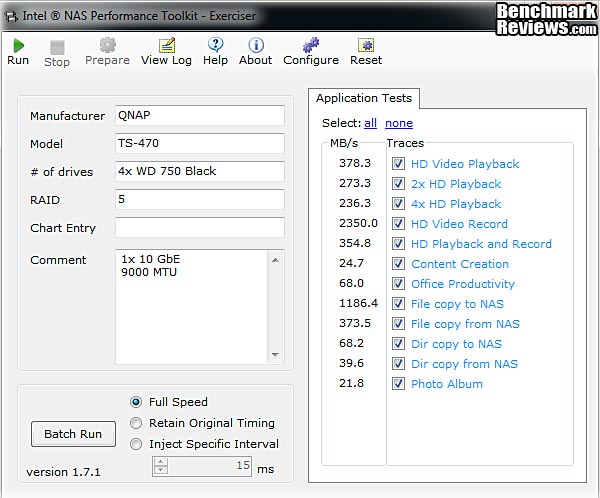
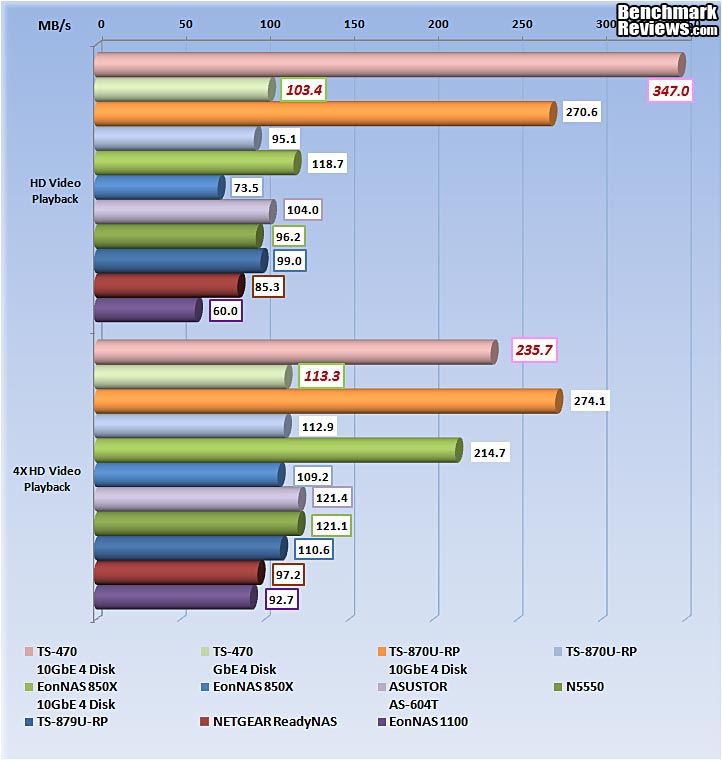
To summarize things, here are consolidated charts of the “Fast” NASPT tests, the “Medium-Speed” tests, and finally the two “Slow” ones. I’ve regrouped these into four charts this time, in order to make them more legible. As the number of entries grows, the text gets too small to read, at some point. I’ve highlighted the text for the QNAP TS-470 by using red italic text for those two test results – one result with the 10GbE interface, and with the slower GbE interface. There are only a couple models with the faster 10GbE connection. First, let’s look at the two tests with the highest transfer rates. The TS-470 comes out on top for the HD Video Playback trials, and close to it in the 4X playback test. The hardware is similar to the TS-870U-RP, so I expected the results to be closer, but the TS-470 had the very latest firmware on it. Sometimes that’s an advantage, but not always. With 1X Video Playback, the TS-470 hits an average rate of 347 MB/s with the help of the 10GbE NIC. In 4x Video Playback, the TS-470 hits a high of 235.7 MB/s, with the 4-disk configuration. The results with the GbE connection are much lower, but still at the very high end of the pack, compared to other NAS servers.
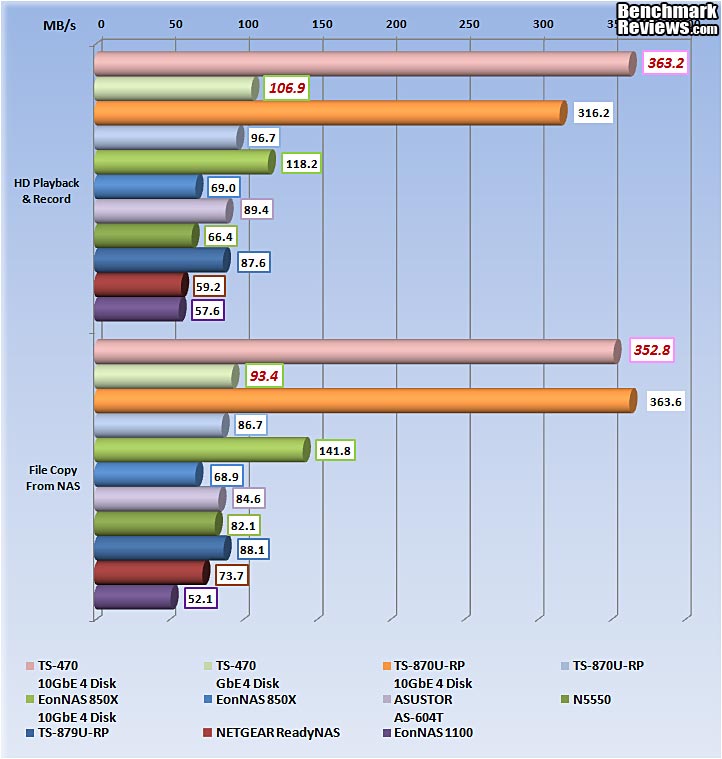
The Medium-Speed tests show the TS-470 putting in another very strong performance, relative to the comparable TS-870U-RP. The higher performance with the four-disk array and 10GbE NIC continues here, especially in the HD Playback & Record test. The EonNAS 850X takes third place in this grouping, and all the NAS units with single GbE interfaces are left in the weeds. The mixture of Reads and Writes makes this set of charts a little topsy-turvy, but the TS-470 continues its top performance with even the pedestrian GbE interface. This fantastic performance from an unassuming 4-bay NAS device.
The “Slow” tests generally are slow because the file transfers are done with data sets that contain a bunch of small files of irregular size. In addition, the Directory Copy tests are accessing the file system index much more heavily than in the other tests. This adds a unique component that could be critically important for some users. The Directory Copy To NAS and Directory Copy From NAS results show once again the effect of the 10GbE interface on performance. The top three contenders stay far ahead of all the other NAS solutions, with one difference; the EonNAS 850X takes a strong second place on the DIR Copy tests, no doubt due to the influence of its Solaris-based operating system. Its ZFS file system is known for being a monster, and it shows that quality here. This is a good demonstration of why it pays to look closely at your potential use cases when shopping for any H/W or S/W solution. The TS-870U-RP puts in a third place effort, not too far behind the others.
The Office Productivity and Content Creation are my least favorite tests in the NASPT suite for two reasons. One, I don’t see most NAS products being used in this fashion. Maybe I’m behind the times, and desktop virtualization will make this a very important benchmark in the near future. Second, the results never seemed to scale very well with the system performance that I was seeing on other tests. The Content Creation results, in particular make no sense to me, so I’ve stopped reporting them. The net improvement from a 10x speed increase in the network interface is only about 15%, much lower than in any other tests. That was enough to push the regular top three performers over the line again. This time, the TS-870U-RP takes the first spot in both tests, with an especially strong performance in the Photo Album benchmark. This test is a bunch of small files again, of varying sizes, arranged in a complex directory structure. This is a very common type of data set, and these results have always seemed more relevant than the other two.

The NASPT benchmark has showed some real world anomalies over time, some of which I wasn’t expecting. Beyond the simple sequential results that are easy to measure and very consistent, is a world of data that is immeasurably complex in its variations. The Intel NASPT suite is one of the few that challenges NAS devices with realistic data sets. The results can be a bit messy to interpret, like they were in this case, but they’ve also provided the greatest potential insight into NAS performance of any commonly used benchmark. Stay tuned to see if we have similar challenges on some non-traditional NAS tests, in the next section.
NAS Comparison Products
- QNAP TS-870U-RP 8-bay SATA NAS Server
- EonNAS 1100 NAS Network Storage Server
- ASUSTOR AS-604T NAS Network Storage Server
- EonNAS 850X NAS Network Storage Server
- Thecus N5550 4-Bay SATA NAS Server
- Netgear ReadyNAS NV+ v2 4-bay SATA NAS Server
- QNAP TS-879U-RP 8-bay SATA NAS Server
- QNAP TS-219P+ 2-Bay SATA NAS server
- QNAP TS-259 Pro 2-Bay SATA NAS server
- QNAP TS-659 Pro II 6-Bay SATA NAS server
- QNAP TS-419P II 4-bay SATA NAS Server
In addition to measuring simple timed transfers, to determine how fast it will read and write contiguous blocks of data, Benchmark Reviews was also able to measures NAS performance using some tests that are traditionally used for internal drives. By mapping the QNAP TS-470 as a local drive, some of our favorite HDD/SSD benchmarking tools worked just fine. Just like the NASPT test suite, I only run these tests on the RAID 5 configuration, as that is the most realistic scenario for a system like this. Some NAS products don’t work too well with this type of test program; even though they may have the ability to map the NAS device to a drive letter, they’re still not treated like local drives by the Operating System. I didn’t have that problem with the TS-470, so let’s look at some results…
ATTO Disk Benchmark Results
The ATTO Disk Benchmark program is free, and offers a comprehensive set of test variables to work with. In terms of disk performance, it measures interface transfer rates at various intervals for a user-specified length and then reports read and write speeds for these spot-tests. There are some minor improvements made to the 2.46 version of the program that allow for test lengths up to 2GB, but all of our benchmarks are conducted with 256MB total length. ATTO Disk Benchmark requires that an active partition be set on the drive being tested. Please consider the results displayed by this benchmark to be basic bandwidth speed performance indicators.

The QNAP TS-470 turned in a solid performance on ATTO, reaching an average peak Read speed of 551.3 MB/s with four disks in RAID 5. These results are in the very top tier of NAS performance, and despite the fact that it came in third place behind the QNAP TS-870U-RP and the EonNAS 850X, the results were still close. I hate to call the roughly 75 MB/s difference between the three results insignificant, but the fact is that every one of the results with appropriate (10 GbE) network hardware beats the performance of most premium desktop SSD units. I’m going to call that “fast enough”. The reality is that there is almost three times more performance available from the TS-870U-RP if you fill it with all eight HDDs and bang on it with multiple high-performance servers. QNAP pulled more than 1800 MB/s in their Read tests, with multiple clients and IOMeter benchmarking software. While I can appreciate the importance of those results, the benchmarks we are presenting here show the typical performance that will be delivered to a single client. Those are equally important results, and depending on how you deploy it, one or the other will be more important to you. Let’s take a look at Write performance next. The single GbE benchmark results of 4-disk configurations were mostly a virtual tie, in the 115-120 MB/s range.
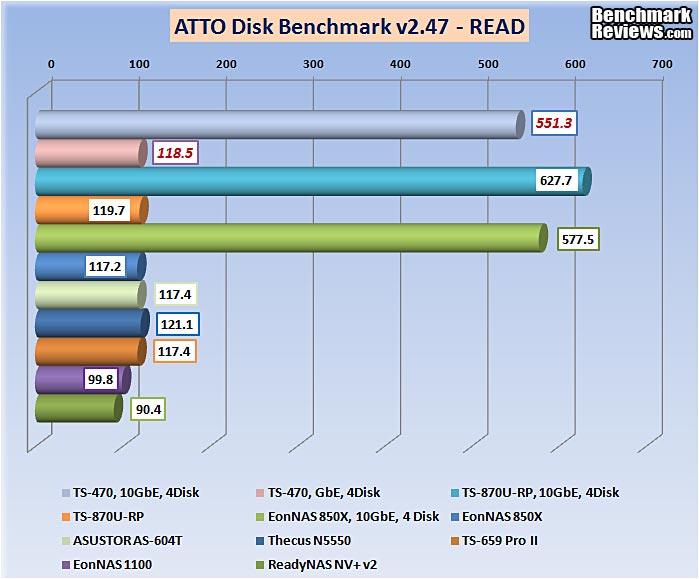
The TS-470 pulls WAY ahead of the pack in the ATTO Write benchmark, with the help of the optional 10GbE NIC. It’s more than 50% faster than the closest competitor, which is an even bigger margin that I saw in the timed file transfers for Write performance. With the old standard for network connections, GbE, the results are once again a close group centered around 120 MB/s. With maximum Read and Write speeds both well over 500 MB/s for the TS-470, I think we’ve entered a new realm for 4-bay NAS servers. This is the sort of performance that used to only be available on large rack mount NAS systems, designed for enterprise use.

It’s good to keep in mind that these ATTO tests are not always indicative of real-world performance, due to the sequential access mode used. In most cases, the results are going to be close to the numbers achieved in timed Read and Write tests. Let’s take another look at that in our next benchmark, CrystalDiskMark 3.0.
CrystalDiskMark 3.0 is a file transfer and operational bandwidth benchmark tool from Crystal Dew World that offers performance transfer speed results using sequential, 512KB random, and 4KB random samples. For our test results chart below, the 4KB 32-Queue Depth read and write performance was measured using a 1000MB space. CrystalDiskMark requires that an active partition be set on the drive being tested. Benchmark Reviews uses CrystalDiskMark to illustrate operational IOPS performance with multiple threads. In addition to our other tests, this benchmark allows us to determine operational bandwidth under heavy load. In this case, the TS-470 pulls excellent numbers for the 512k random tests and low numbers for the 4k random tests, which is not uncommon. Some of the high-end NAS models redeem themselves nicely on the 4k random test with a high queue depth, and the Celeron-based TS-470 does the same.
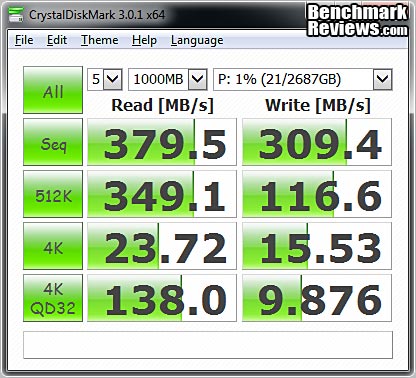
The results in the chart below are for the first test, which is Sequential Read. Once again, the 4-disk RAID 5 configuration of the QNAP TS-470 comes out on top. It’s still worth noting the huge performance gains that are possible by outfitting most NAS models with four bays or more, with a 10GbE network adapter. I hope to see more and more manufacturers bring 10GbE connectivity further down into the product line. The benefits are obvious, and the rest of the network infrastructure products are starting to become available at reasonable prices. Now is also a good time to point out the single GbE results for the TS-470, which are also about 50% better than the competition, as well. 110.6 MB/s is a great result for four bays and just a GbE connection.
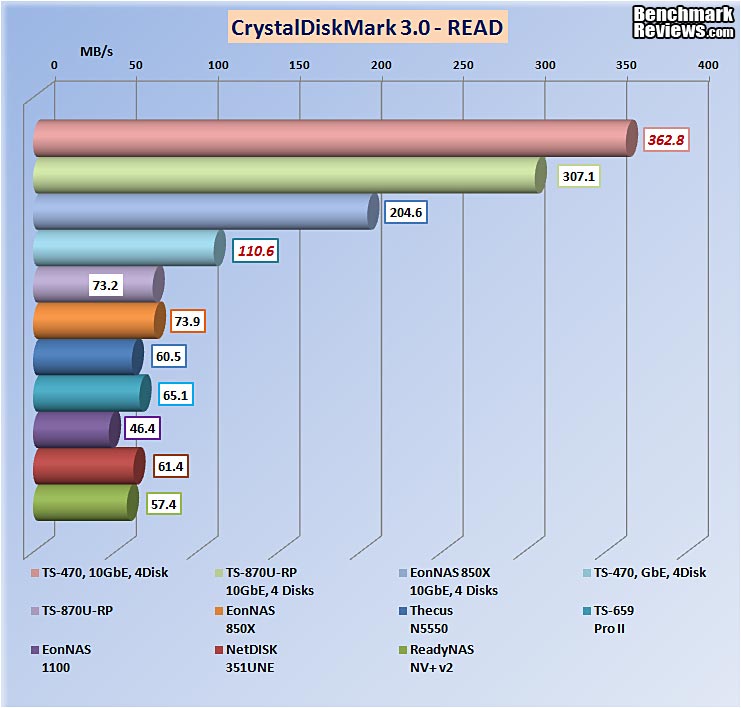
The results in the chart below are for the second CrystalDiskMark 3.0 test, which is Sequential Write. This time, the 4-disk configurations are much closer together. The TS-470 still comes out on top in the 10GbE race, but not by a wide margin. The Write performance of the EonNAS 850X is always a strong point, but the QNAP TS-470 still beets it, and the TS-870U-RP by 30-40 MB/s. All the GbE results are less than half of that, with the TS-870U-RP leading the group with 114 MB/s. The TS-470 ties with the Thecus N5550 for second place in the lower division, with a score of 110.2 MB/s.

All in all, these are an incredible set of results for Network Attached Storage. In many cases they can pump data to and from a workstation as fast, or faster than a local SSD, driven directly from the SATA controller on the motherboard. There’s a whole generation of power users, like CADD designers and video editors, who have been waiting for this kind of performance from mainstream hardware that a small business can afford.
NAS Comparison Products
- QNAP TS-870U-RP 8-bay SATA NAS Server
- EonNAS 1100 NAS Network Storage Server
- ASUSTOR AS-604T NAS Network Storage Server
- EonNAS 850X NAS Network Storage Server
- Thecus N5550 4-Bay SATA NAS Server
- Netgear ReadyNAS NV+ v2 4-bay SATA NAS Server
- QNAP TS-879U-RP 8-bay SATA NAS Server
- QNAP TS-219P+ 2-Bay SATA NAS server
- QNAP TS-259 Pro 2-Bay SATA NAS server
- QNAP TS-659 Pro II 6-Bay SATA NAS server
- QNAP TS-419P II 4-bay SATA NAS Server
My first and solemn duty is to remind everyone that relying on a collection of drives in any RAID configuration for data backup purposes is a huge and potentially costly error. RAID systems provide protection against loss of services, not loss of data. Several examples will illustrate the problem, I hope:
- the drive controller goes bad and corrupts the data on all the drives in the array
- the entire storage device is physically or electrically damaged by external forces
- the entire storage device is lost, stolen, or destroyed
- a single drive in a RAID 5 cluster dies and during the rebuild process, which puts higher stress on the remaining drives, a second drive fails
- floods, earthquakes, tornadoes, etc. (AKA El Niño)
All these points lead to the inescapable conclusion that multiple drives in a common system, in a single location do not provide effective and reliable data backup. Throughout this review I’ve talked about high-availability systems, and the QNAP TS-470 fits into that category, especially when employed in a RAID 6 configuration. Even with two concurrent drive failures, your data is still available and accessible. The NAS device stays online the entire time while the failed drives are replaced and the array is rebuilt. That’s what RAID systems are designed to do. The inherent redundancy is not meant to serve as a backup file set. Remember, we’re not talking about losing data here, we’re only talking about the ability to keep working uninterrupted, if one or two drives should fail. Remember, “Time is Money”.

The QNAP TS-470 is definitely a product that readers of Benchmark Reviews could contemplate purchasing. Maybe you don’t have a real justification for spending the kind of money that it takes to put eight HDD spindles in play, but four bays, a stronger CPU, and the option for 10GbE makes for an interesting proposition. As hi-res audio and video become the norm, it might make sense to invest in this level of performance. Also, if you’ve gone “network happy” in your house, have structured wiring to most every room, and have everything running through a 24 port business class switch, then this is the NAS for you. At the moment, it looks like 10GBASE-T is taking the dominant position in the 10GbE market. It has the advantage of running medium distances on CAT5e or CAT6 cables, which cuts down tremendously on the cost and complexity of implementation. Fiber will always have a place in the data center, but most small and medium size businesses have reasonably small installations, where the 55 meter cable length restriction for CAT5e is not an issue, and certainly the 100m maximum for CAT6 is even less of a limitation. Either way, the PCIe expansion slot on the TS-470 will let you install the network interface card of your choice.
I’m going to leave the issue of SSD caching for another article, just because I don’t see many people opting to do that on a four-bay device. But, if you’re committed to getting the absolute highest performance in a small NAS server, the option is there, courtesy of the new QTS 4.0 operating system.
So, what conclusions can we draw, particularly about this high performance, four-bay TS-470 Turbo NAS server? Click NEXT to find out, and discuss…
Although the rating and final score mentioned in this conclusion are made to be as objective as possible, please be advised that every author perceives these factors differently at various points in time. As Albert Einstein said, “Not everything that can be counted counts, and not everything that counts can be counted.” While we each do our best to ensure that all aspects of the product are considered, there are often times unforeseen market conditions and manufacturer changes which occur after publication that could render our rating obsolete. Please do not base any purchase solely on our conclusions, as they represent our product rating for the sample received which may differ from retail versions.
The performance of the QNAP TS-470 Turbo NAS server was very impressive, especially when the 10GbE-capable feature is enabled. Timed file transfers reached 368 MB/s Read and 321 MB/s Write in RAID 5 with all four disks in service. The results in ATTO Disk Benchmark were even faster, with 551 MB/s in Read mode and 514 MB/s in Write mode. These are disk access speeds that are in line with the best SSD products out there, and the TS-470 did it with 7200 RPM desktop drives that are a tad slower than the latest generation of HDDs. Areal density keeps going up and my Western Digital 750 Black drives are a couple years old now. The combination of a 2.6 GHz Celeron CPU and 10GbE networking really puts the TS-470 Turbo NAS on solid footing that can hold its own in almost any SMB environment.
The small, four-bay form factor of the QNAP TS-470 is not the sort of thing you would expect to see in a data center, but many SMBs operate out of more mundane environments. Remote or branch offices are also a likely application for a smaller device like this. Remember that there are six and eight bay versions in this series, that have the same features and performance, but with more capacity. The front panel has a familiar face, consistent with previous high-end tower models from QNAP. Status LEDs for activity on each HDD are located above each drive bay; the indicators for Status, USB, and LAN are just above that. There is no front door, or cover on the front of the unit, but the exposed drive trays are nicely finished and blend well with the remainder of the front panel. The brushed aluminum outer cover for the top and sides is subtle and classy, much better than an all-black unit, IMHO.

The construction quality of the TS-470 reflects a device that is built to run 24/7 indefinitely, plus look good doing it. I couldn’t find any place where cost had been reduced at the expense of quality, despite the fact that this represents a very mature platform for QNAP. There has been plenty of time for them to revisit the design and do a little value engineering to reduce costs, but they haven’t done it, as far as I can see. QNAP has an enviable reputation for quality and reliability, both very important qualities for a NAS server, and the TS-470 design doesn’t mess with success.
The QNAP TS-470 Turbo NAS network storage server is clearly aimed at small and medium businesses. There are dozens of models in the QNAP storage product line, and this one has been tailored for a specific application. It’s not that it can’t be used in the home, but almost no home network is going to be able to effectively take full advantage of all four of the GbE connections. A business class switch with plenty of I/O is needed to utilize all of the capabilities that come standard with the TS-470. So for the home user, it’s a matter of why pay for features that don’t provide any benefits… On the flip side, the HDMI output probably won’t see much use in the business environment. The addition of an IR receiver on the front panel does make all the multimedia features easier to access though, just in case you do need them. The breakout move, of putting a Celeron-class CPU in a small NAS benefits almost all users, and it’s a welcome relief from the Atom-based models that continue to dominate the market. The large number of apps that are available and the cloud services that extend the reach of NAS storage, all contribute to a versatile system that does more than you could ever imagine a NAS server was intended to do. Some of the high-end routers are attempting to edge their way into this solution space, but for the moment the prize for the most functionality in one small net-centric box goes to the Turbo NAS server.
Before we discuss the pricing in detail, remember that these systems are not discretionary items for most businesses, they are a necessary expense. The tragic and inevitable costs for not having a robust data management system in place are 10-100 times higher than any of the prices you will see in this paragraph. As of December 2013 the diskless TS-470 model was listed for $968.99 (NewEgg | Amazon | B&H). Six and eight bay models are available for those that need additional capacity, and they will have slightly better performance with similar RAID configurations. It’s that higher level of performance that pushes the cost of the TS-470 in the kilobuck range. Keep in mind that just recently this kind of performance used to cost more than $2,000. I’m not immune to sticker shock, but the amount of performance and functionality that the TS-470 brings to the table is impressive, and most businesses will consider the cost to be completely reasonable.
Benchmark Reviews has enjoyed testing all of these network storage solutions, and with the wide range of products on offer from them, anyone in need of a NAS server can find one to fit their current and future needs. The biggest problem is choosing one; that’s why we go into so much detail in our reviews, to help you figure out what level of performance and features is right for you. The TS-470 Turbo NAS server may be overkill for the enthusiast at home, but it looks like a great fit for the SOHO market. Just make sure the networking infrastructure is in place to maximize the overall performance.
+ 551 / 514 MBps best read/write performance
+ System software is SOTA and continually updated
+ Support Apps available for multiple cloud services
+ 10GbE NICs supported, from Multiple Vendors
+ iSCSI certified for several virtualization platforms
+ Storage pools in a Linux environment
+ Flexible RAID error recovery
+ 4x Gigabit Ethernet ports with teaming and failover
+ SSD cache configurations at the $1,000 price point
+ Two eSATA and two USB 3.0 ports on rear panel
+ High quality construction
– 4x GbE interfaces are most useful on business class LAN
– 10GbE NICs are still an expensive upgrade
– Non-business users will compare to consumer devices (<<$$$)
– USB port on front panel is not SuperSpeed (USB 3.0)
-
Performance: 9.50
-
Appearance: 9.00
-
Construction: 9.50
-
Functionality: 9.50
-
Value: 9.50
Excellence Achievement: Benchmark Reviews Golden Tachometer Award.
COMMENT QUESTION:
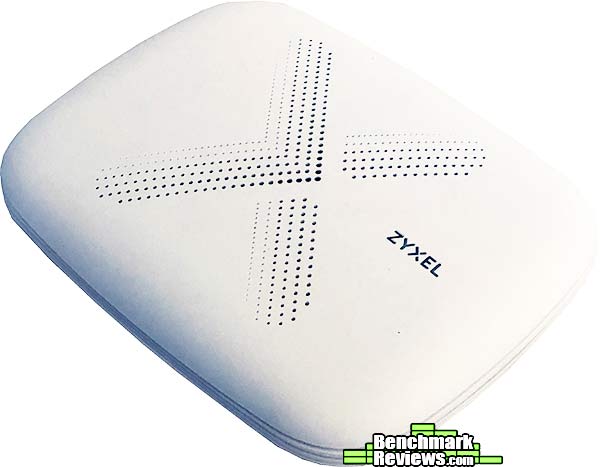


3 thoughts on “QNAP TS-470 NAS Server Review”
Be nice to see an approved pci-e tv tuner like Black Gold tuners for a complete HTPC solution.
For now, TV support is limited to USB tuners. There are about eight models listed in the compatibility table.
“You may install TV Station from QPKG Center in firmware 3.8.1 or above. A compatible DVB-T USB TV Tuner as listed is required to use this function.”
Asus My Cinema U3100 Mini
AverMedia A850(AVerTV Volar Black HD)
FOTOCOM HiHD3
Hauppauge WinTV NOVA-T Stick
KWorld KW-DVB-T 399U
PCTV Systems nanoStick Solo 73e SE
QNAP USB-DVBT01
UPMOST DVB192A HD
None of those seem to support T2, making them redundant. Plus USB tuners generally suck.
Comments are closed.