By Olin Coles
Manufacturer: PINE Technology Holdings Limited, dba XFX
Product Name: Black Edition Double Dissipation Radeon R9 290
Model Number: R9-290A-EDFD
UPC: 778656065468
Price: Starting at $559.99 (Amazon | Newegg)
Full Disclosure: The product sample used in this article has been provided by XFX.
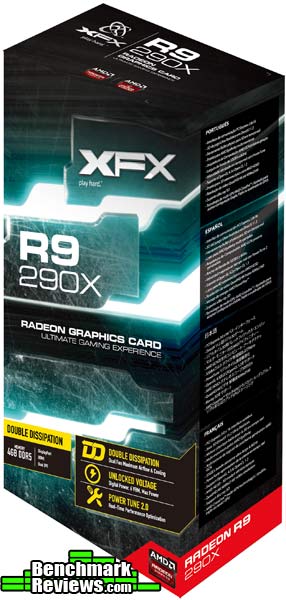
When the AMD Radeon R9 290X video card debuted, it first appeared to be a solid competitor to NVIDIA’s GeForce GTX 780 series… until heat and noise were taken into consideration. The Curacao XT-based video card offered plenty of graphics power, but the cooling system was forced to work hard and loud. When the Radeon R9 290 series arrived, this gave brands such as XFX the opportunity to further improve upon the AMD reference design by incorporating a much better cooling solution paired with long-life capacitors. In this article Benchmark Reviews tests the XFX Radeon R9 290 Double D, model R9-290A-EDFD, which sells online for $499.99 (Amazon). This Black Edition Double Dissipation Radeon R9 290 features a 947 MHz UltraHD 4K resolution-ready graphics card with 2560 Stream processors and support for the upcoming DirectX 11.2 API.
AMD’s recent direction extends their graphics reach into emerging markets, primarily through the use of integrated GPUs. This hasn’t slowed their pursuit in the discrete graphics market, where the AMD Radeon video card series continues to battle for supremacy in some of the most demanding DirectX 11 video games available on PC. The AMD Radeon R9 290 is an example of this effort, utilizing a Hawaii-Pro GPU that’s clocked to 947 MHz with 4GB GDDR5 memory at 5 GHz. Benchmark Reviews tests the custom-designed XFX Radeon R9 290 Double-Dissipation Black Edition video card using several highly-demanding DX11 video games such as Metro: Last Light, Batman: Arkham City, and Battlefield 4.
What’s new in Radeon R9 290: revamped AMD Graphics Core Next Architecture supports upcoming DirectX 11.2 API, UltraHD 4K resolution-ready via DisplayPort MST streams, and a new AMD CrossFire technology via hardware DMA engine.

| Specifications | |
| Output | 1 x HDMI 1.4a (with 3D) 1 x DisplayPort 1.2 2 x Dual-Link DVI-D |
| GPU | 947 MHz Core Clock 28 nm Hawaii Chip 2560 Stream Processors |
| Video Memory | 4096 MB Size 512-bit GDDR5 5000 MHz Effective |
| Dimension | 11.61″ x 5.63″ x 1.65″ Dual slot design |
| Software | Driver Disk Installation Guide Installation DVD |
| Accessory | Quick Installation Guide 6-pin to 4-pin power cable 8-pin to 6-pin power cable |
| System Requirements | |
|
UltraHD 4K Resolution is:
- 3840 x 2160 30 Hz TV
- 4096 x 2160 24 Hz TV
- Half frame 1920 x 2160 60 Hz IT
- Half frame 2048 x 2160 60 Hz IT
The XFX Radeon R9 290 Black Edition Double Dissipation graphics card, model R9-290A-EDFD, sells online for $559.99 (Amazon | Newegg). The kit includes various documentation, driver installation DVD, a 6-pin to 4-pin power cable, and an 8-pin to 6-pin power cable. AMD has replaced the external CrossFire interconnect with PCI-Express based CrossFire/CrossFireX managed by Catalyst software on modern motherboards.
The first thing you’ll notice about this card is the dual-fan “Double Dissipation” cooler. The fansink is quite elaborate: XFX replaces the stock AMD vapor chamber cooler with a “HydroCell” vapor chamber of their own design. They then apply two Duratec IP-5X dust-free fans whose design prevents dust from ever reaching the fan bearings, and surrounds the whole assembly with an aluminum “Ghost 2 Thermal Technology” shroud whose design is said to improve cooling by directing air out the sides and bottom of the card.

The XFX Radeon R9 290 DD is designed with a AMD Hawaii Pro GPU factory clocked to 947 MHz, tested to remain stable under demand. XFX also loads the R9 290 with 4GB of GDDR5 video memory clocked to 1250MHz (5000MHz data rate). Add to this the custom ’Double-D’ thermal management system keeping this Black Edition video card cool, and you’ve got an ideal formula for top-end graphics performance.
The XFX Radeon R9 290 Double D graphics card measures 11.0″ long x 4.5″ wide x 1.5″ tall. A video card with these dimensions are best suited for installation into tower computer cases, but may also lend itself to small form-factor enclosures if there is sufficient clearance. Since the card exhaust air back into the case, make sure to have adequate ventilation.

Available output connectors on the XFX Radeon R9 290 graphics card include two Dual-Link DVI ports, one HDMI 1.4a port, and one DisplayPort 1.2. XFX has taken care to design the card’s ventilation openings around the graphics outputs, allowing some of the heated air to escape outside the enclosure.

Most graphics cards run hot, and leave very little room for additional overclocking. The XFX Radeon R9 290 DD graphics card operates at the 947 MHz reference speed, which leaves room for additional tweaking. Enthusiasts can use their favorite overclocking tool to squeeze more speed out of the card, which makes use of the ultra-efficient fansink cooler to reach maximum potential while remaining stable under stress.

XFX’s Radeon R9 290 DD video card requires one 6-pin and one 8-pin PCI-E power connector for proper operation. XFX recommends a minimum power supply rating of 750 watts, and suggests using their own XFX 850W PSU to power the AMD Radeon R9 290.

The back of the card doesn’t have any sort of cover or heatsink plate, so you can see all the screws that secure the cooling apparatus to the card. White circular “Warranty void if removed” stickers cover two of the screws. I don’t know if it makes any difference in the real world, but some users might prefer a backplate to protect the minuscule electronic components on the card from damage and static discharge.

In the next section, we share details on the new AMD ZeroCore Power Management technology featured on the Radeon R9 290 graphics card…
Source: AMD
When a discrete GPU is in a static screen state it works to minimize idle power by enabling a host of active power saving functions including (but not limited to); clock gating, power gating, memory compression, and a host of other features. However, GPUs with AMD’s exclusive AMD ZeroCore Power technology can take energy savings to entirely new heights by completely powering down the core GPU while the rest of the system remains active.
Nearly all PCs can be configured to turn off their displays after a long period of inactivity. This is known as the long idle state; where the screen is blanked but the rest of the system remains in an active and working power state (ACPI G0/S0). As soon as the system goes into long idle state and applications are not actively changing the screen contents, the GPU enters the AMD ZeroCore power state. In the AMD ZeroCore power state, the GPU core (including the 3D engine / compute units, multimedia and audio engines, displays, memory interfaces, etc.) is completely powered down. However, one cannot simply remove the GPU and its associated device context completely; particularly when it is the only GPU in the system as is the case in many enthusiast platforms. The operating system and SBIOS must still be aware that a GPU is still present in the system. For this reason, the AMD ZeroCore Power state maintains a very small bus control block to ensure that GPU context is still visible to the operating system and SBIOS. The AMD ZeroCore power state also manages the power sequencing of the GPU to ensure that the power up/down mechanism is self-contained and independent of the rest of the system.
The enablement of the AMD ZeroCore Power feature is controlled by the driver. The driver monitors the display contents and allows the GPU to enter the AMD ZeroCore Power in the condition that the GPU enters long idle and subsequent work requests are no longer being submitted to the engine. If any applications update the screen contents, AMD ZeroCore Power technology can periodically wake the GPU to update the framebuffer contents and put the GPU back into the AMD ZeroCore Power state. Furthermore, applications such as Windows 7 desktop gadgets are architected to minimize activity and save power in the long idle state. These applications are active during screen-on mode to display dynamic content such as weather, RSS feeds, stock symbols, system status, etc. but also have the intelligence to suspend any updates and activity when the system enters long idle. These applications will not wake the GPU from the AMD ZeroCore Power state in long idle.
AMD ZeroCore Power technology delivers tremendous energy savings. Many PCs remain in the long idle state for a variety of use cases that are highly relevant to everyday consumers, enthusiasts and professionals. In AMD ZeroCore Power mode, users can still enjoy non-graphics activities such as file serving/streaming, motherboard audio and music, and remote access while the GPU core is essentially powered off.
In the next section, we detail our test methodology and give specifications for all of the benchmarks and equipment used in our testing process…
The Microsoft DirectX-11 graphics API is native to the Microsoft Windows 7 Operating System, and will be the primary O/S for our test platform. DX11 is also available as a Microsoft Update for the Windows Vista O/S, so our test results apply to both versions of the Operating System.
In each benchmark test there is one ‘cache run’ that is conducted, followed by five recorded test runs. Results are collected at each setting with the highest and lowest results discarded. The remaining three results are averaged, and displayed in the performance charts on the following pages.
A combination of synthetic and video game benchmark tests have been used in this article to illustrate relative performance among graphics solutions. Our benchmark frame rate results are not intended to represent real-world graphics performance, as this experience would change based on supporting hardware and the perception of individuals playing the video game.
- Motherboard: ASUS P9X79 Deluxe Motherboard (Intel X79 Express)
- Processor: Intel Core i7-3960X Extreme Edition (six cores/3300 MHz)
- System Memory: G.SKILL Ripjaws-Z 32GB DDR3-1600
- Power Supply Unit: OCZ Z-Series Gold 850W OCZZ850
- Monitor: Lenovo ThinkVision LT3053p IPS LED-Backlit 30″ LCD
- 3DMark11 Professional Edition by Futuremark
- Settings: Performance Level Preset, 1280×720, 1x AA, Trilinear Filtering, Tessellation level 5)
- Aliens vs Predator Benchmark 1.0
- Settings: Very High Quality, 4x AA, 16x AF, SSAO, Tessellation, Advanced Shadows
- Batman: Arkham City
- Settings: 8x AA, 16x AF, MVSS+HBAO, High Tessellation, Extreme Detail, PhysX Disabled
- BattleField 3
- Settings: Ultra Graphics Quality, FOV 90, 180-second Fraps Scene
- Lost Planet 2 Benchmark 1.0
- Settings: Benchmark B, 4x AA, Blur Off, High Shadow Detail, High Texture, High Render, High DirectX 11 Features
- Metro 2033 Benchmark
- Settings: Very-High Quality, 4x AA, 16x AF, Tessellation, PhysX Disabled
- Unigine Heaven Benchmark 3.0
- Settings: DirectX 11, High Quality, Extreme Tessellation, 16x AF, 4x AA
| Graphics Card | Radeon R9 270X | Radeon HD7950 | GeForce GTX760 | GeForce GTX680 | Radeon HD7970 | GeForce GTX780 | Radeon R9 290 | Radeon R9 290X | GeForce GTX780Ti |
| GPU Cores | 1280 | 1792 | 1152 | 1536 | 2048 | 2304 | 2560 | 2816 | 2880 |
| Core Clock (MHz) | 1030 | 850 | 980 | 1006 | 925 | 863 | 947 | 1000 | 876 |
| Shader Clock (MHz) | 1120 Boost | N/A | 1033 Boost | 1058 Boost | N/A | Boost 902 | N/A | N/A | Boost 928 |
| Memory Clock (MHz) | 1400 | 1250 | 1502 | 1502 | 1375 | 1502 | 1250 | 1250 | 1750 |
| Memory Amount | 2048MB GDDR5 | 3072MB GDDR5 | 2048MB GDDR5 | 2048MB GDDR5 | 3072MB GDDR5 | 3072MB GDDR5 | 4096MB GDDR5 | 4096MB GDDR5 | 3072MB GDDR5 |
| Memory Interface | 256-bit | 384-bit | 256-bit | 256-bit | 384-bit | 384-bit | 512-bit | 512-bit | 384-bit |
- Sapphire Radeon R9 270X (1050 MHz GPU/1100 MHz Boost/1450 MHz vRAM – AMD Catalyst 13.11 Beta v8)
- AMD Radeon HD 7950 (850 MHz GPU/1250 MHz vRAM – AMD Catalyst 13.9)
- NVIDIA GeForce GTX 760 (980 MHz GPU/1033 MHz Boost/1502 MHz vRAM – Forceware 320.39)
- NVIDIA GeForce GTX 680 (1006 MHz GPU/1059 MHz Boost/1502 MHz vRAM – Forceware 320.39)
- AMD Radeon HD 7970 (925 MHz GPU/1375 MHz vRAM – AMD Catalyst Catalyst 13.11 Beta v8)
- NVIDIA GeForce GTX 780 (869 MHz GPU/902 MHz Boost/1502 MHz vRAM – Forceware 331.70)
- XFX Radeon R9 290 DD (947 MHz GPU/1250 MHz vRAM – AMD Catalyst 13.12)
- MSI Radeon R9 290X (1000 MHz GPU/1250 MHz vRAM – AMD Catalyst 13.12)
- NVIDIA GeForce GTX 780 Ti (875 MHz GPU/928 MHz Boost/1750 MHz vRAM – Forceware 331.70)
FutureMark 3DMark11 is the latest addition the 3DMark benchmark series built by FutureMark corporation. 3DMark11 is a PC benchmark suite designed to test the DirectX-11 graphics card performance without vendor preference. Although 3DMark11 includes the unbiased Bullet Open Source Physics Library instead of NVIDIA PhysX for the CPU/Physics tests, Benchmark Reviews concentrates on the four graphics-only tests in 3DMark11 and uses them with medium-level ‘Performance’ presets.
The ‘Performance’ level setting applies 1x multi-sample anti-aliasing and trilinear texture filtering to a 1280x720p resolution. The tessellation detail, when called upon by a test, is preset to level 5, with a maximum tessellation factor of 10. The shadow map size is limited to 5 and the shadow cascade count is set to 4, while the surface shadow sample count is at the maximum value of 16. Ambient occlusion is enabled, and preset to a quality level of 5.

- Futuremark 3DMark11 Professional Edition
- Settings: Performance Level Preset, 1280×720, 1x AA, Trilinear Filtering, Tessellation level 5)

 3DMark11 Benchmark Test Results
| Graphics Card | Radeon R9 270X | Radeon HD7950 | GeForce GTX760 | GeForce GTX680 | Radeon HD7970 | GeForce GTX780 | Radeon R9 290 | Radeon R9 290X | GeForce GTX780Ti |
| GPU Cores | 1280 | 1792 | 1152 | 1536 | 2048 | 2304 | 2560 | 2816 | 2880 |
| Core Clock (MHz) | 1030 | 850 | 980 | 1006 | 925 | 863 | 947 | 1000 | 876 |
| Shader Clock (MHz) | 1120 Boost | N/A | 1033 Boost | 1058 Boost | N/A | Boost 902 | N/A | N/A | Boost 928 |
| Memory Clock (MHz) | 1400 | 1250 | 1502 | 1502 | 1375 | 1502 | 1250 | 1250 | 1750 |
| Memory Amount | 2048MB GDDR5 | 3072MB GDDR5 | 2048MB GDDR5 | 2048MB GDDR5 | 3072MB GDDR5 | 3072MB GDDR5 | 4096MB GDDR5 | 4096MB GDDR5 | 3072MB GDDR5 |
| Memory Interface | 256-bit | 384-bit | 256-bit | 256-bit | 384-bit | 384-bit | 512-bit | 512-bit | 384-bit |
In Battlefield 4, players step into the role of a U.S. Marines named Recker who leads a special operations unit called ‘Tombstone’. While the single-player campaign offers a unique and exciting storyline, BF4 truly shine with a new 64-player online multiplayer mode with large spacious maps.
The graphics engine behind Battlefield 4 is called Frostbite 3, which offers more realistic environments with higher resolution textures and next-generation particle effects. A first-time ‘networked water’ fluid system allows players in the game to see the same wave at the same time. Tessellation has also been improved since Frostbite 2 in BF3.
AMD graphics cards are optimized for Battlefield 4 using AMD’s Mantle API that enables a boost in performance.
Using Fraps to record frame rates, our Battlefield 4 benchmark test uses a three-minute capture on the ‘Baku’ stage where Recker is handed the tactical binoculars. Relative to the online multiplayer action, these frame rate results are nearly identical to most large maps with the same video settings.

- BattleField 4
- Settings: Ultra Graphics Quality, FOV 70, 180-second Fraps Scene
 Battlefield 4 Benchmark Test Results
| Graphics Card | Radeon R9 270X | Radeon HD7950 | GeForce GTX760 | GeForce GTX680 | Radeon HD7970 | GeForce GTX780 | Radeon R9 290 | Radeon R9 290X | GeForce GTX780Ti |
| GPU Cores | 1280 | 1792 | 1152 | 1536 | 2048 | 2304 | 2560 | 2816 | 2880 |
| Core Clock (MHz) | 1030 | 850 | 980 | 1006 | 925 | 863 | 947 | 1000 | 876 |
| Shader Clock (MHz) | 1120 Boost | N/A | 1033 Boost | 1058 Boost | N/A | Boost 902 | N/A | N/A | Boost 928 |
| Memory Clock (MHz) | 1400 | 1250 | 1502 | 1502 | 1375 | 1502 | 1250 | 1250 | 1750 |
| Memory Amount | 2048MB GDDR5 | 3072MB GDDR5 | 2048MB GDDR5 | 2048MB GDDR5 | 3072MB GDDR5 | 3072MB GDDR5 | 4096MB GDDR5 | 4096MB GDDR5 | 3072MB GDDR5 |
| Memory Interface | 256-bit | 384-bit | 256-bit | 256-bit | 384-bit | 384-bit | 512-bit | 512-bit | 384-bit |
| Graphics Card | Radeon R9 270X | Radeon HD7950 | GeForce GTX760 | GeForce GTX680 | Radeon HD7970 | GeForce GTX780 | Radeon R9 290 | Radeon R9 290X | GeForce GTX780Ti |
| GPU Cores | 1280 | 1792 | 1152 | 1536 | 2048 | 2304 | 2560 | 2816 | 2880 |
| Core Clock (MHz) | 1030 | 850 | 980 | 1006 | 925 | 863 | 947 | 1000 | 876 |
| Shader Clock (MHz) | 1120 Boost | N/A | 1033 Boost | 1058 Boost | N/A | Boost 902 | N/A | N/A | Boost 928 |
| Memory Clock (MHz) | 1400 | 1250 | 1502 | 1502 | 1375 | 1502 | 1250 | 1250 | 1750 |
| Memory Amount | 2048MB GDDR5 | 3072MB GDDR5 | 2048MB GDDR5 | 2048MB GDDR5 | 3072MB GDDR5 | 3072MB GDDR5 | 4096MB GDDR5 | 4096MB GDDR5 | 3072MB GDDR5 |
| Memory Interface | 256-bit | 384-bit | 256-bit | 256-bit | 384-bit | 384-bit | 512-bit | 512-bit | 384-bit |
BattleField 3 Benchmarks
- BattleField 3 Campaign
- Settings: 2560×1600 Resolution, Ultra Graphics Quality, FOV 90, 180-second Fraps Scene
 Battlefield 3 Benchmark Test Results
DX11: Metro 2033 Benchmarks
-
DX11: Metro 2033 Benchmark
-
Settings: 2560×1600 Resolution, Very-High Quality, 4x AA, 16x AF, Tessellation, PhysX Disabled

Metro 2033 Benchmark Test Results
- Unigine Heaven Benchmark 3.0
- Settings: 2560×1600 Resolution, DirectX 11, High Quality, Extreme Tessellation, 16x AF, 4x AA
 Heaven Benchmark Test Results
For power measurements, PCI-Express graphics cards are isolated for idle and loaded electrical power consumption. In our power consumption tests, Benchmark Reviews utilizes an 80-PLUS GOLD certified OCZ Z-Series Gold 850W PSU, model OCZZ850. This power supply unit has been tested to provide over 90% typical efficiency by Chroma System Solutions. To measure isolated video card power consumption, Benchmark Reviews uses the Kill-A-Watt EZ (model P4460) power meter made by P3 International. In this particular test, all power consumption results were verified with a second power meter for accuracy.
The power consumption statistics discussed in this section are absolute maximum values, and may not represent real-world power consumption created by video games or graphics applications.
A baseline measurement is taken without any video card installed on our test computer system, which is allowed to boot into Windows 7 and rest idle at the login screen before power consumption is recorded. Once the baseline reading has been taken, the graphics card is installed and the system is again booted into Windows and left idle at the login screen before taking the idle reading. Our final loaded power consumption reading is taken with the video card running a stress test using graphics test #4 on 3DMark11, and again with FurMark’s “Torture Test” for comparison.
This section discusses power consumption for the XFX Radeon R9 290 DD Black Edition Double Dissipation graphics card, model R9-290A-EDFD. This product operates at factory-clocked GPU and GDDR5 speeds, which means that our power consumption results are not representative of the entire Radeon R9 290-series product family which may be overclocked or feature modified designs by various board partners.
Radeon R9 290 requires one 75W 6-pin and one 150W 8-pin PCI-E power connection for normal operation, and will not activate the display unless proper power has been supplied. XFX suggests at least a 750 watt power supply for the Radeon R9 290.
In our real-world test results, the Radeon R9 290 graphics card consumed 21W at the lowest idle reading, and 296W during high-demand graphics from 3DMark11. Using FurMark’s “Torture Test” under full load with fan operating at 100%, power consumption increased to 358 watts.
This section reports our temperature results subjecting the video card to maximum load conditions. During each test a 20°C ambient room temperature is maintained from start to finish, as measured by digital temperature sensors located outside the computer system. GPU-Z is used to measure the temperature at idle as reported by the GPU, and also under load.
Using a modified version of FurMark’s “Torture Test” to generate maximum thermal load, peak GPU temperature is recorded in high-power 3D mode. FurMark does two things extremely well: drives the thermal output of any graphics processor much higher than any video games realistically could, and it does so with consistency every time. Furmark works great for testing the stability of a GPU as the temperature rises to the highest possible output:
The temperatures illustrated below are absolute maximum values, and do not represent real-world temperatures created by video games or graphics applications:
| Video Card | Ambient | Idle Temp | Loaded Temp | Max Noise | ||||
| ATI Radeon HD 5850 | 20°C | 39°C | 73°C | 7/10 | ||||
| NVIDIA GeForce GTX 460 | 20°C | 26°C | 65°C | 4/10 | ||||
| AMD Radeon HD 6850 | 20°C | 42°C | 77°C | 7/10 | ||||
| AMD Radeon HD 6870 | 20°C | 39°C | 74°C | 6/10 | ||||
| ATI Radeon HD 5870 | 20°C | 33°C | 78°C | 7/10 | ||||
| NVIDIA GeForce GTX 560 Ti | 20°C | 27°C | 78°C | 5/10 | ||||
| NVIDIA GeForce GTX 570 | 20°C | 32°C | 82°C | 7/10 | ||||
| ATI Radeon HD 6970 | 20°C | 35°C | 81°C | 6/10 | ||||
| NVIDIA GeForce GTX 580 | 20°C | 32°C | 70°C | 6/10 | ||||
| NVIDIA GeForce GTX 590 | 20°C | 33°C | 77°C | 6/10 | ||||
| AMD Radeon HD 6990 | 20°C | 40°C | 84°C | 8/10 | ||||
| NVIDIA GeForce GTX 650 Ti BOOST | 20°C | 26°C | 73°C | 4/10 | ||||
| NVIDIA GeForce GTX 650 Ti | 20°C | 26°C | 62°C | 3/10 | ||||
| NVIDIA GeForce GTX 670 | 20°C | 26°C | 71°C | 3/10 | ||||
| NVIDIA GeForce GTX 680 | 20°C | 26°C | 75°C | 3/10 | ||||
| NVIDIA GeForce GTX 690 | 20°C | 30°C | 81°C | 4/10 | ||||
| NVIDIA GeForce GTX 780 | 20°C | 28°C | 80°C | 3/10 | ||||
| Sapphire Radeon R9 270X Vapor-X | 20°C | 26°C | 68°C | 4/10 | ||||
| XFX Radeon R9 290 DD | 20°C | 30°C | 90°C | 4/10 | ||||
| MSI Radeon R9 290X | 20°C | 34°C | 95°C | 8/10 | ||||
| NVIDIA GeForce GTX 780 Ti | 20°C | 31°C | 82°C | 3/10 |
Everything that consumes electricity produces heat, but when it comes to video cards it’s important how that heat is managed. Since power consumption for Radeon R9 290 is relatively high for a modern graphics card, an improved thermal management system is required. This is exactly why XFX utilized their Double Dissipation fansink for this video card.
After ten minutes at 100% load using Furmark’s “Torture Test” the XFX Radeon R9 290 DD reached 90°C, which is modest peak temperature by comparison to the R9 290X. Idle temperatures were exceptionally cool at 30°C. The dual-fan design with large aluminum GPU heatsink really keeps temperatures in check, but more importantly noise is dramatically reduced over the AMD reference cooler design. Only barely audible under load, the XFX R9 290 is far more quiet than the AMD Radeon R9 290X – which gets even louder than 8/10 when operating in “performance” mode.
The temperatures discussed in this section are relative maximum values, and may not represent real-world temperatures created by video games or graphics applications. Your results may vary depending on ambient room temperature and firmware revision.
IMPORTANT: Although the rating and final score mentioned in this conclusion are made to be as objective as possible, be advised that every author perceives these factors differently. While we each do our best to ensure that all aspects of the product are considered, there are often times unforeseen market conditions and manufacturer revisions that occur after publication which could render our rating obsolete. Please do not base any purchase solely on this conclusion, as it represents our rating specifically for the product tested which may differ from future versions. Benchmark Reviews begins our conclusion with a short summary for each of the areas that we rate.
My ratings begin with performance, where the $499 XFX Radeon R9 290 DD Black Edition graphics card competes against NVIDIA’s GeForce GTX 780 series in terms of price. In DirectX 11 tests the Radeon R9 290 typically matched performance with GeForce GTX 780, and only occasionally surpassing it on certain benchmark tests. Ultra-demanding DX11 games such as Batman: Arkham Asylum produced 112 FPS with Radeon R9 290, which was outperformed by GTX 780 that generated 118 FPS. Battlefield 3 tests gave the Radeon R9 290 a slight lead over GTX 780 when Ultra quality settings were used. Lost Planet 2 played well on all graphics cards when set to high quality with 4x AA, but was a test anomaly that forced the Radeon R9 290 to really trail behind GTX 780. In Aliens vs Predator the performance was more competitive, with R9 290 well ahead by 8 FPS over GTX 780. Metro 2033 is another demanding game that requires high-end graphics to enjoy high quality visual settings, producing a 3 FPS lead for Radeon R9 290 over GeForce GTX 780.
Synthetic benchmark tools offer an unbiased read on graphics products, allowing video card manufacturers to display their performance without special game optimizations or driver influence. Futuremark’s 3DMark11 benchmark suite strained our high-end graphics cards with only mid-level settings displayed at 720p, allowing the Radeon R9 290 to build a slight lead over the GeForce GTX 780 in three out of four tests. Unigine Heaven 3.0 benchmark tests used maximum settings that tend to crush most products, yet the XFX Radeon R9 290 still surpassed GeForce GTX 780 by 2 FPS at 1920×1080 and 4 FPS at 2560×1600.

Appearance is a much more subjective matter, especially since this particular rating doesn’t have any quantitative benchmark scores to fall back on. AMD’s Radeon HD series has traditionally used the same recognizable ‘black and red brick’ design over the past few years, which tends to dull consumer appeal. XFX breathes new life into this aging look with their Double Density twin-fan cooler and glowing XFX logo at the end of the fan shroud. Unfortunately this modified design exhausts much of the heated air back inside the computer case, which might possibly increase operating temperatures on less-ventilated enclosures. Fashionably good looks could earn points with some consumers, but it’s the card’s low noise output and modest operating temperatures that should leave the biggest impression.
Thanks to extremely quiet operation of the XFX Dual Dissipation fansink, the Radeon R9 290 operates at a stable temperature under full load. The card requires a 6-pin and 8-pin PCI-E power connection to operate, which are available on most all 750W+ power supply units. Additionally, consumers have a top-end single-GPU solution capable of driving three monitors with AMD HD3D support using the two DL-DVI ports with supplementary DisplayPort outputs.
Nobody likes to RMA their video card because it usually means going without use of the computer, which is why construction is so important. According to XFX marketing representatives, any new R-Series graphics cards with Double Dissipation receive a lifetime warranty if the owner registers their card with XFX within 30 days of purchase. Should the XFX Radeon R9 290 DD Black Edition graphics card fail during the warranty period, technical support is available by registering your product at xfxsupport.com.
As of February 2014, the XFX Radeon R9 290 DD (model R9-290A-EDFD) is available online for $559.99 (Amazon | Newegg). This price is roughly $40 higher than the least-expensive GeForce GTX 780 models, which was outperformed on most benchmark tests. A lifetime product warranty ensures that their money doesn’t go to waste if something breaks.
Summary: the XFX Radeon R9 290 DD graphics card relies on the Double Dissipation fansink to keep cool and quiet under full load, which is something you won’t get from the AMD-designed R9 290. This makes the XFX R9 290 DD ideal for standalone desktop installations and high-detail gaming. Multi-card CrossFire sets no longer require an interconnect bridge, and so long as the enclosure is large enough to fit two dual-slot cards and offers above-average case ventilation there will be room for upgrade opportunities. For the money, you’re getting a very competitive video card that runs quietly and still has room for additional overclocking performance.
+ Tends to outperform GeForce GTX 780
+ DirectX 11.2 ready graphics solution
+ Supports CrossFire and CrossFireX
+ Triple-display and AMD HD3D support
+ XFX Double Dissipation system keeps GPU very cool
+ Relatively low audible noise under full load
+ 4GB GDDR5 video RAM buffer
+ UltraHD 4K display support
+ Lifetime product warranty
– Some heated exhaust is circulated back into enclosure
– Relatively high power consumption
-
Performance: 9.25
-
Appearance: 9.00
-
Construction: 9.25
-
Functionality: 9.00
-
Value: 7.25
Quality Recognition: Benchmark Reviews Silver Tachometer Award.
COMMENT QUESTION: How much are you willing to spend on a graphics card?


