By Greg Schepers
Manufacturer: ROCCAT GmbH
Product Name: ROCCAT Ryos MK Pro Mechanical Gaming Keyboard
Model Number: ROC-12-851 BK
UPC: 4250288123564
Price As Tested: $169.99 (Amazon | Newegg)
Full Disclosure: The product sample used in this article has been provided by ROCCAT.
ROCCAT is certainly not a newcomer to providing peripherals to gamers; they’ve produced many models of gaming mice, keyboards, headsets, and even gaming laptops. It is the innovators, like the people at ROCCAT, that continue to keep PC gaming more than merely relevant, and Benchmark reviews is proud to bring you this review of ROCCAT’s first mechanical keyboard; the ROCCAT Ryos MK Pro Mechanical Gaming Keyboard. Considering the quality of the entire line of peripherals that ROCCAT has to offer, there is no reason to think that the Ryos MK Pro will be anything but impressive.
The Ryos MK Pro is not the only model of mechanical keyboard that ROCCAT has released. There are two other models, the MK Glow and the MK, each looking almost identical to the MK Pro, but not quite as feature-packed and are, therefore, less expensive. Also, with the Ryos MK Pro, ROCCAT has shown that it will do what it takes to produce a product that will appeal to the masses by making the MK Pro available in four, yes four Cherry MX switches; red, brown, black, and blue. We’ve been provided with the black Cherry MX keys for this review. And finally, the ROCCAT Ryos MK Pro comes in 15 different layouts, so anyone in the world should be able to find an MK Pro that suits his or her style. Fortunately, I have been provided with the US Layout.
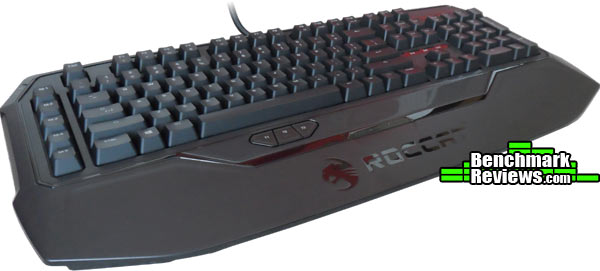 The features and specifications below are a tangible representation of the effort that ROCCAT put forth in order to provide us with a quality keyboard. For example, each key can be customized with its own backlighting. The backlighting customization on this keyboard is impressive and unprecedented. And, there are features that ROCCAT has developed are not limited to the MK Pro. The ROCCAT Talk feature allows a gamer to take full advantage of the Easy Shift[+] technology when the MK Pro is paired with a compatible ROCCAT mouse.
- PER-KEY ILLUMINATION
insane customization possibilities - EASY-SHIFT[+]™ BECOMES EASY KEYBOARD
assign a secondary function to virtually any key - N-KEY ROLLOVER
means advanced anti-ghosting - HIGH-POWERED HARDWARE
two 32-bit ARM Cortex processors + 2 MB of flash memory - ROCCAT™ ACHIEVEMENTS DISPLAY
keep track of your vital statistics - KEY SWITCHES TO SUIT EVERY GAMER
CHERRY MX key switchs in blue, black, brown, and red - SMUDGE-PROOF GLOSSY LOOK
killer look – with no fingerprints - INTEGRATED MEDIA HUB
audio in/out and two USB 2.0 ports - COMPLETE COMFORT, ROCK SOLID
jumbo-size integrated wrist rest - CLUTTER-FREE, SUPER-STABLE SUPPORT
in-built cable channel and five rubber feet - ROCCAT™ TALK® – SET BONUS
get more out of your ROCCAT™ devices
by combining their functions
- Per-key illuminated mechanical keyboard with 113 keys
- Advanced anti-ghosting with N-key rollover
- Choice of four CHERRY MX key switches
- 3 programmable thumbster keys (T1 – T3)
- 5 programmable macro keys (M1 – M5)
- 94 other programmable keys
- 1000 hz polling rate, 1 ms response time
- 1.8 m rear-exit braided cable
- 1 x audio in, 1 x audio out, 2 x USB 2.0 ports
Dimensions
23.4 cm X 50.8 cm
System requirements
Windows® XP/Windows Vista® 32/64-bit/Windows® 7 32/64-bit
Windows® 8 / Windows® 8 Pro
USB 2.0 port
Internet connection for driver installation
In the package
ROCCAT™ Ryos MK Pro
Quick-Installation Guide
The size of the box is an indication of how large the ROCCAT Ryos MK Pro actually is, and one of the reasons for its girth is due to the fact that the wrist rest is not of the removable type. More about that later. In any event, the Ryos MK Pro is very well protected and will, without a doubt, arrive at your location looking good and ready for action.
 Something that probably won’t spark everyone’s interest and some of you may even consider it inconsequential is the molded plastic piece that goes over the keyboard (not pictured). I’m sure it was meant solely for protection during shipping, but it works really well as a dust cover. Again, I’m sure some folks would react with a, “meh,” while others would consider that a nice touch and proof of ROCCAT’s attention to detail. The little things count.

As mentioned above, the ROCCAT Ryos MK Pro is of the larger variety in terms of mechanical keyboards. Considering that it is not modular, nor does it have a removable wrist rest, it is going to stay that way. What you see is what you get in terms of size. However, one can make the argument that, having the wrist rest build onto the keyboard, the wrist rest feels more solid and has more of a natural feel to it. At least I would make that argument. Removable wrist rests are designed to be, well, removable. Most of them are hollow pieces of plastic that feel flimsy and will have a tendency to shake, rattle, and or roll. Not the wrist rest on the ROCCAT Ryos MK Pro. It is part of the construction.

Flip the ROCCAT Ryos MK Pro over in order to see what it has in store for us. There are rubber pads, that are very generous in size, located in each of the four corners of the bottom of the keyboard. In addition, there is a long, thin rubber pad located under the wrist rest. Combined, these rubber pads will virtually eliminate any chance of the keyboard shifting during use. I have the Ryos MK Pro on a mat and it still won’t move easily.
Other features located on the bottom of the keyboard include the cable channeling and the feet for height adjustment. Nit-pick alert: the feet are very short and have quite a lean to them preventing any real noticeable height increase from taking place.

On the left-side of the keyboard, you will find five macro keys labeled M1 through M5. I have never been a big fan of the macro keys on the left side for a couple of reasons; first, I have a tendency to accidentally depress one of these keys on occasion while working or playing. Yeah, I know it’s probably just me, but I thought it was worth mentioning. Second, the left-positioned macro keys extend the width the keyboard by around 10%. I prefer the macro keys to be above, not to the side, like what can be found on the Gigabyte Aivia Osmium. This is obviously a personal preference and not something I would list as a negative.
The caps lock key may also serve as the Easy-Shift[+] key. This key provides you with the ability to assign dual functions to a single key. We all can relate to how handy this feature can be, especially when gaming. Also, if you have a ROCCAT Talk compatible mouse, the Easy-Shift[+] key on the keyboard can be used to assign a secondary function to each mouse button.

I am a big fan of keys beneath the spacebar. The ROCCAT Ryos MK Pro has 3 programmable “thumbster” keys, labeled T1 through T3 in that location. However, it can be a bit difficult to locate the right one at crunch-time since they are flat and run parallel to the surface. Yes, T2 has a little speed-bump on it to make it easier to locate, but with the other subtle contouring on and around the buttons, it is still a difficult task to find what you are looking for. Also, it takes a little more effort than necessary to depress them. That sounds like a wimpy comment, but considering the effortlessness of the key actuation on the rest of the keyboard, these clearly take more effort. In conclusion here, keys beneath the keyboard are great; but maybe different keys than these.
Considering all of the mechanical keyboards that have been introduced in the past couple of years, it has to be a difficult task to develop something innovative that separates a keyboard from the rest of the pack. As you will see, ROCCAT has incorporated some pretty cool innovative features into the ROCCAT Ryos MK Pro without sacrificing anything else in terms of quality or function.

On the left-side toward the back of the ROCCAT Ryos MK Pro, you will find the pass-through ports for both the headset and the microphone. This is a pretty standard feature nowadays, but it is very convenient nonetheless.
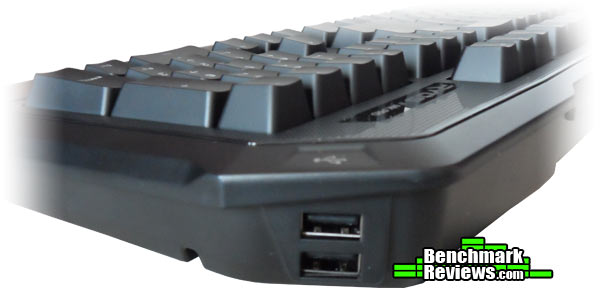
Another standard feature found on most modern mechanical gaming keyboards is the USB 2.0 pass through ports. These particular ports are located on the right-side of the ROCCAT Ryos MK Pro towards the back.

As I mentioned earlier, this is the ROCCAT Ryos MK Pro with black Cherry MX keys. My personal preference is either black or blue Cherry MX keys for gaming, but I like the tactile clickety-clack when typing. In any event, these keys are outstanding.
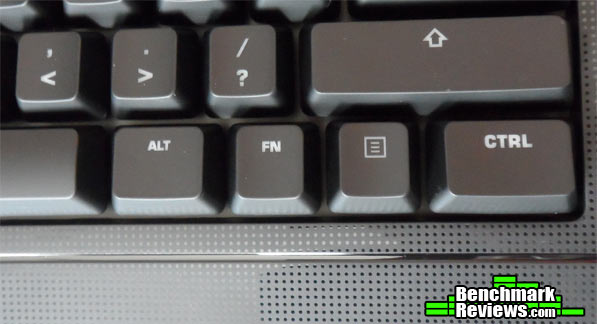
The function key is not unlike what you would find on a laptop. It provides you with a number of secondary functions found on the F1 through F12 keys.
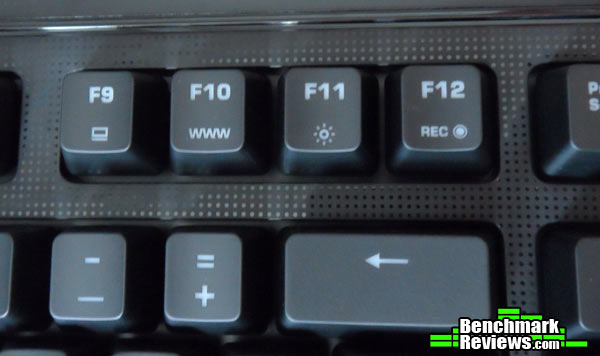
This is a continuation from the above function key discussion. Anyway, depressing the FN key and then pressing F11 will allow you to cycle through the brightness of the backlit keys. Using the FN/F12 key combination will set you up to quickly record a macro, which can be assigned to any key on the keyboard.
Assigning the macro keys (M1 – M5) is simple. Hit FN/F12 once, hit the macro key (M1-M5) of choice, record your macro, then hit FN/F12 again. To quickly record a macro and assign it to any other key on the keyboard, you need to substitute depressing one of the M1-M5 macro keys for the Easy-Shift[+]/key of choice.
What are we looking for when it comes to the software for our new keyboard? Customization certainly comes to mind. We want to be able to adjust the backlighting, record macros, create profiles, and so on and so forth. Another important characteristic of the GUI is that it remains relatively easy to navigate. I almost typed “simple,” but I’m not sure that would be accurate, considering all of the features that the ROCCAT Ryos MK Pro has in its arsenal.

Before giving an overview of the MAIN CONTROL page above, Let me point out that the bottom quarter of each page in the GUI will provide you with access to the GAME PROFILES. So, from where you see GAME PROFILES to the bottom of the page, that will appear the same no matter what main tab is highlighted.
The MAIN CONTROL page provides the ability to manipulate a number of different features. For example, you can disable the Easy-Shift[+] functionality and utilize the standard caps lock key instead. Also, you can make a number of illumination adjustments.

The KEY ASSIGNMENT tab is where you go to assign not only the primary functions, but also the secondary functions to any of the keys on the ROCCAT Ryos MK Pro. The process is pretty simple; click on the key you want to manipulate and select the primary and secondary functions from the drop down.

One of the features that ROCCAT really features when presenting the keyboard is the illumination. I’m sure people have spent hours customizing their lighting configuration. As you can see, you can choose from some lighting effects, you can turn individual key backlighting off and on, you can light up or shut off pre-defined light groups, and so on.

Under the ROCCAT R.A.D. tab, you will find statistics. The statistics include the total key strokes that you’ve made, the number of times you’ve hit the WASD keys, the thumb-buttons, the Easy-Shift[+] key, multi-media keys, the M keys, the number of times you’ve used ROCCAT Talk, etc. There are also achievements that you can unlock. Sadly, I have not unlocked one yet.
Finally, there is an update/support tab, but there’s really nothing out of the ordinary to show on that tab. I would rather move forward with the review and let you know how the ROCCAT Ryos MK Pro performed.
When it comes to testing a gaming peripheral, such as a mechanical gaming keyboard, the results are pretty much based on the review’s subjectivity. Another reviewer may have a different opinion of the same keyboard. In the case of the ROCCAT Ryos MK Pro Mechanical Gaming Keyboard, the same reviewer could come up with varying results between a Ryos MK Pro with black Cherry MX keys to a Ryos MK Pro with blue Cherry MX keys. The point is, there are many different variables to consider in a peripheral review and there is nothing that can truly be quantified.
In order to test the ROCCAT Ryos MK Pro, I used it for approximately three weeks for not only gaming purposes, but it was also employed to perform a number of other functions, such as the creation of the review you are reading. I played a number of different games and game types, including Battlefield 4, Company of Heroes, Splinter Cell Blacklist, and Wargame. The other garden-variety tasks performed included the use of Microsoft Office products including Outlook and Word, Adobe Photoshop, Google Chrome, and Skype.
- Motherboard: Gigabyte GA-990FXA-UD3
- System Memory: 16GB (2 x 8GB) DDR3 1333 G.Skill Ripjaws X Series
- Processor: AMD FX-6100 Zambezi 3.3 GHz Six-Core Processor
- Audio: ASUS XONAR DG PCI 5.1 Audio Card
- Video: HIS Radeon HD 7950 IceQ Boost Clock 3GB GDDR5 PCI-E Graphics Card
- Optical Drive: Pioneer Black Internal BD/DVD/CD Writer BDR-207DBKS
- PSU: Corsair HX Series HX750 750W GOLD Certified Modular Active PFC Power Supply
- Monitor: AOC e2752Vh (27″) & Samsung SyncMaster PX2370 (24″)
- Operating System: Windows 7 Ultimate

The best place to start in terms of sharing the results of the ROCCAT Ryos MK Pro Mechanical Gaming Keyboard’s review is… where else? Gaming of course! First, the feel of the keyboard is fantastic while gaming. As I mentioned earlier, I am a big fan of the black Cherry MX keys, especially for gaming. Also, the weight of the keyboard combined with the anti-slip rubber pads on the bottom ensured that the keyboard would remain stable and in place during the most intensive gaming sessions. I would be remiss if I did not mention the Easy-Shift[+] functionality of this keyboard. Having the ability to assign a secondary function to a key makes life much easier whether you are playing a FPS or a MMO. Even thought it is a little odd initially to use the caps lock key as a primary key, once you get the hang of it, it is hard to do without. Considering that you can set up the lighting to completely black out when you hit the Easy-Shift[+] key, the adjustment to using it is made even easier.
Using the ROCCAT Ryos MK Pro for everyday tasks was also a pleasure. Going back to the black Cherry MX keys; they are very good for typical typing, but I prefer the tactile response of a blue for this purpose. This is just a personal preference. Again, the black keys perform well and feel very good. Also, the Easy-Shift[+] feature can come in handy in the task performing capacity as well. Opening this, cutting and pasting that… you can assign keys to do pretty much whatever you want, which makes life much easier and certainly has the potential to greatly increase your efficiency.
The overall verdict of the testing of the ROCCAT Ryos MK Pro was that it passed with flying colors. This is one solid, high-performing keyboard that has plenty of bells and whistles to make your gaming and professional lives much easier. And, from a customization standpoint, you could spend hours setting up both the macros and the lighting in order to have the ROCCAT Ryos MK Pro perfectly individualized for you.
There are many positive attributes to share about the ROCCAT Ryos MK Pro Mechanical Gaming Keyboard. The ability to customize it is in the forefront of this conversation. Having the ability to assign a secondary function to just about every key on the keyboard is extremely beneficial no matter if you are gaming or if you are trying to complete some office-related tasks. Both the Easy-Shift[+] and FN keys make this level of customization possible. Just to push the customization conversation a bit further, the ROCCAT Ryos MK Pro has on-the-fly macro recording as well. Then there are five profiles that can be programmed, there are virtually limitless lighting configurations, the ROCCAT Talk feature, etc… this is one impressive keyboard.
As good as the ROCCAT Ryos MK Pro has performed in testing and as solidly constructed as it appears and feels, there are some areas of improvement for this device. One of the first items that I noticed that really didn’t suit my tastes was the “thumbster” keys. My suggestion would be to make them more like a traditional keyboard key rather than a flat, hard to locate button that requires more force than necessary to actuate. Another feature that could be implemented/improved is to have USB 3.0 pass-through ports rather than the USB 2.0 ports. Finally, the feet for height adjustment should do more than merely perform an inconsequential angle shift. This very minor criticism does not detract from the fact that this is a fantastic keyboard.

The purpose of this section is to present to you the final analysis of the ROCCAT Ryos MK Pro Mechanical Gaming Keyboard. This analysis is separated into categories, which include appearance, performance, construction, functionality, and value. As stated earlier in the testing methodology section, these results are based on my experiences while using the ROCCAT Ryos MK Pro for a relatively brief period of time. These results, being subjective in nature, should be used as a reference and not as a recommendation.
The ROCCAT Ryos MK Pro Mechanical Gaming Keyboard almost has an armor-esque shape to it. It looks tough, and the black matte finish, which covers the majority of the surface, is the right choice. There is some subtle glossy-black trim around the perimeter of the main keyboard area. Contained within this trim is more black matte finish with tiny glossy polka-dots in a row and column pattern.
The black Cherry MX keys are fantastic example of the ROCCAT Ryos MK Pro’s overall performance of the past few weeks. These keys are outstanding for gaming and exceptional for typing. As mentioned earlier, I prefer blue Cherry MX keys for typing, but the blacks perform just as well. Nothing left me wanting for more from a standpoint of performance.
As tough as the ROCCAT Ryos MK Pro looks, it is build even tougher. It is, without a doubt, the most solidly constructed mechanical gaming keyboard that I have ever personally put my hands on. And, my opinion of its construction is not based on its weight. It is on the heavy side, but when you pick it up and shake it, you know that it is a beast and you forget that it is constructed of mainly plastic. Nothing shakes, nothing rattles, nothing rolls. It is obvious that it will withstand years of use.
Functionality is off the charts. The ROCCAT Ryos MK Pro Mechanical Gaming Keyboard has endless customization options for both key assignments and backlighting. Even though the lighting only comes in blue, the individualized lighting feature makes up for it. And when it comes to customizing your keyboard to do your bidding while gaming or while utilizing it to perform more conventional tasks, the ROCCAT Ryos MK Pro is second to none. The Easy-Shift[+] function allows you to create a second profile for each and every key. Also, if paired with a compatible ROCCAT mouse, the ROCCAT Talk feature is fantastic. Finally, my only complaint in this area is the “thumbster” keys. I am all for keys beneath the space bar; just don’t make them so hard to find or difficult to actuate.
My overall assessment of the ROCCAT Ryos MK Pro Mechanical Gaming Keyboard is that its pros far outweigh its cons and it is likely a substantial upgrade to what you are currently using. It looks tough, it is tough, its customization options are ridiculous, and it can play nice with your mouse.
As of August 2014, the sticker price for the ROCCAT Ryos MK Pro Mechanical Gaming Keyboard was $169.99 (Amazon | Newegg). You can pay plenty more for a mechanical gaming keyboard and receive less. It’s hard to deem a keyboard a value at that price point, but I think I’ll make an exception for the ROCCAT Ryos MK Pro.
+ customization options are all-time great (Easy-Shift[+] & FN key)
+ ROCCAT Talk feature
+ extremely well-built/solid device
+ looks as tough as it actually is
+ black Cherry MX switches
+ dual purpose dynamo (gaming and performing tasks)
+ backlighting options, individualized
+ pass-through ports, both USB and headphone/mic
– “thumbster” keys could use improvement
– pass-through ports should be USB 3.0
– feet barely change angle/stance
-
Performance: 9.50
-
Appearance: 9.25
-
Construction: 9.50
-
Functionality: 9.00
-
Value: 8.75
Excellence Achievement: Benchmark Reviews Golden Tachometer Award.
COMMENT QUESTION: What is your preference when it comes to the Cherry MX keys?


