By Steven Iglesias-Hearst
Manufacturer: ROCCAT, Inc.
Product Name: Ryos MK Pro MX Brown Gaming Keyboard
Model Number: ROC-12-851-BN (US Layout)
EAN: 4250288179288
Price As Tested: $169.99 (Amazon | NewEgg)
Full Disclosure: The product sample used in this article has been provided by ROCCAT.
PC Gaming is not dead, it’s just that there isn’t as much innovation happening to steal the headlines. Tablets, Laptops and Consoles are taking the limelight. Sure they’re great for intermittent gaming but can’t really compete with the ultimate solution – The humble PC. ROCCAT is making its debut into the thriving mechanical keyboard market with three variants of its Ryos MK Mechanical Gaming Keyboard. In this review, Benchmark Reviews will be testing the top of the line ROCCAT Ryos MK Pro Mechanical Gaming Keyboard (model# ROC-12-851-BN – US Layout) with Cherry MX Brown switches and individual backlit keys.
Prospective buyers can choose between blue, black, brown, or red Cherry MX switches and various layouts particular to your country of residence. The Ryos MK pro allows for complete remapping of all of the keys and full customization of the individual backlight LED’s. There are five dedicated macro keys and three thumbster keys, as well as the unique ROCCAT Easy Shift[+] function and ROCCAT Talk compatibility. An integrated wrist rest as well as two USB 2.0 ports and Audio I/O ports further extend the functionality of the Ryos MK Pro Mechanical Gaming Keyboard.

- PER-KEY ILLUMINATION
insane customization possibilities
- EASY-SHIFT[+] BECOMES EASY KEYBOARD
assign a secondary function to virtually any key
- N-KEY ROLLOVER
means advanced anti-ghosting
- HIGH-POWERED HARDWARE
two 32-bit ARM Cortex processors + 2 MB of flash memory - ROCCAT ACHIEVEMENTS DISPLAY
keep track of your vital statistics - KEY SWITCHES TO SUIT EVERY GAMER
CHERRY MX key switches in blue, black, brown, and red
- SMUDGE-PROOF GLOSSY LOOK
killer look – with no fingerprints
- INTEGRATED MEDIA HUB
audio in/out and two USB 2.0 ports - COMPLETE COMFORT, ROCK SOLID
jumbo-size integrated wrist rest - CLUTTER-FREE, SUPER-STABLE SUPPORT
in-built cable channel and five rubber feet
- ROCCAT TALK – SET BONUS
get more out of your ROCCAT devices by combining their functions
- Per-key illuminated mechanical keyboard with 113 keys
- Advanced anti-ghosting with N-key rollover
- Choice of four CHERRY MX key switches
- 3 programmable thumbster keys (T1 – T3)
- 5 programmable macro keys (M1 – M5)
- 94 other programmable keys
- 1000 hz polling rate, 1 ms response time
- 1.8 m rear-exit braided cable
- 1 x audio in, 1 x audio out, 2 x USB 2.0 ports
Dimensions
23.4 cm X 50.8 cm
System requirements
Windows XP/Windows Vista 32/64-bit/Windows 7 32/64-bit
Windows 8 / Windows 8 Pro
USB 2.0 port
Internet connection for driver installation
In the package
ROCCAT Ryos MK Pro
Quick-Installation Guide
The ROCCAT Ryos MK Pro is larger than your average keyboard and has an inbuilt wrist rest, you had better be sure that you have plenty of desk real estate if you intend to get one of these beasts. The shape and design of the ROCCAT Ryos MK Pro is like a mix between space age and industrial, the Blue/black color scheme works really well and makes for a nice change from the plethora of red/black gaming peripherals currently available

Here we have a US layout version of the ROCCAT Ryos MK Pro of which there are 15 different layouts in total. The Ryos MK Pro is absolutely huge which is good for me as I have larger than average hands, the large built in wrist wrest comes in really handy too. The Ryos MK Pro measures approximately 51cm x 23cm.

The ROCCAT Ryos MK Pro is slightly sloped as standard which means you won’t need to use the height adjustment feet underneath. The key layout has a nice ergonomic curve which will work to improve comfort during extended typing sessions.

Underneath the ROCCAT Ryos MK Pro we see five very large rubber feet, cable routing channels and two small height adjusting feet.

To the left of the main keys are the M1-M5 macro keys. This layout makes for a slight learning curve as you will find a few accidental key presses while you are getting to grips with this keyboard. By default the Caps Lock key is assigned to ROCCAT’s EasyShift[+] function. If you wish to change this you can do so within the software utility.

Below the spacebar are three (T1-T3) thumbster keys. These are very well placed but are not as easy to actuate as the regular keys.
In this section we will take a closer more detailed look at some of the important features of the ROCCAT Ryos MK Pro.
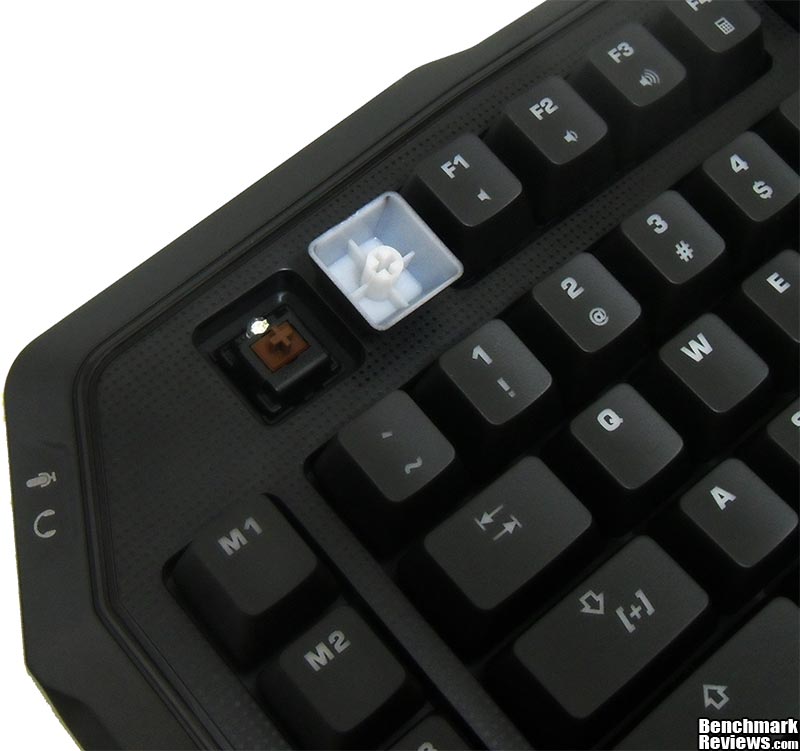
The ROCCAT Ryos MK Pro sample we have for testing has Cherry MX Brown switches with integrated LED’s. The keycaps are translucent with a black exterior to allow the Blue light from the LED’s to shine through and illuminate the symbols.

The ROCCAT Ryos MK Pro has two USB 2.0 pass through ports built into the rear right corner.

On the rear left corner of the ROCCAT Ryos MK Pro we have microphone and headphone pass through ports.

ROCCAT Ryos MK Pro has a high quality braided cable that terminates with two USB connectors and headphone and microphone jacks.

The rubber feet on the ROCCAT Ryos MK Pro are huge but don’t have as much grip as I would like. I found that the height adjusting feet are smaller than I would have liked.

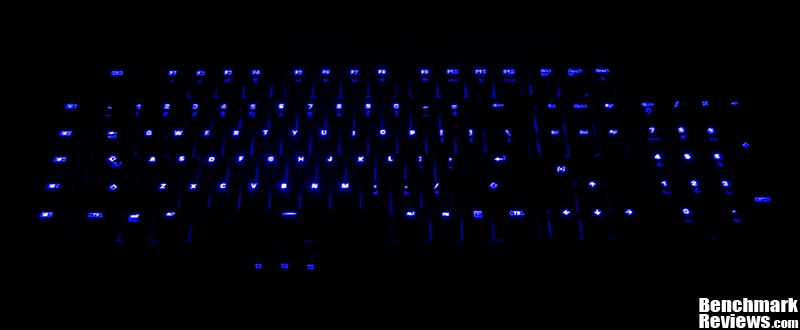
Of course the main feature of the ROCCAT Ryos MK Pro (besides the mechanical keys) is the intense blue illumination. Not only do the key symbols illuminate, the light also bleeds out beneath the keys for a nice back glow effect.
In this section we will have a look at the software that drives the ROCCAT Ryos MK Pro Gaming Keyboard.

The main control tab is where you set the function of the modifier keys (EasyShift[+] and FN keys) and enable/ disable the default windows modifier keys. Key illumination brightness can be set in this screen as well.

In the key assignment screen users can re-map and assign secondary functions to all of the keys with the exception of the escape key. The software utility separates the keys into the following zones; M-Keys, Thumbster Keys, Easy-Zone, and F-Keys. The F-Keys also have a third function when pressed in conjunction with the ‘FN’ key (next to the right ALT key).

The key illumination tab of the Ryos MK Pro software utility is a little counter intuitive. There are no instructions on how to change the illumination of the keys so you must try to figure it out for yourself. It would be a really simple task if there was a dedicated physical key or button on the keyboard. Instead you must select each key individually and assign colour on or off.

The ROCCAT R.A.D. tab tracks your keystrokes and awards achievements when you get to certain milestones. Statistics are kept for the for the WASD, EasyShift, Macro, and Thumbster keys – collecting info on total keystrokes, average per hour and average per day.

The last tab of the RYOS keyboard utility allows you to check for driver updates and get online support in one convenient location, this saves you having to trawl through the website in order to find the relevant pages.
Testing an input device is simple, all one needs to do is use it. Unfortunately there are no quantative benchmarks to run, no numbers to compare, and no software used that can test the quality of the hardware. Testing an input device like the ROCCAT Ryos MK Pro Gaming Keyboard is going to be based around personal opinion and preference. In this section I will present my unbiased opinion with regards to the use and operation of the Ryos MK Pro and report back any improvement benefiting directly by its use in various games and programs listed below. Your mileage may vary slightly and as such this should be taken as a guide only.
- Motherboard: ASUS Z87I-PRO
- System Memory: 8GB Corsair Vengeance 1600MHz
- Processor: Core i5 4670K
- Video: Palit GeForce GTX 770
- Disk Drive: Kingston HyperX 120GB
- Monitor: HKC 22″ Widescreen (1920×1080)
- Operating System: Windows 7 Ultimate x64 (SP1)
- Adobe Photoshop CS5
- Firefox and Internet Explorer web browsers
- Microsoft Office applications
- Call of Duty Series
- Battlefield Series
- Just Cause 2
- Nether
- GTA IV
The ROCCAT Ryos MK Pro Gaming Keyboard is much like any keyboard when it comes to normal use. To set it aside from crowd it has the innovative EasyShift[+] function that allows you to as assign a secondary function to every key except the escape key. This is the first mechanical keyboard from ROCCAT and they built a very good keyboard that is hard to improve on. Each key has its own backlight and can be independently controlled via the software utility. The level of customisation could only be increased by adding multicolor LED’s. The T-Keys are harder to actuate than the other keys due to their location and button design but this is the only niggle I have with the Ryos MK Pro.

The large wrist wrest and ergonomics make for comfortable usage when gaming and typing. The integrated USB and audio ports give you a more convenient location to connect your other peripherals and accessories. The Ryos MK Pro Gaming Keyboard is a ROCCAT Talk enabled device which means that users who own a compatible ROCCAT pointing device can take advantage of using the EasyShift[+] function for both devices from one location (keyboard or mouse).
This was my first time using MX brown switches and I was not disappointed in the slightest. MX Brown’s require low activation force and have low level tactile feedback. These characteristics are very easy to notice when switching from MX Red or Black switches since neither of those have any tactile response. Users switching from MX Blue switches will notice that there is slightly less noise from the MX Browns due to the lack of a click.
EasyShift[+] is such a great idea and it has been really well implemented on the Ryos MK Pro keyboard. Every key but the Escape key can have a primary and secondary function assigned to them and they are only a modifier click away. This is made one step better when you pair the Ryos MK Pro keyboard with the a compatible mouse using ROCCAT Talk, I have the EasyShift[+] keys on both devices set to control either device and it really opens up the possibilities of configurations to a whole new level. The limit really is your imagination and memory span. Add to this that you can have five profiles on each device and you can now start to realise the amount of possible configurations that are literally only a few clicks away. The best case scenario from this team up of peripherals is for an RTS gamer, in this category a lot is dependent on Actions Per Minute and I think the combo will really excel here.

The Ryos MK Pro performed flawlessly throughout testing. The setup utility makes assigning functions to keys and playing with illumination more difficult than it needs to be, but it is not too much of a hardship. The MX Brown switches feel great and have got me doubting the superiority of MX Black keys.
There is no doubt that the Ryos MK Pro is a great looking keyboard. Like any other peripheral that gets a lot of use it’s looks will need to be maintained with a good clean now and then. The Blue illumination is very intense at the highest setting and looks almost ultraviolet at the lowest setting.
The Ryos MK Pro is extremely well built and is big and heavy. The construction is mainly plastic but it feels very sturdy all the same. The use of MX keys means that the Ryos MK Pro will last well into the future
I really wanted to give the Ryos MK Pro a 10 for functionality and would have done so still if it were not for the few nuances within the configuration software. Other keyboard manufacturers implement configuration functions at the hardware level so users can change them on the fly but the Ryos MK Pro must be configured from the setup utility. EasyShift[+] and ROCCAT Talk make for a highly configurable device and integrated USB and Audio ports make connecting your other peripherals and accessories more convenient.
The ROCCAT Ryos MK Pro Mechanical Gaming Keyboard is a top of the line keyboard not just for ROCCAT but for the entire segment of the market. Even with this said I still think the $169.99 (Amazon | NewEgg) price tag is a hard pill to swallow. The overall rating will suffer as the individual price rating will bring the average down.
The ROCCAT Ryos MK Pro Mechanical Gaming Keyboard is an awesome bit of kit and would be a worthy addition to anyone’s gaming arsenal. The level of customization and functionality are outweighed by the high price. This means that the Ryos MK Pro narrowly misses out on the Benchmark Reviews gold award, and must instead settle for silver.
+ All keys can have primary and secondary function re-mapped (except Escape key)
+ Individual backlit key control and LED brightness control
+ Cherry MX Brown Switches
+ Integrated wrist rest
+ Integrated USB and audio ports
+ Easy Shift[+] and ROCCAT Talk allow for multiple key configurations
+ Dedicated Macro and Thumbster keys
+ Great durable construction
+ Great for Gaming and Typing
– Very heavy keyboard
– Expensive enthusiast solution
– Rubber feet don’t grip as well as I would like
– Height adjustment doesn’t make enough difference to keyboard angle
– Blue is your only color option
-
Performance: 9.50
-
Appearance: 9.00
-
Construction: 9.25
-
Functionality: 9.75
-
Value: 7.00
Quality Recognition: Benchmark Reviews Silver Tachometer Award.
COMMENT QUESTION: Mechanical keyboards are well established now. Are you using one yet?


