By Tom Jaskulka
Manufacturer: Thermaltake Technology Co., LTD.
Product Name: Urban SD1
Model Number: CA-1A9-00S1NN-00
UPC: 841163053713
Price As Tested: $93.00 (Newegg / Amazon)
Full Disclosure: The product sample used in this article has been provided by Thermaltake.
Thermaltake has recently added another chassis to their Urban lineup. A modern update of the classic Lanbox Lite chassis (also by Thermaltake), the Urban SD1 is designed for builders that are building around the mATX/mITX form factors and still want room for large graphics cards, AIO liquid coolers and multiple drives. Utilizing modular internals in a chassis not much bigger than many ITX boxes, the Urban SD1 promises an easy building experience. Weighing in at 5.8 kg and with dimensions of 239 x 280 x 456mm (HWD), will this sophisticated relative of the Lanbox / Armor A30 deliver on its claims of high-performance in a micro-ATX form factor? Benchmark Reviews was given an opportunity to build a system in the Urban SD1 (model CA-1A9-00S1NN-00), so let’s see what changes have been incorporated in this new member of the Urban chassis family.

Features & Specifications
| Model | Urban SD1 |
| P/N | CA-1A9-00S1NN-00 |
| Case Type | Micro Case |
| Dimension (H x W x D) | 239 x 280 x 456 mm (9.4 x 11 x 17.9 inch) |
| Weight | 5.8 kg / 12.8 lb |
| Side Panel | No Window |
| Color | Exterior & Interior : Black |
| Material | SECC & Aluminum |
| Cooling System | Front (intake) : 90 x 90 x 25 mm fan (1200rpm, 16dBA ) Rear (exhaust) : 60 x 60 x 25 mm fan x 2 (1500rpm,18dBA) |
| Drive Bays | -Accessible : 2 x 5.25″,1 x 3.5″ -Hidden : 2 x 3.5″, 2 x 2.5″ |
| Expansion Slots | 4 |
| Motherboards | 9.6” x 9.6” (Micro ATX), Mini-ITX |
| I/O Ports | USB 3.0 x 2, HD Audio x 1 |
| PSU | Standard PS2 PSU (optional) |
| Top: 1 x 120mm or 1 x 140mm (Converted from Radiator Bracket) | |
| Other | CPU cooler height limitation: 90mm VGA length limitation: 350mm |
The Urban design has been very kind to Thermaltake’s Lanbox Lite. A cursory glance at the layout, and it becomes obvious the Urban SD1 is an updated version of a small form-factor case that has been on the market for some time. There are a few changes though, so let’s start with the outside of the case.

Remember to remove the protective plastic wrap to display the beautiful brushed aluminum panels. It’s just the front face, and the panel is still primarily plastic – but it is a very nice touch that drastically enhances the aesthetic in my very own humble opinion. While there’s a special place in my heart for unique and aggressive designs like the Armor A30i, I feel that the Urban design approach is a better decision for this type of case.

The back of the Urban SD1 helps illustrate the internal layout. An ATX PSU fits above the motherboard so tall CPU coolers won’t be compatible (the SD1 states a CPU cooler height limitation of 90mm). Four PCI slots restrict Crossfire/SLI configurations to specific motherboards, but I’m going to go out on a limb and say this chassis isn’t quite designed for “hot and loud” components. I’m sure blower-style graphics cards would be the better choice for such a setup.
If you look closely, you can make out the different sections that make up the “modular” design. While not entirely modular (you can’t rearrange any of these sections), they can be removed individually – you’ll just need to work through the eleven (!!!) thumbscrews on the back panel to do so. While it’s a bit more than the typical four thumbscrews for side panels, it should make assembling a system in the Urban SD1 a little easier.

The right side of the Urban SD1 showcases the round holes for cooling the motherboard and drives, as well as a cutout for opening the front door.

The left side is almost identical to the right, with the round holes (this time for GPU ventilation) running the entire length of the panel. You’ll probably want to select your graphics cards carefully for this enclosure, since that mesh won’t be able to redirect or muffle any noise from your card’s fans.

Another series of round hole ventilation covers the top panel, separated into two sections for drives and the power supply intake. The forward section hides an optional fan mount for 120/140mm fans or radiators, when the included additional drive tray (radiator bracket) is used.

There isn’t much to see on underneath the Urban SD1, although sharp eyes will pick up on a few details. The front dust filter slides out from the bottom, which means you’ll need lift up the front of the case to remove it for cleaning. A series of intake vents in front of the filter supply fresh air to the rest of the case via a 90mm fan, and the attachment points for the 3.5″ removable drive cage are visible too (along with the sliding portions of the removable motherboard tray).
With the tour of the outside complete, let’s look at some of the more detailed features of the Urban SD1.

The front door swings open to reveal two external 5.25″ bays, as well as a single 3.5″ external bay and some more slots for ventilation. While smaller form factors are becoming more popular, few of them set aside space for multiple optical drive bays (or external 3.5″ devices, for that matter).

Removing the top cover and peering into the internals gives us the first glance of the space available for components. An ATX power supply will take up most of the space in the lower right corner of this photo, with external bay devices occupying most of the front (left in the photo above).

Keeping with the “modular” nature of the Urban SD1, the cage for the external devices is easily removable (after removing two thumbscrews). This should make installing devices in these bays pretty simple, since you can install them in the cage first and then place them into the chassis.

Removing the top drive bracket reveals the 90mm fan and 3.5″ removable drive cage, along with the front panel connectors and 4-pin molex adapters for the fans. It’s a good thing the fans are pretty quiet, as the only option is to plug them into the power supply (no motherboard control); I suppose if you find the right fan controller you could still control their speed. I wouldn’t worry about it though as even at full RPM the included fans are not very noisy (all under 18dBA according to the manual).

The entire motherboard tray slides easily out the back (after removing six thumbscrews). We’ll see this in a bit more detail during the build section of the review, but I almost wonder if I should have installed the power supply first. The removable motherboard tray is great (you’ll wonder how you ever dealt with cramped quarters in other cases before), but any cables that are attached have to be managed on their “slide” back into the case.

The motherboard tray isn’t the only thing that is removable. From left to right (above), the 5.25/3.5″ external drive bay cage (with two 2.5″ drive mounting locations on top), motherboard tray, and the power supply bracket are all easily removed with a few thumbscrews.

The internal 3.5″ bay is removable as well, but the sides of the Urban SD1 case remain attached – making it much easier to install all components outside of the case first, then replace them as you go.
All of the removable chassis parts are out and ready to have some components installed – let’s start with the motherboard and CPU as usual.

Removable motherboard trays seem to be a rare find – when done right, they definitely make it easier to install the motherboard, CPU and RAM (as well as attach the front panel connectors and power cables). The Urban SD1’s removable motherboard tray will allow you to install graphics cards at this point as well, then slide the entire assembly back into the main chassis. Make sure you attach the front panel connectors to the motherboard first, otherwise it may be tough to squeeze your hand in there later.
Since all of the included fans use 4-pin Molex connectors for power, I just daisy-chained them together for easy access later. There’s a bit of room alongside the motherboard for routing cables, but some attachment points or cable routing channels along the side of the case would be absolutely helpful; alas, there isn’t a way to manage these without using twist-ties through the round hole mesh. It gets a little interesting keeping cables out of the way when sliding the tray back in, and I haven’t even gotten to the power supply yet…  The front panel cables are long enough to attach before the motherboard tray is reinserted, but only just so (the front panel audio cable will probably need to be attached later). Again, tie-down points would be helpful in routing some of these cables around the front fan and other components, but there are none to be found.
  The power supply installs in its own removable bracket, and is placed over the motherboard. I wasn’t comfortable with using the PSU fan to exhaust the heated air from the processor and graphics card, so I opted to use the open vents on top to isolate the PSU from the rest of the system (and keep it running cooler) – this is probably the intended installation anyway. There’s adequate ventilation for both orientations, so you could use the power supply as an additional case fan if your components would allow everything to stay cool. Due to the way the six mounting points on top of the PSU bracket attach to the main chassis, you won’t be able to simply slide the PSU on with the motherboard tray. Most cables will be long enough to attach before fastening down the PSU bracket though, so wiring everything up is a breeze.
  However, keeping those cables out of spinning fans isn’t as easy. Since the power supply hangs right above the CPU cooling fan, you’ll have to spend a little extra time making sure the overhanging cables won’t get tangled in any moving parts. Again, a few tie down points would do wonders here.
  The last modular component to be installed is the external drive/device bracket. Depending on your motherboard and graphics cards, you may have a bit of a tight fit here. While an R9 290 graphics card is a little overkill for this enclosure, it will fit (if only just). The stock external device bracket will result in some pretty tight clearances as seen above (you’ll have to plug in the PCI-E power cables first!). Look closely at that 3.5″ external bay too – if you have a micro-ATX motherboard that has the PCI-E x16 slot starting at slot two, you won’t clear this bracket with many dual-slot graphics cards.
  Thankfully, Thermaltake includes an additional drive bracket that has a mounting point for a single 120/140mm fan. It is much more streamlined, and should remove any GPU clearance issues you may have with the first drive cage. A single 2.5″ drive mount is available, making this bracket an obvious choice for a GPU-heavy gaming oriented build (typically with a HDD+SSD configuration).
  The 2.5″ mounting point on either bracket is tool-less; simply slide the included plastic clip’s pegs into the screw holes on the side of the drive (with the other side already in the metal bracket clips), and pivot it down until it clicks into place. An extra tool-less clip is shown in the picture above, sitting on the “X” on the left – only one is needed per drive, two are included. I thought this was a great feature – many chassis still rely on screws for SSDs, it is nice to see some tool-less provisions made for something other than 3.5″ and 5.25″ devices.
  Along with the tool-less SSD mounts, this bracket is ideal for mounting an AIO CPU cooler’s radiator. If you ignore the bundle of cables and remove the HDD cage underneath, a double-thick radiator in a push/pull fan configuration should fit (such as the H80i, Tundra TD03 or Thermaltake’s own Water 3.0 Pro), but a normal 25mm-thick radiator would probably be the best option for all-around compatibility. This water cooling bracket is reversible too, so you can flip it around…
  …and use it to supply cool air directly to the graphics cards with an additional fan. With blower-style GPUs especially, this would be an ideal configuration. Curiously, the screw holes were too small for normal fan screws (probably because this bracket is designed for the 6×32 screws for liquid cooling hardware – it is the “radiator bracket” after all), but a few of the included reusable ties worked just fine. The manual isn’t very helpful here – four screws are included for an additional fan, but they didn’t fit either.
While many of these points have been mentioned (or will be reiterated in the conclusion), I wanted to make sure I placed some of my observations while using the Urban SD1 together. The following are some of the thoughts I had while working with the Urban SD1.
Observation 1: Lots of thumbscrews to disassemble. Not that big of a deal, but there’s a lot of em! Perhaps a necessary evil (the removable sections are nice!), and at least most don’t require the use of a screwdriver.
Observation 2: NO CABLE MANAGEMENT. None. Not even a little. No windows, so maybe it doesn’t matter – but with a PSU hanging OVER a spinning CPU fan, perhaps some way to route cables to the side while sliding the motherboard tray in would be nice. Some tie down points would do wonders.
Observation 3: Loud (depending on your components…). There really isn’t any noise dampening or redirection, you get ALL of it (especially since cases like this usually sit on top of your desk). The stock fans are quiet at least, but your components probably won’t be. With that comes heat. The Prodigy M handled a custom cooler (XFX) R9 290, maxing it out at 72C under a 100% GPU compute load. The SD1? 80+C. The top panel by the PSU got uncomfortably warm to the touch. Really, there just wasn’t a way to get rid of the heated air. A single exhaust fan would help quite a bit, but there just isn’t much room. The Armor A30 added a fan to the top, this would be one possible solution. I know the R9 290 is a bit unfair for this type of enclosure (even though it WAS within temperature specs), but there are cases of similar size that can keep it cooler (and therefore quieter).
While working in the Urban SD1, I couldn’t help but draw some comparisons between this case and a Fractal Design Node 304. This isn’t a comparison article, and each chassis has its own strengths and weaknesses that vary depending on your own preferences. Sometimes one of the best ways to illustrate some of those strengths or weaknesses is just to place it next to another case. It was fascinating for me to see the wildly different approaches to internal design between the two, and while they end up being pretty close in size they couldn’t be more different.
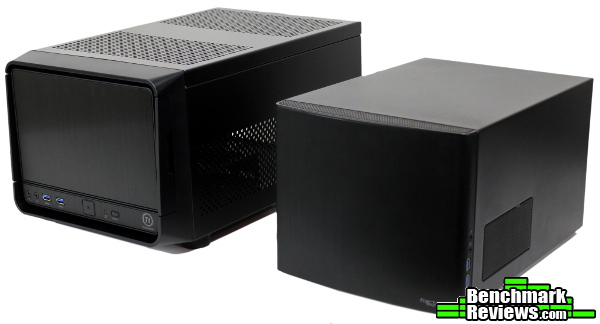
Obviously the Node 304 is mini-ITX only, but the stock airflow is superior to the Urban SD1. Both enclosures would struggle with a hot card like the R9 290, but the 140mm exhaust fan of the Node 304 helps prevent the heated air from accumulating at least. Of course, the Urban SD1 can accommodate a larger variety of parts because of its micro-ATX compatibility. I’d say taller CPU coolers would be a benefit of opting for the Node 304, but it’s a toss-up depending on your ITX board if it’ll clear the rest of your components – at least both will fit a 120mm AIO liquid cooler without much of an issue.

It’s tough to beat the efficiency of the Node 304, but the expanded part selection afforded by the micro-ATX compatible Urban SD1 is a benefit. Really, seeing the two made me wonder what would have happened if Thermaltake would have taken the opportunity to reinvent the Lanbox Lite as an ITX box…

I’ll try and summarize my experience with the Urban SD1 in terms of Performance, Appearance, Construction, Functionality and Value categories, but I feel like I should add a disclaimer. You must understand that my own preferences and uses for cases differ from most; while I try to view each case as objectively as I can, I probably can’t avoid my own bias from affecting my conclusion in some manner. I implore you to think in depth of your OWN uses and preferences, and use my reviews as a guide or simply as another perspective.
With the right components, I think the Urban SD1 would be a satisfactory performer. However, I’d hesitate to use anything other than mid-range open air cooled GPUs due to poor stock airflow. Using blower-style coolers or adding an additional fan would help (thus removing the ability to mount most AIO liquid coolers for the CPU), but to deal with heat monsters like the R9 290 the passive ventilation just wasn’t enough – some additional exhaust was needed to keep fan speeds at reasonable levels. If you’re comfortable with the PSU fan doing double duty as an exhaust, that may help the heat buildup a little. More stock airflow is needed for this chassis to really qualify as “high-performance” in my opinion.
The appearance category is where the Urban SD1 really shines. I like the designs of the Urban series, and the SD1 is by far the best looking Lanbox Lite yet. The conservative aluminum front panels are beautiful, and the clean lines are complimentary and tasteful. That other side of my brain still wishes the top blue power LED would scan back and forth “Knight Rider” style though… Missed opportunities aside, the Urban SD1 is an attractive enclosure overall.
The reduced use of plastic really enhanced the overall construction “look and feel” of the SD1 compared to the similar A30 or Lanbox Lite. Even with the large number of removable parts, everything fit together nicely. The power supply bracket is a little wobbly on its own, but once installed it is very solid. It would be nice to not have to deal with so many thumbscrews when removing components (or the six screws for the power supply bracket), but I don’t really see a way around that without re-engineering the entire thing. Besides, that’s something most people only have to deal with once or twice, it isn’t that big of a concern.
The biggest contribution to functionality for the Urban SD1 is the various sub-assemblies that can be removed for easier installation of components. The removable motherboard tray, PSU bracket and drive cages really do make for an easier time of assembly. It’s too bad a complete lack of cable management complicates this process a bit, but with this many removable components perhaps tied-down cables would just get in the way anyway. The small updates help keep the Urban SD1 modern, but the main feature would still be the external drive bays – there just aren’t that many cases this small that still make provisions for external devices.
The Thermaltake Urban SD1 was listed online for $93.00 (Newegg / Amazon) at the time of this review. While performance-oriented micro-ATX cases are still a bit rare, there have been some excellent candidates on the market for some time. BitFenix’s Prodigy based enclosures are especially compelling if cooling performance in a smaller mATX form factor is your main consideration (along with Fractal Design’s Arc Mini R2 and Define Mini, Silverstone’s TJ-08B-E, Corsair’s Obsidian 350D…) The external bays of the Urban SD1 are relatively unique for this particular form factor though, and fills a niche the other towers can’t. The only problem I can see is there are quite a few proven performers in this price range (most fall within $10). The competition is strong, and I fear the updates to the Lanbox formula, while certainly an improvement, may not ultimately be enough to shift the value back in favor of the Urban SD1.
Overall, the Urban SD1 is an attractive update to a classic form factor. There are a number of performance-oriented micro-ATX enclosures though, and I just don’t feel like I can recommend the Urban SD1 to anyone that doesn’t need the external bays (if you do, the SD1 is one of the only options). The stock airflow is just too limiting for high-end components, but at least there are some optional tweaks that can mitigate that somewhat. The updates modernize the chassis enough to keep up with current components, but it feels like the internal design has aged faster than the rest of the case. However, as an HTPC or with careful selection of low-heat components I think the Urban SD1 would be a great choice if you like the look and form factor.
+ Very attractive, small form factor chassis
+ mATX, wider range of compatible components
+ One of the few cases this small that can still use full-size optical drives or external bay devices
+ “Modular” design does assist in installing components
– No cable management
– Can run warm – needs additional GPU cooling or careful component selection
– Only the front panel blocks noise
-
Performance: 6.75
-
Appearance: 9.25
-
Construction: 8.00
-
Functionality: 7.50
-
Value: 7.25


One thought on “Thermaltake Urban SD1 MicroATX Case Review”
After building a lot of small form factor systems in the last couple of years, I’ve become a big fan of SFX power supplies. One, specifically: the Silverstone ST45SF-G. With short, modular cables it’s much easier to fit into a mITX or mATX case than a standard power supply, and at 450W it’s enough for a relatively beefy system, although a high-end SLI or CrossFireX system will probably require something larger.
Comments are closed.