By Jason Vaught
Manufacturer: Sentey Inc. Product Name: Lumenata Pro Model Number: GS-3900 UPC: 788513039006 Price As Tested: $44.99 (Amazon)
Full Disclosure: The product sample used in this article has been provided courtesy of Sentey Inc.
What is the point in purchasing a gaming mouse vs a regular mouse? When you make the decision to invest in a quality gaming mouse, such as the Sentey Lumenata Pro, it goes without saying that you won’t only be using the mouse for gaming. With the features and responsiveness this mouse offers, it will easily become your “go to” mouse for all of your objectives. Nowadays every computer user uses an optical mouse, my apologies for those of you stuck with old “ball mice” at work, and don’t necessarily know the difference in DPIs(Dots Per Inch) or polling rates. But this is techplayboy.com, so you came here because you’re either already or an up and coming enthusiast! If your hunt is for a very nice gaming mouse that meets and exceeds it’s factory specifications, as well as my expectations, then you’ve come to the right place. As we delve deeper into the Lumenata Pro’s features, we’ll also be testing its responsiveness(DPI), its polling rate, as well as real world everyday use for both gaming and other mouse intensive task such as Photoshop.
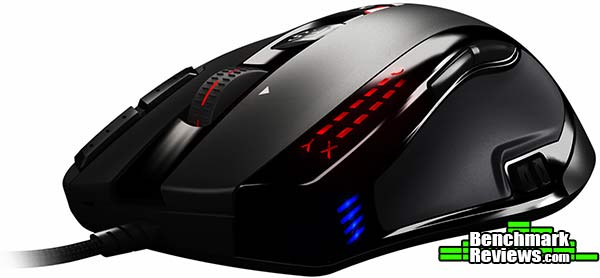
- ADNS 9800, 4 Level Preset, 8200 DPI Laser
- Avago Chipset
- 1000Hz Polling Rate
- 4D 4 Way Scrolling
- 30G Acceleration with 150 inches/sec track speed
- Independently programmable X & Y Axis
- 9+2 Buttons (9 Macro Buttons) + 1 DPI Selector
- 5 Configurable Profiles
- Adjustable Lift Feature (Collects Surface Information to Customize Tracking Performance)
Some gaming mice, come in very efficient and cost effective packaging, this is adequate as most people throw away the packaging once they’ve taken the mouse out. The good people at Sentey decided to take a different approach, the full bells and whistles approach!

The Sentey Lumenata Pro comes packaged within a zippered travel case encased in a sturdy, magnetically sealed box. They even throw in a poster, door hanger, and a Sentey VIP registration card. I’m very impressed that they throw in a carrying case for this mouse, as it is normally a $25 option. Usually product documentation and driver availability is on a company’s website and minimal in the product’s actual packaging. Sentey decided to include everything you would need in their packaging and then some, including a driver/software installation mini-CD.

The Lumenata Pro itself is of a fairly common design, ergonomically. This top down view gives you a general idea of the mouse’s overall shape and button layout. Clearly it is a right-hand only mouse, which is also common among mice in general. Sorry my left handed friends.

The left side of the mouse features configurable forward and back buttons above your thumb, as well as the DPI selector switch below your thumb. The selector switch being below your thumb is uncommon in gaming mice but has proven to be an intuitive idea.

The right side of the mouse features two programmable buttons, and the center scroll wheel is also a button, and a 4 way directional pad for internet browsing. The cord is attached and wrapped in a heavy duty braid with a gold plated USB connector.

The Sentey Lumenata Pro is right handed and leaning towards the palm grip style, although you could comfortable use it in claw style if you wish. The dimensions, as shown above, are in line with most mice in it’s class. It fits my medium sized hands very comfortable, I would say it’s of a similar size to the Logitech G700, but smaller height wise than the G500s. Not as wide as the G9x, but taller. Hope these other mice references help, but if not, the actual dimensions are shown above.
One of the Lumenata Pro’s best and least advertised features is the Adjust Lift Button. This very cool feature calibrates the mouse to your specific mouse pad or mouse surface and will help you avoid cursor movement cutoff if you should have the habit of lifting your mouse during gaming. I’ve personally never seen or heard of this type of feature, it seems to allow the software to solve the problem of lift instead of weights on the mouse, such as other mice manufacturers use. It’s also very useful if you happen to change or switch between multiple mouse pads containing different textures.
Note: Logitech just recently updated their software for the G502 to support surface calibration, wonder where they got that idea from!

It is the first setting the manual has you configure as seen above. It does however, pose a problem if you should happen to lift the mouse up completely off the surface during calibration, resulting in a non-moving mouse pointer. Luckily Sentey knows about this problem and published the fix for it right below the configuration instructions.

The Lumenata Pro software is farely straightforward without a lot of fluff and settings hid in tree-ed menus. As you can see above, you presented with Button Function, Macro Management, and DPI & Tool. Each of which, as you will see below, takes you to that specific areas settings of the mouse. These settings are what you commonly see in gaming mouse software, just a little more streamlined, with enhanced functionality for the X & Y axis settings, as you’ll see below.

The button function button menu in the software of the Lumenata Pro allows you to set up 5 different profiles, all of which are categorized by 5 different colors. When on the selected mode, the scroll wheel and the M button change to the color of the selected profile. You can also assign different macros to the individual profiles, which is a nice feature. To switch between the modes you can either select one from this screen or use the “M” button that is below the F.S. button directly on the mouse. The color beside the “M” or Mode button will indicate which mode or profile you’re in.

The Lumenata Pro software’s macro management menu is fairly easy to use compared to some. You can either choose from a list of commands to build your macro or you can hit the record button, and perform the macro you desire, then hit stop and your macro is stored. If you’re happy with the macro, including the pause between each function, then you simply drag the macro to the list on the left and it will have you name it. To assign the macro to a button on the mouse, you go back to button function and drag the desired macro to the desired button, piece of cake. It also gives you the option to record or not record the duration or intervals between each part of the macro. In my testing I used a this simple macro above in World of Tanks (W.O.T).

The DPI & Tool menu is where the mouse out classes the competition, not only do you have 4 individual DPI profiles to choose and customize from, but you can set the X & Y axis of each profile to operate independently of one another. You can also set the scroll acceleration, allowing you to make scrolling through long pages even easier, this setting can be adjusted directly on the mouse as well, by holding the F.S. button for 3 seconds, then pressing it twice more. You adjust the count (1 to 9) using the scroll wheel, then press F.S. for 3 seconds again to save the setting and drop out of setting mode. The X & Y axis can even be adjusted directly on the fly buy holding the F.S. button for 3 seconds for the X axis, then press it once more for the Y axis. When you’re on the selected axis settings, the indicator strips on the left top side of the mouse will blink and you adjust the sensitivity by using the scroll wheel. Another feature to help you fine tune your playing style while in game!
The Sentey Lumenata Pro was tested on both USB 3.0 and USB 2.0 ports for over 100 total hours. The programs and games that were used during testing, regular Windows and browser use aside, include: Adobe Photoshop CS6, World of Tanks, Battlefield 3, Diablo III.
-
Motherboard: ASUS Sabertooth Z87
-
System Memory: Corsair XMS3 4GB x 4
-
Processor: Intel i7-4770K Haswell @ 3.5 Ghz
-
Audio: On-board
-
Video: XFX Double Dissipation R9-290X (4GB)
-
PSU: Corsair HX Series 1000HX
-
Monitor: Dell UltraSharp U2412M IPS 24″ x 3 @ 5760×1200
-
Operating System: Windows 7 Ultimate (64-bit)
Lumenata Pro has an available function, through the software only, to change its polling rate between 125 and 1000Hz. The max, 1000Hz, was used for all of my tests. According to our (Benchmark Reviews) polling tools, Direct Input Mouse Rate & Mouse Rate Checker, the Lumenata Pro performed exactly as advertised on both USB 2.0 & 3.0.

During my testing, with a monitor set to a resolution of 5720×1200, I stayed in the 5200 to 5900 resolution range, this proved to be quite comfortable for me. Working in Photoshop CS6, I had to lower the DPI to around 2000 to 3000 depending on how much control I needed and how small of an area I was trying to work in. These DPIs are a little lower than what I normally use, but only because the Lumenata Pro is lighter than my current mouse.
While gaming with the Lumenata Pro, I did have to drop the resolution down to around 800 DPI while playing World of Tanks, mainly because with how easily I could spin the turret was making it difficult to shoot on the run. Battlefield yielded a similar outcome, but with only dropping to 3000 during game play and 2000 during sniping. Diablo III I ran at a constant 2200 DPI, which for me was the sweet spot for Diablo III with this mouse. I’m sure with more practice and some improved hand and I coordination on my part, I could easily run this mouse at some of the higher DPIs, although I can’t fathom sniping at 8200 DPI!
None of the usual problems from the ADNS-9800 sensor was experienced during my testing, which tells me that the adjustable lift feature has proven to be a superb idea. Having all the macro buttons proved to be beneficial in both gaming and applications (Photoshop). With gaming, I could easily assign simple or complex macros and execute them with one click. While in Photoshop, I assigned specific functions and shortcuts to the macro keys, making Photoshop that much more efficient.
Most of you reading this have probably never heard of Sentey, but they have been in the gaming business for quite a while. Offering a plethora of gaming products, the Argentinian based company has hit the mark with the implementation of the Lumenata Pro, featuring loads of options, for a decent price. Something you don’t see very often with some of the bigger names in the industry. For some, the ADNS-9800 sensor will turn you off immediately, mainly for it’s poor implementation in other mice, but Sentey did it right with this mouse. I’ve noticed 0 lag with the Lumenata Pro, something that cannot be said about my current mouse, the G700.

The Sentey Lumenata Pro’s performance is exactly what you would expect from an upper tier mouse. The Avago ADNS-9800 sensor showed no input lag that is commonly associated with that sensor. The buttons have a nice solid feel and the grip is comfortable.
The Lumenata Pro features clean lines, a comfortable button layout, and a unique placement of the DPI selector switch. The DPI selector switch, although not what I’m used to, proved to be quite intuitive in it’s placement in terms of ease of use. The rubberized exterior is nice and grippy, but attracts loads of dust and dirt, though not un-common in gaming mice.
Although the Lumenata Pro is lighter than what I’m used to, it does not feel any less solid. The construction is nice, with attention to details in many areas, such as the button layout and the teflon feet on the bottom. The Lumenata is a wired mouse, featuring a sturdy, braided cable with a gold plated USB connector. The rubberized finish makes it easy to grip, but also easy to attract dirt.
The Lumenata Pro sets the pace in terms of functionality. While most manufacturers only let you change specific settings with software, the Lumenata Pro allows you to change almost all settings right from the mouse. The software works well, the sensor performs as it should and the adjustable lift feature is a first for me. That alone really sets this mouse apart from it’s competition. The Lumenata Pro’s software is where we run into a bit of wrinkle, each mouse Sentey makes, uses a different piece of software. Most manufacturers have one piece of software that will recognize and display options for the mouse that it detects, this would be a more ideal solution than the several different versions of software Sentey currently uses.
As of May 2014, the Sentey Lumenata Pro can be had for a mere $44.99 (Amazon), a very reasonable price for a feature rich gaming mouse. Even if it was selling for it’s MSRP of $79.99, it would still be a good deal on an exceptionally thought out mouse.
Although a well designed mouse, with many features only found on the higher end, it would not take my current mouse’s spot as my “go to” mouse. Mainly because it’s just not heavy enough for my tastes. Some people like a lighter mouse, but I need something heavier. Anyone looking for a good, decently priced, feature rich mouse, should definitely take a look at the Sentey Lumenata Pro. So long as weight is not a factor that is.
+ 5 Configurable Profiles
+ 8200 DPI
+ 1000Hz Polling Rate
+ 9 Macro buttons
+ Independent and Programmable X & Y Axis
+ Price
– No adjustable weight system
– Rubberized finish attracts dirt
– Software needs to be less individualized
-
Performance: 9.25
-
Appearance: 9.00
-
Construction: 8.75
-
Functionality: 8.75
-
Value: 9.50
Excellence Achievement: Benchmark Reviews Golden Tachometer Award.
COMMENT QUESTION: What gaming mouse are you currently using?



2 thoughts on “Sentey Lumenata Pro Gaming Mouse Review”
This is just a re-branded Shogun Bros Ballista MK1 from a few years ago. Even the software looks the same. https://shogunbros.com/commander/ballista-mk-1
Thanks for the comment Jon, I reached out to Sentey concerning the similarities to the Shogun Bros MK-1. Sentey informed me that the Lumenata chassis design is not exclusive worldwide but is exclusive in retail for Sentey here in the U.S.
However they do caution that the components found inside the Lumenata Pro vary from those found in other, similar mice built on the same chassis. So while they are both the same design on the outside, they may not have the same type or quality of components on the inside. Hope this clears things up a bit.
Comments are closed.