By Tom Jaskulka
Manufacturer: BitFenix
Product Name: Colossus
Model Number: BFC-CLS-600-KKLG1-RP
UPC: 886027006658
Price As Tested: $159.99 (Newegg | Amazon)
Full Disclosure: The product sample used in this article has been provided by BitFenix.
August 2010. A new company releases a massive enclosure aptly named the Colossus. The original Colossus was BitFenix’s first product as a company, and it captured the attention of the enthusiast crowd at the time with its various added features and performance capabilities. While Benchmark Reviews has taken a look at the Colossus before, the recent release of the micro-ATX (and mini-ITX) Colossus M got us thinking: how much performance was retained in the Colossus’ spiritual successor? The SofTouch finishes, LiteTrak systems and bold styling are all there, but how do the two compare when filled with similar hardware? Is the monolithic Colossus ancient history by now, or can BitFenix’s first product still hold its own? Courtesy of BitFenix, let’s see how the latest micro Colossus stacks up against the original version (model BFC-CLS-600-KKLG1-RP).
We’ll start by taking another look at the Colossus to see how hardware has changed over the past three years. Remember, this was a time when AMD just announced the ATI graphics brand would be retiring in favor of AMD labeling (the Radeon HD 5800 series was winding down before the upcoming launch of the 6850/6870 in October, while Nvidia wouldn’t refresh their current Fermi-based GTX 480 with the 580 until November 2010). Deus Ex: Human Revolution was released on PC, the Call of Duty franchise was rapidly approaching its Black Ops debut, and Socket 1155 was a few months away (The LGA1366-based Core i7-970 had just been released; Sandy Bridge won’t make an appearance for another six months with AMD’s AM3+ Bulldozer cores almost another year away.).
To be fair, these two Colossi were designed for two different times. The GTX 480 was notoriously hot and loud (the architecture for the more recent R9 290 reference card didn’t even exist yet!), and Intel’s microprocessor lineup was transitioning from the 45nm to the 32nm process. Mini-ITX wouldn’t really take off for another year or so – full towers were necessary to keep hot and loud components at bay.

BitFenix Colossus
| Materials | SECC, ABS |
| Color (Int/Ext) | Black/Black or White/White |
| Dimensions (WxHxD) | 245 x 558 x 582 mm (ATX Full Tower) |
| Motherboard Sizes | Mini-ITX, mATX, ATX, E-ATX |
| 5.25″ Drive Bays | x 5 (1 x external 3.5″; tool-free) |
| 3.5″ Drive Bays | x 7 |
| 2.5″ Drive Bays | x 7 (using standard 3.5″ drive bays) |
| Cooling Front | 1 x 230mm |
| Cooling Rear | 1 x 140/120mm (optional) |
| Cooling Side Panel | n/a |
| Cooling Top | 1 x 230mm (or 1 x 140 or 2 x 120mm optional) |
| Cooling Bottom | 1 x 140/120mm (optional) |
| PCI Slots | 8 (tool-free) |
| I/O | 2 x USB3.0, 2 x USB2.0, eSATA, Audio |
| Power Supply | PS2 ATX (bottom, multi direction) |
| Models | |
| Colossus Black | BFC-CLS-600-KKLB1-RP |
| Colossus White | BFC-CLS-600-WWLB1-RP |
BitFenix Colossus M
| Materials | Steel, Plastic, SofTouch™ |
| Colors (Int/Ext) | Black/Black |
| Dimensions (WxHxD) | 250 x 330 x 374mm |
| Dimensions (WxHxD) | Micro-ATX, Mini-ITX |
| 5.25″ Drive Bays | x 1 |
| 3.5” Drive Bays | x 4 |
| 2.5” Drive Bays | x 3 |
| Cooling Top | 120mm x 2 (optional) |
| Cooling Bottom | 120mm x 2 (1 included) or 200mm x 1(optional) or 230mm x 1 (optional) |
| 120mm x 1 (included) or 140mm x 1 (optional) | |
| PCI Slots | x 5 |
| I/O | USB 3.0 x 2, HD Audio |
| Power Supply | PS2 ATX (bottom, multi direction) |
| Extras | LiteTrak™ lighting system, SofTouch™ surface treatment, magnetic heat shield |
The original BitFenix Colossus made quite an impression at the time. There wasn’t anything quite like it, and it still stands out as a behemoth of a case. Let’s start with a quick look around the outside, and then take a closer look at some of the detailed features of the Colossus.

The imposing, monolithic front profile of the Colossus is striking, even to this day. It has aged well, in my opinion – of course, I’ve always preferred matte finishes (and BitFenix’s SofTouch implementation is a very good example). The slightly recessed LED strips in the front panel add to the “monolith” feel of the door, as it gives a blocky impression to the entire thing. I’m almost a bit disappointed this exact design didn’t carry over to the smaller Colossus M given how great it looks in person (although perhaps it isn’t as suitable for a smaller area). The rear of the Colossus reveals nine PCI slots, and judging by the 120/140mm fan mount and space on either side of the ATX power supply location this is a pretty wide chassis (it would have to be, since it ships with two 230mm fans in stock configuration). It’s a bit strange we don’t see any additional mesh or venting on this back panel, especially above the PCI slots. The Colossus doesn’t really struggle with heat in the first place and it isn’t a “positive pressure” chassis like SilverStone’s Raven RV04, so perhaps it wouldn’t change much anyway.
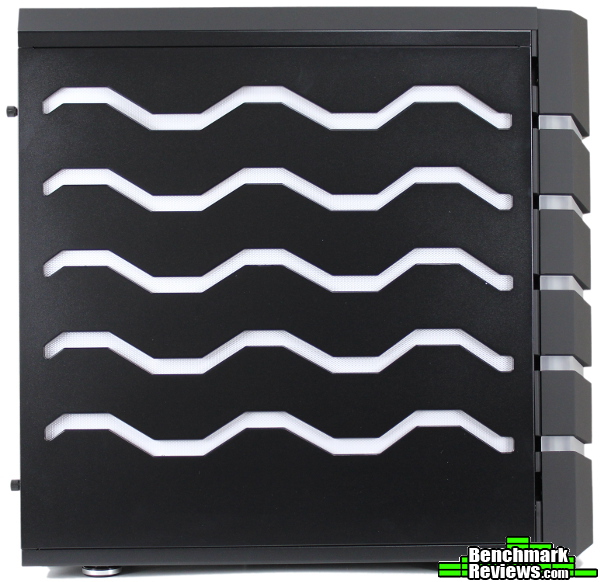
The Colossus can be found in windowed or non-windowed versions; if you opt for one without a window you’ll receive a panel with additional lighting instead. The entire effect is nicely done, although the more recent Colossus M’s LiteTrak system is definitely more efficient/advanced (it only uses two LEDs for the entire case! The diffusion is better on the Colossus M as well). Still, very few cases ship with built-in lighting (other than fans) of any sort, making the Colossus a bit of a rarity even today.

The non-window version of the BitFenix Colossus is identical on both sides so the wrap-around lighting continues around both panels. It doesn’t use light-pipes like the Colossus M, instead using a row of LEDs on the top and bottom for illumination.
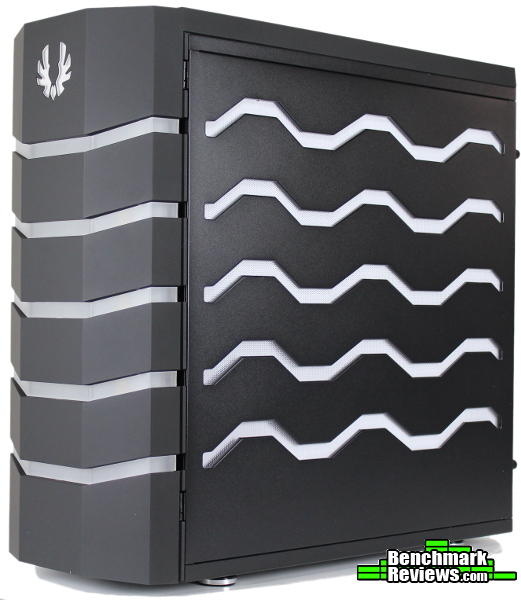
Continuing with the symmetric design, the hinges for the front door can be swapped if desired. Doors can be a bit annoying if they open from the “wrong side” (depending on where you place your case); this avoids the issue entirely.
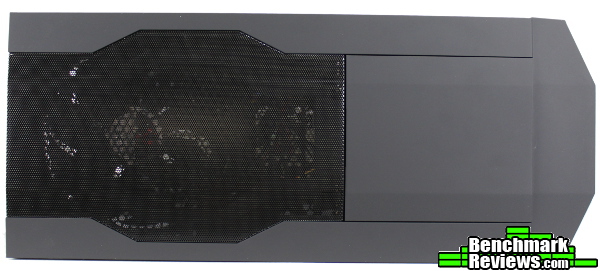
A mesh exhaust vent for the included 230mm Spectre fan adorns the top of the Colossus, with the “S3” system in front (a secure storage container that can be locked, we’ll see this up close in a bit). It’s interesting looking at the Colossus after reviewing the Colossus M – while it’s a small detail, I found myself wishing some more of these design elements would have carried over to the smaller, newer Colossus. I know the Colossus M is very heavily based on the Prodigy chassis, but I would have loved to see this same mesh design on the Colossus M for the top two 120mm fan mounts (if only in a nod to the original). Hey, if you’re going to use the same name…

A sliding filter covers the power supply intake fan, with two more filtered fan mounts in the middle. You’ll need to take these off to install fans (and they’ll need to be removed again to clean them), but I’m sure if this case was released again today these would be updated with sliding filters as well. More importantly, the front door contains a large area to intake cool air through the front mesh even with the door closed (a design element the Colossus M uses as well).
That’s it for the outside, let’s take a closer look at some detailed features of the original Colossus.
Of course, the most prominent feature of the Colossus is the wrap-around LED lighting. This chassis is the Venom edition which can alternate between red, green or “breathing” modes.

The effect is stunning, especially for a “first edition” implementation. I’d imagine the team at BitFenix learned a few things from this Colossus, as the new Colossus M uses a better form of diffusion for more even illumination – and accomplishes a better effect with fewer LEDs (of course, it has much less area to light up). If there are ever plans to release an updated Colossus, I hope they can use the diffused/light pipe system from the Colossus M (along with a red/green/blue LED controller for more color options!); there were far fewer “hot spots” with the smaller Colossus M. I must say I really appreciate the engraved look on the original Colossus though – somehow it made the entire chassis look more menacing.

The white backing on the side panels helps reflect some of the light for better distribution (the side panel LEDs are only located along the top and bottom of the panel so the center of the panel is noticeably dimmer), although using frosted acrylic would have been even better. Removing the panels gives us a look at the interior – while ATX towers haven’t changed too much in the past few years, you can definitely see that 5.25″ bays were of greater use in 2010. The rubber grommets could stand to be a bit bigger and the tool-less 3.5″ drive trays a bit less flimsy, but overall it’s a flexible and expandable interior. There’s even room to mount a 240mm radiator up top if you wanted to.

Above is the S3-branded secure storage area. I can’t recall any other chassis right now that has such extensive cable management options for peripherals (although some of the Cooler Master cases have a PCI slot cover that can effectively secure a cord, and NZXT has their Bunker accessory) so this was a surprisingly useful addition for me. While the eSATA port has become a bit dated over the past few years, USB 3.0 ports are nice to see (there’s two USB 2.0 ports alongside the headphone/mic jacks too). There’s enough space for a portable hard drive to be locked away up here, and by using the cable management hooks you can secure your USB peripherals too. Power, reset, color mode and brightness settings (along with a fan controller) are all located here as well.

The power and HDD activity LEDs (blue and red) won’t shine through the front door, but I think the external lighting will do a pretty good job of letting you know if your system is powered on. The cord management channels won’t fit more than one cable at a time, but other cords can just drape across the front and use any of the cutouts along the side (five per side, two at the bottom). A keyboard and mouse would utilize these channels nicely. It’s a great feature, and surprisingly still pretty rare even among modern chassis.

Those channels continue all the way to the bottom of the case, so cords won’t need to be hanging off the side of the Colossus. There’s enough space behind the front door for cool air to find its way into the enclosure, but I could hear the included fan’s RPMs increase very slightly when opening the door (indicating that there is a bit of restriction). We’ll take a closer look at temperatures later, but it doesn’t seem to ultimately affect temperatures enough to make it an issue.

The BitFenix Colossus (Venom Edition, anyway) ships with two 230mm BitFenix Spectre fans as standard. It’s nice to see enough room up here for radiators too, even though all-in-one liquid coolers weren’t quite as commonplace then as they are now. A row of grommets up top are great to see since these are very useful if you add any additional fans, and the typical water-cooling holes in the back make an appearance too.
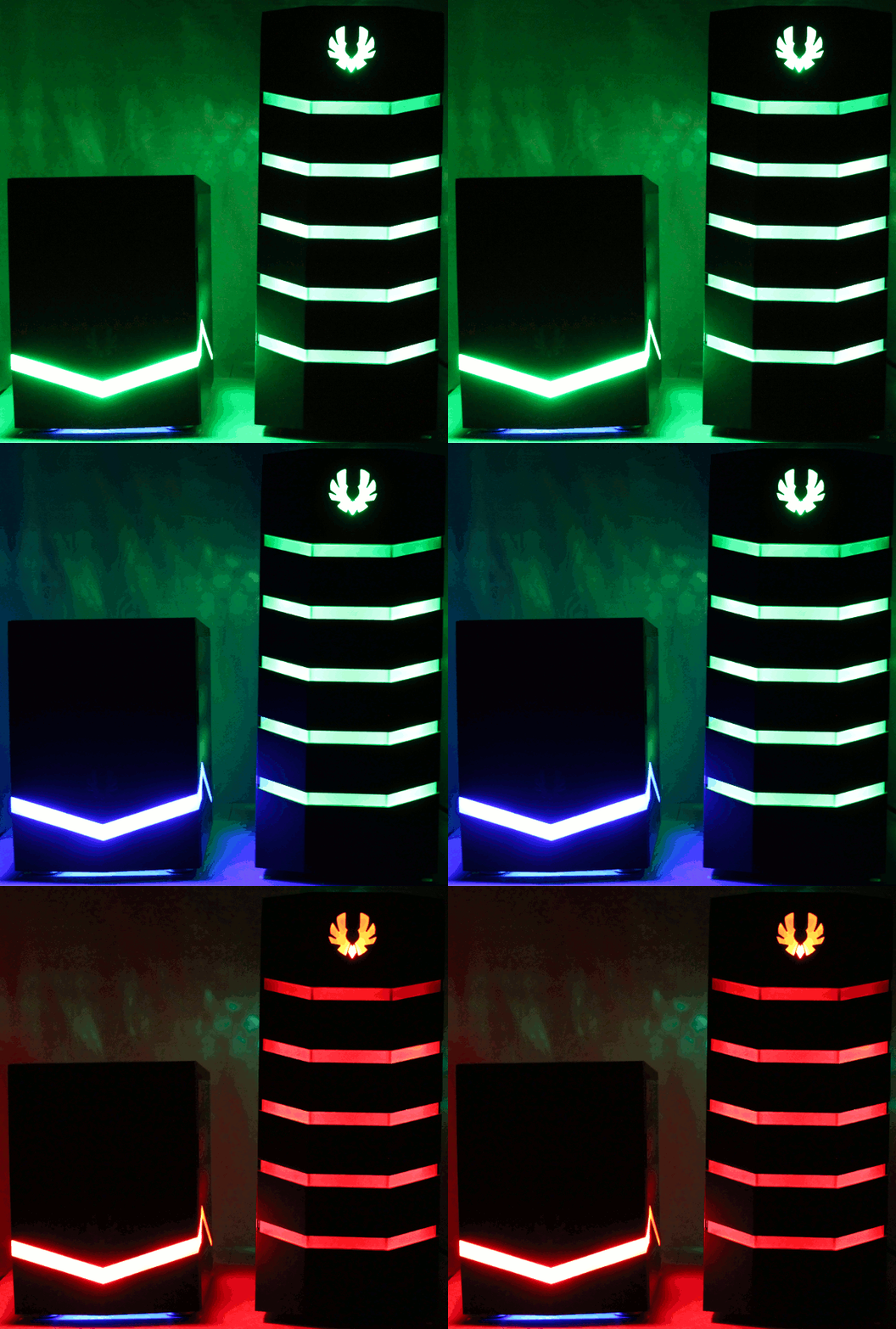
Finally, I think another look at the lighting systems of both Colossi are in order. It’s difficult to reproduce LEDs accurately in a photograph (at least for me!), but these three shots (combined in a .gif) turned out pretty good I think. Since this version of the Colossus doesn’t have tri-color LEDs like the Colossus M, the green washes out the blue on the Colossus M ever so slightly; otherwise these are pretty accurate to what each chassis will look like in a darkened room. The additional green light in back is from the green LED Spectre Pro fans BitFenix sent along to help test the performance capabilities of the two cases. Speaking of which, let’s see how they compare!
First things first: I decided to ignore CPU temperatures for both of these chassis. While graphics cards have essentially maintained their power requirements over the past few years (they’ll still dissipate between 150-250+ watts of heat), most CPUs have moved into the sub-100W range. With the popularity of all-in-one liquid coolers it has become much easier to isolate the temperature of the CPU from the rest of the components anyway, so for this comparison I’ll focus on GPU temperatures. To make it easier to test the Colossi side by side, I’ll use a slightly different platform for each case – although there’ll be enough room in both cases and motherboards to leave one PCI-slot spacing between the crossfired Radeon R9 270Xs. I started with a full GPU compute test (100% load) to warm up the chassis – when temperatures plateaued, I recorded the temperatures of each card and ran the Heaven and 3D Mark 11 benchmarks once (recording the maximum temperature reached for each test). Ambient temperatures hovered around 17.3C. Results from these benchmarks will follow a picture of each configuration tested.
First up, the original Colossus running 270Xs in Crossfire:

| Colossus CrossFire | Heaven | 3DMark 11 | GPU Compute |
| XFX 270X (Top) | 53 | 49 | 73 |
| XFX 270X (Bottom) | n/a | 48 | 66 |
For some reason the Heaven benchmark refused to use the second R9 270X (it worked fine in 3DMark 11 and the GPU compute tests). I’ll update this figure once I determine why! Generally the Heaven temperatures are just a bit higher than 3DMark, so take that for what it’s worth.
Now for a similar configuration in the Colossus M:
| Colossus M CrossFire | Heaven | 3D Mark 11 | GPU Compute |
| XFX 270X (“Top”) | 48 | 49 | 56 |
| XFX 270X (“Bottom”) | 64 | 59 | 77 |
The smaller Colossus M does a remarkable job at keeping the 270X’s cool, especially for the card that sits at the top of the case (right next to the intakes up top). The original Colossus cooled both cards better overall, but the Colossus M still kept things manageable. The open-air cooler design of the 270X’s didn’t do the smaller Colossus M any favors, but that’s what tends to happen when the card design shifts the cooling responsibilities to the chassis.
Taking out the two R9 270X’s and using a single R9 290 (this one using XFX’s Double Dissipation cooler instead of the reference design) should give us an idea of how each chassis will handle a notoriously hot card.
| Colossus | Heaven | 3D Mark 11 | GPU Compute |
| XFX R9 290DD | 67 | 63 | 73 |
Not much to say yet, until we place the R9 290 in the Colossus M:
| Colossus M | Heaven | 3D Mark 11 | GPU Compute |
| XFX R9 290DD | 64 | 64 | 69 |
Again we see the benefit of having those intake fans pointing directly at a GPU (the Colossus M, with a single GPU, has the stock Spectre 120mm fans installed as top intakes). Really though, both chassis have enough airflow with the additional fans to keep the R9 290’s ~300W at bay (although the original Colossus’ stock 230mm configuration is far superior to the Colossus M stock fans).
The added 140 and 230mm fans in both chassis were run on their highest settings for each test, and the Colossus M had the original 120mm Spectre fans installed as top intakes for the R9 290 test. The results are actually pretty interesting – the smaller Colossus M more than holds its own against the massive Colossus. What these numbers don’t really tell you are the noises though – the larger Colossus did an incredible job of swallowing up some of the fan noise, where it was more apparent with the Colossus M. Still, the smaller Colossus M worked wonders with the Crossfired 270Xs and a synthetic 100% compute load – the peak temperature was 4C higher on the “top” card (bottom in the Colossus M), but the “bottom” card was a full 10C cooler than in the Colossus! Most of the difference probably comes from the fact that this card in the smaller Colossus M is sitting right up against the intake ports on top of the case – it essentially has its own isolated direct intake with cool, outside air, while the Colossus holds the two cards much deeper inside. There’s definitely enough airflow in both chassis to keep each configuration cool though, and for normal gaming situations the larger volume of the original Colossus helps keep temperatures more similar between the two cards.
The Colossus M stays surprisingly cool given how much smaller it is, but overall it’s tough to beat the larger volume of the original Colossus. It’s amazing to me that they’re even close – BitFenix did a great job packing a lot of performance potential into that Colossus M. You’ll need some extra fans to match the Colossus, but it’s certainly possible.
Seeing the Colossus M staged right next to its full-tower predecessor was a neat experience. It was interesting to see the changes and decisions made to take the soul of the Colossus and shrink it to micro/mini size, while ultimately retaining most of the performance. At the same time, the unique LiteTrak systems evolved into an even better version on the newer Colossus M (while the older Colossus still outshines the competition even today in that area). It’s too bad the other unique features of the original Colossus didn’t make the transition (lockable storage container, cable management) and I still like the multiple recessed LED stripes and front panel design of the original better, but both chassis were enjoyable to work with and would make stylish additions to any setup.

Two Colossi for two different times. While full towers aren’t as necessary as they used to be for multi-GPU configurations, it’s still hard to beat massive 230mm fans and a huge internal volume. The Prodigy-based Colossus M still manages to hold its own though. You’ll need to add to the stock configuration to compete, but fully outfitted the Colossus M was just as viable as the massive Colossus (especially for gaming). It’s amazing that the main choice you have to make between the two chassis is how much weight you feel like lugging around (or whether you wanted to be restricted to micro-ATX or smaller motherboards) – the performance of both Colossi, especially with carefully chosen components, ends up being pretty similar.
While Benchmark Reviews has reviewed the BitFenix Colossus before, I’ll still run down our Performance, Appearance, Construction, Functionality and Value categories as they would apply today. The Colossus is still available at a few online retailers, but stock seems to be hit or miss at times.
The Colossus was a great performer in 2010, and with today’s focus on energy efficiency and performance-per-watt components it has even more headroom. The newer components allow smaller chassis like the Colossus M to keep up, but there’s still “no replacement for displacement” when it comes to the massive internal volume of the Colossus. The stock fan arrangement strikes a nice balance between noise and performance, and there’s room to expand if necessary. The Colossus should be able to handle most enthusiast grade systems without a hassle, and remains one of the top performers through the years.
BitFenix picked the right case to start off their portfolio – it’s appearance turned some heads when it was introduced in 2010, and still does today. However you feel about LED case lighting, the Colossus is a sight to behold (even though the side panels need more diffusion or frosted acrylic to look evenly lit). The SofTouch finish is exquisite and really provides a unique effect, helping to further differentiate the Colossus from other cases. Rarely does a case so fully earn its name – the Colossus is just that, in styling, weight and volume. I hope they use the same monolith/ancient alien artifact/Tron look if they ever update the original Colossus with another full tower. Maybe it isn’t for everyone (you can turn the lights off, fun-haters!) but the effect is absolutely striking.
For a first try, BitFenix didn’t cut many corners with the construction of the Colossus – or weight, for that matter. It. Is. Heavy. There is little doubt about the stability and sturdiness of this chassis. This is the Venom Edition, which was released after the original chassis and received a few updates (ninth PCI slot, thumbscrews instead of tool-less PCI covers) but unfortunately the flimsy tool-less hard drive trays remain. They work sufficiently when loaded with drives, but when they are empty they have a tendency to fall out of their slots. Due to the overall weight, I wouldn’t expect you’d want to transport this thing around too often, so it’s a problem that ultimately isn’t a deal-breaker (but hopefully is addressed in any future revisions – I would expect so, considering it isn’t an issue on any newer chassis from BitFenix).
I appreciated the extra functionality the original Colossus offers. I’ve never used a case that integrated cable/cord management for peripherals so well, and the lockable storage container was a nice addition too. I can see some users might be annoyed about having to flip up the cover to turn the machine on (there are other ways to turn on a PC…), but the benefit of the S3 container could easily outweigh those concerns if you are concerned about the security of your peripherals/external drives. The lighting controls and analog fan controller (with multiple fan headers) were ahead of their time, and still provide a surprising amount of functionality for this class of tower.
While it may be getting harder to find in stock, the Colossus is still available online for $159.99 (Newegg | Amazon). That places it in a “premium tower” bracket, competing with chassis like Corsair’s Obsidian series, Silverstone’s Fortress and Raven towers, Cooler Master’s Cosmo SE/HAF Stackers, and NZXT’s Phantom 630. There are a lot of great cases to choose from both below and above that price point, but very few of them combine the price, performance, looks and features of the BitFenix Colossus. If you like the way it looks and don’t mind the size/weight, I feel like you’d get your money’s worth with the Colossus. If you don’t care as much about the lighting and opt for the windowed versions instead you could get into a Colossus for a bit less (they usually run ~$30 cheaper).
The imposing profile of the original Colossus still makes a statement a few years after its release; it would still be a great home for enthusiast-class systems. It’s fascinating, really. Since the release of the Colossus, BitFenix has churned out quite a few chassis: Shinobi (regular/XL), Survivor, Raider, Ghost, Ronin, Shadow, Outlaw, Merc (Alpha/Beta), Prodigy/M, Phenom, Colossus M, Comrade, and Neos (with a Pandora/Atlas/Aegis announcement just ahead of Computex 2014). They came out swinging with the Colossus, and I hope they don’t lose track of what captured the imaginations of so many back in 2010. If they updated the lighting, drive trays and added provisions for 2.5″ drives while keeping everything else the same, the Colossus could easily hold its own in today’s market, in my opinion. As it is, I’d still have no problems recommending the Colossus to anyone in the market for a unique, colossal enclosure that brings a lot of performance and features for its price point.
+ Great performance with today’s hardware
+ Unique, colossal appearance that still makes an impression four years later
+ SofTouch finish minimizes fingerprints
+ LED lighting system, while starting to show its age, still more innovative than most of the competition
+ S3 secure storage a plus
+ Cable management for peripherals
+ Reversible front door
– Very heavy
– Flimsy drive trays
– Only Green/Red or Blue/Red LED combos to choose from, no blends or custom colors
-
Performance: 9.50
-
Appearance: 9.50
-
Construction: 8.75
-
Functionality: 9.25
-
Value: 8.50


4 thoughts on “BitFenix Colossus Computer Case Revisited”
Thanks for another very thorough review Tom. Personally, I think you put this one about 1.5 points too high but that’s me.
I think the case is overpriced and has that “teenager”/racing stripe” look to it that I stopped seeing as “cool” 40 years ago, (unfortunately).
My biggest concern and disappointment was the cooling config availability. I have to select my 5Ghz profile for my CPU whenever I want to ‘fly’, (long-time FSX hobbyist), because the FSX program is notoriously CPU intensive. That means I need it to keep cool, (under 73C in my case), and to do that, it takes a 120 x 240 CLS liquid-cooled radiator system or bigger.
This is probably where this case truly falls by the wayside for me. I saw no place to install the 120mm x 240mm radiator let alone the (4) 120mm fans that the radiator would be sandwiched in for a push/pull config.
I won’t go into the entire reasoning about radiator configurations and why it’s so important to take-in the coolest available air at the highest cubic foot rate per minute, (not the time or place).
But the fact that the front closes over the fan grids and forces the incoming or outgoing air to snake around a panel, is definitely not good for maximizing serious closed-loop, liquid-cooling configurations w/o going into external systems.
In fact, the 120mm x 360mm CLS radiators seem to be gaining some popularity and now many look for a case that has the potential to mount that type of system. In other words, Bitfenix may have even gone backwards here.
(Full Tower Needs)
I have a mid-tower, (Corsair Carbide 500R), that I have now filled with SSD’s and HDD’s and though the cable management is still clean, I’m going to have to face the fact that I really can’t put anymore in it.
My point here is that I’m not so sure I agree with you when you say that the need for a full size tower case is dwindling, (paraphrasing).
As I added several SSD’s over a period, the HDD’s they replaced were still very much needed in a ‘support role’. At this point, I have 5 internal drives, two of which are SSD’s and the other 3 are all 1TB in size. I’m pretty sure that I’ll be looking at a full-size tower of the “Obsidian” persuasion soon. 😉
Well that’s probably more than you wanted to hear but nevertheless, your review has once again been incredibly insightful leaving me with no need to ‘guess’ at what I would get if I bought the case.
Oh! The gif LED pics were GREAT! Really, I haven’t seen that technique used in quite some time and I thought it was a very clever inclusion. Very Good!
Thanks, Rich Paul
Hello Rich, and thanks for reading! I appreciate that you took the time to throw in your perspective; one of the things I like most about PCs are the endless configurations that are possible. It’s almost impossible to consider every viewpoint, so I appreciate the readers that send a little feedback our way! Out of curiosity, which category would you have taken the 1.5 points from? From your comments, I would expect the appearance category would take a hit 😉 Appearance is always the difficult/subjective one, and if you’ve read any of my other reviews you know I’m a sucker for LEDs, much as I wish I could grow out of it 🙂 If you haven’t seen the Colossus in person though, I’d implore you to check it out before forming an opinion. I thought it would resemble my Thor V2, and while they’re similar in size and layout they make entirely different impressions visually.
Comparing the Colossus next to the Colossus M is what generated my thoughts on dwindling full-tower usage. I generally build gaming-oriented systems, usually with a single SSD (at most, another HDD for storage). Since I’m constantly switching hardware and trying out different configurations, any personal/long-term data ends up in a NAS or cloud-based storage (to survive the fervent and constant hardware experimentation). I just don’t have the need for arrays of drives for the majority of my builds any more, and with ITX/mATX gaining in popularity it’s pretty simple to build comparable systems in much smaller chassis. Multiple GPUs end up as the last major reason (for me) to use a larger chassis, but as I found out in this article smaller cases are starting to perform similar there too. Of course, that’s my own experience – I’m always curious to hear about others’ configurations. As I mentioned before, that’s my favorite part of the PC ecosystem – options!
I should reiterate, the Colossus does accommodate 240mm closed-loop coolers (check out the detailed features page); if I have time, I’ll try a few that I have on hand to double-check any clearances. If you needed the additional airflow, you could always leave the front door open – I didn’t have the time to test it, but I’m willing to bet airflow would be improved, however slight. Perhaps if BitFenix ever updates the Colossus, they’ll make some accommodations for radiators up front too. Out of curiosity, which CPU are you running at 5GHz? I’m going to assume a 2500K, but if it’s an FX CPU (the 73C limit?) you’ll have to let me know which board you’re using and the voltage you needed to get it stable – my i5-2500K will run at 5, but I’d love to reach 5GHz with the FX-8320 I have sitting around too 🙂
And thanks for the feedback on the LED .gif! Glad to hear it was helpful!
I should add a little clarification – the BitFenix Colossus (the Venom Edition, anyway) does make a few provisions for watercooling in the front panel. The 3.5″ drive cage can be removed with a few screws (you can see them by the fan filters on the bottom), and the front 230mm fan can be replaced with two 120mm fans (or a 240mm radiator + fans).
A Corsair H100i and SilverStone TD02 fit in this location, but the hoses wouldn’t be long enough to reach the CPU socket (each of those coolers would fit just fine up top as well). A Swiftech H220 would reach, but the extra reservoir attached to the radiator is a few millimeters too “tall” to fit underneath the 5.25″ bays. All three coolers would fit in place of the top 230mm fan, although the TD02’s thicker radiator might start to interfere with motherboard components, depending on your motherboard (in the system in the article, the 8-pin CPU power connector would definitely need to be plugged in first!).
Hey Tom, I Had just posted a reply to your first response a few moments ago and then I saw this one. I’m not sure if my post went through because I don’t see it. If I don’t see it when I return in a little while, I’ll repost it. I also need to steal a moment from some appointments to read this response more carefully, (I haven’t done that yet, I’m getting hammered by biz emails!).
Rich
Comments are closed.