By Bruce Normann
Manufacturer: Blue Microphones
Product Name: Spark Digital Studio Condenser
UPC: 836213000861
Price As Tested: $189.99 (Amazon | NewEgg)
Full Disclosure: The product sample used in this article has been provided by Blue Microphones.
If you want to give your podcasts a professional appearance, you need a good quality microphone. Forget about the tiny hole on your portable smart-whatever device, there’s a world of difference between consumer and professional-grade microphones, and the signal processing circuits that go along with them. Once you have a good microphone and preamp, you then need to digitize the signal using an Analog-to-Digital (A/D) convertor, and get that digital signal into your PC. The Spark Digital from Blue Microphones is an all-in-one solution for high quality digital audio production. All the signal processing is done inside the body of the microphone, and the interface to your computer is through one of several available serial connections. The Spark Digital supports USB 1.1/2.0, the relatively new Lightning connection, or the older Apple 30-pin interface, through the use of separate cables for each connection type. Benchmark Reviews has an audio side to it, but we’ve mostly concentrated on the output side of the equation – headphones and speakers. Some of our readers are content creators though, so it’s high time we paid some attention to the beginning of the signal chain.
If you’ve done any recording, you know how important it is to have the ability to monitor the signals that you’re generating. A recording level meter can only tell you so much; in order to really assess what’s happening you need to be able to hear the audio feed yourself, in real time. The Spark Digital has a headphone jack integrated into the standard cable assembly that provides real-tome monitoring, direct from the microphone’s internal electronics. That way, there’s no latency (delay) to deal with, which is a key factor in getting the sound right. You might not think so, but it’s really hard to concentrate on a delayed audio signal. The brain just keeps saying “Yeah, but…” a hundred times a second, using up all your internal processing power and preventing you from focusing on the sound. It’s hugely annoying if you’re doing a podcast or voiceover for a video, but it’s a killer-destroyer if you are trying to play music. It’s a common issue with many digital setups, and Blue Microphones has tackled it head on. If you have access to some of the more sophisticated recording software that’s readily available and want to do multi-track recording, a zero-latency monitoring setup is absolutely essential.

At Benchmark Reviews, sometimes we have to switch gears a bit when testing new equipment. Sometimes standards change, like DirectX or Ethernet, and sometimes we are testing a new type of product, like the Blue Spark Digital Microphone. There are lots of ways to measure sound quality, but even a $50k audio test lab is going to miss things that your ears will tell you, straight up. One of the most revealing tests for any audio equipment is reproducing the human voice. Since the Spark Digital is ideal for podcasting and voice over duty, that’s the way I tested it, with my own voice and that of another volunteer. I compared it to the performance I got with several condenser microphones from my own collection, all of which use a more traditional, analog signal path. For the comparison mics, the signal from the microphone preamp was sent to the line in connection on a discrete soundcard, where the A/D conversion finally occurred.
The technical specs for the Blue Spark Digital are pretty straightforward. You can see here that the digital format is exactly the same as CD Audio – 16 bits @ 44.1 kHz. This ensures maximum compatibility with the other software and hardware that the Spark Digital is likely to be used with. System requirements are typical, i.e. low, and the only major platform that is missing is Android. Considering how well Apple’s portable products are represented in the musical world and in media outlets, this doesn’t represent a real problem, but some people are bound to be disappointed.

Let’s take a look at what the innovative folks at Blue Microphones has delivered with the Digital Spark. The next section is an ooverview of the product and its features.
The Spark Digital from Blue Microphones is not a completely new design; it’s based on an all-analog version that has been available for a while. The Spark Digital is also not the first USB microphone that Blue has offered; there was the Yeti and the Snowball before it. Two things make the Spark Digital stand out from the others, the full compatibility with the entire Apple product line, including both the new Lightning interface and the old 30-pin connection, and the extremely high sound quality of the overall package.

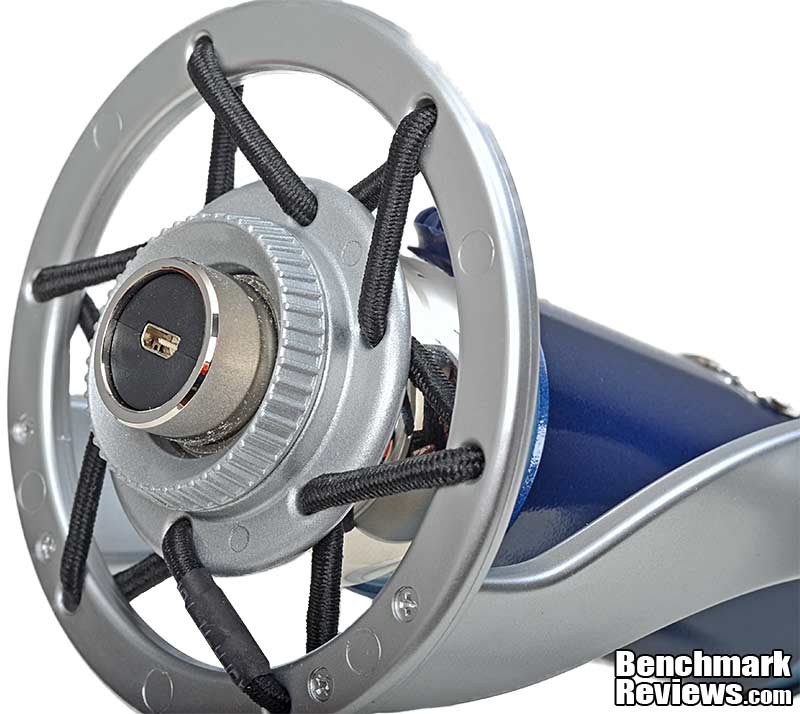
One of the attractive features of the Spark Digital is the fact that it comes with everything you need to get started, including a high quality desktop stand. Shock mounting is integral and quite effective and no assembly is required for the stand. The microphone body is threaded on the bottom and it screws into a rotating collar on the stand, to create a very secure assembly.

The stand has a sturdy swivel that makes it easy to adjust the angle of the microphone and get the best relationship between the microphone and source. For a typical podcast or voice-over session, the Spark Digital will be tilted back, as shown above, in order to get the most direct path between the speaker and the microphone capsule. It’s important not to get too close to the microphone or you get boomy undertones and an unnatural emphasis on the hard sounds from words that start with plosive consonants such as P, T, or K. In my use, I found that it was best to be between 8″ and 12″ from the microphone to get an accurate, natural representation of my voice. Sometimes you don’t want accurate, you want a particular sound. By changing the distance and angle of the microphone you can make subtle (and not so subtle) changes in how the voice is captured.

Mic location is also an important factor if you are recording a wider range of instruments. Blue gives some advice in the Quick Start manual on almost anything (music related) that you might want to record: Vocals, Acoustic Guitar, Electric Guitar, Drums, Saxophones, Flutes, Reed Instruments, Piano, Strings, Acoustic Bass, and Electric Bass. I don’t know of any widely available mixers that accept USB mic inputs, so you’re limited to creating a multi-track recording one track at a time. I really don’t think that’s the intended usage for this product, but it can be done. The target market, for music anyway, is probably the home recorder who won’t go beyond 3-4 tracks anyway. That’s doable with the help of some software like GarageBand.

The Blue Spark Digital comes packaged in recyclable packaging and is well protected with a molded cardboard insert keeping things stable inside the box. You can see that the desktop stand is fully assembled, which is nice. Nothing worse than making a mistake and stripping a screw on a nice casting like this. Then it’s either send it back or go MacGyver on it and living with a hashed up version. The build quality and appearance of the microphone and stand are really nice and they’re meant to be a pleasure to use, so it’s good that I don’t have to rely on my screwdriver skills to turn a bunch of parts into a product.

Let’s look at some of the Blue Microphones Spark Digital features in more detail. The next page has detailed pictures and more in-depth descriptions.
The first thing you have to do, after getting the Spark Digital resting comfortably in its shock-mount stand, is connect it to your computer. There are two versions of the Spark Digital that are currently offered. One has separate cables for Lightning and USB connections, and the second one has USB and the old 30-Pin Apple connection. With these three options, all the major platforms are accommodated. The exception at this time is Android, but that’s only limited by driver availability. There’s no reason that the hardware should be incompatible. If you need all three, you can purchase the one that you are missing from Customer Service at Blue Microphones. That’s what I did, since I got the USB-Lightning version and needed the 30-Pin Apple connector to interface with an older iPad. My experience with Blue Customer Service was fast, efficient, and friendly. Don’t hesitate to call them if you have a question or concern, or just want to buy some more accessories. The picture below shows just the cable end that connects to your computer. The cables themselves were nicely made, with good quality construction. It would have been cool to have a really flexible cable construction, like a good professional mic cable, but since this is a microphone that’s designed to stay put, firmly grounded on the table in front of you, it’s not a problem.

The other end has a mini USB connector that mates up with this receptacle on the bottom of the Spark Digital microphone body. The manufacturer has tweaked the mechanical fit of this connection to make it a little more secure than normal. Given the kind of handling that microphones typically get, that was a smart move. Another connection is located at this end of the cable, and that’s the headphone jack. The Spark Digital drives the monitoring headphones directly from its own internal circuits, thereby eliminating any delays or latency in the monitor signal. It’s a simple approach and it works very well. Some of the headphones I used for monitoring have a semi-open air construction, and I never heard any delay between the live sound and the signal coming from the microphone. People do have their preferences, but a typical studio headphone set will have quite a bit of isolation.
One of the reasons the headphone monitoring system works so well is that the user has quick and easy access to independent microphone gain and headphone volume adjustments right on the microphone itself. Conveniently located right on the front, towards the bottom, is a multi-function knob that adjusts gain, volume, and also mutes the output of the microphone. In normal mode, the knob controls headphone volume and the volume level is displayed on a series of small blue LEDs directly above the knob. In this “normal” mode, the status indicator light in the center of the knob is also steady blue. Press it in and hold for three seconds, and all the LEDs turn yellow indicating that the knob is now controlling microphone gain. Some tend to call this setting “sensitivity”, but gain is gain in my book…. The microphone ships with the gain set fairly low, to avoid any loud surprises; most users will need to bump the gain up a bit to get it right. Pressing the knob once will mute the microphone, which is indicated by the status indicator on the knob flashing its blue LED. It’s more complicated to describe than it is to use, which is a plus for users.

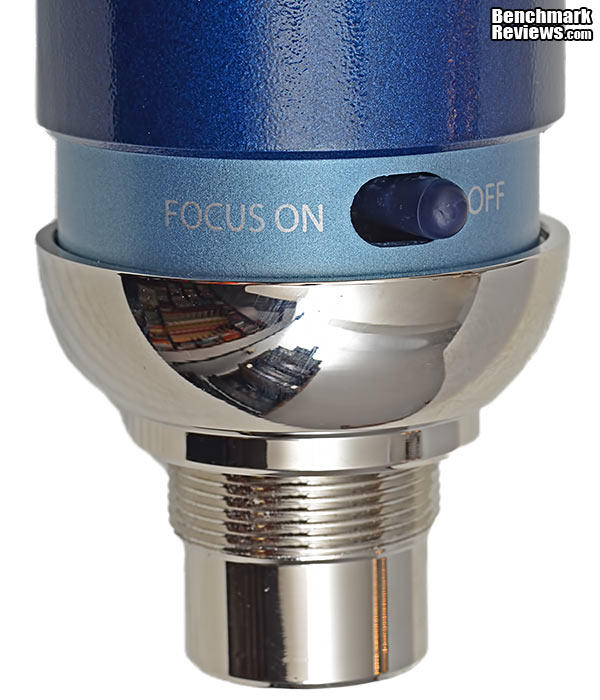
Around the back of the Digital Spark, directly opposite the Volume/Gain/Mute button is a switch that alters the response of the microphone slightly, to provide a clearer, more “focused” sound. The Focus Control acts differently than a standard high-pass filter – it alters the bias voltage of the condenser capsule, which changes the capsule’s behavior in a way that’s more nuanced than a standard filter acting on a microphone’s output. It’s still performs one of the tasks of a low frequency filter, which is to keep the rumbly stuff out of your audio signal. That’s especially important if you are going to run the audio track through some post-processing, where any stray low frequency components modulate the audio processor and produce unwanted effects. You do lose a bit of weight in the signal, so some experimentation is necessary. Sometimes you can compensate by moving closer to the microphone, sometimes that muddies up the upper bass without filling in the lower bass. The truth is, there is no way to get high quality sound without a fair amount of experimentation. Even seasoned pros, who know in advance the effect that certain changes will have, don’t know what combination of settings and adjustments will produce the best sound.
Good sound starts at the source. Once it gets messed up, there’s no way to undo it. The Second Law of Thermodynamics dictates that once you mix the ketchup and the mustard, you’re going to be hard pressed to separate the two. Same thing with sound; once an extraneous component gets added to the original signal, forget about extracting it back out. It’s in there for good. For microphones that means that the thin membrane, magnets and coils of wire that make up what’s commonly called the capsule, need to be of the highest quality possible. Blue Microphones gets that, and although this review of the Spark Digital is focused on all the supporting elements that make it unique (USB, Lightning, monitoring, etc.), it’s important to remember that before there was a Spark Digital there was an all analog Spark microphone that earned its place in the lineup without the benefit of any digital features. Before that, was a bevy of Blue beauties that always seemed to offer great sound for the money and a bit of specialization that made them uniquely useful.

Hidden behind multiple layers of stainless steel mesh is a circular, gold-sputtered Mylar diaphragm that turns airborne vibrations into an electrical signal. Large diaphragm condensers have been very popular since they were first used commercially in the 1940s, but their roughly 1″ diameter diaphragms all have resonance peaks somewhere in the audio band that needs to be tweaked. That’s why most large condenser mics have a distinctive sound, because no two designs have the same set of resonances. There is a recent trend toward medium diameter diaphragms, in order to push the resonant frequencies out of the audio band, or at least make them easier to control. This new breed of medium-sized microphone capsules tend to have a more natural sound, while maintaining most of the benefits that the large diaphragm models are known for.
Now that we’ve had the grand tour of the Digital Spark, let’s hook this thing up and see how it works. The next page deals with Setup and Usage.
Setting up the Spark Digital was very easy, as it mimics all the standard audio drivers and acts just like any other microphone in Windows or iOS. Installation was no more difficult than plugging in a new mouse. System requirements are very low, so an older laptop or first generation iPad is OK, as long as you have the right connecting cable. The Spark Digital model that I received included the Lightning cable, which limits it to the more modern Apple devices: Gen4 iPad, iPad mini, and iPhone 5. I purchased the 30 Pin cable from Customer Service at Blue Microphones, so that I could use it with an older iPad. I could have bought the version that had the 30 Pin Apple interface + USB for the PC, but I wanted to have the flexibility in the future to use the Lightning interface. The 30 Pin cable is the cheaper of the two, when you buy it as an accessory, so if you want all three cables it’s best to buy the Lightning kit and get the 30 Pin cable from customer service.

One of the key features of the Spark Digital is that the microphone has a dedicated analog output which is meant to be used for monitoring with headphones. That signal is passed from the internal circuits of the microphone to a 3.5mm headphone jack, located on a pigtail near the end of the cable that plugs into the bottom of the microphone. It makes sense to put it at that end, because that’s where the performer is, but it also means that you need to be careful that the headphone cable doesn’t move around too much and disturb the microphone. The shock mount won’t filter out any scraping noises if the user drags the headphone cable around on the table in close proximity to the microphone. The good news is that you’ll hear it in the headphones as it happens, the bad news is that the take is ruined already by the time you hear it. Yes, a time machine is on every audio engineer’s wish list.

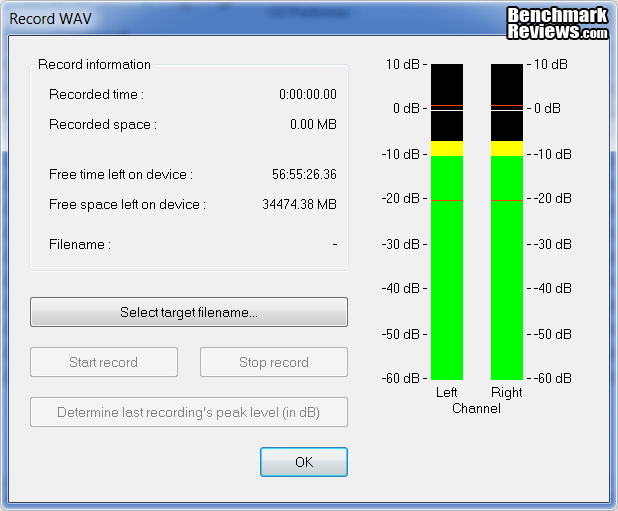
Just like any analog recording setup, there are several places in the signal chain where gain needs to be adjusted. Gain, Sensitivity, Level, Volume – they’re all different terms for the same thing, variation in the magnitude of the signal. The key in setting the gain at every point along the chain is to make sure that no single output is driven so hard that it runs out of breath and distorts, and on the flip side to make sure that no single input is overloaded with a signal that’s too strong for it to handle. It’s all about balance. The Spark Digital is shipped with the microphone gain set relatively low, in order to prevent any unpleasant surprises when first connecting it. Blue recommends setting the volume level on the computer’s internal driver to 80%, as a starting point. Once that’s set, you can access the microphone gain adjustment by pressing and holding the main control knob until the LEDs turn yellow. In this state, the knob changes the mic gain, and you can see the approximate level by looking at the group of LED indicators right above the adjustment knob. Once you’re done, just press the button again and the indicators will all turn blue again, and you’re back in normal operating mode. I usually set the mic gain so that the loudest sounds register on the recorder’s VU meters at -3dB, because I like a little headroom. Digital clipping (going above 0dB) produces brutal distortion and could cause harm to your equipment, not to mention your ears, during playback. You can use the Normalizing function to get back that 3dB after the recording is done; it’s a lot tougher to get rid of the effects of signal clipping.

Once the microphone is plugged in and set up, now it’s time to open a recording application. I used something very simple, Exact Audio Copy V1.0 beta 3. It’s a lightweight tool that I mainly use for ripping CDs and some mild editing of WAV files. There is a recording capability built right into the operating system, but it’s a bit clunky, as you might imagine. The recording module within Exact Audio Copy is straightforward and uncomplicated, just the way I like it. Normally, I would use a Tascam solid state recorder to record digital audio files, but that hardware is 3x – 5x the cost of the Spark Digital. For this assessment, I wanted to use what a typical podcaster would use, and stay within reasonable cost restraints. Using the sound card for A/D conversion duty makes more sense, especially if you have a good quality discrete card. The built-in sound processor on the motherboard could also be used, but their quality varies and not everyone pays a lot of attention to this component when buying a new laptop, system, or motherboard.
The situation is very similar if you plan on using an Apple device for your recording. The main difference is that you should definitely use a third-party recording app, because the built-in Voice Memos application uses a low bit rate and will not produce high quality recordings. Blue Microphones recommends investigating some of these popular recording tools in Apple’s app store:
- RØDE Rec
- GarageBand
- Jammit
- MultiTrack DAW
- Music Studio Lite
- StudioMini Recording Studio
- SunVox
- TwistedWave Audio Editor
There are some very sophisticated tools available in this list, but I stuck to one of the simple ones, RØDE Rec. Yes, I know it’s owned by a competitor, but they only recently bought it from the original developers, so I used it anyway. Plus, like all things that are too cheap to be good, and too good to be true, it does have a bug. Converting and exporting large (over 2GB) files causes the app to crash and the file appears to be unrecoverable. This was not an issue during the review, but I felt I should mention it.

Recording on the Apple platform was pretty much the same as on Windows. That’s mostly because I chose the most basic recording apps to use, and I’m not reviewing the apps. Obviously, once you start getting into post-processing and multi-tracking, the character of the app and the platform will have a much bigger influence. In terms of how the computer interfaces with the microphone, the bottom line is that both Microsoft and Apple treat the Spark Digital like any other ordinary audio device, and that’s a good thing.
In the next section, I’ll explain how Benchmark Reviews tested the performance of the Spark Digital, and we’ll see how it compares with an assortment of studio mics that are in roughly the same price range (< $500).
As I mentioned in the introduction, I used my own voice and the voice of a well-known volunteer to test the Blue Microphones Digital Spark. They are repeatable, I know them both extremely well, and it covers what I think at least half of the target market will be doing with this microphone; recording themselves. I used several professional-quality microphones that I am very familiar with as a reference. The main difference they have compared to the Spark Digital is that they are all analog, and need the addition of a microphone preamp and an A/D convertor to be able to create digital recordings. That’s standard practice, and I chose a good, but reasonably inexpensive two-channel mic preamp to partner with the analog mics I used for comparison. I also used what I feel most people would use for A/D conversion, which is a dedicated sound card inside the computer. I need to mention that the combination of these two items can easily cost $2-300, if you don’t have them already. Here’s a picture of the mic preamp that I used (courtesy of the manufacturer). It’s out of production now, but there are others available now, that offer similar performance at a similar price.

Computing requirements for the Spark Digital are quite low, so I used my daily driver PC for the majority of the testing. It’s nothing special, just an old AMD Phenom BE, but it has a good 24bit/96kHz discrete sound card in it because I like to listen to music while I’m at my desk. The line output feeds a modified Dynaco tube amplifier and a pair of Celestion F1 speakers situated on the desk. This setup is not the ultimate in audio quality, but it has a very natural sound and is better than 99% of the “computer speakers” on the market. For critical monitoring tasks, headphones are almost always the go to solution, as they provide much higher resolution than most speakers. I use a couple of different headphones, depending on the mood and the application.
The Audio-Technica ATH-AD700 phones have the most natural sound and are the most comfortable. If I’m watching a movie, they’re the best choice by far. The Grado SR125 phones are the most illuminating, especially in the midband, and are also pretty comfortable. They’re just a bit too revealing for casual use, when I need to focus on more than what is in my ears. Both of them feature semi-open construction and as a result, don’t offer full isolation from the sounds around you. The JVC HA-RX900 headphones are what I normally use for live mixing, because they do offer excellent isolation. Partly because of their closed-back construction, they offer the best bass response and they have a solid midrange. The highs are a little closed in, compared to the best headphones, but they’re still there. These are the type of headphones that are best to use for monitoring during the recording process. You only want to hear the signal that’s being sent to the recorder, and you don’t want any of the ambient sound being mixed in with your monitor feed. Later, when playing back the recording, the open or semi-open back headphones are OK, and their increased resolution is useful in spotting possible issues with the recording.
Testing and scoring was somewhat subjective, in that I used my own ears as measuring instruments, but I’ll also claim that my assessments are somewhat objective. As a DIY builder of audio equipment, and as an audio engineer focused on live sound performances, I have a well-trained set of ears, and a mature characterization framework that I can draw upon. I’ve used dozens of different microphones in a variety of settings and I always try to integrate independent assessments into my own evaluations. Each of the microphones was scored on a number of qualities that I find useful in differentiating both loudspeakers and microphones. In no particular order, they are: Softness/Hardness, Tone realism, Dynamics, Definition/Resolution, Bass response, Midrange response, Treble response, and Spatial clarity. For each microphone, I read an identical script and adjusted the microphone location and attitude to get the most natural sound. I then did a final take and recorded that signal for further comparison. I scored each unit while listening to playback through the Grado SR125 headphones, as they are the most revealing of the bunch that I normally use. I also listened through the other headphones that were available, just to see if there was some positive or negative synergy that was impacting the results. I used Exact Audio Copy V1.0 beta 3 software for the recording process, and foobar2000 v1.3.2 for playback.
- Motherboard: ASUS M4A88TD-V EVO/USB3 (1308 BIOS)
- System Memory: 4 x 2GB OCZ, AMD Black Edition OCZ3BE1600C8LV4GK
- Processor: AMD Phenom II X2 555 Black Edition Callisto 3.2GHz Socket AM3
- CPU Cooler: Cooler master Z600
- Video: ATI Radeon HD 5670 512MBB GDDR5 (Catalyst 8.801.0.0)
- Drive 1:Corsair F100 SSD 100GB (CSSD-F100GB2)
- Drive 2: Western Digital Velociraptor 300GB Drive WD3000HLFS
- Enclosure: SilverStone Fortress FT01 SST-FT01B-W Gaming Case
- PSU: OCZ ModXStream Pro 500 Modular ATX12V V2.2, OCZ500MXSP
- Operating System: Windows 7 Home Premium SP1
Support Equipment
- AKG C 1000 S Microphone
- AKG C 3000 Microphone
- AKG C 3000 B Microphone
- Audio-Technica AT3035 Microphone
- Presonus BlueTube Microphone Preamp
- Grado SR125 Headphones
- Audio-Technica ATH-AD700 Headphones
- JVC HA-RX900 Headphones
- Creative Labs X-Fi XtremeMusic Sound card
- foobar2000 v1.3.2
- Exact Audio Copy V1.0 beta 3
Most people have had exposure to a wide variety of audio loudspeakers. From the lo-fi junk that comes bundled with entry-level computers and the incredibly tiny versions that are jammed into the corner of their laptops, to the towering racks of pro-audio drivers at a live concert, everybody knows that different speakers all sound different. Not that many people understand that microphones are exactly the same way. The tiny microphone on your smartphone has a diaphragm that’s scarcely bigger than the period at the end of this sentence. A high end studio quality condenser mic, used to record those hot vocals from your favorite star, has a gold-sputtered, hand tuned diaphragm that’s roughly one inch in diameter. It also costs somewhere between $1,000 and $20,000, and it’s probably a 1950’s vintage tube version, to boot.

Based on extended listening to the various tracks that were recorded with a number of microphones that I’m familiar with, I gave each one a rating for the eight different characteristics I mentioned in the methodology section. Just like the revised rules for figure skating, there are no tens, as that implies that there is nothing better. Remember, these are all very affordable, entry level products, in the grand scheme of professional recording tools.
.
| Blue Digital Spark |
AKG C 1000 S |
AKG C 3000 B |
AKG C 3000 |
A-T AT3035 |
|
| Soft/Hard | 8 | 6 | 7 | 9 | 8 |
| Tone realism | 7 | 7 | 6 | 9 | 9 |
| Dynamics | 8 | 8 | 6 | 7 | 9 |
| Definition/Resolution | 7 | 7 | 8 | 9 | 8 |
| Bass | 8 | 7 | 8 | 8 | 7 |
| Mid | 8 | 7 | 8 | 9 | 8 |
| Treble | 7 | 6 | 7 | 9 | 9 |
| Spatial clarity | 8 | 6 | 6 | 8 | 8 |
| Average Score | 7.63 | 6.75 | 7.00 | 8.50 | 8.25 |
Two things pop out at me after compiling the results. One is that the Spark Digital really hung in there with a group of microphones that I like and respect, and that generally cost more than the Digital Spark. Secondly, it had a very even performance across the whole spectrum of important characteristics, and didn’t have any significant failings. If I had to guess how the manufacturer accomplished that, I’d say that the opportunity to design the whole signal chain at once probably allowed a high level of optimization. All of the low scores (if you can call a 7 low…) have to do with the way the Spark Digital handles treble. This is always a high wire act for microphones, as an accurate, extended high frequency response will often cause problems downstream. Even though the mic was just capturing the sound honestly, the microphone always gets blamed for any harshness that comes out at the end of the signal chain. It’s a common problem; everyone wants detail, more detail, until their brain says, “STOP, ITS TOO BRIGHT!” In this case, the Spark Digital commits a minor sin of omission in order to save the user from the annoying pops, screeches, and whistles that often detract from an otherwise good recording.
What does this mean for the end user? It means you have to treat this microphone the same way you would any other microphone. You have to play to its strengths and compensate for its weaknesses; there are no perfect microphones. For instance, the acoustic guitar that is accompanying the singer is not going to have the same snap that you would get if you had a separate, small diaphragm condenser pointed right at the player’s fingers. Compensate by using steel strings, instead of Nylon. OTOH, you aren’t going to get any of those annoying, harsh sibilants from the singer. It’s always a compromise, which is why audio engineers tend to throw seven mics at a trio of folk singers. They want to be able to mix and match the signals later, in the quiet leisure of their mixing room. With one microphone and a single USB connection, you don’t have that luxury, so spend a lot of time trying different microphone placements. Sometimes a couple inches one way or another will make a big difference.
If I had to sum up the performance of the Digital Spark, I would have to couch it in terms of two things; suitability for use, and value. Everything I experienced with this latest model from Blue Microphones was just right for what I see as the most compelling use case. Podcasts and video voice-overs are a growing application for a much larger group of users than ever before. Almost all of them are amateurs, and don’t have a background in audio engineering. The Spark Digital gives them the means to produce professional quality sound with very little knowledge or effort. I give it a 10 for this application. Musicians are going to have a harder time of it, unless they’re singing a cappella. Trying to record an instrument and voice with one microphone is going to mean some compromises will have to be made. If you’re serious about your music, I suggest buying a small mixer with at least four mic preamps, and a couple good analog microphones. You’ll have a lot more flexibility, including the ability to record in Stereo. Here’s where the value part comes in. For the podcaster, the musician’s rig used to be the only game in town and it was overkill for voice-over duty. The Spark Digital gives you everything you need to get very high quality audio into your computer, for less than 200 bucks. You can do it for less (…see the Yeti and Snowball models from Blue Microphones), but you can’t get the same audio quality for less money.
Let’s move on to some Final Thoughts and then, my Conclusions about the Digital Spark and how I think it fared when benchmarked against some industry standards.
The audio recording scene has always suffered from a wide gap between professional gear and consumer products. On the one hand there is a huge variety of microphones, preamps, mixers, and processing gear that will provide the tools to create great recordings, once you master the techniques. The consumer market occasionally offers up some mediocre, lo-fi solutions that interface with whatever recording platform is in style that decade. The combination of digital audio and the internet have changed that, in the last few years. Although the term podcast heralds back to the days when iPods ruled the planet, not iPads, the name has stuck with us. The current low-end recording solution is the rear-facing camera on a smartphone or tablet and the built in microphone. All very lo-fi (and hi-tech), and everyone got their start on YouTube that way. The next step up is a huge one, to a compact digital camera or an Interchangeable Lens Camera (ILC). The enhanced optics give the video component a big boost in quality, but the audio still suffers from the ills of miniaturization. Some models offer an input for an external mic, and the increase in sound quality and flexibility are well worth the upgrade costs. For straight audio recording, it all depends on how much time and money you want to invest, but I think the solution you’re looking at here is a top contender if your budget is less than $400.

I’m an engineer, so I’m no stranger to test equipment, testing protocols, and the science behind all that. Lab tests will tell you a lot, but what they tell you is mostly what’s wrong with a product. This is invaluable information during development, because it tells you what you need to go back and fix, in the design. Using that same information to determine “sound quality” is a tougher problem. Humans are notoriously non-linear in our senses and our thinking. Our survival instincts make us more sensitive to transient sounds, while centuries of human speech have honed our ability to detect very slight variations in the middle frequency range. Babies make all kinds of sounds that don’t conform to a formal language structure, but a parent still needs to be able to interpret those jibber-jabber sounds accurately, for the survival of the species. So, our ears and our brains are most sensitive to the subtlety of sounds in the upper midrange, where most baby’s (…and wives, mothers, and girlfriends) voices reside. See what I mean about survival skills…?
The Spark Digital is not the do-all, be-all microphone that solves every recording problem. The first rule of microphones is that there are no perfect microphones in this world. Its design brief was limited to a couple of applications, and I believe Blue Microphones was able to take advantage of that fact to optimize it for its intended purpose. Having control of the signal all the way to the USB digital interface also provided the opportunity to build some synergy into the circuitry. I put the Spark Digital up against several studio-quality microphones that I know and love and it came out in the middle of the pack. That’s a solid win, in my book! Integration with the host computer platform was simple and seamless, whether it was a PC or an iSomething. The inherent frequency response and the addition of the Focus control provided an optimum setup for voice, similar to the classic RE20 broadcast mic that is ubiquitous in most radio station sound booths.
Blue Microphones has always had a quirky design ethos, and the Spark Digital fits right into their family tree. Dressed up in a deep blue livery, with big chrome accents on both ends, it’s not a device that’s going to blend in. The satin finish on the aluminum desk stand provides a bit of contrast and relief from the high polish surfaces on the microphone. At first I thought they clashed, but the stand provides a more neutral background which then allows the microphone to stand out a bit more. Regardless of its finish, the stand is a work of art anyway, with just the right amount of retro appeal designed in.

I detected no design or construction flaws in or on the Spark Digital. Considering the number of high end surface finishes on the microphone itself and the accompanying stand, there are plenty of opportunities to create seconds. The build quality was nice and tight and I suspect it will live a long and happy life in a studio, somewhere. I would not attempt to use the Spark Digital for live music performances, because it was not designed to handle the rigors of the road. It’s designed for studio recording and for that role it’s very well built. The shock mount desk stand is a standout IMHO, and really adds to the overall impression of quality. Threading the microphone into the stand was a bit fiddly, but I’ve always been a shameless cross threader. Once both sets of threads were properly aligned, it screwed in smoothly and then was seated firmly. The Spark Digital was utterly reliable during my usage, and it’s backed by a major player in the pro audio market with a solid customer service department, so you can scratch that off from your list of worries.
First of all – kudos to Blue Microphones for including a very useful desktop shock mount with the Digital Spark. That item is an accessory for some of the competitors, and for its intended use it’s really a necessity. The controls that are available on the Digital Spark are well designed and well executed. The Volume/Gain/Mute control manages to integrate a number of functions without being overly complex. The gain control for the microphone and the headphone volume both had a decent range of adjustment. I never felt that I needed “one more turn” on the volume knob. The LED indicator scheme always lets you know exactly what’s going on, so you can avoid those awkward moments when you “thought” you were recording…. The Focus control on the back of the microphone worked well, and manages to avoid chopping off ALL the bass, like several other high-pass filters do on some microphones. Driver issues were a non-issue, as in there were none, even on an old laptop running XP. For those within the Apple universe, I’m not sure how much it matters that there are two different versions for sale, one with the Lightning connector + USB, and one with the Apple 30-Pin connector + USB. Is that a deal breaker, I confess to not knowing?
The Spark Digital gets very high marks for value, based on two factors. One is that by eliminating the need for a separate mic preamp and A/D conversion hardware, the total cost of the recording solution goes way down. Just for reference, the plain Spark microphone, without the ability to go direct into a USB port has the same MSRP as the Spark Digital. The second factor is the overall level of performance you get for less than $200. The Spark Digital is widely available for $189.99 (Amazon | NewEgg). I put this microphone up against a quartet of studio mics that all cost more, and the Spark Digital held its own. When I combine the sound quality, the build quality, plus the added functionality of the USB interface and then look at the price, I see an excellent value. There are cheaper solutions, but if you want to get this level of sound quality streaming into your computer, you can’t get it any cheaper than this.
This is my first foray into digital microphones, so I wasn’t sure what to expect. There’s so much junk being marketed today that you can plug into a USB port, that part of me was skeptical. However, I knew Blue Microphones’ history of innovation, so I was hopeful that the Spark Digital would turn out to be a truly useful product. The skeptic lost this round…. Not only is it useful, it’s easy to use, easy to set up, easy on the eyes, and it produces great sound without a lot of work. Great sound never comes easy, but the Spark Digital cuts out a whole host of steps in the process and lets you focus on the small details, like microphone placement, that can maximize your sonic results. The fact that it cuts out a lot of the ancillary equipment that you would need with an analog microphone, means reductions in complexity and cost.
+ Super simple to set up and use
+ Optimized for the intended market
+ Excellent audio performance
+ Excellent value for this level of quality
+ Monitoring solution works great
+ Solid construction
+ Shock mount desk stand looks good, works good
+ Works with wide variety of host devices (iOS + PC)
+ Unique visual style
– iOS users must choose Lightning or 30 Pin version (or buy accessory cable)
– USB connection paradigm can be limiting for musicians (for now…)
– Not compatible with Android devices
-
Performance: 9.00
-
Appearance: 8.75
-
Construction: 8.75
-
Functionality: 9.50
-
Value: 9.50


